Category Archives: Technology

Posts are related to technology.

The Future of Offshore Wind Farms: Trends & Tech

The Future of Offshore Wind Farms: Trends and Innovations

The world urgently needs cleaner energy solutions to combat climate change. Consequently, the future of offshore wind farms represents a major shift in global power. Decades ago, placing giant turbines in the deep ocean seemed impossible. Today, however, rapid technological advancements make ocean-based wind energy cheaper and safer.

Notably, organizations like the Global Wind Energy Council track this massive growth worldwide. Specifically, their data shows how ocean winds can sustainably power millions of homes. Why does this matter for modern society? First, land-based wind projects often face strict space limits. Furthermore, local communities frequently push back against the visual impact. In contrast, the ocean offers vast areas with stronger, consistent wind patterns.

Therefore, offshore wind energy stands as a critical pillar for climate goals. Specifically, energy companies capture faster winds by moving infrastructure out to sea. Moreover, these ocean winds rarely stop blowing. Thus, this steady supply creates a highly reliable power grid. In this article, we explore upcoming industry trends. Additionally, we cover floating turbines and grid connectivity. Read on to discover how ocean winds will light up our world.


What Is the Future of Offshore Wind Energy?

The future of offshore wind energy looks promising as governments, utilities, and private investors accelerate the transition toward cleaner electricity. Continued advances in turbine technology, floating foundations, and digital monitoring are making offshore wind farms more efficient and cost-effective. As countries pursue net-zero emissions, offshore wind is expected to play a central role in reducing reliance on fossil fuels while improving long-term energy security.

Floating wind technology is expanding development into deeper waters where wind speeds are stronger and more consistent. At the same time, high-voltage direct current (HVDC) transmission systems are improving long-distance power delivery with lower energy losses. Artificial intelligence and predictive maintenance also help operators detect equipment issues early, reducing downtime and maintenance costs. As manufacturing capacity grows and supply chains strengthen, project delivery is becoming more reliable. Together, these developments position offshore wind to supply a significant share of global electricity while creating skilled jobs, supporting coastal economies, and driving sustainable economic growth.

Floating Turbines Expand Reach

Floating offshore wind turbines are opening vast ocean areas that were previously unsuitable for traditional fixed-bottom foundations. Instead of relying on shallow seabeds, these platforms remain anchored in deep waters where stronger and steadier winds improve energy production.

This technology allows countries with deep coastlines to develop offshore wind resources that were once inaccessible. As floating systems become more affordable and commercially proven, they are expected to expand renewable energy generation across new regions. Their growing adoption will help increase clean electricity capacity while reducing dependence on conventional energy sources.


What Is the Offshore Wind Target for 2030?

Countries around the world have set ambitious offshore wind targets for 2030 to accelerate renewable energy deployment and reduce greenhouse gas emissions. Collectively, these goals aim to install hundreds of gigawatts of offshore wind capacity over the coming years. Many governments are introducing supportive policies, competitive lease auctions, and financial incentives to encourage private investment in large-scale offshore projects.

In Europe, North Sea nations plan to expand offshore wind generation dramatically through shared infrastructure and regional cooperation. Meanwhile, countries across Asia and the Americas continue launching new offshore leasing programs to increase clean energy production. Achieving these targets will require faster permitting, stronger electricity grids, expanded port infrastructure, and greater international collaboration. Meeting these milestones is considered essential for supporting global climate goals while improving energy security and reducing dependence on fossil fuels.

Tripling Global Renewable Capacity

International climate initiatives emphasize tripling global renewable energy capacity by 2030, with offshore wind serving as a major contributor. Offshore wind provides reliable, large-scale electricity generation for densely populated coastal regions where demand continues to grow.

Public-private partnerships will remain essential for financing new projects, expanding transmission infrastructure, and developing advanced installation technologies. Continued investment will help countries reach their renewable energy targets while strengthening long-term energy resilience.


What Is the Outlook for Offshore Wind in 2026?

The offshore wind outlook for 2026 reflects cautious optimism as the industry recovers from inflation, rising interest rates, and recent supply chain disruptions. Developers are adopting more realistic project budgets and negotiating power purchase agreements that better account for changing construction and financing costs. Governments are also refining auction systems by introducing inflation-linked pricing mechanisms that improve project viability and investor confidence.

Technology continues to move forward with larger turbines, higher-capacity generators, and improved rotor designs entering commercial operation. These innovations increase electricity output while lowering the cost of energy over a project’s lifetime. As supply chains stabilize and investment gradually returns, the offshore wind sector is expected to regain momentum. Stronger project economics, supportive government policies, and ongoing technological improvements position the industry for sustainable long-term growth.

Realistic Pricing Restores Investor Confidence

Updated auction frameworks and inflation-indexed contracts are helping stabilize the offshore wind market during 2026. These pricing models better reflect changing material, labor, and financing costs, reducing uncertainty for both developers and investors.

With financial risks shared more effectively, investment decisions have become more predictable. This approach supports steady project development, encourages long-term capital investment, and helps keep major offshore wind projects on schedule.


What are the advantages and disadvantages of offshore wind farms?

Offshore wind installations offer exceptional energy generation advantages due to powerful, uninterrupted marine winds that blow across open ocean waters. These marine turbines consistently achieve higher capacity factors than onshore counterparts, generating clean electricity for densely populated coastal cities. Furthermore, ocean projects avoid the land-use conflicts and aesthetic complaints that often halt onshore developments. On the downside, constructing and maintaining turbines in corrosive saltwater environments demands specialized vessels and massive capital investments. Transmission infrastructure also requires expensive undersea cables to bring generated power back to the mainland grid successfully. Engineers constantly innovate to overcome these hurdles while maximizing clean energy yields.

Balancing Environmental Impact and High Capital Costs

Building massive marine turbines creates complex engineering hurdles alongside notable ecological considerations during construction phases. Heavy foundation driving and vessel traffic can temporarily disrupt local marine ecosystems and coastal wildlife habitats. Additionally, the initial capital expenditure required for offshore projects significantly exceeds standard onshore installations. Developers must balance these steep upfront expenses against long-term energy returns and grid stability benefits.


Is there a future for wind energy?

The future of wind energy remains remarkably bright as technological innovations drive down costs and boost turbine reliability globally. Modern engineering breakthroughs allow manufacturers to build taller towers, wider rotors, and floating platforms that unlock deeper ocean waters. These advancements enable projects in areas previously deemed inaccessible due to extreme water depths or harsh weather conditions. Government policies worldwide continue to support decarbonization efforts, ensuring steady financial backing for emerging clean tech projects. As battery storage and smart grid integration improve, wind power will serve as a foundational pillar of future energy grids.

Floating Turbines and Deeper Water Expansion

Floating turbine technology represents the next major frontier for marine energy generation across international waters. Traditional fixed-bottom towers limit deployment to shallow coastal shelves, restricting potential geographic sites. Floating platforms anchored securely to the seabed allow developers to harness deep-water winds where air currents blow stronger. This breakthrough drastically expands potential deployment zones, securing long-term growth for the industry.


What Is the Roadmap for Offshore Wind Energy in 2030?

The future of offshore wind farms depends on a clear roadmap that outlines the major actions needed to expand the industry on a global scale. A key priority is modernizing ports so they can handle increasingly larger turbine components and specialized installation vessels. Upgrading transmission infrastructure is equally important because it ensures electricity generated offshore reaches consumers through stronger and more resilient power grids, supporting the future of offshore wind farms.

Governments also need to streamline permitting while maintaining high environmental standards that protect marine ecosystems. At the same time, workforce development programs must train thousands of technicians, engineers, and marine specialists to support construction, operations, and maintenance. These investments will strengthen the future of offshore wind farms by reducing development bottlenecks, improving project timelines, and accelerating the transition to cleaner energy systems.

Continued innovation in turbine technology, floating wind platforms, and grid integration will also shape the future of offshore wind farms, helping the industry deliver more reliable renewable energy over the coming decades.

Streamlining Marine Permitting Processes

Governments are simplifying marine permitting processes to reduce unnecessary delays while maintaining environmental protections. Faster approvals allow renewable energy projects to move from planning to construction more efficiently.

Balanced regulatory frameworks support responsible offshore wind development by protecting marine habitats without slowing essential clean energy investments. Efficient permitting also improves investor confidence and helps countries stay on track with renewable energy goals.


Frequently Asked Questions

How do offshore wind turbines withstand harsh ocean storms?

Engineers build offshore wind turbines to withstand extreme marine conditions by using marine-grade materials, advanced engineering, and aerodynamic blade designs. During severe storms, the turbines automatically feather their blades to reduce wind resistance and mechanical stress.

Depending on water depth, engineers secure turbines to the seabed with robust fixed foundations or stabilize them with anchored floating platforms. Continuous monitoring systems also help operators identify structural issues before they become serious.

What happens to marine life around wind farms?

Research indicates that offshore wind farm foundations can function as artificial reefs, providing habitat for fish, shellfish, and other marine organisms. In some locations, these structures increase local biodiversity by creating protected areas where commercial trawling is limited.

Developers conduct extensive environmental assessments before construction. They also monitor marine ecosystems throughout the project’s lifecycle to minimize impacts on marine mammals, fish populations, and migratory birds.

How is electricity brought from the ocean to land?

Offshore wind turbines generate electricity, which travels through underwater array cables to an offshore substation. The substation increases the voltage to reduce transmission losses over long distances.

High-voltage export cables then carry the electricity beneath the seabed to an onshore substation, where grid operators integrate it into the national power grid for homes, businesses, and industries.

What is the lifespan of an offshore wind farm?

Most modern offshore wind farms operate efficiently for 25 to 30 years. During this period, operators perform regular inspections, scheduled maintenance, and component replacements to maximize reliability and energy production.

With proper maintenance and selective equipment upgrades, some wind farms can continue operating beyond their original design life. Others may undergo repowering, where operators replace older turbines with newer, more efficient models instead of completely decommissioning the wind farm.


Conclusion

The global transition to sustainable power requires bold engineering, international cooperation, and significant investment. The future of offshore wind farms is promising as countries continue moving away from fossil fuels and embrace the immense potential of renewable energy generated at sea.

Innovations such as deep-water floating platforms and 15-megawatt wind turbines are making offshore wind energy more efficient, affordable, and reliable. At the same time, developers are improving subsea grid connections and using environmentally friendly construction methods, such as noise-dampening bubble curtains, to reduce the impact on marine life. Learning about these engineering breakthroughs can also inspire students interested in science and renewable technology. Explore these best science project ideas for Class 10 students to discover hands-on projects related to energy and innovation.

Ultimately, offshore wind energy will play a vital role in meeting the world’s growing electricity demand while reducing carbon emissions. Supporting clean energy initiatives today will help create a more sustainable and resilient future for generations to come.


What Makes Red Light Flashlights Different From Regular Ones

What Makes Red Light Flashlights Different From Regular Options

If you spend any time outdoors after dark, you already know how blinding a standard white LED can be. Whether you are setting up a campsite, checking a trail map, or looking through a telescope, bright white beams completely ruin your natural ability to see in the dark. This is exactly why outdoor enthusiasts, astronomers, and tactical professionals rely on red light flashlights instead.

But what exactly sets them apart from the standard flashlights you keep in a kitchen drawer? The difference fundamentally comes down to biology and physics. When you use a standard white flashlight, your pupils constrict immediately. This biological reaction forces your eyes to constantly readjust to the darkness every time you turn the beam off.

Red light, however, operates on a much longer wavelength. According to experts at Sky & Telescope, red wavelengths do not bleach the light-sensitive pigment in your eyes. This scientific fact allows you to navigate effectively without destroying your hard-earned dark adaptation.

In this guide, we will explore exactly what makes these specific tools different from regular options. We will cover the science behind human vision, the practical benefits of using red illumination, and the best real-world applications for your outdoor gear kit. By the end, you will understand exactly why a red beam is mandatory for nighttime exploration.


Are red light flashlights better?

Red light flashlights are not universally better than regular torches, but they excel in specific night tasks. They outperform white light whenever you need to preserve your natural night vision in pitch-black settings. Regular white beams cause immediate pupil constriction, blinding you temporarily when you turn the device off. Red beams bypass this harsh reaction, letting your eyes stay adjusted to the dark environment effortlessly. However, white light remains far superior for general tasks, color differentiation, and maximum illumination distance. Therefore, choosing the right tool depends entirely on your specific activity and immediate lighting needs.

Wavelength Physics and Human Eye Sensitivity

The superiority of red beams stems directly from human biological optics and light physics. Rod cells in our eyes handle low-light vision and remain largely insensitive to long-wavelength red light. When you switch on a red beam, your rods do not bleach their rhodopsin pigments entirely. This clever biological quirk lets you see map details without triggering a reset in your dark adaptation timeline.


Why do astronomers use red flashlights?

Astronomers rely heavily on red light flashlights because deep space observation demands absolute dark adaptation for hours. Stargazers spend considerable time letting their eyes adjust to faint starlight and distant nebulae through telescope eyepieces. Turning on a bright white flashlight instantly ruins this hard-earned night vision, requiring another thirty minutes of dark adaptation. Red illumination provides just enough localized light to read star charts or adjust camera settings without interfering with sensitive eye receptors. This practical habit ensures astronomers can read equipment dials while maintaining optimal vision for observing faint celestial objects across the night sky.

Protecting Faint Starlight Viewing Capabilities

Stargazing requires maximum sensitivity from human eye photoreceptors to detect faint photons traveling across the universe. White light overwhelms these delicate cells and forces pupils to close rapidly, obscuring dim stars entirely. Red illumination avoids this disruption, allowing scientists and hobbyists to maintain peak visual acuity while working efficiently under dark rural skies.


Why use a red flashlight at night?

Using a red flashlight at night prevents temporary blindness and keeps your pupils dilated in dark environments. Whether you walk down a dark campsite trail or navigate a tent, white light creates harsh glare and disturbs sleeping companions. Red beams emit a soft, localized glow that illuminates your immediate path without casting blinding reflections. This discreet nature also prevents you from attracting unwanted attention or ruining the night vision of fellow campers. Furthermore, insects are notoriously less attracted to red light wavelengths compared to harsh white LED bulbs.

Preserving Night Vision and Camp Comfort

Navigating a dark campsite requires careful balance between personal safety and minimizing disruptions to others nearby. Blasting a high-lumen white beam wakes up fellow campers and destroys everyone’s night vision instantly. A gentle red glow provides adequate visibility for finding gear or walking paths while maintaining a peaceful, dark environment for the entire group.


What Are Red Light Flashlights Good For?

Red light flashlights prove exceptionally useful across a wide variety of specialized outdoor, tactical, and industrial applications. Hunters frequently use red beams because many game animals cannot perceive red wavelengths clearly, allowing hunters to track targets without startling them. Military personnel and tactical operators rely on red settings to read maps discreetly during night operations without giving away their position. Photographers working in darkrooms or night landscapes use red illumination to adjust camera settings safely. Additionally, automotive mechanics and emergency responders utilize red filters or bulbs to preserve night vision during roadside repairs.

Tactical Stealth and Wildlife Observation

The unique properties of red illumination make it invaluable for discreet nighttime operations and wildlife tracking. Because many animals lack sensitivity to long red wavelengths, observers can watch wildlife without causing behavioral distress or flight responses. Similarly, tactical professionals use low-intensity red beams to maintain operational security and preserve situational awareness during high-stakes nighttime deployments.


Is a 200,000 Lumen Flashlight Real?

A flashlight advertised as producing 200,000 lumens in a handheld consumer device is generally unrealistic. While extremely powerful lighting systems do exist, they require large power sources, advanced cooling systems, and much larger housings than a typical flashlight.

Lumens measure the total amount of visible light emitted by a source. Producing 200,000 lumens generates enormous heat and consumes significant electrical power. A pocket-sized flashlight cannot safely sustain that output using standard rechargeable batteries.

Many online listings exaggerate brightness figures to attract buyers. Some confuse lumens with beam distance or peak beam intensity, while others simply use inflated marketing claims. Before buying a high-output flashlight, look for products tested under the ANSI FL1 standard or supported by trusted independent reviews. Reputable manufacturers usually publish realistic performance data, including runtime and regulated output, making it easier to compare different models accurately.

Understanding Marketing Hype and Thermal Limits

Many budget flashlight brands advertise extremely high lumen ratings that cannot be verified through independent testing. These claims often exceed the physical limits of compact handheld electronics.

High-powered LEDs generate substantial heat. Without efficient heat sinks and thermal regulation, excessive temperatures can reduce brightness, damage components, or shorten the LED’s lifespan. Quality flashlights automatically reduce output when temperatures become too high.

When comparing flashlights, focus on verified specifications rather than headline lumen numbers. Look for regulated output charts, ANSI FL1 certification, realistic runtime data, and reviews from trusted testers. These details provide a much more accurate picture of real-world performance than exaggerated marketing claims.


How Do I Make My Flashlight a Red Light?

Converting a standard white flashlight into a red light flashlight is simple and affordable. In most cases, you can make the change without replacing the flashlight itself.

The easiest solution is to install a red filter over the flashlight lens. Slip-on silicone filters and dedicated red lens caps block most other wavelengths while allowing red light to pass through. Another option is applying a transparent red lighting gel or vinyl film that fits securely over the lens.

If your flashlight uses a modular design, you may be able to replace the white LED with a dedicated red LED emitter. Some premium tactical flashlights also include built-in red LEDs alongside white and green modes, allowing you to switch colors with a single button. The best option depends on your flashlight design and how often you plan to use red illumination.

Using Slip-On Filters for Easy Conversion

Slip-on red filters are one of the most convenient ways to convert a flashlight temporarily. They install in seconds and can be removed just as quickly when white light is needed.

This flexibility makes them popular with campers, hunters, astronomers, and outdoor enthusiasts. Instead of carrying separate flashlights, you can switch between white and red illumination whenever conditions change. It’s an inexpensive upgrade that adds versatility while helping preserve your night vision during nighttime activities.


Why Do Military Use Red Flashlights?

Military personnel use red flashlights because they help maintain night vision while reducing visibility during nighttime operations. Bright white light can reveal a person’s position from long distances and temporarily reduce the user’s ability to see in darkness.

Red light produces a lower visual signature and is generally less disruptive to dark-adapted eyes. Soldiers use it to read maps, inspect equipment, review checklists, and move inside vehicles or command posts without flooding the area with bright illumination.

This allows units to remain more prepared when transitioning between lit and dark environments. While red light can still be detected, it is often preferred for close-range tasks that require discretion and minimal light output. These characteristics make red tactical flashlights valuable tools in military, law enforcement, and other professional nighttime operations.

Tactical Concealment and Operational Readiness

Maintaining operational security often requires limiting unnecessary light. Red illumination provides enough visibility for close-range activities without producing the intense glare associated with white LEDs.

Military personnel commonly use red light for equipment checks, weapon maintenance, reading maps, and communicating inside vehicles or temporary shelters. Because their eyes remain better adapted to darkness, they can respond more quickly when lights are switched off.

Many tactical flashlights include dedicated red LEDs or compatible red filters for this reason. While no light source is completely invisible, controlled red illumination offers a practical balance between visibility and reduced visual disturbance during nighttime missions.


Frequently Asked Questions

Can Red Light Attract Bugs?

Red light generally attracts far fewer insects than white, blue, or ultraviolet light. Most flying insects are much more responsive to shorter wavelengths, especially UV and blue light, which they use for navigation.

Because red light has a longer wavelength, many insects show little interest in it. This makes a red light flashlight an excellent choice for camping, fishing, hiking, and other outdoor activities where insects are common. Although it won’t eliminate bugs completely, it can significantly reduce the number drawn to your light source.

Does Red Light Help You Sleep Better?

Red light has a much smaller effect on melatonin production than blue or bright white light. Melatonin helps regulate your body’s natural sleep-wake cycle, and exposure to blue-rich light before bed can suppress its production.

Using a dim red flashlight at night allows you to move around without exposing yourself to intense white light. While a red flashlight is not a sleep treatment, it is generally less disruptive to your circadian rhythm and may make it easier to return to sleep after nighttime interruptions.

Is Red Light Better for Hunting?

Many hunters prefer red hunting lights because several game animals have limited sensitivity to red wavelengths. Deer, feral hogs, coyotes, and other species often perceive red light less distinctly than humans do.

This can help reduce the chance of startling animals while scanning fields or tracking movement. However, animal vision varies by species, and red light does not make a hunter invisible. Always follow local hunting regulations and use lighting responsibly during nighttime hunting activities.

Can Red Light Pass Through Fog Better?

Red light generally experiences less scattering than shorter wavelengths such as blue light. Because of its longer wavelength, it can reduce glare in fog, smoke, and dusty conditions compared to bright white or blue-rich light.

However, the improvement is often modest rather than dramatic. Vehicle fog lights are commonly yellow or amber because those colors also reduce scattering effectively while providing good visibility. Even so, a red flashlight can perform well in misty environments and may offer a clearer view than a standard white beam in certain conditions.


Conclusion

Understanding what makes red light flashlights different from regular options ultimately comes down to basic biology and practical purpose. Regular white flashlights certainly dominate when you need extreme brightness, long-distance visibility, and highly accurate color rendering.

However, standard beams are actively detrimental when you need to maintain your natural night vision in the wilderness. By utilizing extremely long red wavelengths, these specialized flashlights allow you to see your immediate surroundings without destroying the rhodopsin in your eyes.

This simple shift in color provides undeniable advantages. You can navigate your campsite comfortably without attracting swarms of insects, observe wildlife without startling animals, and read maps without painful glare. If you’re planning a family camping trip, pairing the right lighting with engaging outdoor activities can make the experience even better. Check out our guide on fun games that both parents and children will enjoy for ideas to keep everyone entertained after sunset.

If you spend considerable time outdoors after dark, relying solely on a standard white flashlight is a mistake. Instead, choose a high-quality dual-mode headlamp or durable handheld flashlight with independent white and red light modes. Investing in a reliable red light flashlight will enhance your nighttime adventures while preserving your vision, improving wildlife observation, and making every outdoor experience more enjoyable.

Black Light Flashlight: What Is It Actually Used For?

What Is A Black Light Flashlight Actually Used For?

Have you ever wondered what glowing secrets hide in plain sight around your home? A black light flashlight is a fascinating tool that reveals things our naked eyes simply cannot see. By emitting ultraviolet (UV) radiation—a spectrum of light documented by authorities like the U.S. Food and Drug Administration—these devices make certain substances fluoresce or glow in the dark. Whether you are a curious homeowner, a dedicated pet parent, or a professional cleaner, keeping one of these handy gadgets in your drawer can completely change how you view your surroundings.

Many people think these UV flashlights are only for escape rooms or forensic crime shows. However, they are incredibly practical for everyday use. From spotting hidden pet urine on your living room rug to identifying counterfeit currency before making a big cash sale, the applications are surprisingly diverse.

In this comprehensive guide, we will explore exactly what these tools do and how they work. You will learn the top practical uses for a black light flashlight, how to choose the right one for your specific needs, and what safety precautions you should take. Let us dive into the glowing world of UV light and uncover the invisible together.


What Are Black Light Flashlights Good For?

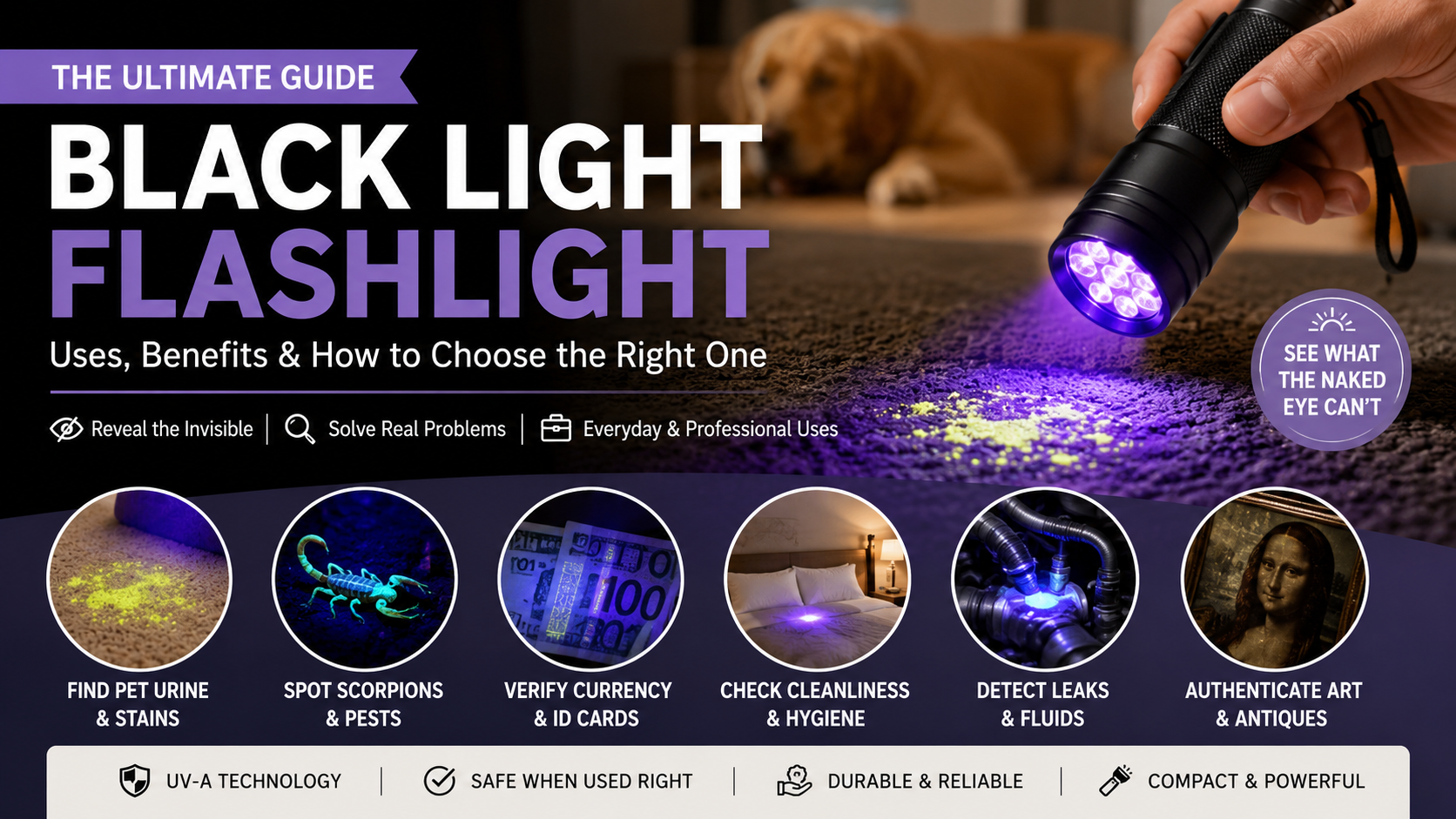
A black light flashlight is a versatile tool with practical uses in homes, workplaces, and specialized industries. One of its most common applications is helping pet owners locate hidden urine stains on carpets, rugs, upholstery, and hard floors that remain invisible under normal lighting. Hotels, vacation rentals, and cleaning professionals also use UV flashlights to inspect rooms for biological residues and verify cleanliness. In the automotive industry, mechanics pair ultraviolet lights with fluorescent dyes to identify difficult-to-find leaks in engines, cooling systems, and air conditioning units.

Collectors and hobbyists use black light flashlights to examine uranium glass, minerals, antiques, and vintage collectibles that fluoresce under ultraviolet light. Security professionals also rely on UV flashlights to verify banknotes, passports, identification cards, and event tickets containing hidden security features. Whether for home maintenance, inspections, or professional work, a quality black light flashlight provides a fast, reliable way to reveal details invisible to the naked eye.

Essential Household and Professional Applications

Getting the best results from a black light flashlight depends on choosing the right wavelength for your task. Different UV wavelengths produce different levels of fluorescence and visibility.

For general household cleaning, a 395nm UV flashlight is an affordable choice for detecting pet urine stains and common spills. A 365nm UV flashlight produces less visible purple light and offers greater accuracy for professional inspections, document verification, and mineral identification. Always darken the room before scanning because reduced ambient light makes fluorescent materials stand out more clearly. After locating pet stains, treat them immediately with a high-quality enzymatic cleaner. This breaks down uric acid crystals instead of simply masking odors. Professionals also recommend scanning the area again after cleaning to confirm that no hidden residue remains. Using the correct wavelength and cleaning method improves detection accuracy and helps eliminate odors permanently.


Can You Turn Your Phone Flashlight Into a Black Light?

The simple answer is no. A smartphone flashlight cannot become a true black light flashlight because it uses standard white LEDs rather than ultraviolet LEDs. These LEDs are designed for everyday illumination and cannot generate the UV-A wavelengths required to produce fluorescence. Many mobile apps claim to convert your phone into a UV light by changing the screen color or adding purple filters to the camera flash. However, these apps only alter visible light and do not create genuine ultraviolet radiation. Since fluorescence occurs only when invisible UV light excites certain materials, software alone cannot reproduce this effect. Without dedicated UV hardware, smartphones cannot perform reliable stain detection, mineral inspection, or counterfeit verification. If you need authentic UV performance, an external UV accessory or a dedicated black light flashlight is the only practical solution.

Understanding Mobile Limitations and Filters

Many people download UV flashlight apps expecting them to reveal hidden stains or security markings. Unfortunately, these applications cannot overcome the physical limitations of smartphone hardware.

If an object appears to glow while using a screen filter, the effect usually comes from reflected visible light rather than genuine fluorescence. Real ultraviolet illumination requires specialized UV LEDs that standard smartphones do not include. External clip-on UV accessories can provide limited functionality, but they still cannot match the brightness or performance of a dedicated black light flashlight. For dependable inspections, invest in hardware specifically designed to emit ultraviolet light instead of relying on software that changes only screen colors.


What Will Glow Under a Black Light?

Many everyday materials contain compounds that react strongly when exposed to ultraviolet light. Organic substances such as pet urine, saliva, and other bodily fluids often fluoresce because they contain proteins and minerals. In nature, several minerals, fungi, and even scorpions produce vivid fluorescent colors under UV illumination. Household products can also glow unexpectedly. Laundry detergents often contain optical brighteners that make white fabrics appear brighter in daylight and glow under ultraviolet light. Tonic water shines with a bright blue color because it contains quinine. Certain paints, markers, cosmetics, and adhesives also fluoresce. Understanding which materials naturally react to UV light makes a black light flashlight useful for cleaning, scientific demonstrations, hobby collecting, and security inspections.

Common Household and Natural Fluorescent Materials

Knowing which materials naturally fluoresce helps you interpret what you see during an inspection. Not every glowing object indicates contamination or a biological stain.

Common materials that glow under UV light include:

  • Pet urine and many bodily fluids
  • White clothing washed with optical brighteners
  • Toothpaste
  • Petroleum jelly
  • Certain vitamins
  • Tonic water containing quinine
  • Paper currency with UV security features
  • Minerals such as fluorite and calcite
  • Some fungi and scorpions

Recognizing these reactions prevents confusion during inspections. It also helps distinguish between harmless fluorescent household products and genuine biological contamination.


Can an iPhone Do a Black Light?

An iPhone cannot function as a black light flashlight because its LED flash and display emit only visible light. Apple designs iPhone hardware for photography, video recording, and general illumination rather than ultraviolet emission. Although many third-party apps advertise UV flashlight features, they simply apply purple or blue filters without generating real ultraviolet wavelengths. Covering the flash with colored plastic, tape, or markers also does not create UV light. Instead, it reduces the flashlight’s brightness. If you need portable ultraviolet capability, the most practical solution is a dedicated UV flashlight or a reputable clip-on UV LED accessory designed specifically for smartphones. These devices provide genuine ultraviolet illumination for inspections that phone hardware cannot perform.

Hardware Realities of Smartphone Cameras

Modern smartphones intentionally exclude ultraviolet LEDs because they are designed for safe everyday use and visible-light photography. Their camera sensors and flash systems are optimized for the visible spectrum rather than UV inspection.

Generating true ultraviolet light requires specialized semiconductor components that are not included in current consumer smartphones. While future devices may incorporate advanced UV sensors, today’s iPhone models cannot replace a dedicated black light flashlight. If you regularly inspect pet stains, minerals, collectibles, or security documents, a purpose-built UV flashlight remains the most reliable and accurate choice.


Is a black light and UV light the same?

A black light and ultraviolet light are essentially the same thing, because a standard black light is just a specialized source of ultraviolet radiation. Specifically, these popular handheld devices emit long-wave ultraviolet light, often abbreviated as UV-A radiation, alongside a faint amount of visible violet glow. When you switch on a black light flashlight, invisible UV rays strike specific phosphors or organic compounds, causing them to fluoresce brightly. This fluorescence makes invisible stains, minerals, and security features visible to the human eye. While all black lights are ultraviolet lights, not all UV sources are black lights, since industrial UV lamps emit shorter, more dangerous wavelengths.

Wavelength Spectrums and UV-A Classifications

Understanding the specific light spectrum helps clarify why these terms are used interchangeably in consumer markets. Ultraviolet radiation spans from 100 to 400 nanometers, divided into UV-A, UV-B, and UV-C subcategories. Consumer black lights operate safely within the 365 to 395 nanometer range, which constitutes long-wave UV-A. This specific band excites fluorescent materials efficiently while avoiding the harmful tissue damage associated with shorter UV wavelengths.


Frequently Asked Questions

Are black light flashlights dangerous to look at?

Avoid looking directly into the beam of a black light flashlight, especially for extended periods. Although most consumer UV-A flashlights are considered relatively safe during normal use, prolonged exposure can cause eye strain or irritation. If you frequently use UV lights for inspections, wearing UV-blocking safety glasses offers additional protection.

How do I clean pet stains found with a UV light?

After locating a stain with your black light flashlight, apply an enzymatic pet stain remover to the affected area. Allow the cleaner to work for the recommended time so it can break down the uric acid crystals completely. Blot the area gently and let it air dry before checking the spot again with your UV flashlight.

What is the difference between 365nm and 395nm UV lights?

A 365nm UV flashlight produces cleaner ultraviolet light with very little visible purple glow. It is preferred for professional inspections, mineral identification, and document authentication. A 395nm UV flashlight emits more visible violet light, making it more affordable and well suited for everyday tasks such as finding pet urine stains.

Can I use a black light flashlight to find scorpions?

Yes. Many scorpion species naturally fluoresce with a bright blue-green glow under ultraviolet light. Because of this, campers, hikers, and homeowners often use a black light flashlight for safe nighttime inspections in areas where scorpions are common.


Conclusion

In conclusion, these devices are much more than simple novelty items. A high-quality black light flashlight is a remarkably versatile tool that deserves a spot in every home and professional toolkit. We have explored how these devices harness the power of ultraviolet radiation to reveal a hidden world of fluorescent materials.

Whether you are trying to locate the source of a persistent pet odor, inspecting a hotel bed for pests, or ensuring the authenticity of a valuable antique, this technology provides instant, undeniable answers. By choosing the correct wavelength for your specific needs—typically 395nm for general household chores or 365nm for professional inspections—you can tackle complex cleaning and diagnostic tasks with incredible efficiency.

Remember to prioritize safety by never shining the beam directly into anyone’s eyes. You should also consider wearing protective eyewear if you plan to use the device for extended periods. Since many UV flashlights are battery-powered, keeping your device charged and avoiding common smartphone mistakes that reduce battery life can also help you develop better charging habits for rechargeable electronics.

Ultimately, owning a black light flashlight empowers you to see beyond the limitations of human vision. You can uncover hidden messes, verify important documents, and keep your environment safe. Invest in a reliable UV torch today, keep one in your emergency drawer, and take control of the unseen hazards lurking right under your nose.

Innovation Born from Limitations

Innovation Born from Limitations

It is easy to assume that limitless resources always lead to the best ideas. However, history tells a completely different story. In fact, some of the greatest breakthroughs happen when teams face severe constraints. Specifically, if you look closely at innovation born from limitations, you will see that scarcity often forces people to think creatively. For instance, the brilliant engineers at NASA famously turned life-threatening constraints into amazing solutions during the Apollo 13 mission.

Consequently, they had to fit a square peg into a round hole using only everyday materials. Furthermore, this concept applies heavily to businesses, modern technology, and our daily lives. Strict constraints force us to strip away the unnecessary quickly. Therefore, we must focus deeply on what truly matters to succeed. Instead of asking for more money, brilliant innovators use exactly what they have. In addition, we will explore several inspiring examples of this powerful concept.

Specifically, we will look at how clever companies and creators have used tight boundaries for massive success. You will learn why having less can actually help you achieve much more. Ultimately, let us dive into the sheer power of creative constraints today. Moreover, you can actively apply this highly effective mindset to your own difficult projects.

What Are the Limitations of Innovation?

While innovation born from limitations can inspire creative problem-solving, it also has clear drawbacks. Severe constraints often force teams to focus on immediate challenges instead of long-term opportunities. As a result, organizations may prioritize quick fixes over meaningful research and development. This approach can delay breakthrough discoveries that require patience, funding, and sustained effort.

Limited resources can also increase stress and burnout. Teams may spend too much time stretching inadequate budgets, tools, or staffing levels. Over time, temporary workarounds can become permanent, creating technical debt and reducing efficiency. Systems built under constant pressure may struggle to scale as demand grows.

Innovation thrives when constraints encourage smarter thinking, not when they create ongoing hardship. Organizations should avoid glorifying scarcity as a permanent strategy. Instead, they should combine healthy limitations with the right level of support, investment, and planning. This balance allows creativity to flourish while ensuring sustainable growth and long-term success.

The Danger of Short-Term Patchwork Solutions

Resource shortages often push teams toward temporary fixes instead of durable solutions. While these quick patches solve immediate problems, they rarely support future growth. As projects expand, maintaining fragile workarounds becomes more expensive and time-consuming.

Eventually, developers spend more time repairing old systems than building new features. Productivity slows, innovation declines, and scalability suffers. Recognizing when a temporary solution has outlived its usefulness is essential. Sustainable innovation requires replacing short-term patches with reliable, long-term architectures before technical debt becomes a major obstacle.


How is innovation born?

Innovation is born when curious minds collide with challenging problems, turning everyday friction into powerful new ideas. Instead of waiting for perfect conditions, creators look at their immediate surroundings and find unconventional uses for ordinary materials. This spark often starts with frustration over an inefficient process or a glaring gap in the market. When people refuse to accept that things must stay the same, they begin experimenting with alternative approaches. Over time, these small experiments compound into massive technological or cultural shifts that redefine entire industries.

The Role of Scarcity in Creative Breakthroughs

Scarcity forces creators to abandon complex blueprints in favor of simple, elegant solutions. When you have fewer resources, every single choice matters deeply. This high-pressure environment eliminates wasteful features and centers attention on core functionality. As history shows time and again, minimalist thinking breeds maximum impact for ambitious projects.


Is Innovation Always Born From Necessity?

While necessity drives many incredible inventions, innovation is not exclusively born from survival or urgent pressure. Sometimes, creative leaps happen purely out of boredom, playfulness, or a sudden flash of artistic inspiration. Inventors often tinker with new concepts without any immediate crisis forcing their hand. Furthermore, corporate research and development labs frequently fund exploratory projects that solve problems people did not even realize they had yet. Therefore, while necessity acts as a powerful accelerator, human curiosity remains an independent engine for discovery.

Exploration Beyond Immediate Survival Needs

Exploratory innovation thrives when creators have the freedom to test wild ideas without urgent stakes. These projects rely on open-ended wonder rather than panic or tight deadlines. By giving teams space to dream, organizations unlock visionary concepts that completely transform future markets and redefine everyday human experiences.


Do Limitations Make Creativity?

Limitations do not automatically create creativity, but they often help direct it. Unlimited choices can overwhelm people and make decision-making difficult. When clear boundaries exist, creators can focus their attention on solving a specific problem instead of exploring endless possibilities.

This focused approach explains why innovation born from limitations often produces practical and effective solutions. Constraints encourage individuals to eliminate unnecessary options and make better use of available resources. Designers, writers, engineers, and entrepreneurs frequently introduce self-imposed limits to improve their work and overcome creative blocks.

However, balance remains important. Constraints should challenge creative thinking without becoming overwhelming. When used effectively, they provide structure that transforms scattered ideas into focused action, leading to stronger solutions and more consistent innovation.

Channeling Infinite Choices Into Focused Action

Too many options can slow progress by creating uncertainty and hesitation. Clear boundaries simplify decision-making and help creators concentrate on what matters most. Instead of spreading attention across countless possibilities, they invest their energy in solving the core challenge.

This focused mindset improves productivity, strengthens problem-solving, and often produces more practical results. Well-designed constraints reduce distractions while encouraging deeper thinking and more purposeful execution.


What Are the 4 Pillars of Creativity?

Understanding the four pillars of creativity helps explain how innovation born from limitations develops in real-world situations. The first pillar is domain knowledge, which provides the expertise needed to understand problems and recognize opportunities. Without a strong foundation, creative ideas often lack practical value.

The second pillar is creative thinking, which involves connecting ideas in original ways and exploring multiple solutions. The third pillar is intrinsic motivation, the internal drive that encourages people to continue despite setbacks and challenges. Finally, the fourth pillar is the environment, including workplace culture, leadership, collaboration, and available resources.

These four pillars work together rather than independently. Strong knowledge, flexible thinking, personal motivation, and a supportive environment create the conditions where creativity can flourish. Even under constraints, balancing these elements increases the likelihood of meaningful and sustainable innovation.

The Vital Role of Intrinsic Motivation

Intrinsic motivation keeps people engaged when challenges become difficult. Individuals driven by curiosity, purpose, or personal satisfaction are more likely to persist through repeated failures. They continue experimenting even when external rewards are limited.

Organizations can strengthen intrinsic motivation by encouraging autonomy, recognizing meaningful contributions, and supporting continuous learning. A motivated team remains resilient, adaptable, and capable of generating innovative solutions over the long term.


Frequently Asked Questions

Can too many restrictions destroy creativity completely?

Yes. Excessive or unrealistic restrictions can reduce morale and discourage experimentation. When people fear failure or harsh consequences, they usually avoid taking creative risks. Innovation born from limitations works best when constraints encourage problem-solving without creating constant pressure or anxiety.

How do agile teams use constraints effectively?

Agile teams use intentional constraints through fixed sprint timelines, limited budgets, and clearly defined priorities. These boundaries reduce scope creep and help teams focus on delivering the highest-value features first. By working within predictable limits, agile teams improve efficiency while encouraging continuous innovation.

Is brainstorming more effective with or without limits?

Brainstorming is usually more productive when it includes clear constraints. Specific challenges, such as reducing costs or meeting a tight deadline, encourage more focused and practical ideas. Completely open-ended brainstorming often generates broad concepts that are difficult to implement.

How can businesses manufacture productive constraints?

Businesses can create productive constraints by setting realistic deadlines, limiting project budgets, reducing unnecessary processes, or assigning smaller cross-functional teams. These intentional boundaries encourage smarter decision-making, faster execution, and greater focus on customer value. When applied thoughtfully, manufactured constraints strengthen innovation without limiting long-term growth.

Conclusion

When you look back at the grand sweep of human history, one pattern becomes clear: having unlimited resources is rarely the true catalyst for breakthrough innovation. Instead, some of the greatest achievements have emerged from difficult circumstances where people were forced to think differently. From life-saving space exploration solutions to revolutionary digital communication platforms, resource scarcity has repeatedly proven that limitations can inspire extraordinary creativity.

The next time you face a shrinking budget or an aggressive project deadline, don’t see it as a permanent obstacle. Instead, treat those restrictions as opportunities to simplify, prioritize, and innovate. Learning the principles of setting up constraints for creative thinking can help you transform limitations into a practical framework for generating better ideas and solving complex problems more effectively.

By embracing a frugal mindset and focusing on what truly matters, individuals and teams can accomplish remarkable results with fewer resources. Ultimately, innovation born from constraints creates stronger, more resilient solutions. Rather than fearing limitations, use them as the spark that fuels your next creative breakthrough.

Why Do Some Rockets Not Have Fins?

Why Do Some Rockets Not Have Fins? The Science of Spacecraft Steering

Have you ever watched a modern space launch and wondered why do some rockets not have fins? If you grew up building model rockets or watching classic science fiction movies, you probably expect every spacecraft to feature those iconic, dart-like wings at the base. However, if you look closely at modern launch vehicles like the SpaceX Falcon 9 or the Blue Origin New Shepard, those familiar fins are completely missing.

To understand this dramatic shift in aerospace design, we have to look at how engineering has evolved over the decades. Early rockets relied heavily on fins for stability. They worked exactly like the feathers on the back of an arrow. As the rocket flew through the thick atmosphere, the rushing air pushed against the fins to keep the vehicle pointed safely upward. You can explore the basics of this aerodynamic principle in the NASA beginner’s guide to rockets.

But here is the engineering catch. Fins only work when there is air moving around them. Once a rocket leaves the Earth’s atmosphere and enters the vast vacuum of space, fins become entirely useless dead weight. Therefore, brilliant engineers developed much smarter, computer-driven methods to keep massive rockets stable and on course.

In this article, we will explore the fascinating science of rocket steering. We will break down why modern spacecraft leave the fins behind, how thrust vector control works, and what the future of orbital design looks like.

Why Don’t NASA Rockets Have Fins?

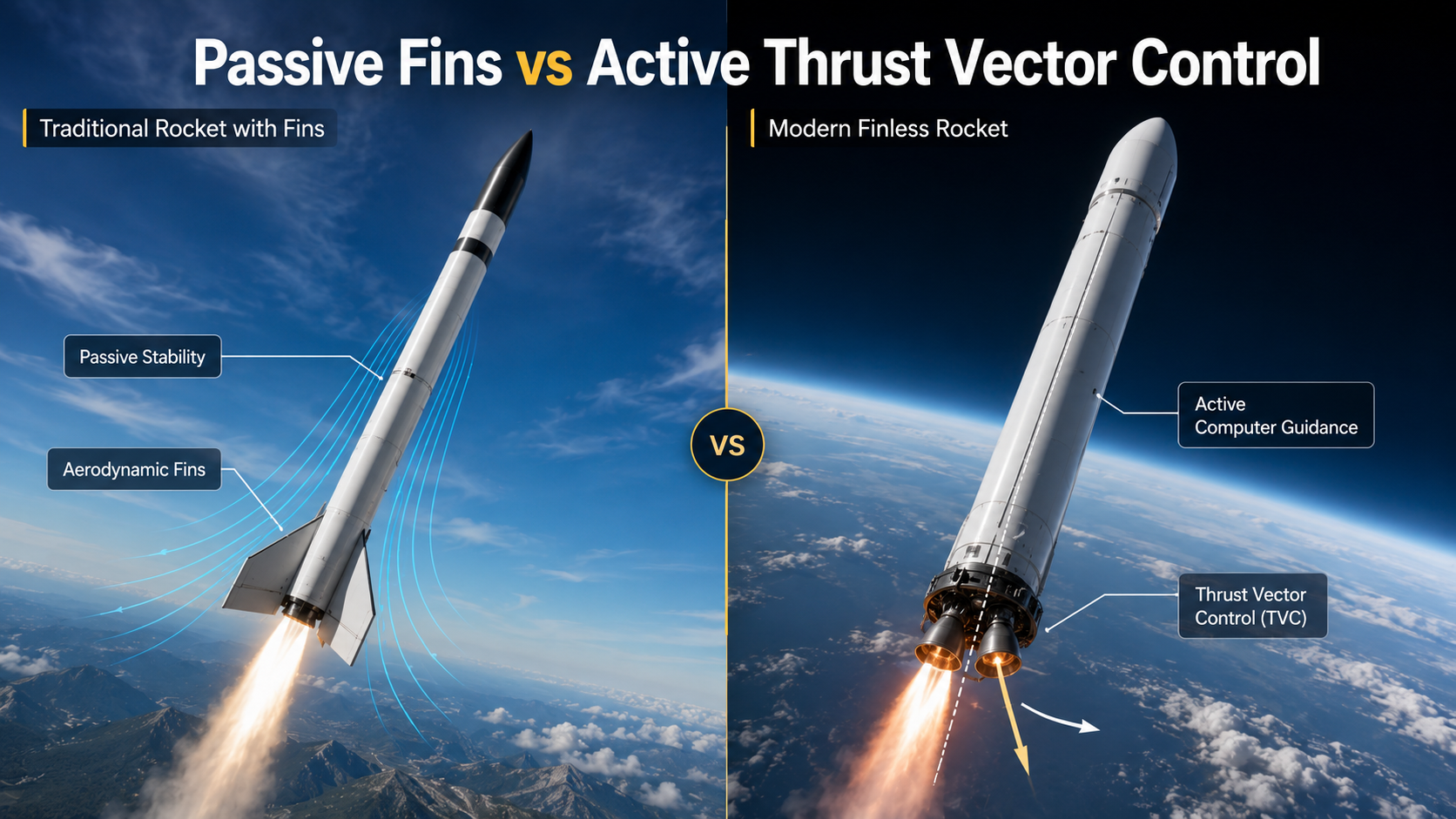
NASA rockets often do not use exterior aerodynamic fins because they rely on thrust vector control (TVC) instead of passive aerodynamic surfaces for stability. As large launch vehicles climb through Earth’s lower atmosphere, aerodynamic drag and structural loads become significant challenges. Large fixed fins increase skin friction drag, add structural weight, and reduce overall launch efficiency.

Instead of using fins, modern rockets continuously adjust the direction of their engine exhaust. This process, known as thrust vectoring, provides precise control throughout ascent. It reacts much faster than passive aerodynamic surfaces and maintains the rocket’s planned trajectory even in changing atmospheric conditions.

Engineers also aim to keep launch vehicles as lightweight as possible. Every kilogram saved can increase payload capacity or improve mission performance. Eliminating large exterior fins helps reduce unnecessary mass while maintaining excellent flight stability through advanced guidance systems.

The Role of Thrust Vector Control

Thrust Vector Control (TVC) is the primary reason modern orbital rockets can fly safely without large aerodynamic fins. Instead of depending on airflow over fixed surfaces, TVC changes the direction of engine thrust to steer the vehicle throughout flight.

Rocket engines are mounted on gimbals that allow them to pivot by small angles. Flight computers calculate the rocket’s position and attitude many times each second. If winds or other forces push the rocket away from its planned path, the engines immediately adjust to restore stability.

This active control system works during every phase of powered ascent, including periods when aerodynamic surfaces become less effective. Because thrust vectoring provides rapid and precise corrections, it completely replaces the stabilizing role that fins once served on many early rocket designs.


Is it better for a rocket to have 3 or 4 fins?

Deciding between three or four stabilizing surfaces involves balancing aerodynamic drag, weight, and roll stability during atmospheric ascent. Three fins, known as a tripod configuration, actually offer a distinct aerodynamic advantage over four. With only three points of contact, every single fin experiences a higher angle of attack, which generates stronger restoring forces with less overall structural weight. Furthermore, a three-fin design eliminates the risk of an indeterminate fit on a flat launch pad surface where four symmetrical pieces might wobble. However, four surfaces provide redundant stability and simpler manufacturing symmetry for traditional model rocketry enthusiasts. Engineers must carefully weigh these factors before finalizing any suborbital or atmospheric flight design.

Minimizing Aerodynamic Drag With Three Fins

Reducing extra mass on any launch vehicle saves valuable fuel during the critical atmospheric ascent phase. Three stabilizing surfaces create less surface area, which directly lowers skin friction and form drag. Aerospace designers prefer this minimalist approach because every ounce saved translates into higher payload capacities and better overall flight efficiency.


Why don’t rockets have fins?

Large orbital launch vehicles skip external stabilizing surfaces because active guidance systems control flight paths far better than passive aerodynamics can. As a vehicle climbs past the thickest parts of the atmosphere, aerodynamic forces decrease rapidly while the air thinned out. Massive orbital boosters rely instead on thrust vectoring, which involves pivoting the main rocket engine nozzles in real time to steer the vehicle. According to SpaceX engineering data, gimbaled engines make quick, precise adjustments that react instantly to wind shears. External surfaces would only add dead weight and extreme thermal stress once the vehicle reaches hypersonic speeds outside the sensible atmosphere.

Utilizing Thrust Vectoring for Precise Guidance

Gimbaled engine technology replaces passive stabilization by actively redirecting exhaust plumes to steer the vehicle along its trajectory. Computers calculate tiny directional corrections thousands of times per second. This active control method adapts dynamically to changing atmospheric conditions far more effectively than fixed aerodynamic surfaces ever could.


Why Do Some Missiles Not Have Fins?

Some modern missiles are intentionally designed without external fins. Their missions often demand high speed, compact storage, stealth, and rapid maneuverability. Large fins increase drag, require additional launch clearance, and occupy valuable space inside launch systems.

Finless missiles can fit more efficiently inside vertical launch cells, sealed canisters, aircraft weapon bays, or mobile launchers. Removing external surfaces may also help reduce the radar signature on certain designs while lowering aerodynamic heating during high-speed flight.

Instead of fixed fins, these missiles rely on advanced guidance technologies such as thrust vectoring, lateral control thrusters, or internal control mechanisms. These systems provide accurate steering and fast attitude corrections without the weight and structural penalties associated with large aerodynamic surfaces.

Benefits of Confined Launch Compatibility

Compact finless missiles are well suited for sealed launch systems used by many modern military platforms. Their streamlined shape allows engineers to maximize storage space while protecting the weapon from harsh environmental conditions.

Key advantages include:

  • Higher storage density in launch cells and canisters
  • Better protection from moisture, dust, and corrosion
  • Faster deployment during operational missions
  • Lower maintenance while stored for extended periods
  • Improved compatibility with aircraft internal weapon bays

These benefits make finless designs especially valuable for modern defense systems where space, readiness, and reliability are essential.


Can a Rocket Fly Without Fins?

Yes. A rocket can fly without fins if it has an effective active stabilization system. Modern launch vehicles continuously monitor their orientation using onboard sensors and correct any unwanted movement through engine control systems.

Without active guidance, a symmetrical rocket moving through the atmosphere can become unstable and begin tumbling. Earlier rockets solved this problem with fixed fins, which shifted the center of pressure behind the center of mass to provide passive stability.

Today’s rockets replace that passive approach with advanced avionics. High-speed computers, inertial measurement units, hydraulic actuators, and thrust vector control work together to keep the vehicle stable. These systems respond within milliseconds, allowing rockets to maintain accurate flight paths through challenging atmospheric conditions.

Achieving Dynamic Stability via Avionics

Modern rockets depend on sophisticated flight computers and avionics to maintain stability throughout ascent. These systems continuously collect data from onboard sensors and compare the rocket’s actual position with its planned trajectory.

Whenever small deviations occur, the guidance system instantly commands engine adjustments. This rapid feedback loop keeps the vehicle properly aligned, even during periods of strong aerodynamic forces or changing wind conditions.

Because these corrections happen continuously, modern rockets can safely fly without relying on natural aerodynamic stability from fixed fins.


Why Does Falcon 9 Not Have Fins?

The SpaceX Falcon 9 does not use traditional fixed aerodynamic fins on its main body because it relies on engine gimballing during ascent and deployable grid fins during descent.

During launch, the rocket’s nine Merlin engines use thrust vector control to keep the vehicle stable. This system provides accurate steering while avoiding the extra weight and drag that permanent fins would create.

After stage separation, the returning first stage deploys four titanium grid fins. These movable control surfaces guide the booster through Earth’s atmosphere during reentry and help position it for a precise propulsive landing. Since the grid fins remain folded during ascent, they do not reduce payload performance like large fixed fins would.

The Function of Titanium Grid Fins

Titanium grid fins are specialized aerodynamic control surfaces used during Falcon 9’s return to Earth. Unlike conventional flat fins, they use an open lattice structure that performs efficiently across a wide range of flight speeds.

Their design offers several advantages:

  • Excellent control at both supersonic and subsonic speeds
  • Lower hinge forces than conventional fins
  • High heat resistance during atmospheric reentry
  • Precise steering for controlled booster landings
  • Foldable design that minimizes drag during launch

These characteristics make grid fins ideal for reusable launch vehicles that must return safely for another mission.


Frequently Asked Questions

Do all rockets require stabilization to reach orbit safely?

Yes. Every rocket needs some form of stabilization during flight. Without it, the vehicle could tumble, experience excessive structural loads, or drift away from its intended trajectory.

Modern rockets achieve stability through active guidance systems rather than relying solely on aerodynamic fins. Flight computers, thrust vector control, inertial sensors, and navigation systems work together to keep the rocket properly aligned throughout ascent. Smaller rockets may still depend on fixed fins because they lack these advanced control technologies.

How do rockets stay on course without aerodynamic control surfaces?

Rockets remain on course by using sophisticated guidance, navigation, and control (GNC) systems. Inertial measurement units constantly track the vehicle’s position, orientation, and movement.

When the rocket begins drifting from its planned path, onboard computers calculate the required correction within milliseconds. They then command the engines to pivot slightly using thrust vector control. This redirects the exhaust plume and restores the correct trajectory much faster than passive aerodynamic fins could.

Are grid fins the same as traditional rocket fins?

No. Although both provide aerodynamic control, grid fins differ significantly from traditional solid fins. Grid fins have an open lattice structure that performs efficiently across a broad speed range, especially during transonic and supersonic flight.

Traditional fins mainly provide passive stability through airflow. Grid fins, however, are movable control surfaces that actively steer reusable boosters during atmospheric descent. Their design also requires less actuator force while maintaining excellent control authority.

Do small model rockets also fly without fins?

Most model rockets require fixed fins because they do not include the sophisticated guidance systems found on orbital launch vehicles. Passive aerodynamic stability is the simplest and most reliable way to keep these lightweight rockets flying straight.

Without fins, a typical model rocket would quickly become unstable after launch. Since hobby rockets usually lack thrust vector control, flight computers, and precision sensors, aerodynamic fins remain essential for safe and predictable flight.


Conclusion

As we have discovered, rocket science is all about maximizing flight efficiency and eliminating unnecessary weight. If you have ever wondered why some rockets do not have fins, the answer lies in remarkable advances in computer technology and active guidance systems.

Traditional fins played a vital role in early rocketry by providing passive stability through the dense lower atmosphere. However, they also create aerodynamic drag, add extra weight, and become ineffective once a spacecraft reaches the vacuum of space.

Today, aerospace engineers rely on Thrust Vector Control (TVC), which uses powerful onboard computers to continuously adjust the direction of a rocket’s engines. This sophisticated steering method enables modern launch vehicles to be lighter, more efficient, and capable of carrying heavier payloads into orbit. If you’re fascinated by space exploration, you’ll also enjoy exploring the best space gifts for space lovers, featuring unique ideas for astronomy enthusiasts and aspiring astronauts.

Furthermore, systems such as Reaction Control System (RCS) thrusters allow spacecraft to maneuver precisely once they are in space. The transition from finned rockets to sleek, finless launch vehicles represents one of the most significant engineering advancements in modern aerospace. The next time you watch a rocket launch, you’ll have a deeper appreciation for the sophisticated guidance systems and rapid computer calculations that keep it perfectly balanced on its journey beyond Earth’s atmosphere.

Residential Solar Panel Installation: Ultimate Guide

The Ultimate Guide to Residential Solar Panel Installation

Switching to solar power is one of the smartest upgrades you can make for your home. As traditional electricity bills continue to rise, homeowners actively search for better energy alternatives. A complete residential solar panel installation offers a reliable way to reduce utility costs and gain long-term energy independence. However, the transition process can feel overwhelming if you do not know exactly where to start.

From choosing the right rooftop equipment to understanding local utility regulations, you must consider numerous variables. Fortunately, resources from the U.S. Department of Energy demonstrate that transitioning to solar power is more accessible today than ever before. This comprehensive guide will walk you through every critical step of your solar journey. We will cover how to evaluate your property’s potential and explain the available financial benefits. You will also learn exactly what happens on the actual installation day.

A successful project requires careful research and planning. You must accurately calculate your current household energy usage. You must also evaluate your roof’s physical condition before starting. Furthermore, hiring a qualified, certified contractor is crucial for long-term safety and performance. By the end of this article, you will possess the foundational knowledge needed to make a confident, informed decision. Let us dive into the details so you can power your home efficiently.


Can I Run a 1.5 Ton AC on a 3kW Solar System?

Running a 1.5-ton air conditioner on a 3kW solar system is generally impractical without grid support or a large battery backup. A standard 1.5-ton AC typically consumes 1,500–1,800 watts during normal operation. However, when the compressor starts, its surge power can briefly rise to two or three times its normal consumption.

A 3kW solar system can produce up to 3,000 watts under ideal sunlight. In real-world conditions, actual output is usually lower. Dust, high temperatures, cloud cover, and panel orientation often reduce production to around 2,000–2,400 watts during peak sunlight hours.

This leaves very little power for other household appliances, including lights, fans, refrigerators, or electronics. In addition, solar panels do not generate electricity at night. Without a substantial battery bank or grid connection, running your AC after sunset is not possible.

If air conditioning is a major part of your daily electricity use, a 5kW or larger solar system usually provides a more practical and reliable solution.

Understanding Inverter Capacity Limitations

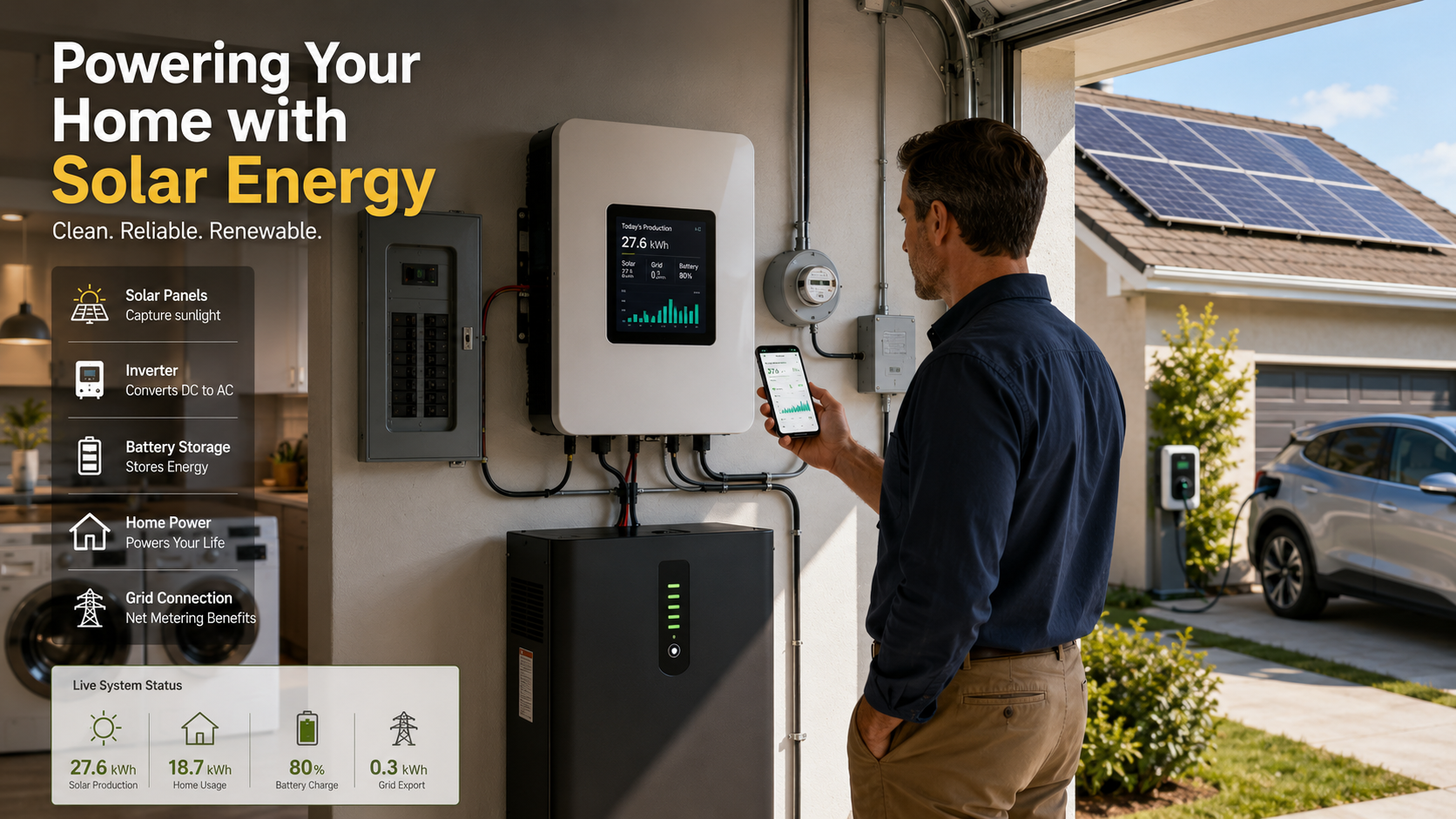
The solar inverter is just as important as the solar panels. It converts the DC electricity produced by your panels into AC power for your home. A standard 3kW inverter can continuously supply about 3,000 watts of power.

The challenge comes when your air conditioner starts. The compressor requires a high surge current during startup. Even though this surge lasts only a few seconds, it can overload an undersized inverter and cause the system to trip or shut down.

A larger inverter provides additional capacity to handle these temporary power spikes while maintaining stable performance. It also gives you more flexibility to operate other household appliances at the same time.

If you plan to use a 1.5-ton AC regularly during daylight hours, upgrading to a 5kW solar system with an appropriately sized inverter offers better reliability, improved energy management, and room for future household electricity needs.


What Is the Cost of a Solar Panel Installation?

The cost of solar panel installation depends on several factors, including your location, equipment quality, roof design, and household energy consumption. In the United States, a typical residential solar system usually costs between $15,000 and $25,000 before applying available tax credits or incentives.

Solar pricing is commonly measured on a cost-per-watt basis. Most homeowners pay approximately $2.80 to $3.20 per watt for a professionally installed system. For example, a standard 6kW solar system generally costs around $18,000 before incentives.

Adding battery storage increases the total investment. A home battery backup typically adds $7,000–$12,000, depending on battery capacity and installation requirements.

Other factors that affect pricing include roof complexity, local labor costs, permitting fees, equipment brand, and whether additional electrical upgrades are needed.

Federal Incentives and Rebates

Government incentives can significantly reduce the overall cost of installing solar panels. In the United States, the Residential Clean Energy Credit allows eligible homeowners to claim a federal tax credit that lowers the total project cost.

Many state governments and local utility providers also offer additional financial benefits. These may include:

  • State rebates
  • Net metering programs
  • Solar Renewable Energy Certificates (SRECs)
  • Low-interest financing options

These incentives can shorten the system’s payback period and improve long-term savings. Since available programs vary by location and may change over time, it is always worth checking local incentive programs before purchasing a solar energy system.


What Are 5 Disadvantages of Solar Power?

Although solar power offers long-term savings and clean energy, it also has several disadvantages that homeowners should understand before investing.

Some of the most common drawbacks include:

  • High upfront installation costs
  • Reduced electricity production during cloudy or rainy weather
  • No energy generation at night without battery storage
  • Roof condition may require repairs before installation
  • Gradual efficiency loss over the lifespan of the panels

Most modern solar panels lose only about 0.5% of their efficiency each year, allowing them to continue producing electricity for decades. However, this gradual decline should still be considered when planning long-term energy production.

Understanding these limitations helps homeowners choose the right system size, battery capacity, and financing options for their specific energy needs.

Evaluating Weather and Geographic Limitations

Your geographic location has a major impact on how much electricity your solar panels generate each year. Homes in areas with abundant sunshine generally produce more energy than those in regions with frequent cloud cover, heavy rainfall, or shorter winter days.

Seasonal weather also affects daily production. Even well-designed systems generate less electricity during winter due to reduced daylight hours and lower sun angles.

Homeowners living in less sunny regions often compensate by installing larger solar arrays or adding battery storage to improve energy availability. In some cases, maintaining a grid connection remains the most practical solution for ensuring reliable electricity throughout the year.


What Is the 20% Rule for Solar?

The 20% rule for solar is a planning guideline that helps balance system performance, future energy needs, and long-term value. Many installers recommend sizing a solar system to meet approximately 100% of your annual electricity consumption while allowing about 20% additional capacity for future increases in energy use.

Some professionals also apply this guideline when sizing battery storage or inverter capacity. The additional margin helps the system handle seasonal variations in solar production and occasional increases in household electricity demand.

Although the exact application varies among installers, the goal remains the same: creating a solar system that performs efficiently today while remaining flexible for future expansion.

Applying the Buffer for Future Needs

Planning for future electricity demand can prevent expensive system upgrades later. Many homeowners eventually purchase electric vehicles, install heat pumps, or add new household appliances that significantly increase energy consumption.

Including a reasonable capacity buffer during the initial installation allows your inverter, wiring, and electrical infrastructure to accommodate these future additions more easily.

This forward-thinking approach improves long-term system value, reduces retrofit costs, and helps ensure your solar investment continues meeting your household’s changing energy requirements for many years.


Can I Run 2 ACs on a 5kW Solar System?

A 5kW solar system can generally run two air conditioners, provided your overall household electricity consumption remains within the system’s capacity. Two 1.5-ton inverter ACs typically consume around 3,000 watts while operating under normal conditions. Under ideal sunlight, a 5kW solar panel system can generate approximately 5,000 watts, leaving enough capacity to power essential appliances such as lighting, fans, and a refrigerator.

Actual performance depends on weather conditions, panel efficiency, inverter capacity, and the time of day. Solar power production decreases during cloudy weather and after sunset, so battery storage or grid electricity may be needed. Running additional high-power appliances, such as electric water heaters or ovens, at the same time can overload the inverter. Proper energy management helps maximize system efficiency while maintaining reliable operation.

Managing Power Surges and Inverter Capacity

The solar inverter plays a critical role in determining how many appliances your solar system can operate simultaneously. Although a 5kW solar system may generate sufficient electricity, the inverter has a maximum continuous output that should not be exceeded. High starting currents from multiple appliances can temporarily increase power demand.

Using inverter air conditioners helps reduce startup surges because they gradually adjust compressor speed instead of drawing maximum power immediately. Smart energy management devices and programmable timers can also distribute electrical loads more efficiently throughout the day.

Scheduling high-power appliances during peak sunlight hours improves solar energy utilization and reduces dependence on grid electricity. Monitoring your inverter’s performance regularly ensures safe operation and helps extend the lifespan of both your solar system and connected appliances.


Solar Panel Installation Government Scheme

Many governments offer solar panel installation government schemes to encourage homeowners to adopt renewable energy. These programs reduce installation costs through subsidies, tax incentives, net metering policies, or low-interest financing options. Financial assistance makes residential solar systems more affordable and improves the return on investment.

In many regions, eligible households can receive support for installing approved rooftop solar systems through certified vendors. Program benefits and subsidy amounts vary depending on local government policies and system capacity.

Before applying, homeowners should review eligibility requirements, compare approved installers, and understand the application process. Taking advantage of a solar panel installation government scheme can shorten the payback period while reducing long-term electricity expenses and supporting cleaner energy generation.

Navigating Subsidy Applications and Eligibility Criteria

Applying for a solar panel installation government scheme requires careful preparation and accurate documentation. Most programs require applicants to use certified equipment and approved installation companies that meet national quality standards.

Applicants are commonly asked to provide identity documents, recent electricity bills, proof of property ownership or occupancy, and other supporting paperwork. Submitting complete and accurate information helps avoid unnecessary delays during the approval process.

Before signing any installation agreement, verify that both the equipment and installer qualify under the relevant government scheme. Following official guidelines improves your chances of receiving financial assistance while ensuring your solar system complies with applicable regulations and safety standards.


Frequently Asked Questions

Do solar panels require heavy maintenance?

No. After residential solar panel installation, solar panels require very little maintenance because they have no moving parts. Occasional cleaning removes dust, leaves, pollen, and other debris that can reduce energy production. Many modern systems also include monitoring apps that notify homeowners if performance drops unexpectedly after residential solar panel installation.

Will my solar system work during a power outage?

Most grid-tied solar systems automatically shut down during a power outage to protect utility workers. If you want backup power during blackouts, you’ll need a hybrid inverter paired with a home battery storage system. During your residential solar panel installation, your installer can recommend the right backup solution for your home’s energy needs.

How long do residential solar panels last?

Most high-quality residential solar panels include a 25-year performance warranty. After residential solar panel installation, they typically continue generating electricity for 25 years or more, although at a slightly lower efficiency over time. Solar inverters generally need replacement every 10–15 years, depending on the model and operating conditions.

Can I install solar panels myself?

DIY residential solar panel installation is generally not recommended. Installing a solar system involves electrical wiring, rooftop work, permitting requirements, and local building codes. Hiring certified professionals improves safety, ensures code compliance, and helps protect your manufacturer warranties.


Conclusion

Transitioning to renewable energy is a brilliant financial and environmental decision. A properly executed residential solar panel installation provides decades of reliable, clean power directly to your home. You dramatically reduce your monthly utility bills and proactively protect yourself against relentlessly rising energy costs. Furthermore, you significantly lower your household carbon footprint, actively contributing to a much healthier planet.

While the entire transition process involves several distinct phases, working with a qualified, licensed contractor makes it incredibly simple. They seamlessly guide you through the initial property assessment, the complex equipment selection, and the tedious permitting paperwork. Before moving forward, it’s also worth ensuring your home is ready for a long-lasting installation. Evaluating your roof’s condition is essential, and understanding how to select a sustainable roof system can help you choose a durable, energy-efficient roofing solution that complements your new solar panels and enhances your home’s overall sustainability.

Remember to analyze your historical energy consumption carefully and always choose high-quality equipment that accurately matches your specific residential needs and budget constraints. You must also take full advantage of available federal tax credits and local state incentives. These lucrative financial tools maximize your overall return on investment.

Now is the perfect time to explore your property’s solar potential. Modern panel technology is more efficient than ever, and financial incentives remain highly favorable. Start your journey by gathering comprehensive quotes from reputable, certified local installers. Compare their proposed system sizes, hardware brands, and long-term warranties. By taking these proactive steps today, you secure a brighter, more sustainable energy future for your home.

Ransomware Infect a Computer: Email Attacks Explained

How Ransomware Infects a Computer Through Email Attachments and Phishing Links

Understanding how cyber threats operate is essential for building a strong digital defense. Today, attackers often rely on everyday communication tools like email to ransomware infect a computer and gain unauthorized access to valuable data.

Every day, millions of phishing messages target individuals and organizations. These emails are carefully designed to appear legitimate and convince users to click harmful links or open infected attachments. According to guidance from Cybersecurity and Infrastructure Security Agency (CISA), social engineering remains one of the most common methods attackers use to gain initial access to systems.

When users interact with malicious files or phishing links, attackers can ransomware infect a computer without immediate detection. The malware may silently install itself, encrypt important files, disrupt business operations, and demand payment for data recovery.

Understanding how ransomware infects a computer helps users recognize dangerous email behavior before an attack occurs. This article explains how phishing emails, malicious attachments, and deceptive links allow attackers to ransomware infect a computer, along with security practices that can help prevent ransomware infections.


How does ransomware infect your computer?

Understanding how ransomware infect a computer begins with knowing the common methods attackers use to deliver malicious software. Ransomware usually enters a system when a user opens a harmful file, clicks a dangerous link, or downloads unsafe software.

Cyber criminals often disguise ransomware as legitimate documents, applications, or messages. They use social engineering techniques to convince users that a file or link is safe.

Once the malicious program runs, it starts working in the background. It may encrypt files, disable security features, and spread through connected drives or networks.

The most common ways ransomware infect a computer include:

  • Malicious email attachments disguised as invoices, reports, or receipts
  • Phishing links that redirect users to infected websites
  • Fake software downloads containing hidden malware
  • Compromised websites that deliver malicious code
  • Unpatched software vulnerabilities exploited by attackers

Many victims do not notice the infection immediately. They often discover ransomware only after files become locked, renamed, or unavailable.

Regular backups, security updates, and careful online habits provide strong protection. Knowing how ransomware infect a computer helps users identify threats before serious damage occurs.

Recognizing Sneaky File Execution Triggers

Attackers often depend on convincing file names and familiar formats to hide ransomware. A harmful document may look like a normal invoice, shipping notice, or business report.

When users open these files, hidden scripts or malicious code may activate. Some attackers use documents with embedded macros that download ransomware from remote servers.

A simple document can become a dangerous entry point. This is one reason why understanding how ransomware infect a computer is important for everyday users and businesses.

Users should be careful when receiving unexpected attachments. Before opening any file, verify the sender and confirm that the message is legitimate.

Simple safety practices include:

  • Avoid opening unexpected attachments
  • Disable automatic macro execution
  • Scan downloaded files
  • Keep security software updated

Recognizing these warning signs can prevent ransomware from entering your system.

What Is Another Name for Ransomware?

Security professionals and digital forensics experts often use different terms to describe ransomware and its related malware variants. Learning these alternative names helps users understand security alerts, recognize attack methods, and communicate more effectively during a cybersecurity incident. Security software may classify ransomware as crypto-malware, extortionware, or cryptographic malware, depending on how it operates and the type of damage it causes.

Although these names emphasize different characteristics, they all describe malicious software designed to block access to valuable data and demand payment for its release. Attackers typically encrypt files, lock systems, or disrupt business operations until victims pay a ransom, often in cryptocurrency.

Understanding these interchangeable terms improves cybersecurity awareness. It also helps organizations and individuals respond more effectively when reporting incidents to IT teams, cybersecurity professionals, or law enforcement agencies.

Understanding Crypto-Malware Variants

Crypto-malware is a specialized form of ransomware that focuses on encrypting files instead of locking the entire operating system. After infecting a device, it silently scans local drives, connected storage, and shared network folders for valuable data. It then encrypts documents, images, databases, and other important files using strong cryptographic algorithms.

Most victims remain unaware of the attack until they attempt to open a file and discover it has become inaccessible. A ransom note usually appears, explaining that the files have been encrypted and providing instructions for payment, often in cryptocurrency.

Unlike screen-locking ransomware, crypto-malware targets the data itself. This makes recovery much more difficult without reliable backups or the correct decryption key. Understanding how crypto-malware works helps users recognize ransomware attacks quickly and encourages preventive measures such as regular backups, endpoint protection, and timely software updates.

What Is the Main Cause of a Ransomware Attack?

The leading cause of a ransomware attack is human error, particularly when users fall victim to phishing emails or other social engineering tactics. Although software vulnerabilities and weak security controls can contribute to an attack, cybercriminals most often exploit human behavior to gain access to systems. A single click on a malicious link or an infected email attachment can trigger a ransomware infection.

Attackers design these messages to appear trustworthy and create a sense of urgency. They often impersonate coworkers, banks, delivery companies, or government agencies to encourage immediate action without careful verification.

Organizations can significantly reduce ransomware risks by combining technical security controls with employee awareness training. Email filtering, multi-factor authentication, regular software updates, and cybersecurity education work together to prevent users from unknowingly giving attackers access to their networks.

The Role of Social Engineering

Social engineering is one of the most effective techniques used to distribute ransomware. Instead of attacking software directly, cybercriminals manipulate people into making unsafe decisions. They exploit trust, curiosity, fear, or urgency to convince users to open malicious attachments, click harmful links, or disclose sensitive information.

Attackers often disguise their messages as legitimate communications from trusted organizations, financial institutions, delivery services, or internal company departments. These emails frequently contain convincing branding and realistic language, making them difficult to identify at first glance.

Once the victim interacts with the malicious content, ransomware can download and execute automatically. Because human behavior is often the weakest security link, organizations should provide regular cybersecurity awareness training, encourage employees to verify suspicious requests, and implement advanced email protection to reduce the success of social engineering attacks.

Is Phishing and Ransomware a Computer Attack?

Yes, phishing and ransomware are both forms of computer attacks, but they serve different purposes within the same attack chain. Phishing is the initial delivery method that tricks users into taking an unsafe action. Ransomware is the malicious payload that encrypts files or locks systems after gaining access.

In many attacks, criminals first send fraudulent emails containing malicious links or attachments. When a recipient clicks the link or opens the attachment, ransomware is downloaded and executed on the device. The malware may then spread across the network and encrypt additional systems.

Understanding this relationship helps organizations build layered cybersecurity defenses. Strong email security, user awareness training, endpoint protection, and regular data backups work together to interrupt the attack before ransomware can execute and cause widespread damage.

The Attack Chain Connection

The connection between phishing and ransomware follows a predictable sequence. Attackers first deliver a convincing phishing email to a large audience or carefully selected individuals. These messages often create urgency by claiming there is an unpaid invoice, security issue, or delivery problem that requires immediate action.

When a victim clicks the malicious link or opens the infected attachment, malware is downloaded onto the device. The ransomware then installs itself, communicates with attacker-controlled servers if needed, and begins encrypting files or spreading across connected systems.

Breaking this attack chain at its earliest stage greatly reduces the risk of infection. Organizations should combine email filtering, endpoint detection, network monitoring, and employee education to stop phishing attempts before ransomware reaches critical systems or sensitive business data.

Who Is Most Affected by Ransomware?

Although ransomware can target anyone, some industries face a much higher risk because they depend on continuous access to critical data and services. Small and medium-sized businesses, healthcare organizations, educational institutions, and municipal governments are among the most frequent victims.

These organizations often manage sensitive information while operating with limited cybersecurity resources or outdated infrastructure. Attackers know that prolonged downtime can disrupt essential services, making victims more likely to pay a ransom to restore operations quickly.

Healthcare providers and schools cannot afford extended interruptions because they support patient care and education. Local governments also provide critical public services that communities rely on every day.

Understanding which sectors are most vulnerable helps organizations prioritize cybersecurity investments. Regular backups, employee training, timely software updates, network segmentation, and incident response planning all reduce the likelihood and impact of a ransomware attack.

Healthcare and Municipal Vulnerabilities

Healthcare organizations and municipal governments remain attractive ransomware targets because they manage sensitive personal data and deliver essential public services. Hospitals rely on continuous access to patient records and medical systems, while local governments operate critical infrastructure such as public utilities, emergency services, and administrative networks.

Cybercriminals understand that disrupting these operations creates significant pressure to restore services quickly. This urgency increases the likelihood that organizations will consider paying a ransom to regain access to their systems.

To reduce risk, these sectors should implement multiple layers of security. Best practices include maintaining offline and immutable backups, deploying advanced email security, applying software updates promptly, monitoring networks for suspicious activity, and regularly testing incident response plans.


FAQs About How Ransomware Infect a Computer

How does a malicious email attachment start the ransomware infection process?

A malicious email attachment can begin a ransomware infection when a user opens the file and interacts with its content. Attackers often disguise ransomware as Word documents, Excel spreadsheets, invoices, or other common files.

Some documents contain hidden macros or scripts that execute when users enable certain features. These scripts may connect to external servers and download the actual ransomware program.

After installation, ransomware can scan the computer for important files and connected network locations. It then encrypts the data and prevents normal access. Victims usually discover the attack when they see a ransom note demanding payment for file recovery.

To reduce this risk, users should avoid opening unexpected attachments, verify the sender, and disable unnecessary document features such as macros.

Why are phishing links more dangerous than traditional malware downloads?

Phishing links are dangerous because they often avoid traditional malware detection methods. Unlike infected attachments, a phishing email may contain only a simple link that redirects users to an external website.

Attackers can change website addresses quickly, use compromised websites, or create realistic fake login pages. This makes detection more difficult for security systems.

A phishing link may lead to malware installation or credential theft. If attackers obtain login details, they may access business systems and deploy ransomware manually.

Users should avoid clicking unexpected links and should verify website addresses before entering passwords. Security tools such as web filtering and multi-factor authentication also provide additional protection.

What role does human error play in ransomware infections from emails?

Human behavior plays a major role in many ransomware attacks. Even advanced security systems can be affected when users unknowingly open harmful attachments or click dangerous links.

Attackers use psychological techniques such as urgency, fear, and curiosity. For example, a fake account warning may pressure users into acting quickly without checking the message carefully.

Security awareness training helps reduce these risks. Employees should learn how to identify suspicious emails, verify requests, and report possible threats.

Creating a security-focused workplace culture is essential. Users are an important part of an organization’s defense system, and informed decisions can prevent serious ransomware incidents.

Can Standard Antivirus Software Block Ransomware Delivered Through Phishing Links?

Standard antivirus software can stop some ransomware threats, especially when the malware is already known and has recognizable patterns. However, traditional antivirus solutions may not detect every attack, particularly newer ransomware variants, zero-day threats, or fileless malware.

Phishing links create additional challenges because they may not contain a malicious file at the beginning. Instead, they can redirect users to websites that exploit software vulnerabilities or steal login credentials. Since the initial email may appear harmless, basic antivirus tools may not identify the danger immediately.

Modern organizations use a layered security approach to improve protection. This includes:

  • Endpoint detection and response (EDR): Monitors devices for suspicious activity.
  • Secure email gateways: Blocks harmful messages before delivery.
  • Web filtering tools: Prevents access to dangerous websites.
  • Multi-factor authentication: Reduces the impact of stolen passwords.
  • Security awareness training: Helps users recognize phishing attempts.

Combining multiple security controls provides stronger protection because if one defense fails, another layer can help stop the ransomware attack before serious damage occurs.

What Immediate Steps Should Be Taken After Clicking a Suspicious Phishing Link?

If a user clicks a suspicious phishing link or opens a potentially dangerous attachment, quick action is important. Early response can limit the damage and reduce the chance that ransomware spreads across a network.

The first step is to disconnect the affected computer from the internet and local network. This helps prevent communication with attackers and reduces the risk of spreading malware to shared systems.

Next, the user should immediately notify the IT or security team. Avoid attempting random fixes because important evidence may be lost during investigation.

Recommended actions include:

  • Disconnect the device from Wi-Fi or wired networks.
  • Report the incident to security personnel.
  • Avoid entering passwords into suspicious websites.
  • Do not delete files or security logs unless instructed.
  • Allow security professionals to examine the system.

Fast reporting gives security teams more time to contain the threat, investigate the attack, and restore affected systems safely.


Conclusion: Protecting Your Computer From Ransomware Attacks

Understanding how ransomware infects a computer is the first step toward improving cybersecurity. Attackers often rely on phishing emails, malicious attachments, and deceptive links to trick users into installing malware or revealing sensitive information.

Throughout this article, we explored how cybercriminals use social engineering to bypass traditional defenses. We also examined how infected documents, phishing websites, and stolen credentials can lead to ransomware infections.

Preventing ransomware requires more than a single security tool. Strong protection comes from combining technology, employee awareness, and reliable recovery plans.

Organizations and individuals should take proactive steps by:

  • Reviewing email security settings.
  • Keeping software and operating systems updated.
  • Enabling multi-factor authentication.
  • Creating secure offline backups.
  • Training users to identify phishing attempts.

Cyber threats continue to evolve, but informed users and strong security practices can greatly reduce risk. By staying alert and following proven cybersecurity measures, you can protect valuable data and reduce the chances of ransomware disrupting your digital environment.

If you suspect a ransomware infection, recognizing the warning signs early can help limit damage. Learn more about the common signs your computer may be infected with ransomware and the steps you can take to respond quickly.

Warning Signs for Your Laptop: 15 Red Flags

15 Warning Signs You Should Never Ignore for Your Laptop

Spotting early warning signs for your laptop can save you from sudden data loss and expensive repairs. When a computer starts acting up, users often brush off minor glitches as temporary quirks. However, ignoring these subtle red flags usually leads to catastrophic hardware failure down the road. According to recent hardware reliability reports by Intel Support, proactive maintenance drastically extends device longevity and prevents unexpected system crashes. Whether you rely on your machine for professional software development, remote work, or daily browsing, recognizing hardware and software distress signals is crucial. This article explores fifteen critical symptoms your computer exhibits when it needs immediate attention, ranging from abnormal fan noises to sudden battery drainage. By understanding these indicators, you can troubleshoot issues early, back up precious files, and take corrective action before a minor glitch turns into a total system meltdown.

1. Strange Noises Coming from the Hard Drive

One of the most important warning signs for your laptop is unusual noise coming from the storage drive. If your laptop uses a traditional Hard Disk Drive (HDD), clicking, grinding, buzzing, or repeated ticking sounds may indicate a serious mechanical problem. HDDs contain moving parts, including spinning platters and read/write heads, which can wear out over time.

These sounds often appear when the drive motor begins failing, internal components become misaligned, or the laptop experiences physical damage from drops or impacts. Dust and excessive heat can also contribute to storage problems.

When you notice strange hard drive noises, avoid delaying action. A failing drive can suddenly stop working and cause permanent data loss. Create a backup of important files immediately using an external drive or cloud storage.

Modern Solid State Drives (SSDs) do not produce mechanical sounds, but freezing, slow loading times, or file errors can still indicate storage failure. Early diagnosis can help you replace the drive before losing valuable data.

2. Frequent Blue Screens of Death (BSOD) or System Crashes

Frequent crashes are another major laptop warning sign that should never be ignored. On Windows devices, these failures often appear as the Blue Screen of Death (BSOD). Mac users may experience similar problems through system freezes or kernel panic errors.

These crashes occur when the operating system encounters a critical problem and cannot continue safely. The cause may be software-related, such as corrupted system files, faulty updates, or incompatible drivers. However, repeated crashes can also point toward hardware issues.

Common causes include:

  • Damaged operating system files
  • Faulty RAM modules
  • Overheating components
  • Failing motherboard parts
  • Driver conflicts

Occasional crashes may happen, but frequent system failures require attention. Ignoring them can increase the risk of file corruption and data loss.

Run built-in diagnostic tools to identify the cause. Updating drivers, repairing system files, or replacing damaged hardware can restore stability and prevent bigger laptop problems in the future.

3. Excessive Overheating and Loud Fan Activity

Excessive heat is one of the most common warning signs for your laptop. While laptops naturally produce heat during use, extreme temperatures indicate that the cooling system may not be working properly.

If your laptop becomes unusually hot while performing simple tasks, such as browsing the internet or writing documents, there may be a problem with airflow or internal components. Loud fans running constantly are another sign that your device is struggling to control its temperature.

Several factors can cause overheating:

  • Dust blocking cooling vents
  • Dirty internal fans
  • Old thermal paste on the CPU or GPU
  • Using the laptop on soft surfaces that restrict airflow

High temperatures can reduce hardware lifespan and force your processor to slow down through thermal throttling. This results in poor performance and frequent freezing.

To prevent overheating, clean your vents regularly, keep airflow areas clear, and monitor system temperatures. Proper cooling maintenance helps protect your laptop from permanent heat-related damage.

4. Rapid Battery Drain and Unexpected Shutdowns

Battery problems are another clear indicator that your laptop may need attention. Over time, lithium-ion batteries naturally lose their ability to store power. However, sudden battery decline or unexpected shutdowns can signal serious battery degradation.

A healthy laptop battery should provide consistent usage time. If your battery percentage drops quickly, shuts down at a high charge level, or only works when connected to a charger, the battery may be reaching the end of its life.

Common battery failure signs include:

  • Extremely short battery life
  • Battery warning notifications
  • Unexpected power loss
  • A swollen battery pushing against the laptop body

A swollen battery requires immediate attention because it can damage internal components and create safety risks.

Replacing an old battery can restore portability and improve reliability. Avoid ignoring battery issues, especially when physical swelling appears. Regular charging habits, proper ventilation, and avoiding extreme temperatures can help extend battery health.

5. Sluggish Performance and Endless Freezing

Slow performance is one of the earliest warning signs for your laptop. When simple tasks become frustratingly slow, your device may be experiencing hardware limitations, software problems, or storage issues.

Common symptoms include delayed application launches, frozen screens, slow web browsing, and an unresponsive cursor. These problems often occur when system resources are overloaded or when important components begin failing.

Several factors can reduce laptop performance:

  • Too many startup programs using memory
  • Malware or unwanted background processes
  • Low storage space on the main drive
  • Aging hardware components

An older laptop with a traditional HDD may become much faster after upgrading to an SSD. Adding more RAM can also improve multitasking performance.

Before replacing your laptop, check for unnecessary software, remove unused programs, and perform regular maintenance. A slow computer does not always mean complete failure. Early troubleshooting can restore speed and extend the useful life of your device.

6. Random Reboots and Unexpected Power Cuts

Unexpected restarts are serious warning signs for your laptop because they often indicate problems with power delivery, overheating, or internal hardware stability. A laptop should not restart randomly during normal activities like browsing, working, or watching videos.

These sudden shutdowns usually happen when the system detects a dangerous condition and activates a safety response. For example, excessive heat, unstable voltage, or faulty components can force the laptop to turn off to prevent further damage.

Common causes of random reboots include:

  • Overheating caused by blocked vents or failing fans
  • A damaged power adapter or charging cable
  • Battery problems
  • Faulty RAM or motherboard components
  • Loose internal connections

Ignoring frequent restarts can lead to corrupted files and interrupted work. It may also place additional stress on important hardware components.

To troubleshoot the issue, check your laptop temperature, test the charger, and inspect the charging port. Keeping your system cool and maintaining reliable power connections can prevent unexpected failures.

7. Peripheral Ports and USB Failure

Problems with USB ports and other connections are common laptop hardware warning signs that should not be overlooked. Your laptop should easily recognize external devices such as keyboards, mice, storage drives, and monitors.

When USB ports, HDMI connections, or USB-C ports stop working randomly, the problem may come from software issues or physical damage. Driver problems, dirt buildup, and repeated stress on ports can all affect connectivity.

Common causes of port failure include:

  • Outdated or corrupted device drivers
  • Dust and debris inside connection ports
  • Damaged cables or accessories
  • Physical wear from frequent plugging and unplugging

Start by testing different cables and devices to identify whether the problem is with the accessory or the laptop itself. Updating drivers can also resolve many connection issues.

However, damaged ports caused by electrical surges or physical force may require professional repair. A failing port can sometimes indicate deeper motherboard problems, especially when multiple connections stop working at the same time.

8. Display Artifacts, Flickering, and Dead Pixels

Screen problems are important warning signs for your laptop because they may indicate issues with the display panel, graphics hardware, or internal connections. Your laptop screen should display clear images without unusual colors, flickering, or distortion.

Common display problems include horizontal lines, flashing screens, random colors, black spots, and groups of dead pixels. These issues may develop slowly or appear suddenly after physical damage.

Possible causes include:

  • A failing graphics processing unit (GPU)
  • Damaged display cables
  • Outdated graphics drivers
  • Physical damage to the screen panel
  • Loose internal connections near the hinge

A simple way to identify the cause is by connecting your laptop to an external monitor. If the external display works correctly, the problem may be related to the laptop screen or cable.

Keeping graphics drivers updated and handling your laptop carefully can reduce display problems. If screen issues continue, professional inspection may prevent further hardware damage.

9. Keyboard Malfunctions and Unresponsive Trackpads

Keyboard and trackpad problems are frustrating warning signs for your laptop because they directly affect how you interact with your device. When keys stop responding, repeat characters, or the trackpad becomes unreliable, there may be an underlying hardware or software issue.

Input problems often develop because of daily wear, accidental spills, or internal component damage. Even small amounts of liquid can damage keyboard circuits and create long-term problems.

Common causes include:

  • Liquid spills under the keyboard
  • Damaged ribbon cables
  • Driver problems
  • Dirt buildup between keys
  • Battery swelling affecting the trackpad

Before replacing hardware, try updating input drivers and cleaning the affected areas carefully. External keyboards and mice can help confirm whether the built-in components are failing.

A swollen battery requires immediate attention because it can push against the trackpad and damage surrounding parts. Addressing keyboard and trackpad problems early helps maintain productivity and prevents more expensive repairs.

10. Wi-Fi Disconnections and Bluetooth Dropouts

Frequent connection problems are another important warning sign for your laptop. Modern laptops depend heavily on wireless features for internet access, file transfers, and connected devices. When Wi-Fi repeatedly disconnects or Bluetooth devices fail to connect, the issue may require investigation.

First, check whether the problem affects only your laptop. If other devices work normally on the same network, your laptop may have a wireless hardware or software issue.

Common causes include:

  • Outdated network drivers
  • Damaged wireless cards
  • Loose internal antenna connections
  • Incorrect network settings
  • Interference from nearby devices

Updating your wireless adapter drivers can often solve connection problems. Resetting network settings may also restore stable performance.

However, repeated failures on an older laptop may indicate a failing Wi-Fi card. Fortunately, wireless components are often replaceable without replacing the entire computer.

Reliable wireless connectivity is essential for modern work and communication. Fixing connection problems early prevents interruptions and improves your overall laptop experience.

11. Strange Burning Odors or Unusual Smells

A burning smell is one of the most serious warning signs for your laptop and should never be ignored. Unlike normal heat from regular use, a chemical or electrical odor often indicates that internal components are overheating or damaged.

This smell may come from failing electrical circuits, overheating power components, damaged charging parts, or a battery problem. Continuing to use a laptop with a burning odor can increase the risk of permanent hardware failure.

If you notice an unusual smell, follow these steps:

  • Shut down the laptop immediately.
  • Disconnect the charger and external devices.
  • Allow the device to cool before inspection.
  • Seek professional repair if the smell continues.

Do not ignore burning odors by assuming they will disappear. Electrical damage can spread quickly and affect expensive components such as the motherboard or battery.

Early action can protect your files, prevent further damage, and reduce repair costs. A strange smell is your laptop’s way of warning you that immediate attention is required.

12. Persistent Operating System Error Messages

Frequent system errors are important warning signs for your laptop because they often indicate software corruption, malware activity, or damaged system files. Occasional errors may happen, but repeated warnings usually point to a deeper problem.

You may notice messages about missing files, failed services, application crashes, or system repair requirements. These issues can make your laptop unstable and increase the chance of data loss.

Common causes include:

  • Corrupted operating system files
  • Failed software updates
  • Malware infections
  • Damaged storage drives
  • Incorrect system settings

Start by running built-in repair tools such as system file verification utilities. Updating your operating system and scanning for malware can also improve stability.

If errors continue despite troubleshooting, a clean operating system installation may be necessary. Before making major changes, always back up important files.

Keeping your software updated and maintaining enough storage space helps prevent many system-related problems. Addressing error messages early keeps your laptop secure and reliable.

13. Unusual Fan Noises and Grinding Sounds

Strange fan noises are another common warning sign for your laptop. While fans naturally become louder during heavy tasks, unusual sounds such as grinding, rattling, or clicking usually indicate a cooling system problem.

Laptop fans work continuously to remove heat from internal components. Over time, dust buildup, worn bearings, or damaged fan blades can prevent them from operating smoothly.

Possible causes of unusual fan sounds include:

  • Dust blocking fan movement
  • Aging fan bearings
  • Loose internal components
  • Damaged cooling assemblies

A failing fan cannot properly remove heat, which may cause overheating, slow performance, and sudden shutdowns. Ignoring unusual sounds can eventually lead to complete fan failure.

Regular cleaning helps maintain proper airflow. Use compressed air carefully to remove dust from vents, but avoid damaging internal parts.

If the noise continues after cleaning, the fan may need replacement. A properly working cooling system protects your processor, graphics hardware, and other important laptop components from heat damage.

14. Unrecognized Hardware Changes and Boot Failures

Boot problems are serious warning signs for your laptop because they may indicate storage failure or communication problems between hardware components. If your laptop displays messages like “no bootable device found,” the system may not be detecting the storage drive correctly.

The storage drive contains your operating system and personal files. When it starts failing, your laptop may become unable to start normally or may freeze during startup.

Common reasons for boot failures include:

  • A failing SSD or HDD
  • Loose storage connections
  • Incorrect BIOS settings
  • Damaged system files
  • Failed storage hardware

First, check whether the storage drive appears in the BIOS settings. If the drive is missing, it may require reseating or replacement.

Regular backups are essential because storage failure can happen without much warning. Cloud storage or external backups protect important documents, photos, and work files.

Replacing an old drive with a modern SSD can improve performance while restoring system reliability. Acting quickly can prevent permanent data loss.

15. The Laptop Won’t Turn On At All

A completely unresponsive laptop is the most severe warning sign for your laptop. When pressing the power button produces no lights, fan activity, or screen response, the problem may involve power delivery, battery failure, or motherboard damage.

Before assuming the laptop is permanently damaged, perform a few basic checks. Sometimes simple power issues can prevent startup.

Try these troubleshooting steps:

  • Check that the charger and power outlet work properly.
  • Remove external devices and try starting again.
  • Perform a power reset by holding the power button.
  • Inspect the charging port for visible damage.

If the laptop remains completely dead, the issue may involve internal components such as the motherboard, power circuit, or damaged connectors.

Professional diagnosis may be required to identify failed parts and determine whether repair is possible. Regular maintenance, careful handling, and reliable backups reduce the impact of sudden laptop failure.

Recognizing early warning signs helps prevent reaching this final stage and protects your valuable data.

Frequently Asked Questions About Warning Signs for Your Laptop

What to avoid when using a laptop?

Protecting your mobile workstation requires avoiding several common habits that degrade hardware over time. Placing your device on soft surfaces like beds or couches blocks vital airflow vents, trapping heat inside the chassis. Extreme heat destroys lithium-ion batteries and damages sensitive internal silicon components rapidly. Furthermore, eating or drinking near your keyboard invites accidental liquid spills that cause immediate short circuits. You should also avoid using uncertified cheap chargers that supply unstable voltage to your motherboard. Lifting your computer by the display screen creates immense pressure on the hinges and panel, frequently cracking the LCD glass. Keeping magnets near mechanical hard drives or dropping the device causes physical sector damage. Cultivating clean operational habits safeguards your investment and prevents frustrating data loss events.

Is laptop on lap bad for sperm?

Placing high-performance portable computers directly on your lap exposes the body to significant heat and electromagnetic radiation. Modern microprocessors generate high temperatures during intensive tasks like gaming, video editing, or running multiple browser tabs. Extended heat exposure elevates the local scrotal temperature, which temporarily impairs healthy sperm production and motility. Medical research indicates that maintaining an optimal testicular temperature is crucial for male reproductive health. While occasional use poses minimal long-term risk, chronic daily placement on the lap can negatively impact fertility metrics. Using a dedicated lap desk creates a physical heat barrier that protects your body from direct thermal exposure. Switching to a desk setup completely eliminates this ergonomic and reproductive risk factor.

How to check if your laptop is ok or not?

Checking your system health involves using built-in diagnostic tools and monitoring hardware performance metrics over time. You can check if your laptop is okay by running the built-in Windows Memory Diagnostic, checking disk error-checking utilities, and monitoring internal temperatures with trusted third-party software. Reviewing your battery health report and checking driver updates also provides deep insight into your machine’s operational stability and overall longevity.

What are the signs of a good laptop?

Identifying a quality portable computer requires looking past marketing hype and evaluating core performance metrics. A reliable machine features a sturdy aluminum or reinforced chassis that resists flexing under pressure. It includes a crisp, color-accurate display with high resolution and comfortable viewing angles for extended work sessions. Responsive tactile keyboards with adjustable backlighting and smooth precision glass trackpads signify excellent build quality. Under the hood, a good system boasts a modern multi-core processor paired with at least sixteen gigabytes of RAM. Fast solid-state storage ensures rapid boot times and snappy application loading without frustrating lag spikes. Efficient thermal management keeps fan noise minimal during normal web browsing and word processing tasks.

What laptop to stay away from?

Navigating the consumer market requires recognizing red flags that indicate sub-par engineering and poor value. You should stay away from older machines equipped with traditional mechanical hard drives instead of modern solid-state drives. Avoid heavily discounted models featuring soldered, non-upgradeable four gigabytes of RAM that struggle with multitasking. Units built entirely from cheap, brittle plastic often suffer from weak hinge designs that snap easily. Laptops with inadequate cooling solutions that suffer from severe thermal throttling under light loads must be avoided. Be cautious of obscure brands lacking accessible customer support, driver updates, and replacement part availability. Researching independent user reviews helps you bypass unreliable models prone to premature motherboard and power failure.

Conclusion: Protect Your Laptop by Recognizing Early Warning Signs

Recognizing the warning signs for your laptop helps you prevent unexpected failures, protect important files, and avoid unnecessary repair expenses. Small problems such as unusual noises, overheating, slow performance, battery issues, and frequent crashes should never be ignored.

Your laptop often provides early signals before serious damage occurs. Paying attention to these symptoms allows you to take action before a minor issue becomes a major hardware failure.

To keep your device reliable:

  • Maintain regular backups of important files.
  • Keep your operating system and drivers updated.
  • Clean cooling vents and fans regularly.
  • Monitor battery health and system performance.
  • Address unusual behavior as soon as possible.

A proactive approach can extend your laptop’s lifespan and improve everyday performance. Whether you use your device for work, study, development, or entertainment, understanding these warning signs helps you maintain a safer and more dependable computer experience.

If you are planning to upgrade your device or choose a machine for demanding tasks, check out our guide on how to choose the right gaming laptop to understand the important features, specifications, and performance factors to consider before buying.

Garmin Cirqa Smart Band Launched: Screen-Free Tracking & Price

Why the New Garmin Cirqa Smart Band Changes Everything for Fitness Tracking

The Garmin Cirqa Smart Band marks a new direction in wearable technology. Instead of adding more notifications and distractions, it removes the screen completely. This unique approach focuses on continuous health monitoring rather than constant interaction. As a result, users can stay informed about their health without feeling tied to another digital display.

Many people now want technology that supports wellness without increasing screen time. The Garmin Cirqa Smart Band reflects that growing trend. It quietly tracks key health metrics throughout the day and syncs everything to the Garmin mobile app. You review your data when it suits you, not whenever your wrist lights up.

This article explores the band’s screen-free design, battery life, health features, fitness tracking capabilities, and subscription-free experience. You’ll also learn how it compares with today’s growing category of minimalist fitness trackers.


What Is the Garmin Cirqa?

The Garmin Cirqa Smart Band is a screenless health and fitness tracker built for continuous daily wear. Unlike traditional smartwatches, it removes the display and focuses entirely on collecting health and performance data.

The minimalist design is aimed at users who want a comfortable wearable that works quietly in the background. Instead of checking a screen throughout the day, users review their information later through the companion smartphone application.

The device is designed to track a wide range of health and fitness measurements. These include activity levels, sleep patterns, heart health indicators, and recovery information.

Key features include:

  • Continuous heart rate monitoring
  • Sleep stage tracking
  • Blood oxygen measurements
  • Stress monitoring
  • Body Battery energy insights
  • Activity tracking for multiple workouts

The screen-free approach creates several benefits. It reduces distractions, improves comfort during sleep, and allows the device to focus battery power on health sensors.

For users who prefer wellness tracking over smartwatch features, the Garmin Cirqa offers a simpler and more focused experience.

Advanced Sleep and Recovery Tracking Features

Recovery monitoring is one of the most important parts of modern fitness technology. The Garmin Cirqa focuses heavily on helping users understand how their bodies respond to daily activity.

The device tracks important recovery indicators, including sleep patterns, respiration changes, and skin temperature trends. These measurements help create a clearer picture of overall wellness.

Sleep tracking is especially valuable for athletes and active individuals. Poor sleep can affect performance, energy levels, and recovery ability.

The Garmin Cirqa uses collected health information to provide insights into readiness and daily performance. Users can better understand when to train harder and when to prioritize recovery.

By combining comfort, long battery life, and detailed health analytics, the device aims to compete in the growing screenless wearable market.

How Much Will the Garmin Cirqa Cost?

Understanding the Garmin Cirqa price is important for anyone considering a new health and fitness wearable. The device is positioned as an affordable alternative to premium smartwatches and subscription-based recovery trackers.

The Garmin Cirqa arrives with an expected retail price of $199. This places it below many high-end smartwatches while still offering advanced health and performance tracking features.

One of the biggest advantages is its approach to ongoing costs. Many modern fitness trackers require monthly subscriptions to access detailed recovery scores, training insights, and health reports.

The Garmin Cirqa follows a different model. Users can access essential health information without being forced into a recurring payment plan.

The device is expected to provide value through Garmin’s established ecosystem. Users can monitor important metrics such as:

  • Sleep quality and recovery trends
  • Heart rate variability (HRV)
  • Stress levels
  • Daily energy measurements
  • Activity and fitness progress

For athletes and everyday users, avoiding mandatory subscription fees can make the Garmin Cirqa a more practical long-term investment.

Zero Subscription Fees Make It a Cost-Effective Fitness Tracker

The lack of a required monthly subscription is one of the Garmin Cirqa’s strongest selling points. Many competitors charge recurring fees for advanced analytics, making ownership more expensive over time.

Garmin’s approach focuses on hardware value and software integration. Users can access important health insights through the Garmin Connect platform without paying extra for basic tracking features.

Optional services such as Garmin Connect+ may provide additional benefits, but everyday users can still access core wellness data without a premium membership.

This pricing strategy makes the Garmin Cirqa appealing to people who want detailed fitness information without another monthly expense.

A subscription-free model also gives users more control. They can continue tracking their health data for years without worrying about losing important features because of a canceled membership.

For budget-conscious athletes, runners, and wellness-focused users, this approach creates a stronger value proposition compared with many subscription-driven alternatives.

Which Fitness Tracker Does Virat Kohli Use?

Professional athletes require accurate information about training load, recovery, and overall performance. Because of this, many elite sports players use advanced wearable technology to monitor their physical condition.

Indian cricket star Virat Kohli has been associated with the WHOOP fitness tracker, a screenless wearable designed around recovery and performance analysis.

The WHOOP band focuses on important athletic measurements such as sleep quality, cardiovascular strain, and recovery scores. Unlike traditional smartwatches, it avoids screens and notifications during training and competition.

Screenless wearables have become increasingly popular among professional athletes because they allow players to collect valuable health data without distractions.

Benefits of these devices include:

  • Continuous recovery monitoring
  • Sleep performance analysis
  • Training strain insights
  • Minimal distractions during sports activities
  • Comfortable 24-hour wear

The popularity of devices like WHOOP shows the growing demand for recovery-focused fitness technology. The Garmin Cirqa follows this same trend by combining a minimalist design with advanced health tracking.

Why Professional Athletes Prefer Screenless Fitness Bands

Elite athletes often need technology that supports performance without creating additional distractions. Screenless fitness trackers provide valuable biometric information while staying simple and comfortable.

During matches and intense training sessions, athletes do not need constant notifications or visual information on their wrists. Instead, they can review important data afterward through a connected app.

These devices help athletes understand how their bodies respond to training, competition, and recovery periods.

As wearable technology continues to evolve, screenless trackers are becoming an important tool for sports performance management. They combine comfort, simplicity, and detailed health analysis in a compact design.

Will Garmin Release a Whoop Alternative?

The rise of screenless recovery wearables has created strong demand for alternatives to products like WHOOP. Many athletes now prefer simple fitness bands that collect detailed health information without the distraction of a smartwatch display.

The Garmin Cirqa Smart Band enters this growing category by offering a minimalist design combined with Garmin’s established health and fitness ecosystem. It provides users with continuous tracking while keeping the experience focused on recovery, performance, and wellness.

For years, WHOOP has been popular among professional athletes because of its focus on sleep, strain, and recovery analysis. Garmin already has a strong reputation among runners, cyclists, and endurance athletes through its sports watches and Garmin Connect platform.

The Garmin Cirqa bridges these two approaches. It offers a screen-free experience while connecting with Garmin’s existing health tracking tools.

Important benefits include:

  • A distraction-free wearable design
  • Long-term health trend analysis
  • Integration with Garmin Connect
  • Recovery-focused insights
  • Comfortable daily wear

This makes the Garmin Cirqa a potential competitor for users who want WHOOP-style recovery tracking without moving away from the Garmin ecosystem.

Connecting Screenless Tracking With the Garmin Ecosystem

A major advantage of the Garmin Cirqa is its connection with Garmin’s existing software platform. Users who already own Garmin devices can continue viewing their fitness history in one place.

The Garmin Connect app allows users to review activity trends, recovery information, sleep patterns, and overall wellness data. This creates a smoother experience compared with switching between separate fitness platforms.

Many screenless fitness trackers depend on their own independent applications. Garmin’s established ecosystem gives the Cirqa a different advantage because many athletes already use Garmin products for training.

The ability to combine historical workout data with new recovery insights can help users understand their overall fitness journey.

For people searching for a Garmin WHOOP alternative, the Cirqa offers a familiar experience with the benefits of Garmin’s sports technology background.

Is Garmin Cirqa waterproof?

The Garmin Cirqa is fully equipped to handle water exposure, featuring an official water resistance rating of up to 50 meters. According to official specifications from Garmin, this 5ATM rating means the fitness band can safely withstand pressure equivalent to a depth of 50 meters. Users can wear the device with complete confidence while swimming in a pool, splashing through shallow water, showering, or getting caught in heavy rain. The durable engineering ensures that moisture does not penetrate the housing, safeguarding the internal sensors and continuous health tracking mechanisms. Whether you are tracking laps in the pool or sweating heavily during a rigorous outdoor run, the hardware remains fully protected against water ingress.


Frequently Asked Questions

Does the Garmin Cirqa Smart Band have a screen?

No. The Garmin Cirqa Smart Band features a completely screen-free design. It does not display notifications, messages, or fitness data on the device itself. Instead, all health and activity information syncs automatically to the companion mobile app for convenient review.

How long does the battery last on a single charge?

The device offers up to 10 days of battery life under typical use. Removing the display significantly reduces power consumption, allowing continuous health and sleep tracking with fewer charging interruptions.

Do I need a subscription to access my health data?

No. Garmin includes core health metrics, sleep scores, Body Battery, activity history, and training readiness insights without requiring a monthly subscription. Users can access these features through the companion app immediately after setup.

Can I track outdoor runs and workouts with GPS?

Yes. The tracker supports connected GPS when paired with a compatible smartphone. This allows accurate tracking of outdoor routes, pace, and distance while maintaining the band’s lightweight and compact design.

How does the device track sleep and recovery?

The band automatically monitors sleep stages, Heart Rate Variability (HRV), respiration, overnight skin temperature, and nap detection. These metrics combine to generate detailed sleep and recovery insights within the Garmin app.

What colors and sizes are available?

The wearable is available in several woven fabric band colors, including black, blue, and grey. Multiple sizing options help ensure a comfortable fit for both wrist and upper-arm wear.


Conclusion

The Garmin Cirqa Smart Band introduces a refreshing approach to wearable technology by removing the screen and focusing entirely on health and fitness tracking. Its lightweight design, extended battery life, and distraction-free experience make it appealing to users who want meaningful wellness insights without constant notifications.

With continuous health monitoring, detailed sleep analysis, Body Battery, and support for more than 80 activities, the band delivers many features expected from premium fitness trackers. The addition of connected GPS and a subscription-free experience further increases its value.

For users looking to reduce screen time while maintaining comprehensive health tracking, the Garmin Cirqa Smart Band stands out as a compelling option. Its balance of comfort, simplicity, and advanced analytics reflects the growing demand for wearable devices that support wellness without adding digital distractions.

If you’re interested in exploring more wearable fitness technology, check out our complete guide to the Google Fitbit Air Fitness Tracker.

Is the Apple TV 4K Still Worth Buying? (2026 Price Hike Verdict)

Is the Apple TV 4K Still Worth Buying? (2026 Price Hike Verdict)

Is the Apple TV 4K still worth buying after recent price increases in the streaming device market? For many buyers, the answer depends on how much they value speed, software quality, and long-term reliability.

The Apple TV 4K has earned a reputation as one of the best premium streaming boxes available. However, a higher price changes the buying decision. Spending significantly more than a basic streaming stick requires clear advantages.

This guide examines whether the Apple TV 4K still delivers enough value in 2026. We will look at its hardware performance, tvOS experience, smart home features, and long-term benefits compared with cheaper alternatives.

For users who want a smooth, ad-free entertainment experience, the Apple TV 4K remains a strong option. But casual viewers may find that lower-cost devices provide everything they need.

Is it worth buying Apple TV 4K now?

The Apple TV 4K is still worth buying if you want a premium streaming experience with fast performance and excellent image quality. It is especially valuable for users who prefer a smooth interface without excessive advertisements or unnecessary distractions.

The device uses powerful hardware that allows apps to open quickly and run reliably. Streaming services feel responsive, even when switching between different platforms. This makes everyday entertainment more enjoyable compared with many lower-cost streaming devices.

The Apple TV 4K also delivers impressive home theater features. It supports 4K HDR, Dolby Vision, and Dolby Atmos, creating a more immersive movie and TV experience when paired with compatible equipment.

Other benefits include:

  • Easy screen sharing through Apple devices
  • iPhone-based setup and remote control options
  • AirPods support for private listening
  • Strong privacy features
  • Regular software improvements

Although the upfront cost is higher than basic streaming sticks, the long-term performance and reliability make it a strong option for many buyers.

Superior Performance and Interface Value

One of the biggest advantages of the Apple TV 4K is its consistently fast user experience. Many smart TV systems become slower over time, but Apple’s dedicated streaming hardware is designed to remain responsive for years.

The clean interface is another major benefit. The Apple TV 4K avoids the heavy advertising and clutter often found on some competing platforms. This creates a simpler way to browse apps, discover content, and manage your entertainment.

Its powerful processor also helps with demanding streaming features and future updates. As streaming apps continue to improve, stronger hardware becomes increasingly important.

For users who value speed, privacy, and a premium experience, the Apple TV 4K offers excellent value. It may cost more initially, but its performance and software support can make it a better long-term investment.

Is Apple TV 4K Discontinued?

No, the Apple TV 4K has not been discontinued. Apple continues to support the product line with hardware availability, software updates, and new features through its tvOS platform.

Some users wonder about the future of the device because streaming technology changes quickly. However, Apple continues to maintain the Apple TV 4K as part of its entertainment ecosystem.

The device remains available through official Apple channels, authorized retailers, and other trusted sellers. Buyers can feel confident knowing that Apple continues to provide updates and security improvements.

A supported product line is important because streaming devices depend heavily on software. Continued updates help maintain app compatibility, improve performance, and protect the device over time.

For anyone concerned about buying a product that may become outdated soon, the Apple TV 4K remains a reliable investment.

Active Support and Software Updates

Software support is one of the strongest reasons to consider the Apple TV 4K. Apple regularly updates tvOS with improvements that enhance performance, security, and user features.

These updates help the device stay compatible with popular streaming applications. They also improve stability and introduce new features that keep the experience fresh.

Unlike some cheaper streaming devices that may receive limited support, Apple generally provides long-term software support for its hardware products.

This makes the Apple TV 4K attractive for users who want:

  • Better security
  • Continued app compatibility
  • A smoother interface
  • New features over time

A streaming device is not only about hardware specifications. Ongoing software support plays a major role in how useful the product remains.

Is Apple TV 4K Worth It in 2026?

The Apple TV 4K remains a strong choice in 2026 for people who want premium streaming performance. It continues to compete well because of its powerful hardware, reliable software updates, and seamless integration with Apple services.

Streaming technology continues to evolve. New video formats, higher-quality content, and smarter home devices require capable hardware. The Apple TV 4K is built to handle these improvements without feeling outdated quickly.

It also works well within modern smart home setups. Features such as Matter and Thread support help it connect with compatible smart home accessories. This makes it more than just a streaming device.

The Apple TV 4K is especially appealing for:

  • Apple ecosystem users
  • Home theater enthusiasts
  • Users who want a fast interface
  • People who prefer fewer advertisements
  • Buyers looking for long-term software support

While many smart TVs now include streaming apps, a dedicated streaming box often provides better speed, stability, and control.

Future-Proofing Your Home Entertainment Setup

Choosing a streaming device is not only about current features. Long-term support also matters. The Apple TV 4K provides a reliable platform that can continue receiving tvOS updates and security improvements.

A strong processor helps the device handle future applications and streaming requirements. This reduces the chances of slow performance or compatibility issues as technology advances.

For users building a modern entertainment system, the Apple TV 4K offers several advantages:

  • Consistent performance over time
  • Support for advanced audio formats
  • Compatibility with modern smart home standards
  • Regular operating system updates
  • A stable app experience

Smart TV software can vary widely between brands. Dedicated streaming hardware usually provides a more consistent experience because the device is designed specifically for entertainment.

For buyers who want a streaming box that can last several years, the Apple TV 4K remains a dependable choice.

How Long Does an Apple TV 4K Last?

An Apple TV 4K typically lasts around five to eight years with normal use. Many users continue using older models beyond that period because streaming devices experience less physical wear than smartphones, tablets, or laptops.

The hardware inside the Apple TV 4K is designed for long-term performance. Its powerful processor helps maintain smooth navigation, fast app loading, and reliable 4K video playback as streaming services continue to evolve.

Unlike many built-in smart TV platforms, dedicated streaming boxes often receive longer software support. Regular tvOS updates help improve security, performance, and app compatibility throughout the device’s lifespan.

Several factors can affect how long your Apple TV 4K remains useful, including:

  • Frequency of use
  • Internet connection quality
  • Streaming app requirements
  • Availability of future software updates
  • Hardware condition

For most users, the Apple TV 4K remains a dependable entertainment device for many years after purchase.

Software Support and App Longevity

One of the biggest strengths of the Apple TV 4K is Apple’s long-term software support. Apple regularly updates tvOS to improve security, fix issues, and add new features.

These updates help older Apple TV 4K models continue working with popular streaming services. As apps become more demanding, older hardware may eventually experience slower performance, but Apple’s optimization helps extend usability.

A well-maintained Apple TV 4K can continue delivering a smooth streaming experience for many years. This makes it a strong choice for buyers who want a device that does not become outdated quickly.

The combination of reliable hardware and consistent software updates is one reason many users consider the Apple TV 4K a long-term investment rather than a short-term streaming upgrade.

Is There a New Apple TV 4K Coming Out in 2026?

Rumors about a new Apple TV 4K model in 2026 continue to attract attention from technology enthusiasts. Some reports suggest Apple may introduce upgraded hardware in the future, potentially improving performance, gaming capabilities, or smart features.

However, Apple has not officially confirmed a new Apple TV 4K release for 2026. Until the company announces a new model, these reports should be considered speculation rather than guaranteed information.

The current Apple TV 4K already provides excellent performance for everyday streaming. It supports high-quality video formats, advanced audio features, and a smooth tvOS experience.

For buyers who need a streaming upgrade today, the current model remains a capable choice. Those who enjoy having the latest technology may prefer to wait for official announcements before making a decision.

Weighing the Wait for New Hardware

Whether you should buy an Apple TV 4K now or wait depends on your current setup and priorities. If your existing streaming device feels slow or struggles with modern apps, upgrading now can significantly improve your viewing experience.

Waiting for a possible future release may make sense for users who are not in a hurry and want the newest hardware available. However, waiting indefinitely for unconfirmed updates can delay enjoying the benefits of a faster and more reliable streaming system.

The current Apple TV 4K already delivers:

  • Fast app performance
  • Excellent 4K HDR streaming
  • Dolby Vision and Dolby Atmos support
  • Strong software support

For most users, the current generation offers more than enough performance for a premium home entertainment setup.


Frequently Asked Questions About the Apple TV 4K

Is the Apple TV 4K still worth buying if I do not own an iPhone?

Yes, the Apple TV 4K works as a standalone streaming device. You do not need an iPhone to use its main features.

The device includes a physical Siri Remote and provides access to the App Store. Users can install popular streaming apps, create profiles, and watch 4K content without owning other Apple products.

However, iPhone users get additional conveniences. These include easier password entry, automatic setup features, and display color calibration using supported iPhone cameras.

For Android users or households without Apple devices, the Apple TV 4K still delivers excellent performance. Its strongest features, such as fast navigation, high-quality video support, and the tvOS experience, work independently.

Does the Apple TV 4K require a monthly subscription fee?

No, the Apple TV 4K itself does not require a monthly subscription. After purchasing the hardware, you can use free applications and services without paying Apple an additional fee.

You can access free streaming apps, YouTube, and ad-supported services without a separate device charge.

However, some entertainment platforms require their own subscriptions. These may include services such as Netflix, Disney+, Apple TV+, or gaming platforms.

The device is simply the hardware that connects your television to available content. Your subscription costs depend on the services you choose to use.

Should I buy the 64GB Wi-Fi model or the 128GB Ethernet model?

For most users, the 128GB Apple TV 4K model offers better long-term value.

The upgraded version includes more storage, a Gigabit Ethernet connection, and Thread support for smart home devices.

The Ethernet port provides a reliable wired connection, which can help households with demanding 4K streaming setups or unstable Wi-Fi networks.

The extra storage also provides more space for apps and games. This is useful for users who plan to use Apple Arcade or install many applications.

The 64GB model is still suitable for basic streaming. However, the 128GB version provides more flexibility and additional features for a relatively small price difference.

Can I play games on the Apple TV 4K?

Yes, the Apple TV 4K supports gaming through the App Store and Apple Arcade.

Its powerful processor allows it to run many casual and arcade-style games smoothly. Users can connect compatible Bluetooth controllers, including Xbox and PlayStation controllers.

The device is not designed to replace dedicated gaming consoles. It does not compete with platforms built for high-end AAA gaming.

However, it works well for family games, casual titles, and subscription-based gaming experiences.

For users who want a streaming box that can also handle light gaming, the Apple TV 4K offers extra value.

How long will the Apple TV 4K receive software updates?

Apple has a strong reputation for supporting its devices for many years. The Apple TV 4K typically receives software updates long after release.

Older Apple TV models have continued receiving tvOS updates years after launch, helping users maintain access to new features and applications.

This long support cycle improves the overall value of the device. Buyers are less likely to replace their hardware because of outdated software.

Compared with many budget streaming devices, Apple’s longer update history provides greater confidence for long-term ownership.


Conclusion: Is the Apple TV 4K Still Worth Buying in 2026?

So, is the Apple TV 4K still worth buying after the price increase? For many users, the answer remains yes.

The device costs more than budget streaming sticks, but it delivers advantages that cheaper alternatives often cannot match. These include faster performance, an ad-free interface, premium video support, and long-term software updates.

The combination of the A15 Bionic chip, tvOS experience, Dolby Vision support, Dolby Atmos audio, and smart home features makes it one of the most capable streaming devices available.

For people who watch television frequently and want reliable performance for years, the higher price can be justified. The device feels faster, stays supported longer, and provides a more polished experience.

Apple’s recent pricing changes across its product lineup have also affected other devices in India, making it important for buyers to evaluate overall value before upgrading. You can learn more about recent Apple product price increases and how they impact MacBook and iPad costs in India in our detailed guide.

The Apple TV 4K is best suited for viewers who value quality, speed, and longevity. For those users, the extra investment delivers a smoother and more enjoyable home entertainment experience.

How to Lock and Unlock Aadhaar Biometrics via mAadhaar App

How to Lock and Unlock Aadhaar Biometrics Using the mAadhaar App

Locking and unlocking Aadhaar biometrics is a security feature that helps protect your fingerprint, iris, and facial biometric data from unauthorized use. UIDAI allows Aadhaar holders to disable biometric authentication whenever they do not need it and temporarily unlock it when verification is required. This prevents misuse of biometric details for identity verification, banking services, SIM activation, and other Aadhaar-based services. In this guide, you will learn how to lock and unlock Aadhaar biometrics using the mAadhaar app and the official UIDAI portal, along with benefits, steps, and common questions.

Your biometric information is one of the most sensitive parts of your digital identity because it is unique to you and cannot be changed like a password. Enabling biometric locking gives you better control over when your Aadhaar details can be used for authentication.

Before managing your biometric settings, make sure your Aadhaar is linked with your registered mobile number. You can also access other Aadhaar-related online services through the official UIDAI website, which provides secure tools and information for Aadhaar holders.

Using the mAadhaar app, you can easily manage how to lock and unlock Aadhaar biometrics, enable biometric locking, temporarily unlock your biometrics when required, and maintain stronger protection against unauthorized verification attempts. This makes Aadhaar biometric security management simple and convenient from your smartphone.

How to lock biometrics in mAadhaar app?

Locking biometric authentication in the mAadhaar app is a simple way to protect your Aadhaar identity details from unauthorized use. This security feature allows you to disable biometric authentication temporarily, preventing anyone from using your fingerprint or iris data for verification.

To start, open the official mAadhaar application on your registered mobile device. Enter your four-digit PIN to access your profile dashboard. Select the biometric lock option available under the security settings section.

Review the confirmation message and approve the request using your app credentials. Once activated, your biometric data becomes unavailable for authentication until you unlock it again. This added protection helps reduce the risk of misuse if your Aadhaar details are exposed.

Using the biometric lock feature regularly can improve your overall digital identity security. It gives you better control over when your biometric information can be used.

Steps to activate your biometric protection securely

Activating biometric protection through the mAadhaar app requires only a few simple steps. Before starting, make sure your device has a stable internet connection and your registered mobile number is active.

Follow these steps to enable biometric locking:

  • Open the mAadhaar app and log in with your security PIN.
  • Select your Aadhaar profile from the dashboard.
  • Open the biometric settings section.
  • Choose the option to lock biometrics.
  • Confirm your request after reviewing the security notification.

After successful activation, you will receive a confirmation message from the system. Your biometric authentication will remain disabled until you manually unlock it.

Keeping biometrics locked when not required is a useful security practice. It limits unnecessary access attempts and provides an extra layer of protection for your Aadhaar identity.

How can I unlock my Aadhar card biometrics lock?

Knowing how to unlock Aadhaar card biometrics lock helps you complete important identity verification processes without delays. You may need to unlock biometrics when using banking services, telecom services, or government platforms that require biometric authentication.

To unlock your biometrics, open the mAadhaar application and enter your security PIN. Access your Aadhaar profile and navigate to the biometric settings area. Your current biometric status will appear as locked.

Select the unlock option and confirm your choice. Depending on your requirement, you may choose a temporary unlock or permanently disable the lock. A temporary unlock is useful when you need authentication for a specific task.

Once the request is processed, your biometric authentication becomes available again. After completing your verification, it is recommended to lock your biometrics again to maintain better security.

Choosing between temporary and permanent biometric unlock options

Selecting the correct biometric unlock option helps you balance convenience and security. The mAadhaar app provides flexibility by allowing users to choose between temporary and permanent unlocking based on their needs.

A temporary biometric unlock activates authentication for a limited period. After the selected duration ends, the biometric lock is automatically enabled again. This option is helpful when you only need verification for a single service or transaction.

A permanent unlock keeps biometric authentication active until you manually enable the lock again. This may be suitable for users who regularly require biometric verification.

Before choosing an option, consider how often you use Aadhaar-based authentication services. Temporary unlocking is generally safer for occasional requirements because it reduces the time your biometrics remain available.

Always check your biometric status after completing any verification activity.

How do I unlock my biometrics?

Understanding how to unlock my biometrics is important when you need Aadhaar authentication for official services. Users may need to change their biometric status when completing applications, financial procedures, or identity verification tasks.

To unlock your biometrics, open the verified mAadhaar app and access your Aadhaar profile. Find the biometric lock management section and check your current security status. Select the unlock option and enter your PIN when prompted.

The application will process your request and synchronize the updated status with the Aadhaar system. After successful completion, authorized biometric devices can verify your identity again.

For better protection, avoid keeping your biometrics unlocked longer than required. Once your verification is complete, enable the biometric lock again through the app.

Regularly managing your biometric settings helps protect your Aadhaar information and reduces the possibility of unauthorized identity verification attempts.

Best practices for managing your Aadhaar biometric status

Maintaining proper control over your Aadhaar biometric settings is an important part of digital security. Good security habits can help prevent misuse and keep your identity information protected.

Follow these best practices:

  • Lock your biometrics when you are not using Aadhaar authentication.
  • Use only official Aadhaar services for managing biometric settings.
  • Keep your mAadhaar app updated to the latest version.
  • Avoid sharing your security PIN with anyone.
  • Check confirmation messages after changing biometric settings.

You should also avoid accessing Aadhaar services through unknown links or unofficial applications. Phishing websites may attempt to collect sensitive information.

Managing your biometric status regularly gives you more control over your digital identity. Simple actions, such as locking biometrics after use, can improve your overall Aadhaar security.

How to unlock biometric without mAadhaar app?

If you cannot access the mAadhaar app, you can still manage your biometric settings through official Aadhaar online services. Knowing how to unlock biometric without mAadhaar app is useful when your application is unavailable, outdated, or removed from your device.

Visit the official Aadhaar website using a secure browser. Enter your Aadhaar number and complete the required captcha verification. After that, verify your identity using the OTP sent to your registered mobile number.

Once you access your account dashboard, find the biometric lock management option under authentication settings. Follow the instructions to unlock your biometric status.

Always use official Aadhaar platforms instead of third-party websites. This reduces the risk of phishing attempts and protects your personal information.

Using the web portal provides a reliable alternative when mobile access is not possible. It allows you to manage biometric security settings without installing the mAadhaar application.

Using official web portals for Aadhaar biometric management

The official Aadhaar web portal acts as a backup option for managing identity settings when mobile services are unavailable. It provides users with access to important security features through a desktop or mobile browser.

Before entering your details, confirm that you are using the official government website. Avoid suspicious links, emails, or third-party platforms requesting Aadhaar information.

The online portal requires secure verification through your registered mobile number. This ensures that only authorized users can change biometric settings connected to their Aadhaar profile.

Using official channels helps maintain privacy and reduces the chances of identity misuse. Whether you manage your biometric lock through the mAadhaar app or the web portal, regularly reviewing your settings is a smart security practice.

Keeping your Aadhaar biometrics protected gives you greater control over your personal information and helps create a safer digital identity experience.

What happens if Aadhaar biometric is locked?

When you lock your Aadhaar biometrics, fingerprint and iris authentication become unavailable until you unlock them. This prevents anyone from using your biometric details for Aadhaar authentication without your permission.

For example, services that require fingerprint verification, such as some banking or government services, may not work while your biometrics are locked. In such cases, you need to temporarily unlock your biometrics before completing authentication.

Biometric locking does not disable your Aadhaar number. You can still use Aadhaar services that rely on OTP-based verification or other available authentication methods.

The feature gives you greater control over your identity. It is useful when you want to prevent unnecessary biometric usage while keeping your Aadhaar active.

Effect on Daily Authentication and Transactions

Before locking your biometrics, consider the services you use regularly. Some platforms require fingerprint or iris verification for authentication.

If you frequently use biometric-based services, temporary unlocking can help you complete transactions without permanently disabling the security feature.

Benefits of biometric locking include:

  • Protection against unauthorized biometric authentication.
  • Better control over Aadhaar usage.
  • Reduced risk from misuse of biometric verification.
  • Easy unlocking whenever required.

Checking authentication requirements before important transactions can help avoid delays. Planning ahead ensures that your Aadhaar services continue smoothly while your biometric information remains protected.


How to Lock and Unlock Aadhaar Biometrics Using the mAadhaar App

The mAadhaar app allows users to manage Aadhaar biometric security settings directly from their smartphones. Before locking your biometrics, make sure your Aadhaar is linked with your registered mobile number.

Step 1: Download and Register on the mAadhaar App

Follow these steps to set up the app:

  1. Download the official mAadhaar app from the Google Play Store or Apple App Store.
  2. Open the application and allow necessary permissions.
  3. Create a secure 4-digit passcode.
  4. Add your Aadhaar profile using your Aadhaar number and registered mobile number.
  5. Enter the OTP received on your registered mobile number.
  6. Complete the registration process.

Step 2: How to Lock Aadhaar Biometrics

To enable biometric locking:

  1. Open the mAadhaar app.
  2. Enter your 4-digit passcode to log in.
  3. Select your Aadhaar profile.
  4. Open the My Aadhaar section.
  5. Select the Biometric Lock option.
  6. Read the instructions and choose Enable Biometric Lock.
  7. Enter the captcha code and OTP received on your registered mobile number.
  8. Select Verify to complete the process.

Your Aadhaar biometrics will now be locked.

Once locked, fingerprint or iris authentication attempts will fail until you temporarily unlock your biometrics.

Step 3: How to Temporarily Unlock Aadhaar Biometrics

You may need to unlock your biometrics when completing services that require biometric verification.

Follow these steps:

  1. Open the mAadhaar app.
  2. Log in using your passcode.
  3. Select Biometric Unlock.
  4. Enter the captcha code.
  5. Verify using the OTP sent to your registered mobile number.
  6. Tap Unlock.

Your biometrics will remain unlocked temporarily for 10 minutes. After this period, the biometric lock automatically activates again.


Frequently Asked Questions About Aadhaar Biometric Locking

What happens after locking Aadhaar biometrics?

When you lock Aadhaar biometrics, UIDAI blocks fingerprint, iris, and facial authentication requests linked to your Aadhaar number. As a result, no one can use your biometric details for verification until you unlock them through the mAadhaar app or UIDAI portal. This security feature helps prevent unauthorized biometric authentication attempts and protects your digital identity.

Does biometric locking stop Aadhaar OTP authentication?

No, biometric locking does not stop OTP-based Aadhaar authentication. Your registered mobile number will continue receiving OTPs, and you can use services that require mobile verification. However, biometric-based verification will remain unavailable until you unlock your biometric settings.

How long does Aadhaar biometric unlock remain active?

Aadhaar biometric unlock remains active temporarily for 10 minutes. After this period, UIDAI automatically activates the biometric lock again. Therefore, you can complete your required fingerprint or iris verification during this short window without manually locking your biometrics afterward.

Can I unlock Aadhaar biometrics without my registered mobile number?

No, you cannot unlock Aadhaar biometrics without access to your registered mobile number. UIDAI sends an OTP to your linked phone number to confirm your identity during the unlock process. Therefore, you must update your mobile number through an Aadhaar enrolment centre if you no longer use your registered number.

Is there any charge for locking or unlocking Aadhaar biometrics?

No, UIDAI provides Aadhaar biometric locking and unlocking services free of charge. You can manage your biometric settings through the mAadhaar app or official UIDAI portal without paying any service fee.

What happens if someone tries biometric authentication while my Aadhaar biometrics are locked?

If someone attempts biometric authentication while your Aadhaar biometrics remain locked, UIDAI rejects the request. Therefore, the person cannot complete verification using your fingerprint, iris, or facial biometric data. This protection helps reduce the risk of unauthorized Aadhaar-based authentication.

Can I permanently unlock Aadhaar biometrics?

Yes, Aadhaar users can disable biometric locking through UIDAI services whenever they want. However, keeping your biometrics locked when you do not need authentication provides an additional layer of identity protection and helps secure your Aadhaar information.


Conclusion

Locking and unlocking Aadhaar biometrics is a simple way to improve the security of your digital identity. By using the mAadhaar app or UIDAI portal, you can control when your fingerprint, iris, and facial authentication data can be used. Keeping biometrics locked when not required reduces the risk of unauthorized verification attempts. Check your Aadhaar biometric settings regularly and use this security feature whenever you want greater control over your identity information.

As digital identity solutions continue to evolve, technologies like secure digital wallets may further change how people manage personal information online. You can also explore how digital identity systems are developing in the future by reading our guide on how Google Wallet could solve digital identity.

Check your Aadhaar biometric settings regularly and use this security feature whenever you want greater control over your identity information.

Humanoid Robot: Technology, Uses, and Future

Understanding the Humanoid Robot: Technology, Uses, and Future

Artificial intelligence and advanced hardware are transforming ideas once limited to science fiction into real-world solutions. A humanoid robot is a machine designed to resemble the human body, with features such as a head, torso, arms, and legs.

Unlike traditional industrial robots that remain fixed in one location, humanoid machines can operate in environments created for humans. They can walk through buildings, climb stairs, open doors, move objects, and interact with existing workplace systems.

Companies such as Boston Dynamics continue to demonstrate how advanced robotic systems can move through complex environments with improved balance and agility. You can explore examples of advanced robotics and mobility research on the official Boston Dynamics website.

This technology matters because businesses do not need to rebuild their facilities for these machines. A human-shaped robot can use many existing tools, workspaces, and processes.

In this guide, we will explore how humanoid robots work, their main components, practical applications, benefits, challenges, and their future impact on industries worldwide.


What Is a Humanoid Robot?

A humanoid robot is an autonomous machine designed to resemble the human body and perform human-like tasks. It typically includes a head, arms, legs, and a body structure that allows movement through human environments.

These robots combine artificial intelligence, sensors, and mechanical systems to understand surroundings and complete tasks. They can walk, pick up objects, operate equipment, and communicate with people.

The main advantage of humanoid robots is their ability to work in spaces already designed for humans. They can navigate stairs, open doors, and use everyday tools without requiring major changes to existing environments.

Traditional robots often perform specific tasks in controlled areas. For example, factory robotic arms usually remain fixed in one location. Humanoid robots offer greater mobility and adaptability.

Core Mechanics and Artificial Intelligence

The technology behind humanoid robots combines mechanical engineering with advanced AI. Sensors collect information about the environment, while artificial intelligence helps the robot understand and respond.

Modern humanoid robots use:

  • Computer vision to recognize objects and surroundings
  • Neural networks to improve decision-making
  • Actuators to create human-like movement
  • Force sensors to interact safely with objects and people

Machine learning allows these robots to improve through experience. Over time, they can become better at completing tasks and adapting to new situations.

This combination of hardware and software makes humanoid robots more versatile than many traditional automation systems.

How Much Will a Humanoid Robot Cost?

The cost of a humanoid robot depends on its design, hardware, software, and intended purpose. Prices currently vary widely because the technology is still developing.

Basic research models used by universities and robotics developers may cost between $5,000 and $20,000. These systems are usually designed for learning, testing, and software development.

Advanced commercial humanoid robots built for factories, warehouses, and business applications can cost between $30,000 and more than $100,000. Their higher prices come from advanced sensors, powerful motors, artificial intelligence systems, and durable materials.

Many robotics companies believe future mass production could reduce prices significantly. Some industry leaders expect general-purpose humanoid robots to eventually reach the $20,000 to $30,000 price range.

Production Scale and Component Expenses

Building an affordable humanoid robot requires major improvements in manufacturing. Current systems depend on expensive components that increase production costs.

Important cost factors include:

  • High-performance actuators for smooth movement
  • Advanced cameras and sensors for environmental awareness
  • Powerful batteries for extended operation
  • Artificial intelligence systems for decision-making

Mass production could reduce these expenses. The automotive industry provides a similar example, where large-scale manufacturing lowered vehicle costs over time.

However, early customers will likely pay premium prices. Companies adopting humanoid robots today are mainly using them for research, testing, and specialized workplace tasks.

As production improves, humanoid robots may become more accessible for businesses and eventually consumers.

What Did Elon Musk Say About Humanoid Robots?

Elon Musk has described humanoid robots as one of the most important developments in future automation. He believes these machines could transform industries by handling repetitive, dangerous, and physically demanding work.

Musk has suggested that large-scale production could eventually make humanoid robots affordable. His long-term vision places the potential price around $20,000 to $30,000 for mass-produced models.

According to this vision, humanoid robots could become general-purpose workers. They may support factories, businesses, and households by completing tasks that currently require human labor.

Tesla has been developing its humanoid robot project, known as Optimus, and testing early versions in controlled environments. The goal is to create a robot capable of adapting to different workplace situations.

Long-Term Vision and Labor Integration

The broader idea behind humanoid robots is to shift repetitive physical work from humans to machines. This could improve productivity while allowing people to focus on creative and strategic activities.

Potential future applications include:

  • Manufacturing assistance
  • Warehouse operations
  • Dangerous industrial tasks
  • Household support
  • Healthcare assistance

However, widespread adoption depends on several challenges. Robots must become safer, more reliable, and more affordable before they can become common in everyday life.

The future of humanoid robotics will likely involve gradual integration rather than immediate replacement of human workers.

Does India Have a Humanoid Robot?

India has made important progress in humanoid robotics through government research and private innovation. One of the country’s most recognized projects is Vyommitra, a humanoid robot developed by the Indian Space Research Organisation (ISRO).

Vyommitra was designed for uncrewed test missions connected with India’s Gaganyaan human spaceflight program. The robot acts as an artificial astronaut assistant and helps researchers study space conditions.

The name Vyommitra means “space friend.” The robot is designed to communicate, operate control systems, and monitor environmental conditions.

India’s growing robotics ecosystem also includes universities and startups working on automation, artificial intelligence, and service robots.

Space Exploration and Domestic Innovation

Vyommitra represents an important step in India’s space technology development. The humanoid robot is designed to support future human space missions by testing systems before astronauts travel.

Key capabilities include:

  • Monitoring cabin conditions
  • Operating selected controls
  • Communicating with mission teams
  • Supporting research in space environments

The project demonstrates how robotics can support exploration beyond Earth. It also highlights India’s increasing role in advanced automation and aerospace technology.

As robotics research expands, India is expected to develop more applications in manufacturing, healthcare, education, and other sectors.

Which Country Is No. 1 in Robotics?

Japan is widely considered the leading country in robotics because of its advanced technology, innovation, and decades of experience in robot development. The country has made significant contributions to industrial automation, humanoid robots, healthcare robots, and artificial intelligence-based systems. Japanese companies are among the world’s top manufacturers of industrial robots used in factories worldwide.

Japan’s success comes from strong research, skilled engineers, and early adoption of robotics in industries such as automotive, electronics, and manufacturing. However, China, South Korea, Germany, and the United States are also major players in the robotics industry. While China leads in robot adoption and manufacturing scale, the U.S. is highly influential in AI-powered robotics. Overall, Japan remains one of the most recognized leaders in global robotics innovation.


Frequently Asked Questions About Humanoid Robots

Can I Buy a Humanoid Robot for Personal Home Use Today?

Fully autonomous home humanoid robots are not yet widely available for regular consumers. Most existing models are designed for companies, research institutions, and universities.

Some developer-focused robots can be purchased for testing and education. However, they do not yet provide the complete household assistance shown in science fiction.

A practical home humanoid robot must overcome several challenges. These include affordability, safety, battery life, and reliable performance in unpredictable environments.

As technology improves, home robots may eventually help with cleaning, household tasks, elderly care, and personal assistance.

How Does a Bipedal Robot Balance While Walking?

Bipedal robots maintain balance through advanced control systems, sensors, and artificial intelligence algorithms. To achieve this, they continuously collect and process information about their position and movement.

For instance, gyroscopes and motion sensors measure changes in balance and orientation. Then, the robot’s computer analyzes this data and adjusts motor movements in the legs, knees, and ankles.

As a result, when the robot encounters uneven ground or an unexpected force, its control system quickly calculates corrections. These adjustments help the machine remain stable and avoid falling.

However, walking on two legs remains challenging because balance requires constant coordination. Therefore, engineers use machine learning and improved hardware to make robotic movement smoother, safer, and more reliable.

Where Are These Intelligent Machines Currently Being Used?

Humanoid robots are still developing; however, organizations are already testing and deploying them in several industries. Because of their ability to move through human environments, these machines are useful for workplaces where flexibility is important.

Currently, manufacturing plants are among the leading users of humanoid robotics. Companies are testing these machines for tasks such as moving components, supporting assembly lines, and handling repetitive work.

Similarly, logistics companies are exploring robotic workers for warehouses. Humanoid machines can assist with sorting packages, transporting materials, and loading goods.

In addition, research laboratories continue improving robotic intelligence, movement, and safety systems. At the same time, some organizations are studying their use in healthcare, retail, and emergency response.

As the technology advances, adoption is expected to expand. Eventually, future applications may include customer assistance, home support, and complex industrial operations.

Will Autonomous Human-Like Bots Replace Human Workers?

Humanoid robots are designed primarily to support human workers rather than completely replace them. Instead, their main purpose is to handle tasks that are repetitive, dangerous, or physically demanding.

For example, in workplaces, these machines can perform activities that may cause fatigue or injury over time. A robot could lift heavy materials in a warehouse, while human employees focus on planning, quality control, and system management.

At the same time, human skills such as creativity, decision-making, communication, and problem-solving remain difficult for machines to replicate. Therefore, future workplaces are likely to involve collaboration between humans and robots.

As a result, the growth of humanoid robotics may change the nature of many jobs. Workers may spend less time performing physically demanding tasks and more time managing advanced technologies.

Ultimately, the most successful approach will likely involve humans and robots working together to improve safety, productivity, and efficiency.

What Is the Average Cost of an Advanced Bipedal Machine?

The cost of a humanoid robot depends on its hardware, software capabilities, sensors, and level of intelligence. Currently, advanced models can range from approximately $50,000 to $150,000.

Because high-performance robots require expensive components, including specialized motors, artificial intelligence systems, cameras, and advanced computing hardware, early models remain costly.

However, manufacturers expect prices to decrease as production increases and technology improves. Over time, mass manufacturing can reduce component costs and make robots more accessible to businesses.

Additionally, companies developing commercial humanoid robots aim to create affordable systems for wider industrial use. Consequently, lower costs could allow smaller businesses to adopt robotic assistants in the future.

As the industry matures, pricing will likely become one of the key factors determining how quickly humanoid robots enter mainstream workplaces.


The Future of Humanoid Robot Technology

The development of the modern humanoid robot represents a major shift in automation and artificial intelligence. These machines combine advanced mechanics, sensors, and AI systems to perform tasks that once required human abilities.

Throughout this article, we explored how humanoid robots work, their industrial applications, benefits, and technical challenges. From manufacturing support to healthcare assistance, these machines are creating new possibilities across multiple sectors.

Challenges such as battery limitations, movement control, and complex hand coordination still need improvement. However, rapid progress in artificial intelligence and robotics engineering continues to solve many existing problems.

As technology advances and production costs decrease, humanoid robots may become a common part of modern workplaces. Businesses that understand this transition early will be better prepared for future automation opportunities.

The future of robotics will likely focus on collaboration. Human expertise combined with robotic efficiency can create safer workplaces, higher productivity, and new possibilities across industries.

To learn how artificial intelligence is transforming factories, workforce management, and smart manufacturing, read our guide on the future of industrial work with AI.

What Is Steam Frame? Valve’s New VR Innovation Explained

What Is Steam Frame? Valve’s New VR Innovation Explained

Virtual reality continues to evolve as players demand better performance, comfort, and immersion. The Steam Frame represents a new approach to VR hardware design, focusing on how advanced technology can improve the connection between users and digital environments.

Modern VR systems must balance several challenges. They need sharp visuals, accurate tracking, low latency, and comfortable designs for longer gaming sessions. Many traditional headsets force users to choose between high performance and physical comfort.

Steam Frame aims to address these challenges through improved hardware architecture, software integration, and user-focused design principles. By working alongside the SteamVR ecosystem, this technology highlights the importance of combining powerful hardware with efficient software

This guide explores Steam Frame’s design approach, key features, setup process, optimization methods, and potential role in the future of immersive gaming.

How Much Will a Steam Frame Cost?

The Steam Frame price remains one of the biggest questions among VR enthusiasts. Valve has not confirmed an official retail price yet, but expectations are already high. The company has a history of offering competitive hardware pricing, especially with products like the Steam Deck.

Many buyers expect Valve to balance advanced hardware with an accessible price point. However, the Steam Frame includes premium components, including a powerful mobile processor, advanced optics, tracking technology, and wireless streaming features. These additions could place it above traditional gaming accessories.

Current estimates suggest the final cost may depend on storage options and manufacturing conditions. Industry observers have suggested a wide range of possible prices, but none of these figures represent an official Valve announcement.

For buyers, the most important factor will be value. A higher price could still make sense if the headset delivers strong standalone performance, smooth PC VR streaming, and long-term software support.

Storage Tiers and Component Pricing Impact

The final Steam Frame cost will likely depend on the hardware configuration Valve chooses to offer. Storage capacity is expected to play an important role because standalone VR games require more space than many traditional applications.

A lower-storage model could appeal to users who mainly stream games from a gaming PC. Meanwhile, a larger storage version may attract players who want to install more standalone VR experiences directly on the headset.

Key factors that may influence pricing include:

  • Processor performance: Advanced chips increase production costs but improve gaming capability.
  • Display and optics: High-quality VR panels and lenses add to the overall hardware expense.
  • Memory and storage: Larger capacities provide more flexibility but raise manufacturing costs.
  • Wireless technology: Dedicated streaming features can increase the headset’s value.

Valve will need to find a balance between premium features and consumer expectations. The Steam Frame’s success may depend not only on its specifications but also on whether the final price feels reasonable compared with competing VR headsets.

What Is the Steam Frame?

The Steam Frame is a next-generation standalone virtual reality headset developed by Valve. It is designed as a more flexible successor to the company’s earlier VR hardware, offering a wireless experience without requiring a permanent connection to a desktop computer.

Unlike traditional PC VR headsets, the Steam Frame includes its own internal computing hardware. This allows users to run compatible games directly on the device, similar to other standalone VR platforms. The headset combines portable convenience with access to the wider Steam ecosystem.

Powered by a Qualcomm Snapdragon processor and a customized version of Arch Linux-based SteamOS, the Steam Frame delivers an independent VR experience. It includes high-resolution pancake lenses, inside-out tracking cameras, and advanced motion controllers with magnetic thumbsticks for accurate movement and control.

Steam Frame Hardware and On-Device Processing

The Steam Frame is built around a compact computing system that places important hardware directly inside the headset. Instead of relying entirely on an external gaming PC, the device uses an integrated processor, memory, storage, and operating system to handle VR experiences locally.

At its core, the headset uses advanced mobile system-on-chip technology combined with high-speed unified memory. This design helps reduce the need for external hardware while maintaining smooth performance for supported applications.

Valve has also focused on software compatibility. The Steam Frame uses technologies such as Proton and other compatibility solutions to help bring existing software experiences to its ARM-based architecture. This approach allows users to access compatible titles from their Steam library without requiring every game to be rebuilt from the ground up.

The result is a device that combines the convenience of mobile VR with many benefits of the broader PC gaming ecosystem.

Will I need a PC for the Steam frame?

No, the Steam Frame does not require a PC for standalone VR gaming. The headset is designed to operate independently with its own processor, operating system, and storage system.

Users can download and play supported games directly on the device without connecting it to a desktop computer. This makes the Steam Frame suitable for travel, casual gaming, and situations where carrying a full gaming setup is inconvenient.

However, a PC can still enhance the experience. Players with powerful gaming computers can use the headset for more demanding PC VR titles that require greater graphical performance than the built-in hardware can provide.

The Steam Frame supports wireless streaming from a desktop PC through a dedicated low-latency connection. This allows users to enjoy higher-end VR games while maintaining the freedom of a wireless headset.

Wireless PC Streaming and Performance Options

One of the key advantages of the Steam Frame is its ability to provide both standalone and high-performance VR experiences. The headset is designed for users who want flexibility rather than being limited to a single setup.

For standalone use, the Steam Frame runs games using its internal hardware. This provides a simple experience similar to a gaming console, with no cables or external computer required.

For more demanding applications, users can connect the headset to a powerful PC wirelessly. A dedicated wireless adapter creates a direct connection between the computer and headset, reducing dependence on standard home network equipment.

This setup helps deliver faster data transfer and lower latency compared with traditional wireless streaming methods. As a result, users can switch between portable VR gaming and advanced PC-powered experiences based on their needs.

The Steam Frame’s hybrid approach makes it appealing to both casual VR users and dedicated PC gamers.

Is the Steam Frame Its Own PC?

The Steam Frame is essentially a specialized portable computer built into a VR headset. While it is not a replacement for a traditional desktop PC, it includes many of the core components needed for independent computing.

Inside the headset are a processor, memory, storage, and a complete operating system. These components allow the device to run applications, process graphics, and manage system functions without outside hardware.

The Steam Frame is designed specifically for virtual reality rather than general computing tasks. It is not intended for demanding workloads such as professional video editing, advanced office work, or desktop-level productivity.

However, from a technical perspective, it functions like a compact Linux-based gaming computer. It can execute software, connect to networks, install updates, and run supported VR experiences directly.

This built-in computing architecture is what separates the Steam Frame from older VR headsets that depended entirely on external PCs.

Steam Frame Operating System and Software Compatibility

The Steam Frame runs on a customized version of SteamOS, giving it access to Valve’s broader gaming ecosystem. The operating system manages hardware performance, software installation, updates, networking, and application execution.

A major focus of the platform is software compatibility. Valve uses tools such as Proton and other translation technologies to help existing software work across different hardware architectures.

Because the Steam Frame uses an ARM-based processor, compatibility layers play an important role in expanding its game library. These technologies reduce the need for developers to create completely separate versions of their games.

The operating system also provides a familiar experience for Steam users. Players can access supported games, manage their library, and use Valve’s ecosystem in a portable VR format.

By combining standalone hardware with SteamOS, the Steam Frame aims to deliver a balance between mobile convenience and PC gaming flexibility.

Is the Steam Frame Worth It?

Whether the Steam Frame is worth buying depends on your gaming habits, current hardware, and expectations from a VR headset. Valve’s upcoming device is designed for players who want more freedom than traditional wired VR systems while still maintaining access to powerful PC gaming experiences.

One of the headset’s biggest advantages is its focus on flexibility. The Steam Frame is expected to support standalone VR gaming while also offering wireless PC streaming features. This approach gives users the option to enjoy immersive experiences without being limited by cables.

For gamers already invested in the Steam ecosystem, the headset could provide strong value. Access to existing libraries, familiar software features, and wireless gameplay options may make the upgrade more appealing.

However, the final decision will depend on the price, available games, and real-world performance after launch. Players who already own a capable VR headset may need to consider whether the new features justify an upgrade.

The Steam Frame may be especially appealing to users who want:

  • Wireless PC VR gaming without traditional cable restrictions.
  • Standalone functionality for portable entertainment.
  • Steam ecosystem integration with existing gaming libraries.
  • Flexible gameplay options across different VR experiences.

The headset’s value will ultimately come from how well it balances performance, convenience, and affordability.

Assessing Your Gaming Preferences

Choosing the right VR headset starts with understanding how you plan to use it. The Steam Frame may be a strong option for players who want both portable gaming and access to high-performance PC VR content.

Users who mainly enjoy casual VR experiences may appreciate the convenience of a standalone device. The ability to play without a computer could make the headset easier to use in different locations.

On the other hand, dedicated PC gamers may find the wireless streaming features more important. A strong connection between the headset and a gaming PC could deliver high-quality visuals while removing the limitations of physical cables.

Before buying, consider these questions:

  • Do you want a standalone VR experience?
  • Do you already own a gaming PC suitable for VR?
  • Are wireless features important to you?
  • Do you value access to the Steam gaming ecosystem?

The Steam Frame appears designed for players who want a balance between convenience and performance. It is not simply a replacement for existing VR devices. Instead, it aims to create a more connected experience between portable hardware and PC gaming.

Once pricing, performance tests, and user reviews become available, buyers will have a clearer picture of whether the Steam Frame delivers enough value for their needs.

Frequently Asked Questions About Steam Frame

What Is the Steam Frame?

The Steam Frame is a VR hardware design concept focused on improving immersive gaming through better comfort, tracking, and software integration. It combines balanced hardware construction, advanced optics, and optimized performance to create a smoother virtual reality experience.

In addition, its main goal is to reduce common VR limitations, including discomfort during long sessions and performance challenges. By working alongside the broader SteamVR ecosystem, Steam Frame represents an approach that supports both gamers and developers.

As a result, VR hardware designs like Steam Frame highlight the importance of combining powerful specifications with practical usability as virtual reality technology continues to advance.

How Does Steam Frame Improve VR Visual Quality?

Steam Frame improves visual quality through a combination of display optimization, optical design, and performance tuning. For this reason, clear visuals depend on more than resolution alone. Lens quality, calibration, refresh rate, and stable frame delivery all influence the final experience.

Additionally, a properly adjusted optical system can help reduce issues such as distortion and screen-door effects. Display calibration also allows users to achieve sharper images based on their viewing preferences.

Furthermore, thermal efficiency and stable performance contribute to better visuals. When hardware maintains consistent operation, users can enjoy smoother gameplay with fewer interruptions.

Is Steam Frame Compatible With Existing SteamVR Accessories?

Compatibility is an important consideration for VR users who already own SteamVR equipment. Currently, the SteamVR ecosystem supports various accessories, including controllers and tracking devices, which helps users create flexible setups.

However, exact compatibility depends on final hardware specifications and official support information. Therefore, users should check confirmed compatibility details before upgrading or purchasing additional accessories.

Overall, a strong ecosystem remains valuable because it allows players to expand their VR setup without replacing every component. This flexibility can make future upgrades easier and more cost-effective.

What Are the Recommended System Requirements for Steam Frame?

The ideal system requirements for Steam Frame depend on its final hardware configuration and software optimization. Generally, advanced VR systems require capable computer hardware to deliver smooth performance.

A suitable setup typically includes:

  • A modern dedicated graphics card
  • A powerful multi-core processor
  • At least 16GB of RAM
  • Fast USB connectivity
  • Compatible display connections

Moreover, higher-performance computers allow users to increase rendering quality and maintain smoother frame rates.

Therefore, matching system settings with available hardware is important. Optimizing graphics options helps prevent performance issues and creates a more consistent virtual reality experience.

How Can I Fix Motion Blur or Tracking Drift?

Motion blur and tracking drift can reduce VR immersion. Fortunately, several adjustments can improve performance. Tracking issues often come from room conditions, sensor placement, or software settings.

To improve tracking accuracy:

  • Remove reflective surfaces near tracking areas.
  • Check sensor positioning.
  • Recalibrate the play space.
  • Keep software updated.

Meanwhile, motion blur can often be reduced by adjusting graphics settings and ensuring the system maintains stable frame rates. Reducing demanding options can create smoother movement.

Ultimately, every VR setup is different. Testing settings gradually helps users find the right balance between image quality, comfort, and performance.

Conclusion: Steam Frame and the Future of Immersive Gaming

The Steam Frame represents the ongoing evolution of virtual reality hardware. Modern VR systems must deliver more than high-quality graphics. They must also provide comfort, accurate tracking, reliable performance, and strong software support.

A successful immersive gaming platform depends on the relationship between hardware and software. Balanced design, efficient thermal management, and optimized settings all contribute to a better user experience.

Proper configuration also plays an important role. Preparing the play area, adjusting SteamVR settings, and maintaining updated drivers can improve performance and comfort.

As VR technology continues to develop, future hardware will focus on removing barriers that limit adoption. Better ergonomics, improved compatibility, and smarter software integration will help create more natural digital experiences.

For users, the best results come from combining capable hardware with thoughtful setup and optimization. Steam Frame reflects the industry’s continued effort to make virtual reality more accessible, comfortable, and immersive. Readers can also learn more about Valve’s Steam Machine hardware and its role in PC gaming.

YouTube PiP Not Working on iPhone? Fix It Fast (2026)

YouTube PiP Not Working on iPhone? How to Fix It (2026)

Few things are more frustrating than watching a video stop the moment you leave the YouTube app. If you are searching for YouTube PiP not working on iPhone, you are dealing with a common issue faced by many iOS users.

Picture-in-Picture (PiP) allows videos to continue playing in a small floating window while you use other apps. It is useful when you want to watch tutorials, follow podcasts, take notes, or browse messages without stopping your video.

Apple introduced system-wide Picture-in-Picture support with iOS 14. However, YouTube’s PiP feature depends on more than just your iPhone settings. It also relies on YouTube app settings, account permissions, regional availability, and software compatibility.

You can confirm iPhone compatibility and supported PiP features through official Apple documentation on Apple Support.

The feature can stop working after an iOS update, a YouTube app update, or an accidental settings change. Sometimes, the issue comes from account restrictions or temporary software bugs.

Fortunately, most PiP problems can be fixed quickly. In this guide, you will learn how to troubleshoot YouTube Picture-in-Picture not working on iPhone using simple steps. These solutions cover iOS settings, YouTube preferences, Premium requirements, app updates, and browser alternatives.


Why is YouTube PiP not working on my iPhone?

Several factors can prevent YouTube Picture-in-Picture from working properly on an iPhone. The feature depends on your iOS settings, YouTube app version, account status, and regional availability. If any of these elements are misconfigured, the video may not shrink into a floating window when you leave the app.

Software updates can also reset certain preferences or introduce temporary bugs. In some cases, an outdated app version may prevent PiP from functioning correctly. Your YouTube account type may also affect feature availability because PiP support differs by country and subscription plan.

Before trying advanced fixes, verify that your iPhone supports Picture-in-Picture and that both iOS and the YouTube app are fully updated. Identifying the actual cause saves time and helps you apply the correct solution instead of relying on trial and error.

App Updates and Account Status

An outdated YouTube app often causes compatibility issues with advanced features like Picture-in-Picture. Updating the app through the App Store can resolve many software bugs.

Also, check whether PiP is available for your account and region. Depending on your location and subscription, some playback features may vary.


Can YouTube play PiP on iPhone?

Yes, YouTube can play picture-in-picture on iPhone, but availability depends on your region, subscription tier, and app settings. Premium subscribers globally enjoy built-in background playback and picture-in-picture modes directly inside the official iOS app. Free users in the United States historically accessed this feature through the mobile web version using Safari, though official support policies occasionally shift. Ensuring your app is fully updated from the App Store remains essential for seamless compatibility. Understanding these foundational requirements helps you diagnose whether your specific account type or app version is causing unexpected playback roadblocks.

Understanding Premium and Free Access Requirements

Free tier users often experience limitations depending on geographic location and current YouTube feature rollouts. Premium subscribers bypass these regional restrictions effortlessly, making app settings the primary focus for troubleshooting. Always verify that your account status remains active before changing deeper system configurations or reinstalling software packages.


How to fix PiP not working on YouTube?

Fixing picture-in-picture issues usually involves adjusting a few hidden toggles within your iPhone settings menu. Start by opening your general settings, tapping on picture-in-picture, and ensuring the automatic start toggle is actively enabled. If the setting is already turned on, try toggling it off and back on to clear temporary software glitches. Sometimes, closing the YouTube application completely and restarting your iOS device resolves stubborn background playback freezes instantly. Checking for pending app updates in the App Store also ensures you are running the latest bug fixes released by developers.

Verifying Safari Settings for Web-Based Playback

If you primarily watch videos through the Safari browser, specific browser-level configurations must be correctly set. Open Safari settings, check website preferences, and ensure that desktop website requests or automated picture-in-picture permissions are allowed. Clearing your browser cache frequently prevents outdated cookies from interfering with video player controls during active multitasking sessions.


Why is picture in picture not working for YouTube?

Sometimes YouTube PiP not working on iPhone occurs even when everything appears correctly configured. Temporary iOS bugs, background processes, or app conflicts can prevent the video from switching into floating mode.

A simple restart often clears temporary system errors. If that does not help, ensure Start PiP Automatically remains enabled in your iPhone settings. You should also verify that Background App Refresh and required permissions are active for YouTube.

Network interruptions can occasionally affect playback behavior, especially if the app crashes or loses connection while streaming. Testing PiP on another supported video can help determine whether the problem is video-specific or system-wide.

Working through these common troubleshooting steps usually restores normal Picture-in-Picture functionality without requiring more advanced fixes or reinstalling the application.

System Cache and Background Refresh

Minor software glitches can interfere with media playback.

Try these quick fixes:

  • Restart your iPhone.
  • Update iOS to the latest version.
  • Update the YouTube app.
  • Enable Background App Refresh.
  • Close and reopen YouTube.

These simple actions often resolve temporary PiP issues.


How do I enable PiP on YouTube?

Enabling Picture-in-Picture requires both iPhone and YouTube settings to work together. First, open Settings > General > Picture in Picture and make sure Start PiP Automatically is turned on. Without this setting, YouTube may not enter floating mode when you leave the app.

Next, open YouTube and verify that your account supports PiP in your region. If applicable, enable any available playback settings within your account preferences. Keeping the YouTube app updated also improves compatibility with the latest iOS features.

After confirming these settings, play a supported video and exit the app. The video should automatically continue in a floating window. If it still does not work, restart your device and test again. These checks solve most cases of YouTube PiP not working on iPhone without requiring advanced troubleshooting.

Toggling App and System Settings

Before testing PiP, confirm the following:

  • Picture-in-Picture is enabled in iPhone Settings.
  • Your iPhone runs a supported iOS version.
  • YouTube is updated.
  • Your account supports PiP in your region.
  • Restart the app after changing any settings.

These steps ensure both iOS and YouTube are properly configured.


How to Fix YouTube Picture-in-Picture Not Working on iPhone

If your YouTube floating window disappears when you leave the app, follow these solutions in order. Most users can restore PiP by adjusting a few settings.

These steps cover both iPhone system controls and YouTube-specific options. They also help identify whether the problem comes from your device, app, or account.

Step 1: Fix YouTube PiP Not Working on iPhone by Enabling iOS Settings

Your iPhone controls whether apps can use Picture-in-Picture mode. If this option is disabled, YouTube cannot create a floating video window.

Follow these steps:

  1. Open the Settings app on your iPhone.
  2. Scroll down and tap General.
  3. Select Picture in Picture.
  4. Turn on Start PiP Automatically.

After enabling the setting, test YouTube again. Play a video and swipe up to return to the Home Screen.

If the option was already enabled, refresh the setting. Turn it off, wait about 10 seconds, and turn it on again. This can clear minor system-level glitches.

Keeping this option enabled allows supported apps to automatically enter Picture-in-Picture mode whenever you leave the app.

Step 2: Fix YouTube PiP Problems by Enabling the YouTube App Setting

Even when iOS allows PiP, YouTube has its own control for the feature. A disabled app setting can prevent the floating player from appearing.

To check the YouTube setting:

  1. Open the YouTube app.
  2. Tap your profile picture in the bottom-right corner.
  3. Tap the Settings icon.
  4. Select General.
  5. Find Picture-in-Picture.
  6. Turn the option on.

Your iPhone and YouTube app settings must both be enabled for Picture-in-Picture to work correctly.

iPhone Settings → General → Picture in Picture → Start PiP Automatically ON

YouTube App → Settings → General → Picture-in-Picture ON

When both options are enabled, YouTube should be able to open videos in a floating PiP window.

After changing the setting, restart the YouTube app and test a regular video. If PiP still does not work, continue with the next troubleshooting steps.

Step 3: Check YouTube Premium Requirements and Regional Restrictions

One of the most confusing reasons for YouTube PiP not working on iPhone is account-based restrictions. The feature does not work the same way for every user.

YouTube controls Picture-in-Picture availability based on your location, account type, and the type of content you watch. In some regions, free users can access PiP for standard videos. In other regions, YouTube Premium is required for official app-based PiP.

YouTube Premium subscribers generally receive full access to PiP features, including background playback and additional playback controls. However, some music videos remain restricted because of licensing agreements.

Before troubleshooting your iPhone, check whether your account has access to the feature.

User Type Region PiP for Standard Videos PiP for Music Videos
YouTube Premium Subscriber Worldwide Enabled Enabled
Free Account User United States Enabled Disabled
Free Account User Outside United States Restricted Disabled

If you are outside the United States and use a free YouTube account, the missing PiP feature may not be a technical problem. It may simply be a regional limitation.

You can learn more about YouTube Premium features through the official YouTube website: YouTube Premium.

Step 4: Force Close YouTube and Restart Your iPhone

Temporary software glitches can prevent the YouTube floating player from appearing. Restarting the app and iPhone often fixes these small problems.

When iOS fails to load video overlays correctly, the app may continue playing normally but refuse to switch into Picture-in-Picture mode.

Follow these steps:

  1. Swipe up from the bottom of your iPhone screen.
  2. Hold briefly to open the App Switcher.
  3. Find the YouTube app card.
  4. Swipe upward to close the app completely.
  5. Open YouTube again and test PiP.

If the issue continues, restart your iPhone.

For newer iPhone models:

  1. Quickly press and release the Volume Up button.
  2. Quickly press and release the Volume Down button.
  3. Hold the Side button until the Apple logo appears.

A restart refreshes background processes and can resolve display-related issues affecting floating video windows.


Frequently Asked Questions About YouTube PiP on iPhone

Why Did My YouTube Floating Player Suddenly Stop Working?

Your YouTube floating player may stop working because of a disabled setting, an app update, or an iOS software change.

The problem usually comes from one of three areas:

  • iPhone Picture-in-Picture settings
  • YouTube app preferences
  • Account-based restrictions

Start by checking both PiP settings. Make sure Start PiP Automatically is enabled in iPhone settings. Then confirm that Picture-in-Picture is active inside the YouTube app.

You should also check whether your YouTube account supports PiP in your region. Some users may lose access because of changes in YouTube’s feature availability rules.

Updating both iOS and the YouTube app can also prevent compatibility issues.

Do I Need YouTube Premium to Use Picture-in-Picture on iPhone?

It depends on your location and the type of content you watch.

In the United States, some free users can use Picture-in-Picture for regular videos through the official YouTube app. However, music videos generally require YouTube Premium.

Outside the United States, official YouTube app PiP access may require an active Premium subscription.

You can still try Safari playback as an alternative. Browser-based PiP availability may vary, but it can work for users who cannot access the feature through the app.

How Do I Enable Floating Video Windows Through Safari on iPhone?

To use YouTube PiP through Safari:

  1. Open Safari.
  2. Visit YouTube.
  3. Start playing a video.
  4. Switch the video to full-screen mode.
  5. Swipe up to return to the Home Screen.

If the floating window does not appear, request the desktop version of the website. Then restart playback and try again.

Safari uses iOS system-level Picture-in-Picture support, so it can sometimes work differently from the YouTube app.

Why Does PiP Work for Normal Videos but Not Music Videos?

YouTube applies stricter playback rules to music content because of licensing agreements.

Regular videos, such as tutorials, reviews, and educational content, may support Picture-in-Picture for eligible users.

Official music videos often require YouTube Premium for background playback and floating windows.

If PiP works with normal videos but stops with music videos, your iPhone settings are probably working correctly. The restriction is likely related to content licensing.

What Should I Do If the PiP Option Is Missing From YouTube Settings?

If the Picture-in-Picture option does not appear in YouTube settings, start by updating the app.

Try these solutions:

  • Update YouTube from the App Store.
  • Make sure your iPhone uses iOS 14 or later.
  • Sign out of your YouTube account and sign back in.
  • Force close and reopen the app.
  • Delete and reinstall YouTube if the setting remains unavailable.

Reinstalling the app removes outdated preferences and refreshes the connection between YouTube and iOS.


Conclusion

Fixing YouTube PiP not working on iPhone is usually straightforward once you check the right settings.

Start by confirming that Picture-in-Picture is enabled in both iPhone settings and the YouTube app. Then check whether your account, location, or video type affects PiP availability.

Most problems come from disabled options, outdated software, or account restrictions. Restarting the app, updating iOS, and reinstalling YouTube can solve many temporary issues.

If the official YouTube app still does not support PiP, Safari provides another option for watching videos in a floating window.

Keeping your iPhone updated and regularly checking YouTube settings will help maintain a smoother multitasking experience. With the correct setup, you can enjoy videos while replying to messages, browsing apps, or completing other tasks without interruptions.

For more ways to improve your iPhone’s performance and keep it running smoothly, check out our guide on how to speed up your iPhone and improve overall performance.

Pixel 11: What to Expect From Google’s Next Flagship

Pixel 11: Leaks, Specs, and What to Expect From Google’s Future Flagship

The smartphone industry moves quickly, and interest in the Pixel 11 is already growing among Android fans and technology enthusiasts. Although Google has not officially revealed the device, early discussions around its possible features, hardware improvements, and AI capabilities have created strong anticipation.

Google has built a unique position in the premium smartphone market through computational photography, clean Android software, and artificial intelligence integration. You can follow official hardware announcements through the Google Store, where Google highlights its latest devices and technology updates.

The Pixel lineup has always focused on improving the overall user experience instead of competing only through hardware specifications. With every generation, Google continues refining camera processing, software intelligence, and custom Tensor chips.

The upcoming Pixel 11 could represent another major step in Google’s smartphone strategy. It may introduce better performance, improved efficiency, advanced AI features, and stronger camera capabilities.

For everyday users, the device could offer a smarter and more reliable smartphone experience. For photographers and mobile professionals, improvements in image processing and performance may make it an attractive upgrade.

In this guide, we will explore everything expected from Google’s next flagship phone. We will cover the possible Pixel 11 release date, Tensor G6 processor, camera upgrades, design changes, battery improvements, and software features.


Is There a Google Pixel 11 Coming?

Google has followed a reliable flagship release schedule for several years, making the arrival of the Pixel 11 highly likely. Although the company has not officially confirmed the device, its annual hardware cycle strongly suggests that a new Pixel generation is already in development. As with previous launches, Google is expected to reveal the phone during its usual flagship launch window. Until then, most details come from industry reports, supply chain information, and historical release patterns rather than official announcements.

The Pixel 11 is expected to build on Google’s strengths in artificial intelligence, computational photography, and clean Android software. Buyers can also expect improvements in performance, battery efficiency, and on-device AI features powered by the next-generation Tensor chipset. While specifications remain unconfirmed, Google’s consistent product roadmap makes the arrival of another flagship smartphone a realistic expectation for users planning their next upgrade.

Expected Timeline and Development Phases

Developing a flagship smartphone takes years of planning, testing, and software optimization. Google typically begins work on future Pixel models long before their public announcement. Engineers refine the hardware, improve camera systems, and optimize Android to deliver a polished experience at launch.

Before production begins, prototype devices undergo extensive testing to identify performance, battery, and reliability issues. Once the design is finalized, manufacturing partners prepare for large-scale production ahead of the official launch. Although Google has not shared the Pixel 11 development timeline, previous generations indicate that this process follows a predictable schedule. Buyers should expect more reliable information as the expected launch window approaches and official announcements begin to replace early speculation.


Is Pixel 11 Worth Waiting For?

Whether you should wait for the Pixel 11 depends on your current smartphone and upgrade needs. If your existing device performs well, receives regular software updates, and still delivers good battery life, waiting could be worthwhile. Google’s next flagship is expected to introduce a new Tensor processor, improved AI capabilities, and camera enhancements that may offer a better long-term experience. Recent reports also suggest the Pixel 11 lineup will launch soon, making the wait relatively short for many buyers.

However, if your current phone struggles with performance, has poor battery health, or no longer receives security updates, upgrading now may be the better option. Delaying a purchase can become frustrating if your device no longer meets your daily needs. Compare the expected Pixel 11 features with your current phone before deciding. Choosing the right time to upgrade ensures you get the best balance of value, performance, and longevity.

Assessing Your Current Upgrade Timeline

A smartphone typically delivers its best value during the first two to three years of daily use. After that, battery health often declines, and performance may become less consistent. Software support also plays an important role, especially if you rely on the latest Android features and regular security updates.

Before waiting for the Pixel 11, evaluate how well your current phone handles everyday tasks. Consider battery life, app performance, storage availability, and update eligibility. If these areas still meet your expectations, waiting for Google’s next flagship could be a smart decision. On the other hand, frequent slowdowns, poor battery life, or outdated software may justify upgrading sooner. Reviewing your current device objectively helps you choose the most practical and cost-effective upgrade path.


Will There Be a Pixel 11A?

Google’s A-series smartphones have become a popular choice for buyers who want flagship-inspired features at a lower price. Although Google has not confirmed a Pixel 11a, the company has consistently released an A-series model after its flagship lineup. If Google follows its established strategy, the Pixel 11a could arrive several months after the Pixel 11 and offer many of the same software features at a more affordable price.

The device would likely inherit Google’s latest Tensor processor or a variant of it, along with the company’s renowned computational photography and clean Android experience. To keep costs down, Google may use different materials or make small hardware compromises. Even so, the A-series has built a reputation for delivering excellent value. Buyers looking for premium software, reliable cameras, and long-term updates without paying flagship prices may find the Pixel 11a worth waiting for once Google officially announces its plans.

Mid-Range Strategy and Market Impact

Google’s mid-range strategy allows the company to reach a wider audience while strengthening the Pixel ecosystem. By offering premium software features at a lower price, the A-series appeals to students, professionals, and users upgrading from older Android devices. This approach also helps Google compete with other brands in the highly competitive mid-range smartphone market.

If the Pixel 11a follows previous generations, it will likely share many core features with the flagship model. Buyers can expect excellent camera performance, regular Android updates, and useful AI-powered tools, although some premium hardware features may be reserved for the flagship devices. This balanced strategy gives consumers more choices across different budgets while maintaining the signature Pixel experience. As always, the final specifications and release schedule will depend on Google’s official product roadmap.


Which country banned Google Pixel?

Regional restrictions and court rulings have occasionally impacted Google’s hardware footprint, leading many tech enthusiasts to ask which country banned Google Pixel. Legal disputes and stringent domestic manufacturing laws can abruptly halt smartphone sales in specific territories. For instance, a Japanese district court issued a sales injunction on specific older generation models following patent litigation involving communication technology. Meanwhile, regulatory bodies in other regions have implemented strict domestic content thresholds that block devices lacking localized manufacturing footprints. These legal actions demonstrate that even globally recognized brands must navigate complex local legislation. As the Pixel 11 approaches its official launch, monitoring how international compliance evolves helps clarify why certain regions experience retail roadblocks while others enjoy seamless device availability.

International Trade Rules and Local Compliance Mandates

Regulatory frameworks often enforce strict local content laws to protect domestic industries and manufacturing ecosystems. When major tech corporations fail to meet these specific thresholds, local authorities restrict commercial distribution. Consequently, understanding these compliance mandates reveals why certain hardware lineups face barriers before reaching store shelves.


Why is Google Pixel not popular in India?

Despite aggressive global marketing campaigns for devices leading up to the Pixel 11, the brand historically faced unique adoption hurdles in the subcontinent. Consumer preferences in the region heavily lean toward aggressive hardware pricing, extensive offline retail presence, and rapid after-sales service networks. Competitors like Samsung and various Chinese original equipment manufacturers established deep-rooted distribution channels decades ago, capturing immense market share through aggressive local retail partnerships. Furthermore, earlier Pixel generations faced inconsistent supply chains, higher price tags relative to bundled hardware specifications, and limited service center density outside major metropolitan hubs. While consumer interest in pure Android software remains high, these operational and pricing dynamics historically restricted mainstream market penetration across tier-two and tier-three Indian cities.

Retail Infrastructure and Competitive Pricing Pressures

Succeeding in the highly price-sensitive Indian consumer market requires robust offline distribution networks and localized manufacturing to dodge heavy import tariffs. Brands that rely heavily on online-only sales models often struggle to capture the massive offline consumer base that prefers hands-on retail demonstrations before making purchase commitments.


Frequently Asked Questions About Pixel 11

How does the Pixel 11 compare to older generations?

The Pixel 11 is expected to deliver noticeable improvements over earlier Pixel models. Although Google has not confirmed the final specifications, the next-generation Tensor chipset is likely to provide better performance, improved energy efficiency, and faster on-device AI processing. Users upgrading from older devices may also benefit from smoother multitasking, longer battery life, and enhanced thermal management.

Google is also expected to refine its computational photography system with improved image processing and new AI-powered camera features. Combined with future Android updates, these enhancements should provide a more responsive and capable user experience. Buyers using an older Pixel or another Android phone will likely notice meaningful improvements once the device becomes available.

Will older accessories work with the new model?

In most cases, accessories designed for older Pixel phones are unlikely to fit the Pixel 11 perfectly. Even small changes to the phone’s dimensions, button placement, or camera module can prevent older cases and screen protectors from fitting correctly. Manufacturers often adjust the external design to accommodate new hardware and improve durability.

If Google changes the device’s overall design, buyers should purchase accessories made specifically for the Pixel 11. Using compatible cases, chargers, and screen protectors helps ensure proper protection and the best user experience. Waiting for accessories from trusted manufacturers after the official launch is the safest option.

What software support can buyers expect?

Google has built a strong reputation for providing long-term software support for its flagship smartphones. While the official support policy for the Pixel 11 has not been announced, buyers can reasonably expect multiple Android OS upgrades and regular security updates based on recent Pixel releases.

Long-term software support keeps a smartphone secure, stable, and compatible with new Android features. It also extends the usable life of the device and improves its overall value. Choosing a phone with reliable software updates ensures continued performance, enhanced security, and access to the latest AI-powered features introduced by Google.

Where can I buy the device upon release?

Once officially launched, the Pixel 11 is expected to be available through the Google Store, authorized retail partners, and major online marketplaces in supported regions. Availability may vary by country, so buyers should check official sales channels for the latest information.

Early launch promotions often include trade-in offers, bank discounts, cashback deals, or bundle offers with Pixel accessories. Purchasing from authorized retailers ensures you receive a genuine device with official warranty coverage and customer support. Comparing launch offers across trusted sellers can also help you secure the best overall value when the Pixel 11 becomes available.


Conclusion: Is the Pixel 11 Worth Waiting For?

The Pixel 11 represents an exciting future direction for Google’s smartphone ecosystem. While official details are still unavailable, expectations suggest that the device will focus on meaningful improvements rather than simple hardware upgrades.

Google’s biggest strengths are likely to remain artificial intelligence, camera innovation, and software integration. A more efficient Tensor G6 processor could improve performance while supporting advanced AI features directly on the device.

Key expected highlights include:

  • Improved processor efficiency
  • Better thermal management
  • Advanced computational photography
  • Enhanced video processing
  • Deeper Gemini AI integration
  • Long-term software support

Google’s approach has always focused on creating a smarter smartphone experience. Instead of competing only through specifications, the company aims to make devices more helpful and personalized.

For users considering a future flagship upgrade, keeping track of official Pixel announcements will be important. The Pixel 11 could become another major step in Google’s vision for AI-powered mobile technology.

As smartphones continue becoming more intelligent, connected devices such as AI-powered fitness trackers and smart wearables are also shaping the future of personal technology. Explore how wearable technology is evolving in our guide to Google Fitbit AI fitness tracker technology.

Make Android Home Screen Useful

Make Your Android Phone’s Home Screen Actually Useful

Most Android phones open to a busy grid of colorful app icons. While familiar, this layout often creates unnecessary distractions every time you unlock your device. Instead of helping you get things done, it encourages endless tapping, scrolling, and app switching. You can make Android home screen useful by turning it into a simple command center that highlights the tools and information you need most.

Android offers excellent customization features, yet many people continue using the default layout. As a result, they spend extra time searching for apps or checking basic information that could be visible immediately. A well-organized home screen reduces digital clutter, improves focus, and speeds up everyday tasks. You can explore more personalization options through Android’s official customization features to understand how Android devices support flexible layouts and user preferences.

This guide explains five practical ways to create a cleaner, smarter, and more productive Android home screen. You’ll learn how to use widgets effectively, organize apps around your daily routine, customize layouts with launchers, and take advantage of shortcuts that save time throughout the day.


How to make an Android home screen look good?

Creating an attractive Android home screen is about balancing style and functionality. A clean layout looks better and makes your phone easier to use every day. Instead of filling your screen with apps and widgets, focus on keeping only the tools you use most often.

Start with a high-quality wallpaper that complements your icons without making them hard to see. A simple background usually works best because it keeps the screen clean and improves readability. Then remove unnecessary shortcuts from your main page and keep only your daily essentials within easy reach.

Organize the remaining apps into neatly labeled folders or hide those you rarely use. Using a consistent icon pack from the Google Play Store helps create a polished, unified appearance. Pay attention to spacing and icon alignment, as these small details can make your home screen look much more organized without requiring advanced customization skills.

Clean Up Clutter with Minimalist Widgets

Minimalist widgets improve both the appearance and usability of your Android home screen. They provide useful information while maintaining a clean layout. Instead of adding several colorful widgets, choose one or two that match your wallpaper and overall theme.

A simple clock, weather, or calendar widget is often enough for most users. These widgets offer quick access to important information without overwhelming the display. Limiting the number of widgets also leaves more open space, creating a modern and uncluttered look.

Choose widgets with matching colors and clean typography to maintain visual consistency. Resize them carefully so they fit naturally within your grid layout. A balanced arrangement keeps the screen functional while making it easier to find information at a glance.


How to make your Android look like an iPhone for free?

Transforming your device’s interface to match Apple’s clean aesthetic is entirely possible without opening your wallet. You do not need expensive hardware upgrades to enjoy a sleek, minimalist design on your current phone. The secret lies in downloading reliable third-party customization apps from the Google Play Store. Free tools like launcher applications and icon packs let you replicate iOS layouts in minutes. You can easily mimic the iconic app library, clean dock, and smooth grid arrangements found on Apple devices. Customization gives you the best of both worlds by combining Android flexibility with iPhone elegance. Organizing your favorite applications into neatly structured pages instantly reduces visual clutter and boosts daily speed. Taking time to configure these free settings creates a polished look that fools almost anyone glancing at your device.

Using third-party launchers for seamless iOS transitions

Third-party launchers act as complete graphical replacements for your default user interface. Applications like Launcher iOS 17 or Nova Launcher provide instant access to layout grids and icon customization. Simply install your chosen app, grant the necessary permissions, and set it as your default home application. You can swap out standard icons for custom packs that mimic the rounded square design of iOS. This simple adjustment completely alters the visual vibe of your device instantly.


How Can I Efficiently Organize My Android Home Screen?

Efficient organization helps you spend less time searching for apps and more time using your phone. A well-organized Android home screen relies on clear categories, consistent placement, and regular maintenance. Start by grouping similar apps into folders based on their purpose.

Popular folder categories include Finance, Productivity, Social Media, Entertainment, Shopping, and Utilities. Keep your primary page focused on daily essentials while moving less frequently used apps to additional pages or the app drawer. This approach keeps the main screen clean without sacrificing convenience.

Review your layout every few weeks and remove apps you no longer use. Keeping your dock and primary app positions consistent strengthens muscle memory and makes navigation faster. A simple organization system is easier to maintain and improves the overall user experience.

Utilize Alphabetical Grids and Smart Folders

Smart folders and alphabetical organization make managing large app collections much easier. Many launchers automatically organize newly installed apps, reducing the need for manual sorting. This keeps your home screen tidy even as you install more applications.

If automatic folders are unavailable, sort your app drawer alphabetically so every app is easy to locate. Combining folders on the home screen with an organized app drawer creates a simple and efficient navigation system. This method works well for both casual and power users.

Avoid creating too many folders, as that can slow navigation. Instead, keep categories broad and intuitive. A streamlined organization system is easier to remember and maintain over time.


How to Create a Good Home Screen?

A good Android home screen layout should reflect how you use your phone each day. The goal is to reduce unnecessary taps while keeping frequently used apps within easy reach. Before changing your layout, spend a day noticing which apps you open most often.

Place communication apps, productivity tools, and your preferred web browser near the bottom of the screen. This makes one-handed use more comfortable. If your phone’s default launcher offers limited customization, consider using a trusted launcher with adjustable grids and gesture controls.

Remember that your setup does not need to stay the same forever. As your habits change, update your layout to match your daily routine. Small adjustments over time help create a home screen that feels both efficient and personalized.

Prioritize Ergonomics and Thumb Reach

A visually appealing layout should also be comfortable to use. Position your most-used apps within your natural thumb reach, especially if you often use your phone with one hand. Keeping essential apps in the lower half of the display reduces hand movement and speeds up navigation.

Reserve the upper portion of the screen for larger widgets or decorative wallpaper elements. This creates a balanced appearance while improving accessibility. Consistent app placement also builds muscle memory, allowing you to find important apps quickly without searching.

Think about how you hold your phone throughout the day. Adjust your layout to support those habits rather than following trends. A practical design often feels more satisfying than one focused only on appearance.


How do I make my homescreen pretty?

Creating an aesthetically pleasing display requires a careful balance of color harmony and minimal clutter. Many users throw random widgets everywhere, which quickly creates a chaotic and overwhelming visual environment. To make your homescreen pretty, you should start by picking a cohesive color palette that matches your wallpaper. Minimalist icon packs and clean, transparent widget setups help maintain a breathable layout. Hide apps you rarely use inside tidy folders rather than letting them litter your primary working pages. Utilizing high-resolution abstract photography or soft gradient backgrounds adds an instant touch of modern elegance. Remember that less is often more when designing a display that feels calm and inviting. Clean lines, intentional spacing, and unified themes turn an ordinary phone into a stunning piece of pocket art.

Choosing minimalist widgets and clean icon packs

Widgets play an important role in making your Android display both attractive and functional. The right widgets can help you make Android home screen useful by giving quick access to essential information without opening multiple apps. Free tools like KWGT or KWGT Kustom Widget Maker offer incredible design flexibility for custom aesthetics. Pick clock and weather widgets that feature thin typography and muted pastel color tones. Pair these elements with a unified icon pack to ensure every visual asset matches your chosen theme. This cohesive approach prevents visual fatigue and creates a gorgeous, balanced display.


Frequently Asked Questions About Making an Android Home Screen Useful

How do widgets affect battery life on Android devices?

Widgets use a small amount of battery because they refresh information in the background. The impact depends on how often they update and the type of data they display. Weather, stock, and news widgets usually consume more power than simple calendar or clock widgets.

Most modern Android phones manage background activity efficiently, so a few well-chosen widgets have little effect on battery life. To reduce power consumption, choose widgets with manual or hourly refresh intervals instead of real-time updates. Limiting your home screen to two or three essential widgets keeps your device responsive while still giving you quick access to important information.

What is the best way to keep my Android home screen clean?

A minimalist layout is the easiest way to maintain a clean and organized home screen. Keep only your most frequently used apps and one or two useful widgets on the main page. Store less frequently used apps in folders or access them through the app drawer.

Review your home screen regularly and remove shortcuts you no longer use. Organize folders by purpose, such as Work, Travel, or Finance, rather than by app type. Gesture controls and app shortcuts can also reduce the number of icons you need to display, making your interface easier to navigate.

Can custom launchers slow down older Android phones?

Not necessarily. Many lightweight Android launchers are designed to improve performance on older devices. They often use fewer system resources than manufacturer-installed interfaces, which may include extra animations and background services.

Performance-focused launchers let you disable visual effects, simplify layouts, and remove unnecessary features. This can free up memory and make navigation feel faster. Choosing a trusted, lightweight launcher is often an effective way to improve both speed and customization on aging smartphones.

What is the difference between an app icon and an app shortcut?

An app icon opens the application’s main screen. An app shortcut opens a specific feature within that application. This saves time by skipping extra menus and unnecessary taps.

For example, tapping a messaging app icon opens your conversation list. A messaging shortcut can open a chat with a specific contact immediately. Similarly, a camera shortcut may launch document scanning instead of the standard camera interface. These shortcuts help make Android home screen useful by providing faster access to everyday tasks.

How do I stop new app icons from appearing on my home screen?

Many Android devices automatically add newly installed apps to the home screen. While convenient for some users, this can quickly create clutter.

You can disable this behavior through the Google Play Store settings or your device’s home screen settings, depending on the manufacturer. Turn off the option to add new app icons automatically. Once disabled, newly installed apps will remain in the app drawer until you choose to place them on your home screen manually.


Conclusion

Learning how to make Android home screen useful can transform the way you interact with your phone every day. A well-organized layout reduces distractions, speeds up common tasks, and helps you focus on what matters most. Small changes, such as adding a calendar widget, organizing apps by purpose, or using app shortcuts, can make a noticeable difference.

You don’t need to redesign your entire home screen at once. Start with one improvement, evaluate how it fits your routine, and make adjustments over time. As your habits change, your home screen should evolve with them. Additionally, exploring other useful tools can further improve your Android experience. Check out our guide on best free apps for Android to discover more apps that can improve your daily smartphone workflow.

By combining widgets, thoughtful app organization, Focus Mode, smart launchers, and deep shortcuts, you can build a cleaner and more efficient Android experience. These simple changes save time, reduce unnecessary screen use, and create a home screen that truly works for you.

Honor X7e Plus 5G Launch: 8100mAh Battery & 120Hz Display

Honor X7e Plus 5G Launches With an 8,100mAh Battery, 120Hz Display, AI Button, and Snapdragon Chip

The Honor X7e Plus 5G has officially launched, bringing several premium features to the mid-range smartphone segment. The device combines an 8,100mAh battery, a 120Hz refresh rate display, a dedicated AI button, and a Snapdragon processor to deliver a balanced experience for everyday users. These upgrades position the smartphone as an attractive option for buyers seeking long battery life, smooth performance, and modern connectivity.

Honor continues to strengthen its smartphone lineup by focusing on features that improve real-world usability rather than adding unnecessary extras. The large battery is designed to support extended usage, while the high-refresh-rate display delivers smoother navigation and gaming. The dedicated AI button adds quick access to intelligent features, making daily tasks more convenient.

This article takes a closer look at the Honor X7e Plus 5G, covering its design, display, processor, battery, camera system, software, and overall value.


Is the Honor X7 a 5G Phone?

The standard Honor X7 is not a 5G phone. It was launched as an affordable 4G LTE smartphone designed for users who need reliable everyday connectivity. The device supports regular mobile browsing, video streaming, social media use, and online communication through 4G networks.

The Honor X7 does not include the hardware required for 5G connectivity. This means users cannot access newer fifth-generation mobile networks with this model. For most daily activities, however, 4G performance remains sufficient.

Budget buyers should understand this limitation before purchasing. A 5G phone usually costs more because it requires additional network components. If faster mobile speeds, lower latency, or future-ready connectivity are important, users should consider newer Honor models with 5G support.

The Honor X7 remains a practical choice for users who mainly need dependable smartphone features at an affordable price.

Network Limitations and Connectivity Performance

Because the Honor X7 is limited to 4G LTE connectivity, mobile download speeds depend on available network coverage and carrier performance. It does not support modern 5G bands or standalone 5G networks.

For common smartphone activities, this limitation is not a major issue. Users can still browse websites, watch videos, attend video calls, and use social media apps comfortably on a stable 4G connection.

The phone is better suited for casual users who prioritize affordability rather than maximum network speed. It provides enough performance for regular communication and entertainment needs.

However, users who frequently download large files, use cloud-based applications, or rely on high-speed mobile internet may prefer a 5G-enabled smartphone. Choosing the right device depends on personal requirements, budget, and local network availability.

What Is the Price of Honor Play 70 Plus in India?

The Honor Play 70 Plus price in India has not been officially confirmed because the device is mainly targeted at selected international markets. Pricing can change depending on regional availability, taxes, import charges, and seller policies.

The smartphone is designed for users who want entertainment-focused features. It offers features such as a large display, strong battery capacity, and smooth performance for everyday activities.

Indian buyers interested in the Honor Play 70 Plus may find imported versions through online sellers. However, imported smartphones can come with additional expenses. These may include shipping fees, customs charges, and limited warranty coverage.

Before purchasing an imported device, buyers should consider long-term ownership factors. Important points include:

  • Warranty support
  • Network compatibility
  • Repair availability
  • Software updates
  • Overall ownership cost

A locally available smartphone often provides better after-sales convenience and easier service access.

Is Honor X7 a Good Phone?

The Honor X7 is a good budget smartphone for users who need reliable daily performance without spending heavily. It offers a stylish design, a large display, and strong battery life suitable for regular smartphone activities.

The device handles essential tasks such as messaging, browsing, video playback, and social media usage effectively. Its user-friendly software experience makes it accessible for students, casual users, and people upgrading from older phones.

The Honor X7 is not designed as a flagship device. It does not focus on advanced photography features or intensive gaming performance. Instead, it delivers practical features at an affordable price point.

Its biggest strengths are battery endurance, comfortable handling, and dependable everyday usability. Users looking for a simple smartphone for communication, entertainment, and basic productivity will find it a balanced option.

For buyers comparing affordable smartphones, the Honor X7 provides good value for regular daily needs.

Everyday Performance and Value of Honor X7

The Honor X7 focuses on the features that matter most to average smartphone users. Its battery capacity supports long usage sessions, making it suitable for browsing, watching videos, and staying connected throughout the day.

The phone also offers a comfortable design and a smooth software experience. Users can easily manage apps, notifications, and daily tasks without unnecessary complexity.

Although it may not compete with premium smartphones in areas like camera quality or processing power, it delivers reliable performance for its category. Its affordable pricing makes it attractive for buyers who want essential smartphone features.

The Honor X7 works well as a daily driver for users with moderate needs. It provides a practical combination of design, battery life, and usability.

For people searching for an affordable Honor smartphone, the X7 remains a reasonable choice when 5G connectivity is not a priority.

Does Honor 50 Have 5G?

Yes, the Honor 50 supports 5G connectivity. Unlike the entry-level Honor X7, the Honor 50 belongs to a higher smartphone segment and includes support for faster mobile networks.

The device is designed for users who want improved connectivity, quicker downloads, and smoother online experiences. With 5G support, it can provide better performance in areas with compatible network coverage.

A 5G smartphone can be useful for activities that require faster data speeds. These include cloud gaming, high-quality video streaming, large file transfers, and online productivity tasks.

The Honor 50 also offers stronger overall hardware compared with budget-focused models. This makes it a better option for users who want a more advanced smartphone experience.

For buyers deciding between the Honor X7 and Honor 50, network requirements are an important difference. The Honor X7 focuses on affordability, while the Honor 50 provides faster connectivity and more premium features.

Is Honor Better Than Samsung?

Whether Honor is better than Samsung depends on the user’s budget, priorities, and preferred features. Both brands offer smartphones across different price categories, with each company focusing on different strengths.

Samsung is known for its wide device range, strong global presence, reliable software support, and established service network. Many users prefer Samsung phones because of features like camera performance, ecosystem integration, and long-term updates.

Honor focuses on stylish designs, competitive specifications, fast charging options, and value-focused smartphones. Many buyers choose Honor because it offers premium-looking devices at more affordable prices.

The software experience also differs between the brands. Samsung uses One UI, which provides many customization options. Honor uses MagicOS, which aims to deliver a clean and smooth user experience.

Choosing between Honor and Samsung depends on personal priorities. Users who value long software support may prefer Samsung. Buyers seeking attractive designs and competitive hardware may find Honor appealing.


Honor X7e Plus 5G Battery and AI Button Features

The standout feature of the Honor X7e Plus 5G is its massive 8,100mAh battery. The high-capacity battery is designed to comfortably last through an entire day of demanding activities, including video streaming, web browsing, gaming, navigation, and social media usage. Many users may even achieve multiple days of moderate use on a single charge.

Honor complements the large battery with intelligent power management that limits unnecessary background activity. This helps maximize battery life while maintaining consistent system performance. Fast charging support further reduces downtime by restoring power more quickly.

Another notable addition is the AI button, which provides quick access to supported smart features and shortcuts. Depending on software configuration, the button can simplify common tasks and improve overall convenience.

Battery highlights include:

  • 8,100mAh battery for extended usage.
  • Fast charging support.
  • Smart battery optimization.
  • Dedicated AI button for quick functions.

These features make the device especially appealing to users who prioritize endurance and convenience.


Frequently Asked Questions

What is the biggest feature of the Honor X7e Plus 5G?

The biggest highlight of the Honor X7e Plus 5G is its massive 8,100mAh battery, which is one of the largest batteries available in its smartphone category. This large battery is designed to provide extended usage, allowing users to stream videos, browse the internet, make video calls, play games, and use social media for long periods without worrying about frequent charging. For moderate users, the battery may even last beyond a full day, making it an excellent choice for travel or busy work schedules.

Beyond battery life, the smartphone offers several premium features that improve the overall experience. The 120Hz display delivers smoother scrolling and more responsive animations, while the Snapdragon processor provides dependable performance for everyday multitasking. The dedicated AI button adds quick access to intelligent features and customizable shortcuts, helping users complete common tasks more efficiently. Combined with 5G connectivity, these features create a well-balanced smartphone that focuses on performance, convenience, and long-lasting battery endurance.

Does the Honor X7e Plus 5G support 5G?

Yes, the Honor X7e Plus 5G fully supports 5G connectivity, allowing users to benefit from faster mobile network speeds where compatible 5G services are available. Compared to previous-generation networks, 5G provides significantly quicker downloads, faster uploads, lower latency, and a more stable online experience. These improvements make everyday activities such as video streaming, cloud storage, online gaming, and video conferencing much smoother.

The addition of 5G also helps prepare the device for expanding network infrastructure in many regions. Users can enjoy quicker access to online content while reducing buffering during high-definition streaming sessions. Faster download speeds also make installing applications and software updates more convenient.

Alongside its advanced network support, the Honor X7e Plus 5G combines efficient hardware and software optimization to maintain stable connectivity during daily use. Whether working remotely, attending online meetings, browsing social media, or communicating with friends and family, the smartphone is designed to deliver a reliable and responsive mobile experience through modern wireless technology.

What processor powers the Honor X7e Plus 5G?

The Honor X7e Plus 5G is powered by a Snapdragon processor, providing a balance between reliable performance and efficient power consumption. Snapdragon chipsets are widely recognized for delivering stable everyday performance while helping extend battery life through intelligent power management. This makes the device suitable for users who regularly switch between multiple applications without experiencing significant slowdowns.

The processor handles common activities such as web browsing, messaging, social media, video streaming, navigation, and productivity applications with ease. Combined with MagicOS software optimization, the chipset ensures smoother multitasking and faster application launches throughout the day. Users can also enjoy casual gaming and multimedia playback with consistent responsiveness.

Another advantage of the Snapdragon platform is its support for advanced connectivity technologies, including 5G networking, improved wireless performance, and enhanced security features. Together with the phone’s 120Hz display and large 8,100mAh battery, the processor helps create a balanced smartphone experience that emphasizes efficiency, stability, and dependable daily performance.

What does the AI button do?

The dedicated AI button on the Honor X7e Plus 5G is designed to improve convenience by providing quick access to supported artificial intelligence features and customizable shortcuts. Instead of navigating through multiple menus, users can perform selected tasks more quickly by pressing the dedicated button. Depending on software support and regional availability, the AI button may activate intelligent assistants, launch commonly used applications, or trigger personalized functions.

Artificial intelligence has become an important part of modern smartphones because it helps simplify everyday tasks. The AI button works alongside the phone’s software to improve productivity and reduce the time needed to access frequently used features. This can be especially useful for users who regularly switch between work, communication, and entertainment throughout the day.

In addition to improving accessibility, the AI button complements other key features of the Honor X7e Plus 5G, including the Snapdragon processor, 120Hz display, 5G connectivity, and 8,100mAh battery. Together, these technologies create a more intelligent and user-friendly smartphone experience that focuses on speed, efficiency, and everyday convenience.

Is the 120Hz display useful?

Yes, the 120Hz display on the Honor X7e Plus 5G provides noticeable improvements over traditional 60Hz smartphone screens. A higher refresh rate allows the display to update more frequently, resulting in smoother scrolling, more responsive animations, and an overall better user experience. Whether browsing websites, reading social media feeds, or switching between applications, everyday interactions feel more fluid and natural.

The benefits become even more noticeable during supported mobile games, where smoother motion can improve visual responsiveness and create a more enjoyable gaming experience. Watching videos, viewing photos, and navigating the interface also feels more refined because screen transitions appear cleaner and more consistent.

Despite offering a faster refresh rate, the Honor X7e Plus 5G balances performance with battery efficiency through intelligent software optimization. Combined with the device’s large 8,100mAh battery, users can enjoy the advantages of a high-refresh-rate display without sacrificing everyday battery life. For users upgrading from a standard display, the smoother experience provided by the 120Hz screen is one of the smartphone’s most noticeable and valuable improvements.


Conclusion

The Honor X7e Plus 5G enters the market with several standout features that strengthen its position in the competitive mid-range segment. Its 8,100mAh battery, 120Hz display, Snapdragon processor, dedicated AI button, and 5G connectivity combine to deliver a balanced smartphone experience focused on endurance, smooth performance, and everyday convenience.

For users looking for a device with exceptional battery life, responsive performance, and modern features without moving into the premium price range, the Honor X7e Plus 5G presents a compelling option. Its practical feature set makes it well suited for work, entertainment, and daily communication.

If you’re also wondering how much memory you actually need for a smooth smartphone experience, don’t miss our detailed guide on How Much RAM Does an Android Phone Really Need in 2026?. It explains how RAM affects multitasking, gaming, and everyday performance, helping you choose the right Android phone for your needs.

How Long Do Android Tablets Last? Lifespan & User Views

How Long Do Android Tablets Last? Here’s What Users Say

When you purchase a new tablet, you want to know you’re making a smart long-term investment. If you’re shopping for a new device, you’re probably wondering: how long do Android tablets last?

Modern Android tablets are built to remain functional for years, but their real lifespan depends on several factors, including hardware quality, battery health, manufacturer software support, and how well the device is maintained. According to Google’s Android Security documentation, regular security updates play an important role in keeping Android devices protected against newly discovered vulnerabilities. You can learn more on the Android Open Source Project (AOSP) Security page.

Understanding a tablet’s lifespan matters because it affects both your budget and your digital security. A device that becomes slow or unsupported after two years is far less valuable than one that continues receiving updates and performs reliably for five or more years.

This guide explains the average lifespan of Android tablets, explores what real users report after years of ownership, and shares practical tips to help your tablet last as long as possible.

How Long Do Android Tablets Last on Average?

Most Android tablets remain usable for three to five years, while premium models often last five to seven years with proper care.

Two separate lifespans determine how long a tablet remains useful.

Hardware Lifespan

This refers to how long the physical components continue working, including:

  • Display
  • Battery
  • Charging port
  • Buttons
  • Motherboard
  • Speakers

Many tablets remain fully functional well beyond five years if they avoid physical damage.

Software Lifespan

Software support determines how long the manufacturer provides:

  • Android version upgrades
  • Security patches
  • Bug fixes

A tablet may still work perfectly after six years, but once security updates stop, it becomes increasingly risky for activities like online banking, shopping, or storing sensitive information.


How Long Do Android Tablets Last According to Real Users?

User experiences across Reddit, Android forums, and technology communities generally fall into three categories.

Premium Tablets (Samsung Galaxy Tab S Series)

Owners of premium Samsung tablets consistently report excellent longevity.

Many users say tablets like the Galaxy Tab S7 and Tab S8 still perform smoothly after four years thanks to powerful processors, generous RAM, and longer software support.

These devices generally continue handling multitasking, streaming, note-taking, and productivity apps without major slowdowns.

Budget Tablets

Owners of budget Android tablets often report a shorter period of peak performance.

While many budget devices remain functional for three or four years, users frequently notice slower app launches, longer loading times, and reduced responsiveness after two or three years.

They’re usually ideal for:

  • Video streaming
  • Reading ebooks
  • Web browsing
  • Children’s educational apps

However, demanding games and newer productivity applications may become noticeably slower over time.


What Determines How Long Android Tablets Last?

Several factors influence a tablet’s usable lifespan.

1. Battery Health

Lithium-ion batteries naturally wear out over time.

Most modern tablet batteries retain around 80% of their original capacity after several hundred charge cycles, although the exact number varies by manufacturer and battery chemistry.

As batteries age, users typically notice:

  • Shorter battery life
  • Slower charging
  • Unexpected shutdowns under heavy loads

Battery wear is normal and doesn’t necessarily mean the tablet itself has reached the end of its life.

2. Software Support

Software support is one of the biggest factors affecting longevity.

Manufacturers have significantly improved update commitments in recent years.

For example:

  • Google Pixel Tablet receives up to 7 years of operating system and security updates.
  • Samsung Galaxy Tab S series receives several Android version upgrades plus years of security updates on flagship models.
  • Budget tablets generally receive fewer updates.

Choosing a tablet with long-term software support can significantly extend its safe and practical lifespan.

3. Processor and RAM

Hardware specifications determine how gracefully a tablet ages.

New Android versions and apps become more demanding over time.

Generally:

  • 3–4 GB RAM works well for basic tasks.
  • 6–8 GB RAM offers better long-term performance.
  • 12 GB RAM is ideal for heavy multitasking and creative work.

A faster processor also helps maintain smooth performance several years after purchase.

4. Storage Capacity

Running low on storage can make any tablet feel slower.

Keeping at least 15–20% of internal storage free allows Android to manage temporary files more efficiently and helps maintain performance.


How to Make Your Android Tablet Last Longer

Proper care can add years to your tablet’s usable life.

Charge Smart

One of the easiest ways to extend your Android tablet’s lifespan is by adopting healthy charging habits. Lithium-ion batteries naturally lose capacity over time, but how you charge them can influence the rate of wear. Instead of letting the battery regularly drain to 0% or keeping it plugged in at 100% for extended periods, many experts recommend maintaining the battery between 20% and 80% whenever possible. Modern tablets include built-in battery management systems, but avoiding unnecessary battery stress can still help preserve long-term performance.

Best charging practices include:

  • Keep the battery between 20% and 80% when practical.
  • Avoid letting the battery frequently drop to 0%.
  • Use the original or a certified charger.
  • Unplug the tablet after it reaches a full charge if possible.
  • Enable built-in battery protection features if your tablet offers them.

Following these simple habits can help slow battery degradation and keep your tablet performing well for several years.

Keep Your Android Tablet Cool

Heat is one of the biggest enemies of any electronic device, especially tablets with lithium-ion batteries. Excessive heat accelerates battery wear and can reduce the lifespan of the processor and other internal components. Whether you’re gaming, streaming, or working, keeping your tablet at a moderate temperature helps maintain stable performance and prevents unnecessary hardware stress. If your tablet feels unusually hot, allow it to cool down before continuing heavy use.

To prevent overheating:

  • Avoid leaving your tablet inside a parked car.
  • Keep it out of direct sunlight for long periods.
  • Don’t play demanding games while charging.
  • Remove thick protective cases during heavy workloads if needed.
  • Use the tablet in a cool, well-ventilated environment.

Reducing heat exposure is one of the most effective ways to improve both battery health and overall tablet longevity.

Protect Your Android Tablet from Damage

Accidental drops and scratches are among the most common reasons tablets require expensive repairs. Even a single fall can crack the display, damage the charging port, or affect internal components. Investing in a quality protective case and tempered glass screen protector is a simple and affordable way to reduce these risks. Proper protection not only preserves the appearance of your tablet but also helps maintain its resale value if you decide to upgrade in the future.

Protect your tablet by:

  • Using a shock-absorbing protective case.
  • Installing a tempered glass screen protector.
  • Keeping liquids away from the device.
  • Carrying it in a padded sleeve while traveling.
  • Avoiding placing heavy objects on top of it.

A small investment in protective accessories can save you from costly repairs and significantly extend your tablet’s lifespan.

Keep Storage Clean for Better Tablet Performance

Running low on storage can noticeably slow down your Android tablet. As available storage decreases, Android has less room to manage temporary files, app updates, and background processes efficiently. Regularly cleaning unnecessary files keeps your device responsive and improves overall performance. It’s also a good idea to organize photos, videos, and downloaded files so your storage doesn’t become cluttered over time.

Storage maintenance tips:

  • Delete apps you no longer use.
  • Remove duplicate photos and videos.
  • Clear app cache occasionally.
  • Move large files to cloud storage or an SD card (if supported).
  • Keep 15%–20% of internal storage free.

Maintaining free storage helps your tablet boot faster, launch apps more quickly, and stay responsive as it ages.

Install Updates to Extend Android Tablet Lifespan

Software updates play a vital role in keeping your Android tablet secure, stable, and compatible with the latest apps. Manufacturers regularly release updates that fix bugs, improve performance, patch security vulnerabilities, and introduce useful features. Skipping updates for long periods may leave your device exposed to security risks or cause compatibility issues with newer applications. Installing updates promptly helps ensure your tablet continues to operate smoothly for as long as it receives official support.

Make updating a regular habit by:

  • Installing Android system updates when available.
  • Updating apps through the Google Play Store.
  • Enabling automatic updates over Wi-Fi.
  • Restarting your tablet after major updates.
  • Backing up important data before installing significant system upgrades.

Keeping your software current is one of the easiest ways to maximize your tablet’s performance, security, and overall lifespan.


FAQ: How Long Do Android Tablets Last?

How do I know if my Android tablet needs replacing?

Knowing when to replace your Android tablet depends on both its performance and security. If your tablet no longer receives security updates, struggles to run the apps you use daily, or takes several seconds to respond to simple tasks, it may be reaching the end of its useful life. Other warning signs include poor battery life, frequent crashes, overheating, random restarts, or a damaged charging port. A swollen battery or cracked display should be addressed immediately, as these can pose safety risks. If repair costs are close to the price of a newer tablet, replacing the device is usually the better long-term investment.

Can I still use an Android tablet that no longer gets updates?

Yes, you can still use an Android tablet after software updates have ended, but you should understand the limitations. Without regular security patches, the device becomes more vulnerable to malware and newly discovered security threats. It is generally best to avoid using unsupported tablets for online banking, shopping, password management, or storing sensitive personal information. However, older tablets can still serve useful purposes such as reading ebooks, watching downloaded movies, streaming music, displaying family photos, controlling smart home devices, or acting as a digital clock. Using them primarily for offline tasks helps reduce security risks.

Is replacing the battery worth it?

Replacing the battery can significantly extend the life of an Android tablet, but whether it is worthwhile depends on the device. If your tablet still performs well, receives software updates, and meets your daily needs, a battery replacement is often much cheaper than purchasing a new premium tablet. On the other hand, if the device is already slow, unsupported, or has other hardware problems, investing in a new battery may not provide enough value. For budget tablets that originally cost under $150, battery replacement costs can sometimes approach the tablet’s resale value, making replacement a more practical option.

Why do budget Android tablets slow down faster?

Budget tablets typically use less powerful processors and smaller amounts of RAM.

As Android apps become more demanding, limited hardware reaches its performance limits sooner, resulting in slower multitasking and longer loading times.

Budget devices also tend to receive fewer software updates than premium models.

How long does Samsung support its tablets?

Budget Android tablets often slow down faster because they are designed with entry-level processors, limited RAM, and slower storage to keep costs low. While these specifications are sufficient for basic tasks like browsing the web or watching videos, they have little room to handle increasingly demanding apps and newer Android features. As applications receive updates and require more processing power, performance gradually declines. Budget models also tend to receive fewer software updates and performance optimizations than premium tablets. As a result, users may notice slower app launches, lag while multitasking, and reduced responsiveness after just two or three years of regular use.


Conclusion: How Long Do Android Tablets Last?

So, how long do Android tablets last?

For most users, the answer is three to five years, while premium Android tablets can remain reliable for five to seven years with proper care and continued software support.

Hardware durability is only part of the equation. Long-term software updates, battery health, and processor performance ultimately determine how useful a tablet remains over time.

If you want the longest lifespan possible, choose a tablet from a manufacturer with a strong update policy, protect it from physical damage, maintain healthy charging habits, and keep its software up to date. With proper care, a quality Android tablet can continue serving you well for many years.

To get even more value from your device, explore our guide to the best free apps for Android. It highlights useful productivity, entertainment, security, and utility apps that can help you make the most of your Android tablet every day:

Why Do Optical Computer Mice Always Use Red Lights?

Why Do Optical Computer Mice Always Use Red Lights?

Have you ever wondered why optical computer mice always use red lights underneath them? Turn over almost any traditional desktop mouse, and you will usually see a bright red glow shining onto the desk.

This familiar red light was not chosen for appearance. It became popular because of practical engineering decisions involving optical sensor technology, manufacturing costs, and energy efficiency.

When companies began developing modern optical mice, they needed a better alternative to older mechanical mice. Traditional mice used rolling balls that collected dust and required regular cleaning. Engineers wanted a more reliable way to detect movement without physical contact.

Companies such as Agilent Technologies helped develop early optical sensing technology. These designs used light-emitting diodes (LEDs) and silicon photodetectors to capture surface details and convert movement into digital signals. Agilent’s early work on optical navigation sensors played an important role in advancing modern mouse technology. You can learn more about the development of optical navigation systems through this overview of Agilent optical mouse sensor technology.

The reason optical mice commonly use red LEDs comes from a combination of sensor sensitivity, low production costs, and efficient power usage. Understanding these factors explains why the red glow became a symbol of modern computer navigation.

How Optical Mouse Tracking Technology Works

An optical mouse detects movement by using a small camera sensor and LED light instead of mechanical wheels or moving parts. Inside the mouse, a tiny optical sensor captures thousands of images every second from the surface beneath it. These images allow the mouse to identify small changes in the texture of the desk or mousepad.

The LED underneath the mouse shines light onto the surface, highlighting tiny patterns, bumps, and shadows that are not visible to the human eye. The sensor records these details and compares each image with the previous one to detect movement.

A built-in digital signal processor (DSP) analyzes these image changes and calculates the direction and speed of the mouse. It then converts this information into electronic signals that move the cursor on your computer screen.

This process happens within milliseconds. The mouse does not directly sense your hand movement. Instead, it tracks how the illuminated surface patterns shift as you move the device.

Why Optical Computer Mice Always Use Red Lights

The main reason optical computer mice use red lights is that red LEDs offer an excellent balance of performance, cost, and efficiency. During the early development of optical mice, engineers needed a light source that worked well with existing sensor technology.

Red LEDs provided several important advantages:

  • They worked efficiently with silicon-based photodetectors.
  • They were inexpensive to manufacture.
  • They required less power than many alternative colors.
  • They offered reliable performance for everyday surfaces.

The combination of these benefits made red LEDs the ideal choice for mass-market computer mice. Although newer technologies now use infrared and laser systems, red optical sensors remain an important part of computer hardware history.

The visible red glow became common because it solved a practical engineering problem. It was affordable, dependable, and easy to produce at large scale.

1. Silicon Sensors Detect Red Light Efficiently

One major reason optical mice use red LEDs is the sensitivity of silicon photodetectors. These sensors are designed to detect changes in light intensity and are especially effective with wavelengths near the red portion of the spectrum.

Because the sensor responds well to red light, the mouse does not need an extremely powerful light source. A lower brightness LED can still provide enough information for accurate tracking.

This improves reliability while reducing energy use. The sensor can capture clear images of the surface without requiring expensive components.

Blue and green wavelengths can also be detected, but they were less practical when optical mice became widely available. Red LEDs provided a simple and efficient solution using existing semiconductor technology.

This compatibility between red LEDs and silicon sensors helped manufacturers create affordable optical mice for millions of computer users.

2. Red LEDs Reduced Manufacturing Costs

Cost played a major role in the popularity of red optical mice. When optical mice became common in the late 1990s and early 2000s, red LEDs were already mature and inexpensive technology.

Manufacturers had decades of experience producing red LEDs. The production process was reliable, and components were widely available.

Other LED colors were not as affordable at the time. Blue and green LEDs required more advanced semiconductor materials and were more expensive to manufacture.

Using red LEDs allowed companies to keep optical mouse prices low. This helped optical mice replace mechanical models and become standard computer accessories.

The decision was not based on appearance. It was a practical choice that allowed manufacturers to deliver accurate tracking technology at a reasonable price.

3. Red LEDs Use Less Power

Energy efficiency was another important advantage of red LEDs. Red light requires a lower forward voltage compared with shorter wavelengths, such as blue or ultraviolet light.

This means a red LED can operate while using relatively little electrical power. For wired mice, this reduced the energy drawn through the USB connection. For early laptop users, efficient hardware was especially valuable.

Lower power consumption also helped manufacturers create cooler and more reliable devices. Every small improvement mattered when designing compact computer accessories.

Although modern sensors have become more advanced, power efficiency remains an important consideration. Red LEDs helped optical mice achieve reliable tracking without unnecessary energy use.

The Red LED Advantage

Benefit Why It Matters
Cost-effective Red LEDs were historically cheap to produce.
High compatibility Silicon sensors detect red wavelengths effectively.
Energy efficient They require relatively low operating power.

Why Don’t Optical Mice Use Blue, Green, or Yellow Lights?

Other light colors can technically work in optical mice, but they offer limited advantages for standard tracking systems.

Blue and green LEDs require more complex semiconductor materials. During the early years of optical mouse development, these components were more expensive and less practical for mass production.

White LEDs also provide no major tracking benefit. They require additional materials to create a broad spectrum of light, increasing complexity and cost.

The goal of an optical mouse is not to create attractive lighting. The goal is to provide accurate movement detection at a low price.

Red LEDs achieved this goal better than most alternatives. They offered strong sensor compatibility and reliable performance without adding unnecessary manufacturing expenses.

For everyday computer users, the red LED was simply the most practical solution.

The Evolution of Optical Mouse Technology: Infrared and Laser Sensors

Although many optical computer mice use red lights, modern technology has expanded beyond visible LEDs. Many premium office and gaming mice now use infrared sensors or laser-based tracking systems.

Infrared optical mice use light outside the visible spectrum. Because humans cannot see infrared light, these mice may appear to have no light underneath them. However, the internal sensor can still detect the illumination.

Infrared technology is especially useful for wireless mice because it can reduce visible distractions and improve power efficiency.

Laser mice use a laser diode instead of a traditional LED. The stronger, more focused light allows sensors to capture finer surface details.

This can improve performance on challenging surfaces, including some glossy materials. However, the best tracking depends on the sensor design, not simply the type of light source.

Frequently Asked Questions

Why Do Some Optical Mice Have No Visible Light?

Some modern optical mice appear to have no light underneath them because they use infrared LEDs instead of traditional visible red LEDs. Infrared light exists just beyond the range of human vision, which means our eyes cannot see it. However, the optical sensor inside the mouse can detect infrared wavelengths and use them to track movement accurately.

Manufacturers often use infrared technology in wireless mice because it provides efficient performance while reducing unnecessary visible illumination. This helps improve battery life and creates a cleaner appearance, especially when using a mouse in a dark room.

If your optical mouse works normally but does not show a glowing light, it is most likely using an infrared sensor. The absence of visible light does not mean the mouse is inactive or damaged.

Can a Red Optical Mouse Work on Glass?

Most standard red optical mice do not work properly on glass surfaces because they depend on reflected light patterns to detect movement. Optical mice use an LED to illuminate tiny textures, marks, and surface details. The internal camera sensor captures these changes and calculates how the mouse moves.

Glass creates problems because it is transparent, smooth, and highly reflective. Instead of producing clear surface patterns, it often reflects light or allows the light to pass through. This leaves the sensor with limited information to process.

As a result, the mouse may move unpredictably or stop responding completely. Some advanced laser mice and specialized optical sensors perform better on glass because they can detect smaller surface imperfections. However, even these models may require a suitable surface for the most reliable tracking performance.

Is the Red Light Under a Mouse Dangerous?

The red light underneath a standard optical mouse is generally safe because it comes from a low-power LED, not a high-intensity laser. The light is designed only to illuminate the surface below the mouse so the sensor can capture movement patterns.

Accidentally looking at the red glow for a brief moment will not harm your eyes. However, as with any direct light source, you should avoid staring into it closely for an extended period.

It is important to remember that laser-based mice work differently. They use a more concentrated laser diode that produces a stronger and more focused beam. Although these devices are designed for normal use, users should never intentionally look directly into the sensor opening.

For everyday use, the red LED in a typical optical mouse does not pose a safety concern.

Does Mouse Light Color Affect Gaming Performance?

The color of the light underneath a mouse does not directly determine gaming performance. A red, infrared, or other type of illumination does not automatically make a mouse faster or more accurate. Performance mainly depends on the quality of the internal sensor, processing system, and tracking technology.

Important factors that affect gaming performance include:

  • Sensor accuracy for precise movement detection
  • DPI range for sensitivity adjustment
  • Tracking speed for fast movements
  • Surface compatibility for consistent performance
  • Response time for quick input recognition

Modern gaming mice often use advanced infrared sensors because they provide excellent tracking without visible lighting. Some older red optical mice may perform worse simply because their sensors are outdated, not because red light itself is inferior.

For competitive gaming, the sensor design matters far more than the color of the light source underneath the mouse.

Why Did Mechanical Mice Not Use Red Lights?

Older mechanical mice did not use visible red lights because they relied on a completely different tracking method. Instead of using optical sensors and LEDs, these mice contained a rubber-coated ball that physically rolled across the desk surface.

As the ball moved, it rotated internal rollers that represented horizontal and vertical movement directions. Small mechanical components detected these rotations and converted them into signals that controlled the cursor on the screen.

Because mechanical mice measured physical movement through direct contact, they did not need an external light source to examine the surface. This design worked well for many years but had several disadvantages. Dust and dirt could collect around the ball, causing inaccurate movement and requiring regular cleaning.

The development of optical mouse technology replaced these moving parts with cameras and light sensors, creating a cleaner, more reliable, and lower-maintenance solution.

Conclusion: The Engineering Behind the Red Glow

Optical computer mice use red lights because red LEDs provided the perfect combination of performance, affordability, and efficiency. They matched well with silicon sensors, required little power, and were inexpensive to manufacture.

This practical combination helped optical mice become a standard computer accessory around the world. The familiar red glow was not a design trend. It was the result of careful engineering decisions.

Today, many advanced mice use infrared or laser technology instead. These systems can provide improved tracking on difficult surfaces and reduce visible lighting.

However, the classic red optical mouse remains an important example of simple and effective hardware design. Its success came from choosing a solution that was reliable, affordable, and easy to produce.

If you enjoy learning about the technology behind modern displays and electronic devices, you can also explore this detailed comparison of AMOLED vs OLED vs LCD display technology to understand how different screen technologies work.

Noise Cancelling Headphones : How to Choose the Right Pair

The Ultimate Guide to Noise Cancelling Headphones: How to Choose the Perfect Pair

The world is becoming louder every day, but your listening experience does not have to suffer. Whether you are working in a busy café, traveling on a long flight, or relaxing at home, noise cancelling headphones can help create a quieter and more focused environment.

These headphones have moved beyond being a premium travel accessory. Today, they are useful tools for work, entertainment, study, and everyday relaxation. By reducing unwanted background noise, they allow you to enjoy music, podcasts, and calls without increasing the volume to unhealthy levels.

The technology behind these devices has developed significantly over the years. One of the major contributors to commercial active noise reduction was Bose Noise Cancelling Headphones Technology, which originally explored noise reduction solutions for pilots before introducing the technology to consumers.

Modern headphones use advanced microphones, processors, and algorithms to detect surrounding sounds. They then create signals that reduce unwanted noise before it reaches your ears. This process delivers a cleaner and more immersive listening experience.

Understanding how this technology works can help you make a smarter buying decision. Different headphones offer different levels of comfort, battery life, sound quality, and noise reduction performance.

In this complete guide, we will explain how active noise cancellation (ANC) works, compare popular headphone designs, and explore the most important features to consider. You will learn what separates basic models from premium options and how to choose the right pair for your needs, lifestyle, and budget.

Whether you need headphones for travel, office work, gaming, studying, or daily commuting, this guide will help you find the features that matter most.

How Noise Cancelling Headphones Block Out the World

To understand the value of premium noise cancelling headphones, it helps to look at the technology behind them. Modern headsets use a combination of physical design and advanced electronics to reduce unwanted sounds.

Manufacturers rely on two main methods: passive noise isolation and active noise cancellation (ANC). Both methods improve your listening experience, but they work in very different ways.

Passive isolation depends on the physical structure of the headphones. Materials such as memory foam ear cushions and silicone ear tips create a barrier between your ears and outside sounds. This design blocks some noise before it reaches your ears.

Active noise cancellation uses electronic processing to reduce surrounding sounds. Small microphones inside and outside the headphones monitor environmental noise in real time.

The headphones then create an opposite sound wave, known as an inverted signal. This signal combines with the unwanted noise and reduces it through a process called destructive interference.

Together, passive isolation and ANC provide a more immersive audio experience. The best headphones combine both methods to deliver stronger noise reduction and clearer sound.


Passive vs. Active Noise Isolation: Understanding the Difference

Passive noise isolation is the simplest form of noise reduction. It does not require batteries, software, or electronic processing. Instead, it uses the physical design of headphones to block outside sounds.

Over-ear headphones achieve passive isolation through large ear cups and thick padding. Wireless earbuds use silicone tips that create a seal inside the ear canal.

This physical barrier works well against many everyday sounds. It can reduce voices, keyboard noise, and general background distractions. However, it cannot completely remove external noise.

Active Noise Cancellation (ANC) works differently. It uses built-in microphones to capture surrounding sounds. Internal processors analyze these sounds and generate an opposite waveform.

When the original noise and the generated signal meet, they partially cancel each other out. This makes ANC especially effective against consistent low-frequency sounds.

Common examples include:

  • Airplane engine noise
  • Train vibrations
  • Air conditioners
  • Office background sounds

ANC is less effective against sudden or unpredictable sounds, such as a person speaking nearby. For the best results, many premium headphones combine ANC technology with strong passive isolation.

The Science Behind Active Noise Cancellation

The technology behind ANC is based on the behavior of sound waves. Sound moves through the air as vibrations that create patterns of peaks and troughs.

When headphones detect an unwanted sound, their internal system creates a matching sound wave with the opposite pattern. This process is called destructive interference.

For example, if an outside noise creates a sound wave with a peak, the headphones produce a wave with a corresponding trough. When these waves interact, they reduce the overall sound level.

This process happens extremely quickly. Modern ANC headphones use advanced chips and algorithms to analyze sounds almost instantly.

The effectiveness of noise cancellation depends on several factors:

  • Microphone quality
  • Processing speed
  • Headphone design
  • Fit and seal quality
  • ANC software performance

Because of these factors, two headphones with similar specifications may provide very different noise reduction results.

A comfortable fit is also important. Even the most advanced ANC system cannot perform well if outside sound easily enters through gaps around the ears.


Essential Features to Look For in Noise Cancelling Headphones

Choosing the right pair of active noise cancelling headphones requires more than checking the noise reduction rating. The best model depends on how and where you plan to use it.

Travelers may prioritize battery life and comfort. Office users may need clear calls and smart switching features. Music lovers may focus more on sound quality and customization options.

Understanding the most important features helps you avoid paying for options you do not need. It also ensures your headphones match your daily routine.

Before buying, consider factors such as battery performance, connectivity, comfort, sound quality, and smart features.

Battery Life and Charging Performance

Active noise cancellation requires additional processing power, which affects battery usage. Because of this, ANC headphones usually have shorter battery life than standard wireless models.

Most high-quality over-ear headphones provide around 20 to 30 hours of playback with ANC enabled. Some newer models can last even longer with efficient power management.

Fast charging is another useful feature. Many headphones provide several hours of listening time after only a short charging period.

When comparing battery performance, consider:

  • Playback time with ANC turned on
  • Charging speed
  • Battery life with ANC disabled
  • Charging port type
  • Availability of wired listening options

For frequent travelers, longer battery life reduces the need to carry chargers everywhere. For daily commuters, quick charging can be especially convenient.

Smart Ambient Sound Modes and Modern Features

The best noise cancelling headphones do more than block outside sounds. Many modern models include intelligent features that help you control how much of the environment you hear.

Transparency mode or ambient mode uses external microphones to bring outside sounds into your headphones. This allows you to stay aware without removing your device.

This feature is useful when:

  • Walking near traffic
  • Listening for airport announcements
  • Talking with coworkers
  • Moving through public spaces

Many premium headphones also include additional smart features:

  • Adaptive ANC: Automatically adjusts noise cancellation based on your surroundings.
  • Custom equalizers: Let you adjust bass, mids, and treble through a mobile app.
  • Multi-point Bluetooth: Allows connection to multiple devices, such as a laptop and smartphone.

These features improve convenience and make headphones easier to use throughout the day.


Finding the Right Fit: Why Headphone Design Matters

The design of your noise cancelling headphones plays an important role in comfort, sound quality, and noise reduction performance. A good fit improves passive isolation and helps the ANC system work more effectively.

Most headphones fall into two main categories: over-ear headphones and true wireless earbuds. Each style has its own advantages and limitations.

Your choice should depend on your daily activities, comfort preferences, and how you plan to use the headphones.

For example, frequent travelers may prefer over-ear models because they provide stronger isolation and long-lasting comfort. People who commute, exercise, or need maximum portability may prefer wireless earbuds.

Before choosing a pair, consider:

  • How long you wear headphones each day
  • Whether you travel frequently
  • How much portability matters
  • Your preferred sound experience
  • Your comfort requirements

The right design will make your headphones more enjoyable and improve your overall listening experience.

Over-Ear Noise Cancelling Headphones

Over-ear headphones are often considered the best choice for maximum noise reduction. Their large ear cups completely surround your ears and create a strong physical barrier against outside sounds.

This design provides excellent passive isolation while giving the ANC system more support. As a result, many premium over-ear models perform extremely well in noisy environments.

They are especially useful for:

  • Long flights
  • Office work
  • Studying
  • Home listening sessions
  • Professional audio use

The larger design also allows manufacturers to include bigger drivers. This can improve sound quality, bass response, and overall audio detail.

However, over-ear headphones are not perfect for everyone. Their larger size makes them less convenient to carry compared with earbuds. They can also feel warmer during extended use, especially in hot environments.

If comfort and strong noise reduction are your priorities, over-ear headphones remain one of the best options available.

True Wireless Noise Cancelling Earbuds

True wireless earbuds have become popular because of their compact size and convenience. They fit easily into pockets and are ideal for people who need portable audio throughout the day.

Modern wireless earbuds have improved significantly. Many models now offer advanced ANC technology that can reduce background noise effectively.

Their small design makes them perfect for:

  • Daily commuting
  • Exercise sessions
  • Outdoor activities
  • Quick phone calls
  • Travel on the go

Unlike over-ear headphones, earbuds rely heavily on ear tip fit. A proper seal is necessary for strong passive noise isolation and better ANC performance.

However, earbuds usually cannot match the complete noise reduction of larger over-ear designs. Their smaller batteries may also require more frequent charging.

For users who value portability and convenience, true wireless earbuds provide an excellent balance between performance and flexibility.


Frequently Asked Questions About Noise Cancelling Headphones

How do noise cancelling headphones protect your hearing?

Noise cancelling headphones can help protect your hearing by reducing the need to increase volume in noisy environments. When people cannot hear their audio clearly, they often raise the volume to compete with surrounding sounds.

Long-term exposure to loud audio can increase the risk of hearing damage. Health experts commonly warn that repeated exposure to high sound levels can harm the delicate structures inside the ear.

ANC headphones reduce background noise, allowing you to enjoy music, podcasts, and calls at a lower volume. This creates a more comfortable listening experience without forcing your ears to work harder.

For example, commuters on buses or airplanes often increase their volume because of engine noise and conversations around them. With effective noise cancellation, they can maintain clearer audio at safer levels.

However, noise cancelling technology does not make listening at high volumes safe. Volume level and listening duration still matter. The best approach is to combine ANC with responsible listening habits.

Can noise cancelling headphones completely block out voices?

No, noise cancelling headphones cannot completely remove human voices. ANC technology works best with consistent, low-frequency sounds rather than sudden and unpredictable noises.

Examples of sounds ANC handles well include:

  • Airplane engine vibrations
  • Train movement
  • Air conditioning systems
  • Road noise

Human speech is more difficult to cancel because voices constantly change in tone, volume, and frequency. The technology cannot always react quickly enough to eliminate every conversation nearby.

However, good headphones can still reduce voices significantly. The physical design of the ear cups or ear tips blocks additional sound through passive isolation.

When combined with music or another audio source, ANC can make nearby conversations much less distracting. This is why many people use noise cancelling headphones for offices, libraries, and travel.

Is active noise cancellation safe while walking outside?

Active noise cancellation is generally safe when used responsibly. However, wearing headphones with strong noise reduction while walking near traffic can reduce your awareness of important environmental sounds.

Sounds such as:

  • Car horns
  • Emergency vehicles
  • Bicycle bells
  • Approaching vehicles

may be harder to notice with full ANC enabled.

For outdoor activities, many headphones offer Transparency Mode or Ambient Mode. These features allow outside sounds to pass through the headphones using built-in microphones.

This makes it easier to stay aware of your surroundings while still enjoying your audio.

When walking in busy areas, cycling, or crossing roads, consider reducing noise cancellation or using awareness modes. Safety should always come before audio immersion.

Do noise cancelling headphones drain your phone battery faster?

No, noise cancelling headphones do not significantly increase your smartphone or laptop battery usage. The additional processing required for ANC happens inside the headphones themselves.

The headphones use their own built-in battery to power:

  • External microphones
  • Noise processing chips
  • ANC algorithms
  • Wireless features

Your phone mainly provides the Bluetooth connection and audio signal. It does not handle the noise cancellation processing.

Because ANC requires extra power, your headphones will usually have shorter battery life when the feature is activated. Turning ANC off can extend headphone battery performance.

However, your phone battery will remain mostly unaffected whether ANC is enabled or disabled.

Why do some people feel ear pressure when using ANC?

Some users experience a sensation of pressure when first using active noise cancellation. This feeling is sometimes described as ANC pressure or a “blocked ear” sensation.

The headphones are not physically pushing against your eardrums. Instead, your brain may interpret the sudden reduction of low-frequency sounds as a pressure change.

This sensation can feel similar to:

  • Riding in an elevator
  • Flying in an airplane
  • Changes in altitude

For most people, the feeling becomes less noticeable after regular use. It may also help to adjust the ANC level if your headphones provide different intensity settings.

If the sensation feels uncomfortable, taking short breaks or using a lower cancellation setting can improve comfort.


Conclusion: Choosing the Best Noise Cancelling Headphones for Your Needs

Investing in a quality pair of noise cancelling headphones can improve your focus, productivity, and everyday listening experience. These devices combine advanced technology with thoughtful design to create a quieter personal environment.

Whether you work remotely, travel often, study, or simply enjoy music, ANC headphones give you better control over the sounds around you.

The best choice depends on your lifestyle. Frequent travelers may benefit from over-ear headphones with strong noise reduction and long battery life. Active users may prefer lightweight wireless earbuds with a secure fit and reliable transparency features.

Before purchasing, consider the factors that matter most:

  • Comfort during long listening sessions
  • Battery performance
  • Sound quality
  • Noise cancellation strength
  • Smart features
  • Device compatibility

A great pair of headphones does more than play audio. It creates a personal space where you can concentrate, relax, and enjoy your favorite content without unnecessary distractions.

As noise levels continue to increase in modern life, noise cancelling headphones offer a practical way to improve your listening experience while maintaining comfort and control.

If you want to understand how audio influences concentration, emotions, and mental performance, explore our guide on how music affects the brain, memory, and focus to learn more about the connection between sound and cognitive function.

What Google Wallet Could Solve for Digital Identity Problems

How Google Wallet Could Solve Our Biggest Digital Identity Problems

Google Wallet could solve many of the digital identity challenges caused by fragmented cards, apps, and verification systems. The smartphone has replaced many everyday items, including cameras, notebooks, and music players. Yet many people still carry a physical wallet filled with cards, IDs, tickets, and access badges.

Managing these items digitally remains complicated. Users often need separate apps for payments, airline tickets, transit passes, loyalty programs, and identity verification. This fragmented experience creates unnecessary friction.

This is where Google Wallet could solve several major problems by bringing important credentials into one secure mobile platform. Instead of depending on multiple physical cards and disconnected apps, users can manage essential digital assets from a single location.

As digital interactions continue to grow, the need for secure and instant identity verification has become more important. Modern digital wallets are moving beyond simple payment storage. They are becoming complete identity management platforms.

Google Wallet aims to simplify how people store and use digital credentials. From payment cards to government IDs and workplace access passes, the platform represents a shift toward a more connected and secure digital future.

The Fragmented State of Digital Credentials

Today’s digital credential landscape is highly divided. Users often download separate applications for airlines, event organizers, retailers, banks, and transportation providers.

A concert ticket may exist in one app, a transit pass in another, and a loyalty card somewhere else. This creates unnecessary complexity for users who simply want quick access to their information.

This fragmentation also increases security risks. Every additional application that stores personal data creates another possible target for attackers.

When credentials are spread across multiple platforms, users must manage more passwords, permissions, and privacy settings. They also need to trust many different companies with sensitive information.

A centralized system could reduce these challenges by creating a more consistent way to manage digital identity. This is one of the biggest areas where Google Wallet could solve daily technology frustrations.

By combining different credentials into a secure mobile environment, digital wallets can improve convenience while reducing unnecessary exposure of personal information.


What Google Wallet Could Solve for Daily Security

Eliminating Physical Card Loss

Losing a physical wallet can create immediate problems. Replacing bank cards, identification documents, and membership cards often requires multiple steps.

A digital wallet reduces dependence on physical items by storing important credentials securely on a smartphone. Instead of carrying numerous cards, users can access digital versions whenever needed.

Modern smartphones include security features such as encryption, biometric authentication, and remote device management. These protections make unauthorized access much harder if a device is lost.

With tools like remote locking and device management, users can protect their information without physically recovering the phone first.

A secure digital wallet can help reduce the risks associated with lost or stolen cards. It also makes everyday activities faster because users no longer need to search through a physical wallet.

The goal is not simply replacing plastic cards. It is creating a safer and more convenient way to manage identity, payments, and access credentials.

Preventing Fraud Through Tokenization

Traditional payment cards expose important information during transactions. Card numbers and other details can become targets for fraud if they are copied or stolen.

Google Wallet improves payment security through tokenization technology. Instead of sharing the actual card number with merchants, the system creates a unique digital token.

The process works like this:

[Actual Card Data] 
        ↓
[Secure Tokenization Engine]
        ↓
[Unique Digital Token Shared With Vendor]

This approach protects sensitive financial information. Merchants receive a secure token instead of the original payment details.

Even if a retailer experiences a data breach, stolen transaction tokens are far less useful than real card information.

Tokenization is one reason digital payments can offer stronger protection than traditional physical card transactions. It reduces unnecessary exposure while allowing users to complete payments quickly.

Streamlining Fragmented Public Transit and Travel

Public transportation and travel systems often create unnecessary digital barriers. Many cities require separate transit apps, accounts, or payment systems before passengers can access services.

For travelers, this process becomes even more complicated. A person visiting a new city may need to learn a completely different ticketing system.

A unified digital wallet experience can simplify this process. By storing transit passes and travel credentials in one secure location, users can access transportation services more easily.

This is another area where Google Wallet could solve everyday mobility challenges by reducing the need for multiple apps and physical tickets.

Key advantages include:

  • Faster boarding: Passengers can tap their phones instead of waiting in ticket lines.
  • Automatic updates: Digital passes can display balances, renewals, and expiration information.
  • Simplified travel: Users can manage multiple supported transit credentials from one device.

The same approach applies to airline travel. Boarding passes, reservation details, and travel updates can appear directly on a smartphone.

Instead of searching through emails or printed documents at airport checkpoints, travelers can access important information instantly.

A connected digital wallet creates a smoother travel experience. It removes unnecessary steps and allows users to focus on their journey rather than managing tickets.


The Future of Government IDs and Driving Licenses

Government identification represents one of the most important opportunities for digital wallet technology. Physical driver’s licenses and identification cards have been used for decades, but digital alternatives are becoming increasingly common.

A digital ID stored on a smartphone could make identity verification faster and more private. Instead of showing an entire identification card, users may only need to share specific information.

For example, someone purchasing an age-restricted product may only need to prove they meet the age requirement. They may not need to reveal their exact birth date or home address.

This creates a more privacy-focused approach to verification.

A typical digital ID process may look like this:

However, digital ID adoption depends on government approval, local regulations, and acceptance by businesses.

While some regions support digital identification, physical IDs remain necessary in many situations. Until digital standards become widely accepted, users should continue carrying required physical identification.


Overcoming Corporate and Hospitality Access Barriers

Modernizing Office Keycards

Many workplaces still rely on physical access badges. These cards can be lost, damaged, copied, or forgotten.

Moving access credentials into a secure digital wallet could improve workplace security and convenience. Employees could use their smartphones instead of carrying separate access cards.

For businesses, digital access management offers better control. Administrators can issue, update, or remove permissions remotely.

This reduces the need for replacing lost cards and simplifies employee onboarding. It also creates a clearer record of who has access to specific locations.

Mobile-based access systems can provide several benefits:

  • Faster employee access management
  • Reduced costs from physical badge replacement
  • Improved security through encrypted credentials
  • Easier updates for changing permissions

As workplaces become more connected, smartphone-based access control may replace many traditional badge systems.

Simplifying Smart Home and Hotel Check-Ins

The hospitality industry also faces challenges with physical keys and traditional check-in processes.

Hotels often experience crowded front desks, especially during busy travel periods. Digital credentials could allow guests to receive secure room access directly on their smartphones.

Instead of waiting for a key card, travelers could enter their rooms using encrypted digital keys.

Smart home technology can benefit from similar systems. Homeowners can provide temporary access to guests, cleaners, or service providers without sharing physical keys.

These digital credentials can be managed remotely and removed whenever access is no longer needed.

By connecting payments, identity, and access control, digital wallets could become a central tool for managing everyday interactions.


Frequently Asked Questions About What Google Wallet Could Solve

What major issues does Google Wallet solve for daily users?

Google Wallet helps address one of the biggest problems in modern digital life: credential fragmentation. Many people manage multiple physical cards and separate apps for payments, tickets, memberships, and transportation.

By bringing these items together, a digital wallet creates a more organized experience. Users can store payment cards, loyalty programs, event tickets, transit passes, and supported identity documents in one secure location.

This reduces the need to carry a physical wallet filled with plastic cards. It also saves time because users can quickly access important information from their smartphones.

Google Wallet also improves convenience through contactless technology. Using near-field communication (NFC), users can complete payments or access supported services with a simple tap.

Beyond convenience, digital storage can improve security. Physical cards can be lost, copied, or damaged. Digital credentials are protected through device encryption and authentication features.

While digital wallets cannot eliminate every identity challenge, they provide a more connected approach to managing everyday credentials.

Is using a digital wallet safer than carrying physical plastic cards?

Yes, digital wallets can provide stronger security protections than traditional physical cards. Plastic cards expose important details, including card numbers and expiration dates, during regular use.

Google Wallet reduces this risk through tokenization, which replaces actual payment information with a unique digital identifier.

During a transaction, merchants receive the token rather than the user’s real card details. This means sensitive financial information is less likely to be exposed during payment processing.

Digital wallets also use smartphone security features such as:

  • Biometric authentication like fingerprint or face recognition
  • Device encryption
  • Secure payment verification
  • Remote device management

If someone finds a lost phone, they still need to bypass these security protections before accessing stored credentials.

However, users should continue following basic security practices. Keeping devices updated, using strong authentication, and enabling security features remain important steps.

Digital wallets improve protection, but responsible device management is still essential.

Can Google Wallet completely replace my physical driver’s license?

Google Wallet can support digital driver’s licenses and government IDs in certain locations, but it cannot completely replace physical identification everywhere.

The ability to use a digital ID depends on government regulations, local acceptance, and available verification systems.

Some regions have introduced digital identification programs for specific situations, including airport security and selected businesses. However, many organizations and authorities still require physical identification.

A complete transition from physical IDs will require broader adoption and consistent standards across different regions.

Until digital IDs become universally accepted, carrying a physical backup identification card remains necessary.

The future of digital identity is moving toward greater convenience and privacy. However, widespread replacement of physical IDs will take time.

How does tokenization protect my financial transactions?

Tokenization protects payment information by replacing sensitive card details with a unique digital token.

When a user adds a credit or debit card to Google Wallet, the system creates a secure token connected to that payment method.

During a transaction, the merchant receives the token instead of the original card number. The payment network uses this token to authorize the purchase.

The advantage is that the actual financial information is not directly shared with the merchant.

If attackers access transaction data, the token usually has limited value because it is designed for secure payment processing rather than reuse.

Tokenization creates an additional security layer between users, merchants, and payment networks.

This technology is one reason digital payments can offer improved protection compared with traditional card transactions.

What happens to my stored passes if I lose my Android phone?

If an Android phone is lost, stored Google Wallet credentials remain protected by device security features.

Users can use Google’s device management tools to locate, lock, or erase their smartphone remotely. This helps prevent unauthorized access to stored payment cards, tickets, and other credentials.

Because many wallet items are connected to a user’s account, they can often be restored when setting up a replacement device.

Users may recover:

  • Payment cards
  • Loyalty cards
  • Transit passes
  • Digital tickets
  • Other supported credentials

The exact recovery process depends on the type of credential and the service provider.

A lost phone can be inconvenient, but digital wallet security features are designed to reduce the impact and protect personal information.


Conclusion: How Google Wallet Could Solve Digital Identity Challenges

The growth of mobile technology shows how Google Wallet could solve many problems caused by fragmented identity management.

For years, people have carried separate cards for payments, transportation, identification, and access. Digital wallets provide a path toward combining these experiences into a single secure platform.

By supporting payment cards, transit passes, tickets, workplace credentials, and digital IDs, Google Wallet can make everyday interactions faster and simpler.

Security is another major advantage. Features such as tokenization, encryption, and biometric authentication help protect sensitive information during digital transactions.

However, the transition to a fully digital wallet ecosystem will require wider adoption. Governments, businesses, transportation providers, and consumers must all support compatible systems.

The future of identity management will likely become more digital, connected, and privacy-focused. As adoption increases, digital wallets may reduce dependence on physical cards while improving convenience and security.

A card-free future is not only about removing items from our pockets. It is about creating a smarter way to manage identity, payments, and access in everyday life.

As digital platforms continue to evolve, understanding the skills and certifications behind modern technology can help professionals stay prepared for future opportunities. If you want to explore valuable technology certifications that can strengthen your digital knowledge, check out our guide on Google certifications worth doing.

Is a Foldable Phone Worth It? A Complete Buying Guide

Is a Foldable Phone Worth It? The Ultimate Guide to Folds and Flips

The smartphone market remained largely unchanged for years. Most devices followed the same glass rectangle design with only minor upgrades. The arrival of the foldable phone changed that pattern by introducing flexible displays and new ways to use mobile technology.

These innovative devices combine smartphone portability with tablet-sized screens. Users can unfold a compact device into a larger workspace within seconds. Early foldable models faced concerns about durability, high prices, and limited software support. However, recent generations have improved significantly.

Companies such as Samsung and other leading smartphone manufacturers have refined hinge designs, display materials, and software features. These improvements have helped foldable devices move beyond being experimental gadgets. Today, they are becoming practical tools for productivity, entertainment, and creative work.

Choosing a foldable smartphone still requires careful consideration. These devices offer unique advantages, but they also come with trade-offs. Buyers must evaluate factors such as screen durability, pricing, battery life, camera performance, and everyday usability.

This complete foldable phone buying guide explains how flexible displays work, explores different foldable designs, and examines their real-world benefits and limitations. By the end, you will understand whether a foldable device matches your needs or if a traditional smartphone remains the better choice.


Understanding Foldable Phone Technology and Designs

A foldable phone uses advanced display technology that allows the screen to bend without breaking. Unlike traditional smartphones with rigid glass panels, these devices rely on flexible OLED displays, ultra-thin glass layers, and specially designed hinge systems.

Manufacturers have developed different folding styles to meet different user preferences. The market has mainly settled around two popular designs: book-style foldable phones and clamshell flip phones. Each design offers a different balance between screen size, portability, and everyday convenience.

Book-style models focus on productivity and larger displays. They open like a small tablet and provide more space for multitasking, reading, gaming, and professional work. These devices are ideal for users who want a phone that can replace both a smartphone and a tablet.

Clamshell flip models focus on compactness and style. They fold vertically and become smaller when closed. This makes them easier to carry while still providing a full smartphone experience when opened.

Understanding these two designs helps buyers choose the right foldable device based on their lifestyle, usage habits, and priorities.

The Book-Style Fold

Book-style foldable phones are designed for users who want maximum screen space without carrying a separate tablet. These devices look like regular smartphones when closed but expand into a large, tablet-like display when opened.

The biggest advantage of this design is productivity. The wider internal screen makes activities such as multitasking, document editing, video calls, and content creation much easier. Users can often run multiple applications side by side, creating a more desktop-like experience.

These devices are especially useful for professionals, students, and anyone who frequently works from their phone. Reading ebooks, reviewing presentations, managing emails, and browsing detailed websites become more comfortable on the larger display.

However, book-style models are usually thicker and heavier than standard smartphones. Their larger size also makes them more expensive. Buyers should consider whether the extra screen space justifies the higher cost and reduced portability.

The Clamshell Flip

Clamshell foldable phones offer a different approach by prioritizing portability over screen expansion. Inspired by classic flip phones, these devices fold vertically into a compact square shape that easily fits into smaller pockets or bags.

When opened, they provide a familiar smartphone experience with a tall display. Many models also include an external cover screen for checking notifications, controlling music, viewing widgets, or taking quick selfies without opening the phone.

The main benefit of this design is convenience. Users get a full-sized smartphone that becomes significantly smaller when not in use. This makes flip-style foldables attractive for people who value fashion, portability, and simple everyday handling.

The trade-off is a smaller internal display compared with book-style devices. They are better suited for communication, social media, and casual use rather than heavy multitasking.

Feature Book-Style Fold Clamshell Flip
Primary Benefit Large productivity-focused screen Compact portability
Best Used For Multitasking, work, media consumption Travel, communication, everyday use
Closed Profile Thicker and heavier Smaller and easier to carry

Everyday Benefits of Owning a Foldable Phone

A flexible smartphone changes how users interact with digital content. The biggest advantage is the ability to enjoy a larger workspace without carrying a separate tablet or laptop.

Book-style foldable phones are especially powerful for multitasking. Users can open several applications at the same time, making tasks faster and more convenient. For example, you can join a video meeting while taking notes or compare information between two apps.

Another major feature is Flex Mode, which uses the hinge as a built-in stand. By partially folding the phone, users can place it on a flat surface without needing extra accessories.

This feature is useful for many situations, including:

  • Watching videos hands-free
  • Following cooking instructions
  • Taking group photos
  • Joining video conferences
  • Recording content

Foldable devices also improve entertainment experiences. Larger screens provide more space for movies, games, reading, and browsing. The ability to switch between compact and expanded modes gives users more flexibility throughout the day.

For people who rely heavily on mobile technology, these advantages can make a foldable phone feel more like a portable computer than a traditional handset.

Addressing the Durability Question

Durability is one of the biggest concerns for anyone considering a foldable phone. Traditional smartphones use rigid glass screens, but foldable devices require flexible materials that can bend thousands of times.

Most modern foldable displays use Ultra Thin Glass (UTG) combined with protective layers. This technology allows the screen to fold repeatedly while maintaining image quality. However, the inner display remains softer than standard smartphone glass.

Because of this difference, foldable screens require more careful handling. Sharp objects, excessive pressure, or rough use can damage the surface more easily than a traditional phone display.

Manufacturers have improved hinge technology significantly. Modern hinge systems are designed with precision components that reduce stress on the display. Many premium foldable models also include internal mechanisms that help prevent dust and debris from entering the hinge area.

Water resistance has also improved. Several high-end foldable smartphones now offer IPX8 water resistance, allowing protection against accidental water exposure. However, the “X” rating means they are not officially tested for dust protection.

Users should still avoid exposing foldable devices to sand, dirt, and small particles. Proper care remains important because the folding mechanism contains complex moving parts.

Overall, modern foldables are much more reliable than early models. They can handle normal daily use, but they still require more attention than conventional smartphones.


Software Optimization: The Key to a Great Foldable Experience

Hardware alone does not define the quality of a foldable smartphone. Software optimization plays an equally important role in making the flexible design useful.

Modern operating systems are designed to take advantage of larger foldable displays. Features such as app continuity allow applications to move smoothly between the cover screen and the main internal display.

For example, you can start reading a message on the outside screen and open the device to continue using the larger display. The transition happens automatically without interrupting your activity.

Important foldable software features include:

  • App Continuity: Moves apps smoothly between different screens.
  • Taskbars: Provides faster access to frequently used applications.
  • Split-Screen Multitasking: Allows multiple apps to run together.
  • Flex Mode: Adjusts layouts when the phone is partially folded.

These features make foldable phones more productive than traditional smartphones. They allow users to work, communicate, and consume content in more flexible ways.

However, app support still affects the overall experience. Some applications are not fully optimized for large foldable displays. As adoption increases, developers continue improving compatibility.

A well-designed software experience can transform a foldable phone from an expensive novelty into a practical daily device.


Weighing the Major Disadvantages of Foldable Phones

Despite their advantages, foldable smartphones still have several limitations. Buyers should understand these drawbacks before making a premium purchase.

The most noticeable issue is the display crease. The folding area creates a visible line across the screen, especially under certain lighting conditions. While the crease becomes less distracting over time, users can still feel it when touching the display.

Another challenge is battery capacity. Foldable designs require complex internal layouts, leaving less space for large batteries. Some models may offer shorter battery life compared with similarly priced traditional flagship phones.

Camera performance can also be a compromise. Manufacturers must fit camera sensors into thinner folding sections, which can limit hardware choices. Some foldable models still cannot match the best camera phones available.

Other disadvantages include:

  • Higher purchase prices
  • More delicate internal displays
  • Heavier designs compared with standard phones
  • Limited repair options in some regions

For many users, these drawbacks are acceptable because of the unique benefits foldables provide. However, people who prioritize maximum durability, long battery life, or the best possible camera system may prefer traditional flagship smartphones.


Frequently Asked Questions About Foldable Phones

Is the screen crease noticeable on a foldable phone during daily use?

The foldable phone crease is one of the most discussed aspects of flexible displays. It can be visible at certain angles, especially under bright overhead lighting or when viewing dark content.

However, most users find that the crease becomes less noticeable after regular use. When viewing the display directly, especially with colorful or bright content, the line often blends into the screen experience.

You may still feel a slight dip when moving your finger across the folding area. This is noticeable during scrolling or typing but rarely affects normal daily activities.

Display technology continues to improve with each generation. Manufacturers are reducing crease visibility through better hinge designs and improved flexible materials. For most users, the crease becomes a minor detail rather than a major problem.

Do foldable phones last as long as traditional smartphones?

Modern foldable phones are designed to handle thousands of folding cycles. Many premium models are tested for around 200,000 folds, which can represent several years of regular use.

The hinge is usually one of the most durable parts of the device. However, the flexible inner display requires more careful handling than traditional smartphone screens.

Over time, some users may experience issues such as protective layer wear near the folding area. Manufacturers often provide replacement services for these components.

With normal care, a high-quality foldable phone can easily last through a typical two-to-three-year upgrade cycle. However, users should handle the device carefully to maintain long-term reliability.

Are flexible smartphones waterproof or dustproof?

Many premium foldable smartphones offer IPX8 water resistance, which provides protection against accidental water exposure. This rating means the device can survive limited water immersion under controlled conditions.

However, the “X” in the rating indicates that dust resistance has not been officially tested. Small particles such as sand, dirt, and debris can still create problems for folding mechanisms.

Users should avoid using foldable devices in environments with heavy dust or loose particles. Beaches, construction areas, and outdoor locations with sand require extra caution.

While water protection has improved significantly, dust resistance remains one of the biggest challenges in foldable phone design.

Why are foldable phones more expensive than regular flagship smartphones?

The higher price of foldable devices comes from advanced engineering and specialized manufacturing. Creating a display that bends repeatedly requires expensive materials and complex production methods.

Foldable screens use advanced OLED technology and ultra-thin glass layers. The hinge system also contains many precision components designed to support thousands of folding movements.

Research and development costs are another major factor. Companies invest heavily in improving durability, reducing thickness, and creating better software experiences.

As manufacturing improves and production increases, prices are expected to become more competitive. However, foldable phones currently remain premium devices because of their specialized technology.

Can I use a stylus on a foldable phone?

Some book-style foldable phones support stylus input, but users must use compatible pens designed specifically for flexible displays.

Standard hard-tip styluses can damage the softer inner screen. Applying too much pressure may leave marks or affect the display layers.

Compatible foldable styluses are designed with safer materials and pressure control. They provide a smoother writing experience while protecting the flexible panel.

For professionals, students, and creative users, stylus support can make a foldable phone even more useful. It allows easier note-taking, document editing, and creative work on a larger mobile screen.


Conclusion: Is a Foldable Phone Worth Buying?

The modern foldable phone has evolved from an experimental concept into a practical smartphone category. Today’s models combine advanced engineering, flexible displays, and powerful software to provide experiences that traditional phones cannot match.

The biggest advantage is versatility. A foldable device can work as a compact smartphone while offering a larger workspace when needed. This makes it valuable for multitasking, entertainment, productivity, and creative tasks.

However, foldable phones are not perfect. Buyers must consider the higher cost, softer internal screens, display crease, and possible compromises in battery life or camera performance.

For professionals, early adopters, and users who rely heavily on mobile productivity, a foldable phone can be an excellent investment. The extra screen space and flexible design provide meaningful benefits.

For users who want maximum durability, the best cameras, or the lowest price, traditional flagship smartphones may still be the better option.

Before purchasing, consider how you use your phone every day. If a larger display and flexible design can improve your workflow, exploring current foldable models may be worthwhile. The right choice depends on your priorities, budget, and expectations from your next smartphone.

If you are still comparing smartphone options and want to understand the differences between major mobile platforms, check out our detailed guide on iPhone vs Android for students to help you choose the right device for your needs.

How to Evaluate New Technology Before You Buy

Evaluate New Technology Before You Buy

Investing in the wrong software or hardware can completely derail your team’s daily productivity. It can also drain your corporate budget quickly. When you look for ways to evaluate new technology before you buy, you actively protect your business. You avoid exceptionally costly implementation mistakes and severe operational friction by implementing a structured framework. A thorough software review allows you to analyze enterprise software options via platforms like Gartner to see what fits. Shiny object syndrome frequently drives companies to adopt trendy tools. However, they do not actually need these tools to execute their core operations.

The Importance of Software Assessment

A highly structured assessment framework ensures your modern IT investments align perfectly with long-term business goals. It also delivers a clear, measurable return on investment over time. Without a rigorous baseline evaluation protocol, organizations run the high risk of accumulating expensive technical debt. This debt slows down your overall growth. Taking the time to properly audit platforms prevents administrative headaches. These headaches typically arrive when you are forced to roll back a flawed deployment across multiple departments.

What This Procurement Guide Covers

This comprehensive guide will walk you through a practical, step-by-step framework. This framework is designed to assess digital tools thoroughly before making any long-term financial purchase. We will cover how to define your core business requirements. We will also analyze integration capabilities and accurately calculate the comprehensive total cost of ownership. By the end of this educational article, you will possess the exact strategic framework needed. This will allow you to make confident, data-driven technology acquisitions for your growing organization.

Embracing this disciplined approach allows leadership teams to remain agile. It helps you avoid marketing traps that often obscure a software application’s true operational limitations. Let us dive into the foundational steps required to make smart, efficient, and highly strategic technology selections. These choices will properly support your workforce.

How to Evaluate New Technology Before You Buy

Every single year, organizations waste thousands of dollars on complex software platforms. Employees ultimately abandon these tools due to poor usability or bad alignment. To prevent this widespread issue within your own business, you must look directly past polished marketing hype. You need to analyze how a tool actually functions under real-world conditions. Far too many applications look spectacular during a curated corporate presentation. Yet, they completely crumble when subjected to the chaotic data demands of a live department.

Evaluating a product requires a healthy dose of professional skepticism. You must be willing to investigate the underlying mechanics of the platform. By establishing strict baseline criteria before signing an agreement, you gain absolute clarity. You learn exactly what the software can achieve. This proactive analysis shifts the power back into your hands. It allows you to dictate terms based on practical requirements rather than vendor promises. If you want to evaluate new technology before you buy, you must build a repeatable screening process. This process should test every claim a software salesman makes during their pitch.

Identify Your Core Business Problems First

Before browsing vendor feature lists or booking sales calls, you must pinpoint the exact operational problems you need to solve. Technology is ultimately a tool designed to enable a broader business strategy. This means it can never serve as a functional strategy all by itself. Introducing an advanced platform into a broken, disorganized process will only accelerate your existing operational inefficiencies. It will not fix them. Leaders must sit down and diagnose the core breakdowns occurring within their daily production lines first. You must do this before looking outward for external software answers.

This internal diagnostic phase ensures you purchase tools to fix real gaps. It keeps you from investing in features that sound impressive but offer zero daily utility. By anchoring your search in concrete corporate issues, you create an objective filter. This filter quickly eliminates irrelevant software options from your consideration pool. This initial step is the most critical phase when you evaluate new technology before you buy. It sets the baseline for your entire procurement project.

Define Your Technical Software Requirements

Gather direct, unvarnished input from the specific team members who will actually use the software application on a daily basis. Write down their specific pain points and software friction points. Document the regular manual bottlenecks that slow down their core deliverables. Create a highly detailed list of “must-have” architectural features versus optional “nice-to-have” capabilities to guide your future vendor conversations. This clear, predefined distinction prevents costly scope creep from inflating your project parameters during the intense vendor selection process.

When you explicitly outline your technical boundaries ahead of time, you can quickly filter out software packages. You easily drop options that lack fundamental, non-negotiable features. Furthermore, involving your staff early in the requirement gathering phase builds immediate internal buy-in. It ensures they feel valued and respected throughout the procurement journey. Defining these core elements helps you evaluate new technology before you buy by matching software specs to human needs.

Map Out the End-User Digital Workflow

Document exactly how corporate data currently flows through your specific department. You can do this by creating an accurate visual map of your daily procedures. Visualize precisely how the proposed new application will alter this daily sequence once it is introduced to the active production environment. If a new platform requires your team to complete five additional manual steps to perform a simple task, user adoption rates will inevitably plummet.

A truly great software upgrade should simplify human actions. It should remove administrative redundancies and create an intuitive path toward task completion. Take the time to analyze user experience design, menu navigation, and the overall cognitive load required to operate the system effectively. Designing an optimized workflow prior to purchase helps ensure the chosen system adapts to your people. It prevents the system from forcing your people to adapt to a broken layout. A smooth workflow is vital when you evaluate new technology before you buy.

Analyze Tool Integration and Compatibility

A brilliant piece of software becomes entirely useless if it cannot communicate smoothly with your existing, highly critical corporate tech stack. Siloed data creates massive operational friction and encourages manual double-entry. It also exponentially increases the risk of catastrophic human error across your entire infrastructure. When tools operate in isolation, your employees waste valuable time exporting spreadsheets. They spend hours manually moving information between disconnected dashboards.

Modern businesses rely on fluid data ecosystems where information updates automatically across all operational nodes. It should do this without requiring manual intervention. Therefore, your technological evaluation must heavily prioritize architectural compatibility. You must ensure any incoming platform slots neatly into your current software environment. Failing to verify these digital connections beforehand will inevitably lead to expensive custom development projects later down the line. You will pay just to keep your business operational. To evaluate new technology before you buy, you must run an extensive compatibility check.

A text-based explanation of the integration framework illustrates how an existing tech stack connects to new technology through a dedicated API or native integration channel, enabling bidirectional data flow between both systems.

Check Available Vendor API Documentation

Carefully review the vendor’s public developer documentation to confirm how cleanly their system connects with your current tools. Look specifically for pre-built, native integrations that require absolutely minimal IT oversight or custom engineering work to set up successfully. You can verify these technical standards by reviewing official documentation on platforms like GitHub. A robust, well-documented Application Programming Interface (API) indicates that the software vendor prioritizes long-term system interoperability. It shows they value modern engineering standards.

If the API documentation is hidden behind a paywall or appears poorly maintained, consider that a major red flag for future development stability. Ask your internal engineering team to review the technical endpoints. They must ensure the data transfer speeds match your real-time business demands. Choosing a well-connected platform drastically reduces long-term maintenance overhead. It keeps your business data unified. Checking these details helps you evaluate new technology before you buy with high precision.

Evaluate Security Protocols and Corporate Compliance

Ensure the technology vendor strictly meets your specific industry compliance standards. They must hold mandatory regulations such as GDPR, HIPAA, or SOC 2 Type II certifications. Ask the vendor directly for their latest independent security audit reports. Review their formal data encryption standards for both rest and transit. A cheaper software tool could easily cost your company millions of dollars in legal fees if it triggers a severe corporate data breach.

You must verify where the vendor hosts their servers, how they handle data backups, and what their disaster recovery timeline looks like. Never compromise on cyber security protocols just to save a small percentage on your annual software subscription costs. Partnering with a security-conscious vendor protects your brand reputation. It ensures your proprietary business information remains safe from malicious actors. Security assessment is non-negotiable when you evaluate new technology before you buy.

Calculate the Total Cost of Ownership (TCO)

The upfront sticker price of a software subscription rarely represents the true, long-term financial impact on your business operations. To properly evaluate new technology before you buy, you must dig much deeper to uncover hidden implementation expenses. Software vendors often obscure these fees during early talks. A comprehensive financial assessment requires tracking direct and indirect costs over a prolonged operational window. This allows you to view the true expenditure curve.

  • Implementation Fees: The direct costs of data migration, custom software configuration, and initial IT architectural setup.

  • Training Costs: The value of lost productivity hours while employees step away from their jobs to learn the new system.

  • Maintenance and Support: Premium tier customer service fees, mandatory hardware upgrade costs, and annual renewal increases.

Build a detailed financial spreadsheet that explicitly calculates all of these distinct variables over a realistic three-to-five-year period. A tool with a deceptively low monthly fee might actually end up costing significantly more than an enterprise option. This happens if it requires extensive custom coding or heavy consulting fees. Knowing the true total cost of ownership allows you to negotiate better contract terms. It prevents painful budget surprises mid-deployment.

Conduct a Strict Proof of Concept (PoC) Before You Buy

Never commit your hard-earned capital to a long-term enterprise software contract without thoroughly testing the platform using your own real-world data. Relying solely on a polished, highly curated vendor demonstration is a dangerous recipe for operational disappointment. It leads directly to wasted financial resources. Sales presentations are deliberately designed to showcase a product under perfect, flawless conditions. These settings rarely match the chaotic reality of your daily business.

A formal Proof of Concept allows your organization to stress-test the software application. You can learn more about managing complex software assets by reviewing structural guides on IEEE Xplore. This practical trial phase strips away the marketing glitz. It exposes any underlying software bugs, slow loading times, or user experience flaws. Investing time into a rigorous pilot program provides concrete empirical evidence. Your executive leadership needs this data to approve the purchase with absolute confidence. It is the ultimate way to evaluate new technology before you buy.

Run a Limited System Sandbox Trial

Request a dedicated, fully functional trial environment from the sales representative. Do not accept a limited, feature-stripped demo account. Have a small, trusted group of power users test the system intensely for a minimum of two consecutive weeks. Challenge these specific employees to replicate their toughest, most complex daily tasks within the sandbox environment. This allows them to see how the system handles pressure.

Instruct them to actively look for interface latency, save errors, or confusing navigation menus that hinder speed. Collect their honest feedback through structured daily check-ins. This tracks how the platform performs under regular operational strain. If your power users struggle to complete basic tasks during the trial, the wider staff will likely reject the application entirely upon full launch. Running a sandbox trial is the safest path when you evaluate new technology before you buy.

Assess Customer Support Response Times

Make a deliberate effort to test the vendor’s customer help desk responsiveness during your active sandbox trial period. Submit a technical support ticket regarding a minor configuration issue. You can also ask a complex question about their API architecture. Note exactly how quickly the support team responds to your inquiry. Track whether their guidance actually resolves your technical issue efficiently.

A company that ignores prospective buyers during a sales trial will undoubtedly offer terrible service once they secure your long-term contract. Pay close attention to whether you interact with helpful human experts or unhelpful, automated AI bots. Avoid vendors that just repeat generic documentation. Reliable, fast, and knowledgeable technical support is essential for minimizing downtime when an unexpected system outage occurs in production. Assessing support response helps you evaluate new technology before you buy.

Frequently Asked Questions

How long should the technology evaluation process take before you buy?

The overall duration of your technology evaluation process depends heavily on the architectural complexity of the software. It also depends on your specific organizational size. For small, standalone SaaS applications with minimal integrations, a complete evaluation might only take two weeks of focused analysis. However, for massive enterprise resource planning systems or core database migrations, the process can easily span three to six months.

This requires cross-departmental review. Do not rush this critical timeline under any circumstances. Rushing frequently leads to overlooked integration bugs and missed compliance flaws. Rushing the process to save a few days often results in spending months fixing deployment errors later. You will pay for these mistakes after the contract is signed. Allow your evaluation committee the necessary time to investigate every single technical risk before releasing corporate funds. A patient approach helps you evaluate new technology before you buy.

Who should be included in the technology buying committee?

Your formal technology evaluation committee must include three distinct structural viewpoints. This ensures a completely balanced, risk-averse purchasing decision for the company. First, you need to include the specific department head or executive stakeholder who controls the budget. This person understands overall corporate strategy. Second, you must include an experienced IT professional or cybersecurity analyst.

This expert will rigorously review backend security protocols, data compliance, and API integrations. Finally, you must include the actual front-line employees who will be forced to utilize the software tool for their daily tasks. Leaving these crucial daily end-users out of the buying decision almost always leads to terrible software adoption rates. It also creates intense staff resentment. Gathering these diverse viewpoints protects your business from blind spots. It ensures the platform satisfies both technical and financial goals. This team structure is vital when you evaluate new technology before you buy.

What are the warning signs of a bad software vendor?

You should watch out for vague answers regarding data security, missing API documentation, hidden implementation fees, or uncooperative sales representatives. If a vendor pushes aggressively for a long-term contract before allowing your team to test the actual product, proceed with extreme caution. High-quality, trustworthy software vendors will openly share detailed technical specifications.

They will provide compliance certificates and real-world customer case studies without hesitation. Another major warning sign is a sales team that makes grand promises about features that are not yet built. Never purchase a software product based on what it might become in a future update. Evaluate only what functions today. If a vendor lacks transparency during the initial sales process, their behavior will likely worsen after onboarding. Spotting these signs is essential when you evaluate new technology before you buy.

How do I measure the return on investment for new software?

To accurately calculate the return on investment, you must systematically track specific key performance indicators both before and after you implement the tool. Common quantitative metrics include the total hours saved per week, significantly reduced operational error rates, or increased sales conversions within the department. Compare these clear financial gains directly against your calculated total cost of ownership.

This determines the absolute financial value generated by the tool. Additionally, consider qualitative factors like employee satisfaction and reduced burnout. These elements contribute heavily to long-term staff retention. If the financial and operational benefits do not clearly outweigh the all-inclusive costs within eighteen months, the investment may not be worthwhile. Continuous measurement ensures that your technology stack remains lean, efficient, and highly profitable over time. Tracking these metrics helps you evaluate new technology before you buy.

What should I do if a tool fails our software trial?

If a software platform completely fails your strict proof of concept or sandbox trial, you must walk away from the deal immediately. Do not fall into the psychological trap of the sunk cost fallacy. Do not believe smooth sales promises that upcoming updates will fix current bugs. It is infinitely cheaper to restart your software search from scratch than to spend months trying to repair a fundamentally broken framework.

Document exactly why the tool failed to meet your standards. This allows you to refine your requirements checklist for the next vendor. Use the failed pilot test as a valuable learning experience to steer your buying committee toward a more compatible solution. Standing firm on your operational requirements protects your company’s bottom line. It maintains high workflow standards across your teams. Knowing when to quit is crucial when you evaluate new technology before you buy.

Conclusion

Learning how to evaluate new technology before you buy systematically protects your business from expensive operational disruptions and broken budgets. By identifying your core problems first, analyzing system compatibility, and calculating the true total cost of ownership, you remove dangerous guesswork from software procurement. Do not let aggressive vendor sales pitches or flashy marketing videos pressure your team into making hasty, unresearched commitments. Approach every single software purchase with a highly systematic, analytical mindset to ensure your investments drive real operational growth and long-term efficiency.

A successful technology rollout requires patience, cross-departmental communication, and a stubborn adherence to your defined technical requirements. When you prioritize thorough testing via sandboxes and demand full transparency from vendors, you safeguard your company’s digital infrastructure. Technology should always serve as an accelerator for human talent, freeing your staff from tedious manual bottlenecks. If you want to dive deeper into financial validation metrics, you can learn how to measure ROI before investing in new software to ensure your budget yields positive strategic returns. By maintaining strict procurement standards, you ensure that every platform added to your stack actively strengthens your market position.

Take charge of your business transformation by implementing these rigorous evaluation steps today. This ensures your organization remains highly competitive, agile, and secure for years to come. Every step you take to evaluate new technology before you buy brings you closer to operational excellence. It protects your hard-earned corporate revenue from software waste.

Signs Your Computer Has Malware: 7 Warning Signs

Is Your PC Infected? 7 Warning Signs Your Computer Has Malware

Computers store important personal information, work files, passwords, and financial details. This makes them common targets for cybercriminals. Knowing the signs your computer has malware can help you act quickly and protect your data.

Malicious software often works quietly in the background. However, it usually leaves clues through unusual system behavior. Slow performance, unwanted advertisements, strange applications, and unexpected changes can all indicate a possible infection.

Malware includes viruses, spyware, adware, ransomware, and other harmful programs. Each type behaves differently, but most infections affect your computer’s performance, security, or privacy. Following basic security practices, such as keeping your system updated and using trusted malware protection tools recommended by Microsoft’s malware protection guide, can help reduce the risk of infection.

In this guide, you will learn the 7 most common signs your computer has malware and what these warning signals mean. Recognizing these problems early can help you reduce security risks and keep your system protected.


1. Signs Your Computer Has Malware: Sudden Slow Performance

A sudden drop in computer performance is one of the most common signs your computer has malware. If your device becomes slow without any clear reason, malicious software may be using your system resources.

Many malware programs run hidden processes in the background. They may use your CPU, RAM, and storage to perform unauthorized tasks. These activities can make everyday actions feel much slower.

You may notice delays when opening applications, browsing websites, or starting your computer. Programs that normally work smoothly may freeze or take longer to respond.

A slow computer does not always mean malware. It can also happen because of low storage, outdated hardware, or too many programs running. However, sudden performance problems combined with other warning signs should not be ignored.

If your computer becomes unusually slow, check for unfamiliar processes and run a trusted security scan.


2. Malware Warning Signs: Frequent Pop-Up Ads and Fake Alerts

Unexpected pop-up advertisements are another major warning sign of malware. While online ads are common, random pop-ups appearing outside your browser may indicate an adware infection.

Adware displays unwanted advertisements to generate money for attackers. Some malicious pop-ups pretend to be system warnings or antivirus alerts. They may claim your computer has urgent problems and ask you to install unknown software.

Clicking these fake alerts can make the infection worse. They may install additional malware or redirect you to phishing websites designed to steal personal information.

Common signs of adware include:

  • Pop-ups appearing when no browser is open
  • Fake security warnings
  • Frequent advertisements on normal websites
  • New browser tabs opening automatically

Avoid clicking suspicious alerts. Instead, close them safely and scan your computer with reliable security software.


3. Signs of Malware Infection: Unknown Programs and Browser Extensions

Finding unfamiliar applications on your computer can be a clear sign of malware. Some malicious programs hide inside free software downloads and install without your full knowledge.

This often happens through bundled software installers. You may download one useful program but accidentally install extra applications, toolbars, or browser extensions.

Check your installed programs regularly. Look for software you do not remember downloading or extensions that appeared without your permission.

Suspicious signs include:

  • Unknown applications in your program list
  • New browser toolbars
  • Extensions you never installed
  • Programs launching automatically

Not every unfamiliar program is dangerous. Some may be legitimate system tools. However, unknown software should always be investigated.

Downloading programs only from official sources and carefully reviewing installation options can reduce the risk of unwanted malware.


4. Browser Hijacking: Another Sign Your Computer Has Malware

Unexpected browser redirects are another common sign your computer has malware. This problem often occurs because of browser hijackers that modify your browser settings.

A browser hijacker can change your homepage, default search engine, or new tab settings. It may redirect your searches to unfamiliar websites filled with advertisements or malicious downloads.

You may notice that:

  • Search results look different
  • Websites open without permission
  • Your homepage changes suddenly
  • Unknown extensions appear

These redirects are often designed to track your online activity or send you to unsafe websites. Some attackers use fake login pages to steal usernames and passwords.

Removing suspicious extensions, resetting browser settings, and scanning your device can help resolve browser hijacking problems.


5. Malware Symptoms: Unusual Data Usage and Network Activity

A sudden increase in internet usage can indicate that malware is active on your computer. Some malicious programs communicate with remote servers to send stolen information or receive instructions.

For example, spyware may collect browsing history, passwords, or personal files. It can then transfer this information without your knowledge.

You may notice:

  • Higher internet usage than normal
  • Slower network speeds
  • Unknown programs using bandwidth
  • Unexpected background activity

Check your computer’s network activity if you notice unusual data consumption. Task Manager on Windows and Activity Monitor on Mac can help identify programs using network resources.

If you suspect malware is sending your data, disconnect your device from the internet temporarily. This can help limit further unauthorized activity while you remove the threat.


6. Security Warning Signs: Antivirus Software Stops Working

Malware often tries to disable security protections so it can continue operating without detection. If your antivirus suddenly turns off or refuses to update, it may be a warning sign of infection.

Some advanced malware changes system settings or blocks security websites. This prevents users from downloading updates or removing the malicious program.

Watch for signs such as:

  • Antivirus software closing unexpectedly
  • Firewall settings changing automatically
  • Security updates failing
  • Access to security websites being blocked

A disabled security tool does not always mean malware is present. However, unexpected changes should be investigated quickly.

Restart your computer and check your security settings. If problems continue, use a trusted malware removal tool to scan your system.


7. Signs Your Computer Is Infected: Unexpected File and System Changes

Unexpected changes to your files or system settings can be one of the strongest warning signs of malware. Some malicious programs modify files, change preferences, or interfere with normal computer functions.

You may notice:

  • Missing or renamed files
  • Changed desktop settings
  • New user accounts
  • Programs opening or closing by themselves

Ransomware is a serious example of malware that can lock files and demand payment for recovery. Other threats may silently change settings to maintain access to your system.

If you notice unusual changes, avoid ignoring them. Disconnect from the internet if necessary and scan your computer using trusted security software.

Regular backups, software updates, and safe browsing habits can help reduce the damage caused by malware infections.


Frequently Asked Questions About Signs Your Computer Has Malware

Can malware hide on my computer without showing any signs?

Yes, malware can sometimes stay hidden on your computer without showing obvious warning signs. Advanced threats such as spyware, rootkits, and stealth malware are designed to operate quietly in the background. They may collect passwords, track online activity, record keystrokes, or steal personal information without causing noticeable performance problems.

Unlike aggressive malware that creates pop-ups or slows your device, hidden threats focus on avoiding detection. This makes them harder to identify through normal computer use. Regular security checks are important because silent infections can remain active for long periods.

Use updated antivirus software, install system updates, and avoid suspicious downloads to reduce risks. Regular scans can help detect hidden malware before it causes serious damage to your privacy, accounts, or personal data.

Will resetting my computer completely remove malicious software?

A factory reset can remove many types of malware because it deletes files, applications, and system settings from the main storage drive. For common infections, resetting your computer is often an effective way to restore a clean environment.

However, some advanced threats may survive a standard reset. Malware such as bootkits can infect deeper system areas and remain active even after normal files are removed. These infections are less common but can be difficult to eliminate.

For serious infections, a clean operating system installation is usually a safer option. Before resetting or reinstalling your system, back up important personal files carefully. Avoid restoring suspicious files that may contain malware.

After recovery, install security updates, enable protection tools, and follow safe browsing habits to prevent future infections.

Why is my antivirus software suddenly disabled?

If your antivirus software suddenly turns off without your permission, it may be a warning sign of malware activity. Some advanced malware programs attempt to disable security tools so they can continue operating without being detected.

These threats may change system settings, block security updates, or prevent access to antivirus websites. A disabled firewall or antivirus program can leave your computer vulnerable to additional attacks.

First, restart your computer and check your security settings. If the problem continues, perform a malware scan using a trusted security tool. Running a scan in Safe Mode can sometimes help because fewer programs run during startup, making it easier to detect harmful software.

Keep your antivirus software updated and avoid downloading unknown programs. Strong security habits reduce the chance of malware disabling your protection.

How does malware get onto a computer in the first place?

Malware usually enters a computer through unsafe online activities or security weaknesses. One common method is phishing, where attackers send fake emails or messages containing harmful links or attachments. Clicking these links can install malicious software without your knowledge.

Downloading pirated software, using untrusted websites, and installing programs from unknown sources are also common causes of malware infections. Some threats hide inside free applications or bundled software installers.

Outdated operating systems and missing security updates can create vulnerabilities that attackers exploit. To reduce your risk, keep your computer and applications updated regularly.

Always download software from official sources, avoid suspicious links, and be careful with email attachments. Using reliable security software adds another layer of protection against malware threats.

Can a computer virus spread to other devices on my home Wi-Fi?

Yes, certain types of malware can spread to other devices connected to the same home network. These threats are often called worms because they can automatically move from one infected device to another without requiring much user interaction.

A worm may search your network for computers, storage devices, smart TVs, or other connected systems with security weaknesses. If another device has outdated software or weak protection, the malware may infect it as well.

If you suspect a device is infected, disconnect it from your Wi-Fi network immediately. Then scan each connected device using trusted security software. Updating your router firmware, using strong passwords, and installing regular device updates can reduce the chance of network-based malware spreading.

Protecting every connected device helps keep your entire home network safer.


Final Thoughts

Knowing the signs your computer has malware helps you identify threats before they become serious. Slow performance, unwanted pop-ups, unknown programs, browser redirects, unusual network activity, disabled security tools, and unexpected system changes are important warning signals.

If you notice these symptoms, take action quickly. Run a malware scan, remove suspicious applications, update your software, and protect your important accounts with strong passwords.

Good cybersecurity habits can keep your computer safer and reduce the chances of future malware infections. If your system is already showing signs of infection, follow this step-by-step guide on how to remove malware from Windows 11 without losing your data to clean your device safely while protecting your important files.

Clicking on a Suspicious Link? 5 Smart Steps to Stay Safe

5 Smart Things to Do Before Clicking on a Suspicious Link

Receiving an unexpected email, urgent text message, or social media notification with a link can be unsettling. Before clicking on a suspicious link, take a few seconds to verify where it leads. That brief pause can prevent malware infections, identity theft, financial fraud, or unauthorized access to your online accounts.

Cybercriminals often rely on urgency and curiosity to manipulate people into acting quickly. Messages may claim your account is locked, a package is waiting, or a payment requires immediate attention. According to the Cybersecurity and Infrastructure Security Agency (CISA), phishing remains one of the most common ways attackers gain access to personal and business information. Developing safe browsing habits is one of the most effective ways to reduce this risk.

Modern phishing campaigns have become increasingly convincing. Fake websites often copy the appearance of trusted brands, while deceptive URLs can look almost identical to legitimate ones. Fortunately, a few simple checks can help you recognize warning signs before interacting with a suspicious website.

This guide explains five practical steps to help you inspect unknown links safely. You’ll learn how to preview URLs, identify fake domains, verify shortened links, use trusted security scanners, and confirm messages through official channels. Following these simple practices will help protect your devices, accounts, and personal information from today’s most common online threats.


1. Before Clicking on a Suspicious Link, Inspect the Destination URL

One of the easiest ways to avoid clicking on a suspicious link is to inspect its destination before opening it. Many phishing emails and scam messages disguise malicious URLs behind buttons, images, or convincing text. Although the visible text may appear legitimate, the hidden link can direct you to a fake website designed to steal passwords, payment details, or other sensitive information. Taking a few seconds to preview the URL can help you spot suspicious domains before any damage occurs. This simple habit is one of the most effective ways to identify phishing attempts and improve your overall online security.

How Link Masking Works

Cybercriminals frequently hide dangerous URLs behind trusted-looking text, logos, or call-to-action buttons. For example, a button labeled “Verify Your Bank Account” may actually lead to a fraudulent website. On a desktop computer, move your mouse pointer over the link without clicking. Most browsers and email applications display the actual destination URL in the bottom corner or status bar. Compare the displayed web address with the official domain. If the URL contains unusual words, random characters, or unexpected domain names, avoid opening it.

How to Preview Links on Mobile Devices

Mobile devices do not support traditional mouse hovering, but you can still inspect links safely before opening them.

  • Press and hold the link instead of tapping it.
  • Wait for the preview window or context menu to appear.
  • Review the complete web address carefully.
  • Check for spelling mistakes or unfamiliar domains.
  • Close the preview if anything looks suspicious.

Using this quick check before opening unknown links can significantly reduce your risk of phishing attacks and malicious websites.


2. Avoid Clicking on a Suspicious Link by Checking Fake Domains

Before clicking on a suspicious link, examine the website address carefully. Many phishing attacks rely on fake domains that closely resemble trusted brands. At first glance, these URLs may appear genuine, but small spelling changes often reveal the scam. Attackers commonly replace letters with similar-looking numbers or symbols to fool users. This tactic, known as typosquatting, is designed to trick people into sharing passwords, payment details, or other sensitive information. Some scammers also use deceptive subdomains to make a malicious website look legitimate. Learning how to recognize these domain tricks is a simple but effective way to avoid phishing websites and protect your personal information.

Common Typosquatting Examples

Typosquatting involves registering domains that differ from legitimate websites by only one or two characters. These changes are easy to overlook, especially when you’re in a hurry.

Legitimate Domain Malicious Domain Cybercrime Trick
paypal.com paypa1.com Replaces the letter l with the number 1
netflix.com netfIix.com Replaces the lowercase l with an uppercase I
amazon.com amaz0n.com Replaces the letter o with the number 0

Always read the entire domain name instead of relying on its appearance. A single altered character can redirect you to a fraudulent website.

Watch Out for Deceptive Subdomains

Scammers also misuse subdomains to make fake URLs appear trustworthy. Remember that the actual domain is the name immediately before the extension, such as .com, .org, or .net.

For example, bank.of.america.security-update-login.com may look convincing. However, the real domain is security-update-login.com, not bankofamerica.com. When a URL contains multiple words or extra sections before the main domain, inspect it carefully before opening the page.


3. Before Clicking on a Suspicious Link, Expand Shortened URLs Safely

Shortened links can hide their true destination, making them a common tool in phishing campaigns and online scams. Before clicking on a suspicious link, check where a shortened URL actually leads. While services such as Bitly and TinyURL are widely used for legitimate purposes, cybercriminals also use them to disguise malicious websites. Because the destination remains hidden, you cannot judge a link’s safety by its appearance alone. Expanding and scanning the URL first helps you identify potential threats without exposing your device or personal information. This simple precaution significantly reduces the risk of visiting fake websites or downloading malicious content.

Why Shortened Links Can Be Risky

URL shortening services replace long web addresses with compact links that are easier to share. Although they are useful for marketing and social media, they also conceal the final destination. Attackers often exploit this feature to hide phishing pages, malware downloads, or fake login portals. If you receive a shortened link from an unknown or unexpected source, avoid opening it until you verify where it leads.

Use Trusted URL Scanners Before Opening a Link

Instead of opening a shortened URL directly, copy and paste it into a trusted online scanner. These tools reveal the final destination without loading the website in your browser.

Popular options include:

  • VirusTotal
  • URLScan.io
  • CheckShortURL (for expanding shortened links)

These services also compare the URL against multiple threat databases. If the link has been reported for phishing, malware, or other malicious activity, you’ll receive a warning before visiting the site.


4. Scan a Suspicious Link Before Clicking to Protect Your Device

Sometimes a link appears genuine but still raises concerns. Before clicking on a suspicious link, let a trusted security tool analyze it first. URL scanners and security sandboxes examine websites for phishing attempts, malware, and other online threats without exposing your primary device. These tools use real-time threat intelligence and reputation databases to identify suspicious domains. They provide an extra layer of protection when you are unsure whether a website is safe. Taking a few minutes to scan an unfamiliar URL can prevent malware infections, data theft, and unauthorized account access.

Scan the URL with a Trusted Security Tool

Copy the suspicious URL without opening it and paste it into a reputable scanning service. These platforms inspect the website for known security risks before you visit it.

Popular scanning tools include:

  • Google Safe Browsing
  • VirusTotal
  • URLScan.io

These services evaluate domain reputation, SSL certificate validity, malware reports, and phishing activity. If the link has been flagged by security researchers, you’ll receive a warning before opening it.

Test Suspicious Websites in a Security Sandbox

If you must access an unknown website for work or research, use an isolated environment instead of your primary device.

Safer options include:

  • Browser sandboxes that isolate web sessions.
  • Virtual machines (VMs) that run separately from your operating system.
  • Antivirus software with real-time web protection enabled.

These security measures help contain malicious code and reduce the risk of compromising your computer or personal data.


5. Verify the Source Before Clicking on a Suspicious Link

Before clicking on a suspicious link, confirm that the message is genuine through a trusted source. Phishing emails and text messages often impersonate banks, employers, online stores, and streaming services to create a false sense of urgency. Instead of responding immediately, verify the request using official communication channels. A legitimate organization will not pressure you to act within minutes or threaten account closure without providing other ways to contact them. Taking a few extra moments to confirm the sender’s identity can prevent fraud, identity theft, and unauthorized access to your accounts. Independent verification is one of the simplest and most effective defenses against phishing scams.

Never Trust the Contact Information in the Message

Avoid calling phone numbers, replying to email addresses, or clicking contact links included in suspicious messages. These details may belong to scammers rather than the organization they claim to represent. Using them can lead directly to a phishing operation or social engineering attack.

Safe Ways to Verify a Request

Instead of relying on the message, contact the organization through trusted sources.

  • Type the official website address directly into your browser.
  • Sign in using your saved bookmark or the company’s official mobile app.
  • Call customer support using the number printed on your bank card, bill, or official statement.
  • Ask the organization whether the message or request is legitimate before taking any action.

Verifying requests through independent channels helps you avoid fake websites and protects your personal and financial information.


Frequently Asked Questions

What should I do if I already clicked on a suspicious link?

If you accidentally clicked on a suspicious link, take immediate action to protect your device and personal information. First, disconnect your device from the internet if you notice unusual activity or suspect malware is being downloaded. This can help prevent further communication between malicious software and external servers.

Next, run a complete antivirus scan using updated security software to detect and remove potential threats. If you entered sensitive details, such as your username, password, or payment information, change those credentials immediately using a different trusted device.

You should also enable multi-factor authentication (MFA) on affected accounts to add an extra layer of protection. Monitor your accounts for unusual logins, suspicious transactions, or unexpected changes. Acting quickly after clicking a suspicious link can reduce the chances of identity theft, financial loss, and unauthorized access.

Can simply clicking a link infect my device with malware?

Yes, clicking a link can potentially infect your device with malware, although the level of risk depends on your device security, browser settings, and software updates. Some cybercriminals exploit zero-day vulnerabilities or use drive-by download attacks that can install malicious software without requiring much user interaction.

Modern browsers include advanced security features that block many online threats, but outdated systems and unpatched software remain more vulnerable to attacks. A malicious link may redirect you to a compromised website, trigger unwanted downloads, or attempt to exploit weaknesses in your device.

To reduce the risk of malware infections, keep your operating system, web browser, and antivirus software updated. Avoid opening unknown links, especially from unexpected emails, messages, or social media accounts. Regular security updates and cautious browsing habits provide strong protection against malicious websites.

Does HTTPS mean a website is completely safe?

No, HTTPS does not guarantee that a website is completely safe or trustworthy. It only means that the connection between your browser and the website is encrypted. This encryption helps protect data from being intercepted while it travels between your device and the website. However, it does not confirm that the website itself is legitimate.

Cybercriminals can obtain valid SSL/TLS certificates for phishing websites, allowing fake pages to display the HTTPS padlock symbol. Attackers often use this technique to create a false sense of security and convince users to enter passwords, payment details, or other sensitive information.

Before trusting any website, carefully check the domain name, review the URL for suspicious changes, and look for other phishing warning signs. Always verify the source before sharing personal information, even when a website uses HTTPS.

How can I report a phishing link or scam website?

If you discover a phishing link or scam website, reporting it can help protect other users from similar attacks. Start by submitting the suspicious URL to trusted security organizations and threat-reporting platforms. You can report malicious links to Google Safe Browsing, the Anti-Phishing Working Group (APWG), or your country’s official cybersecurity agency.

You should also report the message directly through the platform where you received it. Mark suspicious emails as Spam or Phishing in your email service, and use reporting options available in messaging apps or social media platforms.

Providing accurate details, such as the suspicious URL and the source of the message, helps security teams investigate the threat. Reporting phishing attempts allows security providers to identify harmful websites faster, remove dangerous content, and improve protection for internet users worldwide.

What is the difference between phishing and smishing?

Phishing and smishing are both forms of social engineering attacks designed to trick people into sharing sensitive information or taking unsafe actions. Phishing is a general term used for fraudulent messages, often delivered through email, that attempt to steal passwords, financial details, or personal data. These messages may contain fake links, attachments, or websites designed to collect user information.

Smishing is a specific type of phishing attack that uses SMS text messages instead of email. Attackers may send urgent messages claiming to be from banks, delivery services, or online platforms. These messages often include suspicious links that redirect users to fake login pages or malicious websites.

Both phishing and smishing depend on deception, urgency, and user trust. To stay protected, avoid opening unknown links, verify unexpected messages, and confirm requests through official channels before providing any personal information.


Conclusion

Knowing what to do before clicking on a suspicious link is one of the simplest ways to protect yourself online. Cybercriminals constantly refine their phishing tactics, but a few careful checks can help you avoid most scams. Inspect the destination URL, look for misspellings, expand shortened links, scan suspicious websites, and verify unexpected messages through official channels before taking any action.

No single warning sign can identify every phishing attempt. However, combining these five safety habits greatly reduces your risk of malware infections, identity theft, and financial fraud. Staying cautious is far more effective than reacting after your personal information has been compromised.

Remember, legitimate organizations rarely pressure you to click a link immediately or threaten immediate consequences for delaying your response. When in doubt, open your browser and visit the company’s official website directly instead of using the link provided in an email or text message.

By making these simple checks part of your daily browsing routine, you can browse with greater confidence and keep your devices, accounts, and personal information protected from evolving cyber threats.

For more guidance on staying safe from online scams, learn how to identify a phishing attack email and recognize common warning signs to improve your email security awareness.

Why You Should Switch To YouTube Music Today

Why You Should Switch To YouTube Music Today

The music streaming market is more competitive than ever. Millions of listeners are now reviewing their monthly subscriptions and looking for better value. If you want a platform that combines music, videos, and personalized recommendations, you should switch to YouTube Music today.

Services like Spotify and Apple Music have dominated streaming for years. However, Google has created a unique experience by combining traditional music streaming with the massive content library of YouTube. This gives listeners access to official releases, live performances, covers, remixes, and rare recordings in one place.

You can explore the official YouTube Music platform to see how it works across smartphones, computers, and other connected devices.

Modern music habits have changed significantly. People no longer listen only to studio albums or popular singles. They also enjoy live sessions, fan-made versions, concert recordings, music videos, and audio podcasts.

This shift has made traditional streaming services feel limited for many users. A platform focused only on audio cannot always match the variety available through YouTube’s global content ecosystem.

In this guide, we will explain the biggest reasons to switch to YouTube Music. You will learn about its catalog, recommendation system, YouTube Premium advantages, playlist migration options, and overall value compared with other streaming platforms.

Whether you are a dedicated music fan or a casual listener, this guide will help you decide if moving your library is the right choice.


Key Reasons You Should Switch To YouTube Music

Most music streaming platforms appear similar at first glance. They offer millions of songs, monthly subscriptions, playlists, and personalized recommendations. However, the differences become clearer when you explore their unique features.

When you switch to YouTube Music, you gain access to more than standard audio streaming. The platform connects traditional music content with YouTube’s enormous video library. This creates a broader entertainment experience.

Unlike many competitors, YouTube Music does not depend only on official releases. It also includes content uploaded by artists, creators, labels, and communities worldwide.

This makes it especially useful for listeners who enjoy discovering unusual versions of songs. You can find recordings that may not exist on traditional streaming platforms.

The biggest advantages include:

  • A massive music and video catalog
  • Personalized playlists powered by Google’s recommendation technology
  • Seamless connection with YouTube Premium
  • Background playback and offline listening
  • Easy access to rare and unique recordings

For many users, these features make YouTube Music more than just another streaming app. It becomes a complete destination for discovering and enjoying music.

An Unmatched Music and Video Catalog

Traditional streaming platforms usually focus on official studio releases, albums, and licensed singles. While this works well for mainstream listening, it leaves out a huge amount of music-related content.

When you switch to YouTube Music, you unlock a much wider collection. The platform combines licensed tracks with content available throughout YouTube.

This means you can discover music that is difficult to find elsewhere. Independent artists, live performers, and creators regularly upload unique recordings.

Some of the content you can access includes:

  • Official studio albums and remastered versions
  • Unreleased tracks and underground releases
  • Live concerts and performance recordings
  • Fan covers and acoustic versions
  • Music videos with quick audio switching

One of the biggest advantages is the ability to move between audio and video versions instantly. If you start listening to a song and want to watch the performance, you can switch without searching again.

Because YouTube has one of the largest user-generated content libraries in the world, the discovery possibilities are almost endless.

For listeners who enjoy rare songs, live versions, and alternative recordings, this catalog depth is one of the strongest reasons to make the move.

Superior Personalization and Smarter Recommendations

A great streaming service should help you discover new music without requiring constant searching. This is where YouTube Music’s recommendation system becomes valuable.

Google uses advanced machine learning technology to understand listening patterns. The platform studies your preferences and creates suggestions based on your activity.

Your recommendations can change depending on factors such as:

  • Your listening history
  • Favorite artists and genres
  • Time of day
  • Current activity
  • Previously saved songs

For example, your workout playlist may focus on energetic tracks. During work hours, it may suggest calmer background music.

Over time, the system becomes more accurate. It learns which songs you replay and which recommendations you skip.

The process can be viewed like this:

User Listening Habits → Google Algorithm Processing → Personalized Playlists

The Supermix feature also helps keep your library fresh. It combines familiar favorites with new discoveries, creating a continuous stream of music.

Instead of spending time searching for songs, you can simply open the app and start listening.

This personalized approach makes YouTube Music a strong choice for users who want effortless music discovery.

Seamless Background Playback and Offline Downloads

Modern listeners expect flexibility. They want music available while working, traveling, exercising, or using other apps.

YouTube Music delivers this experience through background playback and offline listening features.

With a premium subscription, you can continue playing music even when your phone screen is turned off. You can also switch between apps without interrupting playback.

Offline downloads are another useful feature. They allow you to save songs, albums, and playlists before traveling or entering areas with limited internet access.

The platform also includes Smart Downloads, which automatically saves recommended songs based on your listening habits.

This helps ensure you always have fresh music available without manually selecting every track.

These features are especially helpful for commuters, travelers, and anyone who wants reliable access to music anywhere.


The Value Proposition: YouTube Premium Integration

One of the strongest reasons to switch to YouTube Music is the additional value offered through YouTube Premium. Many users compare streaming services based only on music features. However, the overall subscription experience matters just as much.

With YouTube Premium, you receive full access to YouTube Music along with several benefits across the entire YouTube platform. This makes the subscription more valuable than a traditional music-only service.

Instead of paying separately for ad-free video and music streaming, you can combine both experiences into one plan.

The YouTube Premium bundle includes:

  • Ad-free music listening through YouTube Music
  • Offline downloads for songs and videos
  • Background playback when your screen is off
  • Ad-free viewing across YouTube
  • Offline access to YouTube videos

This combination makes YouTube Premium appealing for people who regularly use both services.

Many listeners already spend hours watching YouTube content. Removing advertisements while gaining a complete music platform creates a smoother entertainment experience.

For users who want more than just an audio app, the bundle provides practical savings and convenience.

Double the Value With YouTube Premium

A major advantage of switching to YouTube Music is how it works alongside YouTube Premium. The two services are designed to work together instead of operating as separate subscriptions.

Traditional music platforms focus only on audio. YouTube Premium expands the experience by including video features throughout the YouTube ecosystem.

Here is how the value compares:

Feature YouTube Music Standalone YouTube Premium Bundle Traditional Competitors
Ad-free music Included Included Included
Offline music downloads Included Included Included
Background audio playback Included Included Included
Ad-free YouTube videos Not included Included Not included
YouTube video downloads Not included Included Not included

The difference becomes clear when you consider your complete digital entertainment setup.

A single YouTube Premium subscription gives you access to music, videos, and offline features. This reduces the need for multiple subscriptions.

For frequent YouTube users, the added benefits can make switching to YouTube Music a more logical choice.


YouTube Music vs Spotify and Apple Music: Which Platform Fits You?

Choosing a streaming service depends on your personal listening habits. Spotify, Apple Music, and YouTube Music each offer different strengths.

Spotify has built a strong reputation for playlist sharing, social features, and podcast discovery. It is a popular choice for users who enjoy creating and sharing playlists with friends.

Apple Music attracts listeners who prefer premium audio features, including lossless audio and spatial sound support. It also integrates well with Apple devices.

However, YouTube Music offers something different. It combines traditional streaming with the massive YouTube content library.

This makes it ideal for people who enjoy:

  • Live performances
  • Music videos
  • Acoustic sessions
  • Rare recordings
  • Fan-created content

The right platform depends on what you value most. If you want a deeper catalog and stronger connection between music and video, switching to YouTube Music may provide a better experience.

Comparing Discovery With Spotify and Apple Music

Music discovery has become one of the most important parts of streaming. A good platform should help you find new artists while keeping your favorite songs accessible.

Spotify is well known for algorithm-based playlists such as Discover Weekly and personalized mixes. Apple Music focuses heavily on expert-curated playlists and high-quality audio experiences.

YouTube Music takes a different approach. It combines algorithmic recommendations with the discovery power of YouTube.

Because creators upload millions of performances, covers, and alternative versions, users can discover music beyond official releases.

For example, you may find:

  • A live concert version unavailable elsewhere
  • A rare acoustic performance
  • An independent artist’s original recording
  • A fan remix of a popular song

This broader approach makes music discovery more flexible.

If you enjoy exploring different versions of songs instead of only listening to official albums, YouTube Music offers a unique advantage.


How to Migrate Your Music Library Easily

Many people hesitate to switch streaming platforms because they worry about losing years of playlists and saved music.

Fortunately, moving your collection is much easier than it used to be. Several trusted migration tools can transfer playlists between services automatically.

You do not need to manually search for every song again. Most tools can identify matching tracks and recreate your playlists on YouTube Music.

The migration process usually involves a few simple steps:

  1. Choose a playlist transfer tool
    Services like Soundiiz and TuneMyMusic can help move your library.
  2. Connect your accounts
    Sign in to your current music service and your Google account.
  3. Select your content
    Choose playlists, liked songs, albums, and saved artists.
  4. Start the transfer
    Allow the service to match and copy your music collection.
  5. Review your new library
    Check that your playlists and favorite tracks transferred correctly.

Most transfers take only a short time. This makes switching to YouTube Music a simple process without rebuilding your entire collection manually.

Frequently Asked Questions About Switching To YouTube Music

Is YouTube Music included free with YouTube Premium?

Yes, YouTube Music Premium is included with a YouTube Premium subscription. When you subscribe to YouTube Premium, you automatically receive access to all paid music features.

These features include ad-free listening, background playback, and offline downloads. You can enjoy music without interruptions while also removing ads from regular YouTube videos.

This combination makes YouTube Premium a strong option for users who want both video and music benefits. Instead of paying separately for different entertainment services, you get access to both platforms through one subscription.

For people who regularly watch YouTube and listen to music every day, the bundle provides additional convenience and value.
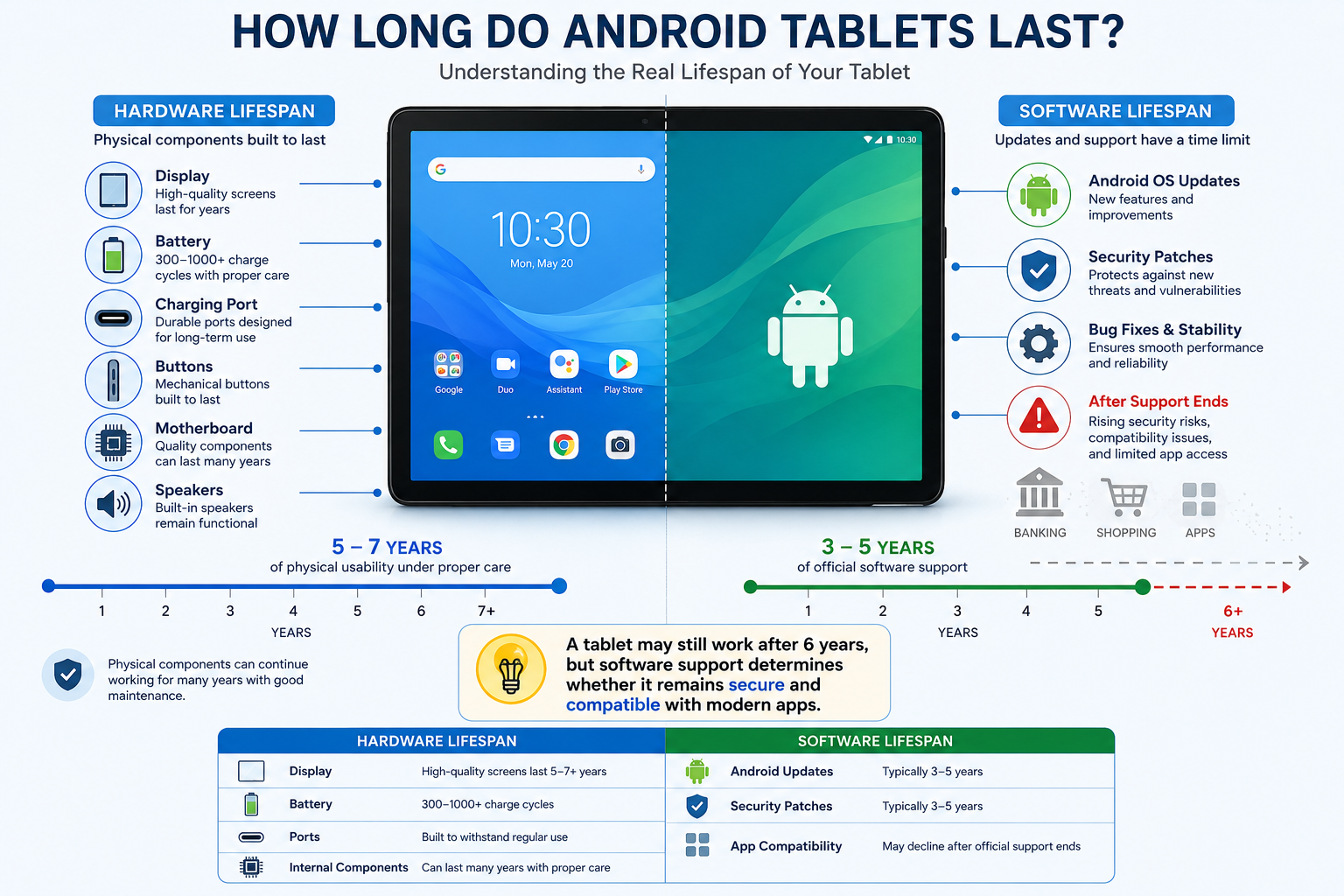
How does YouTube Music sound quality compare with Spotify and Apple Music?

YouTube Music provides high-quality audio that works well for most everyday listeners. The platform supports streaming quality suitable for smartphones, Bluetooth headphones, wireless speakers, and car audio systems.

Spotify and YouTube Music both focus on delivering reliable streaming performance. Apple Music stands out by offering lossless audio options for listeners with compatible equipment.

However, most users will notice little difference during normal listening. Audio quality depends on several factors, including headphones, internet connection, and personal preferences.

For casual listening, workouts, commuting, and everyday entertainment, YouTube Music delivers a clear and enjoyable experience.

Users who prioritize professional-level audio quality may prefer platforms focused specifically on lossless formats. For most listeners, the difference is unlikely to impact their daily experience.

Can I transfer my existing playlists from Spotify or Apple Music?

Yes, you can transfer your playlists when you switch to YouTube Music. Several third-party migration services make the process faster and easier.

Tools such as Soundiiz and TuneMyMusic can connect your existing streaming account with your Google account. They then match your saved songs and recreate your playlists.

The transfer process can include:

  • Saved playlists
  • Favorite songs
  • Albums
  • Artists you follow

This prevents you from manually rebuilding your music library from the beginning.

Some songs may not transfer if they are unavailable in YouTube Music’s catalog. However, most popular tracks can be matched successfully.

For users who have spent years organizing playlists, these migration tools remove one of the biggest barriers to switching platforms.

Does YouTube Music have a desktop app for computers?

YouTube Music does not currently offer a traditional desktop application like some competing platforms. However, you can use it through any modern web browser.

You can also install it as a Progressive Web App (PWA) on supported computers. This creates an app-like experience without downloading large software files.

The desktop version supports useful features such as:

  • Keyboard controls
  • Media key support
  • Desktop notifications
  • Smooth playback controls

The browser-based approach keeps the platform lightweight and accessible across different operating systems.

Whether you use Windows, macOS, or ChromeOS, you can access your music library without needing dedicated desktop software.

What happens to my uploaded MP3 files if I switch platforms?

You can continue using your personal music collection after switching to YouTube Music. Google allows users to upload personal audio files to their library.

You can upload up to 100,000 personal tracks and access them alongside the platform’s streaming catalog.

Uploaded files can be organized into playlists and played across your connected devices. This is especially useful for listeners who own rare recordings, personal mixes, or songs unavailable through streaming services.

Your uploaded music remains separate from YouTube Music’s official catalog but works within the same listening experience.

This feature gives users more control over their collection compared with many competing platforms.

Can I listen to YouTube Music offline without internet access?

Yes, offline listening is available for paid subscribers. You can download songs, albums, and playlists directly to your mobile device.

This feature is useful when traveling, commuting, or entering areas with unreliable internet access.

You can manually select specific content to download. You can also use Smart Downloads, which automatically saves recommended music based on your listening habits.

Offline playback helps ensure your favorite songs are always available. It also reduces mobile data usage when you listen frequently.

For users who travel often or have limited connectivity, offline downloads are one of the most practical reasons to switch to YouTube Music.


Conclusion: Is It Time To Switch To YouTube Music?

Choosing to switch to YouTube Music can significantly improve your everyday listening experience. The platform offers more than a traditional music streaming service by combining songs, videos, live performances, and unique creator content.

Its connection with YouTube gives users access to a wider variety of music. You can discover official releases, rare recordings, covers, and live versions that may not appear on other platforms.

The recommendation system also makes discovering new music easier. Personalized playlists adapt to your habits and help you find songs that match your taste.

Another major advantage is the value of YouTube Premium. A single subscription provides ad-free YouTube viewing and a complete music streaming experience. This makes it a practical choice for users who already spend time on both platforms.

Moving your playlists is also simple. Migration tools allow you to transfer your favorite songs without rebuilding your library manually.

If you want a streaming service with a deeper catalog, smarter recommendations, and stronger video integration, switching to YouTube Music is worth considering.

If you want to discover more about the connection between music and emotional well-being, check out our guide on what is music therapy and how it works.

Best iPad Accessories Cheaper Than Apple (2026 Guide)

Useful iPad Accessories Cheaper Than Apple Brand Products

Buying a new iPad is an exciting upgrade, but official accessories can quickly increase the total cost. Choosing iPad accessories cheaper than Apple allows you to create a powerful setup without paying premium prices for every add-on. From styluses and keyboard cases to USB-C hubs and protective covers, affordable alternatives can deliver excellent performance for students, professionals, creators, and everyday users.

Apple accessories such as the Apple Pencil, Magic Keyboard, and official adapters offer premium design and seamless integration. However, many third-party brands now provide similar features at much lower prices. These affordable iPad accessories include responsive styluses, durable cases, multi-port hubs, and reliable charging solutions.

Modern third-party products are no longer simple budget replacements. Many include features like palm rejection, magnetic attachment, fast charging, adjustable stands, and precision tracking. This makes them practical alternatives for users who want better value.

In this guide, we compare the best iPad accessories cheaper than Apple products. You will discover cost-effective options that improve productivity, protect your device, and help you build a complete iPad workspace without overspending.


1. Metapen Pencil A8: A Budget Apple Pencil Alternative for iPad

Best for: Students, note-taking, casual drawing, and document marking

The Apple Pencil is one of the best styluses available for iPad users, especially for artists who need pressure sensitivity and precise control. However, many users do not need advanced professional features, making a cheaper alternative a smarter choice.

The Metapen Pencil A8 is one of the most affordable Apple Pencil alternatives available. It provides essential features for everyday iPad tasks, including palm rejection, tilt sensitivity, and quick charging.

You can use it for:

  • Handwritten notes
  • PDF annotations
  • Digital planning
  • Simple sketches
  • Online classes

One of its biggest advantages is the simple setup process. After charging, you can quickly connect and start writing without complicated pairing steps.

The stylus also offers impressive battery performance. A short charging session provides enough power for regular daily use, while a full charge can last several hours depending on activity.

However, professional artists should remember that it does not include pressure sensitivity like Apple Pencil models. This means it may not be ideal for advanced illustration work.

For students and everyday users, though, the Metapen Pencil A8 delivers excellent value at a fraction of Apple’s stylus price.

Buy on Amazon:Metapen Pencil A8 Stylus Pen for iPad


2. Logitech Combo Touch: A Cheaper Magic Keyboard Alternative

Best for: Turning your iPad into a laptop replacement

A keyboard case is one of the most useful upgrades for iPad productivity. Apple’s Magic Keyboard offers an excellent typing experience, but its high price makes it difficult for many users to justify.

The Logitech Combo Touch is a strong alternative that provides many of the same productivity benefits at a lower price. It combines a protective case, detachable keyboard, and built-in trackpad into one accessory.

Important features include:

  • Comfortable laptop-style typing
  • Integrated precision trackpad
  • Adjustable kickstand
  • Protective outer case
  • Backlit keys

Unlike basic Bluetooth keyboards, the Combo Touch creates a more complete laptop-like experience. The adjustable stand also provides multiple viewing angles, making it useful for writing, video calls, and entertainment.

Additionally, Logitech offers versions for several iPad models, including iPad, iPad Air, and iPad Pro. This makes it easier to find a compatible option based on your device.

For students, remote workers, and professionals, this keyboard case provides excellent productivity features without the premium cost of Apple’s Magic Keyboard.

Buy : Logitech Combo Touch iPad Keyboard Case


3. MoKo iPad Case: Affordable Protection Instead of Apple Smart Folio

Best for: Everyday protection and comfortable viewing angles

Protecting your iPad does not have to be expensive. Apple’s Smart Folio cases look great and work well, but they can cost significantly more than many reliable third-party options.

The MoKo iPad Case is a budget-friendly alternative that provides similar everyday protection and functionality. It includes a lightweight design with a front cover that can fold into different viewing positions.

Key benefits include:

  • Affordable pricing
  • Multiple colors and designs
  • Slim lightweight construction
  • Auto sleep/wake support
  • Adjustable viewing angles

The case helps protect your iPad from scratches, dust, and everyday surface damage. It is especially useful for students and casual users who want basic protection without adding extra bulk.

However, it is important to note that slim folio-style cases are not designed for heavy drop protection. Users who frequently travel in rough conditions may prefer a rugged case.

For everyday home, office, and classroom use, the MoKo case provides excellent value and performs many of the same functions as Apple’s official folio case.

Buy on Amazon:MoKo iPad Case Cover


4. IFEART USB-C Cable: Affordable Charging Cable for iPad

Best for: Replacement cables and multi-device charging

Charging cables are another category where you can save money. Apple’s USB-C cables are reliable, but they are often more expensive compared with many high-quality alternatives.

The IFEART USB-C to USB-C Cable offers a more affordable solution for iPad users who need extra cables for home, office, or travel.

Features include:

  • USB-C Power Delivery support
  • Durable cable construction
  • Multiple length options
  • Fast charging compatibility
  • Affordable multi-pack options

A major advantage of buying third-party cables is convenience. Having extra charging cables in different locations means you do not need to constantly move one cable between rooms or bags.

Furthermore, quality USB-C cables can provide charging performance similar to Apple cables when paired with a compatible power adapter.

Always avoid extremely cheap unknown brands because they may lack proper safety protections. Choosing a trusted charging cable helps protect both your device and your investment.

Buy on Amazon:IFEART USB-C to USB-C Cable for iPad


5. RAPIQUE Bluetooth Mouse: A Budget Magic Mouse Alternative

Best for: Improving iPad productivity and desktop-style navigation

The iPad supports Bluetooth accessories, which means adding a mouse can make your tablet feel more like a traditional computer.

Apple’s Magic Mouse works well with iPad, but its price is higher than many users want to pay. The RAPIQUE Bluetooth Wireless Mouse provides a cheaper alternative for people who want better navigation and productivity.

Features include:

  • Wireless Bluetooth connection
  • Quiet clicking buttons
  • Lightweight design
  • Long battery life
  • Comfortable everyday use

A mouse is especially useful when working with documents, spreadsheets, emails, and multitasking apps. It provides more precise control compared with using only the touchscreen.

The RAPIQUE mouse is not designed to replace Apple’s premium experience completely. However, it delivers the essential benefits most users need at a much lower cost.

For students and professionals looking for affordable iPad accessories cheaper than Apple options, adding a budget Bluetooth mouse can be a simple but effective upgrade.

Buy on Amazon: RAPIQUE Bluetooth Wireless Mouse for iPad


Frequently Asked Questions About iPad Accessories Cheaper Than Apple

Do third-party iPad styluses work as well as the Apple Pencil?

Third-party styluses can perform very well for everyday iPad tasks. In fact, they are excellent choices for students, professionals, and casual users who need reliable handwriting and navigation features.

Many affordable styluses include important functions such as palm rejection, tilt sensitivity, and low-lag writing performance. As a result, they provide a smooth experience for taking notes, marking documents, and creating simple sketches.

However, cheaper alternatives may not include every advanced feature found in Apple Pencil models. The biggest difference is usually pressure sensitivity. This feature allows artists to control line thickness by adjusting writing pressure.

For this reason, professional illustrators and digital artists may still prefer premium styluses because they require precise control. On the other hand, regular users can often get excellent value from a quality third-party option.

Before purchasing, check compatibility with your iPad model. Additionally, confirm that the stylus supports the features you need. A well-designed alternative can handle most daily tasks while costing significantly less than Apple’s official accessory.

Will non-Apple chargers and cables damage my iPad battery?

Using non-Apple chargers and cables does not automatically damage your iPad battery. Generally, many third-party charging accessories are designed with advanced safety systems and meet industry standards.

For example, reliable accessories from trusted manufacturers often include protection against:

  • Overheating
  • Excess voltage
  • Power fluctuations
  • Overcharging

When choosing a charger or cable, look for safety certifications such as MFi, UL, or CE approval. These certifications help ensure that the product follows established quality and safety requirements.

However, avoid extremely cheap, unbranded charging accessories. Poor-quality cables may use weak materials or lack proper protection systems. As a result, they can create charging problems and reduce long-term reliability.

Therefore, a certified USB-C charger and high-quality cable can safely power your iPad. You do not always need Apple-branded accessories to maintain battery health.

Ultimately, choosing reputable brands helps you save money while keeping your device protected during daily charging.

Are cheap Bluetooth keyboard cases reliable for daily typing?

Affordable Bluetooth keyboard cases can be reliable for everyday typing when you choose a quality model. Today, many modern alternatives use improved designs that provide comfortable typing and stable wireless connections.

Budget keyboard cases often include features similar to expensive options, including:

  • Scissor-switch keys
  • Adjustable viewing angles
  • Built-in trackpads
  • Rechargeable batteries
  • Bluetooth 5.0 connectivity

Because of these features, they are suitable for writing documents, replying to emails, and managing work tasks. Additionally, many models can last several weeks on a single charge, depending on usage.

However, the main differences between budget and premium keyboard cases are usually material quality and extra features. Apple’s accessories often use higher-end materials and tighter integration. Nevertheless, affordable alternatives can still provide a productive experience.

Before purchasing, check customer reviews and confirm compatibility with your iPad model. With the right choice, a reliable keyboard case can transform your tablet into a practical laptop replacement without the high price.

Can I connect an external hard drive to my iPad using a third-party USB hub?

Yes, you can connect external storage devices to your iPad using a compatible USB-C hub. Fortunately, modern versions of iPadOS support many external drives through the built-in Files app.

With a quality USB-C hub, you can connect:

  • External hard drives
  • USB flash drives
  • Memory cards
  • Cameras
  • Other USB accessories

Additionally, iPadOS supports common file systems such as APFS, FAT32, and exFAT. This makes transferring photos, videos, documents, and other files simple.

However, some external hard drives require more power than an iPad can provide. In these situations, a powered USB hub or pass-through charging connection can improve performance.

For this reason, photographers, creators, and professionals can benefit greatly from a multi-port hub. It creates a more flexible workspace without requiring expensive Apple adapters.

Finally, always choose a reliable hub from a trusted manufacturer. Proper power management helps prevent connection issues and improves long-term reliability.

Do paper-texture screen protectors wear down stylus tips faster?

Paper-texture screen protectors can increase stylus tip wear compared with smooth glass protectors. This happens because their textured surface creates friction, producing a realistic paper-like writing experience.

For artists and note-takers, this extra resistance can be beneficial. It provides more control and allows many users to enjoy a more natural writing feel.

However, the same friction gradually wears down plastic stylus tips. Therefore, users who write or draw frequently may need to replace tips more often.

Fortunately, replacement tips are generally affordable and easy to install. Additionally, checking the condition of your stylus tip regularly helps maintain smooth performance.

If you mainly watch videos, browse websites, or use your iPad casually, a tempered glass protector may be a better choice. It provides excellent clarity and creates less friction.

Ultimately, the best option depends on your priorities. Choose paper-texture protection for writing comfort and drawing control, or select glass protection for maximum clarity and everyday durability.


Conclusion: Build a Better iPad Setup With Accessories Cheaper Than Apple

Creating a powerful iPad setup does not require spending hundreds of dollars on official Apple accessories. By choosing iPad accessories cheaper than Apple, you can enjoy excellent performance, better flexibility, and significant savings without sacrificing essential features.

Today, affordable third-party accessories offer impressive value across almost every category. For example, budget styluses provide smooth writing experiences for students and note-takers, while keyboard cases can transform an iPad into a practical laptop replacement. Similarly, USB-C hubs, chargers, and storage accessories help expand your device’s capabilities at a much lower cost.

Additionally, protective cases and screen protectors are smart investments because they help prevent expensive repairs. Choosing the right accessories can improve your daily workflow while keeping your iPad safe from accidental damage.

However, the best accessory depends on how you use your device. Students may benefit most from a reliable stylus and keyboard case. Meanwhile, professionals may need productivity-focused tools like external storage hubs and advanced charging solutions. Artists may prefer accessories that improve drawing accuracy and screen control.

Before purchasing, always check compatibility, build quality, safety certifications, and customer reviews. A lower price does not always mean lower quality, especially when buying from trusted accessory brands.

Ultimately, modern third-party manufacturers have created excellent alternatives to Apple’s premium products. With careful selection, you can build a reliable, productive, and affordable iPad ecosystem while enjoying the benefits of iPad accessories cheaper than Apple without unnecessary spending.

If you are choosing an iPad setup for school or college, your device choice also matters. Before making a final decision, explore this guide on Mac or Windows for students to understand which platform may better match your learning needs and workflow.

Privacy Phone Screen Protectors: Essential Buyer Guide

Privacy Phone Screen Protectors: How They Work and How to Choose the Best One

Privacy phone screen protectors have become an essential smartphone accessory for people who want to protect sensitive information while using their devices in public. Whether you are checking emails on a train, reviewing work documents at a coffee shop, or accessing financial accounts while traveling, these protectors help prevent nearby people from viewing your screen.

Privacy phone screen protectors use advanced optical technology to limit side-angle visibility while keeping the display clear for the person sitting directly in front of the device. This physical privacy layer helps reduce the risk of visual hacking, where strangers secretly view confidential information displayed on your smartphone.

Modern smartphone protection is no longer only about preventing scratches and cracks. Users also need solutions that protect personal data from unwanted attention. A privacy screen protector creates a restricted viewing zone that keeps messages, passwords, banking details, and private photos hidden from people nearby.

High-quality privacy phone screen protectors provide multiple benefits in one product. They help protect against accidental drops, everyday scratches, fingerprints, glare, and unwanted screen viewing. This makes them a practical alternative to traditional clear screen protectors.

According to cybersecurity recommendations from the National Institute of Standards and Technology (NIST), protecting personal information requires proactive security practices across everyday devices. You can learn more about improving personal cybersecurity habits through NIST Cybersecurity Resources. Adding a privacy filter to your smartphone provides an extra physical safeguard when using your device in shared spaces.

In this guide, we will explain how privacy screen technology works, compare tempered glass and PET film materials, discuss brightness and fingerprint sensor considerations, and show how to install privacy phone screen protectors without bubbles.


How Privacy Screen Technology Works

Privacy screen protectors rely on physical optical engineering instead of software-based security features. Their purpose is to control how light travels from your smartphone display and limit visibility from unwanted viewing angles.

The key component inside these protectors is a special layer containing microscopic structures called micro-louvers. These tiny vertical barriers control the direction of light passing through the screen.

When you view your phone directly from the front, light passes through these openings normally. This creates a clear and bright viewing experience for the device owner.

However, when someone views the screen from the side, the micro-louvers block those angled light paths. The display appears dark, blurred, or unreadable to nearby viewers.

This technology creates a private viewing area while maintaining normal touchscreen functionality. The effectiveness of privacy phone screen protectors depends on the quality of the optical layer, viewing angle range, and material construction.

Micro-Louver Optical Principles

Micro-louver technology works similarly to miniature window blinds. Thousands of microscopic vertical strips are placed inside the protector to control visibility.

At a direct viewing angle of around 0 degrees, light travels through the openings between the louvers. This allows you to see your phone screen clearly.

When the viewing angle moves beyond approximately 28 to 30 degrees, the louvers restrict light movement. People beside you see a dark or distorted screen instead of your content.

The quality of this privacy effect depends on several factors. These include the louver design, material quality, screen brightness, and protector alignment.

Higher-quality privacy filters provide stronger side protection while maintaining better front-facing clarity. Cheaper options may reduce brightness more noticeably or create a slight color shift.


2-Way vs. 4-Way Privacy Filters

Privacy screen protectors generally come in two main designs: 2-way privacy filters and 4-way privacy filters. Choosing between them depends on your daily phone usage and privacy requirements.

A 2-way privacy protector blocks visibility from the left and right sides. This design works best when you normally hold your phone vertically in portrait mode.

For example, commuters checking emails, messages, or banking apps in public spaces can benefit from a 2-way filter. It prevents people sitting beside them from viewing the display.

However, the protection changes when the phone rotates into landscape mode. Someone beside you may be able to see the screen while watching videos or viewing photos.

A 4-way privacy protector offers broader protection by blocking views from the left, right, top, and bottom angles. It provides better coverage when your phone orientation changes frequently.

This makes 4-way filters useful for business users, frequent travelers, and professionals handling confidential information.

2-Way Privacy Filters

  • Block side views from the left and right.
  • Ideal for portrait smartphone use.
  • Usually offer better front-facing brightness.
  • Suitable for everyday privacy protection.

4-Way Privacy Filters

  • Block visibility from all four directions.
  • Provide stronger privacy in crowded spaces.
  • Better for sensitive work documents.
  • May slightly reduce screen brightness compared with 2-way designs.

Selecting the right privacy filter depends on your environment. Casual users may prefer a 2-way protector, while users handling confidential information may benefit from a 4-way option.


Tempered Glass vs. PET Film: Choosing the Right Privacy Screen Protector Material

The material of a privacy screen protector affects its durability, clarity, touch response, and overall user experience. The two most common options are tempered glass privacy protectors and PET plastic privacy films.

Both materials use privacy filter technology to reduce side-angle visibility. However, they offer different levels of physical protection and screen performance.

For most modern smartphones, tempered glass is the preferred choice because it provides stronger impact resistance and a more natural touch experience. It feels similar to the original phone display and offers better protection against accidental drops.

PET film protectors focus mainly on privacy and scratch prevention. Their flexible design makes them useful for older devices with curved displays or users who want an ultra-thin layer.

When choosing between the two, consider how you use your smartphone every day. A person who frequently travels, works outdoors, or handles sensitive information may benefit from a stronger tempered glass option.

A user who prioritizes thinness and flexibility may prefer PET film. Understanding the differences helps you select a privacy protector that matches your needs.

Feature Tempered Glass PET Plastic Film
Impact Protection Excellent protection with 9H hardness rating Basic scratch protection
Touch Feel Smooth glass-like experience Flexible and slightly softer
Clarity Very high sharpness and transparency Moderate clarity
Installation Easier alignment due to rigid structure More flexible but can develop bubbles

Tempered Glass Privacy Screen Protectors

Tempered glass privacy protectors combine multiple protective layers to improve durability and viewing privacy. A typical design includes a scratch-resistant surface coating, a privacy filter layer, and a silicone adhesive base.

The outer 9H hardness layer helps protect against scratches from keys, coins, and everyday objects. It also provides additional resistance against minor impacts and accidental drops.

The rigid glass construction creates a smoother experience compared with flexible plastic films. Swiping, typing, and scrolling feel closer to using the original smartphone display.

High-quality tempered glass protectors also maintain better image sharpness. They usually provide clearer colors and less distortion when viewed directly.

However, tempered glass privacy protectors are slightly thicker than PET films. This added thickness may affect compatibility with some phone cases or certain under-display fingerprint sensors.

Advantages of tempered glass privacy protectors:

  • Strong protection against scratches and everyday impacts.
  • Smooth glass-like touch response.
  • Better screen clarity and color accuracy.
  • Easier installation with precise alignment.

Disadvantages of tempered glass privacy protectors:

  • Slightly thicker profile.
  • May affect some fingerprint scanners.
  • Usually costs more than plastic film options.

For most smartphone users, tempered glass provides the best balance between privacy, durability, and daily comfort.


Flexible PET Privacy Screen Protectors

PET, or Polyethylene Terephthalate, is a lightweight plastic material commonly used in thin screen films. Privacy PET protectors include optical layers that limit side viewing angles while keeping the device profile extremely thin.

The biggest advantage of PET film is flexibility. The material can adapt better to curved displays where rigid glass protectors may have difficulty covering the entire surface.

PET films are also lightweight and barely noticeable after installation. This makes them suitable for users who prefer minimal changes to their phone’s original design.

However, PET protectors provide limited impact protection. They can reduce scratches and minor surface damage but do not absorb strong impacts from drops as effectively as tempered glass.

Over time, plastic films may develop more visible scratches. They can also slightly reduce screen sharpness compared with premium glass options.

Advantages of PET privacy films:

  • Extremely thin and lightweight design.
  • Flexible enough for curved screens.
  • Affordable compared with tempered glass.
  • Minimal change to device thickness.

Disadvantages of PET privacy films:

  • Limited protection against drops.
  • More likely to scratch over time.
  • Slight reduction in display clarity.
  • Installation may require more care to avoid bubbles.

PET film remains a practical option for users who mainly want privacy protection without adding extra thickness.


Real-World Advantages and Trade-Offs of Privacy Screen Protectors

Installing a privacy screen protector provides more than just a darker viewing angle. It creates an additional layer of protection for both your personal information and your smartphone display.

As smartphones become central to banking, communication, work, and personal activities, protecting screen visibility has become increasingly important.

A privacy protector helps reduce the chance of someone viewing sensitive details while you use your device in public. It is especially useful in airports, offices, public transportation, restaurants, and shared workspaces.

However, privacy filters also involve some compromises. The same technology that blocks side views can slightly affect brightness and viewing experience.

Understanding both the benefits and limitations allows you to choose a protector that fits your lifestyle.

Key Benefits of Privacy Phone Screen Protectors

Protects Against Visual Hacking

Privacy filters help prevent nearby people from viewing confidential information. They can protect:

  • Password entries.
  • Banking details.
  • Private messages.
  • Work documents.
  • Personal photos.

Combines Privacy and Screen Protection

A privacy screen protector replaces a standard screen guard while adding visual security. Many models also protect against scratches, fingerprints, and minor impacts.

Reduces Glare

Many modern privacy protectors include anti-reflective or matte coatings. These features reduce glare from sunlight and overhead lighting, improving screen visibility in challenging environments.

Improves Public Smartphone Safety

People often use smartphones in crowded locations where privacy is difficult to maintain. A privacy filter provides an easy physical solution without requiring software changes or additional settings.


Common Privacy Screen Protector Trade-Offs

Slight Screen Brightness Reduction

Because micro-louvers block angled light, they also reduce a small amount of overall light transmission. Most privacy protectors reduce perceived brightness by around 20% to 30%.

Increasing screen brightness can compensate for this difference. However, higher brightness settings may slightly increase battery usage.

Possible Fingerprint Sensor Issues

Some thicker tempered glass privacy protectors can interfere with under-display fingerprint scanners. This is more common with certain optical and ultrasonic sensors.

Choosing a protector designed specifically for your phone model can reduce compatibility problems. Re-registering fingerprints after installation may also improve recognition speed.

Before buying a privacy screen protector, check your device specifications and choose a product designed for your smartphone.


How to Install a Privacy Screen Protector Without Bubbles

A proper installation process ensures your privacy screen protector remains clear, responsive, and free from dust or air pockets. Even a high-quality protector can perform poorly if it is installed incorrectly.

Most installation problems happen because of dust particles, poor alignment, or fingerprints trapped between the protector and the display. Taking a few extra minutes during installation can significantly improve the final result.

Before starting, choose a clean workspace with minimal dust. Avoid installing your protector near open windows, fans, or areas with heavy airflow.

Follow these steps to achieve a smooth, bubble-free installation.

Step 1: Clean the Display Thoroughly

Begin by turning off your smartphone and placing it on a stable surface. Use an alcohol cleaning wipe to remove fingerprints, oils, and surface dirt.

After cleaning, use a microfiber cloth to dry the display completely. The screen should look clear and free from streaks before applying the protector.

Any remaining oil or moisture can weaken the adhesive bond and create uneven areas under the glass.

Step 2: Remove Every Dust Particle

Dust is one of the biggest causes of bubbles under a screen protector. Even a tiny particle can create a visible air pocket after installation.

Use a dust removal sticker or a small piece of clean tape to gently lift particles from the entire display surface.

Pay special attention to the edges of the phone because dust often collects around the bezel area.

Step 3: Align the Privacy Protector Carefully

Remove the protective backing layer from the screen protector. Hold the protector by the edges to avoid leaving fingerprints on the adhesive side.

Carefully match the protector with important areas of your device, including:

  • Front camera opening.
  • Speaker cutout.
  • Screen edges.
  • Side bezels.

Correct alignment ensures full coverage while maintaining access to all phone features.

Step 4: Apply the Protector Slowly

Once aligned, gently lower the protector onto the screen. Start from the center and allow the silicone adhesive layer to spread naturally toward the edges.

Avoid pressing down immediately across the entire surface. Letting the adhesive settle gradually helps prevent trapped air bubbles.

Step 5: Remove Remaining Air Bubbles

Small bubbles may appear during installation. Use a microfiber cloth or soft-edged card to push them toward the nearest edge.

Apply gentle pressure and move slowly. Most minor bubbles disappear as the adhesive settles.

After installation, check touchscreen responsiveness and confirm that the privacy effect works correctly from different angles.


Frequently Asked Questions About Privacy Phone Screen Protectors

Do Privacy Phone Screen Protectors Lower Display Brightness?

Yes, privacy screen protectors slightly reduce perceived brightness. The micro-louver technology that blocks side viewing angles also filters some of the light produced by the display.

Most users notice a brightness reduction between 20% and 30% when viewing the screen directly. The exact amount depends on the protector quality, phone display type, and brightness settings.

You can usually compensate by increasing your screen brightness slightly. However, using higher brightness levels may result in a small increase in battery consumption.

Premium privacy protectors use high-transparency materials to reduce this effect. They maintain better front-facing clarity while still blocking unwanted side views.

Will a Privacy Screen Protector Block Fingerprint Recognition?

Most modern privacy screen protectors work well with face unlock and traditional fingerprint systems. However, some thicker tempered glass models may affect under-display fingerprint sensors.

This issue is more common with certain ultrasonic fingerprint technologies used in premium smartphones.

To avoid problems, choose a privacy protector that specifically supports your phone model and fingerprint sensor type.

After installation, deleting and re-registering your fingerprints can improve recognition speed and accuracy.

Can Someone Directly Behind Me Still See My Screen?

A standard 2-way privacy screen protector mainly blocks views from the left and right sides. It does not completely block someone standing directly behind you.

Light still travels outward from the front of the display. Therefore, a person directly behind your shoulder may still see your screen.

If you regularly work with confidential information in crowded environments, a 4-way privacy screen protector offers stronger protection.

It blocks viewing angles from multiple directions, including the top and bottom areas.

Do Privacy Screen Protectors Affect Display Color Accuracy?

High-quality tempered glass privacy protectors usually maintain excellent color accuracy when viewed directly from the front.

However, lower-quality plastic privacy films may introduce slight color changes or a grainy appearance. This is especially noticeable on white backgrounds and bright images.

Choosing a premium protector with high-transmission glass helps preserve sharpness, contrast, and natural colors.

For users who frequently watch videos or edit photos, display quality should be an important buying consideration.

Are Privacy Screen Protectors Easy to Remove?

Yes, most privacy screen protectors can be removed safely without damaging the original display.

Modern protectors use silicone adhesives that create a strong bond while allowing clean removal later.

To remove a protector, gently lift one corner using your fingernail or a thin plastic tool. Slowly peel the protector away from the screen.

Avoid using sharp metal objects because they may scratch the phone display.

After removal, any remaining adhesive residue can usually be cleaned with a microfiber cloth.


Conclusion: Choosing the Best Privacy Phone Screen Protector

Protecting smartphone privacy has become just as important as protecting the physical screen. Modern users store personal messages, financial information, work documents, and private photos on their devices every day.

A high-quality privacy phone screen protector provides a simple way to reduce unwanted viewing while adding protection against scratches and accidental damage.

These protectors use micro-louver technology to restrict side-angle visibility while keeping the screen clear from the front. Choosing the right option depends on your privacy needs, phone model, and preferred material.

For maximum durability, 9H tempered glass privacy protectors offer the best protection against drops and scratches. For users who prefer a thinner design, PET film options provide lightweight privacy coverage.

As digital threats continue to evolve, protecting personal information requires awareness of different online risks. Understanding emerging technologies and privacy challenges, such as those discussed in this guide about Deepfake Technology Explained, can help users make smarter decisions about digital security.

A reliable privacy screen protector helps secure your personal information, protect your smartphone display, and give you greater confidence when using your device anywhere.

Big Data Characteristics: The Ultimate Guide to the 5 Vs

Understanding Big Data Characteristics: The 5 Vs Explained

Every second, organizations generate enormous amounts of digital information. Understanding Big Data characteristics helps businesses manage this growing data landscape and turn raw information into valuable insights.

Traditional databases were designed for smaller, structured datasets. Modern enterprises now handle massive data streams from websites, mobile applications, IoT devices, social platforms, and business systems. These changing requirements have created the need for advanced technologies that can store, process, and analyze information at scale.

Platforms such as Apache Hadoop help organizations process large datasets across distributed computing environments. Hadoop is an open-source framework designed to support distributed storage and large-scale data processing. You can learn more about its architecture and capabilities through the official Apache Hadoop Documentation.

Data management is no longer limited to IT departments. It directly influences business strategy, customer experience, operational efficiency, and revenue growth. Companies that understand their data characteristics can build stronger analytics systems and make faster decisions.

The most common framework for understanding modern data challenges is the 5 Vs of Big Data: Volume, Velocity, Variety, Veracity, and Value. These five characteristics explain how data grows, moves, changes, and creates business impact.

This guide explores each Big Data characteristic in detail and explains how these concepts shape modern enterprise architecture.


What Are the Core Big Data Characteristics?

The definition of enterprise data has changed significantly over the last few decades. Earlier database systems mainly focused on structured information stored in traditional relational tables. However, the rapid growth of digital platforms introduced new challenges in storing and processing information.

To explain these challenges, analysts developed the Big Data 3 Vs model, which included Volume, Velocity, and Variety. These three characteristics described the increasing size, speed, and diversity of modern datasets.

As organizations began focusing more on data reliability and business outcomes, two additional dimensions were introduced: Veracity and Value. Together, these five factors became known as the 5 Vs of Big Data.

Each characteristic represents a different challenge that businesses must solve:

  • Volume focuses on the enormous amount of data generated.
  • Velocity explains how quickly data is created and processed.
  • Variety describes different data formats and sources.
  • Veracity measures data accuracy and reliability.
  • Value represents the useful outcomes gained from data analysis.

Understanding these Big Data characteristics allows organizations to design better storage systems, analytics platforms, and decision-making processes.

Modern businesses use this framework to evaluate their data strategies. It helps teams identify technical limitations, improve data quality, and create solutions that support long-term growth.

1. Volume: The Scale of Modern Datasets

Volume represents the massive quantity of data generated, collected, and stored by organizations. It is one of the most important Big Data characteristics because the amount of information produced today has moved far beyond traditional storage capabilities.

Previously, companies measured their data environments mainly in gigabytes and terabytes. However, large enterprises now manage petabytes and even exabytes of information. This growth happens because data is continuously generated from online transactions, customer interactions, smart devices, sensors, and digital platforms.

Therefore, managing large-scale datasets requires more than traditional database systems. Instead, organizations use distributed storage solutions that divide information across multiple servers. As a result, businesses can improve scalability and expand their infrastructure whenever data requirements increase.

Moreover, high-volume data creates challenges related to performance and storage costs. Companies must develop efficient methods for storing, organizing, and retrieving information quickly. Without proper planning, growing datasets can reduce system performance and increase operational expenses.

Real-World Example:
For example, e-commerce companies collect millions of customer interactions every day. They analyze clicks, searches, purchases, and browsing behavior to improve recommendations and create personalized shopping experiences.

Key Challenge:
As data volumes continue to grow, organizations must scale horizontally by adding more computing resources instead of depending on a single powerful server.


2. Velocity: The Speed of Data Processing

Velocity describes how quickly data is generated, transferred, and analyzed. Among the major Big Data characteristics, velocity has become increasingly important because modern businesses often require immediate insights.

In the past, organizations could rely on batch processing methods. However, many industries now require real-time data analysis. Therefore, companies need systems that can capture and process information instantly. This capability allows them to respond quickly to customer behavior, market changes, and operational challenges.

Furthermore, high-velocity data often comes from continuous sources such as financial transactions, sensors, social media activity, and application logs. Because these data streams arrive constantly, businesses require advanced processing systems that support low-latency data ingestion.

Similarly, organizations use event-driven architectures and real-time analytics platforms to manage fast-moving information. As a result, companies can identify patterns and take action without waiting for traditional processing cycles.

Real-World Example:
For instance, credit card companies analyze transactions instantly to detect suspicious activity. Their fraud detection systems evaluate purchase behavior while customers complete payments.

Key Challenge:
Ultimately, businesses must process continuous data streams efficiently while preventing delays, failures, or performance problems.


3. Variety: The Diversity of Data Formats

Variety refers to the different types, structures, and sources of data collected by organizations. It is one of the most important Big Data characteristics because modern information is no longer limited to simple database tables.

Traditionally, businesses mainly worked with structured data stored in rows and columns. However, today’s organizations manage a combination of structured, semi-structured, and unstructured data. This includes customer records, social media content, videos, emails, sensor readings, documents, and application logs.

Because data comes from many different sources, companies need flexible storage systems and advanced management strategies. Therefore, many organizations use data lakes, cloud storage platforms, and NoSQL databases to preserve information in its original format before analysis.

Unlike traditional databases, these modern systems do not always require a fixed structure before storing data. As a result, businesses can collect information from multiple sources and organize it later based on analytical requirements.

Data Structure Common Examples Primary Storage Models
Structured SQL tables, financial records, customer databases Relational databases
Semi-Structured JSON files, XML documents, server logs NoSQL databases
Unstructured Videos, images, audio files, PDF documents Data lakes, cloud storage

Additionally, managing data variety creates challenges in integration and analysis. Teams must combine information from different sources while maintaining consistency, accuracy, and accessibility.

Real-World Example:
For example, healthcare organizations combine structured patient records with unstructured information such as medical images, reports, and physician notes.

Key Challenge:
Therefore, engineering teams must transform different data formats into usable information without losing important details.


4. Veracity: Ensuring Data Quality and Trust

Veracity measures the accuracy, reliability, and consistency of data. Among the five Big Data characteristics, veracity is essential because inaccurate information can lead to poor business decisions.

Large datasets often contain errors, duplicate records, incomplete information, or inconsistent values. These problems may occur during data collection, storage, or processing. Consequently, organizations that analyze unreliable data may produce misleading insights.

To solve these issues, companies implement strong data governance practices. These practices include validation processes, data cleaning methods, quality checks, and continuous monitoring systems.

In addition, modern analytics platforms often include automated tools that identify unusual patterns and remove inaccurate records. As a result, businesses can improve confidence in dashboards, reports, and machine learning models.

Data accuracy is especially important in industries where decisions affect safety, finances, or customer experiences. Therefore, reliable information helps organizations build better predictions and develop more effective strategies.

Real-World Example:
For example, autonomous vehicles use sensor data to make driving decisions. These systems must remove incorrect readings caused by weather conditions or environmental noise.

Key Challenge:
However, businesses must improve data quality while maintaining fast processing speeds for real-time applications.


5. Value: Turning Raw Data into Actionable Intelligence

Value represents the business benefits organizations gain from analyzing data. It is the final and most strategic Big Data characteristic because information becomes useful only when it supports better decisions.

Although many companies collect enormous amounts of data, storage alone does not create competitive advantages. Instead, businesses must identify meaningful patterns and convert raw information into practical insights.

For this reason, data value can appear in many forms, including improved customer experiences, reduced operating costs, better forecasting, and increased revenue. Furthermore, advanced analytics, artificial intelligence, and machine learning help organizations discover hidden opportunities within large datasets.

However, successful companies do not focus only on collecting more information. Instead, they prioritize relevant data that supports clear business objectives. As a result, analytics investments can produce measurable improvements.

Expert Insight:
Data collection creates value only when organizations transform information into actions that improve business performance.

Real-World Example:
For instance, streaming platforms analyze customer viewing habits to understand preferences and decide which new content projects to develop.

Key Challenge:
Ultimately, organizations must connect technical data strategies with business goals. Otherwise, they risk collecting information without achieving meaningful results.


Frequently Asked Questions About Big Data Characteristics

What are the main characteristics of enterprise data?

The main characteristics of enterprise data are Volume, Velocity, Variety, Veracity, and Value. These five dimensions are commonly known as the 5 Vs of Big Data.

Volume explains the enormous amount of information generated by modern systems. Businesses now manage data measured in terabytes, petabytes, and beyond. Velocity describes how quickly data is created and processed, especially in real-time environments.

Variety focuses on the different formats businesses handle, including text, images, videos, and application logs. Veracity ensures that information remains accurate, consistent, and trustworthy.

Finally, Value measures how effectively organizations use data to improve decisions and achieve business goals. Together, these Big Data characteristics help companies design better storage systems, analytics platforms, and strategies for managing modern digital information.

Why is data velocity so important for modern businesses?

Data velocity is important because many business decisions depend on immediate information. In fast-moving industries, delayed insights can reduce opportunities and increase risks.

For example, financial institutions use real-time analytics to detect suspicious transactions before fraud occurs. Transportation companies analyze live location data to improve routes and manage demand.

Modern customers also expect quick responses from digital services. Businesses use high-speed data processing to personalize experiences, optimize operations, and respond to changing conditions.

Traditional batch processing methods may not meet these requirements. Real-time data systems allow organizations to analyze information as it arrives and take action immediately.

By managing velocity effectively, companies can improve efficiency and maintain a competitive advantage in data-driven markets.

How does data variety impact cloud storage architecture?

Data variety has a major impact on how organizations design their cloud storage architecture. Traditional relational databases work well with structured information, such as financial records and customer tables. However, they are less effective when handling modern data types like videos, social media content, images, and IoT sensor streams.

To manage these different formats, businesses often use flexible storage solutions such as data lakes, cloud object storage, and NoSQL databases. These technologies allow organizations to store structured, semi-structured, and unstructured information without requiring a fixed schema at the beginning.

This flexibility helps companies collect data from multiple sources and analyze it later based on business needs. For example, a company can store application logs, customer interactions, and machine-generated data in the same environment before processing it.

Data variety also affects data integration strategies. Engineering teams must create systems that can connect different sources while maintaining consistency and accessibility.

By managing variety effectively, organizations can build scalable cloud environments that support advanced analytics, artificial intelligence, and machine learning applications.

What is the difference between structured and unstructured data?

Structured and unstructured data differ mainly in how information is organized and stored.

Structured data follows a predefined format. It is usually arranged in rows and columns inside relational databases. Examples include customer information, sales records, account details, and inventory databases. Because it follows a fixed structure, structured data is easy to search and analyze using traditional database tools.

Unstructured data does not follow a specific format or predefined model. It includes images, videos, audio recordings, emails, documents, and social media content. This type of information requires more advanced processing methods because computers must first understand and organize the content.

Organizations increasingly manage both structured and unstructured data together. Modern analytics systems use technologies such as natural language processing, computer vision, and machine learning to extract insights from unstructured sources.

Understanding the difference between these data types helps businesses choose the right storage systems and analytical tools for their needs.

How do companies maintain data veracity?

Companies maintain data veracity by creating strong processes that improve data accuracy, consistency, and reliability. Since large datasets often contain errors, organizations must verify information before using it for analysis.

A common approach is implementing data governance frameworks. These frameworks define rules for collecting, storing, accessing, and managing information across the organization.

Businesses also use automated validation systems to identify duplicate records, missing values, and unusual patterns. Data cleaning tools help correct errors before information enters analytics platforms.

Many organizations also use data lineage tracking to understand where information comes from and how it changes over time. This improves transparency and helps teams identify potential quality issues.

Regular audits and monitoring processes ensure that business reports, dashboards, and machine learning models rely on accurate information.

Maintaining high data veracity allows companies to make confident decisions and reduces the risks caused by unreliable data.


Conclusion: Using Big Data Characteristics for Business Growth

Understanding Big Data characteristics is essential for organizations operating in today’s digital economy. The five key dimensions—Volume, Velocity, Variety, Veracity, and Value—help businesses understand the challenges and opportunities created by modern data environments.

Volume explains the growing size of datasets. Velocity highlights the need for faster processing. Variety focuses on managing different data formats. Veracity ensures information remains accurate. Value helps organizations transform data into meaningful business results.

When companies manage these five characteristics effectively, they can build stronger data strategies and create more reliable analytics systems. This allows them to improve customer experiences, reduce operational costs, and discover new growth opportunities.

Successful organizations do not treat data as a simple storage requirement. They view information as a strategic asset that can support innovation and competitive advantage.

By investing in scalable infrastructure, flexible technologies, and strong data governance, businesses can turn complex datasets into valuable insights. A well-designed data strategy ensures that every piece of information contributes to smarter decisions and long-term success.

As organizations continue adopting advanced analytics and artificial intelligence solutions, technologies such as Retrieval-Augmented Generation (RAG) are becoming increasingly important for connecting large data sources with intelligent systems. Understanding how RAG works can help businesses improve knowledge retrieval, enhance AI accuracy, and create more effective data-driven applications. Learn more about Retrieval-Augmented Generation (RAG) and how it improves AI-powered information systems in this detailed guide.

Real-Time Data Streaming: Architecture, Benefits & Tools

Real-Time Data Streaming: The Complete Modern Guide

Modern businesses cannot rely only on delayed reports and historical data. Decisions now depend on information that is available instantly. Real-time data streaming allows organizations to capture, process, and analyze events as they happen.

From financial transactions and IoT devices to customer interactions and application logs, streaming technology helps businesses respond faster. Instead of waiting hours or days for batch processing, companies can act on fresh data within seconds.

Traditional systems were designed around scheduled data processing. They collected information first and analyzed it later. Real-time streaming changes this approach by creating continuous data pipelines that process events immediately.

Technologies such as Apache Kafka have helped engineering teams build reliable event-driven architectures. These platforms can handle massive data volumes while maintaining speed, durability, and scalability.

Understanding real-time data streaming requires more than knowing how data moves. It involves understanding how modern systems collect, process, store, and analyze continuous streams of information.

In this guide, we will explore how streaming systems work, compare stream processing with batch processing, explain core architecture components, and review popular tools used for real-time analytics.


What Is Real-Time Data Streaming and How Does It Work?

Real-time data streaming is the process of continuously collecting, processing, and analyzing data as events occur. Instead of storing large amounts of information before processing it, streaming systems handle records immediately.

This approach allows applications to respond to changes within milliseconds or seconds. It is commonly used in systems that require instant decisions, such as fraud detection, recommendation engines, monitoring platforms, and automated alerts.

A streaming architecture usually contains three main components:

The process follows an event-driven publish-subscribe model:

  • Producers: Applications, websites, mobile devices, and sensors generate events when something changes.
  • Stream Brokers: Messaging platforms store and organize events into ordered streams called topics.
  • Consumers: Analytics tools, databases, machine learning systems, and monitoring applications subscribe to these streams.

Unlike traditional systems, streaming platforms continuously process incoming information. This allows businesses to react quickly to new conditions.

For example, an online payment system can detect suspicious behavior while a transaction is still happening. A manufacturing system can identify equipment issues before a machine fails.

The main goal of real-time streaming is not only faster data movement. It is creating systems that can understand and respond to events immediately.


Real-Time Data Streaming vs. Batch Processing

Real-time data streaming and batch processing represent two different approaches to handling information. The main difference is how quickly data is processed after it is created.

Batch processing collects data over a specific period. The system then processes the entire group at scheduled intervals. This method works well for large historical reports, backups, and offline analysis.

Real-time streaming processes data continuously. It handles events as they arrive instead of waiting for a collection period to finish.

Feature Stream Processing Batch Processing
Data Scope Continuous, unlimited data flow Fixed groups of collected data
Latency Milliseconds to seconds Hours to days
Execution Always running Scheduled intervals
Best For Fraud detection, live analytics, alerts Reports, backups, historical analysis

Batch systems remain useful for many business operations. They are efficient when immediate results are not required.

However, they create delays because information must wait before processing begins. These delays can prevent businesses from responding quickly.

Stream processing removes this waiting period. It enables real-time decision-making by turning incoming events into immediate insights.

For modern applications, many organizations use both approaches together. Streaming handles fast-changing information, while batch systems support deeper historical analysis.


Core Components of a Real-Time Streaming Architecture

A reliable real-time streaming architecture requires multiple layers working together. Each layer has a specific role in collecting, storing, processing, and delivering data.

A typical streaming pipeline looks like this:

[ Ingestion Layer ] 
        ↓
[ Storage Broker Layer ]
        ↓
[ Processing Engine ]
        ↓
[ Analytics Sink ]

The architecture must support high speed, fault tolerance, and scalability. As data volumes increase, each component must continue operating without interruption.

The major layers include:

1. The Ingestion Layer

The ingestion layer is the entry point of a streaming system. It collects raw events from different sources, including applications, sensors, websites, and databases.

This layer prepares incoming information for processing. It may handle tasks such as data validation, formatting, and protocol conversion.

A strong ingestion system allows organizations to collect millions of events without slowing down the overall pipeline.

2. The Streaming Storage Layer

The storage layer manages incoming event streams. Unlike traditional databases, streaming brokers store data as append-only logs.

These logs maintain event order and allow multiple applications to access the same information. Systems can also divide streams across servers through partitioning.

This design improves performance, reliability, and scalability.

3. The Stream Processing Engine

The processing engine contains the business logic of the streaming system. It analyzes incoming events and transforms raw data into useful information.

Processing engines can filter events, calculate metrics, combine multiple streams, and run analytics in memory.

This layer enables applications to make immediate decisions based on current data.


Key Benefits of Adopting Real-Time Data Streaming

Real-time data streaming provides organizations with faster insights, improved automation, and more responsive digital experiences. As businesses generate increasing amounts of data, traditional processing methods often create delays. Streaming systems solve this challenge by continuously analyzing information as it arrives.

A well-designed real-time data streaming platform helps companies make better decisions using current information instead of outdated reports. It also allows applications to react automatically when important events occur.

The biggest advantages of adopting event streaming include:

  • Immediate Business Insights: Teams can monitor live metrics and make decisions using fresh data. Executives can track performance changes instantly instead of waiting for scheduled reports.
  • Proactive Anomaly Detection: Streaming systems can identify unusual activity in real time. Financial institutions can detect suspicious transactions, while IT teams can identify system failures before they become major problems.
  • Improved Customer Experiences: Companies can personalize services based on real-time user behavior. Streaming data supports recommendations, targeted notifications, and dynamic content delivery.
  • Decoupled System Architecture: Event-driven systems separate data producers from consumers. This allows developers to create new applications without changing existing services.
  • Better Operational Efficiency: Automated responses reduce manual monitoring and improve workflows. Businesses can react faster to changing conditions.

Real-time streaming is especially valuable in industries where timing directly affects outcomes. A few seconds can determine whether a company prevents fraud, avoids downtime, or delivers a better customer experience.

By adopting streaming technologies, organizations create flexible systems that can handle modern data demands. These architectures support scalability while improving speed, reliability, and business agility.


Popular Real-Time Data Streaming Tools and Technologies

Choosing the right real-time data streaming tools depends on several important factors. For example, organizations must evaluate data volume, processing requirements, latency expectations, and their existing technology environment.

Furthermore, different streaming platforms provide different capabilities. While some solutions focus on high-speed event delivery, others specialize in advanced stream processing, complex analytics, or cloud-based management.

Therefore, businesses should select a platform based on their specific workload, scalability needs, and future growth plans.

The most widely used streaming technologies include:

Apache Kafka

Apache Kafka is one of the most popular event streaming platforms available today. It is designed for high-throughput data pipelines and large-scale distributed systems.

In addition, Kafka works as a distributed commit log that stores events reliably. As a result, multiple applications can read and process the same stream independently without affecting other consumers.

Its key features include:

  • High message throughput
  • Fault-tolerant architecture
  • Scalable event storage
  • Real-time data integration

Because of its reliability and scalability, many companies use Kafka as the foundation for event-driven architectures. For instance, it supports applications such as monitoring systems, analytics platforms, data integration solutions, and machine learning pipelines.

Apache Flink

Apache Flink is a powerful framework designed for complex stream processing workloads. Unlike simple data transfer systems, Flink focuses on low-latency computation and accurate event-time processing.

Moreover, it provides advanced capabilities for applications that require continuous calculations and real-time decision-making.

Flink supports:

  • Stateful stream processing
  • Real-time analytics
  • Event-time calculations
  • Fault recovery mechanisms

As a result, Flink is commonly used when businesses need advanced processing logic, accurate analytics, and reliable results from continuous data streams.

AWS Kinesis

Amazon Web Services provides AWS Kinesis, a managed service for collecting, processing, and analyzing real-time data streams.

With Kinesis, teams can build streaming applications without managing complex infrastructure. Additionally, the service supports various use cases, including application logs, video streams, IoT data, and real-time analytics workloads.

Cloud-based streaming services are becoming increasingly popular because they simplify deployment and reduce operational challenges. Moreover, they provide flexible scaling options, allowing organizations to handle changing data volumes more efficiently.

Ultimately, selecting the right streaming technology depends on business goals, technical requirements, and the level of control an organization needs over its data infrastructure.


Common Real-Time Data Streaming Use Cases Across Industries

Real-time data streaming powers many applications that people use every day. From financial security systems to personalized online experiences, continuous data processing has become an essential technology.

Organizations across different industries use streaming platforms to improve speed, automation, and decision-making.

Financial Services

Banks and payment companies use streaming systems to monitor transactions instantly. Fraud detection models analyze payment activity and identify suspicious patterns within seconds.

Streaming also supports algorithmic trading systems that require rapid access to market information.

E-Commerce

Online retailers use real-time data streaming to improve customer experiences. Streaming platforms help manage inventory updates, personalized recommendations, and dynamic pricing.

For example, an e-commerce website can adjust product suggestions based on a customer’s current browsing behavior.

Internet of Things (IoT) and Manufacturing

Manufacturing companies use streaming technology to monitor connected machines and sensors. These systems collect equipment data continuously and detect early warning signs.

Predictive maintenance helps organizations repair machines before unexpected failures occur.

Healthcare

Healthcare providers use real-time streaming to monitor patient information continuously. Connected devices can track vital signs and send alerts when unusual conditions appear.

This enables faster responses and improves patient monitoring processes.

Telecommunications

Telecom companies process network data streams to monitor service quality. They can detect outages, analyze traffic patterns, and optimize network performance.

Across all these industries, the common goal remains the same: transform continuous data into immediate action.


Frequently Asked Questions About Real-Time Data Streaming

What is the difference between real-time data streaming and message queuing?

Real-time data streaming and message queuing both move data between systems, but they work differently. Traditional message queues usually deliver a message to one consumer and remove it after processing.

In contrast, real-time data streaming platforms store events in persistent, ordered logs. Multiple applications can access the same stream at different times without affecting other consumers.

This makes streaming systems more suitable for modern event-driven architectures. A single event can support several applications, such as analytics tools, monitoring systems, and machine learning models.

Message queues are still useful for task distribution and simple communication workflows. However, streaming platforms provide better support for continuous data processing and large-scale analytics.

Is real-time data streaming expensive to implement?

The cost of implementing real-time data streaming depends on system requirements, data volume, and infrastructure choices.

Initial development can require investment in:

  • Streaming platforms
  • Cloud resources or servers
  • Data engineering expertise
  • Monitoring and maintenance tools

However, managed cloud services have made streaming technology easier to adopt. Companies can use scalable solutions without maintaining complex infrastructure themselves.

Over time, streaming can reduce operational costs by improving automation and preventing costly issues. For example, real-time monitoring can detect failures before they cause major downtime.

For organizations handling large amounts of constantly changing data, the benefits often outweigh the initial setup costs.

What is event time versus processing time in streaming?

Event time and processing time represent two different timestamps in a streaming system.

Event time refers to when an action actually happened at the source. For example, it may represent the exact moment a customer completed a purchase.

Processing time refers to when the streaming application receives and handles that event.

These timestamps may differ because of network delays, system performance issues, or temporary connection problems.

Modern stream processing frameworks use event-time processing to produce more accurate results. This is especially important for analytics, reporting, and applications where timing affects business decisions.

Can real-time streaming replace traditional databases?

No. Real-time streaming and databases serve different purposes.

Streaming systems are designed for continuous data movement and event processing. They help applications react quickly to new information.

Traditional databases are better suited for storing structured data, performing complex queries, and supporting application transactions.

Most modern architectures use both technologies together. A streaming platform processes incoming events, while databases store important information for long-term access.

For example, an online store may use streaming to analyze customer activity instantly and a database to maintain customer profiles and order history.

Together, these systems create a complete data management strategy.

How do you handle failures in a real-time stream?

Reliable streaming systems use several techniques to prevent data loss during failures.

Common approaches include:

  • Replication: Data is copied across multiple servers to improve availability.
  • Checkpoints: Processing states are saved regularly so systems can recover quickly.
  • Write-ahead logs: Events are stored before processing to maintain consistency.

Modern streaming frameworks can automatically recover from hardware failures or application errors. When a component stops working, another system can continue processing from the latest saved state.

These reliability features make real-time streaming suitable for critical applications where downtime or lost data can create serious problems.


Conclusion: The Future of Real-Time Data Streaming

Real-time data streaming has become a core requirement for modern digital businesses. Organizations can no longer depend only on delayed reports when decisions must happen instantly.

By processing events as they occur, streaming systems provide faster insights, better automation, and improved customer experiences. Businesses can detect problems earlier, personalize services, and respond quickly to changing conditions.

Building a successful streaming strategy requires careful planning. Companies must choose the right tools, design scalable architectures, and create reliable data pipelines.

Technologies such as Kafka, Flink, and cloud streaming services continue to improve how organizations manage growing data volumes. As connected devices, applications, and digital interactions continue expanding, the demand for instant information will only increase.

The future of data architecture is moving toward event-driven systems. Organizations that adopt real-time data streaming can build more flexible, responsive, and competitive technology environments.

By investing in continuous data processing today, businesses prepare themselves for a faster and more data-driven future.

Strong security practices, continuous monitoring, and awareness of cyber threats are essential for maintaining reliable data systems. Understanding how attackers attempt to access confidential information can help businesses strengthen their defenses and reduce security risks. Learn more about common data theft methods and how hackers steal sensitive information in our detailed guide: How Hackers Steal Data.