
Privacy Phone Screen Protectors: How They Work and How to Choose the Best One
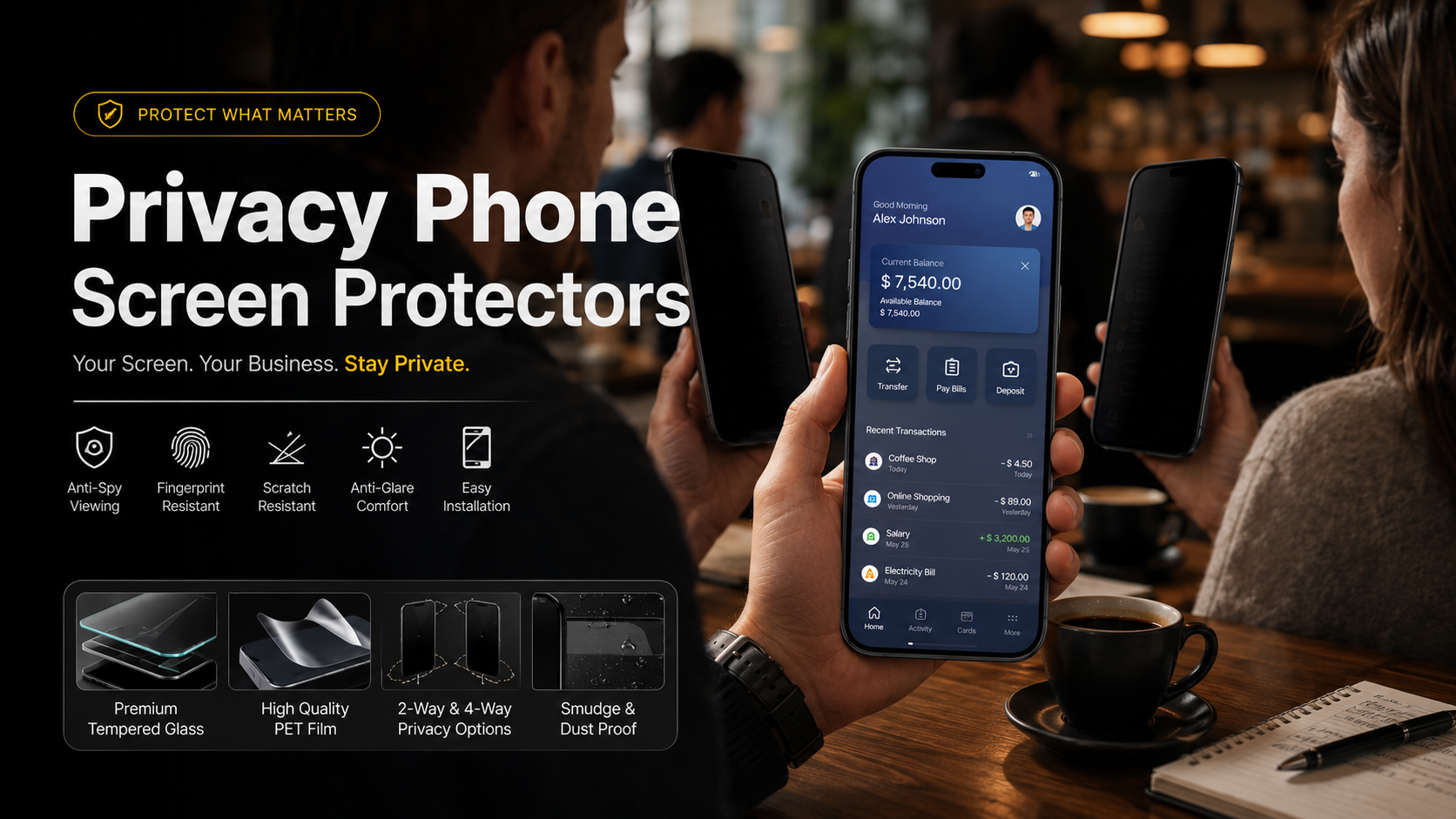
Privacy phone screen protectors have become an essential smartphone accessory for people who want to protect sensitive information while using their devices in public. Whether you are checking emails on a train, reviewing work documents at a coffee shop, or accessing financial accounts while traveling, these protectors help prevent nearby people from viewing your screen.
Privacy phone screen protectors use advanced optical technology to limit side-angle visibility while keeping the display clear for the person sitting directly in front of the device. This physical privacy layer helps reduce the risk of visual hacking, where strangers secretly view confidential information displayed on your smartphone.
Modern smartphone protection is no longer only about preventing scratches and cracks. Users also need solutions that protect personal data from unwanted attention. A privacy screen protector creates a restricted viewing zone that keeps messages, passwords, banking details, and private photos hidden from people nearby.
High-quality privacy phone screen protectors provide multiple benefits in one product. They help protect against accidental drops, everyday scratches, fingerprints, glare, and unwanted screen viewing. This makes them a practical alternative to traditional clear screen protectors.
According to cybersecurity recommendations from the National Institute of Standards and Technology (NIST), protecting personal information requires proactive security practices across everyday devices. You can learn more about improving personal cybersecurity habits through NIST Cybersecurity Resources. Adding a privacy filter to your smartphone provides an extra physical safeguard when using your device in shared spaces.
In this guide, we will explain how privacy screen technology works, compare tempered glass and PET film materials, discuss brightness and fingerprint sensor considerations, and show how to install privacy phone screen protectors without bubbles.
How Privacy Screen Technology Works
Privacy screen protectors rely on physical optical engineering instead of software-based security features. Their purpose is to control how light travels from your smartphone display and limit visibility from unwanted viewing angles.
The key component inside these protectors is a special layer containing microscopic structures called micro-louvers. These tiny vertical barriers control the direction of light passing through the screen.
When you view your phone directly from the front, light passes through these openings normally. This creates a clear and bright viewing experience for the device owner.
However, when someone views the screen from the side, the micro-louvers block those angled light paths. The display appears dark, blurred, or unreadable to nearby viewers.
This technology creates a private viewing area while maintaining normal touchscreen functionality. The effectiveness of privacy phone screen protectors depends on the quality of the optical layer, viewing angle range, and material construction.
Micro-Louver Optical Principles
Micro-louver technology works similarly to miniature window blinds. Thousands of microscopic vertical strips are placed inside the protector to control visibility.
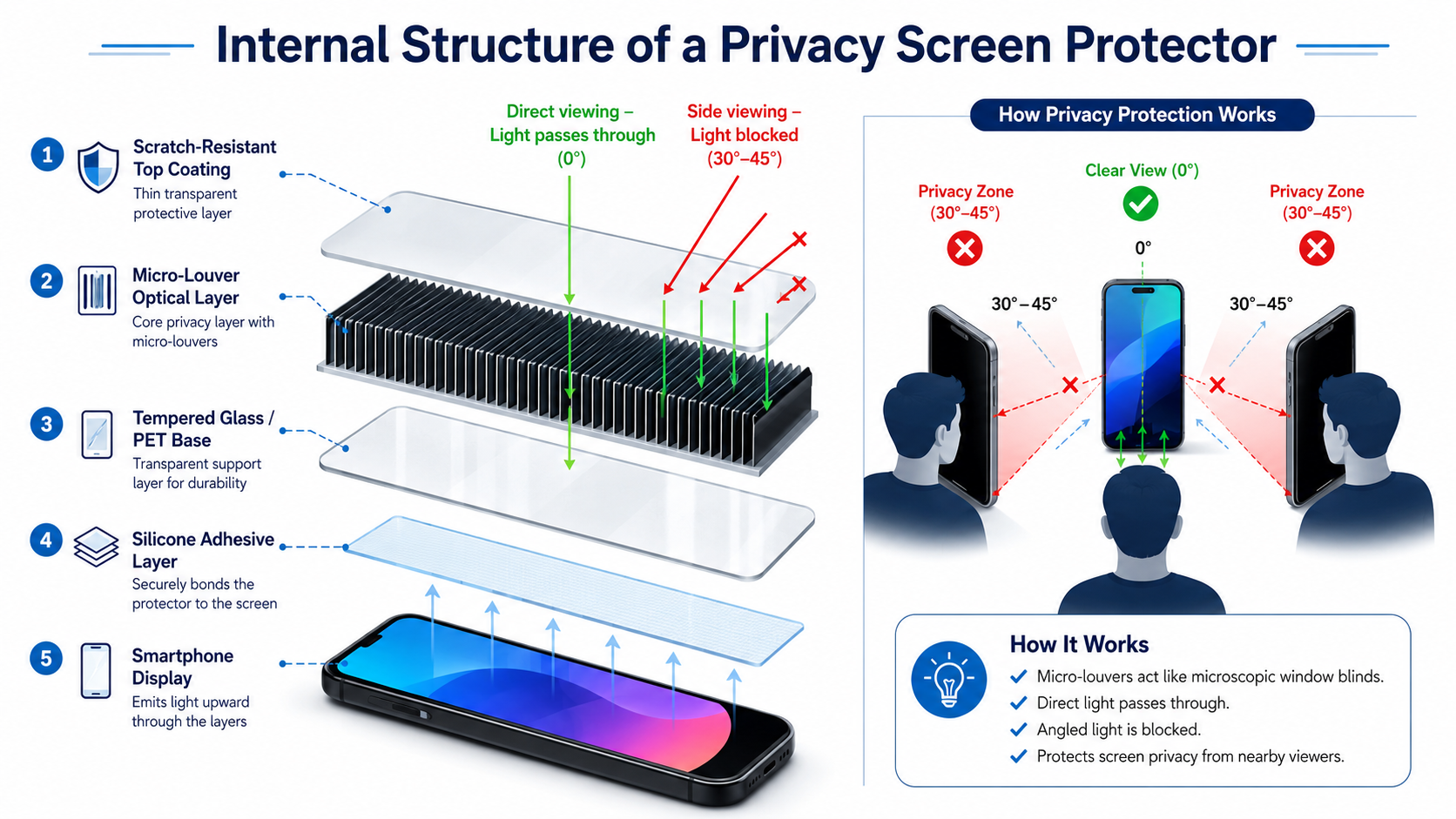

At a direct viewing angle of around 0 degrees, light travels through the openings between the louvers. This allows you to see your phone screen clearly.
When the viewing angle moves beyond approximately 28 to 30 degrees, the louvers restrict light movement. People beside you see a dark or distorted screen instead of your content.
The quality of this privacy effect depends on several factors. These include the louver design, material quality, screen brightness, and protector alignment.
Higher-quality privacy filters provide stronger side protection while maintaining better front-facing clarity. Cheaper options may reduce brightness more noticeably or create a slight color shift.
2-Way vs. 4-Way Privacy Filters
Privacy screen protectors generally come in two main designs: 2-way privacy filters and 4-way privacy filters. Choosing between them depends on your daily phone usage and privacy requirements.
A 2-way privacy protector blocks visibility from the left and right sides. This design works best when you normally hold your phone vertically in portrait mode.
For example, commuters checking emails, messages, or banking apps in public spaces can benefit from a 2-way filter. It prevents people sitting beside them from viewing the display.
However, the protection changes when the phone rotates into landscape mode. Someone beside you may be able to see the screen while watching videos or viewing photos.
A 4-way privacy protector offers broader protection by blocking views from the left, right, top, and bottom angles. It provides better coverage when your phone orientation changes frequently.
This makes 4-way filters useful for business users, frequent travelers, and professionals handling confidential information.
2-Way Privacy Filters
- Block side views from the left and right.
- Ideal for portrait smartphone use.
- Usually offer better front-facing brightness.
- Suitable for everyday privacy protection.
4-Way Privacy Filters
- Block visibility from all four directions.
- Provide stronger privacy in crowded spaces.
- Better for sensitive work documents.
- May slightly reduce screen brightness compared with 2-way designs.
Selecting the right privacy filter depends on your environment. Casual users may prefer a 2-way protector, while users handling confidential information may benefit from a 4-way option.
Tempered Glass vs. PET Film: Choosing the Right Privacy Screen Protector Material
The material of a privacy screen protector affects its durability, clarity, touch response, and overall user experience. The two most common options are tempered glass privacy protectors and PET plastic privacy films.
Both materials use privacy filter technology to reduce side-angle visibility. However, they offer different levels of physical protection and screen performance.
For most modern smartphones, tempered glass is the preferred choice because it provides stronger impact resistance and a more natural touch experience. It feels similar to the original phone display and offers better protection against accidental drops.
PET film protectors focus mainly on privacy and scratch prevention. Their flexible design makes them useful for older devices with curved displays or users who want an ultra-thin layer.
When choosing between the two, consider how you use your smartphone every day. A person who frequently travels, works outdoors, or handles sensitive information may benefit from a stronger tempered glass option.
A user who prioritizes thinness and flexibility may prefer PET film. Understanding the differences helps you select a privacy protector that matches your needs.
| Feature | Tempered Glass | PET Plastic Film |
|---|---|---|
| Impact Protection | Excellent protection with 9H hardness rating | Basic scratch protection |
| Touch Feel | Smooth glass-like experience | Flexible and slightly softer |
| Clarity | Very high sharpness and transparency | Moderate clarity |
| Installation | Easier alignment due to rigid structure | More flexible but can develop bubbles |
Tempered Glass Privacy Screen Protectors
Tempered glass privacy protectors combine multiple protective layers to improve durability and viewing privacy. A typical design includes a scratch-resistant surface coating, a privacy filter layer, and a silicone adhesive base.
The outer 9H hardness layer helps protect against scratches from keys, coins, and everyday objects. It also provides additional resistance against minor impacts and accidental drops.
The rigid glass construction creates a smoother experience compared with flexible plastic films. Swiping, typing, and scrolling feel closer to using the original smartphone display.
High-quality tempered glass protectors also maintain better image sharpness. They usually provide clearer colors and less distortion when viewed directly.
However, tempered glass privacy protectors are slightly thicker than PET films. This added thickness may affect compatibility with some phone cases or certain under-display fingerprint sensors.
Advantages of tempered glass privacy protectors:
- Strong protection against scratches and everyday impacts.
- Smooth glass-like touch response.
- Better screen clarity and color accuracy.
- Easier installation with precise alignment.
Disadvantages of tempered glass privacy protectors:
- Slightly thicker profile.
- May affect some fingerprint scanners.
- Usually costs more than plastic film options.
For most smartphone users, tempered glass provides the best balance between privacy, durability, and daily comfort.
Flexible PET Privacy Screen Protectors
PET, or Polyethylene Terephthalate, is a lightweight plastic material commonly used in thin screen films. Privacy PET protectors include optical layers that limit side viewing angles while keeping the device profile extremely thin.
The biggest advantage of PET film is flexibility. The material can adapt better to curved displays where rigid glass protectors may have difficulty covering the entire surface.
PET films are also lightweight and barely noticeable after installation. This makes them suitable for users who prefer minimal changes to their phone’s original design.
However, PET protectors provide limited impact protection. They can reduce scratches and minor surface damage but do not absorb strong impacts from drops as effectively as tempered glass.
Over time, plastic films may develop more visible scratches. They can also slightly reduce screen sharpness compared with premium glass options.
Advantages of PET privacy films:
- Extremely thin and lightweight design.
- Flexible enough for curved screens.
- Affordable compared with tempered glass.
- Minimal change to device thickness.
Disadvantages of PET privacy films:
- Limited protection against drops.
- More likely to scratch over time.
- Slight reduction in display clarity.
- Installation may require more care to avoid bubbles.
PET film remains a practical option for users who mainly want privacy protection without adding extra thickness.
Real-World Advantages and Trade-Offs of Privacy Screen Protectors
Installing a privacy screen protector provides more than just a darker viewing angle. It creates an additional layer of protection for both your personal information and your smartphone display.
As smartphones become central to banking, communication, work, and personal activities, protecting screen visibility has become increasingly important.
A privacy protector helps reduce the chance of someone viewing sensitive details while you use your device in public. It is especially useful in airports, offices, public transportation, restaurants, and shared workspaces.
However, privacy filters also involve some compromises. The same technology that blocks side views can slightly affect brightness and viewing experience.
Understanding both the benefits and limitations allows you to choose a protector that fits your lifestyle.
Key Benefits of Privacy Phone Screen Protectors
Protects Against Visual Hacking
Privacy filters help prevent nearby people from viewing confidential information. They can protect:
- Password entries.
- Banking details.
- Private messages.
- Work documents.
- Personal photos.
Combines Privacy and Screen Protection
A privacy screen protector replaces a standard screen guard while adding visual security. Many models also protect against scratches, fingerprints, and minor impacts.
Reduces Glare
Many modern privacy protectors include anti-reflective or matte coatings. These features reduce glare from sunlight and overhead lighting, improving screen visibility in challenging environments.
Improves Public Smartphone Safety
People often use smartphones in crowded locations where privacy is difficult to maintain. A privacy filter provides an easy physical solution without requiring software changes or additional settings.
Common Privacy Screen Protector Trade-Offs
Slight Screen Brightness Reduction
Because micro-louvers block angled light, they also reduce a small amount of overall light transmission. Most privacy protectors reduce perceived brightness by around 20% to 30%.
Increasing screen brightness can compensate for this difference. However, higher brightness settings may slightly increase battery usage.
Possible Fingerprint Sensor Issues
Some thicker tempered glass privacy protectors can interfere with under-display fingerprint scanners. This is more common with certain optical and ultrasonic sensors.
Choosing a protector designed specifically for your phone model can reduce compatibility problems. Re-registering fingerprints after installation may also improve recognition speed.
Before buying a privacy screen protector, check your device specifications and choose a product designed for your smartphone.
How to Install a Privacy Screen Protector Without Bubbles
A proper installation process ensures your privacy screen protector remains clear, responsive, and free from dust or air pockets. Even a high-quality protector can perform poorly if it is installed incorrectly.
Most installation problems happen because of dust particles, poor alignment, or fingerprints trapped between the protector and the display. Taking a few extra minutes during installation can significantly improve the final result.
Before starting, choose a clean workspace with minimal dust. Avoid installing your protector near open windows, fans, or areas with heavy airflow.
Follow these steps to achieve a smooth, bubble-free installation.
Step 1: Clean the Display Thoroughly
Begin by turning off your smartphone and placing it on a stable surface. Use an alcohol cleaning wipe to remove fingerprints, oils, and surface dirt.
After cleaning, use a microfiber cloth to dry the display completely. The screen should look clear and free from streaks before applying the protector.
Any remaining oil or moisture can weaken the adhesive bond and create uneven areas under the glass.
Step 2: Remove Every Dust Particle
Dust is one of the biggest causes of bubbles under a screen protector. Even a tiny particle can create a visible air pocket after installation.
Use a dust removal sticker or a small piece of clean tape to gently lift particles from the entire display surface.
Pay special attention to the edges of the phone because dust often collects around the bezel area.
Step 3: Align the Privacy Protector Carefully
Remove the protective backing layer from the screen protector. Hold the protector by the edges to avoid leaving fingerprints on the adhesive side.
Carefully match the protector with important areas of your device, including:
- Front camera opening.
- Speaker cutout.
- Screen edges.
- Side bezels.
Correct alignment ensures full coverage while maintaining access to all phone features.
Step 4: Apply the Protector Slowly
Once aligned, gently lower the protector onto the screen. Start from the center and allow the silicone adhesive layer to spread naturally toward the edges.
Avoid pressing down immediately across the entire surface. Letting the adhesive settle gradually helps prevent trapped air bubbles.
Step 5: Remove Remaining Air Bubbles
Small bubbles may appear during installation. Use a microfiber cloth or soft-edged card to push them toward the nearest edge.
Apply gentle pressure and move slowly. Most minor bubbles disappear as the adhesive settles.
After installation, check touchscreen responsiveness and confirm that the privacy effect works correctly from different angles.
Frequently Asked Questions About Privacy Phone Screen Protectors
Do Privacy Phone Screen Protectors Lower Display Brightness?
Yes, privacy screen protectors slightly reduce perceived brightness. The micro-louver technology that blocks side viewing angles also filters some of the light produced by the display.
Most users notice a brightness reduction between 20% and 30% when viewing the screen directly. The exact amount depends on the protector quality, phone display type, and brightness settings.
You can usually compensate by increasing your screen brightness slightly. However, using higher brightness levels may result in a small increase in battery consumption.
Premium privacy protectors use high-transparency materials to reduce this effect. They maintain better front-facing clarity while still blocking unwanted side views.
Will a Privacy Screen Protector Block Fingerprint Recognition?
Most modern privacy screen protectors work well with face unlock and traditional fingerprint systems. However, some thicker tempered glass models may affect under-display fingerprint sensors.
This issue is more common with certain ultrasonic fingerprint technologies used in premium smartphones.
To avoid problems, choose a privacy protector that specifically supports your phone model and fingerprint sensor type.
After installation, deleting and re-registering your fingerprints can improve recognition speed and accuracy.
Can Someone Directly Behind Me Still See My Screen?
A standard 2-way privacy screen protector mainly blocks views from the left and right sides. It does not completely block someone standing directly behind you.
Light still travels outward from the front of the display. Therefore, a person directly behind your shoulder may still see your screen.
If you regularly work with confidential information in crowded environments, a 4-way privacy screen protector offers stronger protection.
It blocks viewing angles from multiple directions, including the top and bottom areas.
Do Privacy Screen Protectors Affect Display Color Accuracy?
High-quality tempered glass privacy protectors usually maintain excellent color accuracy when viewed directly from the front.
However, lower-quality plastic privacy films may introduce slight color changes or a grainy appearance. This is especially noticeable on white backgrounds and bright images.
Choosing a premium protector with high-transmission glass helps preserve sharpness, contrast, and natural colors.
For users who frequently watch videos or edit photos, display quality should be an important buying consideration.
Are Privacy Screen Protectors Easy to Remove?
Yes, most privacy screen protectors can be removed safely without damaging the original display.
Modern protectors use silicone adhesives that create a strong bond while allowing clean removal later.
To remove a protector, gently lift one corner using your fingernail or a thin plastic tool. Slowly peel the protector away from the screen.
Avoid using sharp metal objects because they may scratch the phone display.
After removal, any remaining adhesive residue can usually be cleaned with a microfiber cloth.
Conclusion: Choosing the Best Privacy Phone Screen Protector
Protecting smartphone privacy has become just as important as protecting the physical screen. Modern users store personal messages, financial information, work documents, and private photos on their devices every day.
A high-quality privacy phone screen protector provides a simple way to reduce unwanted viewing while adding protection against scratches and accidental damage.
These protectors use micro-louver technology to restrict side-angle visibility while keeping the screen clear from the front. Choosing the right option depends on your privacy needs, phone model, and preferred material.
For maximum durability, 9H tempered glass privacy protectors offer the best protection against drops and scratches. For users who prefer a thinner design, PET film options provide lightweight privacy coverage.
As digital threats continue to evolve, protecting personal information requires awareness of different online risks. Understanding emerging technologies and privacy challenges, such as those discussed in this guide about Deepfake Technology Explained, can help users make smarter decisions about digital security.
A reliable privacy screen protector helps secure your personal information, protect your smartphone display, and give you greater confidence when using your device anywhere.