
Why Do Optical Computer Mice Always Use Red Lights?
Have you ever wondered why optical computer mice always use red lights underneath them? Turn over almost any traditional desktop mouse, and you will usually see a bright red glow shining onto the desk.
This familiar red light was not chosen for appearance. It became popular because of practical engineering decisions involving optical sensor technology, manufacturing costs, and energy efficiency.
When companies began developing modern optical mice, they needed a better alternative to older mechanical mice. Traditional mice used rolling balls that collected dust and required regular cleaning. Engineers wanted a more reliable way to detect movement without physical contact.
Companies such as Agilent Technologies helped develop early optical sensing technology. These designs used light-emitting diodes (LEDs) and silicon photodetectors to capture surface details and convert movement into digital signals. Agilent’s early work on optical navigation sensors played an important role in advancing modern mouse technology. You can learn more about the development of optical navigation systems through this overview of Agilent optical mouse sensor technology.
The reason optical mice commonly use red LEDs comes from a combination of sensor sensitivity, low production costs, and efficient power usage. Understanding these factors explains why the red glow became a symbol of modern computer navigation.
How Optical Mouse Tracking Technology Works


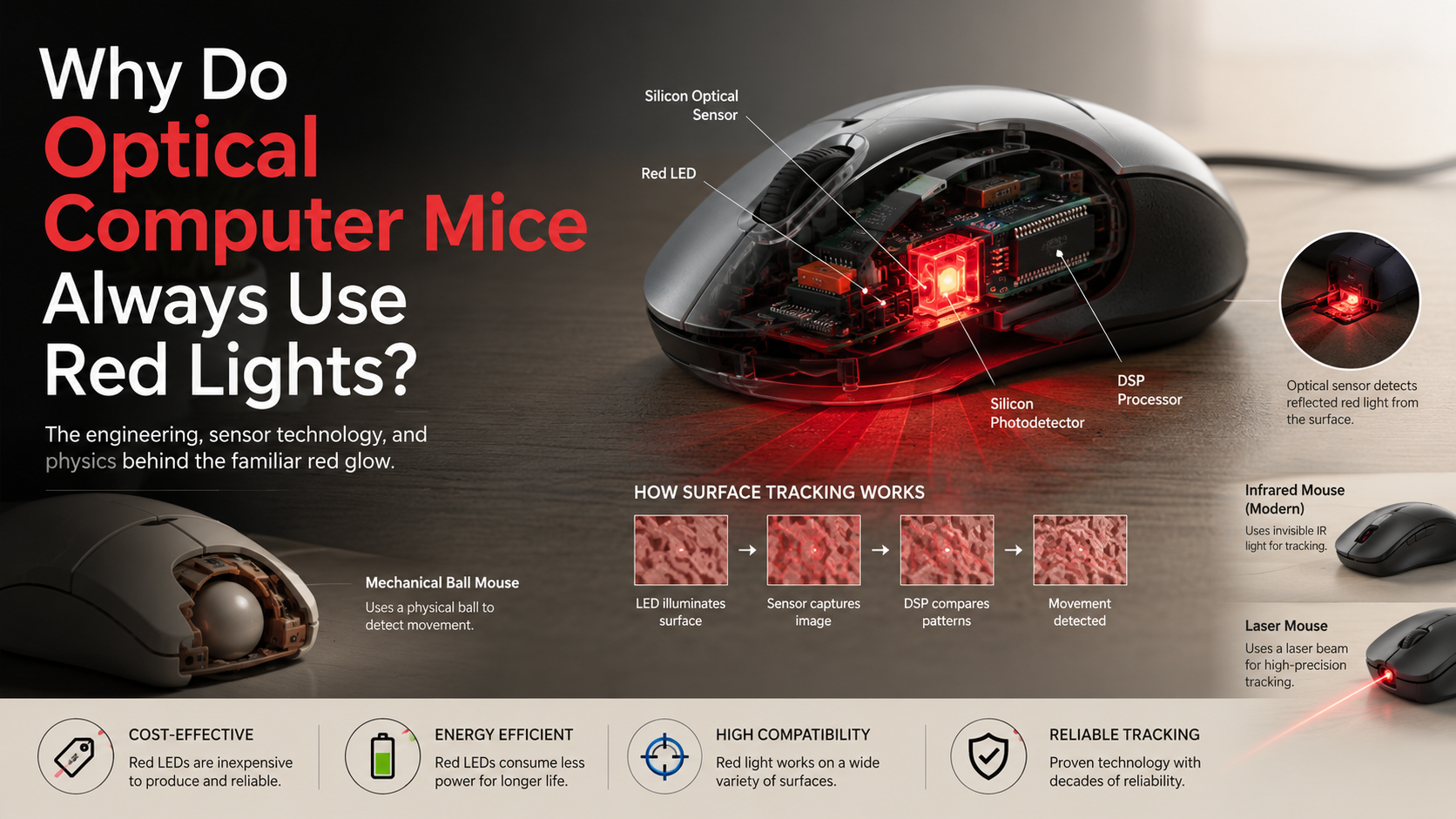
An optical mouse detects movement by using a small camera sensor and LED light instead of mechanical wheels or moving parts. Inside the mouse, a tiny optical sensor captures thousands of images every second from the surface beneath it. These images allow the mouse to identify small changes in the texture of the desk or mousepad.
The LED underneath the mouse shines light onto the surface, highlighting tiny patterns, bumps, and shadows that are not visible to the human eye. The sensor records these details and compares each image with the previous one to detect movement.
A built-in digital signal processor (DSP) analyzes these image changes and calculates the direction and speed of the mouse. It then converts this information into electronic signals that move the cursor on your computer screen.
This process happens within milliseconds. The mouse does not directly sense your hand movement. Instead, it tracks how the illuminated surface patterns shift as you move the device.
Why Optical Computer Mice Always Use Red Lights
The main reason optical computer mice use red lights is that red LEDs offer an excellent balance of performance, cost, and efficiency. During the early development of optical mice, engineers needed a light source that worked well with existing sensor technology.
Red LEDs provided several important advantages:
- They worked efficiently with silicon-based photodetectors.
- They were inexpensive to manufacture.
- They required less power than many alternative colors.
- They offered reliable performance for everyday surfaces.
The combination of these benefits made red LEDs the ideal choice for mass-market computer mice. Although newer technologies now use infrared and laser systems, red optical sensors remain an important part of computer hardware history.
The visible red glow became common because it solved a practical engineering problem. It was affordable, dependable, and easy to produce at large scale.
1. Silicon Sensors Detect Red Light Efficiently
One major reason optical mice use red LEDs is the sensitivity of silicon photodetectors. These sensors are designed to detect changes in light intensity and are especially effective with wavelengths near the red portion of the spectrum.
Because the sensor responds well to red light, the mouse does not need an extremely powerful light source. A lower brightness LED can still provide enough information for accurate tracking.
This improves reliability while reducing energy use. The sensor can capture clear images of the surface without requiring expensive components.
Blue and green wavelengths can also be detected, but they were less practical when optical mice became widely available. Red LEDs provided a simple and efficient solution using existing semiconductor technology.
This compatibility between red LEDs and silicon sensors helped manufacturers create affordable optical mice for millions of computer users.
2. Red LEDs Reduced Manufacturing Costs
Cost played a major role in the popularity of red optical mice. When optical mice became common in the late 1990s and early 2000s, red LEDs were already mature and inexpensive technology.
Manufacturers had decades of experience producing red LEDs. The production process was reliable, and components were widely available.
Other LED colors were not as affordable at the time. Blue and green LEDs required more advanced semiconductor materials and were more expensive to manufacture.
Using red LEDs allowed companies to keep optical mouse prices low. This helped optical mice replace mechanical models and become standard computer accessories.
The decision was not based on appearance. It was a practical choice that allowed manufacturers to deliver accurate tracking technology at a reasonable price.
3. Red LEDs Use Less Power
Energy efficiency was another important advantage of red LEDs. Red light requires a lower forward voltage compared with shorter wavelengths, such as blue or ultraviolet light.
This means a red LED can operate while using relatively little electrical power. For wired mice, this reduced the energy drawn through the USB connection. For early laptop users, efficient hardware was especially valuable.
Lower power consumption also helped manufacturers create cooler and more reliable devices. Every small improvement mattered when designing compact computer accessories.
Although modern sensors have become more advanced, power efficiency remains an important consideration. Red LEDs helped optical mice achieve reliable tracking without unnecessary energy use.
The Red LED Advantage
| Benefit | Why It Matters |
|---|---|
| Cost-effective | Red LEDs were historically cheap to produce. |
| High compatibility | Silicon sensors detect red wavelengths effectively. |
| Energy efficient | They require relatively low operating power. |
Why Don’t Optical Mice Use Blue, Green, or Yellow Lights?
Other light colors can technically work in optical mice, but they offer limited advantages for standard tracking systems.
Blue and green LEDs require more complex semiconductor materials. During the early years of optical mouse development, these components were more expensive and less practical for mass production.
White LEDs also provide no major tracking benefit. They require additional materials to create a broad spectrum of light, increasing complexity and cost.
The goal of an optical mouse is not to create attractive lighting. The goal is to provide accurate movement detection at a low price.
Red LEDs achieved this goal better than most alternatives. They offered strong sensor compatibility and reliable performance without adding unnecessary manufacturing expenses.
For everyday computer users, the red LED was simply the most practical solution.
The Evolution of Optical Mouse Technology: Infrared and Laser Sensors
Although many optical computer mice use red lights, modern technology has expanded beyond visible LEDs. Many premium office and gaming mice now use infrared sensors or laser-based tracking systems.
Infrared optical mice use light outside the visible spectrum. Because humans cannot see infrared light, these mice may appear to have no light underneath them. However, the internal sensor can still detect the illumination.
Infrared technology is especially useful for wireless mice because it can reduce visible distractions and improve power efficiency.
Laser mice use a laser diode instead of a traditional LED. The stronger, more focused light allows sensors to capture finer surface details.
This can improve performance on challenging surfaces, including some glossy materials. However, the best tracking depends on the sensor design, not simply the type of light source.
Frequently Asked Questions
Why Do Some Optical Mice Have No Visible Light?
Some modern optical mice appear to have no light underneath them because they use infrared LEDs instead of traditional visible red LEDs. Infrared light exists just beyond the range of human vision, which means our eyes cannot see it. However, the optical sensor inside the mouse can detect infrared wavelengths and use them to track movement accurately.
Manufacturers often use infrared technology in wireless mice because it provides efficient performance while reducing unnecessary visible illumination. This helps improve battery life and creates a cleaner appearance, especially when using a mouse in a dark room.
If your optical mouse works normally but does not show a glowing light, it is most likely using an infrared sensor. The absence of visible light does not mean the mouse is inactive or damaged.
Can a Red Optical Mouse Work on Glass?
Most standard red optical mice do not work properly on glass surfaces because they depend on reflected light patterns to detect movement. Optical mice use an LED to illuminate tiny textures, marks, and surface details. The internal camera sensor captures these changes and calculates how the mouse moves.
Glass creates problems because it is transparent, smooth, and highly reflective. Instead of producing clear surface patterns, it often reflects light or allows the light to pass through. This leaves the sensor with limited information to process.
As a result, the mouse may move unpredictably or stop responding completely. Some advanced laser mice and specialized optical sensors perform better on glass because they can detect smaller surface imperfections. However, even these models may require a suitable surface for the most reliable tracking performance.
Is the Red Light Under a Mouse Dangerous?
The red light underneath a standard optical mouse is generally safe because it comes from a low-power LED, not a high-intensity laser. The light is designed only to illuminate the surface below the mouse so the sensor can capture movement patterns.
Accidentally looking at the red glow for a brief moment will not harm your eyes. However, as with any direct light source, you should avoid staring into it closely for an extended period.
It is important to remember that laser-based mice work differently. They use a more concentrated laser diode that produces a stronger and more focused beam. Although these devices are designed for normal use, users should never intentionally look directly into the sensor opening.
For everyday use, the red LED in a typical optical mouse does not pose a safety concern.
Does Mouse Light Color Affect Gaming Performance?
The color of the light underneath a mouse does not directly determine gaming performance. A red, infrared, or other type of illumination does not automatically make a mouse faster or more accurate. Performance mainly depends on the quality of the internal sensor, processing system, and tracking technology.
Important factors that affect gaming performance include:
- Sensor accuracy for precise movement detection
- DPI range for sensitivity adjustment
- Tracking speed for fast movements
- Surface compatibility for consistent performance
- Response time for quick input recognition
Modern gaming mice often use advanced infrared sensors because they provide excellent tracking without visible lighting. Some older red optical mice may perform worse simply because their sensors are outdated, not because red light itself is inferior.
For competitive gaming, the sensor design matters far more than the color of the light source underneath the mouse.
Why Did Mechanical Mice Not Use Red Lights?
Older mechanical mice did not use visible red lights because they relied on a completely different tracking method. Instead of using optical sensors and LEDs, these mice contained a rubber-coated ball that physically rolled across the desk surface.
As the ball moved, it rotated internal rollers that represented horizontal and vertical movement directions. Small mechanical components detected these rotations and converted them into signals that controlled the cursor on the screen.
Because mechanical mice measured physical movement through direct contact, they did not need an external light source to examine the surface. This design worked well for many years but had several disadvantages. Dust and dirt could collect around the ball, causing inaccurate movement and requiring regular cleaning.
The development of optical mouse technology replaced these moving parts with cameras and light sensors, creating a cleaner, more reliable, and lower-maintenance solution.
Conclusion: The Engineering Behind the Red Glow
Optical computer mice use red lights because red LEDs provided the perfect combination of performance, affordability, and efficiency. They matched well with silicon sensors, required little power, and were inexpensive to manufacture.
This practical combination helped optical mice become a standard computer accessory around the world. The familiar red glow was not a design trend. It was the result of careful engineering decisions.
Today, many advanced mice use infrared or laser technology instead. These systems can provide improved tracking on difficult surfaces and reduce visible lighting.
However, the classic red optical mouse remains an important example of simple and effective hardware design. Its success came from choosing a solution that was reliable, affordable, and easy to produce.
If you enjoy learning about the technology behind modern displays and electronic devices, you can also explore this detailed comparison of AMOLED vs OLED vs LCD display technology to understand how different screen technologies work.