
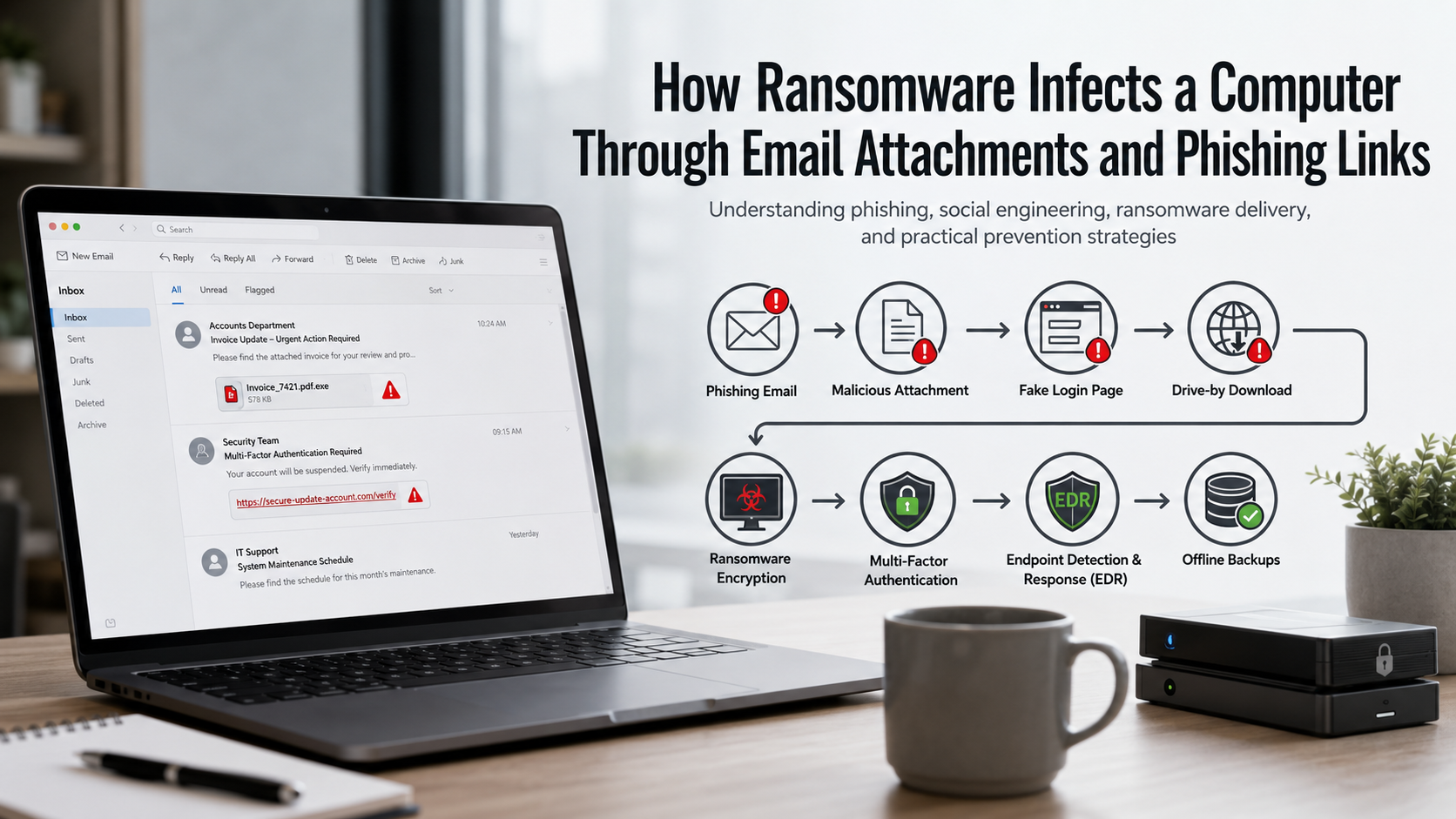
How Ransomware Infects a Computer Through Email Attachments and Phishing Links
Understanding how cyber threats operate is essential for building a strong digital defense. Today, attackers often rely on everyday communication tools like email to ransomware infect a computer and gain unauthorized access to valuable data.
Every day, millions of phishing messages target individuals and organizations. These emails are carefully designed to appear legitimate and convince users to click harmful links or open infected attachments. According to guidance from Cybersecurity and Infrastructure Security Agency (CISA), social engineering remains one of the most common methods attackers use to gain initial access to systems.
When users interact with malicious files or phishing links, attackers can ransomware infect a computer without immediate detection. The malware may silently install itself, encrypt important files, disrupt business operations, and demand payment for data recovery.
Understanding how ransomware infects a computer helps users recognize dangerous email behavior before an attack occurs. This article explains how phishing emails, malicious attachments, and deceptive links allow attackers to ransomware infect a computer, along with security practices that can help prevent ransomware infections.

How does ransomware infect your computer?
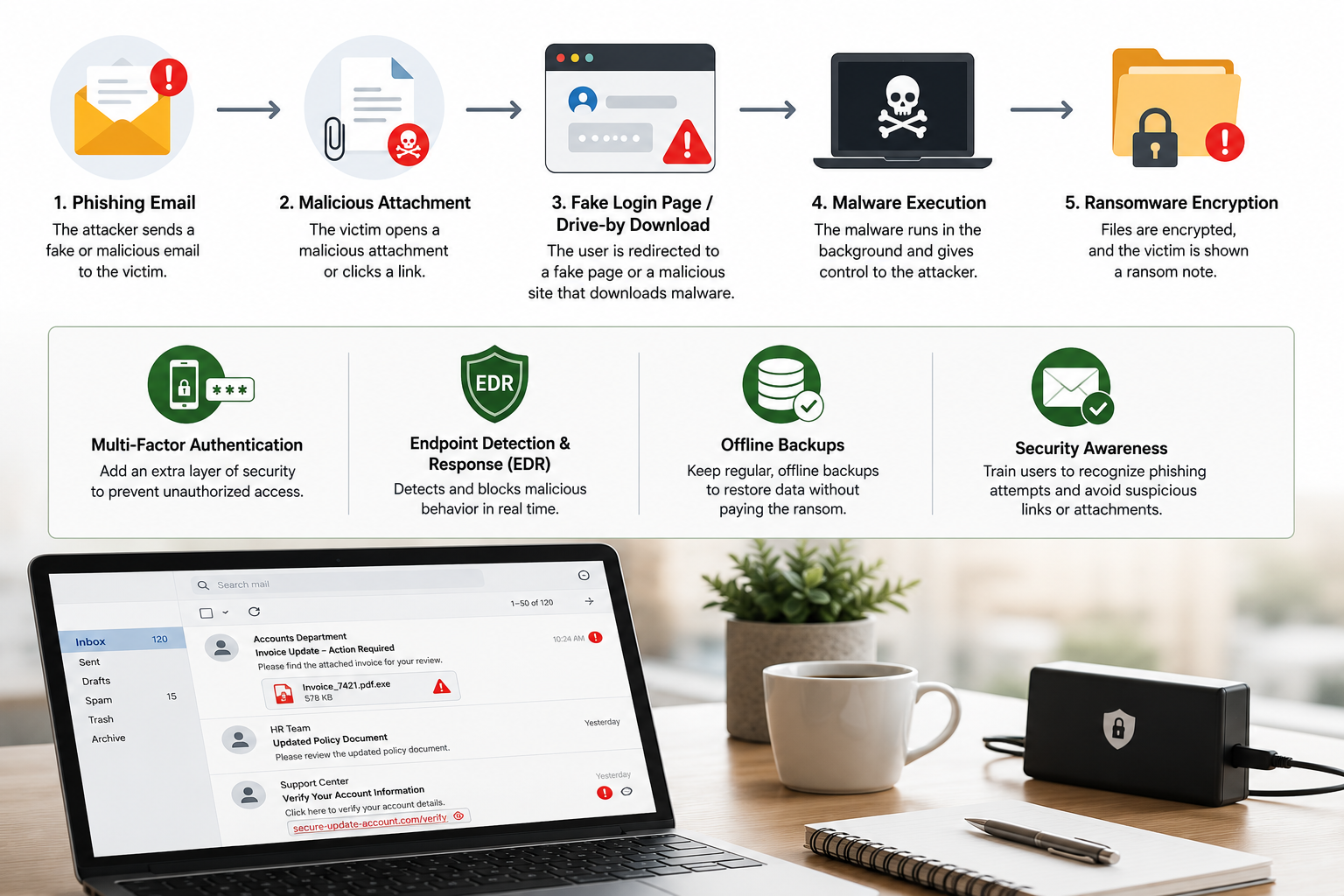
Understanding how ransomware infect a computer begins with knowing the common methods attackers use to deliver malicious software. Ransomware usually enters a system when a user opens a harmful file, clicks a dangerous link, or downloads unsafe software.
Cyber criminals often disguise ransomware as legitimate documents, applications, or messages. They use social engineering techniques to convince users that a file or link is safe.
Once the malicious program runs, it starts working in the background. It may encrypt files, disable security features, and spread through connected drives or networks.
The most common ways ransomware infect a computer include:
- Malicious email attachments disguised as invoices, reports, or receipts
- Phishing links that redirect users to infected websites
- Fake software downloads containing hidden malware
- Compromised websites that deliver malicious code
- Unpatched software vulnerabilities exploited by attackers
Many victims do not notice the infection immediately. They often discover ransomware only after files become locked, renamed, or unavailable.
Regular backups, security updates, and careful online habits provide strong protection. Knowing how ransomware infect a computer helps users identify threats before serious damage occurs.
Recognizing Sneaky File Execution Triggers
Attackers often depend on convincing file names and familiar formats to hide ransomware. A harmful document may look like a normal invoice, shipping notice, or business report.
When users open these files, hidden scripts or malicious code may activate. Some attackers use documents with embedded macros that download ransomware from remote servers.
A simple document can become a dangerous entry point. This is one reason why understanding how ransomware infect a computer is important for everyday users and businesses.
Users should be careful when receiving unexpected attachments. Before opening any file, verify the sender and confirm that the message is legitimate.
Simple safety practices include:
- Avoid opening unexpected attachments
- Disable automatic macro execution
- Scan downloaded files
- Keep security software updated
Recognizing these warning signs can prevent ransomware from entering your system.
What Is Another Name for Ransomware?
Security professionals and digital forensics experts often use different terms to describe ransomware and its related malware variants. Learning these alternative names helps users understand security alerts, recognize attack methods, and communicate more effectively during a cybersecurity incident. Security software may classify ransomware as crypto-malware, extortionware, or cryptographic malware, depending on how it operates and the type of damage it causes.
Although these names emphasize different characteristics, they all describe malicious software designed to block access to valuable data and demand payment for its release. Attackers typically encrypt files, lock systems, or disrupt business operations until victims pay a ransom, often in cryptocurrency.
Understanding these interchangeable terms improves cybersecurity awareness. It also helps organizations and individuals respond more effectively when reporting incidents to IT teams, cybersecurity professionals, or law enforcement agencies.
Understanding Crypto-Malware Variants
Crypto-malware is a specialized form of ransomware that focuses on encrypting files instead of locking the entire operating system. After infecting a device, it silently scans local drives, connected storage, and shared network folders for valuable data. It then encrypts documents, images, databases, and other important files using strong cryptographic algorithms.
Most victims remain unaware of the attack until they attempt to open a file and discover it has become inaccessible. A ransom note usually appears, explaining that the files have been encrypted and providing instructions for payment, often in cryptocurrency.
Unlike screen-locking ransomware, crypto-malware targets the data itself. This makes recovery much more difficult without reliable backups or the correct decryption key. Understanding how crypto-malware works helps users recognize ransomware attacks quickly and encourages preventive measures such as regular backups, endpoint protection, and timely software updates.
What Is the Main Cause of a Ransomware Attack?
The leading cause of a ransomware attack is human error, particularly when users fall victim to phishing emails or other social engineering tactics. Although software vulnerabilities and weak security controls can contribute to an attack, cybercriminals most often exploit human behavior to gain access to systems. A single click on a malicious link or an infected email attachment can trigger a ransomware infection.
Attackers design these messages to appear trustworthy and create a sense of urgency. They often impersonate coworkers, banks, delivery companies, or government agencies to encourage immediate action without careful verification.
Organizations can significantly reduce ransomware risks by combining technical security controls with employee awareness training. Email filtering, multi-factor authentication, regular software updates, and cybersecurity education work together to prevent users from unknowingly giving attackers access to their networks.
The Role of Social Engineering
Social engineering is one of the most effective techniques used to distribute ransomware. Instead of attacking software directly, cybercriminals manipulate people into making unsafe decisions. They exploit trust, curiosity, fear, or urgency to convince users to open malicious attachments, click harmful links, or disclose sensitive information.
Attackers often disguise their messages as legitimate communications from trusted organizations, financial institutions, delivery services, or internal company departments. These emails frequently contain convincing branding and realistic language, making them difficult to identify at first glance.
Once the victim interacts with the malicious content, ransomware can download and execute automatically. Because human behavior is often the weakest security link, organizations should provide regular cybersecurity awareness training, encourage employees to verify suspicious requests, and implement advanced email protection to reduce the success of social engineering attacks.
Is Phishing and Ransomware a Computer Attack?
Yes, phishing and ransomware are both forms of computer attacks, but they serve different purposes within the same attack chain. Phishing is the initial delivery method that tricks users into taking an unsafe action. Ransomware is the malicious payload that encrypts files or locks systems after gaining access.
In many attacks, criminals first send fraudulent emails containing malicious links or attachments. When a recipient clicks the link or opens the attachment, ransomware is downloaded and executed on the device. The malware may then spread across the network and encrypt additional systems.
Understanding this relationship helps organizations build layered cybersecurity defenses. Strong email security, user awareness training, endpoint protection, and regular data backups work together to interrupt the attack before ransomware can execute and cause widespread damage.
The Attack Chain Connection
The connection between phishing and ransomware follows a predictable sequence. Attackers first deliver a convincing phishing email to a large audience or carefully selected individuals. These messages often create urgency by claiming there is an unpaid invoice, security issue, or delivery problem that requires immediate action.
When a victim clicks the malicious link or opens the infected attachment, malware is downloaded onto the device. The ransomware then installs itself, communicates with attacker-controlled servers if needed, and begins encrypting files or spreading across connected systems.
Breaking this attack chain at its earliest stage greatly reduces the risk of infection. Organizations should combine email filtering, endpoint detection, network monitoring, and employee education to stop phishing attempts before ransomware reaches critical systems or sensitive business data.
Who Is Most Affected by Ransomware?
Although ransomware can target anyone, some industries face a much higher risk because they depend on continuous access to critical data and services. Small and medium-sized businesses, healthcare organizations, educational institutions, and municipal governments are among the most frequent victims.
These organizations often manage sensitive information while operating with limited cybersecurity resources or outdated infrastructure. Attackers know that prolonged downtime can disrupt essential services, making victims more likely to pay a ransom to restore operations quickly.
Healthcare providers and schools cannot afford extended interruptions because they support patient care and education. Local governments also provide critical public services that communities rely on every day.
Understanding which sectors are most vulnerable helps organizations prioritize cybersecurity investments. Regular backups, employee training, timely software updates, network segmentation, and incident response planning all reduce the likelihood and impact of a ransomware attack.
Healthcare and Municipal Vulnerabilities
Healthcare organizations and municipal governments remain attractive ransomware targets because they manage sensitive personal data and deliver essential public services. Hospitals rely on continuous access to patient records and medical systems, while local governments operate critical infrastructure such as public utilities, emergency services, and administrative networks.
Cybercriminals understand that disrupting these operations creates significant pressure to restore services quickly. This urgency increases the likelihood that organizations will consider paying a ransom to regain access to their systems.
To reduce risk, these sectors should implement multiple layers of security. Best practices include maintaining offline and immutable backups, deploying advanced email security, applying software updates promptly, monitoring networks for suspicious activity, and regularly testing incident response plans.
FAQs About How Ransomware Infect a Computer
How does a malicious email attachment start the ransomware infection process?
A malicious email attachment can begin a ransomware infection when a user opens the file and interacts with its content. Attackers often disguise ransomware as Word documents, Excel spreadsheets, invoices, or other common files.
Some documents contain hidden macros or scripts that execute when users enable certain features. These scripts may connect to external servers and download the actual ransomware program.
After installation, ransomware can scan the computer for important files and connected network locations. It then encrypts the data and prevents normal access. Victims usually discover the attack when they see a ransom note demanding payment for file recovery.
To reduce this risk, users should avoid opening unexpected attachments, verify the sender, and disable unnecessary document features such as macros.
Why are phishing links more dangerous than traditional malware downloads?
Phishing links are dangerous because they often avoid traditional malware detection methods. Unlike infected attachments, a phishing email may contain only a simple link that redirects users to an external website.
Attackers can change website addresses quickly, use compromised websites, or create realistic fake login pages. This makes detection more difficult for security systems.
A phishing link may lead to malware installation or credential theft. If attackers obtain login details, they may access business systems and deploy ransomware manually.
Users should avoid clicking unexpected links and should verify website addresses before entering passwords. Security tools such as web filtering and multi-factor authentication also provide additional protection.
What role does human error play in ransomware infections from emails?
Human behavior plays a major role in many ransomware attacks. Even advanced security systems can be affected when users unknowingly open harmful attachments or click dangerous links.
Attackers use psychological techniques such as urgency, fear, and curiosity. For example, a fake account warning may pressure users into acting quickly without checking the message carefully.
Security awareness training helps reduce these risks. Employees should learn how to identify suspicious emails, verify requests, and report possible threats.
Creating a security-focused workplace culture is essential. Users are an important part of an organization’s defense system, and informed decisions can prevent serious ransomware incidents.
Can Standard Antivirus Software Block Ransomware Delivered Through Phishing Links?
Standard antivirus software can stop some ransomware threats, especially when the malware is already known and has recognizable patterns. However, traditional antivirus solutions may not detect every attack, particularly newer ransomware variants, zero-day threats, or fileless malware.
Phishing links create additional challenges because they may not contain a malicious file at the beginning. Instead, they can redirect users to websites that exploit software vulnerabilities or steal login credentials. Since the initial email may appear harmless, basic antivirus tools may not identify the danger immediately.
Modern organizations use a layered security approach to improve protection. This includes:
- Endpoint detection and response (EDR): Monitors devices for suspicious activity.
- Secure email gateways: Blocks harmful messages before delivery.
- Web filtering tools: Prevents access to dangerous websites.
- Multi-factor authentication: Reduces the impact of stolen passwords.
- Security awareness training: Helps users recognize phishing attempts.
Combining multiple security controls provides stronger protection because if one defense fails, another layer can help stop the ransomware attack before serious damage occurs.
What Immediate Steps Should Be Taken After Clicking a Suspicious Phishing Link?
If a user clicks a suspicious phishing link or opens a potentially dangerous attachment, quick action is important. Early response can limit the damage and reduce the chance that ransomware spreads across a network.
The first step is to disconnect the affected computer from the internet and local network. This helps prevent communication with attackers and reduces the risk of spreading malware to shared systems.
Next, the user should immediately notify the IT or security team. Avoid attempting random fixes because important evidence may be lost during investigation.
Recommended actions include:
- Disconnect the device from Wi-Fi or wired networks.
- Report the incident to security personnel.
- Avoid entering passwords into suspicious websites.
- Do not delete files or security logs unless instructed.
- Allow security professionals to examine the system.
Fast reporting gives security teams more time to contain the threat, investigate the attack, and restore affected systems safely.
Conclusion: Protecting Your Computer From Ransomware Attacks
Understanding how ransomware infects a computer is the first step toward improving cybersecurity. Attackers often rely on phishing emails, malicious attachments, and deceptive links to trick users into installing malware or revealing sensitive information.
Throughout this article, we explored how cybercriminals use social engineering to bypass traditional defenses. We also examined how infected documents, phishing websites, and stolen credentials can lead to ransomware infections.
Preventing ransomware requires more than a single security tool. Strong protection comes from combining technology, employee awareness, and reliable recovery plans.
Organizations and individuals should take proactive steps by:
- Reviewing email security settings.
- Keeping software and operating systems updated.
- Enabling multi-factor authentication.
- Creating secure offline backups.
- Training users to identify phishing attempts.
Cyber threats continue to evolve, but informed users and strong security practices can greatly reduce risk. By staying alert and following proven cybersecurity measures, you can protect valuable data and reduce the chances of ransomware disrupting your digital environment.
If you suspect a ransomware infection, recognizing the warning signs early can help limit damage. Learn more about the common signs your computer may be infected with ransomware and the steps you can take to respond quickly.