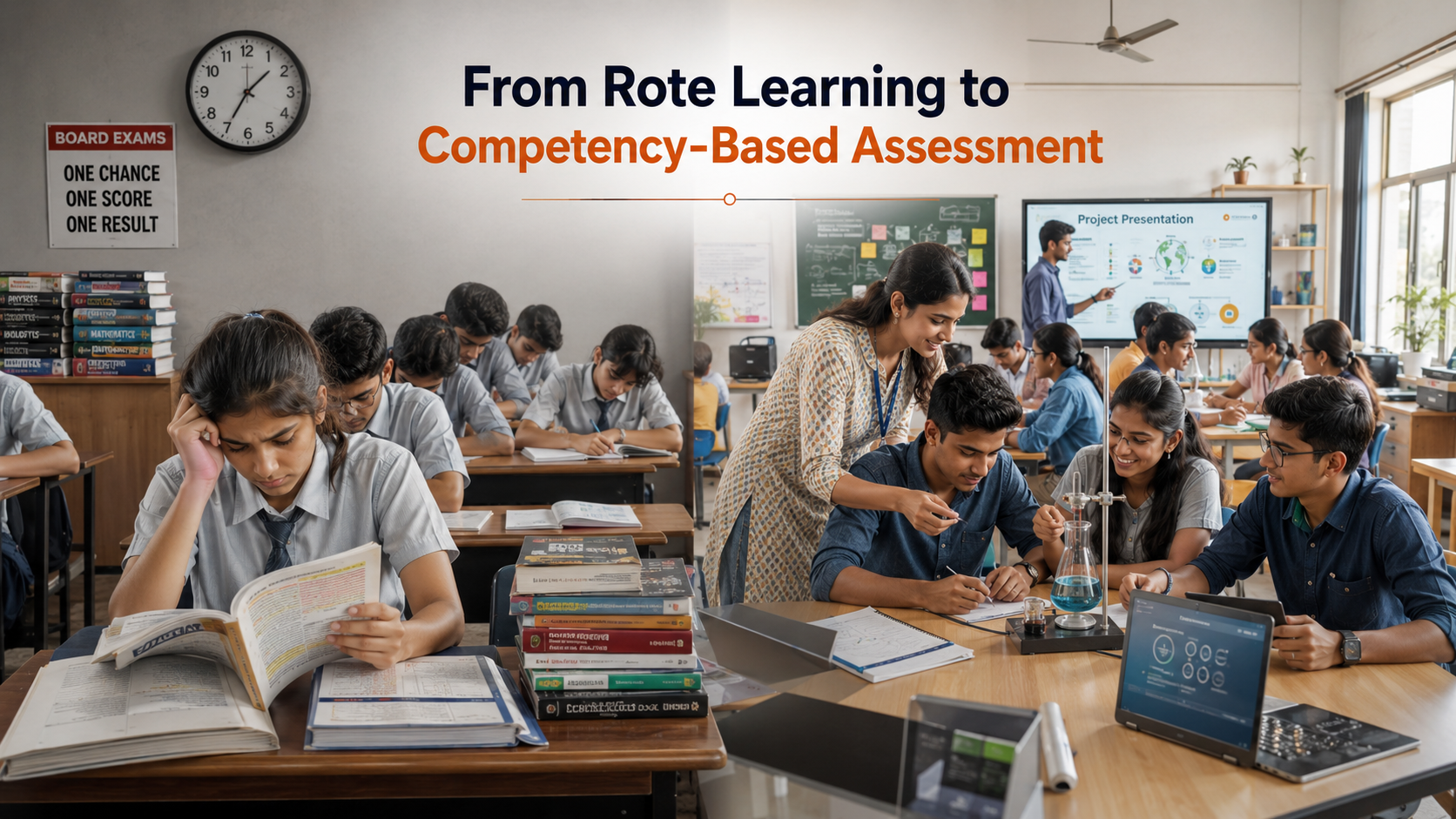
The education landscape is undergoing a massive transformation, making the future of board exams in India a central topic of discussion among students, parents, and educators alike. For decades, the traditional rote-learning model dominated Indian schools, culminating in high-stakes, high-stress final assessments. However, the implementation of the National Education Policy (NEP) by the Ministry of Education is fundamentally shifting this paradigm. This policy intervention aims to replace intense memorization with a structural focus on conceptual clarity and critical thinking. Consequently, the annual ritual of high-pressure examinations is evolving into a more flexible, student-centric assessment framework.
This transformation matters because it redefines how student merit is assessed and aligned with global standards. In this article, we will delve into the major structural changes ahead, including the introduction of biannual assessments and modular formatting. We will also explore the introduction of PARAKH, the new national assessment center designed to set uniform evaluation standards across all state and central boards. Finally, we will look at how these adjustments aim to reduce academic anxiety, eliminate public comparison, and better prepare Indian students for a skill-driven global economy where practical knowledge outvalues temporary memorization.
HOW THE EVALUATION SYSTEM IS EVOLVING
The traditional examination structure often evaluated a student’s memory rather than actual comprehension. To rectify this, the structural framework is moving toward a continuous evaluation model. Instead of relying on a single three-hour exam at the end of the academic year, the system will assess competencies developed over time. This approach minimizes the psychological burden on students. It turns assessment into a tool for learning improvement rather than just a mechanism for elimination.
The revised question patterns focus heavily on application-based and competency-based learning. Students will encounter more case studies, critical reasoning queries, and analytical problems. This change discourages the habit of cramming textbooks a month before the finals. Internal assessments, practical projects, and regular class presentations will hold greater weight. This ensures that a student’s performance throughout the year reflects in their final grade, balancing out a single bad day during exam season. Ultimately, this structural evolution ensures that steady effort throughout the year is rewarded, making the final evaluation a fair reflection of true capability.
MULTIPLE EXAM OPPORTUNITIES AND THE SEMESTER SYSTEM
One of the most anticipated updates regarding the future of board exams in India is the option to take board exams twice a year. This biannual system allows students to appear for their exams when they feel adequately prepared. Moreover, it offers a valuable safety net. If a student underperforms in the first window, they can retain their best score and try again in the next cycle, effectively eliminating the fear of losing an entire academic year due to temporary illness or stress.
The long-term vision includes breaking down subjects into modular segments. Students can complete a module, take the relevant exam, and move on to the next level. This modularity reduces the massive syllabus load that traditionally characterized Class 10 and Class 12 exams. By spacing out the testing process, students can dive deeper into topics without feeling overwhelmed by an unmanageable amount of study material. This shift creates a balanced learning environment that aligns closely with international schooling standards, boosting confidence and overall performance.
THE INFLUENCE OF NEP 2020 ON SCHOOL FINALS
To ensure fairness across different regional and national boards, the government established PARAKH (Performance Assessment, Review, and Analysis of Knowledge for Holistic Development). This body acts as a benchmarking institution. It sets uniform standards for student assessment across CBSE, ICSE, and various state boards. In the past, massive disparities existed between different regional evaluations, putting certain students at a disadvantage during university admissions. PARAKH systematically eliminates this imbalance.
PARAKH Core Pillars
1. Standard Setting
Establishing uniform norms across all Indian boards.
2. Skill Assessment
Shifting focus from memory-based learning to 21st-century skills.
3. Holistic Progress
Encouraging self, peer, and teacher-led evaluations.
Furthermore, the division between Science, Commerce, and Arts is blurring. A student opting for Physics can now simultaneously choose History or Fashion Studies. Consequently, board exams must adapt to evaluate these diverse, personalized subject combinations seamlessly. This multi-disciplinary approach breaks down ancient educational silos, letting students construct custom academic paths that truly match their career interests and personal talents.
WHAT THESE CHANGES MEAN FOR STUDENTS AND TEACHERS
This structural shift requires a parallel evolution in teaching methodologies. Educators can no longer rely on dictating notes from older textbooks. Instead, they must design interactive lessons that stimulate classroom discussions and practical experimentation. This means professional development for teachers will become a continuous necessity, altering the daily workflow within schools nationwide. Classroom environments must transform from passive spaces into highly interactive workshops.
For Students: The focus shifts from memorizing answers to understanding the underlying “why” and “how” of concepts, forcing them to engage with subjects genuinely.
For Teachers: Pedagogy must integrate digital tools, project-based assignments, and personalized feedback cycles rather than relying on uniform lectures.
For Parents: The expectation of perfect 100% scores based on memorization must give way to supporting a child’s unique skill development and emotional resilience.
Ultimately, these reforms aim to foster a healthier mental ecosystem, making learning an enjoyable journey rather than a stressful race. It demands patience and adaptability from all stakeholders involved.
FAQ SECTION
What is the major change in the future of board exams in India?
The major change involves shifting from a high-stakes, once-a-year examination model to a flexible, biannual system. Guided by the National Education Policy, exams will focus heavily on competency-based testing rather than memorization. This means questions will evaluate a student’s analytical skills, logical reasoning, and real-world application of concepts. Additionally, the system will integrate regular internal evaluations, reducing the singular pressure of the final written test. This comprehensive shift ensures that the assessment reflects a student’s true understanding throughout the year rather than their performance on one specific day.
Will students have to appear for board exams twice a year?
No, appearing twice is not mandatory. The biannual system offers students the choice to take exams twice a year to improve their scores. If a student is satisfied with their performance in the first attempt, they do not need to sit for the second window. This setup acts as a safety net to lower stress and prevent the loss of a full academic year due to unforeseen circumstances or illness during a single exam window. It empowers students by putting control back into their hands, allowing them to choose when they feel best prepared to excel.
What is PARAKH and how does it impact Indian board exams?
PARAKH is a national assessment center established under the NEP guidelines. Its main purpose is to set uniform evaluation standards and norms across all recognized school boards in India, including central and state boards. Currently, different boards have varying difficulty levels and grading systems. PARAKH aims to remove these discrepancies, ensuring that student assessments are fair, transparent, and universally comparable across the country. This uniform benchmarking creates a level playing field for college admissions, ensuring that no student is disadvantaged simply due to the grading patterns of their specific regional school board.
How should students prepare for competency-based board exams?
Students should shift their focus from rote memorization to deep conceptual understanding. To prepare effectively, they should solve case studies, practice application-based problems, and engage deeply in laboratory work or school projects. Understanding core principles in subjects like mathematics and science becomes vital, as questions will test how well a student can apply formulas to unfamiliar, real-world situations rather than just asking for textbook definitions. Group discussions, analytical reading, and utilizing interactive digital learning tools can also help adapt to this modern testing format, making standard guidebooks obsolete.
Will Class 10 board exams be permanently canceled?
No, Class 10 board exams are not being permanently canceled. Instead, they are being restructured to cause less stress. The focus is turning toward tracking progress over time rather than treating the Class 10 exam as a definitive filter. The future system aims to make these assessments low-stakes, using them primarily to guide students toward choosing appropriate subject combinations in senior secondary school. They will serve as a diagnostic milestone to identify strengths and weaknesses rather than a rigid screening process that determines a student’s entire future academic direction.
CONCLUSION
The future of board exams in India marks a long-overdue shift from a memory-focused system to a more holistic approach. Reforms include biannual exams, competency-based questions, and standardized grading through PARAKH. Together, these changes aim to reduce exam pressure and move away from a culture of rote learning. They also ensure that assessments measure learning and skill development instead of acting mainly as elimination tools.
The transition will take time. Teachers across diverse schools will need training and support to adapt to the new system. However, the long-term outlook is promising. Students will have more opportunities to learn with curiosity and build practical skills for a competitive world. These skills will also help them explore diverse career paths, including the many job opportunities after engineering available in today’s evolving employment market. The message is simple: success will depend on critical thinking, problem-solving, and creativity rather than memorization. Embracing these reforms can prepare the next generation to face real-world challenges with confidence and innovation.
Cyber Safety for Students: A Guide to Staying Safe Online
The modern digital world offers incredible, unprecedented opportunities for learning, collaboration, and entertainment. However, navigating this vast space safely requires proactive awareness, critical thinking, and the right everyday habits. Practicing robust cyber safety for students is no longer just an optional tech habit or a minor recommendation; it is a fundamental life skill required to protect your personal information, financial data, and digital reputations. According to the official CISA (Cybersecurity and Infrastructure Security Agency) documentation, understanding basic digital hygiene significantly reduces the risk of falling victim to malicious online activity.
As educational environments increasingly rely on cloud-based platforms, virtual classrooms, and social media, students face growing digital risks. They are more likely to encounter phishing attacks, privacy leaks, and emerging threats such as deepfake technology. This article explores the core principles of Cyber Safety for Students. It also provides practical strategies to protect your data, devices, and mental well-being. Understanding these risks helps you study, communicate, and socialize online with greater confidence.
Understanding the Digital Footprint
Every single action you take online leaves a permanent, traceable trail known as a digital footprint. This includes your social media posts, photo uploads, public comments, search engine history, and website registrations. Consequently, what seems like a harmless photo or an impulsive comment today can easily resurface years later. Many students mistakenly believe that deleting a post removes it forever, but archiving tools, screenshots, and server logs can preserve data indefinitely.
Future employers, university admissions boards, and security screeners routinely audit public digital histories to evaluate an applicant’s character. Therefore, managing your online presence with extreme care is the first step toward long-term internet safety. You must view your online profile as an extension of your real-world resume.
Strategies for a Cleaner Digital Presence
Think before posting: Avoid sharing emotional, political, or controversial content that you might regret later in your professional career.
Audit your accounts: Regularly delete old accounts, forum profiles, and applications that you no longer actively use.
Google yourself: Periodically search your full name across multiple search engines to see what information is publicly available to strangers.
Securing Personal Accounts and Data
Weak or recycled passwords represent the easiest entry point for modern cybercriminals. Many students use the exact same simple password across multiple platforms, creating a dangerous domino effect if one obscure website suffers a data breach. Once hackers compromise one account, they will automatically use automated software to test those exact login credentials on major platforms like Google, bank accounts, and university networks.
The Power of Strong Passwords
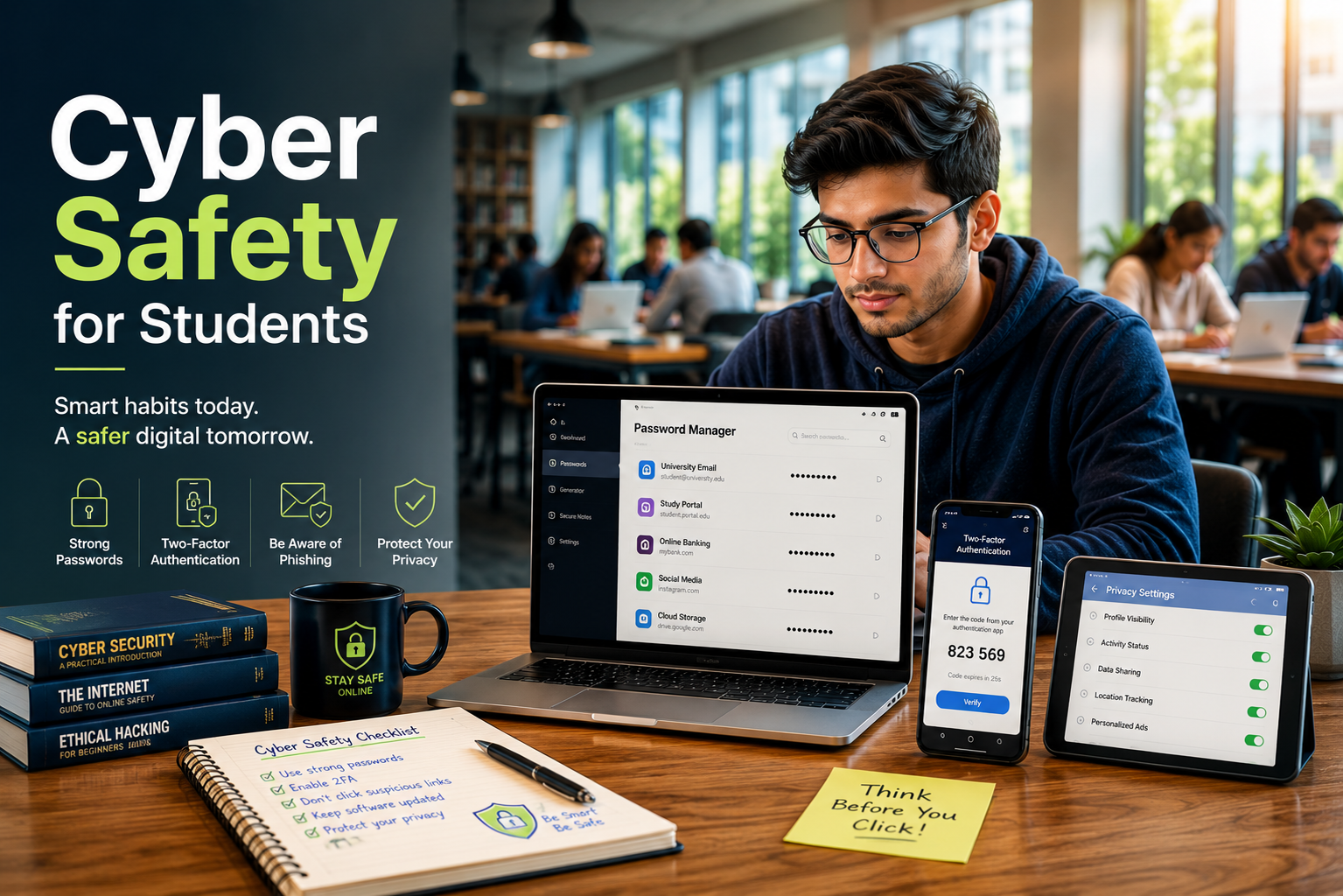
A secure password should resemble a long passphrase rather than a single, predictable word. Combine uppercase letters, lowercase letters, numbers, and unique special symbols to maximize complexity. Avoid easily guessable information like your birthdate, pet’s name, or school name. Using a dedicated password manager can help you generate and store these unique codes safely without needing to memorize them all.
Implementing Multi-Factor Authentication (MFA)
Multi-factor authentication adds a vital, secondary layer of defense that stops hackers in their tracks. Even if a malicious actor discovers your password, they cannot access your account without a secondary verification code sent directly to your physical device. Enabling MFA on your primary email, student portals, and banking apps is a non-negotiable step for modern data protection.
Recognizing Online Threats and Scams
Phishing remains one of the most prevalent and dangerous threats targeting students today. Attackers often masquerade as trusted entities, such as your university’s IT department, a known professor, financial aid offices, or a popular streaming service, to trick you into revealing login credentials. They create a false sense of urgency, claiming your account will be deleted if you do not log in immediately.
Staying Safe on Public Wi-Fi
Coffee shops, libraries, and campus common areas offer convenient public Wi-Fi networks for studying. However, these networks are frequently unsecured, allowing interceptors on the same network to view your active browsing activity and steal data. Avoid accessing sensitive financial accounts, entering credit card numbers, or typing important passwords while connected to public networks unless you are utilizing a secure, encrypted Virtual Private Network (VPN).
How to Spot a Phishing Scam
Phishing scams often share common warning signs. Watch for these red flags before clicking any links or sharing personal information:
Urgent or threatening language that pressures you to act immediately.
Mismatched sender email addresses, such as support@amz-security.com, that imitate legitimate organizations.
Poor grammar, spelling mistakes, or unusual greetings, which are common in fraudulent emails.
Unexpected attachments or suspicious links that redirect you to unfamiliar or fake websites.
Social Media Savvy and Privacy Settings
Social media platforms are fundamentally designed for sharing, but oversharing poses distinct, severe security risks. Identity thieves can easily piece together answers to your security questions—like your mother’s maiden name or your first pet—by analyzing your public profile details and childhood photos. Furthermore, tracking your location data gives bad actors insight into your daily routines.
Optimizing Your Privacy Controls
Take time to thoroughly review the privacy settings on platforms like Instagram, TikTok, and Snapchat. Restrict your profile visibility to “Friends Only” and carefully vet every single friend request you receive. Never share your real-time location, home address, or daily school schedule publicly. By limiting who can see your life, you drastically reduce your surface area for targeted cyber crimes.
Combating Cyberbullying and Mental Fatigue
Digital wellness is an integral, often overlooked component of student internet security. Cyberbullying, online harassment, and digital fatigue can severely impact academic performance and mental health. The psychological weight of constant connectivity can lead to stress, anxiety, and decreased focus. Recognizing when an online space becomes toxic is crucial for your overall safety.
If you encounter online harassment, do not engage or argue with the bully. Document the behavior completely by taking screenshots, block the perpetrator immediately across all platforms, and report the incident to a trusted authority figure, parent, or school administrator. Remember that maintaining firm boundaries with your digital devices and taking regular screen breaks is essential for preserving your mental well-being.
FAQ Section
Why is cyber safety for students so important today?
Cyber Safety for Students is essential because students use the internet every day for learning, research, entertainment, and communication. This constant online activity increases the risk of scams, malware, identity theft, and data breaches. Students also use school-issued devices and campus networks. These systems often store sensitive academic and personal information.
Poor online habits can damage a student’s academic reputation and future career opportunities. Employers and universities may review a person’s digital footprint before making decisions. By following Cyber Safety for Students best practices, students can protect their personal information, secure their devices, and build a positive online presence for the future.
How often should I update my passwords?
You should ideally update your primary, high-priority passwords every three to six months to maintain optimal security against evolving brute-force tracking methods. However, it is even more critical to change them immediately if you suspect an active security breach, notice unusual account login behaviors, or receive a public automated notification about a corporate data leak involving your service providers. Relying on memory alone often leads to using weak, repetitive variations that hackers easily exploit.
Using a dedicated, secure password manager helps track complex, randomly generated variations easily without causing personal confusion. This modern utility effectively eliminates the temptation to reuse old passwords across multiple platforms, ensuring that a single compromised app or forum account does not compromise your entire digital identity, banking portals, or academic networks. Taking this proactive approach drastically reduces your vulnerability to widespread identity theft and credential stuffing attacks.
Is public campus Wi-Fi entirely safe to use?
Public campus Wi-Fi networks are convenient, but they are not always secure. Hundreds or even thousands of users share these networks every day. This makes it easier for attackers to intercept unencrypted data with widely available tools. These “man-in-the-middle” attacks can expose private messages, passwords, and login details.
Avoid making financial transactions or accessing sensitive accounts while using public Wi-Fi. If you must sign in to your student portal or bank account, use a trusted Virtual Private Network (VPN). A VPN encrypts your internet traffic and helps protect your data from unauthorized access.
What should I do if I accidentally click a suspicious link?
If you click a suspicious link or unexpected email attachment, disconnect your device from the internet immediately. Turn off Wi-Fi, enable airplane mode, or unplug the network cable. This helps stop malware from communicating with external servers or stealing your personal data.
Next, run a full malware scan using trusted and updated antivirus software. Monitor your accounts for unusual activity and report any suspicious transactions to your bank if financial information may have been exposed. Change your passwords from a separate, secure device. Never enter passwords into pop-up windows that appear after clicking a suspicious link, as they are often used to steal login credentials.
How can I tell if a website is secure for browsing?
Cyber Safety for Students begins with learning how to identify secure websites before entering any personal information or login credentials. You can verify a website’s basic security by checking the URL carefully. Look for the “https://” prefix at the beginning of the web address, where the “s” indicates an encrypted connection using transport-layer security protocols. A visible padlock icon next to the URL in your browser also suggests that the site has a valid security certificate.
However, Cyber Safety for Students also means understanding that phishing websites can obtain valid security certificates. Because of this, Cyber Safety for Students requires you to check the exact spelling of the domain name and watch for subtle character substitutions that mimic trusted websites. You should also look for warning signs such as poor-quality graphics, broken links, missing contact information, or aggressive pop-up forms requesting personal details. Following these habits is an important part of Cyber Safety for Students, helping you browse safely and avoid online scams. By practising these checks regularly, Cyber Safety for Students becomes a daily habit that strengthens your online security.
Conclusion
Prioritizing cyber safety for students is a fundamental, mandatory requirement for navigating the modern educational landscape successfully. By actively managing your digital footprint, implementing strong passphrase-style passwords, enabling multi-factor authentication, and remaining vigilant against evolving phishing scams, you can protect your data effectively. Total digital security is achieved through consistent, everyday habits rather than a simple, one-time adjustment.
As technology continues to advance, the methods used by cybercriminals will become more sophisticated. Therefore, staying informed and adapting your security habits is essential. Take time to review your privacy settings regularly, question unexpected emails, and take control of your digital world with confidence. Your safety online is entirely within your control, and building these habits now will protect your identity and professional future for decades to come.
Digital Citizenship Guide: The Ultimate 2026 Manual for Navigating the Online World
The internet is no longer just a separate tool that we access occasionally; it is a dynamic space where we live, work, learn, and build meaningful relationships. Because our offline realities and online lives are now fully integrated, learning how to behave in virtual spaces is a fundamental life skill. This comprehensive digital citizenship guide will help you navigate the internet safely, responsibly, and ethically. By understanding your digital footprint, you can protect your personal information while contributing positively to global online communities.
According to guidelines from the International Society for Technology in Education (ISTE), being a good digital citizen means actively participating in the online world in a way that promotes safety, equity, and respect. It is about much more than just avoiding internet scams or ignoring suspicious emails. It involves deeply understanding how your digital actions affect real people on the other side of the screen.
This guide covers everything you need to know to succeed online today. We will explore the core pillars of digital literacy, online safety, and ethical communication. If you want to learn more about online regulations and internet governance, read our article on Should the Government Control the Internet?. Whether you are a student exploring the web, a professional managing a brand, or a parent protecting a family, these foundational principles will empower you to use the internet with confidence, safety, and purpose.
THE CORE PILLARS OF DIGITAL LITERACY
Protecting Your Privacy and Personal Data
Securing your personal information is the first and most critical step toward responsible internet use. Cyber threats evolve rapidly every year, making strong passwords and multi-factor authentication mandatory for everyone. Hackers utilize sophisticated automated tools to crack simple passwords in mere seconds, which can lead to identity theft and financial loss. Therefore, you should use a trusted password manager to generate unique, complex passwords for every platform you use. Additionally, you must enable biometric logins or dedicated authentication apps on all accounts to add an extra layer of security. Avoid sharing sensitive data like your home address, phone number, or financial details on public forums and social media networks. Being cautious about the permissions you grant to smartphone apps is another excellent way to keep your private data secure from unwanted third-party tracking.
Managing Your Permanent Digital Footprint
Every photo you post, comment you leave, article you share, and link you click contributes to your permanent digital footprint. Many internet users falsely believe that deleting a post removes it forever, but archiving tools and quick screenshots can make data permanent. Employers, universities, and background checkers routinely scan these public records to evaluate an individual’s character and professionalism. Consequently, a single reckless post made years ago can have long-term consequences for your career and personal life. Before hitting the “publish” button, always take a moment to consider how your content might look to someone evaluating your character five years from now. Building a positive digital footprint involves curating a web presence that reflects your true values, achievements, skills, and professional growth in a constructive manner.
FOSTERING ETHICAL ONLINE COMMUNICATION
Practicing Digital Etiquette and Netiquette
Treating others with respect is crucial because virtual communication completely lacks physical cues, facial expressions, and vocal tones. Because of this absence of human context, simple jokes or sarcastic remarks can be misunderstood very easily. Clear, polite, and empathetic language should always be your default choice when interacting with people online. Avoid typing out sentences in all capital letters, which universally mimics angry shouting in text conversations, and never engage in malicious flame wars. Good netiquette also means respecting other people’s time and digital boundaries. Do not tag friends in embarrassing photos without permission and avoid sending unsolicited mass messages. By practicing mindfulness in your daily digital interactions, you contribute to a much healthier, more productive, and supportive online environment for internet users worldwide.
Combating Cyberbullying and Misinformation
The anonymity of the internet sometimes emboldens negative behavior, leading to toxic environments on social media networks. Good digital citizens actively stand up against cyberbullying by reporting abusive behavior to platform moderators rather than joining the conflict. Similarly, fighting the rapid spread of digital misinformation is equally vital for maintaining a healthy online society. Fake news spreads incredibly fast because algorithms often prioritize sensationalist content that triggers strong emotional reactions from readers. Always verify the reliability and bias of a news source before sharing any article on your social media profiles. Check fact-checking websites, look for official government documentation, and read multiple sources to ensure you are not accidentally spreading harmful rumors or false data to your friends and followers.
BALANCING SCREEN TIME AND MENTAL HEALTH
Recognizing the Signs of Digital Fatigue
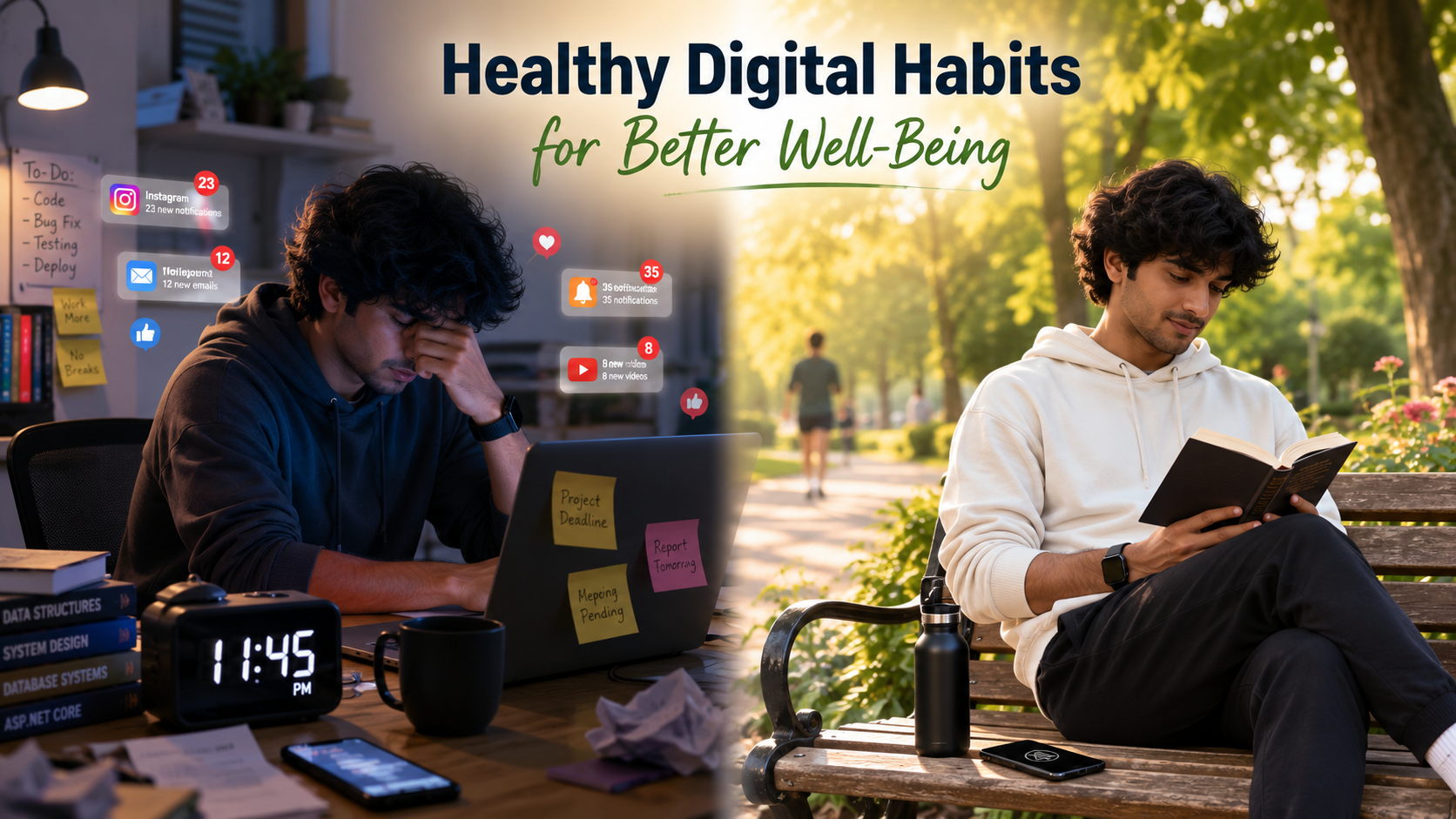
Spending too much time online can harm your physical health, mental well-being, and real-world relationships. Eye strain, persistent headaches, poor posture, disrupted sleep patterns, and increased anxiety are common signs of severe digital fatigue. The constant influx of notifications and notifications triggers dopamine loops that keep us glued to screens for hours on end. Recognizing when technology transitions from a helpful tool into a harmful addiction is vital for your long-term wellness. If you find yourself mindlessly scrolling through media feeds for hours or feeling anxious when away from your phone, it is time to reassess your habits. Acknowledging these symptoms early allows you to take control of your lifestyle before your mental and physical health suffer significant long-term damage.
Tips for a Healthy Digital Diet
Creating a healthy digital diet requires deliberate effort and the establishment of clear boundaries around your personal device usage. First, establish strict tech-free zones in your home, keeping smartphones and laptops entirely out of bedrooms to improve your sleep quality. Second, turn off all non-essential application notifications to minimize daily workplace distractions and regain your focus. You can also use built-in screen time trackers to set daily limits on problematic apps that consume too much of your time. Finally, schedule a regular “digital detox” weekend once a month to disconnect from internet services completely and reconnect with the physical world. Spending quality time in nature, reading physical books, and engaging in face-to-face conversations will rejuvenate your mind and restore your mental clarity.
FAQ SECTION
What is the main purpose of a digital citizenship guide?
A digital citizenship guide teaches people how to use technology safely, responsibly, and ethically. It provides practical steps for protecting personal data, respecting others online, and thinking critically about digital content. These skills help users avoid risks such as identity theft, cyberbullying, phishing scams, and online exploitation. The guide also connects technical skills with ethical behavior. It shows people not only how to use digital tools but also how to use them responsibly. Ultimately, it encourages a safer and more respectful online community where people can learn, collaborate, and share ideas with confidence.
Why is digital citizenship important for students?
Students spend much of their time online for learning, entertainment, and communication. Digital citizenship helps them understand that their online actions can have lasting consequences. It teaches them to recognize cyberbullying, identify online predators, and evaluate the reliability of online information. These skills are essential in a world filled with misinformation. Good digital habits also prepare students for college and future careers, where digital literacy is highly valued. By learning these skills early, students can make better decisions online and build a positive digital reputation.
How can I protect my personal data online?
Protecting your personal data starts with good security habits. Use a unique and strong password for every account. Enable multi-factor authentication whenever possible for added protection. Avoid using public Wi-Fi for banking or shopping unless you use a trusted VPN. Review your social media privacy settings regularly and limit who can see your personal information. Check app permissions before granting access to your location, contacts, or photos. Being careful about what you share online reduces the risk of data breaches and cyberattacks.
What does a positive digital footprint look like?
A positive digital footprint reflects your skills, achievements, and interests. It can include helpful blog posts, professional LinkedIn updates, educational content, or a digital portfolio. Supporting others online and sharing accurate information also strengthens your reputation. A positive online presence shows that you are respectful and responsible. This can benefit you when employers or universities search for your name. A strong digital footprint can create new career, education, and networking opportunities.
How do I handle cyberbullying if I witness it?
If you witness cyberbullying, do not ignore it. Avoid arguing directly with the bully because this may make the situation worse. Instead, save evidence by taking screenshots of harmful posts or messages. Report the content using the platform’s reporting tools. Reach out to the victim with a private message of support. Let them know they are not alone. If the bullying includes threats, blackmail, or hate speech, report it to a trusted adult, school official, workplace representative, or local law enforcement.
Conclusion
Using the internet safely requires more than technical knowledge. It also requires responsibility, empathy, and good judgment. This digital citizenship guide shows how your online actions affect your reputation and influence others. Protect your personal information, communicate respectfully, and manage your digital footprint carefully.
Following the advice in this digital citizenship guide helps create a safer and more welcoming online environment. Technology can improve lives when used responsibly. Start today by updating your passwords, reviewing your privacy settings, and thinking carefully before sharing content. By applying the lessons from this digital citizenship guide, you can help build a safer internet based on trust, respect, and responsibility.
Next Wave of AI: Why Execution Is Replacing Conversation
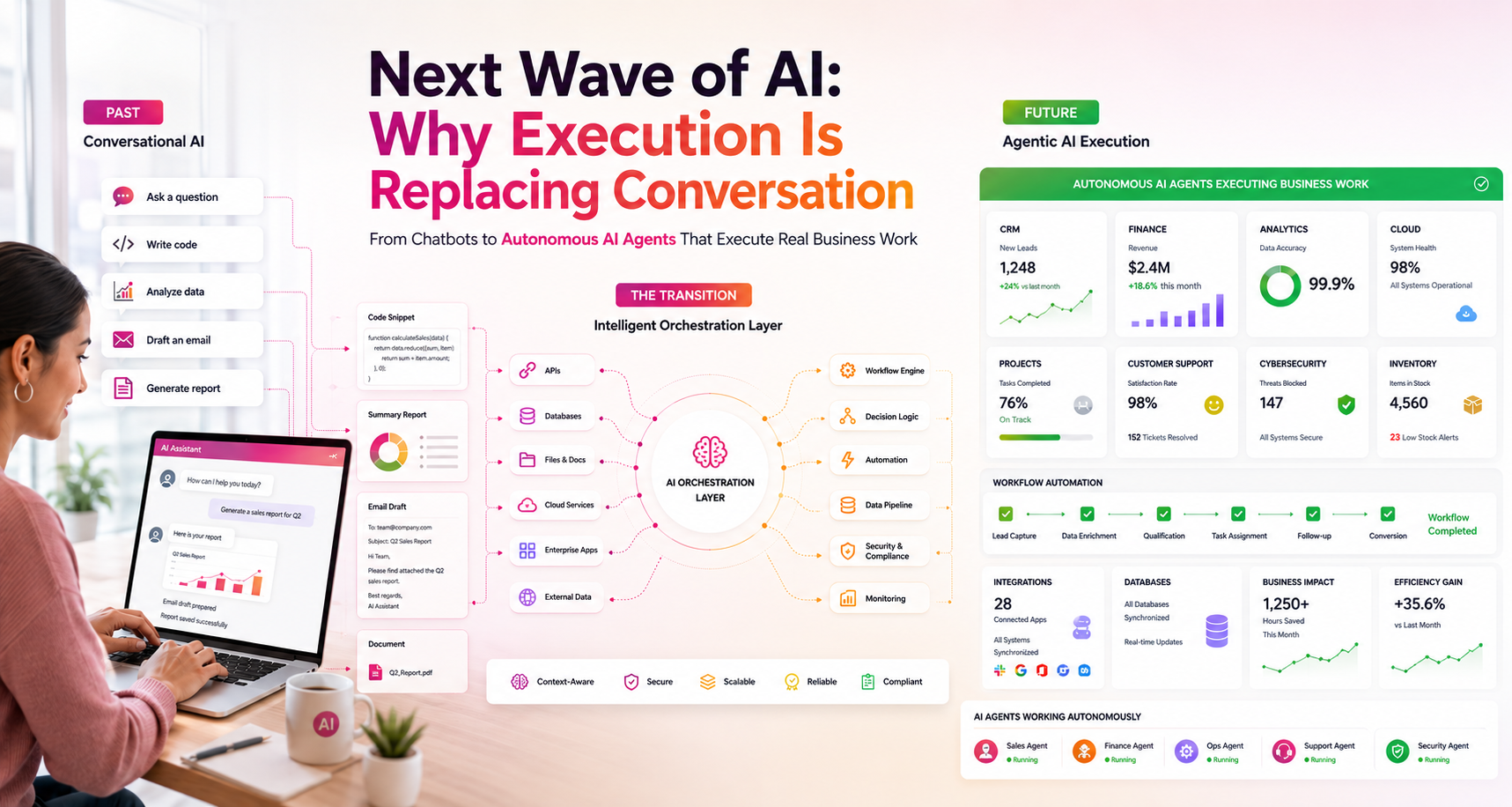
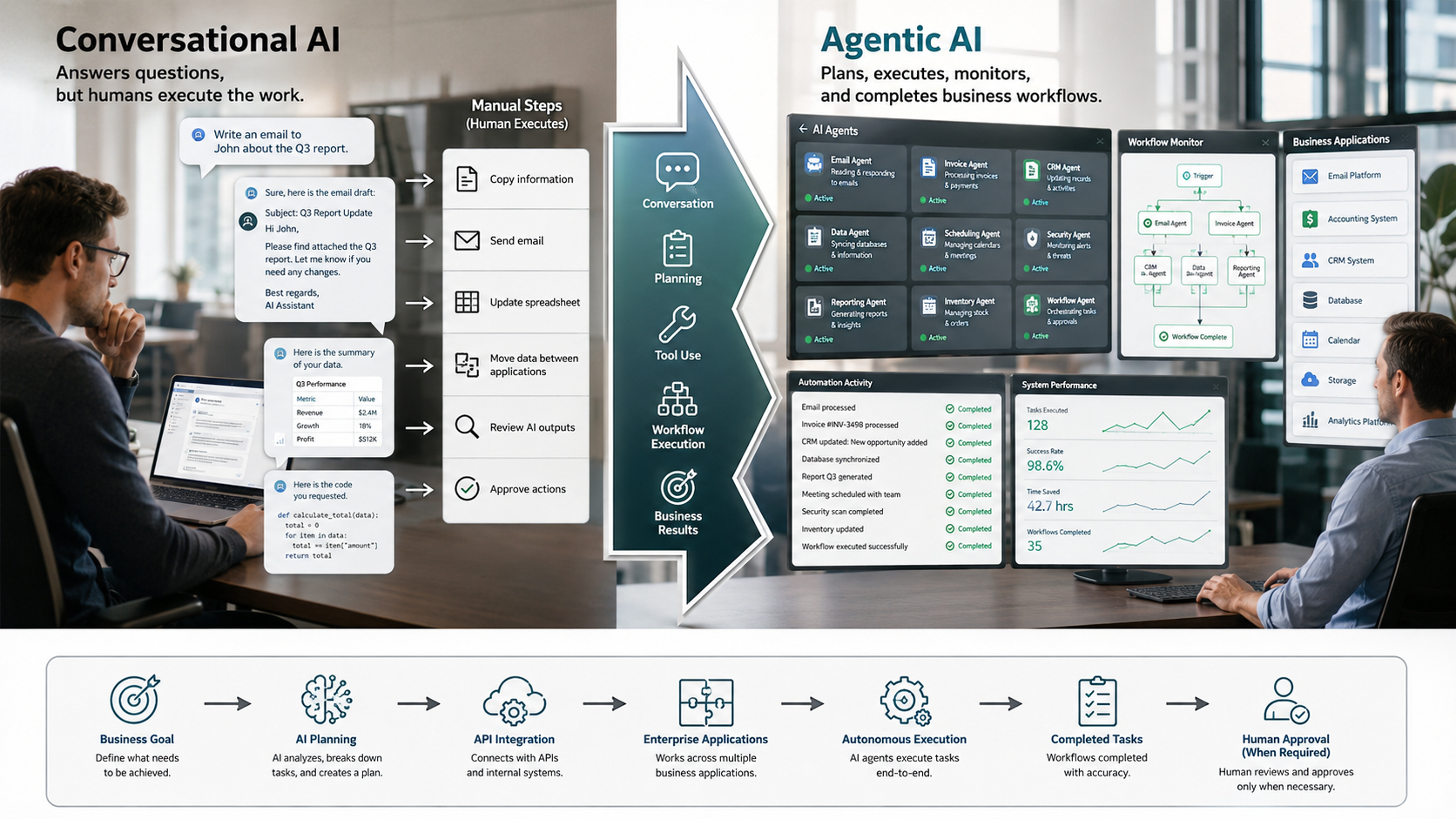
Artificial intelligence has changed dramatically over the past few years. Most people still associate AI with chatbots that answer questions, generate content, or write code. While these tools remain valuable, they represent only the beginning of a much larger transformation. The next wave of AI focuses less on conversation and more on execution. Instead of suggesting what users should do, modern AI systems increasingly perform the work themselves.
Businesses want more than fast answers. They need software that automates workflows, updates databases, analyzes information, and communicates with multiple business applications. This demand is driving the rise of agentic AI, where autonomous systems complete tasks with minimal human intervention.
The shift from conversational AI to execution-based AI will reshape productivity across every industry. Organizations that embrace this technology will reduce repetitive work, improve efficiency, and allow employees to focus on higher-value responsibilities. Understanding the next wave of AI is becoming essential for business leaders, developers, and professionals preparing for the future of work. To learn how modern AI agents plan, use tools, and complete complex workflows, explore OpenAI’s official guide on building AI agents.
Why the Next Wave of AI Is Replacing Conversational AI
Conversational AI made artificial intelligence accessible to millions of users. A simple prompt could generate reports, marketing copy, software code, or customer responses within seconds. This ease of use accelerated AI adoption across businesses of every size.
Despite these advantages, chat interfaces have important limitations. Users still guide every step of the process. They enter prompts, review responses, correct mistakes, and manually transfer information into other software. The chatbot produces useful content, but it rarely completes the entire workflow.
Businesses need more than intelligent conversations. They want AI to process invoices, update CRM systems, organize documents, monitor inventory, and automate administrative work without repeated instructions. These practical requirements are shaping the next wave of AI, where intelligent systems focus on completing tasks instead of generating text.
As companies pursue greater efficiency, execution becomes more valuable than conversation. AI will increasingly act as a digital worker rather than simply serving as a digital assistant.
How the Next Wave of AI Solves the Illusion of Productivity
Many organizations believe conversational AI fully automates their operations. In practice, it often accelerates only one part of a much larger workflow. Employees still perform several manual steps before completing a project.
For example, a chatbot may draft an email campaign in minutes. Someone must still review the content, edit mistakes, upload it into marketing software, schedule delivery, and measure campaign performance. The AI improves writing speed but does not execute the complete process.
The same pattern appears across finance, healthcare, sales, and customer service. Workers continue moving data between applications, verifying information, and managing approvals. These repetitive activities consume valuable time every day.
The next wave of AI removes these bottlenecks. Autonomous agents connect directly with business software through APIs. They move information automatically, trigger workflows, complete repetitive tasks, and notify users only when human decisions become necessary. This approach delivers genuine automation instead of creating the appearance of productivity.
How the Next Wave of AI Eliminates Context Drift
Context drift remains one of the biggest weaknesses of conversational AI. During lengthy discussions, chatbots sometimes lose track of earlier instructions or misunderstand important details. These mistakes force users to repeat information and carefully review every response.
This limitation becomes even more serious in enterprise environments. Large projects often involve dozens of requirements, multiple departments, and complex approval processes. Losing context during execution can create delays, compliance issues, or costly operational errors.
The next wave of AI addresses this challenge by combining language models with structured memory, workflow management, and external databases. Instead of relying only on conversation history, autonomous agents retrieve relevant information whenever they perform a task.
This structured approach improves consistency and reliability. Businesses can automate complex workflows with greater confidence because AI systems maintain context throughout the entire process. As organizations increase AI adoption, reliable execution will become more important than maintaining long conversations.
What Is Replacing Prompt Engineering in the Next Wave of AI?
Prompt engineering became one of the fastest-growing AI skills during the early adoption of generative AI. Users experimented with prompts to improve writing quality, coding accuracy, and research results. Better prompts often produced significantly better outputs.
Today, the next wave of AI is reducing the importance of prompt engineering. Developers now focus on designing autonomous workflows rather than crafting perfect prompts. Multiple AI agents collaborate to complete large objectives automatically.
One agent may analyze a business goal. Another collects information from company systems. A third generates reports or writes code. Additional agents test results, monitor quality, and deploy completed work. Humans supervise the overall process instead of controlling every individual task.
This evolution changes the skills businesses value most. Workflow design, AI integration, automation architecture, and governance now matter more than writing increasingly detailed prompts. Organizations gain greater efficiency because autonomous systems execute work instead of waiting for continuous human instructions.
How the Next Wave of AI Focuses on System Execution
Execution defines the future of artificial intelligence. The next wave of AI integrates directly into enterprise software instead of operating as an isolated chatbot. Modern AI systems communicate with databases, cloud platforms, accounting software, CRM applications, and project management tools.
This connectivity allows AI to complete meaningful business processes. It can read incoming emails, verify customer records, generate invoices, update inventory, schedule appointments, and send notifications without human intervention. Employees receive completed results rather than suggestions.
Advanced AI systems also improve reliability through self-monitoring. When errors occur, they identify the problem, retry failed actions, or recommend alternative solutions. This capability reduces downtime and minimizes manual troubleshooting.
Businesses benefit through lower operating costs, faster workflows, improved accuracy, and greater scalability. As execution capabilities continue advancing, organizations will judge AI systems by measurable business outcomes rather than conversational ability alone.
How the Next Wave of AI Will Change Jobs by 2030
The next wave of AI will reshape many professions during the next decade. Automation will not eliminate every job, but it will significantly reduce demand for repetitive digital work. Roles focused on transferring information between systems, processing routine documents, or following standardized procedures face the greatest disruption.
Data entry, basic customer service routing, repetitive compliance checks, simple report generation, and template-based content creation will increasingly become automated. Autonomous AI systems can complete these predictable workflows faster and more accurately.
At the same time, demand will continue growing for AI architects, cybersecurity specialists, automation engineers, skilled tradespeople, healthcare professionals, and strategic business leaders. These careers require critical thinking, creativity, human judgment, emotional intelligence, or physical adaptability.
Future professionals will work alongside intelligent systems instead of competing against them. Learning how to design, supervise, and optimize AI-powered workflows will become one of the most valuable skills in the modern workplace.
FAQ About the Next Wave of AI
Which 3 jobs will survive AI?
The next wave of AI will automate many repetitive digital tasks, but several careers will continue to thrive because they rely on skills that machines cannot easily replicate. Skilled trades such as plumbers, electricians, and HVAC technicians will remain in high demand. These professionals work in unpredictable physical environments where every job presents unique challenges. AI can assist with diagnostics, but it cannot replace hands-on expertise in most real-world situations.
Strategic human leaders will also remain essential. Business executives, entrepreneurs, and organizational leaders make complex decisions that require emotional intelligence, negotiation skills, ethical judgment, and long-term planning. While AI can analyze data, people still define business goals and manage relationships.
AI system architects represent another future-proof profession. As organizations adopt autonomous AI systems, they need experts to design, monitor, secure, and improve these technologies. These professionals ensure AI agents work safely and efficiently while meeting business objectives. As the next wave of AI expands, demand for experienced AI architects and automation specialists will continue to grow across nearly every industry.
What are the problems with conversational AI?
Conversational AI transformed how people interact with technology, but it still has several important limitations. Most chatbots require continuous human supervision. Users must write prompts, review responses, verify facts, correct mistakes, and manually move information into other applications. This process creates an unnecessary bottleneck and prevents true automation.
Another major issue involves context drift. During long conversations, AI models sometimes lose track of previous instructions or misunderstand user intent. This inconsistency reduces reliability, especially for businesses that manage large projects or sensitive data. Employees often repeat instructions to maintain accuracy, which reduces productivity.
Conversational AI also struggles to execute real-world business processes. It may generate excellent recommendations, but it usually cannot complete workflows independently without additional integrations. For example, it can draft an invoice but cannot automatically process payments unless connected to external systems.
The next wave of AI addresses these limitations through agentic workflows. Instead of simply generating responses, autonomous AI systems connect with enterprise software, execute multi-step tasks, maintain structured memory, and monitor their own performance. This evolution transforms AI from a conversational assistant into a reliable digital worker capable of completing meaningful business operations.
What is replacing prompt engineering?
Prompt engineering became one of the most popular AI skills during the rise of generative AI. Users experimented with different instructions to improve writing, coding, research, and problem-solving results. Well-designed prompts often produced more accurate outputs, making prompt engineering valuable for businesses and developers.
However, the next wave of AI is changing this approach. Instead of relying on increasingly detailed prompts, organizations are building autonomous AI systems that plan, execute, and monitor tasks with minimal human involvement. These systems use agentic workflows where multiple specialized AI agents collaborate to achieve larger business goals.
One AI agent may break a project into smaller tasks. Another gathers information from databases. A third writes code or documents, while another validates the results before deployment. Humans supervise the overall process rather than managing every individual action.
This shift makes workflow design, automation architecture, API integration, and AI governance more valuable than prompt engineering alone. Businesses now focus on building intelligent systems that consistently complete work instead of simply generating responses. As the next wave of AI continues to mature, designing reliable execution pipelines will become one of the most important technical skills.
Which jobs will be gone by 2030?
No one can predict with certainty which jobs will disappear by 2030, but many experts expect AI to automate a growing share of repetitive digital work. The next wave of AI will most likely affect roles that involve structured, predictable, and rule-based tasks. Jobs such as data entry clerks, basic customer support representatives, document processing specialists, routine bookkeeping assistants, and administrative support roles face significant automation pressure.
Similarly, positions focused on repetitive copywriting, standard report generation, template-based coding, and basic quality assurance testing may require fewer workers as AI systems become more capable. Autonomous AI agents can complete these tasks quickly while maintaining consistent quality.
However, automation does not always eliminate entire professions. In many industries, AI changes job responsibilities instead of replacing employees completely. Workers increasingly supervise automated systems, review complex decisions, and solve problems that require human judgment.
The next wave of AI will likely create new opportunities in AI governance, cybersecurity, workflow automation, robotics, cloud computing, and intelligent systems management. Professionals who continuously learn new technologies and develop strategic skills will remain competitive in an AI-driven economy.
What does agentic AI mean in practice?
Agentic AI refers to intelligent software that can plan, make decisions, and execute multiple actions to achieve a defined objective with minimal human supervision. Unlike traditional chatbots that respond to individual prompts, agentic AI performs complete workflows by connecting with external applications, databases, APIs, and enterprise software.
For example, a marketing manager might ask an agentic AI system to launch a product campaign. Instead of simply generating a marketing plan, the system could research competitors, analyze customer trends, write promotional content, schedule social media posts, update project management software, monitor campaign performance, and generate weekly reports automatically.
Businesses can also use agentic AI in finance, healthcare, customer service, software development, and supply chain management. Autonomous agents process invoices, approve routine requests, manage inventory, monitor cybersecurity alerts, and coordinate business operations across multiple platforms.
The next wave of AI depends heavily on these execution-focused systems. Organizations want AI that performs meaningful work instead of producing text alone. As agentic technologies mature, businesses will increasingly deploy digital workers that collaborate with employees, automate repetitive tasks, and improve productivity throughout the enterprise.
Conclusion
The evolution of artificial intelligence is moving past the novelty of conversation. While chatbots opened our eyes to what large language models can do, the next wave of AI is focused entirely on practical, autonomous execution. By transitioning from simple prompt boxes to integrated, multi-agent systems, technology is finally moving toward true automation. This shift will inevitably reshape the workforce, reducing the need for repetitive digital tasks while elevating roles that require human empathy, physical skill, and high-level systems design. To stay ahead, businesses and professionals must look beyond the chat interface and start building the infrastructure required to let AI execute.
If you’re new to AI or want to build a stronger foundation before exploring autonomous agents, read our complete guide to Generative AI. It explains how generative AI works, its real-world applications, benefits, limitations, and why it serves as the foundation for the next generation of AI-powered systems.
How to Read a Cheque: A Complete Step-by-Step Guide
Understanding Your Paper Turnover
Even in our digital banking era, knowing how to read a cheque remains an essential financial literacy skill. Whether you are setting up a direct deposit, writing a payment for rent, or verifying a business transaction, paper cheques still anchor major parts of the financial system. According to compliance and operational guidelines set by central authorities like the Federal Reserve System, standardizing these paper documents ensures that billions of dollars move securely between accounts every day.
Understanding the layout of a cheque prevents costly financial errors. Misreading a digit or misidentifying a number can delay payments, cause overdraft fees, or disrupt your payroll. This comprehensive guide explains every element on a cheque, what the numbers mean, and how to use them with confidence. If you’re looking to strengthen your overall financial knowledge, don’t miss our guide on credit card tips you need to know. Taking a few minutes to master the layout of a cheque protects your hard-earned money and makes everyday banking tasks much easier.
The Anatomy of a Cheque: Front Layout
When you first look at a cheque, the amount of information printed on such a small piece of paper can feel overwhelming. However, every financial institution follows a strict template to keep processing simple. Each section serves a legal purpose to ensure the validity of the transaction. By breaking down the front layout into manageable parts, you can easily identify who is paying, who is receiving, and which bank is managing the exchange of funds.
Personal and Bank Information
In the top-left corner, you will find the account holder’s personal details. This includes the legal name and the registered mailing address. Directly opposite or just below this section, the printing displays the name of the bank or financial institution holding the funds. Having this information visible helps businesses verify the identity of the person writing the cheque. It also gives the recipient peace of mind knowing exactly which bank is backing the financial document being handed over to them.
The Essential Transaction Fields
The middle portion of the cheque contains the specific details required to execute the transaction:
The Date Line: Located in the top right, this dictates when the cheque becomes valid for cashing or depositing.
Pay to the Order of: This line specifies the exact individual or organization authorized to receive the funds.
The Amount Boxes: The cheque features two distinct areas for the payment amount. A small box displays the amount in numbers (e.g., $150.00), while a long line requires you to write the amount out in words.
Every field must be filled out completely to prevent fraud or processing rejections. If you leave the payee line blank, anyone can write their name in and cash the document. Similarly, writing an incorrect date can cause the bank to refuse the deposit altogether.
How to Read a Cheque: Deciphering the Bottom Numbers
The bottom edge of every cheque contains a string of uniquely stylized numbers. Banks use Magnetic Ink Character Recognition (MICR) technology to read this line automatically. Understanding this section is the core of mastering how to read a cheque. These numbers communicate directly with banking computers to transfer funds instantly.
The Transit Routing Number
The first nine digits on the left side represent the routing number. This code identifies the specific financial institution responsible for clearing the funds. Think of it as a postal code for your bank, directing the money to the correct corporate entity. Without this precise nine-digit sequence, clearing houses would not know where to send the transaction requests. It is a vital piece of data required for setting up automated payments or receiving electronic transfers from employers.
The Account Number
The middle set of numbers identifies your personal or business checking account. This sequence tells the bank exactly which vault or ledger to pull the money from once the routing number locates the correct institution. Every account holder has a unique sequence, ensuring that funds are never drawn from the wrong person. When providing banking details for external transfers, you will always copy this exact sequence alongside your routing code to establish a secure link.
The Cheque Number
Usually the shortest sequence on the bottom line, this matches the sequential number printed in the top-right corner. It helps you track individual payments and allows banks to flag duplicate transactions. Using this tracking code helps you maintain accurate record-keeping in your personal ledger. If a cheque goes missing or gets stolen, you can provide this specific number to your bank to issue a stop-payment order quickly.
Key Security Features and the Reverse Side
The back of a cheque is just as important as the front. It contains security measures and validation fields that ensure the funds reach the intended recipient safely. Many users completely ignore the back until they need to sign it, but understanding its layout helps protect against sophisticated counterfeiting methods.
The Endorsement Area
Flip the cheque over, and you will see a designated area that reads “Endorse Here.” The recipient must sign this line before depositing or cashing the cheque. Writing “For Deposit Only” along with an account number adds an extra layer of security, preventing anyone else from cashing it if it gets lost. This simple endorsement practice ensures that your funds remain safe even if the physical piece of paper drops out of your wallet on the way to the bank.
Tracking Security Guards
Modern cheques use advanced printing techniques to deter fraud. Look closely at the back for a “Security Screen” warning box. Many cheques feature microprinted text that looks like a solid line to the naked eye but reveals distinct words under magnification. These high-tech features prevent criminals from photocopying or altering the document. If any of these security patterns appear distorted or missing, a bank teller will immediately flag the cheque for manual fraud investigation.
Common Myths About Processing Cheques
Many consumers hold misconceptions about how paper payments function in today’s digital landscape. Clearing up these myths helps protect your financial health and prevents unexpected fees. As technology evolves, the laws governing physical transactions change as well, making old assumptions dangerous for your account balances.
Do Cheques Last Forever?
A common misconception is that a cheque remains valid indefinitely. In reality, banks consider cheques “stale-dated” after six months. While some institutions may still honor them, they have the legal right to refuse processing. If you find an old payroll or personal cheque tucked away in a drawer, it is always best to contact the issuer for a replacement rather than risking a returned document fee at your local branch.
The Speed of Digital Clearing
Many people assume paper cheques take weeks to clear. Thanks to electronic check conversion laws, banks scan images of cheques instantly. The funds often leave your account within 24 hours, meaning you should never write a cheque assuming you have a few days to deposit the cash. This rapid clearing cycle makes it imperative that you have the full amount available in your balance at the exact moment you hand the paper over.
Frequently Asked Questions
What do the numbers at the bottom of a cheque mean?
The numbers at the bottom of a cheque are written in a special magnetic ink and are divided into three distinct sections. The first nine digits represent the routing number, which identifies your specific bank. The second string of numbers is your unique account number, telling the bank where to pull the funds from. The final, shorter set of digits is the cheque number, which helps track individual transactions. Together, these numbers allow automated sorting machines to process payments accurately and quickly without manual data entry. It serves as the primary communication link between different banks.
This entire row is called the MICR line, which stands for Magnetic Ink Character Recognition. Banks use specialized sorting machines that read this magnetic ink even if someone has written over it or smudged the paper. Understanding this sequence allows you to quickly find the exact information you need when setting up online bills, linking external accounts, or authorizing one-time electronic payments over the phone.
Where is the routing number located on a cheque?
The routing number is always located at the bottom-left corner of a standard cheque. It consists of exactly nine digits and is flanked by specific symbols known as MICR characters. This number functions as an address for your financial institution. When a business or bank scans your cheque, this number instantly tells its computer system which bank holds your checking account. It is the first set of numbers you read from left to right on the bottom line. Finding this number is essential whenever you need to set up recurring automated bill payments online.
In some cases, large national banks use different routing numbers for different states or regions. Therefore, always check the bottom-left corner of your own cheque to verify the correct number. This method is more accurate than relying on a family member’s or coworker’s account information.
How do you read a cheque for direct deposit?
To set up a direct deposit, you need to read the routing number and account number from the bottom of your cheque. Look at the bottom-left corner to find the nine-digit routing number and write it down. Next, look at the middle sequence of numbers to locate your specific account number. Ignore the cheque number entirely for this process. Employers use these two codes to route your paycheck directly into your checking account electronically, eliminating the need for paper delivery. It provides a secure, completely paperless path for your recurring income streams.
When you look at the sequence, you might see small symbols that look like brackets separating the numbers. Do not include these symbols when filling out your direct deposit enrollment form; only copy the numerical digits themselves. If your check does not clearly separate the account number from the check number at the bottom, you can cross-reference it with your monthly bank statement to ensure absolute accuracy.
What is the difference between the routing number and account number?
The routing number identifies the financial institution itself, acting like an institutional zip code. The account number identifies your specific, individual account within that financial institution. Multiple customers at the same bank will share the exact same routing number, but no two customers will ever share the same account number. When reading a cheque, the routing number appears first on the left, while the account number typically follows it in the middle string of digits. Knowing the difference ensures you fill out financial enrollment documents without mixing up critical identification codes.
If you accidentally swap these two numbers on an electronic form, your transaction will fail entirely. The automated clearing house network will try to look for a bank using your account number, fail to find it, and reject the payment request immediately. This error can result in late fees from billing companies or significant delays in receiving your hard-earned payroll deposits.
Why is the amount written twice on a cheque?
The amount is written twice on a cheque to prevent fraud and minimize administrative errors. First, the numerical box gives the bank teller a quick reference for the value. Meanwhile, the written line spells out the amount in words for legal validation. If, however, a discrepancy occurs between the numbers in the box and the written words, legal guidelines state that the written words always take precedence as the official legal amount of the cheque. As a result, this legal rule protects consumers from malicious alterations because words are much harder to rewrite or modify than simple numbers.
For example, a scammer could easily add a zero to the end of the numbers box, turning a fifty-dollar cheque into a five-hundred-dollar cheque. However, changing the handwritten words “Fifty and 00/100” to match that fraudulent addition requires completely rewriting the sentence. Consequently, the document is far more likely to be flagged as tampered with. Therefore, always write out the words clearly and draw a straight line to fill any remaining blank space on that line.
Conclusion
Mastering how to read a cheque gives you greater control over your banking transactions. Once you understand how to read a cheque, you can identify routing codes, account numbers, and security features with confidence. This knowledge helps you avoid processing delays and reduces the risk of banking fraud. Always double-check your written amounts before handing over a cheque. Also, confirm that all numbers are correct. This simple habit keeps your personal finances running smoothly and securely. It also bridges the gap between traditional cheque security and modern electronic processing systems.
Although digital banking continues to grow, paper cheques remain a reliable option for large payments. These include home down payments, vehicle purchases, and business contracts. Learning how to read a cheque removes uncertainty during these important transactions. You no longer have to guess which number belongs on an online payment form. Nor do you need to worry about a teller rejecting your deposit. Taking time to master how to read a cheque builds long-term confidence. It also helps protect your financial well-being for years to come.
The Ultimate Guide to Careers in Digital Marketing: Paths, Skills, and Growth
The corporate world is shifting online rapidly, making digital advertising more vital than ever. Consequently, careers in digital marketing have become some of the most sought-after professional paths in the modern economy. Businesses must build a robust online presence to survive, which drives an unprecedented demand for skilled strategists, creators, and analysts. If you are looking for a dynamic field that merges creativity with technical data, this industry offers a diverse range of opportunities. To explore the foundational guidelines of online visibility and web standards, checking out the Google Search Central documentation provides excellent insight into how the digital ecosystem functions.
Whether you are a recent graduate, a creative writer, or a tech-savvy data analyst, careers in digital marketing offer opportunities for many different skill sets. This comprehensive guide will break down the top high-paying roles, essential skills, and actionable steps to build a successful long-term career. If you are just starting out, consider earning one of the best professional certifications for beginners to strengthen your skills and improve your job prospects. Moreover, the industry is highly dynamic and rewards individuals who embrace continuous learning, change, and adaptation.
Why Choose Careers in Digital Marketing?
The modern marketplace relies almost entirely on electronic channels to attract and retain customers. Choosing a career in this sector offers immense stability, competitive financial rewards, and long-term professional growth potential. As traditional media continues to contract, digital budgets grow exponentially year over year across global corporate structures.
High Demand and Job Security
Virtually every brand requires a functional online strategy to survive in today’s digital-first economy. From global corporations to local boutique shops, businesses invest heavily in their digital presence to maintain customer acquisition pipelines. This universal need creates a continuous, recession-proof stream of job opportunities across various sectors. Because consumer behavior remains anchored online, the demand for professionals who understand digital trends shows no signs of slowing down anytime soon.
Diverse Career Paths
Digital advertising is not a monolithic industry, meaning it accommodates a vast spectrum of unique human talents and working styles. If you enjoy storytelling, video production, or graphic design, content creation and brand building might be your true professional calling. Conversely, if you prefer logic, statistics, and pattern recognition, data analytics and paid media optimization offer challenging, numbers-driven environments. You can easily switch between specializations as your personal interests evolve over the years.
Flexibility and Remote Work
Because this work relies primarily on cloud software, digital dashboards, and online collaboration platforms, professionals enjoy massive geographic flexibility. Many marketing agencies and corporate communications departments offer permanent remote or hybrid work models, allowing a healthier work-life balance. This flexibility allows you to collaborate with international clients and global teams right from your home office. Ultimately, it shifts the focus of your employment from hours logged to actual value delivered.
High-Paying Roles in the Online Marketing Industry
As you plan your professional trajectory, understanding the distinct specializations within the industry will help you target the right positions. Here are some of the most lucrative tracks available today.
Search Engine Optimization (SEO) Specialist
SEO specialists focus exclusively on driving high-quality organic traffic to websites by optimizing technical structures and content layouts. They spend their days improving site architecture, conducting extensive keyword research, and building authoritative backlink profiles to rank higher on search networks. This role requires a perfect balance of technical developer knowledge, strategic user intent analysis, and creative content planning. As search engines continually refine their algorithms, these specialists ensure that an organization’s digital assets remain visible and accessible.
Content Marketing Manager
Content managers oversee the end-to-end creation, curation, and distribution of blogs, corporate videos, eBooks, podcasts, and infographics. They ensure that all published material aligns perfectly with the brand’s established voice while guiding potential customers through the sales funnel. Strong editorial instinct, comprehensive project management skills, and cross-departmental collaboration are completely vital to succeed in this role. By creating highly valuable assets, these professionals build long-term trust and authority for businesses without relying purely on paid ads.
Social Media Strategist
Beyond just posting regular photos, social media strategists manage an organization’s public image across platforms like Instagram, LinkedIn, and TikTok. They analyze audience engagement metrics, design community campaigns, and collaborate closely with digital influencers to boost brand loyalty and conversions. This position requires an intimate understanding of pop culture, platform algorithms, and consumer psychology to capture attention in crowded feeds. Strategists turn passive scrollers into active brand advocates by creating highly interactive online communities.
Paid Media and Pay-Per-Click (PPC) Expert
PPC experts manage sizable advertising budgets on digital networks like Google Ads, Meta Ads, and Amazon Advertising platforms. They design highly targeted campaigns, monitor daily ad spend, and constantly run split tests to maximize total return on investment. This role is highly analytical, requiring an individual to comfortable with complex data spreadsheets, audience segmentation, and mathematical modeling. Because their work directly impacts client revenue, skilled media buyers are always in high demand across agencies worldwide.
Core Skills Needed for a Successful Strategy
To excel in the highly competitive world of digital advertising, you must develop a balanced mix of soft and hard skills.
Essential Skillset Matrix
Success in careers in digital marketing depends on developing both technical and creative skills. On the technical side, professionals should understand data analytics and ROI tracking to measure campaign performance. They also need a solid grasp of search engine algorithms to improve website visibility. In addition, experience with marketing automation platforms helps streamline campaigns and increase efficiency.
Equally important are creative and interpersonal skills. Strong storytelling and copywriting abilities enable marketers to create engaging content that connects with their audience. Moreover, adaptability is essential because digital marketing tools and trends evolve rapidly. Finally, effective cross-team collaboration allows marketers to work successfully with designers, developers, content creators, and sales teams to achieve shared business goals.
Data Literacy and Analytics
Modern marketing campaigns live and die by empirical data, meaning intuition alone is no longer enough to succeed. You must know how to interpret complex user metrics from modern tracking tools like Google Analytics and custom data dashboards. Understanding granular user behavior, specific conversion rates, and exact bounce rates helps you refine marketing strategies for maximum corporate performance. Marketers who can accurately translate raw numbers into actionable business growth strategies will always find themselves ahead of the competition.
Adaptability and Continuous Learning
Search engine algorithms change constantly, social media platforms alter their reach rules overnight, and new software tools emerge weekly. Therefore, successful professionals possess an exceptional growth mindset and an immense tolerance for constant change. You must stay highly curious, read industry publications daily, and continuously update your knowledge base to keep your campaigns performing optimally. Embracing a lifestyle of lifelong learning turns industry disruption into your personal competitive advantage.
How to Get Started and Build Your Portfolio
Breaking into this industry does not always require a formal four-year university marketing degree or expensive educational credentials. Instead, modern digital employers heavily value practical experience, personal initiative, and visible proof of your actual execution capability.
Earn Industry Certifications: Start by taking free, globally recognized courses from reputable platforms like Google Skillshop, HubSpot Academy, or Meta Blueprint.
Build Your Own Website: Launch a personal blog, e-commerce store, or portfolio site to practice foundational SEO, write copy, and track real user data.
Freelance or Volunteer: Offer your digital services to local small businesses, neighborhood non-profits, or family friend operations to build real-world case studies.
By establishing your own digital sandbox, you can test marketing theories without risk, find out what interests you, and create an impressive portfolio that commands attention during job interviews.
Frequently Asked Questions
What Entry-Level Jobs Are Available in Digital Marketing?
If you are exploring careers in digital marketing, several entry-level roles can help you get started. Common positions include Digital Marketing Coordinator, Social Media Assistant, and SEO Junior Analyst. These careers in digital marketing focus on daily tasks instead of long-term business strategy. For example, you may schedule posts, write captions, track campaign performance, and conduct keyword research. As a result, these responsibilities provide practical experience across multiple marketing channels. Over time, careers in digital marketing allow you to discover the specialization that best matches your interests and skills.
Furthermore, careers in digital marketing often begin with collaborative team environments. For instance, a Social Media Assistant may work closely with content writers and graphic designers. This experience helps you understand how different departments support a consistent brand voice. Moreover, learning marketing software, content management systems, and analytics tools builds valuable technical skills. Therefore, careers in digital marketing become easier to advance as your experience grows. By mastering these core responsibilities, you prepare for higher-level positions. Ultimately, careers in digital marketing reward professionals who combine technical knowledge with creativity and strong communication. As your confidence increases, careers in digital marketing can lead to specialist, manager, or leadership roles. This steady progression makes careers in digital marketing attractive for long-term professional growth.
Do I need a marketing degree to get a job?
No, you do not strictly need a marketing degree to secure a position in this field. Many highly successful professionals come from diverse backgrounds like English literature, journalism, computer science, or behavioral psychology. Modern employers value practical tech skills, professional certifications, and hands-on portfolio experience far more than a specific university diploma. A strong portfolio demonstrating real campaigns you managed, or websites you optimized, will carry significant weight during recruitment. Completing industry-standard certifications is an excellent, cost-effective way to validate your skills to potential hiring managers.
Because digital advertising changes much faster than traditional academic curricula can adapt, actual proof of competence is the real currency of the industry. An applicant who can showcase a personal blog they successfully ranked on search engines, or a small budget ad campaign they optimized to achieve a 4% click-through rate, will immediately outshine an individual holding only a theoretical degree. The modern workspace requires people who can comfortably navigate tools like Google Analytics, Meta Ads Manager, and email automation workflows on day one. By prioritizing tangible project outcomes, specialized industry certifications, and localized case studies over standard university credentials, you show forward-thinking employers that you possess the exact real-world capabilities they need to grow their bottom line.
What is the average salary for digital marketers?
Salaries vary widely based on your geographic location, your specific area of expertise, and total years of experience. Entry-level professionals typically earn between $45,000 and $60,000 annually as they build up their skills. However, as you gain experience and move into specialized technical roles like PPC Specialist or Enterprise SEO Strategist, salaries often rise to between $75,000 and $100,000. Senior executives, such as Directors of Digital Marketing or Chief Marketing Officers (CMOs), can easily command salaries well over $130,000 per year, accompanied by performance bonuses.
The significant compensation differences within the industry are driven primarily by how closely a specific role ties to direct business revenue generation.For instance, data analytics, performance marketing, and marketing automation roles generally pay a notable premium compared to generalist support positions. This premium exists because these analytical experts explicitly manage and track large advertising budgets, directly influencing conversion metrics and client returns. Additionally, geographic regions and localized cost-of-living metrics play a critical role in standard pay rates. Working inside high-tech metropolitan hubs or transitioning from a standard marketing agency to an in-house corporate tech product team can accelerate your salary growth by 20% to 30%, making specialized skill development an incredibly lucrative path.
Is Digital Marketing a Stressful Career Path?
Like any fast-paced corporate industry, digital marketing can involve periods of elevated pressure. This is especially true during major holiday product launches or after sudden platform updates. For example, paid media managers face daily pressure to maximize return on ad spend. Meanwhile, social media managers may need to handle public relations crises online. However, the field also offers creative freedom, diverse projects, and flexible work arrangements. As a result, these advantages can reduce workplace burnout over time. Moreover, strong time-management skills and clear client expectations improve productivity. Relying on data instead of emotional guesswork also leads to better decisions. Ultimately, these habits help professionals maintain a healthier work-life balance.
Professional anxiety often comes from the real-time nature of digital marketing. Mistakes can become public within minutes. Likewise, poorly configured dashboards can waste advertising budgets very quickly. Therefore, successful marketers use detailed quality-assurance checklists. They also automate data alerts to detect sudden performance changes. In addition, experienced professionals treat campaign fluctuations as data instead of personal failures. This mindset reduces stress and supports continuous improvement. Finally, structured workflows and clear communication boundaries make the job more sustainable. As a result, marketers can enjoy remote work and creative problem-solving without sacrificing their mental well-being.
How do algorithm changes affect this career?
Algorithm changes by major tech entities like Google or Meta fundamentally reshape how organizations reach their online audiences. A single search update can alter website rankings or advertising costs overnight, requiring professionals to pivot their strategies immediately. While this constant evolution sounds intimidating to outsiders, it actually provides excellent long-term job security for skilled strategists. If digital platforms never changed, automated artificial intelligence could replace human marketers easily. Your ability to interpret algorithm shifts, adapt content, and find creative solutions makes you incredibly valuable to businesses.
When a dominant tech platform rolls out a major system patch or updates its ranking metrics, it creates an immediate knowledge gap in the corporate marketplace. Businesses that rely on steady streams of web traffic or social engagement suddenly find themselves scrambling for answers, which is exactly when an adaptable digital marketer becomes indispensable. Rather than fearing these technical adjustments, top-tier professionals view them as fresh opportunities to outperform competitors who rely on outdated, static tactics. Staying ahead requires reading official industry documentation, testing new layouts on personal digital sandboxes, and learning how to incorporate emerging discovery trends like generative AI engine optimization into your standard strategies. Ultimately, this perpetual state of change ensures that human ingenuity, critical thinking, and rapid strategic adaptation remain highly prized and securely employed assets.
Conclusion
Navigating the diverse world of careers in digital marketing offers an exciting, future-proof professional path for driven individuals. Because businesses rely entirely on digital visibility to generate revenue and survive, the global demand for strategic thinkers, data analysts, and creative storytellers will continue to escalate. By mastering key technical analytics tools, refining your messaging skills, and building a strong personal portfolio, you can easily stand out to top-tier global employers. The industry rewards curiosity, adaptability, and measurable business growth results above all else.
As you progress, focusing on specialization while keeping an eye on broader digital ecosystem trends will make you irreplaceable. Find your specific niche, start creating real-world campaigns, and take the first step toward a thriving digital career today. The future belongs to those who know how to capture attention online, and there has never been a better time to build your expertise in this space.
Exploring Rewarding Careers in Healthcare: A Comprehensive Guide
The demand for dedicated professionals to fill various careers in healthcare is growing at an unprecedented rate worldwide. Whether you want to work directly with patients at the bedside or support medical infrastructure behind the scenes, this industry offers unmatched job security and personal fulfillment. According to data tracking employment trends from the U.S. Bureau of Labor Statistics, healthcare occupations are projected to add millions of stable jobs over the next decade, outpacing nearly every other employment sector. This explosive growth is largely driven by an aging global population and continuous advancements in medical technology that require specialized staff.
Choosing a path in medicine, allied health, or medical administration means dedicating your professional life to improving human health and well-being. It is an industry driven by innovation, deep empathy, and constant scientific advancement. This comprehensive article will break down the top clinical pathways, alternative non-clinical roles, essential skills, and practical steps you can take to build a lasting, meaningful career in this vital field. By understanding the diverse options available, you can find a professional niche that perfectly aligns with your personal strengths and educational goals.
Why Choose Careers in Healthcare?
Entering the medical industry offers a unique blend of long-term financial stability and profound emotional reward. Few professions allow you to make such a direct, tangible difference in people’s lives on a daily basis. When you choose a path in this sector, you enter a community dedicated to service, learning, and resilience. Every role, whether directly clinical or administrative, contributes to the overarching goal of saving lives and improving public health standards. This shared mission creates a deeply fulfilling workplace culture that is hard to find in other corporate environments.
Job security is one of the most compelling reasons to explore this field. People will always require medical treatment, diagnostic testing, emergency interventions, and preventative care, regardless of economic conditions. Consequently, the health sector remains highly resilient during economic recessions and market downturns. Beyond stability, the industry offers incredible flexibility, allowing professionals to transition between different specialties, facilities, or geographical regions seamlessly. The skills you acquire are universally valuable, ensuring you remain employable wherever life takes you.
The diversity of professional pathways within this field ensures that there is a place for every type of talent. Many people mistakenly assume that working in health requires a medical degree or years of intense clinical training. However, the modern healthcare ecosystem relies heavily on a massive, diverse network of professionals. You can find highly lucrative and satisfying roles in technology, data analysis, facility management, finance, and community education. This inclusivity makes it an ideal sector for career changers and young professionals alike.
Top Clinical Healthcare Occupations
Clinical roles involve direct patient interaction, medical diagnosis, and physical treatment. As a result, these professionals play a vital role in patient care. In addition, these positions require professional licensing, hands-on clinical training, and strict adherence to medical protocols. Therefore, they are best suited for individuals who can think quickly and work well under pressure. Most importantly, these professionals see the direct impact of their work on patients and families every day.
Nursing Professionals
Registered nurses (RNs) and nurse practitioners (NPs) are truly the backbone of patient care in hospitals, clinics, and private practices. They monitor patient health, administer medications, perform diagnostic tests, and collaborate closely with physicians to execute comprehensive treatment plans. The nursing profession offers incredible flexibility, allowing individuals to specialize in areas like pediatrics, geriatrics, oncology, or critical care medicine. Because nurses spend the most time with patients, they play a crucial role in patient advocacy and education, ensuring that individuals understand their diagnoses and recovery plans fully.
Allied Health Careers
If you want to treat patients directly but do not wish to become a doctor or a nurse, allied health fields provide excellent alternative pathways. These professions focus on specific aspects of recovery, diagnostics, and patient support, making them vital to the comprehensive care cycle.
Physical Therapists: Help patients recover physical mobility, regain strength, and effectively manage chronic pain after serious injuries, strokes, or major surgeries.
Radiologic Technologists: Safely operate advanced imaging equipment like X-ray, CT, and MRI machines to capture clear internal images that doctors need for accurate diagnoses.
Medical Laboratory Technologists: Analyze blood, tissue, and fluid samples using sophisticated laboratory equipment to help physicians identify infections, diseases, and chemical imbalances accurately.
High-Growth Non-Clinical Pathways
Not all healthcare heroes wear scrubs or work in operating rooms. Non-clinical roles keep hospital networks running smoothly, secure sensitive patient data, manage corporate finances, and optimize large-scale facility operations. These career paths are perfect for analytical thinkers, organizers, and business-minded individuals who want to contribute to public health without managing bodily fluids or performing medical procedures. Without these vital positions, medical providers would lack the resources, data, and organizational structure required to treat patients safely.
Health Information Management
Modern medicine runs entirely on data, creating an urgent need for specialists who can manage electronic health records (EHRs) efficiently. Health information technicians organize, verify, and secure patient data, ensuring total compliance with privacy laws and complex medical coding standards used for insurance billing. This rapidly expanding field is ideal for tech-savvy individuals who want to work in medicine but prefer a structured office or remote environment. As artificial intelligence and big data continue to reshape patient care, these professionals will be at the forefront of digital health innovation.
Healthcare Administration
Hospital administrators, clinic managers, and medical executives oversee the business side of healthcare facilities. They manage budgets, supervise non-clinical staff, and ensure regulatory compliance. In addition, they improve operational efficiency and reduce patient wait times. Therefore, strong leadership, communication, and strategic planning skills are essential. Moreover, administrators ensure that doctors and nurses have the equipment, staffing, and support they need. As a result, healthcare teams can deliver safe, efficient, and high-quality patient care.
Key Skills for Success in the Medical Field
Succeeding in this challenging and rewarding industry requires a delicate, intentional balance of technical knowledge and refined interpersonal skills. Because the medical environment is inherently stressful, professionals must intentionally cultivate emotional resilience to avoid burnout. Employers look for candidates who can demonstrate high emotional intelligence alongside academic excellence, as the best patient outcomes occur when technical precision meets genuine human compassion.
Critical Soft Skills
Empathy, active listening, and clear communication are absolutely vital when dealing with vulnerable, anxious patients and their families. Medical professionals must be able to explain complex diagnoses and treatment plans in simple terms that a layperson can easily understand. Additionally, strong teamwork and conflict-resolution skills are necessary, as care teams must collaborate seamlessly across different departments to ensure total patient safety. When professionals communicate effectively, medical errors drop significantly, and patient trust increases dramatically.
Technical and Academic Competencies
Medical science changes rapidly. Therefore, healthcare professionals must commit to lifelong learning and continuous professional development. Additionally, you should stay updated on new clinical guidelines, technological tools, electronic health record systems, and pharmacological treatments throughout your career. Furthermore, strong critical thinking, cognitive accuracy, and attention to detail are essential. Even small mistakes can have serious consequences for patient safety. As a result, mastering these technical skills helps you deliver consistent, evidence-based care. Ultimately, ongoing learning allows you to provide the highest standard of care throughout your career.
FAQ Section
What are the entry-level careers in healthcare?
Entry-level healthcare jobs let you join the workforce quickly. Many require only a high school diploma and a short certification program. Common roles include certified nursing assistants (CNAs), medical assistants, phlebotomists, and medical billers. These positions provide valuable hands-on experience in clinical settings. They also help you discover your interests before choosing a long-term career path. Many professionals use these roles as stepping stones. Some receive tuition assistance from employers to earn nursing, clinical, or administrative degrees later.
Can I work in healthcare without a medical degree?
Yes. Many healthcare careers do not require a medical degree. The healthcare system relies on many non-clinical professionals every day. You can work in healthcare administration, medical billing and coding, health informatics, human resources, public relations, or medical equipment sales. These roles often require degrees in business, public health, information technology, or communications instead of medical school. This makes them accessible to people with different educational backgrounds.
What healthcare jobs are currently in the highest demand?
Home health aides, nurse practitioners, physician assistants, and medical services managers remain in high demand. An aging population continues to increase the need for long-term care and chronic disease management. Demand for rehabilitation services is also growing. Digital transformation has created opportunities in health informatics and healthcare data analysis. Organizations also need cybersecurity professionals who understand healthcare privacy regulations. Choosing one of these careers can provide strong job security and opportunities for advancement.
How long does it take to get certified for a medical career?
The academic timeline varies completely based on your chosen career path and educational goals. Short certificate programs for phlebotomy, medical assisting, or pharmacy technicians can take anywhere from three to nine months to complete. Associate degrees for dental hygienists or radiologic technologists typically take two full years of study. If you want to become a registered nurse, plan for a four-year bachelor’s degree. Aspiring physicians and specialized surgeons face the longest journey, requiring four years of undergraduate study, four years of medical school, and three to seven years of intense residency training.
What is the difference between clinical and non-clinical roles?
Clinical roles involve direct, hands-on patient care, physical assessment, medical diagnosis, and active treatment. Doctors, physical therapists, registered nurses, and emergency medical technicians are classic examples of clinical staff who interact with patients daily. Conversely, non-clinical roles support the broader operational infrastructure without directly treating patients. These include medical transcriptionists, hospital receptionists, facility managers, health attorneys, and medical coders. Both paths are equally critical to patient outcomes, ensuring that facilities remain safe, legally compliant, financially viable, and efficiently organized for everyone.
Conclusion
The healthcare industry offers meaningful careers in healthcare for people from all educational backgrounds, skill levels, and personality types. Whether you thrive in a fast-paced emergency room or prefer health informatics or hospital administration, there are many careers in healthcare to explore. These careers in healthcare provide strong job stability and a clear sense of purpose. By matching your strengths with the right medical or administrative path, you can build one of many rewarding careers in healthcare that improve lives.
Public health challenges continue to grow, increasing the demand for skilled and compassionate healthcare professionals. As a result, careers in healthcare continue to offer excellent long-term opportunities. To better understand why these roles are so important, explore our guide to the healthcare system of a country. Success requires dedication, hard work, and ongoing learning. In return, you can make a lasting difference in your community. Start by identifying your long-term goals and researching local training programs. Then choose the educational path that fits your ambitions. Taking the first step today can lead to one of the most fulfilling careers in healthcare. With so many careers in healthcare available, you can find a path that matches your skills, interests, and long-term goals.
Traditional schooling has long relied on a fixed, one-size-fits-all timeline that often prioritizes classroom time over actual student understanding. However, global shifts toward personalized learning have made understanding credit-based school education essential for modern families. According to the U.S. Department of Education, flexible pathways help prepare students for a rapidly changing workforce by focusing on measurable outcomes. This structural shift moves classrooms away from traditional seat time toward a system that rewards actual mastery, allowing students to progress as they grasp the material.
For decades, students moved up to the next grade level based purely on their age and the calendar year. If a student struggled with fundamental concepts in a subject like math, the class moved on anyway, leaving them behind. Similarly, advanced learners often found themselves waiting for peers to catch up, leading to boredom and disengagement. A credit-based structure directly addresses these pain points by offering an alternative roadmap that prioritizes individual capability over age-based grouping.
This comprehensive guide explores how a credit framework operates in modern primary and secondary schools. We will break down the structural differences between academic credits and traditional grading systems. Additionally, this article outlines the core benefits for students and examines their real-world impact on graduation requirements. If you’re interested in improving your learning experience, you can also explore our guide to the best educational apps for students, which highlights digital tools that support academic success. By the end, you will understand how this model fosters deeper student engagement and prepares learners for future academic success.
What is Credit-Based School Education?
A credit-based school education is an innovative academic framework where students earn quantified units of recognition, known as credits, for successfully completing specific courses. Instead of advancing automatically by age group or grade level, progress depends on accumulating these credits over time. Each course carries a specific credit value based on the depth of the material, classroom hours, and the estimated independent study required. This system directly shifts the focus from time spent in a chair to actual academic achievement and subject competency.
This system closely mirrors the structure used by universities worldwide, making it an excellent bridge for secondary students. To graduate, high schools establish a required total number of credits across both core subjects and elective pathways. Core areas typically include mathematics, science, language arts, and social studies, ensuring a well-rounded foundation. Electives allow students to explore specialized interests like computer science, graphic design, or foreign languages, tailoring their graduation pathway to their future career goals.
How the Credit Accumulation System Works
The mechanics of this system rely heavily on clear academic benchmarks and structured progression paths. School boards determine the weight of each class prior to the academic year based on instructional hours. Generally, a full-year course translates to one credit, while a semester-long class equals half a credit. Students must actively meet specific performance metrics to secure their credits at the end of the term. Attendance, coursework, independent projects, and examinations all contribute to the final evaluation process.
If a student fails to meet the minimum standards, they do not earn the designated credit. Consequently, they must retake that specific module rather than repeating the entire academic year with all its subjects. This targeted approach prevents students from wasting time on concepts they have already mastered, keeping them motivated to finish. The clear visual layout of a credit checklist allows students to see exactly how close they are to graduation at any given moment.
The Role of Choice and Electives
One major advantage of this structure is the vast freedom of choice it provides to young learners. While core requirements remain mandatory to ensure baseline literacy and numeracy, students select from a diverse menu of electives to fulfill their remaining credit quotas. This flexibility encourages learners to take true ownership of their academic journeys early on. By choosing classes that align with their passions, students become more engaged in the school community.
Career Exploration: Students can test out potential career paths through targeted elective classes like journalism or business management.
Skill Development: Practical courses like personal finance, public speaking, or digital media build vital real-world capabilities.
Interdisciplinary Learning: Learners can easily connect different subjects, combining arts with technology through creative courses.
Benefits of Navigating Academic Credits in Modern Schools
Shifting to a credit-based model offers immense value for diverse student populations with varying learning needs. Traditional grading systems often penalize slow starters permanently, whereas credit models focus entirely on the final learning outcomes. This structural change alters how students view their own academic potential, fostering a growth mindset across all grade levels. It removes the competitive pressure of keeping up with peers and focuses attention on personal progress.
Personalized Learning Pacing
Every child learns at a different speed, and a credit framework accommodates these natural variations seamlessly. Gifted students can accelerate their studies, taking advanced placement courses to earn graduation credits early and avoid boredom. Conversely, students who need extra time can focus intensely on troublesome subjects without the social stigma of failing an entire grade. This flexible pacing reduces burnout and ensures that foundational concepts are truly understood before advanced topics are introduced.
Smoother Transitions to Higher Education
Colleges and universities have utilized credit hours for over a century to measure academic progress. High schoolers who manage their own credit schedules adjust to university life much faster than those from rigid systems. They already understand concepts like prerequisites, credit loads, and the delicate balance between lectures and independent study time. This familiarity reduces freshman anxiety and leads to higher retention rates during the critical first year of college.
Increased Student Accountability
When graduation requirements are expressed as a clear target number, students become highly motivated to track their progress. They actively monitor their own transcripts and choose their workloads based on their personal capacities. This transparency shifts the psychological dynamic from pleasing a teacher to actively achieving a measurable milestone. Students learn time management, long-term planning, and accountability, which are crucial soft skills required in the modern professional workforce.
Feature
Traditional Time-Based System
Credit-Based Framework
Advancement Basis
Age and calendar year
Accumulated course credits
Pacing
Fixed for the entire classroom
Flexible based on student capability
Course Variety
Standardized, rigid curriculum
Rich blend of core classes and electives
Failure Outcome
Repeating the entire grade level
Retaking only the failed credit module
Addressing the Challenges of Implementation
Transitioning a school district to a credit-based model is not without administrative and logistical hurdles. Complexity increases significantly for school schedulers when every single student follows a customized pathway. Software systems must be updated to track individual student progress accurately without errors. Additionally, classrooms must accommodate shifting student numbers, as enrollment in specific modules varies from semester to semester based on student choices.
Moreover, school guidance counselors require specialized training to guide students through their choices effectively. Without proper mentorship, learners might choose paths that are too easy or fail to satisfy competitive university entrance requirements. Therefore, robust advisory programs are absolutely crucial for systemic success within a district. Schools must also educate parents about how to read credit-based transcripts so they can properly support their children at home.
FAQ SECTION
What is the main difference between credit-based education and traditional schooling?
The primary structural divide between a credit-based framework and traditional schooling boils down to how progression is measured: mastery versus time. In a conventional educational setup, schools rely heavily on the concept of “seat time.” Students are grouped strictly by age and move through a standardized curriculum together. At the end of a calendar year, the entire cohort advances to the next grade level regardless of individual variations in understanding. This can leave struggling students with critical learning gaps while leaving advanced learners under-stimulated and bored.
Conversely, a credit-based system abandons age-based synchronization in favor of individual achievement. To graduate, students must successfully complete and earn a predetermined number of academic units (credits). Advancement is tied directly to demonstrating competence in each specific subject. If a student struggles with a particular class, such as Algebra, they do not fail the entire grade or repeat subjects they have already mastered. Instead, they simply retake that specific course module while continuing to advance in their other successful subject tracks.
How do schools determine how many credits a course is worth?
School administrators, state educational boards, and regional accreditation bodies calculate credit values using structured metrics that balance classroom instruction with curriculum depth. They often base this evaluation on the Carnegie Unit, a historical system that measures instructional time. Typically, schools award one full academic credit to a rigorous, comprehensive course that spans an entire academic year and provides approximately 120 to 180 hours of direct classroom instruction.
For shorter, more compact subjects that run for only one semester, schools generally award half a credit ($0.5$). However, schools may adjust these calculations for highly intensive subjects. Advanced laboratory sciences, specialized career and technical education (CTE) tracks, and dual-enrollment college courses often carry higher credit values because they require additional lab hours, practical workshops, or more extensive independent study outside the classroom. Before registration, schools clearly outline these credit values, prerequisites, and course expectations in the official course catalog.
Can students graduate early under a credit-based system?
Yes, early graduation is one of the most prominent benefits of this highly flexible approach to secondary education. Because the ultimate requirement for graduation is reaching a specific numerical target of credits rather than hitting a certain age or completing four fixed years of attendance, motivated students can strategically accelerate their learning timelines. Students looking to fast-track their education can take advantage of multiple pathways, such as enrolling in accredited summer school sessions, taking virtual or online courses outside regular school hours, or overloading their semesters with additional elective classes.
However, successfully pulling off early graduation requires deliberate, long-term planning alongside a guidance counselor. Even if a student accumulates the total required credit count quickly, they must still fulfill specific distribution requirements. For instance, they cannot substitute extra art electives for a mandatory senior-year English credit. Additionally, many states impose minimum attendance guidelines or specific standardized exit exams that must be carefully scheduled. When executed properly, this acceleration allows mature students to enter the workforce or start their university careers ahead of their peers.
What happens if a student fails to earn a specific credit?
When a student fails to meet a course’s passing requirements, the school does not award credit for that class toward graduation. However, schools do not automatically hold students back an entire academic year because of a single failed course. Instead, they limit the setback to that specific subject. Students keep the credits they have already earned in their other classes, which helps maintain their academic progress and confidence.
To recover the missing credit, students must address the deficiency through one of several approved options. Most school districts provide credit recovery programs, including summer school, online learning courses, or self-paced digital modules that focus on the concepts students need to master. Students may also retake the course during a future semester. This flexible approach encourages students to close their learning gaps while staying on track to meet graduation requirements without significant delays.
Is credit-based school education widely accepted by top universities?
Without a doubt, credit-based school education is the universally recognized gold standard for university admissions offices around the world. Because higher education institutions operate entirely on credit-hour systems themselves, university registrars and admissions committees find credit-based high school transcripts incredibly easy to interpret and evaluate. These documents provide a highly transparent, standardized, and granular view of a student’s true academic journey over their secondary school career.
Rather than looking at a generic grade point average from a rigid curriculum, university admissions officers can look at a credit transcript to analyze the exact level of academic rigor a student chose to pursue. It highlights whether a student challenged themselves with advanced placement credits, explored specialized technical pathways, or maintained a balanced workload across core disciplines. This clarity allows competitive universities to accurately assess an applicant’s workload capacity, intellectual curiosity, and overall readiness for the demanding, self-directed environment of higher education.
CONCLUSION
Embracing credit-based school education represents a massive leap forward for modern academic systems seeking to improve student outcomes. By focusing on credit accumulation rather than rigid age groupings, schools create a more human-centered and equitable learning environment. This flexible framework respects individual learning speeds, reduces academic anxiety, and gives students real agency over their intellectual growth. It transforms the educational journey from a passive experience into an active pursuit of knowledge.
Throughout this guide, we have analyzed how this system operates, from the mechanics of credit values to the strategic use of electives. While implementing these changes requires careful administrative planning and robust counseling support, the long-term rewards for students are undeniable. Learners emerge from these progressive programs more independent, highly accountable, and better prepared for the fluid dynamics of adult life.
Ultimately, shifting away from outdated time-based models allows secondary education to mirror the actual demands of the modern world. Success in contemporary careers depends entirely on competence, adaptability, and mastery, not just showing up for a set number of hours. Implementing a structured, flexible credit framework sets the stage for lifelong learning and continuous personal development. Parents, educators, and policy makers should continue advocating for these frameworks to unlock the full potential of every student.
How to Improve iPhone Battery Life: The Ultimate Guide
Few things are more frustrating than watching your iPhone battery drop from 100% to 10% before the day is over. If you are searching for how to improve iPhone battery life, you are not alone. Millions of iPhone users experience battery drain caused by daily usage habits, background activity, screen settings, and charging routines.
Modern iPhones are designed to handle powerful tasks like gaming, video streaming, photography, and multitasking. However, these advanced features can consume a lot of energy if they are not managed properly. According to Apple, lithium-ion batteries naturally age over time, which gradually reduces their maximum capacity. You can learn more about Apple’s official recommendations for battery care and maintaining performance through Apple Batteries – Maximising Performance.
This complete guide explains the best ways to optimize your iPhone settings, reduce unnecessary power consumption, and maintain better battery health. From managing apps and display settings to improving charging habits, these practical tips will help your iPhone last longer throughout the day.
1. Optimize Your iOS Settings for Maximum Efficiency
The fastest way to improve your iPhone battery performance is by reviewing your iOS settings. Many features continue working in the background even when you are not actively using your device. These hidden activities may include app updates, location tracking, notifications, and automatic syncing.
By controlling these settings, you can reduce unnecessary battery usage without affecting your normal phone experience. Small changes can create a noticeable difference in your daily screen time.
How Background App Refresh Affects iPhone Battery Life
Background App Refresh allows apps to download new information even when they are closed. While this feature helps apps stay updated, it can consume processing power and battery.
To change this setting:
Open Settings.
Tap General.
Select Background App Refresh.
Choose Off or allow it only for important apps.
You do not need every application refreshing in the background. Social media, shopping, and entertainment apps often use extra power because they constantly search for new content.
Limiting background activity is one of the easiest steps when learning how to improve iPhone battery life.
Improve iPhone Battery Performance by Managing Location Services
Many apps request access to your location, but not every app needs constant GPS tracking. Location services use energy because your iPhone communicates with GPS satellites, Wi-Fi networks, and mobile towers.
To manage location settings:
Go to Settings > Privacy & Security > Location Services.
Review app permissions.
Change unnecessary “Always” access to While Using the App.
This prevents apps from tracking your location when they are not needed and helps save battery power.
2. How to Improve iPhone Battery Life with Display and Screen Settings
Your iPhone display is one of the biggest battery consumers. Bright screens, animations, and long screen-on time can quickly reduce battery percentage.
Optimizing display settings is an important part of improving battery performance.
Turn On Dark Mode
Dark Mode changes the appearance of your iPhone interface and reduces power consumption on OLED displays. OLED screens can turn off individual pixels when displaying black colors, which may save energy.
To enable Dark Mode:
Open Settings.
Tap Display & Brightness.
Select Dark.
Using Dark Mode, especially at night, can reduce eye strain and may help your battery last longer.
Improve iPhone Battery Usage with Auto-Brightness
Keeping your screen brightness at maximum levels forces your phone to use more energy. Auto-Brightness automatically adjusts the display based on surrounding light conditions.
To enable it:
Go to Settings.
Open Accessibility.
Tap Display & Text Size.
Turn on Auto-Brightness.
This allows your iPhone to maintain a comfortable brightness level while avoiding unnecessary battery drain.
3. Master Healthy Charging Habits
Charging habits play a major role in your iPhone battery lifespan. Lithium-ion batteries perform best when they are protected from extreme charging patterns and temperatures.
Many users believe that charging overnight always damages the battery, but modern iPhones include smart charging features designed to reduce stress.
Optimized Battery Charging for Longer iPhone Battery Life
Optimized Battery Charging learns your charging routine and delays charging beyond 80% until you need the phone.
To activate it:
Open Settings.
Tap Battery.
Select Battery Health & Charging.
Enable Optimized Battery Charging.
This feature helps reduce the time your iPhone stays fully charged, which can slow battery aging.
Protect iPhone Battery Health by Avoiding Extreme Temperatures
Heat is one of the biggest enemies of battery health. High temperatures can permanently affect battery capacity.
Avoid:
Charging in direct sunlight.
Leaving your phone inside a hot car.
Using heavy apps while charging in hot conditions.
Always charge your iPhone on a cool surface with proper airflow.
4. Use Low Power Mode to Extend Battery Life
Low Power Mode is one of the most effective tools for saving energy quickly. It reduces background processes and temporarily limits certain features to increase battery duration.
When enabled, Low Power Mode can:
Reduce background app activity.
Pause automatic downloads.
Lower visual effects.
Limit some syncing processes.
To turn it on:
Open Settings > Battery.
Enable Low Power Mode.
You can also add it to Control Center for faster access.
Many people only use Low Power Mode when their battery is almost empty, but using it during travel, long workdays, or busy schedules can help your battery last significantly longer.
5. Reduce Unnecessary Notifications
Every notification can wake your screen, activate your processor, and use energy. If you receive many alerts every day, your iPhone may lose battery faster than expected.
To manage notifications:
Open Settings.
Tap Notifications.
Choose apps you do not need alerts from.
Disable unnecessary notifications.
Apps like games, shopping platforms, and social networks often send frequent alerts that provide little value.
Reducing notifications helps your iPhone stay inactive longer, lowering power consumption.
6. Keep Your iPhone Software Updated for Better Battery Efficiency
Keeping your iPhone software updated can improve battery efficiency. Apple regularly releases updates that fix bugs, improve performance, and optimize energy usage.
Outdated apps may use more battery because they are not optimized for newer iOS versions.
To update iOS:
Open Settings.
Select General.
Tap Software Update.
For apps:
Open the App Store.
Enable automatic app updates.
Regular updates keep your device running efficiently and prevent unnecessary battery drain caused by software problems.
7. How to Improve iPhone Battery Life by Managing Wireless Connections
Wireless connections constantly communicate with networks and devices. When they are searching for signals, they consume additional power.
Follow these tips:
Use Wi-Fi whenever available.
Turn off Bluetooth when not needed.
Disable personal hotspot after use.
Use Airplane Mode in areas with no signal.
A weak cellular signal can drain your battery because your iPhone increases power to maintain a connection.
Managing wireless settings is another effective method for how to improve iPhone battery life.
8. How to Improve iPhone Battery Life by Removing Battery-Draining Apps
Some apps consume large amounts of power because they run background processes, use location tracking, or constantly sync data.
To check battery usage:
Go to Settings.
Tap Battery.
Review app activity.
If an app uses excessive battery:
Update it.
Limit permissions.
Remove it if unnecessary.
Deleting unused apps also frees storage space and allows your iPhone to operate more smoothly.
9. How to Improve iPhone Battery Health and Check Battery Condition
Every iPhone battery loses capacity over time. This is a normal process because lithium-ion batteries chemically age.
You can check your battery condition:
Settings > Battery > Battery Health & Charging
Look for:
Maximum Capacity.
Peak Performance Capability.
Charging optimization settings.
Signs of an aging battery include:
Faster battery drain.
Unexpected shutdowns.
Reduced performance.
If your battery health becomes poor, replacing the battery can restore your iPhone’s ability to hold a charge.
FAQ Section
What is the 80 20 rule for iPhone battery?
The 80/20 rule for iPhone battery is a popular charging habit that focuses on keeping your battery level between 20% and 80% whenever possible. This approach is recommended because lithium-ion batteries experience more stress when they remain at extremely low or extremely high charge levels. Therefore, avoiding frequent drops to 0% and limiting long periods at 100% can help maintain better battery health over time.
In simple terms, try to charge your iPhone when it reaches around 20% and unplug it near 80% instead of always charging it completely. As a result, the battery goes through less chemical strain, which may slow down natural aging. However, this does not mean you should never charge your phone to 100%. Occasionally reaching a full charge is completely fine, especially when you need extra power.
Additionally, features like Optimized Battery Charging can help manage charging automatically. Overall, following the 80/20 habit, along with avoiding heat and using proper charging practices, can help your iPhone battery stay healthier for a longer time.
Why is my iPhone draining its battery so fast?
If your iPhone battery is draining quickly, the problem is usually caused by several small factors working together. Background app activity, high screen brightness, location tracking, and poor network connections can all increase power consumption. For example, social media apps, streaming services, and navigation apps often continue running tasks in the background, which makes your iPhone use more energy even when you are not actively using it.
Additionally, a bright display is one of the biggest battery consumers. Therefore, lowering brightness and enabling Auto-Brightness can immediately reduce unnecessary battery usage. Another common reason is weak cellular signal. When your iPhone struggles to connect to a network, it increases power output to maintain the connection, which can drain the battery faster.
Moreover, outdated apps or iOS versions may contain bugs that affect battery performance. To identify the cause, go to Settings > Battery and review which apps are using the most power. By updating software, limiting unnecessary background activity, reducing location access, and managing screen settings, you can significantly improve battery life and prevent unexpected battery drain.
How do I keep my battery 100% healthy?
Keeping your iPhone battery at 100% health forever is not possible because lithium-ion batteries naturally lose capacity as they age. However, you can slow down battery degradation and maintain excellent battery health for a much longer time by following smart charging and usage habits.
First, avoid extreme heat, because high temperatures are one of the biggest causes of battery aging. For example, leaving your iPhone in a hot car, charging it under direct sunlight, or using it heavily while it is overheating can reduce battery performance over time. Therefore, always charge your device in a cool and well-ventilated area.
Additionally, use Apple-certified chargers and reliable charging accessories to provide safe and stable power. Turn on Optimized Battery Charging by going to Settings > Battery > Battery Health & Charging. This feature reduces the amount of time your iPhone stays fully charged, which helps protect the battery.
Moreover, avoid regularly draining your phone completely to 0%. Instead, try charging it before the battery becomes extremely low. Finally, reduce heavy activities such as high-performance gaming or long video recording sessions while charging, because extra heat can accelerate battery wear
Is it bad to charge my iPhone overnight?
Charging your iPhone overnight is generally safe with modern devices because iPhones are designed with intelligent battery management systems. Unlike older phones that could experience overcharging problems, newer iPhones automatically control the charging process to protect the battery. Once the battery reaches 100%, the device reduces or stops charging and manages power efficiently to prevent unnecessary stress.
However, keeping your iPhone plugged in for long periods can still contribute to battery aging over time, especially if the device becomes warm. Therefore, enabling Optimized Battery Charging is a smart choice. This feature learns your charging routine and delays charging beyond 80% until you usually need your phone, reducing the amount of time it stays at full capacity.
Additionally, avoid charging your iPhone in places where heat can build up. For example, placing it under a pillow, blanket, or thick material can trap heat and increase internal temperatures. As a result, the battery may experience faster chemical aging.
For better battery health, charge your iPhone overnight on a hard, cool surface with proper airflow. Overall, overnight charging is not harmful when done correctly and with the right settings enabled.
Is 70% iPhone battery health good?
A 70% iPhone battery health level is considered low and usually means the battery has experienced significant aging. The Battery Health percentage shows how much charge your battery can hold compared to when it was new. Therefore, a battery with 70% maximum capacity can only store about 70% of the power it originally could, which leads to noticeably shorter usage time.
Generally, when an iPhone battery drops below 80% maximum capacity, it is considered significantly degraded. At 70%, you may experience faster battery drain, more frequent charging, and reduced performance during daily activities. For example, tasks like gaming, video streaming, camera use, and navigation may consume power much faster than before.
Additionally, an older battery may struggle to provide enough power during demanding situations. As a result, your iPhone may slow down performance temporarily or experience unexpected shutdowns to protect the device.
To check your battery condition, go to Settings > Battery > Battery Health & Charging and review the Maximum Capacity section. If your battery health is around 70%, replacing the battery with a reliable service provider can restore better performance and improve daily battery life. A new battery can make your iPhone feel faster, more reliable, and capable of lasting longer between charges.
Conclusion
Learning how to improve iPhone battery life does not require technical expertise or tedious compromises. By making small, intentional adjustments to your daily settings and charging routines, you gain better control over your device’s performance and battery longevity. Simple steps like disabling unnecessary background data, managing location tracking, reducing screen brightness, and staying within the ideal 20% to 80% charging range can deliver noticeable benefits over time.
Furthermore, protecting your iPhone from extreme heat, keeping iOS updated, and using built-in battery optimization features can help maintain healthier battery performance. These small habits work together to reduce unnecessary power consumption and extend the overall lifespan of your device.
For even better iPhone performance, you can also explore additional optimization tips and learn how to speed up your iPhone in 2026. By combining battery-saving techniques with general performance improvements, you can keep your iPhone running smoothly, efficiently, and reliably for years.
iPhones That Are No Longer Supported in 2026: Is Your Device Outdated?
iPhones That Are No Longer Supported in 2026 are older Apple devices that have reached the end of major iOS update support. Apple’s iPhone lineup is known for offering long software support, but every model eventually stops receiving new iOS versions. You can check the latest iOS compatibility details and supported devices directly through Apple’s official iOS information page: Apple iOS official page. In 2026, several older iPhones no longer receive the latest features, security improvements, and app compatibility updates.In 2026, several older iPhones no longer receive the latest features, security improvements, and app compatibility updates.
When Apple stops providing major iOS updates, the device does not suddenly stop working. You can still make calls, send messages, browse the internet, and use many existing apps. However, over time, unsupported iPhones become less secure because they no longer receive the latest system protections and performance improvements.
For users who rely on their phones for online banking, digital payments, business communication, social media, and personal data storage, staying on an outdated iOS version can become a serious concern. This guide explains which iPhones are no longer supported, what risks older devices face, and whether it is time to upgrade.
Complete List of iPhones That Are No Longer Supported in 2026
Apple has one of the longest software support cycles in the smartphone industry, with many iPhone models receiving iOS updates for several years after their original release. However, as technology advances, older devices eventually reach their software limits. Newer versions of iOS require more powerful processors, stronger security systems, improved graphics capabilities, and hardware designed to handle modern features.
In 2026, several older iPhone models are no longer supported with the latest iOS updates. These devices can still work for basic tasks such as calling, texting, taking photos, and using some existing applications, but they cannot install the newest iOS versions released by Apple.
The main iPhone models that are no longer supported include:
iPhone 6s
iPhone 6s Plus
iPhone SE (1st Generation, 2016)
iPhone 7
iPhone 7 Plus
These models reached the end of major iOS update support because their internal hardware could not meet the requirements of newer operating systems.
The iPhone 8, iPhone 8 Plus, and iPhone X also moved into an older software category after newer iOS versions introduced features that require more advanced hardware capabilities.
Why Apple Stops Supporting Older iPhones
One of the biggest reasons older iPhones lose support is the processor inside the device. The A9 chip used in the iPhone 6s series and the A10 Fusion chip found in the iPhone 7 lineup were designed many years ago.
While these processors were powerful at launch, modern iOS versions demand more advanced performance for features such as artificial intelligence processing, improved privacy controls, advanced camera systems, and stronger security protection.
Hardware Limitations of Older Models
Another factor is memory capacity. Newer apps and operating systems require more RAM and faster storage technology to operate smoothly. Older iPhones may struggle to provide the performance users expect from modern smartphones.
Even after losing official software support, these iPhones are not completely useless. They can still work as secondary devices, music players, cameras, or basic communication phones.
Should You Upgrade an Unsupported iPhone?
For anyone relying on their iPhone for banking, business, online payments, or sensitive personal information, moving to a newer supported model is the safer long-term choice.
A newer iPhone with a recent-generation chip will provide better security, improved performance, and a longer software lifespan.
Why iPhones That Are No Longer Supported in 2026 Lose Updates
The end of iOS support is not only about adding new features. Modern operating systems require significantly more processing power, memory management, and security technology.
Every year, Apple introduces improvements such as:
Advanced privacy controls
Improved security protection
Artificial intelligence features
Better battery management
Faster application performance
Older iPhones often lack the hardware needed to run these systems efficiently.
For example, newer iPhones include more powerful chips with improved neural processing capabilities. These processors help handle tasks like image processing, voice recognition, security encryption, and smart features.
When a device becomes unsupported, Apple focuses development resources on newer hardware that can deliver a stable and secure experience.
Risks of Using iPhones That Are No Longer Supported in 2026
Using an older iPhone after it loses official software support does not mean the device will suddenly stop working. Many unsupported iPhones can still make calls, send messages, take photos, and run existing applications. However, continuing to use an unsupported iPhone in 2026 comes with several important risks that users should consider before keeping the device as their primary smartphone.
Security Problems
The biggest disadvantage of using an unsupported iPhone is the loss of regular security updates. Apple frequently releases iOS updates to fix security vulnerabilities, improve system protection, and defend users against newly discovered threats. Once an iPhone stops receiving major iOS updates, it may no longer receive these important security improvements.
This can affect:
Password security
Online banking safety
Personal files
Private conversations
Stored payment information
While Apple sometimes releases emergency security patches for older systems, these are not guaranteed forever.
App Compatibility Issues
Another major issue with unsupported iPhones is that apps gradually stop working properly. Developers usually update their applications to support newer versions of iOS, and older systems eventually fall behind.
Users may notice problems with:
Banking applications
Social media apps
Streaming platforms
Productivity tools
A phone that works today may have fewer usable apps in the future.
iPhones That Are No Longer Supported in 2026: Supported vs Vintage vs Obsolete
Many iPhone users assume that an older device becomes useless once it stops receiving new updates, but Apple divides its device lifecycle into different categories. Understanding the difference between supported, vintage, and obsolete iPhones helps users make better decisions about upgrades, repairs, and long-term security. The list of iPhones no longer supported in 2026 shows which older Apple devices have reached the end of major iOS update support and may no longer receive the latest features, security improvements, and app compatibility updates.
Supported iPhones
A supported iPhone receives the latest iOS versions directly from Apple. These models get important improvements, including new features, security updates, performance enhancements, and better app compatibility.
Apple considers supported iPhones the safest option because they can run the newest software and work smoothly with modern applications. Users with supported devices can continue enjoying updated features, improved protection, and better overall performance.
A supported iPhone receives:
Latest iOS updates
Security improvements
New features
App compatibility updates
These devices provide the best long-term experience.
Vintage iPhones
A vintage iPhone refers to a device that Apple has stopped selling for a certain period of time but may still qualify for repairs if replacement parts are available. Being classified as vintage does not always mean the phone has lost software support. It mainly relates to Apple’s hardware service and repair availability.
However, being vintage does not mean the phone receives new iOS versions.
Obsolete iPhones
An obsolete iPhone is much older and has reached the final stage of Apple’s lifecycle classification. Apple no longer provides regular hardware service for these devices, and authorized repair providers may not be able to obtain official replacement parts. While the phone may still turn on and perform basic tasks, it becomes increasingly difficult to maintain.
Knowing these categories helps users understand whether they need a simple repair, a battery replacement, or a complete upgrade. A device’s true lifespan depends not only on its physical condition but also on its ability to receive software updates and security protection.
FAQ SECTION
Which iPhone will be outdated in 2026?
By late 2026, the iPhone 11 series may enter the later stages of its software support cycle. Although the iPhone 11 lineup still handles many everyday tasks, Apple may eventually stop including these models in major iOS updates as newer devices introduce more advanced hardware capabilities.
The iPhone 11 uses the A13 Bionic chip, which still delivers solid performance for activities such as calling, messaging, photography, streaming, and many apps. However, future iOS versions may require newer processors and improved hardware features to support advanced functions, artificial intelligence tools, and enhanced security systems.
When Apple ends major software support for the iPhone 11, the device will likely continue working for basic tasks. Users can still make calls, browse the web, and use apps that support the older software version. However, they may lose access to some new features and eventually experience compatibility problems with newer applications.
People who want longer software support should consider upgrading to newer models, as recent iPhones typically receive updates for many years after release.
Can I still use my iPhone 7 in 2026?
Yes, you can still use an iPhone 7 in 2026, but it may not provide the experience that most users expect from a modern smartphone. The device can still handle basic activities such as calling, texting, listening to music, taking photos, and using some older applications. However, the phone has reached the later stages of its usable life because Apple stopped providing major iOS updates for this model several years ago.
The iPhone 7 runs on older software, which means many newer apps may no longer support it. Banking apps, advanced communication tools, and some social media platforms may require newer versions of iOS and stronger hardware. Users may also notice slower performance, shorter battery life, and compatibility issues with newer services.
Security also remains an important concern. Without regular software updates, the phone may not receive the latest protections against new digital threats. For simple offline tasks, the iPhone 7 can still work, but it is not the best choice for managing sensitive information or daily online activities in 2026.
What is the oldest iPhone still supported 2026?
In 2026, the oldest iPhone models that still receive software support include the iPhone 12 series and the iPhone SE (2nd Generation, released in 2020). These devices continue to run modern versions of iOS because Apple designed them with capable processors and hardware that can handle current system requirements.
The iPhone 12 lineup uses the A14 Bionic chip, while the second-generation iPhone SE uses the A13 Bionic chip. Both processors still provide enough power for everyday activities such as messaging, web browsing, photography, streaming, and many popular applications. Apple also continues to focus on security improvements, which helps older iPhone models remain useful and safer to use.
However, these phones are approaching the later stages of their support lifespan. Future iOS updates may eventually stop including these models as Apple introduces newer hardware requirements and advanced features. Even after official software support ends, the phones may continue working for basic tasks, but users may miss new features and security improvements.
For long-term use, newer models like the iPhone 15 or iPhone 16 series provide a longer expected support period.
What phone do most billionaires use?
Most billionaires, technology leaders, and high-profile executives use premium smartphones from major brands rather than choosing rare luxury phones. Many of them prefer models such as the iPhone Pro Max series or the Samsung Galaxy Ultra lineup because these devices combine strong security, powerful performance, and reliable features.
People at the highest levels of business often value privacy and protection, so they choose phones from companies that focus heavily on security updates, encryption, and protection against modern digital threats. Apple and Samsung regularly improve their security systems, which makes their flagship devices attractive choices for professionals who handle sensitive information.
However, billionaires do not all use the same phone. Some choose an iPhone because of its simple user experience and strong connection with other Apple devices, while others prefer Samsung phones because of their customization options and advanced hardware features. In many cases, the phone choice depends on personal preference, business needs, and the technology ecosystem they already use.
Overall, most wealthy individuals usually rely on the same high-end smartphones available to everyday consumers.
Can I still use my iPhone 13 in 2027?
Yes, you can still use your iPhone 13 in 2027. It should continue to work well for everyday tasks. Apple usually supports its flagship iPhone models for several years after release.
The iPhone 13 launched in 2021 with the A15 Bionic chip. It still has enough power for apps, browsing, streaming, gaming, and communication.
The iPhone 13 should continue receiving security updates and software improvements for some time. However, Apple may eventually stop supporting older models. Future iOS versions may require newer hardware for advanced features.
Even after support ends, the phone should still handle basic tasks. You can continue making calls, sending messages, and using many apps.
The device also has strong battery life, a capable camera, and a durable design. With proper care, the iPhone 13 can remain a reliable phone throughout 2027 and possibly longer.
CONCLUSION
Understanding which iPhones no longer receive support in 2026 helps users protect their security and make better upgrade decisions. While keeping an older phone can save money, software support determines how long a smartphone remains safe and compatible with modern apps.
Unsupported iPhones can continue working, but they gradually lose access to security improvements, new features, and app updates. Users who store sensitive information or rely on their phones daily should plan a move to newer hardware.
Deepfake Technology Explained: Understanding Synthetic Media
The digital landscape is rapidly changing with the rise of synthetic media, and deepfake technology is one of the most significant developments in artificial intelligence. A complete deepfake technology explained guide helps users understand how AI-generated videos, images, and audio are created and why they matter. As artificial intelligence continues to evolve, organizations such as IBM Artificial Intelligence Overview are exploring how AI can be developed and used responsibly across different industries.
Deepfakes use advanced artificial intelligence (AI) and deep learning algorithms to manipulate or generate digital content that appears realistic but may not represent a real event. This technology can change a person’s face, replicate their voice, or create completely artificial scenes.
While deepfakes have creative applications in entertainment, education, and accessibility, they also create serious concerns related to misinformation, cybersecurity, privacy, and digital trust.
As AI tools become more powerful and accessible, learning how deepfakes work and how to identify them has become an essential digital skill.
What Is a Deepfake?
A deepfake is a form of synthetic media created using artificial intelligence to replace or modify a person’s appearance, voice, or actions in digital content.
The term “deepfake” comes from two words:
Deep – referring to deep learning, a type of machine learning based on neural networks.
Fake – meaning digitally altered or artificially created content.
Unlike traditional video editing methods that require manual changes, deepfake technology automatically studies large amounts of data and learns human features such as facial expressions, speech patterns, and body movements.
This allows AI systems to create realistic-looking videos and audio recordings that can be difficult to distinguish from genuine content.
How Deepfake Technology Works
Deepfake creation depends on powerful artificial intelligence models trained using large datasets of images, videos, or audio recordings.
The system learns:
Facial structure
Eye movement
Expressions
Voice characteristics
Speaking style
Body gestures
After training, the AI can generate or modify media by applying learned characteristics to another person or scene.
The two major technologies behind deepfakes are:
1. Autoencoders
Autoencoders are neural networks that learn how to compress and reconstruct information.
A typical deepfake system uses:
Encoder
The encoder analyzes an image and reduces it into important features such as:
Face shape
Expression
Position
Movement patterns
Decoder
The decoder reconstructs the face using the learned information.
For face swapping, the system trains on two individuals and transfers the facial features of one person onto another person’s video.
2. Generative Adversarial Networks (GANs)
Generative Adversarial Networks (GANs) are another important technology used for creating realistic synthetic media.
A GAN contains two competing networks:
Generator
The generator creates artificial images or videos and tries to make them appear real.
Discriminator
The discriminator checks whether the content is genuine or fake.
The two systems continuously compete:
The discriminator improves at detecting fake content.
The generator improves at creating realistic content.
Over time, this process produces highly convincing synthetic media.
Why Has Deepfake Technology Become Popular?
Deepfake tools were originally limited to research laboratories because they required:
Expensive hardware
Advanced programming skills
Large computing resources
However, recent advances in AI, cloud computing, and open-source software have made these tools widely available.
Today, many users can create AI-generated content using consumer-level computers and online platforms.
This accessibility has created both exciting opportunities and new digital risks.
Applications of Deepfake Technology
Deepfake technology is considered a dual-use technology, meaning it can be used for both positive and harmful purposes.
Positive Uses of Deepfakes
1. Film and Entertainment
The entertainment industry uses synthetic media for:
Digital character creation
Actor de-aging
Voice restoration
Visual effects
Film production improvements
This can reduce production costs and make creative storytelling easier.
2. Education and Training
Educational institutions can use AI-generated simulations to create:
Interactive historical lessons
Virtual instructors
Realistic training environments
For example, students can experience historical events through digitally recreated scenarios.
3. Accessibility Technology
AI-generated voices can support people who have lost their ability to speak due to illness or injury.
Voice cloning technology may help create personalized communication tools.
Risks and Challenges of Deepfake Technology
Although deepfakes offer innovation, they also introduce serious problems.
1. Fake News and Misinformation
Deepfake videos can be used to create false statements from public figures or manipulate public opinion.
This can impact:
Elections
Social trust
Public safety
Journalism
2. Cybersecurity Threats
Criminals can use AI-generated voices or videos for:
Identity theft
Social engineering attacks
Financial fraud
For example, a fake voice message may imitate a company executive and request unauthorized payments.
3. Privacy Violations
One of the most harmful uses of deepfakes is creating non-consensual manipulated content.
This can damage reputations and violate personal privacy.
How to Detect a Deepfake?
As deepfake technology continues to advance, identifying manipulated content has become more difficult. However, many AI-generated videos and audio files still contain subtle signs that can help reveal whether they are authentic or altered. By carefully examining visual and audio details, users can improve their ability to recognize synthetic media.
Visual Signs of a Deepfake
Unnatural Facial Movements
One of the most common indicators of a deepfake is unusual facial behavior. For example, pay attention to:
Strange or unnatural facial expressions
Irregular eye movements
Abnormal blinking patterns
Stiff or unrealistic facial reactions
Additionally, older deepfake models often struggle to recreate natural eye movement and emotional expressions, making these areas easier to notice.
Lighting and Shadow Inconsistencies
Another important sign is incorrect lighting. A genuine video usually has consistent lighting across the entire scene. Check whether:
Shadows match the surrounding environment
Skin tones remain consistent
Face lighting matches the background
If the face appears brighter, darker, or differently colored than the rest of the image, it may indicate AI manipulation.
Face and Body Distortions
Deepfake software may create blending errors around important areas. Therefore, inspect:
Face edges
Jawline
Hair boundaries
Neck and body transitions
Blurry areas, unnatural textures, or sudden changes in appearance may suggest that the content has been edited.
Audio Warning Signs
Deepfakes are not limited to video; AI-generated voices can also be difficult to identify. When listening to audio, look for:
Robotic or unnatural voices
Strange pauses between words
Unusual pronunciation
Poor lip synchronization
Sudden changes in background noise
Moreover, AI-generated speech may sound realistic but often lacks the natural rhythm, emotion, and variation found in human conversations.
Additional Verification Methods
Finally, combine visual and audio checks with technology-based verification methods. Reverse image searches, metadata analysis, and AI detection tools can help confirm whether a file is original or manipulated. Although no single method is perfect, using multiple checks provides a stronger way to identify deepfake content.
FAQ SECTION
What is the technology behind deepfakes?
Deepfake technology is powered mainly by advanced artificial intelligence techniques, especially deep learning algorithms such as Autoencoders and Generative Adversarial Networks (GANs). These systems first analyze thousands of images, videos, or audio samples of a target individual. During this process, the AI learns important details, including facial features, expressions, voice patterns, and natural movements. Furthermore, Autoencoders help compress and rebuild digital information, while GANs improve realism by allowing one network to create content and another to detect errors. As a result, the generated media becomes increasingly convincing over time. After the training phase is complete, the model can replace faces, imitate voices, or create entirely new footage. Additionally, modern deepfake tools can produce realistic synthetic content faster than traditional editing methods. However, these capabilities also create challenges because they can be misused for misinformation, fraud, and privacy violations.
Is DeepFake illegal in India?
Deepfake technology itself is not completely illegal in India; however, creating or sharing harmful deepfake content can lead to legal consequences. Currently, India does not have a single law specifically designed only for deepfakes. Instead, authorities rely on existing laws to address misuse of synthetic media.
The Information Technology Act, 2000 includes provisions that may apply to deepfake-related crimes, such as digital fraud, identity misuse, privacy violations, and publishing inappropriate content. For example, Sections 66D, 66E, and 67 deal with offenses involving cheating through digital methods, capturing or sharing private images without consent, and transmitting obscene material.
Additionally, the Bharatiya Nyaya Sanhita (BNS) contains provisions related to crimes such as forgery, defamation, and criminal intimidation, which may apply when deepfakes are used to harm someone.
Can ChatGPT detect deepfakes?
No, ChatGPT cannot directly detect deepfakes. ChatGPT is primarily a text-based artificial intelligence model designed to understand questions, analyze information, and generate written responses. However, it does not work like specialized digital forensic software that examines video frames, audio signals, or hidden file data to confirm whether media has been manipulated.
In addition, detecting deepfakes requires advanced technologies such as computer vision models, audio analysis systems, and AI-powered forensic tools. These solutions examine details like facial movements, lighting inconsistencies, voice patterns, metadata, and unusual pixel changes.
For example, a deepfake detection system may identify unnatural blinking, poor lip synchronization, or artificial voice patterns that are difficult for humans to notice. Therefore, while ChatGPT can help explain deepfake concepts, discuss possible warning signs, or guide users on verification methods, dedicated detection tools are needed to accurately analyze synthetic images, videos, and audio files.
What is the concept of deep fake?
The concept of deepfake involves using artificial intelligence and deep learning techniques to create or modify digital content, including videos, images, and audio recordings, so they appear authentic even though they may be artificially generated. The term “deepfake” is a combination of “deep learning” and “fake,” referring to the AI methods used to produce realistic synthetic media.
Essentially, deepfake technology allows computers to study a person’s facial features, voice patterns, expressions, and movements before recreating or replacing them in digital files. As a result, it can be used to swap faces, imitate voices, or change actions without traditional manual editing.
Unlike older editing methods that required extensive human effort, deepfake systems automate the process using neural networks. Furthermore, these tools can generate highly realistic content within a short time. However, while deepfakes have useful applications in entertainment, education, and accessibility, they can also create risks such as misinformation, fraud, and privacy violations when misused.
How can I detect a deepfake?
Detecting a deepfake requires careful observation because AI-generated content is becoming increasingly realistic. However, many synthetic videos and audio files still contain small inconsistencies that can reveal manipulation.
First, examine the visual details of the content. Look for signs such as unnatural blinking, unusual facial movements, inconsistent skin textures, or strange changes in facial expressions. Additionally, check whether the lighting and shadows on the person’s face match the surrounding environment. Blurry edges around the face, jawline, or hair may also indicate that a face has been digitally altered.
Moreover, audio can provide important clues. Listen for robotic voices, unnatural pauses, unusual pronunciation, or poor synchronization between speech and lip movements.
Finally, verification tools can help confirm whether media is authentic. Reverse image search, metadata analysis, and AI-based detection software can trace original sources and identify possible manipulation.
CONCLUSION
Deepfake technology represents a major turning point in our digital ecosystem. As generative artificial intelligence models improve, separating authentic human expression from synthetic fabrications will become increasingly difficult. Understanding the neural networks, autoencoders, and training frameworks that power these files helps users approach online media with healthy skepticism. To better understand the AI models behind synthetic content creation, readers can also explore this detailed guide onGenerative Adversarial Networks (GANs) Explained.
Securing our digital spaces requires a multi-layered strategy. This includes stronger legal frameworks, automated detection software, improved cybersecurity practices, and public media literacy programs. By staying informed and using practical verification habits, we can enjoy the creative benefits of synthetic media while protecting ourselves from its risks.
Best Platforms for Learning English: Your Guide to Fluency
Mastering a new language can completely transform your career, expand your travel experiences, and spark immense personal growth. Finding the right tools is the critical first step toward achieving your goals. Today, the best platforms for learning English offer unprecedented flexibility, allowing you to study whenever and wherever you want. Whether you are prepping for an upcoming professional exam or practicing conversational skills for an international vacation, digital resources make education highly accessible. According to global training data from the British Council, millions of adults worldwide actively seek flexible online environments to improve their global communication skills.
However, the sheer volume of available apps, software systems, and websites can feel overwhelming to navigate on your own. Every learner has unique needs, budgets, and schedules that dictate their ideal learning environment. A tool that works perfectly for a visual beginner might frustrate an advanced student who needs real-time conversation practice with a native speaker. Therefore, choosing the wrong application can waste your valuable time, deplete your budget, and significantly lower your motivation.
This comprehensive guide breaks down the best platforms for learning English this year. We evaluate their core features, teaching methods, and pricing structures to help you make an informed decision. If you’re also looking for practical study strategies, read our guide on learning English as a second language for additional tips to improve your speaking, listening, reading, and writing skills. By exploring these insights, you’ll easily identify the ideal service for your learning style. Let’s dive into the top choices available right now.
Top Choices: The Best Platforms for Learning English
Choosing the right virtual classroom depends heavily on how you absorb information and process new linguistic concepts. Some students thrive with structured grammar drills and vocabulary flashcards, while others prefer casual, spontaneous conversations with native speakers. The digital educational market has evolved rapidly to serve both methods exceptionally well. By understanding the core mechanics of each delivery system, you can choose a product that aligns perfectly with your cognitive habits. Let us examine the top-performing services across different categories so you can understand their unique benefits.
Interactive Mobile Apps for On-the-Go Practice
For absolute beginners, mobile applications offer a low-pressure and affordable entry point into language study. These tools use gamification to make daily practice feel like an entertaining game rather than a tedious academic chore.
Duolingo: This famous tool uses quick, bite-sized lessons focused on translation, basic syntax, and vocabulary building. It is perfect for establishing a daily study habit, though it lacks deep conversational practice or advanced speaking scenarios.
Babbel: This premium subscription service offers a much more structured approach to language learning. It focuses heavily on real-world conversations, practical grammar explanations, and helpful speech recognition tools that analyze your pronunciation instantly.
These mobile services are excellent for building a foundational vocabulary and understanding baseline sentence construction. However, software algorithms can only take you so far on your educational journey. You should eventually pair these digital apps with live speaking practice to truly achieve fluid conversational proficiency.
Live Tutoring Platforms for Personalized Feedback
If your primary goal is confident, fluent speaking, direct human interaction is absolutely essential. Live tutoring services connect you directly with experienced instructors for customized, real-time feedback that targets your personal weaknesses.
Preply: This massive marketplace allows you to browse thousands of independent tutors based on their hourly budget, availability, and specific native accent. You can easily find specialists for business writing, conversational fluency, or formal exam preparation.
Cambly: If you prefer instant access without booking hours ahead, this option connects you to native speakers around the clock. It is highly effective for casual, unstructured chatting and conquering your fear of vocal mistakes.
Expert Insight: Working with a live tutor forces your brain to think dynamically and translate thoughts quickly. Consequently, you overcome the fear of making mistakes much faster than you would using standalone software programs.
Structured Online Courses for Academic Growth
Some learners need a traditional classroom curriculum with clear milestones, formal grading rubrics, and accredited certificates. Academic web portals fill this gap perfectly by offering structured university-level courses taught by real professors.
Coursera: By partnering with major global universities, this site provides comprehensive specializations in corporate communication, technical presentation, and professional academic writing.
edX: This portal features deep, self-paced courses from top-tier global institutions, making it ideal for advanced learners who want rigorous instruction and formal testing metrics.
Different English learning platforms serve different purposes. Mobile apps are best for building vocabulary and developing daily learning habits through software-based exercises, making them ideal for beginners. Live tutoring platforms focus on improving conversational confidence by offering high levels of interaction through one-on-one sessions with real teachers. Academic online courses are well suited for learners who want to strengthen business English and formal grammar, typically providing a medium level of interaction through video lessons, quizzes, assignments, and peer grading. Choosing the right option depends on your learning goals, preferred teaching style, and the amount of personal interaction you need.
How to Maximize Your Digital Language Studies
Simply purchasing a premium software subscription does not guarantee that you will become fluent. To get the maximum value out of these digital tools, you must approach your weekly studies strategically and deliberately.
First, set a realistic daily schedule that fits your current lifestyle. Studying for fifteen minutes every single day yields far better long-term results than cramming for two hours once a week. This continuous consistency allows your brain to retain new vocabulary much more effectively by moving information from short-term memory to long-term memory.
Second, do not rely on just one application to do all the heavy lifting. For example, you can use a mobile app to learn new words during your morning commute, then schedule a weekly live tutoring session to practice speaking those words out loud with a native coach. Combining different methods accelerates your path to fluency and keeps the learning process engaging.
FAQ SECTION
Which are the best platforms for learning English for beginners?
The best platforms for learning English for beginners are Duolingo and Babbel. Duolingo offers a free, engaging way to build basic vocabulary through short games and quizzes. If you want a stronger understanding of grammar and sentence structure, Babbel provides more detailed explanations. These best platforms for learning English help you build confidence before speaking with real people. They create a safe environment where you can make mistakes without embarrassment while training your ear to recognize English sounds. You can also repeat audio, complete exercises, and learn at your own pace. One reason these are considered the best platforms for learning English is their beginner-friendly approach. They allow you to develop essential vocabulary and grammar skills before moving on to live conversations with teachers or native speakers.
Over time, the best platforms for learning English provide a solid foundation of vocabulary and common verbs. As a result, you’ll feel more prepared and confident when joining your first live English conversation or online class. If you’re comparing the best platforms for learning English, starting with Duolingo or Babbel is an excellent choice because both offer structured lessons that make learning easier for beginners.
Can I achieve full fluency using only mobile apps?
No. Achieving complete conversational fluency using only mobile apps is unlikely for most learners. While apps are excellent for learning vocabulary, pronunciation, and common phrases, they cannot fully replicate real conversations.
To speak naturally, you eventually need to practice with native or fluent speakers who use idioms, slang, and natural speech patterns. Treat language apps as a starting point rather than a complete learning solution.
Apps can correct spelling and simple exercises, but they cannot always provide detailed feedback on tone, context, or natural expression. Developing fluency requires responding to unpredictable conversations in real time, which only regular speaking practice can provide.
How much do online English tutoring platforms cost?
The cost of online English tutoring depends on the platform and the teacher’s experience. On marketplaces like Preply, instructors usually charge between $10 and $40 per hour, depending on their qualifications and location. Services like Cambly offer subscription plans starting at around $30 per month for limited weekly sessions.
Most learners can find an option that fits their budget by comparing teachers, lesson formats, and subscription plans. Many platforms also offer trial lessons to help you choose the right tutor.
Specialized tutors, such as those preparing students for the IELTS exam or teaching business English, often charge higher rates. In contrast, conversation-focused tutors usually offer more affordable lessons. Choosing a tutor based on your learning goals helps you balance cost with the level of expertise you need.
Are certified academic courses worth the investment?
Yes, certified courses are highly valuable if you need official credentials for your career advancement or university applications. Programs on Coursera or edX provide structured professional training designed by top academic minds. They teach advanced skills like technical writing, corporate presentations, and nuance in professional environments. These platforms issue digital certificates that you can display directly on your resume or LinkedIn profile to prove your language competency to recruiters. Beyond the piece of paper, the deep academic design forces a level of rigorous reading and analytical comprehension that simple flashcard apps cannot replicate. You interact with long-form literature, analyze complex sentence frameworks, and review peers’ essays. This comprehensive environment ensures you grasp the underlying architectural laws of the language. If your ultimate goal involves working in an international corporation or studying at an English-speaking university, the deep professional growth gained from these platforms justifies the premium cost.
How many hours a week should I spend studying?
Consistency matters far more than the total number of hours you clock in a single day. Aiming for roughly three to five hours per week is ideal for steady, measurable progress over time. Splitting this time into daily twenty-minute sessions prevents mental fatigue and improves your long-term memory retention. Regular, short exposures keep the language fresh in your mind and help you build a sustainable daily habit that persists for months. Cramming for four hours straight on a Sunday afternoon often leads to cognitive overload, meaning you will likely forget the vast majority of the information by the following weekend. By spreading out your exposure, you trigger your brain’s spaced repetition tracking, which signals that the language is vital for daily survival. Over several months, this steady routine accumulates hundreds of hours of high-quality exposure, completely transforming your comprehension skills without causing burnout or disrupting your professional workday schedule.
CONCLUSION
Finding the best platforms for learning English ultimately depends on your personal goals, budget, and learning preferences. Beginners can easily build a solid foundation using gamified mobile apps that turn study into play. Meanwhile, intermediate and advanced students will see much faster progress by investing in live tutoring or structured academic courses.
Every tool mentioned in this guide offers unique advantages designed for different stages of the educational journey. The most successful students do not limit themselves to a single method or app. Instead, they strategically combine different digital resources to create a well-rounded study routine that tackles reading, writing, listening, and speaking simultaneously.
Remember that technology is simply a tool to facilitate real human connection across borders. True fluency requires patience, regular practice, and a willingness to step outside your comfort zone during live conversations. Take action today by downloading an app, enrolling in a course, or booking a trial lesson with a professional tutor to kickstart your language skills and unlock new opportunities worldwide.
Best Math Learning Platforms: Top Online Resources for Every Learner
Finding the best math learning platforms can completely transform how you or your children understand mathematics. Traditional classrooms often move too quickly or too slowly, leaving students either frustrated or completely bored. Fortunately, high-quality digital options offer custom pathways to bridge these gaps. According to educational insights from Khan Academy, personalized practice helps students build true mastery of core skills. Whether you are preparing for standard tests, helping a child in elementary school, or tackling advanced calculus, the right online space makes a massive difference.
Digital tools bring flexibility to modern households. Instead of scheduling rigid weekly appointments with expensive local tutors, families can access world-class educational ecosystems at any hour of the day. Many modern systems integrate diagnostic placement tests to find your precise performance baseline. This approach eliminates unnecessary busywork and targets structural gaps directly.
In this comprehensive guide, we will break down the top tools available today. We closely analyze core software features, target age groups, and distinct teaching methodologies. This detailed breakdown ensures you find a system that successfully turns math anxiety into genuine mathematical confidence.
Why Choosing the Right Math Website Matters
Not all digital tools use the same teaching methods. Some rely heavily on gamification to keep younger kids engaged. Others focus on video lectures and step-by-step breakdowns for older students. Using the wrong platform can actually cause more stress. For instance, a student who needs deep conceptual visual tools will quickly get bored with standard repetitive drills. Consequently, matching the platform’s style to the student’s personal learning preference is the most critical step for long-term success.
Furthermore, a poorly matched system can damage a child’s educational self-esteem. When software pushes a student into complex exercises before they grasp the underlying foundational principles, frustration mounts rapidly. Excellent math sites focus on scaffolding, which is a process where new lessons slowly build upon previously mastered concepts. This methodical approach ensures that learners experience frequent small victories, which builds the psychological resilience required to tackle advanced mathematical problems down the road.
Best Math Learning Platforms for K-12 and Beyond
Here is our curated analysis of the top systems available today, built on user trust, educational quality, and verified results.
Khan Academy: Best Overall Free Platform
Khan Academy remains the gold standard for free, high-quality math education globally. It covers everything from early childhood counting to advanced college-level linear algebra. The interface uses clear dashboards that guide students systematically through complete grade-level curricula.
Key Feature: Completely free with no hidden ads or subscription fees.
Learning Style: Video-based instruction followed by adaptive practice problems.
Best For: Self-paced learners who need a structured, comprehensive curriculum.
The system tracks your progress automatically. If you miss a specific problem type, it suggests targeted review lessons to fix your foundational gaps. Millions of students worldwide use it to supplement their regular homework or prepare for major standardized exams.
Brighterly: Best for Elementary Students
For younger children, interactive engagement is critical. Brighterly focuses on early childhood math education through gamified lessons and live, expert tutoring. They emphasize building an intuitive relationship with numbers rather than memorizing dry rules.
Key Feature: Bright, animated visuals that turn abstract math into concrete puzzles.
Learning Style: Play-based learning backed by live instructor feedback.
Best For: Elementary school children who experience math anxiety.
By making math feel like an adventure game, children develop problem-solving skills without feeling overwhelmed by dry numbers. The combination of self-paced software and professional guidance keeps young kids highly motivated over long periods.
Brilliant.org: Best for Conceptual and Advanced Learning
If you want to understand the “why” behind complex formulas, Brilliant is an outstanding choice. It moves away from standard memorization. Instead of watching an instructor write formulas on a virtual chalkboard, you actively manipulate variables on your screen.
Learning Style: Active problem-solving without long, boring video lectures.
Best For: Teens and adults pursuing STEM fields or data science.
This practical methodology builds deep spatial and logical awareness. It is highly popular among college students, coding professionals, and adult learners who want to brush up on their analytical and mathematical reasoning skills.
Key Features to Look For in Digital Math Tools
When evaluating options, keep these three pillars in mind to ensure you get real value from your time and money:
Adaptive Learning Technology: The software should automatically adjust problem difficulty based on real-time performance.
Progress Tracking: Comprehensive dashboards help parents and teachers pinpoint exact problem areas.
Clear Explanations: Good software does not just tell you that your answer is wrong; it shows you exactly how to solve it correctly.
Comparison of Top Math Websites
Platform
Best For
Price
Format
Khan Academy
All Ages / School Prep
Free
Videos & Practice
Brighterly
Elementary Kids
Varies (Paid)
Games & Live Tutors
Brilliant.org
Critical Thinking & STEM
Subscription
Interactive Puzzles
FAQ Section
What are the best math learning platforms for elementary students?
The best math learning platforms for younger children focus heavily on gamification, interactive storytelling, and rich visual aids. Leading choices in this specific market segment include Brighterly, Prodigy Math, and ABCmouse. These services convert standard, dry arithmetic drills into engaging fantasy games or colorful puzzle adventures. This immersive approach keeps young minds focused while teaching essential foundational concepts like addition, subtraction, and basic fractions. By embedding math challenges directly into a rewarding gameplay loop, children develop core mathematical fluency naturally. They absorb tough concepts without experiencing the fatigue or anxiety often associated with traditional worksheet drills. Furthermore, these elementary platforms allow kids to customize their own digital avatars and earn virtual rewards, transforming math homework from an agonizing chore into a deeply exciting daily ritual.
Are there any high-quality free math websites available?
Yes, Khan Academy is widely recognized as the premier free math learning platform globally. It provides a massive, entirely ad-free educational ecosystem that spans from preschool basics up through advanced college-level calculus and statistics. The platform utilizes highly digestible video explanations alongside adaptive practice sets that instantly adjust difficulty based on student performance. Because it tracks learning progress across multiple grades, it helps users locate and mend old knowledge gaps. Its non-profit mission ensures that top-tier, aligned math education remains accessible to any student with an internet connection, completely removing financial barriers to learning. Additionally, teachers worldwide rely on its backend analytics to assign targeted homework modules and review specific class performance without charging cash-strapped school districts a single dollar.
How do I choose between video-based learning and interactive learning?
Your choice depends entirely on how the student naturally processes new information. Video-based learning platforms work beautifully for independent students who prefer traditional step-by-step explanations, clear lecture formats, and structured note-taking. Conversely, interactive learning software is ideal for tactile and visual learners. These students understand concepts far better by manipulating digital shapes, adjusting variables on sliders, and solving puzzles through active experimentation. If a student loses focus during long lectures, an interactive, hands-on environment will generally yield much higher engagement levels and better long-term concept retention. Many leading modern services are beginning to combine both methods, but identifying whether a learner thrives on passive audio-visual absorption or active tactical gameplay remains the key to choosing the ideal foundational digital architecture.
Can online math tools replace traditional classroom teaching?
Online math tools generally serve as powerful educational supplements rather than complete replacements for traditional classrooms. For example, digital platforms offer excellent remedial help, unlimited practice, and accelerated pathways for advanced students. However, most learners still require the emotional support, real-time guidance, and accountability provided by a live school teacher or private tutor. Therefore, a balanced approach usually delivers the best results. By combining classroom instruction with customized digital practice, students can enjoy personal mentorship while also using software to master difficult skills at their own pace. Furthermore, software cannot pat a frustrated student on the back or instantly read subtle facial expressions to recognize when a child is silently struggling. As a result, the irreplaceable value of human educators in mathematical development becomes clear.
Is Brilliant.org worth it for high school students?
Brilliant is highly worth the investment for high schoolers who intend to pursue competitive fields like engineering, computer science, or advanced data analysis. The platform avoids mechanical, recipe-style memorization entirely. Instead, it challenges students to solve deep logic puzzles and interact with visual mathematical models. This approach builds true conceptual understanding and teaches students how to think like scientists and mathematicians. It prepares teenagers exceptionally well for college-level coursework and standardized entrance exams by training their minds to break down unfamiliar, highly complex problems systematically. Rather than training kids to simply pass a test, it actively rewires their critical thinking habits, providing a massive intellectual advantage that pays substantial dividends far beyond their graduation dates.
Conclusion
Selecting from the best math learning platforms requires looking closely at a student’s age, long-term educational goals, and unique learning style. For example, free resources offer complete, structured learning paths for school support without any financial burden. Meanwhile, specialized interactive systems build strong logic skills for advanced learners. Therefore, by choosing a platform that matches your natural learning style, you can replace stress with genuine confidence. Finally, explore these options, try their sample lessons, and watch your math skills grow over time.
Moreover, investing time in finding the right digital environment ensures that mathematical education becomes an empowering asset rather than an ongoing academic obstacle. In addition, the modern educational landscape offers a wide range of learning methods, meaning that no student is left behind because of a rigid curriculum. Whether you are a parent hoping to strengthen your elementary schooler’s foundation with play-based applications or an adult aiming to master abstract logic puzzles, technology has made high-quality education more accessible than ever.
For more practical strategies to reinforce learning beyond digital tools, explore our guide on how to support learning at home. Ultimately, take advantage of free trials, review progress dashboards, and choose the platform that inspires lasting curiosity and continuous improvement.
The countdown to exam day can feel incredibly overwhelming, especially when you realize time is running out. Fortunately, implementing the right last-minute revision tips can dramatically alter your academic performance and reduce your anxiety. Instead of panicking over what you have not studied, you need to optimize the remaining hours by focusing on high-impact learning strategies. Shifting your mindset from panic to focus allows you to process information efficiently without burning out before you even step foot inside the testing center.
According to educational research published on platforms like the Stanford University Center for Teaching and Learning, active retrieval and strategic review are far more effective than mindless cramming. This article breaks down actionable techniques that help your brain retain critical data when time is short. We will cover everything from prioritizing key topics to managing your mental energy effectively. Understanding how to study under pressure is a skill that benefits you far beyond the classroom. By shifting your approach from passive reading to active engagement, you can make every minute count. Here is your ultimate guide to maximizing your final study sessions and stepping into your exam room with genuine confidence.
Effective Last-Minute Revision Tips That Actually Work
When you are down to the wire, your study strategy requires a complete overhaul. You can no longer afford to read textbook chapters sequentially or highlight blocks of text aimlessly. Instead, you must become highly selective with your focus and energetic with your study methods.
The goal during a final review is not to learn an entire semester of material from scratch but to organize what you already know and patch up major gaps. By changing your methodology to suit the short timeframe, you protect your brain from cognitive overload and ensure that the most critical concepts stick when it matters most. If you want to retain information more effectively, read our guide on memory improvement techniques for exams to strengthen your recall before test day.
Prioritize with the Pareto Principle
The Pareto Principle states that 80% of your results come from 20% of your efforts. In the context of final exam preparation, this means identifying the core concepts that are most likely to appear on the test. Review your syllabus, lecture slides, and past exam papers to spot recurring themes, primary theories, and heavily weighted modules. Master these foundational elements completely before you even look at minor details or footnotes. Focusing heavily on these high-yield topics ensures you secure the bulk of the available points on the test, maximizing your score efficiently even if your study time was cut incredibly short.
Embrace Active Recall
Reading through highlighted notes gives you a false sense of security, often referred to as the illusion of competence. To ensure you actually know the material, force your brain to retrieve the information without looking at your study guides. You can hide your notes entirely and write down everything you remember about a specific topic on a blank sheet of paper. Additionally, flashcards are excellent for testing your definitions and formulas quickly while you are on the move. Another fantastic active strategy is explaining a complex concept aloud as if you were teaching it to a peer, which highlights your immediate knowledge gaps.
Smart Study Strategies for Limited Time
Time management becomes your ultimate weapon when the exam is only a day or two away. If you study haphazardly without a clear structure, you will quickly exhaust your mind without retaining the core facts. Creating a highly focused environment means eliminating notifications, setting specific targets for each hour, and understanding exactly when to push forward and when to rest. When time is working against you, structure provides the mental guardrails needed to keep anxiety at bay and prevent you from jumping erratically between completely unrelated subjects.
Use the Pomodoro Technique
Cramming for six hours straight leads to severe cognitive fatigue, low attention spans, and incredibly poor information retention. Instead, break your study sessions into manageable intervals using a simple timer to keep your mind completely fresh. Study with absolute focus for 25 minutes, then take a refreshing 5-minute break to stretch or drink some water. After completing four of these cycles, reward yourself with a longer 20-minute rest to keep your brain sharp, motivated, and receptive to new data. This rhythmic approach prevents mental exhaustion and helps maintain a high level of performance throughout the day.
Leverage Practice Papers and Questions
Nothing prepares you for an exam quite like replicating the actual test environment. Instead of studying abstract theory for hours, jump straight into past question papers and sample tests. Even if you do not know all the answers initially, attempting the questions highlights your immediate knowledge gaps and familiarizes you with the formatting. Consequently, you can dedicate your remaining time to fixing those specific weaknesses rather than wasting time on things you have already mastered. This targeted approach transforms your passive review into a highly diagnostic, efficient preparation session.
Psychological Hacks to Boost Memory Retention
Your mental state heavily influences how well your brain stores and recalls information during high-stress periods. If your stress hormones are constantly spiking, your prefrontal cortex struggles to access stored data efficiently during the exam. Therefore, managing your psychological health is just as critical as reviewing the academic content itself. Implementing basic cognitive safeguards allows you to remain calm under pressure, which directly translates to clearer thinking, better problem-solving, and more accurate retrieval when you are sitting in front of the exam paper.
Avoid the All-Nighter Trap
Sleep is not a luxury; it is a critical, irreplaceable part of the human learning process. While pulling an all-nighter to cram seems helpful in theory, severe sleep deprivation impairs your memory, critical thinking, and reaction times. During deep sleep, your brain actively treats and consolidates memories, transferring information from short-term storage into long-term recall. Aim for at least seven hours of continuous sleep before your exam so your brain can process and organize what you studied. Walking into a test well-rested will always yield better results than walking in exhausted with a few extra hours of messy cramming.
Condense Notes into Cheat Sheets
Take your extensive study notes and aggressively condense them onto a single sheet of paper or a few small index cards. Use trigger words, acronyms, and simple diagrams to represent massive topics rather than writing out full, tedious sentences. The physical and mental process of summarizing vast amounts of information forces your brain to categorize, prioritize, and synthesize the material deeply. This creative exercise ensures that you understand the underlying connections between concepts, which significantly aids quick mental retrieval when you are facing difficult questions under a strict exam countdown.
FAQ SECTION
What are the best last-minute revision tips for essay-based exams?
The best approach for essay exams is to focus on structural frameworks and core arguments instead of memorizing full essays. Learn three or four versatile case studies, historical quotes, or statistics that can fit multiple questions. Practice creating quick essay plans with an introduction, three main arguments, and a clear conclusion. This helps you organize your ideas under exam conditions. A flexible structure also allows you to adapt your knowledge to different questions without panicking.
Focus on transitional phrases that connect your ideas smoothly because examiners value clear organization and logical flow. Memorize key definitions and thematic headings that demonstrate a solid understanding of the subject. When you understand the main themes of your course, you can apply your knowledge to a wide range of essay questions. This makes it easier to write clear, well-supported, and high-scoring answers.
Is it a good idea to learn new topics the night before an exam?
Generally, learning entirely new topics the night before an exam is counterproductive. Last-minute learning often causes panic and increases stress. It also takes attention away from material you already know well. Your brain needs time and sleep to understand new concepts and store them effectively. Instead of starting a major topic, reinforce what you already know. Review your notes and focus on your strongest areas. It is better to secure marks on familiar topics than risk confusion across the whole syllabus. Protect what you have already learned instead of spreading your attention too thin.
How can I reduce exam anxiety during last-minute studying?
Break your revision into small, achievable tasks. This makes the workload feel more manageable. Take slow, deep breaths whenever you feel overwhelmed. They can help calm your body and reduce stress. Study in a clean, quiet space without digital distractions. Remember that some nervousness is normal. Use that energy to stay alert and focused. Take a five-minute break every hour to refresh your mind. Avoid discussing the exam with anxious classmates because stress can spread quickly. Finally, remind yourself of your preparation and concentrate on the task in front of you.
How do I use past papers when I am short on time?
If time is limited, avoid writing full answers. That approach takes too long. Instead, use bullet-point answers. Read each question and list the key formulas, definitions, or arguments. Then compare your points with the official marking scheme. This method lets you review an entire paper in about 15 minutes instead of two hours. It also exposes you to many question styles in a short time. You will quickly notice common patterns and examiner expectations. Completing three or four papers this way can make the real exam feel much more familiar.
What should I eat and drink during final revision sessions?
One of the most important last-minute revision tips is to choose foods that provide slow-release energy. They help prevent sugar crashes and keep you focused. Good options include almonds, walnuts, berries, oatmeal, eggs, and whole grains.
Another of the best last-minute revision tips is to drink plenty of water throughout the day. Even mild dehydration can reduce concentration and slow thinking. Limit your caffeine intake. One coffee or tea may improve alertness, but too much can increase anxiety and disturb sleep. Among the most effective last-minute revision tips is avoiding heavy, greasy meals because they can make you feel tired. Following these last-minute revision tips by staying hydrated and eating balanced meals will help you perform at your best during your last-minute revision tips routine before an exam.
CONCLUSION
Navigating upcoming exams can feel incredibly daunting, but utilizing strategic last-minute revision tips can turn the tide in your favor and dramatically improve your final results. True academic success in the final hours does not come from chaotic cramming, panicking, or sacrificing your precious sleep. Instead, it relies heavily on smart prioritization, active recall techniques, and maintaining your overall mental well-being. By focusing your energy on the highest-yielding topics and protecting your cognitive health, you maximize your chances of success. Do not let the pressure paralyze your progress; even a single focused hour of active studying is vastly superior to hours spent staring blankly at a textbook in a state of exhaustion.
Trust the preparation strategies you have implemented, take a deep breath, and approach your test with a calm, deliberate, and focused mindset. Remember that an exam is simply an opportunity to showcase what you know, not a reflection of your worth. Sleep well, feed your brain the right nutrients, and step into the testing hall with genuine confidence. You have the tools, the structure, and the mindset required to succeed, so go out there and execute your plan efficiently.
Balancing a heavy academic workload can feel like a high-stakes juggling act for modern students. When finals week approaches or midterm exams pile up, learning how to study for multiple subjects becomes an essential survival skill. Trying to master calculus, history, and chemistry all at once often leads to intense cognitive fatigue, academic burnout, and dwindling grades. Many students react by pulling all-night cramming sessions, but this approach drastically impairs memory retention and problem-solving abilities during actual test conditions.
According to cognitive psychology research published by the American Psychological Association, our brains are not wired to process vast amounts of competing information simultaneously without a structured system. Multitasking is a myth that reduces cognitive efficiency by up to 40% and increases the time required to understand core concepts. To succeed, you need to transition from frantic, unstructured studying to deliberate, evidence-based learning techniques.
This comprehensive guide explains the exact frameworks that top-performing students use to manage diverse course loads effectively. You will learn how to design an optimized study schedule, overcome mental fatigue, and apply active learning techniques for better long-term retention. If you need help creating an effective schedule, read our guide on how to create a study timetable. By the end of this article, you will have a clear, practical roadmap to excel in all your classes without sacrificing your sleep, personal life, or well-being.
HOW TO STUDY FOR MULTIPLE SUBJECTS EFFECTIVELY
Prioritize Tasks Using the Eisenhower Matrix
Not all subjects require the same amount of time, effort, or mental energy during a busy semester. Before opening your textbooks or digital notes, categorize your coursework based on urgency and overall difficulty. The Eisenhower Matrix is an excellent tool for this prioritization process, dividing your daily tasks into four distinct quadrants. You must place your weakest subjects, lowest grades, or upcoming major exams in the highest priority bracket to ensure they receive immediate attention.
Tackling your hardest classes first ensures you process complex material when your baseline brain energy is highest. If you leave your most challenging subjects for the end of the day, mental fatigue will prevent deep comprehension. Analyze your syllabi weekly to determine which assignments carry the most academic weight, and adjust your focus accordingly to optimize your time investment across all courses.
Implement Subject Interleaving
Studying one subject for eight hours may feel productive. However, it can reduce long-term memory retention. Instead of using blocked practice, try a technique called interleaving. This method involves mixing different subjects during one study session. For example, spend one hour solving algebra problems. Take a short break. Then switch to reviewing biological cell structures.
Interleaving encourages your brain to compare different concepts and learning strategies. This process strengthens neural pathways and improves adaptability. It also helps you choose the right problem-solving approach more quickly. That closely matches the demands of a real exam. In addition, interleaving prevents the false confidence that comes from repeating the same type of question without enough variety.
Master the Block Scheduling Method
Vague study goals like “I will look over my notes tonight” usually lead to chronic procrastination and poor time management. To prevent this issue, you must build a rigid yet realistic calendar using the block scheduling method. This approach involves dedicating specific blocks of time to individual subjects throughout your week, ensuring every class gets sufficient coverage.
Study Block
Time Allotted
Focus Subject
Technique Used
Block 1
9:00 AM – 10:30 AM
Advanced Mathematics
Problem Solving
Block 2
11:00 AM – 12:30 PM
World History
Active Recall / Timelines
Block 3
2:00 PM – 3:30 PM
Organic Chemistry
Flashcards / Spaced Repetition
Keep your study blocks between 60 and 90 minutes each, as this timeframe aligns perfectly with natural human ultradian rhythms. Pushing past the 90-minute mark without a break causes a sharp decline in focus, attention span, and information retention. By setting clear boundaries for each subject block, you create an internal sense of urgency that helps you stay on task and avoid distractions.
Use Spaced Repetition Systems
Reviewing information just once is never enough when you are actively managing a diverse and heavy course load. Spaced repetition involves reviewing your study material at increasing intervals over time to actively combat the psychological “forgetting curve.” If you learn a concept today, you should review it tomorrow, then three days later, then a week later, and finally a month later.
You can use digital flashcard tools like Anki or physical Leitner boxes to manage these expanding review intervals automatically. This systematic approach ensures that vital information shifts smoothly from your short-term working memory into permanent, long-term storage. Spaced repetition prevents the need for stressful cramming sessions before exams because the core facts remain easily accessible within your mind, drastically reducing your pre-test anxiety.
MAXIMIZING BRAIN POWER AND RETENTION
Embrace Active Recall Techniques
Reading textbooks and highlighting text over and over creates a dangerous psychological illusion of competence. You feel like you know the material because it looks familiar, but recognition is entirely different from true active retrieval. Active recall requires you to close the book, hide your notes, and force your brain to pull the information out entirely on its own.
Write down everything you can remember on a blank piece of paper without looking at your resources.
Quiz yourself using practice exam papers or teacher-provided question banks under realistic testing conditions.
Explain a complex scientific or historical concept aloud to an imaginary student using simple terms.
By forcing your brain to work harder during the learning process, you create stronger memory traces that are far more resilient to stress. Active recall highlights your specific knowledge gaps immediately, allowing you to study efficiently rather than wasting hours rereading familiar concepts.
Separate Study Environments by Topic
Our brains thrive on environmental cues, physical contexts, and spatial associations to organize memories cleanly. If you study every single course at the exact same desk for weeks, information from different classes can easily blur together. Consider changing your physical environment whenever you switch to a new subject block to give your brain a fresh start.
You might study analytical logic problems at a quiet library cubicle, read literature assignments in a vibrant coffee shop, and review biology diagrams on your living room floor. These distinct spatial anchors help your mind categorize and store diverse data streams without cross-contamination. If you are forced to study in one room, you can alter small details like lighting, background music playlists, or desktop wallpaper to signify a change in subject.
Manage Context Switching Fatigue
Every time you switch your attention from one subject to an entirely different one, your brain experiences a minor cognitive lag known as “switch cost.” This residual focus on the previous topic drains your mental energy and lowers your initial concentration on the new task. To minimize context switching fatigue, you must build intentional buffer zones between your different subject blocks.
Never jump straight from a grueling calculus problem set directly into writing an argumentative essay. Take a fifteen-minute walk outside, drink a large glass of water, do some light stretching, or practice deep breathing. This simple mental reset clears your cognitive palate, lowers cortisol levels, and prepares your mind to absorb a completely new stream of information efficiently.
FAQ SECTION
How many different subjects should I study in a single day?
As a general rule, you should aim to study two to three subjects per day to maximize performance. Trying to cover four or more courses usually leads to extreme context switching fatigue, leaving you with very little real retention at the end of the day. Conversely, focusing on just one subject for an entire day can cause cognitive stagnation and boredom, lowering your overall productivity. Selecting two or three distinct topics provides the ideal balance of variety and depth, allowing you to interleave topics effectively while maintaining high concentration levels throughout your sessions.
When you limit your daily schedule to a few subjects, you allow your brain enough time to dive deeply into the complex nuances of each topic. This depth is essential for creating strong conceptual frameworks. At the same time, switching topics a couple of times prevents the mental exhaustion that comes from staring at a single textbook for eight hours. This balanced rotation keeps your cognitive processing sharp, makes your study blocks feel dynamic, and ensures that you progress evenly across all your courses without neglecting any single discipline during busy exam seasons.
How do I prevent mixing up facts when studying multiple topics?
To keep information separate, avoid studying highly similar topics back-to-back during your daily schedule. For example, do not schedule Spanish vocabulary right after French grammar, as the linguistic structures will conflict and cause proactive interference. Instead, sandwich a completely different topic, like statistics or computer science, between them to create a clear cognitive boundary. This structural buffer gives your brain a chance to cool down and prevents similar facts from blurring together into an unorganized mess.
Additionally, utilizing distinct visual aids helps your brain create separate mental filing cabinets for each discipline. You can assign dedicated colors to each course, using different colored notebooks, unique folder systems, specific highlighters, or tailored mind map styles for each class. Changing your physical study location when switching subjects also provides powerful spatial anchors. By anchoring specific subjects to unique environments and distinct visual cues, your mind can categorize, store, and retrieve diverse data streams seamlessly during high-stress exam conditions.
Is it better to finish one subject entirely before moving to the next?
No, finishing an entire subject block over several consecutive days before touching another course is highly inefficient. This outdated approach relies on massed practice, which severely hurts long-term memory retention and exam preparation. When you dedicate days exclusively to one topic, you build a false sense of security because the information is fresh in your short-term memory. However, by the time you finish your third or fourth subject, you will have forgotten the precise details of the very first one you studied, forcing you to relearn everything from scratch.
Spreading out your study sessions for all subjects evenly across the week yields much higher test scores and keeps all relevant information active in your mind. This technique, known as distributed practice, forces your brain to recall information after brief periods of forgetting, which significantly strengthens neural pathways. Instead of racing to finish a textbook cover-to-cover in a weekend, cycle through your subjects systematically. This continuous rotation ensures steady, balanced growth across your entire academic curriculum.
How do I balance a subject I hate with a subject I love?
You can balance these courses by using the Premack Principle. This psychological concept suggests that enjoyable activities can motivate you to complete less enjoyable ones. Use your favorite subject as a reward for finishing the one you dislike. For example, if you love literature but struggle with calculus, complete your math problems first. Then reward yourself with dedicated reading time. This approach turns your academic interests into a powerful source of motivation.
Start each day with your most difficult or least enjoyable subject. Your willpower and mental energy are usually strongest in the morning. Finishing the hardest task first prevents it from hanging over your day. After completing it, spend time studying your favorite subject. This sequence keeps you motivated and reduces procrastination. It also helps you stay consistent with your most challenging courses.
How long should my study breaks be when managing heavy course loads?
Use the classic Pomodoro Technique or a modified 52–17 rule. Choose the method that best matches your attention span and energy levels. Study deeply for 50 to 90 minutes without interruptions. Then take a 10 to 15-minute break. If you study for 90 minutes, extend your break to 20 to 25 minutes. These breaks are not wasted time. They help your brain process, organize, and retain new information.
Avoid scrolling through social media or checking text messages during your break. Digital screens can increase mental fatigue and reduce focus. Instead, step away from your desk. Walk around the room or do some light stretching. Eat a healthy snack or drink a glass of water. You can also close your eyes and relax in a quiet space. This type of break clears your working memory, lowers stress, and helps you return to studying with better focus.
CONCLUSION
Mastering the art of how to study for multiple subjects requires moving away from chaotic, last-minute cramming and embracing a deliberate, structured framework. By prioritizing tasks through the Eisenhower Matrix, interleaving your topics, and applying active recall, you can easily handle even the most demanding academic schedules. These strategies allow you to process large volumes of information without feeling overwhelmed or confused by competing assignments.
Remember that true academic success is not about studying harder or sacrificing your health; it is about studying smarter. Protect your mental energy by managing context switching costs, utilizing distinct study environments, and taking restorative breaks. Implement these evidence-based study strategies today to take full control of your academic journey, eliminate exam anxiety, and achieve top grades across all your courses.
Career Options After High School: A Complete Beginner’s Guide
Finishing your secondary education is a massive milestone, but it often brings a wave of anxiety about the future. You stand at a major crossroads, facing a dizzying array of paths, choices, and opinions. Exploring the best career options after high school allows you to align your personal passions with sustainable economic opportunities. Data published by the U.S. Bureau of Labor Statistics highlights that mapping out your post-graduation strategy early drastically improves your long-term earning potential. Whether you want to jump straight into the workforce or pursue higher education, understanding your choices ensures you make an informed decision.
This guide explains the main paths available to recent graduates. We will explore university degrees, skilled trades, gap years, and direct entry into the workforce. Each option has its own benefits and drawbacks. If you are considering higher education, our guide on top courses for science students can help you explore popular academic options and career opportunities.
By comparing these routes, you can identify the path that best matches your lifestyle, strengths, and financial goals. Careful planning now can help you avoid costly mistakes later. It also provides a stronger foundation for adulthood.
Exploring Traditional Higher Education
For decades, attending a four-year college or university has been the standard recommendation for high school graduates. This path remains highly relevant today, especially for fields that require specialized academic credentials. Higher education offers a structured environment where you can develop critical thinking skills, expand your worldview, and build a powerful professional network that will serve you throughout your working life. While alternative paths are growing in popularity, earning a college degree still commands a significant wage premium in many highly competitive industries.
Pursuing a Four-Year Bachelor’s Degree
A bachelor’s degree opens doors to professions in corporate business, engineering, healthcare, and technology. Beyond the classroom, universities offer networking opportunities, internships, and campus resources that help shape your career. However, tuition costs have risen significantly, making it vital to calculate your potential return on investment (ROI) before committing to student loans. You must carefully research the job placement rates and average starting salaries for your chosen major. Many students find that fields like computer science or nursing offer an immediate financial return that justifies the initial debt. Ultimately, a four-year degree requires a major investment of time and money, but it remains a primary gateway to upper-management roles and specialized professional sectors worldwide.
Benefits of a Community College or Associate Degree
If you want to save money while keeping your academic options open, community colleges are an excellent alternative. An associate degree takes only two years to complete and prepares you for specialized roles like dental hygienist, web developer, or paralegal. These positions often offer excellent starting salaries without the burden of heavy student debt. Additionally, many community colleges maintain articulation agreements with four-year universities, allowing you to transfer your credits seamlessly later on. This “two-plus-two” strategy lets you graduate with a traditional bachelor’s degree at a fraction of the total cost. It provides a flexible safety net for students who need more time to decide on a specific major while steadily earning college credits.
The Rise of Skilled Trades and Vocational Training
Not every lucrative career requires a traditional degree. Vocational schools and trade programs offer a faster, more affordable path to stable employment. These programs focus entirely on hands-on technical skills, allowing you to bypass general education requirements like art history or literature. As the current workforce ages, a massive wave of retirements is creating an urgent need for younger, qualified technicians across the country.
High-Paying Alternatives to a College Degree
Skilled trades are currently facing a massive labor shortage, which drives up wages for qualified individuals. Programs in these fields focus purely on practical, hands-on training, allowing you to skip general education classes. Because these jobs cannot be outsourced or easily automated, they offer incredible long-term job security. Many specialized technicians eventually transition into business ownership, launching their own successful contracting companies and boosting their earnings even further.
Electricians: Install, maintain, and repair electrical systems in residential, commercial, and industrial buildings safely.
HVAC Technicians: Fix heating, ventilation, and cooling systems, a vital service that remains in high demand across all climates.
Plumbers: Install and repair water supply lines, drainage systems, and waste disposal units in various properties.
The Benefits of Registered Apprenticeships
Apprenticeships offer a unique “earn while you learn” model that completely eliminates the need for student loans. Instead of paying tuition, you receive a paycheck from day one while working under the supervision of an experienced mentor. The Organisation for Economic Co-operation and Development (OECD) notes that countries utilizing robust apprenticeship systems experience significantly lower youth unemployment rates. As you master new skills and hit training milestones, your hourly wages automatically increase according to a structured schedule. By the time your peers graduate from a four-year university with thousands of dollars in debt, you could be a fully licensed journeyman with years of paid work experience and zero academic liability.
Entering the Workforce Directly
If you are eager to start earning money immediately and want to avoid student debt entirely, entering the job market right after graduation is a highly practical choice. This pathway allows you to achieve financial independence quickly and start building a real-world resume.
Entry-Level Jobs with Growth Potential
Many industries value work ethic, reliability, and on-the-job performance far more than formal degrees. Starting at the bottom allows you to learn how a business operates from the ground up, creating a natural pathway for internal promotions. Companies frequently promote dedicated entry-level workers into supervisory and managerial positions because they already understand the daily operations.
Career Growth Examples Across Different Industries
Tech and Sales: Many professionals start as Customer Success Representatives. With experience and strong performance, they can advance to roles such as Account Executive.
Logistics: A common entry point is working as a Warehouse Associate. Over time, employees can move into leadership positions, including Operations Manager.
Hospitality: Entry-level workers often begin as Front Desk Agents. With industry knowledge and management experience, they may eventually become Hotel General Managers.
Building Essential Skills on the Job
Direct work experience teaches you critical transferable skills, such as time management, teamwork, project coordination, and conflict resolution. Employers highly prize these capabilities across all sectors, making you incredibly marketable as your career progresses. Furthermore, many modern companies offer tuition reimbursement programs, meaning they will pay for your college degree or certifications while you work for them. This corporate benefit allows you to gain a debt-free education while keeping a steady stream of income. Entering the workforce immediately does not close the door on education; instead, it often provides a more practical, employer-funded path toward it.
Venturing into Entrepreneurship and the Gig Economy
The modern digital landscape has made it easier than ever for young adults to launch their own businesses or work independently. The traditional nine-to-five corporate model is no longer the only way to build a stable, prosperous career.
Starting a Digital Business
If you possess digital skills like graphic design, video editing, social media management, or coding, you can start freelancing immediately. Platforms like Upwork and Fiverr allow you to connect with global clients right from your bedroom without any upfront capital. While building a business requires immense self-discipline and carries financial risk, it provides unmatched freedom and unlimited earning potential. You act as your own boss, set your own working hours, and directly reap the financial rewards of your hard work. Success in the gig economy depends on your ability to market your services, deliver high-quality work on time, and communicate professionally with clients.
Obtaining Professional Certifications
Short-term professional certificates are rapidly reshaping the job market by offering direct pathways into highly technical roles. Tech giants like Google, Microsoft, and AWS offer specialized training programs in data analytics, cybersecurity, and cloud computing. These certifications take only a few months to complete and can quickly qualify you for entry-level tech roles that pay competitive salaries. Employers increasingly favor skills-based hiring over traditional degrees, making these certificates highly valuable on a resume. By focusing your energy on a specific, high-demand digital skill, you can bypass years of generalized schooling and jump straight into a lucrative modern career track.
FAQs
What are the highest-paying career options after high school without a degree?
The highest-paying options usually lie within the skilled trades, commercial transportation, and specialized services. Air traffic controllers, commercial pilots, and nuclear medicine technologists can earn impressive salaries without a traditional four-year degree, though they do require specific technical certifications or licenses. Additionally, elevator mechanics, web developers, and experienced sales representatives frequently earn wages well above the national median.
Success in these fields depends heavily on technical expertise, spatial awareness, and strong communication skills, proving that specialized knowledge is highly rewarded in the modern economy. For example, elevator mechanics undergo rigorous technical apprenticeships to manage complex vertical transport systems, commanding top-tier blue-collar salaries. Web developers can showcase mastery through complex coding portfolios rather than academic credentials, landing high-paying software roles. Sales professionals with high emotional intelligence can quickly out-earn university graduates through performance-based commission structures. Ultimately, shifting focus toward niche trade certifications or industry-recognized licenses allows you to build an affluent lifestyle straight out of secondary school while preserving your financial freedom.
How do I choose the right path if I am completely undecided?
If you feel overwhelmed by the many career options after high school, start with a self-assessment. Consider your strengths, interests, and values. Think about activities you enjoy and subjects that hold your attention.
Next, explore different career options after high school by speaking with professionals. Informational interviews can provide valuable insights. You can also shadow someone at work or apply for an internship. These experiences help you understand whether a career matches your expectations.
Career assessments can also help narrow down your choices. Many tools connect your skills and personality traits to suitable career options after high school. While no test can make the decision for you, the results may highlight paths you had not considered. Do not pressure yourself to choose a lifelong career immediately. Instead, test different career options after high school through short courses, volunteer work, or part-time jobs. Real-world experience often provides better answers than endless research. The best way to evaluate career options after high school is through action. Each experience teaches you what you enjoy and what you want to avoid. Over time, these lessons will help you make a confident and informed decision.
Are trade schools objectively better than traditional colleges?
Neither option is inherently superior; the best choice depends entirely on your unique career goals, learning style, and financial situation. Trade schools offer accelerated, highly focused programs that lead directly to specific, stable jobs with minimal debt. On the other hand, traditional universities provide a broader education, foster critical thinking skills, and are mandatory for professions like law, medicine, and corporate management. If you prefer hands-on, practical work and want to enter the workforce quickly, a trade school is excellent. If you enjoy academic research and want a traditional campus experience, college is ideal.
Furthermore, trade programs take anywhere from six months to two years, meaning you begin generating income much faster than university students. This drastically cuts down on accrued interest from student loans and positions you favorably within local labor markets facing critical service shortages. However, universities provide a broader liberal arts foundation that simplifies pivoting into executive management later in life. Weigh your current patience for lecture-based learning against your desire for tactile training to determine your perfect choice.
Can I change my career path later if I make the wrong choice now?
Absolutely. Your first decision after high school does not lock you into a specific career for life. The modern job market is flexible. Thousands of adults successfully switch to new industries every year.
The skills you develop in your first jobs can transfer to many other careers. These skills include problem-solving, digital literacy, project coordination, and leadership. Think of your early twenties as a period of learning and exploration. It is a time to gain experience, not make a permanent commitment.
Online learning has made career changes easier than ever. Professional certificates and short courses allow people to build new skills while working full-time. For example, an automotive mechanic can study data analytics in the evenings. Later, they may move into an operations role in a logistics company.
Career paths are rarely fixed. Choosing one direction now does not stop you from exploring different opportunities later. As your interests change, your career can change too.
What is a gap year, and should I consider taking one?
A gap year is a structured break taken between graduating high school and entering college or the workforce. During this time, individuals focus on personal growth, travel, volunteer work, or temporary employment. A gap year is highly beneficial if you feel burned out from academic pressure or need time to figure out your goals. However, a gap year must be carefully planned and purposeful rather than just an excuse to do nothing. Using this time to volunteer abroad or complete a short internship can greatly enhance your resume and give you a clearer perspective.
Moreover, many elite universities and modern employers look incredibly favorably upon candidates who have successfully completed a structured gap year. This intentional pause demonstrates emotional maturity, independence, and a proactive approach to self-discovery. You can spend the year testing out various entry-level freelance gigs, learning a foreign language, or saving capital through local retail work. If approached with strict discipline and clear milestones, this experience provides immense mental clarity, allowing you to return to your chosen professional track with renewed drive and sharp direction.
Conclusion
Choosing among the various career options after high school is a personal journey that requires balancing your passions with economic realities. There is no single “correct” path to long-term professional success. Whether you choose the academic rigor of a university, the practical security of a skilled trade, or the immediate independence of the workforce, your dedication determines your outcome. Focus on building transferable skills, cultivating a professional network, and remaining adaptable to changing industry trends.
Take the time to research your choices, trust your instincts, and confidently step into the next exciting chapter of your life. Remember that your career path is a marathon, not a sprint, and every experience helps you grow. By remaining open to learning and adapting to new opportunities, you will naturally build a rewarding and financially stable life.
Technical vs Soft Skills? Complete Beginner’s Guide
When stepping into the modern job market, you will constantly hear hiring managers talk about balancing Technical vs Soft Skills. Developing the right mix of these capabilities is essential for career longevity, a fact underscored by comprehensive global workforce studies from institutions like the World Bank. Understanding how these two skill sets complement each other is the first step toward building a successful professional path.
Many beginners make the mistake of focusing entirely on one side of the coin. They might spend years mastering a specific programming language while completely ignoring how they communicate with teammates. Conversely, some charismatic individuals rely solely on their personality but lack the concrete abilities required to execute tasks. This guide will demystify both concepts, breaking down the differences in Technical vs Soft Skills and showing you exactly how to cultivate both for maximum career growth.
Whether you are preparing for your very first job interview or looking to pivot into a new industry, achieving a firm grasp on Technical vs Soft Skills will give you a competitive edge. Employers increasingly evaluate candidates based on how effectively they balance Technical vs Soft Skills in real-world workplace situations. Let us dive into what makes each skill set unique and why understanding Technical vs Soft Skills matters for long-term professional success.
Understanding Technical Capabilities: The Hard Facts
Technical skills, often referred to as hard skills, are the quantifiable, teachable abilities you need to perform a specific job. You usually acquire these through formal education, specialized training programs, certifications, or direct on-the-job experience. They are easy to define, measure, and demonstrate to a prospective employer.
For example, a software developer needs to know how to write code in Python or Java. An accountant must understand tax laws and know how to use specific ledger software. A graphic designer must master tools like Adobe Photoshop. These are binary capabilities; you either know how to use the tool, or you do not.
In the discussion of Technical vs Soft Skills, technical abilities are often the foundation that enables professionals to perform their core responsibilities effectively. Whether you are learning programming, digital marketing, or content creation, developing strong technical expertise is essential. Bloggers, for instance, benefit greatly from understanding SEO, website management, and content optimization. If you are new to these concepts, check out our guide on the technical side of blogging.
Employers often assess technical skills through certifications, portfolios, practical tests, or previous work experience. This measurable nature is one of the key distinctions in the debate surrounding Technical vs Soft Skills.
Common Examples of Hard Expertise
Data Analysis: Using SQL, Excel, or Tableau to interpret complex data sets.
Digital Marketing: Managing SEO campaigns, running Google Ads, and analyzing web traffic.
Foreign Languages: Speaking, writing, or translating a second language fluently in a business environment.
Deconstructing Interpersonal Attributes: The Human Element
On the flip side of the coin, we find your interpersonal attributes, universally known as soft skills. These are non-technical, personality-driven traits that dictate how you work, interact with colleagues, and manage your daily responsibilities. Unlike technical abilities, these traits are highly subjective and much harder to quantify on a resume.
They relate directly to your emotional intelligence and situational awareness. Think of them as the grease that keeps the corporate machine running smoothly. A brilliant engineer who cannot take constructive feedback or collaborate with a team will quickly become a liability rather than an asset.
Key Professional Traits to Cultivate
Active Listening: Truly hearing and understanding your colleagues before formulating a response.
Adaptability: Staying calm and finding creative solutions when project requirements change at the last minute.
Conflict Resolution: Navigating disagreements between team members calmly and professionally without hurting morale.
Technical vs Soft Skills: Key Differences Explained
To truly grasp the dynamics of your professional growth, it helps to compare these capabilities across several distinct operational categories. Both are vital, but they serve entirely different purposes in your day-to-day work life.
Interacting with machines, code, data, or processes.
Interacting with colleagues, clients, and yourself.
Moreover, technical expertise gets you the job interview, but your interpersonal traits secure the actual job offer. Employers use your resume to verify your technical baseline, but they use the live conversation to evaluate how well you will fit into their existing company culture.
Striking the Perfect Balance for Career Success
True professional excellence happens at the intersection of both domains. Highly successful individuals understand that these skill sets do not compete; instead, they complement each other perfectly. For instance, a project manager needs the hard capability to build budget spreadsheets, but they also need the leadership to motivate a tired team to meet a tight deadline.
According to data compiled by Harvard University and the Stanford Research Center, 85% of job success comes from well-developed interpersonal traits, while only 15% comes from technical knowledge.
To find your balance, start by assessing your current strengths. If you are highly technical but struggle with public speaking, challenge yourself to lead the next small team meeting. If you are a natural communicator but lack data literacy, take a basic introductory course online. Continuous self-improvement in both areas ensures you remain highly employable.
Frequently Asked Questions
Can you teach soft skills to someone who lacks them?
Yes, you can absolutely develop these behavioral traits, though the transformation process looks entirely different from learning a technical tool. You cannot simply read a textbook or memorize a formula to become empathetic, a better listener, or a more effective leader. Developing these interpersonal attributes requires consistent self-awareness, active feedback from peers, and intentional daily practice under real-world pressure.
For example, if you want to improve your time management, you must actively implement frameworks like the Pomodoro technique or the Eisenhower Matrix, tracking your daily habits until efficiency becomes a natural reflex. Similarly, improving emotional intelligence involves slowing down your reactions during heated conversations and practicing active listening rather than just waiting for your turn to speak. Over time, these conscious, repeated efforts reshape your neurological pathways, fundamentally changing how you interact with colleagues, handle daily stressors, and manage your overall professional workload.
Which skill set do employers value more during the hiring process?
Employers fundamentally value both sets equally, but they prioritize them differently depending on the specific job role and the current stage of the hiring pipeline. For entry-level positions, companies often focus heavily on technical capability to ensure you can execute the baseline tasks without needing constant hand-holding. They need to know you can write the code, balance the ledger, or design the layout immediately.
However, as you climb the corporate ladder into leadership or senior management roles, interpersonal traits become the dominant factor in your success. A director or vice president spends far less time writing code or analyzing raw spreadsheets and much more time negotiating complex deals, motivating cross-functional teams, and resolving interpersonal conflicts. Ultimately, a lack of technical capability keeps you from getting past the initial resume screening, but a lack of interpersonal attributes will stall your career growth or get you fired.
How do I showcase my interpersonal traits on a highly technical resume?
The absolute best way to showcase these traits on a technical resume is by tying them directly to quantifiable business results within your professional experience section. Instead of creating a generic, bulleted “skills” list that explicitly states you are a “good communicator” or a “team player”—which carries very little weight with hiring managers—you should weave these attributes into your actual career achievements.
For example, you could write a bullet point like this: “Coordinated a cross-functional team of five software engineers and three product designers to deliver a complex legacy database migration two weeks ahead of schedule, reducing server downtime by 40%.” This single, action-oriented sentence proves your leadership, proactive communication, and time management abilities using concrete context. It subtly demonstrates to the employer that your personal attributes drive real, measurable business value, making you a highly attractive candidate.
Are technical skills easier to learn than soft skills?
Generally speaking, technical abilities are easier to learn because they follow logical rules, structured frameworks, and clear, binary parameters. If you want to learn a programming language like Python, master data analysis in SQL, or learn financial accounting, you can follow a predefined online syllabus. When you write code or configure a system, you either get an error message or a successful output, allowing you to fix mistakes and see immediate, predictable results.
Interpersonal development, by contrast, is far more ambiguous, subjective, and emotionally demanding. It requires you to confront your own deep-rooted biases, behavioral habits, and communication flaws. Changing how you naturally handle high-stress situations, process constructive criticism, or manage anger takes a long time. It forces you to step outside your comfort zone repeatedly and accept vulnerability, which makes the learning curve feel much steeper.
How Has Remote Work Changed the Balance Between These Skill Sets?
The shift to remote and hybrid work has increased the demand for strong interpersonal abilities. Skills such as written communication, empathy, and self-motivation are now more important than ever.
When you do not see colleagues face-to-face, clear communication becomes essential. Employees must write concise emails and Slack messages. This helps prevent misunderstandings and keeps projects moving forward.
Proactive collaboration and emotional intelligence also play a larger role. These skills help teams work effectively across different locations and time zones. Without casual office conversations, professionals must communicate more intentionally.
Remote work also requires greater personal accountability. Managers cannot observe daily work habits as easily as they can in a traditional office. As a result, discipline and time management become critical for success.
The discussion of Technical vs Soft Skills has evolved because of these workplace changes. Technical expertise remains important, but it is no longer enough on its own. Remote employees must combine strong technical abilities with effective communication and collaboration skills. This balance helps them build trust, stay visible, and contribute consistently to their organizations.
Conclusion: Crafting Your Personal Growth Strategy
Navigating the workplace requires a clear understanding of technical vs soft skills. Hard capabilities act as your passport, opening doors to new industries and satisfying the basic requirements of a job description. Your interpersonal traits act as your vehicle, determining how far and how fast you will travel once you get inside the organization.
Focusing exclusively on one domain while ignoring the other will ultimately stall your professional growth. The most competitive professionals in the modern economy are those who can seamlessly code a program or analyze a financial sheet, and then clearly explain their findings to a room full of stakeholders.
As you move forward, create a balanced learning plan for yourself. Dedicate time to mastering the emerging tools of your specific trade, but do not neglect your emotional intelligence, communication, and leadership capabilities. By deliberately nurturing both sides of your professional profile, you build a resilient, future-proof career.
Best Educational Podcasts? Complete Beginner’s Guide
Audio learning has completely transformed how we consume knowledge, turning mundane daily routines into deeply enriching mental workouts. Whether you are folding laundry, sitting in gridlock traffic, or working out, finding the best educational podcasts can instantly turn your dead time into an intellectual asset. According to comprehensive data on digital media trends published by the Pew Research Center, a significant majority of podcast listeners tune in primarily to learn something new, establishing audio platforms as the modern frontier for accessible, lifelong education.
If you are new to this world, diving into thousands of available shows can feel overwhelming. This guide is designed to cut through the noise and help you discover the Best Educational Podcasts available today. It provides a structured look at top-tier educational shows that offer real depth without putting you to sleep. We will break down exactly where to start, how to listen efficiently, and which Best Educational Podcasts match your specific intellectual interests and learning goals. If you’re also interested in learning how digital creators use modern technology to grow their audiences, check out our guide on creating viral Instagram Reels using AI tools.
Why Audio Learning is the Ultimate Brain Hack
The human brain is remarkably adept at processing information through narrative storytelling. For decades, traditional classrooms relied heavily on visual reading and rote memorization, which often left adult learners feeling disconnected. Audio learning breaks this barrier by reintroducing the ancient tradition of oral histories and conversational debates.
When you listen to an expert break down a complex system, your brain constructs mental models far more dynamically than it would by skimming a dry textbook page. Moreover, it allows for cognitive multitasking. You cannot safely read a book while driving a vehicle, but you can easily digest a detailed narrative about macroeconomics or deep-sea biology.
By engaging your auditory senses, you stimulate neural pathways that enhance creative visualization and long-term memory retrieval. Consequently, consistent listeners often report a much broader understanding of global affairs, scientific discoveries, and historical contexts than those who rely solely on social media snippets.
Best Educational Podcasts: The Ultimate Curated List
To help you navigate the vast audio landscape, we have categorized the absolute top performers in the space. These shows have earned global recognition for their rigorous research, exceptional production value, and unique ability to make dense subjects highly accessible.
Choosing a show requires balancing your personal interests with the time you have available. The right program should challenge your current understanding while remaining entirely entertaining. Below, you will find a thoroughly vetted selection of audio programs that consistently deliver elite-tier educational content without sacrificing listener enjoyment.
General Knowledge and Curiosity Shakers
If you want to know a little bit about everything, these foundational shows are perfect for expanding your conversational repertoire.
Stuff You Should Know: Hosted by Josh Clark and Chuck Bryant, this iconic show is the gold standard of casual learning. They dive into everything from how landfills work to the history of the Rosetta Stone, explaining the mechanics of our world with zero pretension.
TED Talks Daily: If you love the classic TED format but lack the time for long video sessions, this feed delivers daily, bite-sized ideas from the world’s leading minds on technology, psychology, and structural innovation.
By dipping your toes into these general interest feeds, you expose your mind to random disciplines you might never have explored otherwise. They serve as excellent intellectual springboards, often inspiring listeners to seek out specialized books or dedicated documentary series on specific, newly discovered subtopics.
Science, Tech, and Human Behavior
Understanding how our minds and the physical universe operate is essential for navigating modern life. These audio programs excel at making hard science feel like a thriller novel.
Radiolab: Renowned for its avant-garde sound design, this show investigates complex scientific and philosophical concepts through an intensely human lens. It makes abstract physics or molecular biology feel deeply personal.
Hidden Brain: Hosted by Shankar Vedantam, this masterclass in social psychology uses data and narrative to reveal the unconscious patterns that drive human behavior, choice, and relationship dynamics.
Listening to these scientific deep dives alters how you view everyday human interactions. You begin to notice cognitive biases in real-time, understand the technological infrastructure powering your city, and appreciate the immense evolutionary biological history behind your daily psychological habits and emotional responses.
History Reconsidered
Forget the dry dates and dead kings from high school history class. These shows treat the past as a living, breathing drama.
Hardcore History: Dan Carlin behaves less like a traditional professor and more like a war correspondent from a past era. His deep, multi-hour epics unpack the human cost and geopolitical stakes of major historical turning points.
Revisionist History: Malcolm Gladwell re-examines overlooked or misunderstood historical events, challenging whether our collective memory actually aligns with reality.
By re-evaluating the past through these nuanced narratives, you gain a clearer understanding of modern societal issues. History ceases to be a list of static events and becomes a fluid, continuous chain reaction that directly influences today’s political, economic, and cultural landscapes worldwide.
How to Choose the Right Show for Your Goals
Finding your perfect audio match requires a bit of strategy. Not every highly rated show will align with your personal learning style or daily routine. It is incredibly important to evaluate your routine honestly before subscribing to a dozen different feeds.
Many beginners make the mistake of choosing overly dense, academic lectures right away, which quickly leads to mental fatigue and abandonment of the habit entirely. Instead, look for a sustainable balance between lighthearted entertainment and factual substance to keep yourself coming back day after day.
Choosing Your Show
For Short Commutes or Daily Chores (15–30 Minute Episodes)
TED Talks Daily – Quick insights from experts, innovators, and thought leaders.
Stuff You Should Know – Easy-to-follow explanations of fascinating topics.
Radiolab – Engaging stories that blend science, culture, and human experiences.
For Long Drives or Deep Dives (60+ Minute Episodes)
Hardcore History – In-depth historical storytelling with extensive detail and analysis.
Radiolab (Extended Episodes) – Some episodes explore complex topics in greater depth.
Long-Form Educational Podcasts – Ideal for listeners who enjoy immersive learning sessions and detailed discussions.
Choose shorter shows when you have limited time. Save longer episodes for road trips, workouts, or dedicated learning sessions. This approach helps you stay consistent while getting the most value from the best educational podcasts.
Match the Length to Your Routine
If your daily commute is only fifteen minutes, queuing up a three-hour historical epic will leave you feeling fractured. Opt for short-form, daily micro-learning shows instead. Save the deep, cinematic audio documentaries for long weekend road trips or extended workout sessions.
Matching your runtime perfectly to your environment ensures you can finish thoughts in a single session. This completeness prevents the frustration of pausing a complex narrative right before the host delivers the crucial concluding thesis or scientific breakthrough.
Assess the Presenter’s Tone
Some listeners thrive on academic rigor, preferring structured lectures backed by heavy data. Others need humor, banter, and a relaxed atmosphere to retain information. Sample one or two episodes of a show to see if the host’s cadence and delivery style resonate with your ears.
If a host’s voice or presentation style irritates you, your brain will naturally resist absorbing the actual information being shared. Therefore, prioritize finding narrators whose natural conversational flow feels like an organic, welcoming extension of your own internal dialogue.
Smart Strategies for Maximum Knowledge Retention
Listening to great content is only half the battle; actually retaining that data is where the real value lies. If you listen passively, much of that newly acquired knowledge will evaporate within twenty-four hours. Active engagement is what transforms temporary auditory input into permanent mental architecture.
By introducing deliberate processing habits into your routine, you ensure that the time you spend listening compounds into genuine, long-term personal growth. Treat audio learning not just as background white noise, but as a genuine investment in your personal intellectual development.
1. Vocalize what you just heard: Immediately post-episode.
As soon as an episode concludes, explain the core thesis out loud to yourself or a friend in two simple sentences. If you cannot summarize it clearly, your brain hasn’t fully organized the information.
2. Utilize a digital capture tool: Within the same day.
Maintain a dedicated digital notepad on your phone. Jot down three compelling facts, book recommendations, or names mentioned during the broadcast before you sleep.
3. Apply the concept practically: Within 48 hours.
Actively look for a way to inject your new insight into a work meeting, a social dinner conversation, or an online discussion. Practical application solidifies neural connections.
Frequently Asked Questions
What are the best educational podcasts for complete beginners?
For absolute beginners, the ideal entry points are Stuff You Should Know and TED Talks Daily. These programs feature exceptionally clear formatting, friendly hosting styles, and topics that do not require prior technical knowledge. They focus heavily on engagement and casual storytelling, ensuring that new listeners never feel overwhelmed by esoteric academic jargon. Starting here allows you to build a consistent auditory learning habit before diving into more complex, niche, or long-form documentary series. Furthermore, their extensive back catalogs mean you can always find a topic that instantly matches your current mood or curiosity. Additionally, these shows excel at breaking down high-level, complex concepts into digestible, relatable narratives. This approach eliminates the intimidation factor often associated with self-education, establishing a welcoming foundation where any individual can confidently begin their personal intellectual journey without feeling lost or out of depth.
Are educational podcasts free to listen to?
Yes, the vast majority of educational podcasts are free to stream and download. Platforms such as Spotify, Apple Podcasts, YouTube Music, and Amazon Music offer free access to large podcast libraries. These services are usually supported by brief advertisements during episodes.
Some creators offer premium subscriptions or bonus content through platforms like Patreon. However, you can still access thousands of hours of expert-led educational content without spending money. This makes podcast learning one of the most cost-effective ways to educate yourself.
Many creators rely on sponsorships instead of paywalls. As a result, high-quality reporting, academic insights, and philosophical discussions remain freely available. Anyone with an internet connection and a smartphone can access this content. This has significantly expanded public access to knowledge and information.
How can I retain information better when listening?
Retention improves drastically when you shift from passive listening to active processing. To maximize your cognitive takeaway, avoid tasks that require heavy linguistic focus, like drafting emails or reading complex text while listening. Try taking brief notes on your smartphone when a host shares a powerful insight, or use the Feynman Technique by explaining the episode’s core concept to someone else later that day. Applying the information in conversation or writing it down signals your brain that the data is highly valuable, moving it from short-term memory to long-term storage and preventing the standard cognitive decay of information over time. Moreover, implementing visual tracking, such as creating quick mind-maps after listening, helps solidify structural details. Consistently engaging with the audio content through multi-sensory application guarantees that the insights you accumulate transform into permanent, readily accessible knowledge within your everyday life.
Can podcasts actually replace traditional reading?
While audio shows are magnificent for introducing new concepts, providing historical overviews, and sparking curiosity, they work best as a supplement to reading rather than a total replacement. Books allow for deep reflection, flipping back to re-analyze complex arguments, and examining visual charts at your own pace. Audio shows shine at maximizing your hidden pockets of downtime, making them the ultimate tool for broad intellectual discovery that can guide you toward what books you should purchase next. Combining both mediums creates a powerful, multi-sensory learning ecosystem that drastically enhances your overall comprehension and intellectual depth. While listening triggers different neurological pathways optimized for narrative and emotional resonance, physical texts provide structural and spatial memory cues that are critical for mastering dense technical material. Therefore, leveraging both tools strategically ensures a highly balanced, robust approach to comprehensive lifelong learning.
Which podcasts are best for learning science and history?
For science, Radiolab and Hidden Brain are popular choices. They combine scientific research with engaging storytelling, making complex topics easier to understand.
For history, Hardcore History offers detailed and immersive accounts of major historical events. The episodes are often lengthy and explore topics in considerable depth.
Revisionist History takes a different approach. It revisits overlooked events and ideas from the past. The show examines them through a modern analytical lens. These podcasts are widely respected for their research standards and strong production quality. They present complex information in a clear and engaging format. As a result, science and history feel more accessible to a broad audience.
Conclusion
Finding the best educational podcasts is a personal journey. It can completely transform your approach to lifelong learning. By replacing passive media consumption with expert-led audio content, you can turn your daily commute into a learning opportunity.
The modern podcast landscape offers remarkable variety. There is a quality show for almost every niche, interest, and learning style. As technology makes knowledge more accessible, audio learning continues to be a powerful tool for self-improvement.
Do not feel pressured to remember every fact, statistic, or date from an episode. Instead, focus on discovering new ideas and ways of thinking. Choose one show from our curated list today. Listen during your next commute, workout, or household task. Over time, your perspective will expand with each episode.
These small learning sessions add up. Weeks and months of consistent listening can build a strong foundation of knowledge across many subjects.
Oracle Cuts 21000 Jobs: AI Expansion Drives Massive Workforce Reduction
Oracle cuts 21000 jobs in what is being described as one of the most significant workforce restructurings in the technology sector. The company disclosed a substantial reduction in employee headcount as part of a broader strategic transformation focused on artificial intelligence, cloud computing, and infrastructure expansion. The layoffs represent a major shift in how large technology companies are allocating resources as competition in the AI market intensifies.
Key factors behind the restructuring include:
Increased investment in artificial intelligence infrastructure
Expansion of cloud computing capabilities
Growing demand for automated business solutions
Pressure to improve operational efficiency
The workforce reduction comes at a time when enterprise technology companies are investing billions of dollars into AI infrastructure, advanced computing systems, and large-scale data center projects. As organizations race to meet growing demand for artificial intelligence services, many are reviewing operating costs and reallocating capital toward high-priority growth initiatives.
For Oracle, the decision reflects a long-term strategy centered on strengthening its position in cloud infrastructure and AI services. While the layoffs affect thousands of employees worldwide, company leadership views the move as part of a broader effort to improve operational efficiency and support future business growth.
Furthermore, the restructuring comes amid a wider trend of workforce changes across the technology sector. According to a recent report from the BBC covering major AI-driven workforce transformations, companies are increasingly balancing employee costs with growing investments in artificial intelligence infrastructure and automation technologies. Readers can learn more about this broader industry trend in this BBC analysis.
Why Oracle Cuts 21000 Jobs Amid Rising AI Investments
The decision that Oracle cuts 21000 jobs appears closely linked to the company’s aggressive investment strategy in artificial intelligence and cloud infrastructure. Across the technology industry, organizations are directing enormous financial resources toward building data centers, purchasing advanced computing hardware, and developing AI-powered products and services.
Artificial intelligence projects require substantial capital expenditures. Companies must invest in:
High-performance computing systems
Advanced AI processors
Cloud infrastructure
Data storage solutions
Cybersecurity platforms
AI development tools
These investments can cost billions of dollars over multiple years, creating pressure to optimize spending in other areas of the business.
Oracle has been actively expanding its cloud infrastructure offerings to compete with leading cloud providers. As demand for AI-related computing power continues to increase, the company is focusing heavily on scaling its infrastructure capabilities.
This strategic shift has resulted in a reassessment of staffing needs across various departments, including:
Traditional software operations
Support functions
Business services
Administrative roles
Industry experts note that workforce restructuring has become a common trend among technology firms pursuing AI transformation. While layoffs reduce operational costs in the short term, companies hope that automation, productivity improvements, and AI-enabled systems will generate long-term efficiencies.
Impact of Oracle Cuts 21000 Jobs Across Business Units
The impact of Oracle cuts 21000 jobs extends across multiple departments and geographic regions. Rather than targeting a single division, the restructuring appears to affect a broad range of business functions.
Major areas impacted include:
Sales and marketing teams
Research and development departments
Customer support operations
Administrative functions
Regional business units
Sales and marketing teams often experience significant changes during large-scale corporate transformations because companies increasingly rely on automation tools, digital engagement platforms, and AI-assisted customer relationship management systems.
These technologies can help businesses:
Automate repetitive tasks
Improve customer communication
Analyze market trends faster
Reduce manual workloads
Research and development functions may also be affected as organizations shift priorities toward projects that directly support artificial intelligence and cloud infrastructure objectives.
At the same time, specialized technical positions remain in high demand, especially roles involving:
Machine learning
Data engineering
Cloud architecture
Cybersecurity
AI development
The layoffs have implications for employees, local economies, and the broader technology labor market. Workers affected by restructuring efforts may face challenges transitioning into new roles, while employers seek talent with increasingly specialized AI-related skills.
How Artificial Intelligence Is Reshaping the Technology Workforce
The fact that Oracle cuts 21000 jobs highlights a larger transformation occurring throughout the global technology industry. Artificial intelligence is changing how businesses operate, manage resources, and deliver products and services.
AI systems are increasingly being used for:
Data analysis
Customer service automation
Software testing
Business forecasting
Workflow management
Content creation
While automation can increase efficiency, it also changes the skills employers prioritize when hiring and retaining employees.
The growing emphasis on AI has created strong demand for professionals with expertise in:
Artificial intelligence development
Cloud computing
Data science
Machine learning
Infrastructure engineering
Employees who develop these skills are often better positioned to adapt to evolving workplace requirements.
However, concerns remain about:
Job displacement
Workforce disruption
Skills gaps
Employee retraining needs
Policymakers, business leaders, and educational institutions continue to debate how organizations can balance technological innovation with workforce stability.
Oracle’s restructuring serves as a high-profile example of how AI adoption is influencing employment decisions across major corporations.
Financial Implications of Oracle Cuts 21000 Jobs
Large-scale layoffs typically involve significant financial costs before organizations realize long-term savings. Workforce reductions can create immediate expenses related to:
Severance payments
Employee benefits
Legal requirements
Restructuring programs
Operational adjustments
Despite these upfront costs, businesses often pursue restructuring initiatives to:
Improve efficiency
Reduce recurring expenses
Redirect investment toward growth areas
Strengthen competitive positioning
In Oracle’s case, resources may be increasingly focused on:
Cloud infrastructure expansion
AI-related development
Data center investments
Enterprise technology solutions
Investors frequently evaluate restructuring announcements based on their potential impact on:
Profit margins
Revenue growth
Innovation capacity
Market competitiveness
Some market participants view workforce reductions as a sign that management is taking proactive steps to improve financial performance. Others raise concerns about possible impacts on employee morale, customer service, and long-term innovation.
The long-term success of any restructuring effort depends on whether the organization can achieve its strategic objectives while maintaining operational excellence.
Risks and Challenges Following Oracle Cuts 21000 Jobs
Although workforce reductions can improve efficiency, they also introduce significant operational risks. When organizations reduce staffing levels, they may lose:
Institutional knowledge
Technical expertise
Experienced employees
Customer relationships
Employee morale is another important consideration. Remaining workers may experience uncertainty about future organizational changes, which can affect:
Engagement
Productivity
Retention
Workplace confidence
Maintaining clear communication and providing support during periods of transition is often critical to minimizing disruption.
Customer service and product quality can also be affected if workforce reductions occur too quickly or without sufficient planning.
Companies must ensure:
Essential teams remain properly staffed
Critical knowledge is transferred
Customers continue receiving quality support
Business operations remain stable
The decision that Oracle cuts 21000 jobs demonstrates the complex balance companies face when pursuing transformation initiatives.
While leadership may anticipate long-term benefits from increased efficiency and AI adoption, the transition period can present considerable challenges. Successfully managing these risks will play an important role in determining whether the company’s strategic objectives are achieved.
Frequently Asked Questions
What Does Oracle Exactly Do?
Oracle is a global technology corporation that specializes in enterprise software, cloud computing, and database management systems. Most notably, the company is known for its Oracle Database platform, which enables businesses to securely store, organize, and retrieve massive amounts of information. As a result, many of the world’s largest organizations rely on Oracle’s technology to support critical business operations.
In addition to databases, Oracle develops a wide range of enterprise applications. For example, the company offers enterprise resource planning (ERP) software that helps organizations manage finances, human resources, procurement, and operations. Furthermore, Oracle provides customer relationship management (CRM) solutions that assist businesses in improving customer engagement and sales performance. Similarly, its supply chain management tools help companies optimize logistics, inventory management, and production planning.
Over the past several years, Oracle has increasingly focused on cloud computing. Specifically, Oracle Cloud Infrastructure (OCI) provides businesses with computing power, storage, networking, and artificial intelligence capabilities through cloud-based services. Moreover, companies can use OCI to host applications, process large datasets, and run advanced AI workloads.
Additionally, Oracle serves customers across industries such as healthcare, finance, retail, manufacturing, telecommunications, and government. Consequently, the company has become one of the most influential enterprise technology providers in the world. Overall, Oracle’s mission is to help organizations manage data more efficiently, improve productivity, and accelerate digital transformation through innovative software and cloud solutions.
Is Oracle Laying Off 30,000 Employees?
No, Oracle has not officially confirmed layoffs of 30,000 employees. However, speculation about significantly larger workforce reductions circulated earlier in the year through industry reports, analyst discussions, and employee posts on social media platforms. As a result, many observers believed the total number of job cuts could eventually approach 30,000 positions worldwide.
According to the company’s reported workforce figures, Oracle reduced its global employee count substantially during the most recent fiscal year. Nevertheless, the reported reduction was closer to 21,000 positions rather than the widely rumored 30,000. Consequently, Oracle’s total workforce declined from approximately 162,000 employees to around 141,000 employees globally. Although the final figure is lower than initial speculation, it still represents a major corporate restructuring affecting thousands of workers across multiple regions and business units.
Furthermore, the workforce reduction reflects broader changes occurring throughout the technology sector as companies invest heavily in artificial intelligence, cloud infrastructure, and automation technologies. In addition, many organizations are reevaluating staffing requirements while redirecting resources toward strategic growth initiatives.
Therefore, while Oracle has not announced 30,000 layoffs, the reported reduction of approximately 21,000 jobs remains one of the largest workforce restructurings in the company’s history. Overall, the situation highlights how rapidly evolving technology priorities are reshaping employment trends across the global tech industry.
Is Oracle a Big 4 Company?
No, Oracle is not considered a “Big 4” company. In fact, the term “Big 4” has a very specific meaning in the business world and refers exclusively to the four largest professional services and accounting firms: Deloitte, Ernst & Young (EY), KPMG, and PricewaterhouseCoopers (PwC). These organizations primarily provide audit, tax, consulting, risk management, and advisory services to businesses, governments, and institutions worldwide.
Oracle, on the other hand, operates in an entirely different industry. Specifically, Oracle is a global technology company that focuses on enterprise software, cloud computing, database management systems, and artificial intelligence infrastructure. Furthermore, Oracle is best known for its database technology, enterprise applications, and cloud services that help organizations manage business operations and digital transformation initiatives.
Although Oracle is not part of the Big 4 accounting firms, it remains one of the largest and most influential technology companies in the world. Moreover, Oracle competes with major technology providers such as Microsoft, Amazon, and Google in areas such as cloud infrastructure, enterprise software, and AI services. Additionally, many Fortune 500 companies rely on Oracle products to manage databases, financial systems, supply chains, and customer relationships.
Therefore, while Oracle is not classified as a Big 4 company, it is widely recognized as a leading enterprise technology provider with a significant global presence. Overall, Oracle occupies a prominent position in the software and cloud computing industry rather than the accounting and consulting sector.
Is Oracle Bigger Than JPMorgan Chase?
No, Oracle is generally not considered bigger than JPMorgan Chase when comparing key business metrics such as revenue, assets, employee count, and overall financial scale. Although Oracle is one of the world’s largest enterprise software and cloud computing companies, JPMorgan Chase operates on a much larger scale as a global banking and financial services institution.
To begin with, JPMorgan Chase serves millions of consumers, businesses, governments, and institutional clients across numerous countries. As a result, the bank manages trillions of dollars in assets and processes enormous volumes of financial transactions every day. Furthermore, JPMorgan Chase consistently ranks among the largest financial institutions in the world by total assets, market value, and profitability.
Oracle, meanwhile, is a technology company that specializes in database software, cloud infrastructure, enterprise applications, and artificial intelligence services. While Oracle generates tens of billions of dollars in annual revenue and serves thousands of organizations worldwide, its business model differs significantly from that of a global banking giant. Additionally, Oracle’s workforce is substantially smaller than JPMorgan Chase’s employee base.
However, the comparison depends on the metric being used. For example, Oracle is larger and more influential within the enterprise software industry than JPMorgan Chase because the bank does not primarily operate as a technology provider. Conversely, JPMorgan Chase is much larger in terms of total assets, revenue generation, workforce size, and overall financial reach.
Therefore, when evaluating overall corporate scale, JPMorgan Chase is generally considered the larger organization. Nevertheless, Oracle remains one of the most powerful companies in the global technology sector and continues to play a critical role in cloud computing, database management, and enterprise software solutions used by businesses around the world.
Why Are Tech Companies Doing Layoffs While Making Record Profits?
Many technology companies are announcing layoffs despite reporting strong profits and revenue growth. At first glance, this may seem surprising. However, these job cuts are often part of a broader business strategy rather than a response to financial problems.
One major reason is the rapid rise of artificial intelligence. Companies are investing billions of dollars in AI infrastructure, data centers, cloud computing, and advanced chips. Consequently, executives are reallocating resources to support these expensive initiatives. As a result, some departments experience workforce reductions while AI-focused teams continue to grow.
Furthermore, many tech firms expanded rapidly during the pandemic and hired thousands of employees to meet increased demand. However, as growth rates normalized, companies began reassessing staffing levels and operational costs. Therefore, layoffs are often viewed as a way to improve efficiency and maintain profitability.
Additionally, automation is helping organizations streamline routine tasks, reducing the need for certain roles. Ultimately, many layoffs reflect a shift toward AI-driven business models rather than financial weakness. Companies are prioritizing long-term competitiveness while adapting to changing technology and market demands.
Conclusion
The news that Oracle cuts 21,000 jobs serves as a landmark case study for the modern workplace, signaling a profound transformation in how the technology sector manages human capital. By explicitly stating in regulatory documents that internal AI deployment is actively shrinking its headcount, Oracle has turned a long-standing industry prediction into a tangible corporate reality.The company is wagering its future on an aggressive, debt-financed $70 billion infrastructure expansion, betting that automated efficiency can successfully replace traditional human corporate roles without sacrificing enterprise product quality.
For the broader workforce, this historic restructuring emphasizes the critical need for continuous technical upskilling. As corporate strategies continue to favor autonomous systems over traditional labor to protect margins, professionals must adapt to working alongside advanced automated systems. The ultimate takeaway is clear: the integration of artificial intelligence is no longer just a tool for future optimization, but an active catalyst rewriting the rules of corporate employment today.
As technology continues to transform the job market, students and professionals should focus on exploring future-ready career paths and building skills that remain valuable in an AI-driven economy. Students looking for guidance on choosing the right career direction after science education can explore different opportunities and options after 12th Science without NEET or JEE to better prepare for the evolving workforce.
Best Free Apps for Android Users to Elevate Your Smartphone Experience
The Google Play Store hosts millions of applications, making it incredibly overwhelming to separate truly valuable tools from bloated software. Finding the best free apps for Android can completely transform how you use your smartphone, turning it into a powerhouse for productivity, creativity, and entertainment. Whether you want to streamline your daily workflow, secure your personal data, or simply enjoy high-quality entertainment without opening your wallet, the right software makes all the difference. You can browse the official Google Play Store to explore options, but filtering out the noise requires a strategic approach.
Understanding what makes an application worth your storage space involves looking at performance, user privacy, and overall utility. Many applications claim to be completely free, yet they bombard you with intrusive advertisements or hide essential features behind aggressive paywalls. This comprehensive guide highlights outstanding, genuinely helpful software that offers massive value at zero cost. We have thoroughly tested these options to ensure they deliver top-tier performance while respecting your device’s resources. From robust security tools to seamless organization utilities, let’s dive into the essential downloads that will elevate your mobile experience today.
Top Productivity and Organization Tools for Android
Staying organized on the move is essential, and your smartphone is the ultimate tool for efficiency if you equip it correctly. Managing daily schedules, setting reminders, and tracking complex projects becomes completely seamless with the right mobile software.
Google Keep: The Ultimate Lightweight Note-Taking Solution
Google Keep is a simple yet powerful note-taking and organization app designed for Android users who want to capture ideas, manage tasks, and save important information instantly. Its lightweight design makes it extremely fast and reliable, even on entry-level smartphones. Google Keep works perfectly for students, professionals, business owners, and anyone who wants a digital notebook that is always available.
Key Features of Google Keep:
Quick Note Creation: Create text notes, checklists, voice notes, and image-based notes within seconds.
Automatic Sync: All your notes are synchronized through your Google account across smartphones, tablets, and computers.
Smart Reminders: Set time-based or location-based reminders for important tasks.
Color Organization: Use different colors to categorize notes and improve visual organization.
Labels and Search: Add labels and quickly find saved information using Google’s powerful search system.
Shopping Lists: Create practical grocery lists and receive reminders when reaching specific locations.
Voice Notes: Record ideas quickly when typing is inconvenient.
Simple Interface: The clean design ensures smooth performance without unnecessary features.
Google Keep is one of the best free productivity apps for Android because it balances simplicity and useful features. It helps users stay organized without complicated menus or expensive subscriptions. Whether you need a daily planner, reminder tool, or personal notebook, Google Keep provides an efficient solution.
Microsoft To Do: Seamless Task Management
Microsoft To Do is a complete task management application that helps Android users plan their days, organize projects, and improve productivity. It is designed for people who want more than basic reminders and need a structured system for managing responsibilities.
Key Features of Microsoft To Do:
Daily Planning: The “My Day” feature creates a focused workspace for your most important tasks.
Task Breakdown: Divide large projects into smaller, easier steps.
Due Dates and Reminders: Set deadlines and receive alerts before important tasks.
Recurring Tasks: Create repeating reminders for habits, meetings, and regular activities.
Priority Settings: Mark important tasks so you can focus on urgent work.
Device Synchronization: Access your tasks from multiple devices using your Microsoft account.
Outlook Integration: Connect your tasks with Microsoft services for better workflow management.
Simple Interface: Easy navigation makes it suitable for beginners and professionals.
Microsoft To Do is one of the top productivity apps for Android because it combines powerful planning tools with a free and user-friendly experience. It helps users manage work schedules, personal goals, and daily routines effectively.
Essential Security and Privacy Applications
Protecting your digital footprint is more critical than ever. Android offers solid built-in security, but adding specialized software ensures your passwords, browsing history, and personal data remain completely shielded from malicious third parties.
Bitwarden: Open-Source Password Management
Bitwardenis a highly secure password manager app that protects your online accounts by storing passwords safely in an encrypted digital vault. With increasing cyber threats, managing strong and unique passwords has become essential, and Bitwarden makes the process simple.
Key Features of Bitwarden:
Secure Password Storage: Store unlimited usernames, passwords, and private information safely.
Open-Source Security: Its code can be reviewed by security experts, improving transparency.
Password Generator: Automatically creates strong and unique passwords.
Autofill Support: Quickly log into apps and websites without typing passwords manually.
Encrypted Vault: Protect sensitive information with advanced encryption technology.
Multi-Device Sync: Access your saved passwords across Android phones, tablets, and computers.
Biometric Login: Unlock your vault using fingerprint or device security features.
Two-Factor Authentication: Add extra protection to your account.
Bitwarden is one of the best free password manager apps for Android because it provides strong security features without making the experience complicated. It is ideal for users who want privacy, convenience, and better digital protection.
ProtonVPN: Secure Browsing Without Data Caps
Proton VPN is a privacy-focused VPN application that helps Android users browse the internet securely. It protects your connection by encrypting internet traffic, making it useful when using public Wi-Fi networks or browsing sensitive websites.
Key Features of ProtonVPN:
Encrypted Internet Connection: Protects your online activity from unwanted monitoring.
Public Wi-Fi Protection: Adds security when using networks in airports, hotels, and cafes.
Privacy-Focused Design: Built with user security and data protection in mind.
Free VPN Option: Provides access to VPN protection without requiring a paid plan.
Multiple Server Locations: Helps users maintain reliable connections while traveling.
Easy Setup: Simple interface suitable for beginners.
No Complex Settings: Connect quickly with a single tap.
Secure Browsing: Helps protect personal information during online activities.
ProtonVPN is among the best VPN apps for Android because it combines security, ease of use, and privacy features. It is a useful tool for anyone who wants safer browsing and improved online protection.
Must-Have Media and Entertainment Software
Your smartphone is a powerful pocket entertainment center. Upgrading your media experience with specialized tools allows you to enjoy music, videos, and podcasts exactly the way you want.
VLC for Android: Powerful Universal Media Player
VLC for Android is a popular media player app that allows Android users to play almost any video or audio file format. Known for its reliability and open-source development, VLC provides a complete entertainment experience without unnecessary restrictions.
Key Features of VLC for Android:
Multiple Format Support: Plays MP4, MKV, AVI, MP3, FLAC, and many other formats.
No Advertisements: Offers a clean entertainment experience without intrusive ads.
Subtitle Support: Easily load and customize subtitles.
Gesture Controls: Adjust volume, brightness, and playback using simple swipes.
Audio Tools: Manage sound settings and playback options.
Network Streaming: Play media directly from online sources or networks.
Background Playback: Continue listening even when switching apps.
Free and Open Source: Provides powerful features without subscription fees.
VLC for Android is one of the best video player apps because it offers smooth performance, wide compatibility, and complete control over media playback. It is perfect for movie lovers, music listeners, and anyone who manages offline media files.
Pocket Casts: A Premium Podcast Experience
Pocket Casts is a feature-rich podcast application that improves the way Android users discover, organize, and listen to podcasts. Its modern design and advanced playback controls make it a favorite choice among podcast enthusiasts.
Key Features of Pocket Casts:
Podcast Discovery: Find new shows based on interests and categories.
Custom Playback Speed: Adjust listening speed according to your preference.
Silence Removal: Automatically skips unnecessary pauses in episodes.
Smart Filters: Organize podcasts by topic, category, or release date.
Automatic Downloads: Save episodes for offline listening.
Episode Management: Easily track played and unplayed episodes.
Clean Interface: Enjoy a smooth and attractive user experience.
Cross-Device Sync: Continue listening across supported devices.
Pocket Casts is one of the best podcast apps for Android because it combines organization, customization, and excellent audio controls. It is ideal for users who follow multiple podcasts and want a smarter way to manage their subscriptions.
FAQ SECTION
What are the best free apps for Android to improve daily productivity?
Improving daily productivity on Android becomes much easier when you use the right organization tools. Among the best free productivity apps available, Google Keep and Microsoft To Do stand out because they offer simple yet powerful features for managing tasks, notes, and daily responsibilities. These applications are especially useful for students, professionals, and anyone who wants to stay organized while working on the go.
First of all, Google Keep is an excellent choice for users who need a fast and flexible note-taking solution. It allows you to instantly save ideas, create checklists, record voice notes, and store images. Moreover, its color-coded notes and labeling system make it easier to find important information quickly. In addition, Google Keep supports reminders, including location-based alerts, so you never forget important tasks.
On the other hand, Microsoft To Do provides a more structured productivity experience. It helps users break large projects into smaller tasks, assign deadlines, create recurring reminders, and organize daily priorities. Furthermore, the “My Day” feature allows you to focus on essential activities without feeling overwhelmed.
Are free Android security applications genuinely safe to use?
Free Android security applications can be genuinely safe to use; however, it is important to choose trusted and well-established apps. Reliable security tools such as Bitwarden and Proton VPN are popular choices because they focus on privacy, transparency, and user protection. These applications provide useful security features without requiring users to pay for expensive subscriptions.
First of all, open-source applications like Bitwarden offer an additional level of trust because their source code can be reviewed by independent security researchers. As a result, potential weaknesses can be identified and improved more quickly. Furthermore, Bitwarden helps users create strong passwords, store login details securely, and protect accounts from unauthorized access.
Similarly, ProtonVPN improves online safety by encrypting internet traffic and helping protect users when they connect to public Wi-Fi networks. In addition, reputable VPN services clearly explain their privacy policies and security practices, which makes them more trustworthy.
Which free Android applications work completely offline?
Many free Android applications provide excellent offline functionality, making them useful when you have limited internet access or want to save mobile data. Two great examples are VLC for Android and Google Keep. Both apps allow users to complete important tasks without needing a constant internet connection.
First of all, VLC for Android is one of the best offline media player apps available. It allows you to watch movies, listen to music, and open locally stored files without Wi-Fi or mobile data. Moreover, VLC supports a wide range of formats, including MP4, MKV, AVI, MP3, and FLAC, so users do not need additional media players. In addition, features like subtitles, playback controls, and audio adjustments continue working completely offline.
Similarly, Google Keep is a reliable offline note-taking application. Users can create new notes, edit existing lists, write reminders, and organize information even when they are not connected to the internet. Furthermore, once the device reconnects to Wi-Fi or cellular data, all updates automatically synchronize with the user’s Google account.
How do free apps make money if they do not charge users?
Free Android applications can generate revenue in several ways, even when they do not require users to pay for downloads. Many developers use business models that allow them to provide useful features for free while still supporting ongoing development, updates, and customer support.
First of all, one of the most common methods is advertising. Many free apps display advertisements within the application, and developers earn money based on views or user interactions. However, reputable apps usually keep advertisements limited so they do not damage the user experience.
Another popular approach is the freemium model. In this system, users can access basic features completely free, while advanced tools require a paid upgrade. For example, an app may offer free note-taking or productivity features but charge for extra storage, customization options, or professional tools.
Can I find a free video editor for Android without watermarks?
Yes, you can find several free video editing apps for Android that allow you to create professional-looking videos without adding permanent watermarks. Two excellent options are CapCut and VN Video Editor. These applications are especially popular among beginners, social media creators, and users who want powerful editing tools without paying for expensive software.
First of all, CapCut is a feature-rich video editor that provides a wide range of creative tools for free. It allows users to trim clips, combine videos, add music, apply effects, and create engaging content for platforms like social media. Moreover, CapCut includes advanced features such as multi-layer editing, transitions, filters, text animations, and speed controls. As a result, users can produce high-quality videos directly from their smartphones.
Similarly, VN Video Editor offers a professional editing experience with a clean interface and powerful controls. It supports multi-track timelines, keyframe animations, color adjustments, subtitles, and advanced transition effects. Furthermore, VN is designed to give creators more control over their projects while keeping the editing process simple.
CONCLUSION
Equipping your smartphone with the best free apps for Android allows you to maximize your device’s potential without spending a single dime. From the robust, open-source password security of Bitwarden to the seamless multimedia versatility of VLC Media Player, these tools prove that top-tier software does not always carry a premium price tag. Investing a few minutes to download and configure these applications will drastically improve your mobile privacy, organization, and daily efficiency.
As you curate your personal app collection, always prioritize transparency, user reviews, and sensible device permissions to protect your digital safety. The right mix of software turns your mobile device into an optimized tool tailored directly to your lifestyle. Start by downloading one or two utilities that address your most immediate digital bottlenecks, whether that means cleaning up your cluttered daily schedule or securing your online accounts. Ultimately, the flexibility of the Android ecosystem grants you total control over your user experience. Take advantage of these exceptional free resources today, explore their deep feature sets, and enjoy a smarter, safer, and significantly more productive mobile lifestyle.
If you are looking to improve productivity beyond your smartphone, check out our guide on best productivity apps for Windows 11 to discover powerful desktop tools that can help you manage tasks, organize workflows, and boost efficiency across your devices.
If you want to speed up your Android phone without deleting your files, changing a few system settings and improving storage management can make a noticeable difference. A slow Android phone can quickly turn simple daily tasks into frustrating experiences. Whether you are opening applications, browsing websites, taking photos, or switching between different tasks, performance issues can make your device feel outdated. However, in most cases, you do not need to replace your smartphone or perform a factory reset to solve these problems. Modern Android devices are designed to manage resources efficiently, but over time, unnecessary files, background activities, and poorly optimized applications can affect overall speed.
Many users assume that their phone becomes slower because the hardware becomes weaker. In reality, smartphone processors and memory components usually continue working at the same capability they had when the device was new. Instead, software-related issues are often responsible for slow performance. For example, temporary files, unused apps, excessive background processes, and limited storage space can prevent Android from operating smoothly. If you are experiencing performance issues, following this guide to Speed up a slow Android device can help you free up storage and improve your phone’s responsiveness.
Fortunately, you can restore much of your phone’s original performance by making a few smart adjustments. By cleaning unnecessary data, controlling background activity, improving storage management, and adjusting hidden system settings, you can make your Android phone feel faster again. Furthermore, these methods allow you to keep your personal photos, apps, and files without removing everything through a factory reset.
This guide explains the most effective ways to speed up your Android phone in 2026 while keeping your important data safe.
Understanding Why You Need to Speed Up Your Android Phone
Before applying performance improvements, it is important to understand why Android devices slow down in the first place. A smartphone does not usually become slow because the processor suddenly loses power. Instead, performance problems typically develop because the operating system has to handle more tasks than before.
Every application installed on your phone requires storage space, memory, and processing power. Over time, many apps continue running background services even when you are not actively using them. As a result, your device may spend resources syncing data, checking notifications, downloading updates, or collecting information in the background.
Additionally, storage space plays a major role in Android performance. When your internal storage becomes almost full, the operating system has less room to create temporary files and manage system operations. Therefore, apps may take longer to open, animations may feel delayed, and multitasking can become slower.
Another common reason is outdated software. Although updates are usually created to improve security and performance, older applications may not always work efficiently with newer Android versions. Consequently, compatibility issues can create lag, crashes, or battery drain.
Moreover, visual effects, widgets, live wallpapers, and heavy launchers can increase the workload on your phone’s processor. While these features make your device look attractive, they may reduce responsiveness on older or budget smartphones.
The good news is that these problems are usually reversible. With proper optimization, your Android phone can regain speed and provide a smoother experience.
Practical Ways to Speed Up Your Android Phone
You do not need to perform a frustrating factory reset to get your performance back. Use these highly effective, non-destructive expert strategies instead.
1. Clear Cache Files to Speed Up Your Android Phone
One of the easiest and safest ways to speed up an Android phone is by clearing unnecessary cached data. Cache files are temporary files created by applications to help them load information faster. For example, social media apps store images, videos, and website elements in cache so they can appear quickly the next time you open them.
However, while cache files are useful, they can become excessive over time. Large amounts of outdated cache data may occupy valuable storage space and sometimes create conflicts with newer app versions. As a result, applications may become slower, freeze unexpectedly, or consume more system resources than necessary.
To clean cached data, open your Android device settings and go to Settings > Storage. From there, you can review unnecessary files and remove temporary data. Additionally, if a specific application is causing problems, you can clear its individual cache by visiting:
This process does not delete your personal information. Your photos, messages, accounts, and login details remain untouched. Instead, Android simply removes temporary files that the application can rebuild when needed. Clearing cache is one of the safest ways to speed up your Android phone because it removes temporary files without deleting your personal data.
2.Remove Unused Apps and Files to Improve Android Speed
Another effective way to improve Android performance is by removing applications and files that you no longer use. Many users install apps for temporary purposes but forget to uninstall them later. Although these apps may appear inactive, they can still create background processes, receive updates, store data, and consume valuable storage space.
When your phone storage becomes crowded, Android has less available space for important system operations. The operating system requires free storage to manage temporary files, app updates, and internal processes. Therefore, keeping your storage clean allows your device to respond faster.
Start by reviewing your installed applications. Open your app drawer and identify programs that you have not used recently. If an app has been untouched for several weeks or months, uninstalling it can immediately free space and reduce background activity.
Additionally, check your Downloads folder because it often contains forgotten files such as old documents, duplicate images, videos, installation packages, and compressed files. These items may not seem important, but together they can occupy several gigabytes of storage. Regularly removing unused apps is a simple habit that helps you speed up your Android phone and maintain better long-term performance.
3.Update Apps and Software to Speed Up Your Android Phone
Keeping your Android applications and system software updated is one of the most important steps for maintaining smooth performance. Many people delay updates because they believe new versions only add features or change the appearance of apps. However, updates often include important improvements that directly affect speed, stability, security, and resource management.
Application developers regularly release updates to fix bugs, improve compatibility, and optimize how their software uses memory and processing power. For example, an older version of an application may contain unnecessary background activities that slow down your device. After an update, those issues may be resolved, allowing the app to run more efficiently.
Similarly, Android system updates often include performance improvements from manufacturers and Google. These updates can improve battery management, memory handling, and overall system responsiveness. Therefore, keeping your phone updated helps ensure that your hardware and software continue working together properly.
To update your applications, open the Google Play Store, tap your profile icon, and select Manage apps & device. From there, choose Update all to install available updates. Additionally, check your phone’s system updates by opening:
Settings > System > System Update
However, updating alone is not enough. It is also a good idea to remove apps that are no longer supported or maintained. Old applications may become inefficient over time because they are not optimized for newer Android versions.
By combining regular updates with proper app management, you can prevent performance problems before they appear. As a result, your Android phone stays faster, safer, and more reliable without requiring a factory reset.
4.Restart Your Device Regularly for Faster Android Performance
Many Android users keep their phones running continuously for weeks or even months without restarting them. Although modern smartphones are designed to operate for long periods, occasional restarts can significantly improve system responsiveness. A simple reboot helps clear temporary memory issues, refresh background processes, and close applications that may have become stuck.
When you use your phone every day, different apps open and close repeatedly. Sometimes, applications do not completely release the memory or resources they were using. Over time, these small issues can accumulate and cause slower performance, delayed responses, or unexpected app crashes.
Restarting your phone gives Android a clean working environment. During the reboot process, temporary files stored in active memory are removed, background services restart properly, and the operating system reorganizes its processes. Consequently, your phone often feels smoother immediately after turning back on.
For better maintenance, consider restarting your device once every week. This simple habit requires only a few seconds but can prevent many common performance problems. Furthermore, restarting can help identify whether an issue is caused by software rather than hardware.
To restart your phone, press and hold the power button, then select the restart option. Some newer devices may require holding the power button and volume key together.
Although a restart is not a permanent solution for every issue, it is an easy and effective method for keeping your Android phone running efficiently over time.
5.Use Developer Options to Speed Up Your Android Phone Instantly
Android includes a hidden set of advanced tools called Developer Options. Originally created for developers and technicians, these settings allow users to control certain system behaviors. When adjusted carefully, some of these options can make your phone feel significantly faster without changing your personal files.
To activate Developer Options, open:
Settings > About Phone
Then tap the Build Number seven times. After entering your security verification, a message will appear confirming that Developer Options have been enabled.
Next, go to:
Settings > System > Developer Options
One of the most useful adjustments is changing animation settings. Android uses animations when opening apps, switching screens, and moving through menus. These effects look smooth, but they also require processing power. By reducing them, your phone can respond more quickly.
Find these options:
Window animation scale
Transition animation scale
Animator duration scale
Change each setting from 1x to 0.5x. Alternatively, you can disable them completely for an even faster interface.
You can also adjust the Background process limit. This setting controls how many applications remain active in the background. Reducing the limit can help older phones with limited RAM by preventing too many apps from running simultaneously.
However, avoid changing unknown developer settings because some options can affect system behavior. When used properly, Developer Options can make your phone feel faster, smoother, and more responsive without risking your data.
6.Use Lightweight Apps and Web Versions Whenever Possible
Heavy applications are one of the biggest reasons older Android phones become slow. Many popular apps now include advanced features such as automatic video playback, artificial intelligence tools, animations, and constant background syncing. While these features improve the user experience, they also require more RAM, storage, and processing power.
A simple way to improve performance is to switch to lightweight alternatives. Many companies offer simplified versions of their applications that use fewer resources. These lighter apps usually remove unnecessary features while keeping the essential functions you need.
For example, instead of installing a large application, you can sometimes use a mobile website through your browser. Modern browsers support Progressive Web Apps (PWAs), which allow websites to behave almost like installed applications. You can simply open a website in Chrome and choose the option to add it to your home screen.
This approach saves storage space and reduces background activity. Additionally, browser-based versions often receive updates automatically without requiring large downloads.
Another advantage is improved battery life. Since lightweight apps use fewer system resources, your phone does not need to work as hard throughout the day. As a result, you may notice better speed, longer battery performance, and fewer slowdowns.
Therefore, replacing unnecessary heavy apps with simpler alternatives is a practical way to extend the useful life of your Android phone.
7.Remove Heavy Widgets and Live Wallpapers
Your home screen may look attractive with multiple widgets and animated wallpapers, but these features can quietly reduce your phone’s performance. Widgets are constantly updating elements that display information such as weather, news, calendar events, or social media updates. Although they seem simple, many widgets regularly connect to the internet and refresh data in the background.
Live wallpapers also require continuous processing power because they create animations and visual effects every time you unlock your device. On powerful smartphones, the impact may be small. However, on older phones or devices with limited RAM, these extra processes can contribute to lag.
Removing unnecessary widgets can immediately reduce background activity. Start by reviewing your home screen and keeping only the widgets you actually use. For example, if you rarely check a weather widget, removing it can save resources without affecting your daily routine.
Similarly, replacing animated wallpapers with a simple static image can reduce GPU usage and improve battery efficiency. Your phone will spend less energy creating visual effects and more resources on important tasks.
Additionally, a cleaner home screen can make navigation faster because Android does not need to load as many visual elements. Therefore, simplifying your interface is a small but effective optimization technique.
By reducing unnecessary visual features, you can make your Android experience smoother while still maintaining a clean and personalized appearance.
8.Manage Auto-Sync Accounts to Reduce Background Usage
Automatic synchronization is a useful Android feature that keeps your information updated across different services. For example, your phone can automatically sync emails, contacts, calendars, cloud files, and application data. However, having too many accounts syncing at the same time can quietly consume system resources.
Every active sync service requires internet access, battery power, and processing capability. If multiple accounts are connected, your phone may constantly check for new information even when you are not using those services. As a result, your device may experience slower performance, faster battery drain, and increased background activity.
To improve efficiency, review the accounts connected to your phone. Go to:
Settings > Passwords & accounts
Here, you can see which accounts are active and what information they synchronize. If you find old email accounts, unused cloud services, or apps that you no longer rely on, you can disable their synchronization.
Additionally, consider reducing the sync frequency for applications that do not require real-time updates. For example, not every service needs instant notifications. A longer sync interval can reduce the workload on your device.
Furthermore, managing synchronization improves privacy because fewer apps continuously exchange data in the background. Therefore, this simple adjustment benefits both performance and security.
By controlling automatic syncing, you allow Android to focus its resources on the apps and tasks that matter most. This helps your phone feel faster and more responsive throughout the day without removing important accounts or personal information.
9.Optimize Battery Settings and Restrict Resource-Hungry Apps
Battery management and performance are closely connected on Android devices. When certain applications consume excessive power, they are often using a large amount of processing power in the background. Therefore, identifying and controlling these apps can significantly improve your phone’s speed.
Many applications continue running after you close them. They may refresh content, track location, send notifications, or perform background tasks. Although these features can be useful, poorly optimized apps can overload your system resources.
To check which apps are causing problems, open:
Settings > Battery > Battery Usage
This section shows which applications are consuming the most energy. If you notice an app using an unusually high amount of battery, consider limiting its background activity.
Android provides options such as:
Background restriction
Battery optimization
Adaptive Battery
Adaptive Battery uses your usage patterns to decide which applications should receive priority. As a result, frequently used apps stay responsive while rarely used apps receive fewer resources.
Additionally, restricting unnecessary background activity reduces CPU workload. This means your processor spends less time handling hidden tasks and more time responding to your actions.
However, be careful with important apps such as messaging tools or alarms because restricting them too aggressively may delay notifications.
By regularly reviewing battery usage and controlling resource-heavy apps, you can achieve better speed, improved battery life, and a smoother Android experience.
10.Reset App Preferences Without Losing Personal Data
Sometimes Android performance problems are caused by incorrect application settings rather than the apps themselves. Over time, users change permissions, disable important services, or modify default app settings. These changes can create conflicts that affect how the system operates.
Fortunately, Android includes an option called Reset App Preferences. This feature restores default settings for applications without deleting your personal files, accounts, or installed apps.
To access this option, go to:
Settings > Apps > See all apps
Then tap the menu icon and choose:
Reset app preferences
This process restores several settings, including:
Disabled applications
Default app selections
Background permission settings
Notification restrictions
For example, if an important system service was accidentally disabled, resetting preferences can bring it back to normal operation.
Moreover, this method is useful when your phone feels unusually slow but you cannot identify the cause. Instead of performing a factory reset and losing everything, you can first try this safer solution.
However, remember that some customized settings may return to their original state. You might need to adjust certain app permissions again afterward.
Overall, resetting app preferences is a powerful troubleshooting method. It fixes hidden configuration problems while preserving your personal data, making it an excellent option for improving Android performance.
Frequently Asked Questions
How do I increase the speed of my Android phone?
You can increase your phone’s speed by freeing up local storage space, updating your apps, and restarting your device regularly. Additionally, clearing cached data from heavy apps like social media platforms prevents system bottlenecks. For an immediate boost, turn on Developer Options and lower your animation scales to 0.5x. This makes your phone transition between screens much faster.
What does *#9900# do to your phone?
The *#9900# code opens the SysDump menu, which is a hidden diagnostic tool on Android devices. Selecting the “Delete dumpstate/logcat” option within this menu clears out old system logs and error reports. This safely frees up internal storage space without deleting any personal user data. It is an excellent way to resolve sudden, unexplained system sluggishness.
How do I make my phone 10x faster?
To achieve maximum speed improvements, go to Developer Options and change the window, transition, and animator scales to 0.5x or off. Next, restrict the background process limit to a maximum of three apps to optimize RAM usage. Finally, remove bloated widgets from your home screen and uninstall heavy apps that run constantly in the background.
Why is Android so laggy and slow?
Android phones generally experience lag when their internal storage capacity is nearly full, which leaves little room for virtual memory. Furthermore, having too many apps running background services drains your RAM and battery resources. Over time, corrupt system cache files and unoptimized software updates can also degrade your hardware’s processing efficiency.
Will clearing cache delete my personal photos?
No, clearing your app or system cache will not delete personal photos, videos, or documents. Cache files are simply temporary files that apps use to load information a bit faster. Deleting them is completely safe and helps resolve performance bugs.
Conclusion
Learning how to speed up your Android phone does not require advanced technical skills or a risky factory reset. By clearing hidden log files using diagnostic codes, optimizing your device storage, and adjusting animation scales, you can instantly revive an old device. These simple adjustments reduce the heavy burden on your phone’s processor and RAM. Commit to restarting your phone once a week and keeping your storage clean to maintain peak performance. Try these adjustments today to enjoy a faster, lag-free mobile experience.
How to Speed Up Your iPhone and Make It Feel Faster Again
If you want to speed up your iPhone and restore its smooth performance, you do not always need to buy a new device. Over time, iPhones can become slower because of limited storage, too many background processes, outdated software, battery aging, and heavy apps. Learning how to properly manage your settings and resources can help your iPhone feel faster and more responsive again. If your device is already experiencing performance issues, you can also check Apple’s guide on what to do if your iPhone or iPad is running slow for additional troubleshooting steps.
Modern iOS versions include powerful features, advanced security tools, and smarter background functions. While these improvements make the experience better, older devices may need regular maintenance to keep up. By following a few simple steps, you can speed up your iPhone, reduce lag, and improve everyday performance without expensive upgrades.
The good news is that a few simple adjustments can often restore a smoother, faster experience. From cleaning storage and managing apps to improving battery performance, these steps can help your iPhone feel responsive again.
How to Speed Up Your iPhone: Why Your Device Feels Slow
Before you try to speed up your iPhone, it is important to understand why the slowdown happens. Most performance problems are caused by storage issues, background activity, battery health, or software-related problems.
A slow iPhone is usually affected by one or more of these factors:
Low Storage Space
Your iPhone needs free space for temporary files, app data, updates, and system operations. When storage gets almost full, iOS has less room to manage these tasks efficiently.
This can lead to:
Apps opening slowly
Keyboard delays
Stuttering animations
Longer loading times
Keeping some free storage available helps iOS work more smoothly.
Too Many Background Processes
Some apps continue performing tasks even when you are not actively using them. They may refresh content, check your location, download updates, or sync data.
A few background processes are useful, but too many can consume battery and processing power.
Battery Aging
An older battery may not deliver power as efficiently as it once did. iOS can adjust performance in certain situations to prevent unexpected shutdowns, which may make your phone feel slower.
Software Problems
Temporary bugs, memory issues, or outdated software can also affect performance. Sometimes a simple restart or update can fix problems that seem much bigger.
1. Restart Your iPhone to Quickly Speed Up Your iPhone Performance
One of the simplest ways to speed up your iPhone is restarting it regularly. A restart clears temporary files, refreshes system memory, and closes processes that may have become stuck.
A restart clears temporary system issues, refreshes memory, and stops processes that may have become stuck. If your iPhone suddenly feels unusual, apps are freezing, or the keyboard is lagging, restarting should be your first step.
To restart a modern iPhone:
Press and hold the Side button and either Volume button.
Wait until the power menu appears.
Slide the Power Off option.
Wait about 30 seconds.
Hold the Side button again until the Apple logo appears.
If your iPhone is frozen and does not respond, try a force restart:
Quickly press and release Volume Up.
Quickly press and release Volume Down.
Hold the Side button until the Apple logo appears.
A restart does not erase your data or change settings, but it can solve many random slowdowns.
2. Stop Closing Every App Manually
Many people believe that constantly removing apps from the App Switcher makes an iPhone faster. In reality, iOS already manages apps intelligently.
When you leave an app, the system usually pauses it and prevents it from consuming unnecessary resources. Closing it completely means the phone has to reload everything from the beginning the next time you open it.
This can actually make app launching slower and may use more battery.
A better approach:
Leave apps alone when they are working correctly.
Only force-close apps that are frozen, crashing, or behaving incorrectly.
Let iOS handle memory management instead of manually fighting the system.
3. Free Storage Space to Speed Up Your iPhone
Storage management is one of the most effective ways to speed up your iPhone. When your device is almost full, iOS has less room to handle temporary files, updates, and background tasks.
When your device is packed with photos, videos, downloads, messages, and unused apps, the system has less room for temporary operations.
To check storage:
Open Settings.
Tap General.
Select iPhone Storage.
You will see a breakdown of what is using space.
Remove:
Large videos you no longer need
Old screenshots
Huge message attachments
Unused apps
Duplicate files
You can also use Offload Unused Apps. This removes the app itself but keeps your documents and data, allowing you to reinstall it later without losing information.
Try keeping around 10–15% of your storage free for the best results.
4. Clear Safari Data and Browser Clutter
Your browser collects temporary files, cookies, and website data over time.
A large cache can sometimes make browsing feel slower.
To clear Safari data:
Open Settings.
Scroll to Safari.
Choose Clear History and Website Data.
This can improve Safari responsiveness, especially if pages are loading slowly or the browser feels heavy.
5. Update iOS to Help Speed Up Your iPhone
Keeping your software updated is another important step to speed up your iPhone. Apple regularly releases updates that improve stability, fix bugs, and optimize performance.
Apple frequently releases updates that include:
Bug fixes
Security improvements
Memory optimizations
Performance improvements
If your iPhone is slowing down because of a software problem, updating may solve it.
Check for updates:
Open Settings.
Tap General.
Select Software Update.
Install the latest available update.
You can enable automatic updates, but manually checking is useful when your phone is already having problems.
6. Manage Background Activity to Speed Up Your iPhone
Background App Refresh allows apps to update content when you are not actively using them.
It can be useful for apps like:
Messaging
Email
Weather
But dozens of apps running background tasks can create unnecessary workload.
To manage it:
Go to Settings.
Open General.
Tap Background App Refresh.
You can:
Turn it off completely
Disable it only for unnecessary apps
This can help speed up your iPhone by reducing the amount of work your device performs when you are not actively using it.
7. Limit Location Services
Some apps constantly request your location even when you are not using them.
GPS activity can increase battery drain and create extra background workload.
To adjust location access:
Open Settings.
Go to Privacy & Security.
Tap Location Services.
Review apps individually and choose:
Never
Ask Next Time
While Using the App
Only allow constant location access when it is actually needed.
8. Check Battery Health to Improve iPhone Speed
Battery condition can directly affect performance.
To check:
Open Settings.
Tap Battery.
Select Battery Health & Charging.
Pay attention to maximum capacity and performance messages.
A heavily degraded battery may cause slower performance because iOS tries to protect the device from unexpected shutdowns.
Replacing an old battery can sometimes make an older iPhone feel significantly better.
9. Use Low Power Mode to Make Your iPhone Run Smoother
Low Power Mode is mainly designed to save battery, but it can also reduce unnecessary background activity.
It limits things like:
Background syncing
Some visual effects
Certain automatic tasks
To enable it:
Open Settings.
Tap Battery.
Turn on Low Power Mode.
It is especially helpful when:
Your battery is almost empty
The phone is getting warm
You need longer usage time
10. Reduce Animations to Speed Up Your iPhone Experience
iOS animations look smooth, but older devices may feel faster with fewer effects.
To reduce motion:
Open Settings.
Go to Accessibility.
Tap Motion.
Enable Reduce Motion.
You can also reduce transparency:
Go to Accessibility.
Open Display & Text Size.
Turn on Reduce Transparency.
This reduces some visual effects and may make navigation feel quicker.
11. Reset Your iPhone as a Last Resort
If your iPhone remains slow after trying everything, a clean reset may help.
Over years of use, devices collect:
Old settings
Broken configurations
Unused files
App leftovers
Before resetting:
Back up your iPhone.
Perform a factory reset.
Set it up again.
A fresh installation can remove long-term software problems.
12. Keep Your iPhone Cool for Better Performance
Temperature also affects speed.
When an iPhone becomes too hot, the system may reduce performance to protect the hardware.
Avoid:
Using heavy apps while charging
Leaving your phone in direct sunlight
Using thick cases during intense tasks
Keeping the device at a normal temperature helps maintain consistent performance.
Frequently Asked Questions About Speeding Up Your iPhone
How can I make my iPhone faster in 2026?
Making an iPhone faster in 2026 does not always require purchasing a newer model. In many cases, performance issues come from storage pressure, background activity, outdated software, or battery wear. The first thing to do is check your available storage and remove unnecessary files such as old videos, large message attachments, unused apps, and duplicate photos. Keeping some free space allows iOS to manage temporary files and system operations more efficiently.
A simple restart can also solve many small performance problems by clearing temporary glitches and refreshing system processes. Managing Background App Refresh is another useful step because too many apps constantly updating in the background can slow things down and drain battery.
You should also install the latest iOS updates because Apple regularly releases improvements that fix bugs and improve system stability. Reducing animations through Accessibility settings, limiting unnecessary location tracking, and checking battery health can make an older iPhone feel smoother.
If your iPhone still feels slow after these steps, a backup and clean reset may help remove years of accumulated settings and software issues.
Which iPhone models are best for long-term use?
The best iPhone for long-term use is usually a newer model with a powerful processor, enough memory, and strong battery efficiency. Recent iPhone generations are designed to handle future iOS updates better because they have faster chips and improved hardware capabilities.
When choosing an iPhone for several years of use, it is important to consider more than just the camera or design. Processor performance, RAM, battery capacity, and expected software support all affect how well the device will age. Newer Pro models often provide extra performance headroom, making them better suited for demanding tasks such as gaming, video editing, photography, and advanced AI-based features.
However, a standard model from a newer generation can also be a great choice because Apple’s processors are generally powerful and efficient. A well-maintained iPhone with good battery health can remain useful for many years.
For someone planning to keep their phone for five or more years, choosing a recent model is usually the safest option because it will receive software updates longer and handle newer apps more comfortably.
Can an iPhone last 10 years?
An iPhone can physically last 10 years if it is maintained properly, but long-term usability depends on several factors. The hardware itself can remain functional for a decade, especially if the phone is protected from drops, water damage, overheating, and extreme conditions.
One of the biggest challenges with an older iPhone is battery aging. After years of charging cycles, the battery naturally loses capacity, which means shorter battery life and possible performance limitations. Replacing the battery can significantly extend the useful life of an older device.
Software support is another important factor. As iOS continues to evolve, older models may eventually stop receiving major updates. Even if the phone still works, missing security updates and app compatibility can become problems over time.
A ten-year-old iPhone can still handle basic tasks like calling, messaging, browsing, and simple apps. However, it may struggle with newer features, advanced applications, and modern performance expectations.
With proper care, regular updates, and occasional repairs, many iPhones can remain reliable far beyond their original lifespan.
Does deleting apps make an iPhone faster?
Deleting unused apps can improve iPhone performance, but it depends on the situation. Removing apps that you never use helps by freeing storage space, reducing clutter, and giving iOS more room to manage system processes. This is especially helpful when your device is almost full.
However, deleting every app from the App Switcher or constantly closing apps is not the same thing. iOS is designed to manage memory automatically, and frequently force-closing apps can sometimes make things slower because the phone has to reload those apps completely when you open them again.
The best approach is to remove apps you no longer need, offload large apps you rarely use, and review which apps consume the most storage. Some apps also run background tasks, send notifications, or use location services, so removing unnecessary ones can reduce extra activity.
If your iPhone is slow, focus on overall storage management, battery health, software updates, and background settings instead of only deleting apps. These changes usually have a bigger impact on speed and responsiveness.
AI vs Google Search: Which Is Better for Studying?
The debate over AI vs Google Search for studying has completely transformed how students approach homework, research, and exam preparation. For decades, standard search engines served as the undisputed gateway to information, requiring users to sift through pages of links to find answers. However, modern generative platforms now offer instant, synthesized explanations tailored to individual needs. Navigating this shift requires understanding how these tools affect your learning efficiency and academic integrity. According to guidance on Google Search Central, the focus remains on finding helpful, high-quality information, whether created by humans or automation.
Choosing the right platform depends entirely on your immediate academic goal. While one tool excels at breaking down complex formulas, the other remains unmatched for finding primary research documents. This article explores the strengths, limitations, and practical applications of both methods to help you study smarter. We will also explain how both technologies process information so you can choose the best tool for your next big assignment. If you prefer listening to study notes instead of reading them, you can also explore our guide on AI voice generators without a subscription to make revision more convenient.
AI vs Google Search for Studying: The Main Differences
The fundamental difference lies in how these platforms retrieve and process data. Google operates as an indexer, pointing you toward existing live web pages. Conversely, artificial intelligence acts as a synthesizer, processing vast amounts of data to generate a cohesive response from scratch. This divergence fundamentally alters the user experience, changing you from a passive browser into an active conversationalist. When you search on a traditional platform, you must click multiple links, read through paragraphs of text, and compile the answers yourself.
Understanding this distinction changes how you approach assignments. When you use a search engine, you must evaluate multiple sources to verify accuracy. When you use an intelligent assistant, you receive a direct answer, but you must actively guard against potential misinformation or “hallucinations.” Traditional search engines respect the original context of the publisher, showing you exactly where the data lives. Artificial intelligence strips that context away to give you a clean, unified summary. Both methods possess clear advantages, but they require entirely different levels of critical thinking and source verification from the student.
Why AI Excels at Explaining Complex Concepts
Artificial intelligence shines when you need to understand difficult, abstract topics. Instead of reading an entire academic paper, you can ask a tool to simplify the material. The technology acts as a personalized assistant that never runs out of patience, allowing you to ask the same question in ten different ways until you completely grasp the core concept. It eliminates the frustration of hitting paywalls or navigating cluttered, ad-heavy websites just to find a basic definition.
An intelligent assistant can adapt its explanation to your current learning level. If a textbook definition of quantum physics feels overwhelming, you can request an analogy suited for a high school student. This interactive, conversational dynamic mimics a private tutor, allowing you to ask follow-up questions until the concept clicks. You can easily paste a confusing paragraph from your syllabus and ask the machine to translate it into plain English, saving you hours of academic frustration.
For STEM subjects, generative models provide structured, sequential breakdowns of complex equations. They do not just give you the final answer; they detail the journey required to get there. For instance, computer science students can paste broken code blocks to find syntax errors instantly. Math students can view calculus workflows step by step, seeing exactly which algebraic rule applies to each line. This guided feedback helps you identify your mistakes, turning a simple homework session into an active, independent learning experience.
Where Google Search Remains Unmatched for Students
Despite the rapid growth of automation, traditional web search remains an essential asset for serious academic research. The open web holds billions of verified documents, real-time statistics, and primary sources that algorithms cannot reliably replicate from memory alone. When you need absolute factual certainty, historical accuracy, or official institutional data, standard indexing platforms remain the gold standard. They provide the necessary transparency that rigorous academic environments demand from researchers.
Traditional search connects you directly to the source code of global knowledge. If you need a specific government report, a historical archive, or real-time news data, search engines deliver the exact URL. This direct access ensures that you can cite your sources cleanly, which is a core requirement for university-level writing. It also allows you to discover niche forums, PDF datasets, and library catalogs that an artificial intelligence model might overlook or condense into a generic summary.
Because search engines display the exact website hosting the information, evaluating authority becomes straightforward. You can easily check if an article originates from a peer-reviewed journal or a personal blog. This transparency supports critical thinking, ensuring your study materials align with high academic standards. It forces you to look at author credentials, publication dates, and institutional backing. Ultimately, relying on verified search results protects your reputation and prevents you from building an entire research paper on automated fabrications.
How to Combine Both Tools for Maximum Study Efficiency
You do not have to choose just one platform. In fact, the most successful students use a hybrid strategy that leverages the unique strengths of both systems. By treating these technologies as complementary forces rather than direct rivals, you can build a highly optimized workflow. This balanced methodology allows you to maintain extreme academic accuracy while significantly reducing the time you spend reading, formatting, and organizing your study materials.
Start your assignment by using traditional search engines to gather high-quality sources, PDF studies, and data points. This ensures your foundation rests on verifiable, peer-reviewed facts. Once you compile your reading list, use an intelligent assistant to summarize long paragraphs, extract key themes, or generate flashcards for active recall. You can feed the verified search results directly into the generative model, asking it to quiz you on the specific data you discovered.
This hybrid approach protects the accuracy of your data while drastically accelerating your overall reading speed. For example, you can find a complex economic report via a standard search engine, then use an automation tool to break down the key financial metrics. By letting the search engine handle discovery and the intelligent tool handle synthesis, you protect yourself from misinformation while maximizing your productivity. It represents the ultimate modern blueprint for academic success.
FAQ Section
Is AI Better Than Google for Exam Preparation?
AI is generally better for active exam preparation. It can generate interactive practice quizzes, create custom flashcards, and simulate real testing conditions using your lecture notes. It also helps you test your memory through active recall. This learning method is scientifically proven to improve long-term retention. By turning static bullet points into multiple-choice questions, AI becomes a personalized study partner that adapts to your pace.
Google is better when you need official past exam papers, answer keys, or syllabus guidelines. It helps you find the exact materials published by your school or examination board. AI, on the other hand, helps you understand and practice that material. For example, you can use Google to find a past chemistry paper. Then, you can ask AI to explain why option C is correct, step by step. Using both tools together provides a more complete exam preparation strategy.
Can Using AI for Studying Cause Academic Dishonesty?
Yes, using AI can lead to academic dishonesty if you copy generated text and submit it as your own. Most schools and universities consider uncredited AI-generated content to be plagiarism. It does not reflect your own critical thinking, research, or writing skills. Academic integrity policies require that your work represents your own learning. Using AI to write an entire assignment bypasses that process. As a result, many institutions now use AI-detection tools.
Use AI ethically by treating it as a brainstorming partner or study assistant. It can explain difficult concepts, create essay outlines, and proofread your drafts. However, you should write your final essays, code, and lab reports yourself. Doing so helps you maintain academic integrity and avoid penalties such as failing a course or facing suspension.
Why Does AI Sometimes Give Incorrect Information When Studying?
AI systems do not actually know real-world facts. They predict the most likely sequence of words based on patterns in their training data. This design can produce “hallucinations.” These are responses that sound convincing but contain false information, incorrect dates, or made-up facts. AI models also write with confidence, even when they are wrong. This can mislead students who do not verify the information.
Always check important facts before using them in assignments or exams. Verify formulas, historical dates, and key concepts with trusted sources. Compare AI responses with your textbook or reliable educational websites. Never rely on AI alone for high-stakes academic work.
Which tool is better for finding academic papers?
Google, specifically Google Scholar, remains vastly superior for locating peer-reviewed academic papers, established journals, and official legal documents. It provides direct, unfiltered access to live institutional databases, original publisher links, and comprehensive citation counts. These metrics are absolutely essential for verifying a paper’s academic impact and tracing the chronological history of a specific scientific or historical debate.
While modern AI assistants can sometimes search the web or summarize uploaded PDFs, they frequently invent fake sources, hallucinate URLs, or misattribute authors, making them entirely unreliable for foundational source gathering. Serious academic research requires transparent tracking, stable bibliographies, and verified index links that only a dedicated academic search engine can provide. Using Google ensures that your literature review is built on legitimate, traceable scholarship, allowing you to cite real authors and defend your research paper’s bibliography under strict academic scrutiny.
Does Google Search Use AI to Help Students?
Yes. Modern search engines use AI to improve search results for students. In the debate over <strong>AI vs Google for studying, Google now combines both technologies. Features like AI Overviews summarize complex topics at the top of the results page. They also provide links to trusted sources for further reading. This gives students a quick overview and access to reliable information.
<p>The comparison of AI vs Google for studying is becoming less clear because Google now includes AI-powered features. Students can read a summary and then explore the original sources. This saves time while supporting fact-checking. When comparing AI vs Google for studying, Google offers both AI-generated explanations and traditional search results. As AI vs Google for studying continues to evolve, students benefit from using both approaches together. Overall, AI vs Google for studying is no longer about choosing one tool over the other. It is about using each tool for its strengths.
Conclusion
When evaluating AI vs Google Search for studying, the ideal solution is integration rather than exclusion. Artificial intelligence functions beautifully as a flexible, patient tutor that can simplify dense textbook jargon, format complex code, and build customized practice tests on demand. It streamlines your cognitive load, transforming overwhelming amounts of text into actionable, conversational insights that match your unique learning speed. By handling the heavy lifting of summarization and interactive testing, it makes study sessions far more dynamic and engaging than traditional reading.
Meanwhile, traditional web search serves as your anchor for factual accuracy, providing direct access to primary academic journals, live data, and verifiable citations. It ensures your academic foundation remains securely rooted in real-world evidence, keeping you safe from algorithmic errors and plagiarism concerns. Search engines preserve the critical human element of research, linking you directly to the experts, institutions, and peer-reviewed studies that drive global education forward.
By utilizing search engines to discover your core facts and intelligent tools to process them, you can build a highly efficient, reliable study routine. This dual approach saves time without sacrificing depth, allowing you to master complex subjects quickly while ensuring every claim in your homework is backed by genuine authority. Ultimately, the future of studying belongs to students who know how to navigate both technologies responsibly.
Staying on top of coursework can feel like a losing battle for modern students. Between attending lectures, submitting weekly assignments, maintaining a social life, and managing personal commitments, managing your time requires constant, exhausting effort. This ongoing challenge has led many struggling students to turn to a digital AI study planner to fully automate their daily routines. Platforms like Shovel and other smart scheduling tools promise to eliminate procrastination by calculating exactly what to study and when. However, do these digital assistants actually improve your academic performance, or are they just a glorified version of a Google Calendar?
The harsh reality of academic stress is driving this massive shift toward automation. Traditional paper planners and static calendar applications require manual updates every single time a deadline moves or a lecture gets unexpectedly rescheduled. When life gets chaotic, maintaining the planner itself becomes just another tedious chore on your endless to-do list. If you still prefer organizing your study sessions manually, you can also learn how to create a study timetable that complements digital planning tools.
An automated scheduling tool aims to solve this friction by adapting to changes dynamically. This comprehensive review explores how digital study assistants function under real-world conditions. We will analyze their core features, discuss their practical benefits, and highlight potential limitations. By the end, you will know exactly whether integrating an artificial intelligence tool into your academic routine is truly worth the investment.
How Does an AI Study Planner Actually Work?
Traditional calendar apps act as passive storage for your tasks, relying entirely on you to sort through the clutter. In contrast, an automated scheduler acts as an active project manager for your education. When you first set up the software, you do not just type in your exam dates and hope for the best. You input your class schedule, recurring personal commitments, target grades, and current confidence levels in specific subjects. The underlying algorithm processes these variables to identify your true available free hours each day.
By calculating these metrics, it breaks massive study goals into bite-sized, manageable daily tasks. If you tell the system that you have a chemistry exam in two weeks, it will not wait until the night before to alert you. Instead, it systematically distributes study blocks across your calendar, ensuring you cover every topic without burning out. Moreover, these platforms learn from your daily behavior over time. If you consistently skip a scheduled study session on Thursday afternoons, the algorithm notices the pattern. It adjusts future recommendations, shifting heavy cognitive tasks to times when you are statistically more focused and productive. This creates a deeply personalized rhythm that matches your natural biological energy levels.
The Benefits of Using an Automated Scheduling Tool
The primary advantage of using a smart scheduler is the complete elimination of decision fatigue. Many students waste valuable energy simply deciding what to study first, which often leads to total avoidance of the task. An automated system removes this mental barrier by presenting a clear, singular directive the moment you open your laptop. You no longer have to choose between history or math; the planner makes the optimal choice for you based on impending deadlines.
Furthermore, every student processes information at a completely unique pace. A smart planner recognizes this variance by allowing you to adjust how much time you dedicate to specific modules. For instance, if a mathematics concept takes longer to master than expected, the software recalculates your remaining weeks automatically. It also builds hidden safety margins into your week, keeping you on track even if unexpected events occur. This predictive buffer time ensures that a single bad day does not ruin your entire monthly preparation strategy. By partitioning a syllabus into thirty-minute daily milestones, the software lowers the barrier to entry, reducing academic procrastination and making massive projects feel achievable.
Potential Drawbacks of Digital Revision Assistants
While the technology offers clear benefits, a digital scheduler is not a magic solution for academic success. The software relies entirely on the accuracy of the data you provide. If you fail to log your assignments or consistently overestimate your daily free time, the generated schedule becomes completely useless. Algorithms lack human intuition, meaning they cannot guess that you are feeling exhausted or that an assignment turned out to be doubly difficult.
Furthermore, some users experience a phenomenon known as optimization anxiety. Watching an algorithm recalculate your entire month because you missed a single study block can feel discouraging and clinical. If you possess a highly unpredictable schedule or a chaotic personal life, the rigid structure of automated time-blocking might feel restrictive rather than liberating. It takes immense discipline to look at a machine-generated plan and follow it precisely without rebeling against the structure. Therefore, students who prefer spontaneous learning might find these digital tools create more stress than they actually solve.
Maximizing the Efficiency of Your AI Study Planner
To get the most out of your digital assistant, you must establish a consistent routine around its functionality. Treat the software as a strict operational framework rather than a casual suggestion. The optimization process works beautifully, but it requires clean data. You must make it a habit to input new assignments the exact moment your professor assigns them, ensuring the algorithm always calculates your workload using real-time parameters.
Additionally, you must sync all personal calendars with the software. Never isolate your academics from the rest of your life, as they constantly influence each other. Integrate your work shifts, social events, and fitness routines into the platform. If the algorithm does not know you work a job on Tuesday nights, it will continue to schedule heavy revision sessions during those hours. Finally, spend ten minutes every Sunday conducting a thorough progress audit. Review the accuracy of your planner and adjust your estimated task completion speeds based on the previous week’s actual performance. This regular maintenance ensures the algorithm stays aligned with your actual operational capacity.
The Verdict: Should You Switch to an Intelligent Planner?
An AI study planner is an incredibly effective tool for students who struggle with time management and organizational consistency. It bridges the gap between knowing what to do and actually finding the physical time to execute it. The software takes away the stress of organization, leaving you with more cognitive energy to actually focus on your coursework. It turns an overwhelming syllabus into a daily step-by-step checklist that guarantees coverage of the material.
However, the software cannot sit at the desk and do the hard work for you. It is a tool for execution, not a replacement for effort. If you are willing to input accurate data and respect the generated schedule, this technology can significantly reduce your academic stress and elevate your final grades. It represents a major upgrade over traditional methods for anyone ready to commit to a structured routine. For those students, the investment yields massive returns in both productivity and peace of mind.
Frequently Asked Questions
Can an AI study planner help me prepare for major standardized exams?
Yes, these specialized platforms excel at preparing students for high-stakes, long-term standardized exams like the SAT, MCAT, or LSAT. These massive tests require months of sustained, structured revision rather than ineffective short-term cramming sessions. The advanced algorithm calculates the total number of study hours required to cover the comprehensive material and distributes them evenly across your remaining timeline. This systematic approach effectively prevents last-minute panic and ensures you allocate sufficient time to practice exams and weak subject areas. By tracking your progress over months, the planner keeps you accountable, ensuring you peak intellectually right when exam day arrives. Additionally, it adapts to your changing performance metrics, dynamically offering more focus on topics where your practice scores lag, acting as a highly efficient, automated personal tutor that optimizes every single study session.
Are there reliable free versions of these automated tools available?
Many platforms offer functional free tiers or trial periods for students on a tight budget. These basic versions usually include core features like deadline tracking and fundamental time-blocking. However, advanced features like predictive analytics, deep calendar synchronization, and hyper-personalized study recommendations usually require a monthly premium subscription. The free versions are typically excellent for determining whether you enjoy the digital workflow before committing financially. It is wise to test a few free tools to see which user interface matches your personal style before upgrading to a premium account. Furthermore, some open-source projects or institutional applications provide robust scheduling algorithms entirely free of charge through university partnerships, meaning you should always check if your academic institution provides institutional access to premium organization software before spending your own money.
How does an AI study planner handle sudden changes in my schedule?
When you miss a deadline or add an unexpected event, the algorithm instantly rebalances your remaining schedule. It looks at your upcoming free blocks and redistributes the missed tasks across the next few days automatically. This real-time flexibility is the main reason students prefer automated tools over static paper planners, as it removes the stress of manually erasing and rewriting your entire week. The system adapts to your life, ensuring that an emergency on Tuesday does not derail your success on Friday, keeping your momentum alive without manual scheduling work. This automatic redistribution process ensures that tasks never pile up into an unmanageable bottleneck, allowing you to easily visualizer a realistic path forward even after taking an unplanned day off due to illness, unexpected work shifts, or personal emergencies.
Will using a smart scheduler eliminate academic burnout?
It can significantly reduce the risk of burnout, but it cannot eliminate it entirely without your active cooperation. The system works to prevent burnout by discouraging dangerous cramming sessions and ensuring you take regular breaks. It visualizes your actual workload, making it easier to see when you are overcommitting yourself. However, you must still listen to your body and explicitly schedule rest days within the application to maintain long-term mental health. The tool provides the framework for balance, but you must possess the wisdom to enforce your own physical boundaries. An algorithm can flag that you are studying ten hours a day, but if you choose to ignore the warnings and bypass the built-in rest periods, the technology loses its preventative efficacy, making human compliance the ultimate deciding factor in long-term wellness.
Is my personal data safe with these online educational platforms?
Most reputable educational software companies prioritize user privacy and employ standard data encryption protocols to protect your information. They collect data strictly to train the scheduling algorithm and improve your overall user experience. Before signing up, you should always review the platform’s privacy policy to ensure they do not sell your personal data to third-party advertisers or data brokers. Look for applications that comply with modern data protection regulations to ensure your academic records and daily habits remain completely secure, private, and out of the wrong hands. Additionally, you can choose platforms that allow you to use an anonymous email alias and minimize the amount of real-world personal identifiers you upload into the cloud database, giving you complete control over your digital footprint while still leveraging the powerful scheduling capabilities of the software.
Conclusion
Embracing an AI study planner can transform the way you approach your academic workload. By transforming your static to-do list into a dynamic, responsive schedule, these tools remove the administrative friction of being a student. They eliminate the daily guesswork of lesson planning, allowing you to focus entirely on deep learning and retention. This shift in focus maximizes your academic efficiency, ensuring that every hour spent at your desk yields real results. The software acts as a supportive digital coach, keeping you moving forward even when motivation wanes.
While they require initial setup and honest data entry to function optimally, the return on investment is undeniable. The technology has matured to a point where it genuinely understands human scheduling conflicts and learning curves. If you want to optimize your time, eliminate procrastination, and reduce exam anxiety, let an intelligent algorithm handle your calendar. Stop fighting your schedule and start mastering it with the help of modern automation.
Master Your Studies: The Ultimate Guide to Notion Templates for Students
College life is a fast-paced balancing act that can easily overwhelm even the most dedicated individuals. Between tracking complex assignment deadlines, managing daily lecture notes, and maintaining a healthy social life, it is incredibly easy to feel scattered. Fortunately, Notion provides an incredible, all-in-one digital workspace that helps you centralize your entire academic world in one organized space. By utilizing specialized Notion templates for students, you can completely skip the tedious setup process and immediately build a high-functioning digital system that keeps you deeply focused.
This comprehensive guide explores how Notion templates for students can improve the way you study. We cover the essential features every workspace should include, review the best template layouts, and share practical customization tips. Whether you want to prepare for exams, organize assignments, or track daily habits, the right workspace can improve productivity and reduce stress. In addition, if you’re planning to build a student portfolio or launch a personal project, our guide on making a small business website on a budget can help you create a professional online presence without spending a fortune. Overall, investing a little time in setting up your workspace today can save you hundreds of hours throughout your college years.
Why Academic Layouts Change the Way You Study
Traditional paper planners and basic text documents often fail modern college students because they lack flexibility. For example, if a professor changes an exam date or extends a project deadline, you must update your schedule manually. As a result, you waste time rewriting plans and correcting mistakes.
However, digital workspaces solve this problem with connected databases. You can link your class schedule to your daily task list. Therefore, a change in one place updates related information automatically. This saves time and keeps your schedule accurate.
Moreover, these structured workspaces keep all your study materials in one place. Instead of searching through notebooks or desktop folders, you can quickly find everything in the cloud. In addition, this organized system reduces mental clutter and improves focus. Consequently, you spend less time looking for files and more time learning the concepts that matter most.
Key Features Every Student Dashboard Needs
An effective academic workspace must do much more than just look aesthetically pleasing on your computer screen. It needs to serve as a functional, high-powered engine for your daily productivity and academic achievement. When selecting or building your custom setup, you must ensure it includes several core components that work together seamlessly. Without these fundamental pillars, your workspace will eventually become just another disorganized digital junk drawer that you avoid using.
Dynamic Assignment Trackers
Your assignment tracker is the ultimate heartbeat of your entire digital workspace layout. It should allow you to instantly sort tasks by due date, urgency, course name, and completion status. Advanced layouts utilize a comprehensive calendar view or a Kanban board to give you a highly visual representation of your upcoming weeks. Therefore, you can easily spot busy exam periods ahead of time and plan your study sessions before stress builds up.
Interconnected Lecture Notes Databases
Static notes written in isolated documents severely limit your ability to make meaningful connections between complex academic topics. A great student dashboard uses relational databases to link your notes directly to specific classes, professors, and text readings. You can also implement active recall strategies, like hiding crucial study answers inside drop-down toggle lists, to easily quiz yourself right inside the application before big exams.
Personal Habit and Budget Logs
True student success always extends far beyond achieving a perfect grade point average. Managing your personal life, health, and finances is equally critical to avoiding burnout during the semester. The best digital setups include built-in daily habit trackers, workout logs, meal planners, and monthly budget trackers. Keeping these personal databases alongside your academic trackers ensures you maintain a healthy, balanced lifestyle while pursuing your degree.
The Best Notion Templates for Students to Boost Productivity
Finding the perfect setup depends heavily on your specific workflow preferences, tech-savviness, and unique academic major. Let us look deeply at the most popular layout styles that high-achieving individuals use every single day to stay ahead of their coursework.
STUDENT DASHBOARD CORE
1. Academics
Class Notes
Assignment Log
2. Personal
Daily Habits
Meal Planner
3. Life Tracking
Budget Logs
Goal Setting
The Minimalist Clean Workspace
If you get easily distracted by too many visual elements, a minimalist design is absolutely your best choice. These layouts focus strictly on clean text, subtle lines, and hidden databases, keeping your immediate daily priorities front and center. They typically feature a clean to-do list and a straightforward calendar view, ensuring lightning-fast loading times on both your laptop and mobile phone.
The Aesthetic Notion Templates for Students
For many visual learners, the overall appearance of their workspace directly impacts their daily motivation and focus. Aesthetic layouts use beautifully cohesive color palettes, custom cover images, unique icons, and embedded widgets like lo-fi music players or countdown timers. While these visual additions make studying more enjoyable, always verify that the underlying database structure remains highly practical and organized.
The Master All-in-One University Operating System
This is the ultimate setup for heavy users who want a fully automated, connected digital experience. A master university operating system connects every single sub-page in your entire workspace using complex relational tools. For instance, when you check off an assignment in your tracker, it can automatically update your course progress bar and log your study hours into a main dashboard.
Step-by-Step Guide to Customizing Your Study Workspace
Once you download a basic layout, customizing it to match your unique workflow is the next essential step to achieving true efficiency. Every university has different requirements, so forcing yourself into a rigid, pre-made layout without adjustments will only hinder your productivity over time. Follow these simple steps to tailor the digital workspace entirely to your daily routine and personal preferences.
Input your current syllabus: Open all your course outlines at the start of the semester and fill your master database with every exam, project, and reading assignment.
Set up automated status tags: Use vibrant, colorful tags like “Not Started,” “In Progress,” “Reviewing,” and “Submitted” to quickly identify where you need to focus your immediate energy.
Embed external learning tools: Add live widgets, embed Spotify study playlists, or link your Google Drive folders directly inside your project pages for seamless access to resources.
Create a quick-capture mobile page: Design a simple, highly accessible button on your phone’s home screen to jot down sudden ideas, tasks, or reminders while walking across campus.
FAQ Section
How do I add student templates to my personal Notion account?
Adding Notion templates for students to your account is simple. First, sign in to your Notion workspace using a desktop or laptop browser. Next, open the public page for the Notion templates for students that you want to use. Then, click the Duplicate button in the top-right corner.
After you click Duplicate, the selected Notion templates for students are copied to your personal workspace. The template, databases, linked pages, and layouts are added automatically. As a result, you can start using the template immediately.
Once the process is complete, you have full control over your copy. You can edit, rename, delete, or customize every page without affecting the original version. In addition, you can modify the layout, add new databases, and personalize the design. This flexibility makes Notion templates for students ideal for different study styles and academic goals. Ultimately, well-organized Notion templates for students can help you manage courses, assignments, and deadlines more efficiently throughout the semester.
Is Notion completely free for university students?
Yes. Notion offers a free upgrade to its Plus Plan for eligible university students and educators. To qualify, sign up with your official university email address. This is usually an email ending in .edu or your institution’s local equivalent.
If you already use a personal Gmail or Yahoo account, you can change your login email in your account settings. After verification, you can claim the student plan.
The free student upgrade includes several premium benefits. You get unlimited file uploads and a 30-day version history for your pages. If you accidentally delete important notes, you can restore them within that period. This feature is especially useful during busy exam seasons.
Can I use these templates effectively on my smartphone?
Yes. You can access, view, and edit your study workspace using the official mobile app. It is available for both Android and iPhone devices. Keep in mind that large dashboards may not display well on smaller screens. Wide tables, multi-column layouts, and heavy widgets can feel crowded on a phone.
For a better experience, create a separate mobile-friendly page. Place it near the top of your sidebar for quick access. Add large action buttons and simple vertical task lists. This makes it easy to check off assignments, update habits, and find classroom information. You can do all of this while moving between classes without scrolling through large databases.
What is the best way to track my grades using a digital layout?
The most efficient and accurate method to track your academic grades is to utilize a master database that features weighted formula properties. Within your main assignment tracker database, create a numerical column for your earned score, another column for the total possible points, and a third column for the specific percentage weight of that task according to your syllabus. By applying a standard mathematical formula property, your main course dashboard will automatically calculate your real-time cumulative grade dynamically. This means every time you type in a quiz score, your overall predicted grade updates instantly. This allows you to see exactly where you stand mathematically throughout the entire semester. Consequently, you can prioritize your study time effectively, focusing heavily on heavily-weighted final projects while maintaining a clear, accurate, and predictable projection of your final grade point average.
How do I keep my workspace from becoming cluttered?
Keeping your workspace organized requires a simple weekly routine. First, set aside 10 to 15 minutes every Sunday evening for maintenance. Then, review completed assignments and archive finished group projects. Next, remove temporary notes from your inbox. After that, delete unnecessary scratchpad files and outdated documents. Finally, update your habit tracker and plan your schedule for the coming week.
At the end of each semester, move completed courses into a master Archive page. As a result, your main dashboard stays clean and ready for the next term.
A well-organized workspace reduces visual clutter and makes important information easier to find. In addition, it helps you stay focused and lowers unnecessary stress. Overall, regular maintenance keeps your dashboard useful instead of letting it become another source of distraction.
Conclusion
Embracing Notion templates for students is one of the most effective ways to improve your academic workflow and reduce college stress. These customizable templates replace scattered notebooks and forgotten sticky notes with one organized digital system. Everything you need stays in a single workspace. This makes it easier to manage classes, assignments, notes, and deadlines.
By using connected databases, you can clearly track your weekly schedule and academic progress. This improves time management, reduces stress, and helps you stay focused. As a result, you can work more efficiently and improve your grades.
The best productivity system is one that grows with your academic needs. Update your workspace as your classes and priorities change. Rearrange your layout, replace widgets, or modify your databases whenever necessary. Small improvements over time often produce the best results.
Now is the perfect time to build a digital workspace that supports your goals. Take control of your schedule, stay organized every day, and create a more productive and successful college experience.
Juggling classes, assignments, and tight budgets is a core part of the university experience. Fortunately, being a student comes with major perks, including access to powerful digital tools completely free of charge. Finding the right free student software can transform how you take notes, manage projects, and create presentations, saving you hundreds of dollars each semester. Many top tech companies offer premium tools at zero cost to anyone with a valid school email address.
Instead of stretching your budget for expensive licenses, you can leverage these resources to streamline your workflow. For instance, you can access powerful productivity suites directly through the Microsoft Education platform, which provides essential tools for writing and data analysis. Utilizing these free options allows you to focus your financial resources on other university essentials while maintaining a high standard of academic work.
This comprehensive guide covers the essential applications every student needs this year. We will explore top-tier alternatives for writing, graphic design, programming, and time management. If you’re looking for subject-specific recommendations, don’t miss our guide on the best apps to help students with their science homework, which highlights useful tools for improving learning and completing assignments more efficiently. By the end of this article, you will know exactly how to equip your laptop with premium-grade utilities without spending a single penny.
Master Your Studies with the Right Digital Tools
Essential Productivity and Office Suites
Every student needs a reliable office suite for essays, spreadsheets, and presentations. While proprietary software used to cost a fortune, students can now access premium ecosystems entirely free. Academic writing requires a stable platform that supports complex formatting, citation plug-ins, and cloud backups to avoid losing data during system crashes. Fortunately, the current software landscape offers incredible tools that rival paid corporate platforms in every category.
By utilizing free office suites, you ensure that your files remain compatible with your professors’ systems. These platforms also offer extensive template libraries for resumes, lab reports, and budget trackers. Choosing the right productivity ecosystem early in your academic career helps build standard workplace skills that transfer directly into future professional environments.
Microsoft 365 and Google Workspace
Most universities partner with major tech providers to give students free access to cloud-based tools. If your school provides a .edu email address, you can likely download Word, Excel, and PowerPoint for free. These desktop versions offer advanced data analysis and complex formatting tools necessary for engineering, mathematics, and business majors.
Alternatively, Google Workspace offers seamless real-time collaboration that requires no installation. It is incredibly useful for group projects where multiple people need to edit a single document simultaneously. Google Drive also provides reliable cloud storage, ensuring your essays are safe even if your laptop suddenly stops working. Both ecosystems integrate perfectly with popular learning management platforms used by universities worldwide.
Powerful Open-Source Alternatives
If you prefer offline access without cloud dependencies, open-source programs are fantastic choices for privacy-conscious users. LibreOffice and Apache OpenOffice provide fully functional word processors, spreadsheet editors, and presentation applications at zero cost. These programs run smoothly on older laptops because they require very little system memory or processing power compared to modern cloud apps.
Furthermore, open-source applications support standard file formats like .docx and .xlsx, meaning your professor will always be able to open your submissions. They contain no hidden paywalls, subscription prompts, or data-tracking algorithms. This makes them an incredibly stable option for students who want a clean, distraction-free environment for deep academic focus.
Advanced Creativity and Design Applications
Graphic design, video editing, and UI layout tools are no longer reserved solely for design majors. Modern coursework across all disciplines frequently requires visual presentations, business reports, marketing pitches, and digital portfolios. Having professional tools allows you to elevate your assignments and stand out in competitive academic environments.
Investing in creative software suites can quickly drain a student’s bank account due to expensive recurring monthly subscriptions. Thankfully, the creative tech industry has embraced the student community by offering highly capable free tiers and open-source equivalents. These applications provide the exact same toolsets used by professional studios and creative agencies worldwide.
Free Tiers of Premium Creative Tools
Canva is a massive favorite among students for creating quick, stunning graphics, posters, and interactive slide decks. The platform offers a highly generous free tier that satisfies most classroom requirements with thousands of templates. You can design professional-looking infographics for science classes or pitch decks for business competitions within minutes using their intuitive drag-and-drop interface.
For interface design, user experience mapping, and digital prototyping, Figma offers a robust free education plan. This plan gives you access to professional-grade collaboration features used by industry experts in tech companies. Students can build interactive mobile app mockups or website layouts collaboratively in real time, making it an indispensable asset for computer science and design courses.
Open-Source Multimedia Editors
If you need deeper editing capabilities for video or audio projects, proprietary software can be prohibitively expensive. Thankfully, tools like DaVinci Resolve offer Hollywood-grade video editing, color correction, and audio post-production software completely free. While it has a slight learning curve, it provides unmatched power for producing high-quality video presentations and film projects.
For audio editing, podcast assignments, or sound design, Audacity remains the undisputed gold standard for quick, high-quality audio manipulation. It allows students to record live audio, remove distracting background noise, and mix multiple tracks seamlessly. Because it is lightweight, Audacity runs efficiently on almost any computer configuration without causing system lag.
Organization, Note-Taking, and Time Management
Staying organized is often the hardest part of college life as assignments begin to pile up. Between tracking overlapping deadlines, managing massive amounts of reading material, and balancing extracurricular activities, a digital second brain is essential. Relying on paper planners or simple text files often leads to missed deadlines and unnecessary stress.
Modern organization tools allow you to centralize your academic life into a single, cohesive dashboard. By automating your scheduling and categorization, you free up mental bandwidth to focus entirely on learning. The right organizational framework helps turn chaotic lecture notes into searchable, valuable knowledge bases that last long after graduation.
Smart Note-Taking Repositories
Notion has taken the academic world by storm and is one of the best free student software options due to its highly customizable workspaces and database structures. Students can upgrade to a Personal Pro plan for free using their school email, allowing for unlimited file uploads and detailed project tracking. You can build custom assignment trackers, lecture note repositories, and daily planners that sync perfectly across your phone and laptop, making it an excellent choice for free student software users.
Similarly, Obsidian offers a powerful, markdown-based local note-taking experience for students who prefer privacy and speed. It helps you connect ideas visually through an interactive graph view, showing how different course topics intersect over time. Because Obsidian stores files locally as plain text, your notes remain completely secure and accessible even without an active internet connection, making it another reliable free student software solution for organized studying.
Reference and Citation Managers
Writing long research papers requires meticulous source tracking, accurate formatting, and extensive reading lists. Instead of compiling bibliographies manually at two in the morning, smart tools like Zotero and Mendeley automate the entire process. These programs integrate directly with your web browser to save source metadata, PDF files, and web snapshots with a single click.
Furthermore, they install plug-ins directly into your word processor to generate perfectly formatted in-text citations and bibliographies. Whether your department requires APA, MLA, Chicago, or Harvard style, these managers adjust the punctuation instantly. This eliminates formatting errors that could cost you valuable points on major term papers and thesis submissions.
FAQ SECTION
What is the best free student software for writing research papers?
Zotero is arguably the best tool for organizing research and generating bibliographies automatically. It allows you to save journal articles, books, and web pages with a single click from your browser. For the actual writing process, Google Docs and Microsoft Word (accessible via student accounts) are the industry standards. Using Zotero alongside these processors helps ensure your citations are perfectly formatted according to academic guidelines. This combination saves hours of manual formatting work, tracks your PDF files efficiently, and prevents accidental plagiarism by keeping your sources meticulously organized throughout your entire writing process.
Beyond standard features, Zotero acts as an archive, extracting metadata from obscure files and enabling seamless tag organization. You can create shared group libraries to collect references with project partners, eliminating duplicated efforts. By localizing your literature search and simplifying data entry, it establishes an incredibly reliable workspace for undergraduate theses, comprehensive literature reviews, and demanding graduate-level research papers.
Can I get professional design software for free as a student?
Yes, many top software companies offer full-featured educational licenses to verified academic users. Figma provides its professional design and prototyping platform entirely free for verified students and educators, which is excellent for UI/UX projects. For graphic design and quick presentations, Canva offers a highly functional free tier with thousands of templates. If you need advanced video editing, DaVinci Resolve offers a professional studio-grade editor completely free of charge. These tools ensure you do not have to compromise on quality when creating multimedia assignments, portfolios, or visual reports for your classes.
Accessing industrial software for free enables you to practice with identical interfaces used by modern agencies. For example, learning advanced video rendering in DaVinci Resolve or master component systems within Figma directly strengthens your professional resume. This dynamic ecosystem bridges the gap between theoretical classroom knowledge and corporate production realities, giving you a distinct advantage in internship searches.
Do I need a school email address to get free software?
In most cases, yes, an educational email address is required for instant verification. A valid email address ending in .edu or your regional institutional equivalent serves as instant proof of enrollment. Tech companies use automated verification systems like SheerID or UNiDAYS to check these credentials safely. However, if your school does not provide a student email address, many platforms allow manual verification. You can typically upload an official enrollment letter, a current tuition receipt, or a dated student ID card to unlock your free software benefits through their support portals.
The verification process remains highly streamlined across modern software suites. Once approved, access usually lasts for a full academic year before requiring a quick re-verification step. This dynamic allows student developers, creators, and researchers continuous access to premium tools, maximizing software utility throughout extended degree paths or multi-year academic programs without creating unfair financial barriers.
What are the best free alternatives to Microsoft Office?
Google Workspace is the most popular cloud-based alternative, offering Docs, Sheets, and Slides for easy collaboration. It allows multiple students to work on the same presentation or document simultaneously in real time. If you prefer a traditional desktop application that does not require an internet connection, LibreOffice is an excellent open-source alternative. It replicates almost all advanced features of Excel and Word, possesses high compatibility with standard file formats, and contains absolutely no hidden fees, paywalls, or advertisements, making it incredibly reliable for old laptops.
Choosing between Google’s collaborative cloud framework and LibreOffice’s secure offline ecosystem depends entirely on your specific workload requirements. Google handles fast group work elegantly, whereas LibreOffice handles macro scripts and large-scale data sets with ease. Combining both tools gives you a fully comprehensive, free alternative infrastructure capable of conquering every complex office assignment without ever purchasing a commercial license.
Is free open-source software safe to use on my laptop?
Yes, reputable open-source software is incredibly safe and often more secure than proprietary programs. Programs like Audacity, LibreOffice, and Zotero are developed transparently by global communities of programmers who constantly monitor the code. Because the source code is public, security vulnerabilities and bugs are caught and patched much quicker than in closed corporate systems. Always ensure you download these applications directly from their official project websites rather than third-party download portals to avoid modified or malicious installation bundles that could harm your operating system.
Furthermore, open-source utilities protect your digital privacy by excluding background telemetric tracking and hidden monetization features. Because these programs run natively without constant corporate data collection, they require significantly fewer background resources from your CPU. This background optimization translates directly into improved battery performance and faster system operations during long, intensive study sessions in the campus library.
CONCLUSION
Equipping your computer with the right tools does not have to break your bank account. The abundance of high-quality free student software available today ensures that financial constraints will never stand in the way of your academic success. From robust office suites like Google Workspace to advanced organization systems like Notion, you have access to the exact same utilities used by global professionals every day. Utilizing these applications effectively allows you to level the playing field, regardless of your personal budget.
Leveraging these digital resources allows you to organize your study schedules, collaborate seamlessly on group assignments, and produce beautiful visual projects. Taking the time to set up these applications at the beginning of the semester pays massive dividends when finals week arrives and stress levels rise. Explore these options, verify your student status using your institutional credentials, and build a streamlined digital workspace that helps you achieve your academic goals efficiently and comfortably.
Secure Home Network Guide for Remote Engineers: Securing the Digital Workspace
As a remote developer, your local workstation is a direct gateway to production servers, proprietary source code, and sensitive client databases. Consequently, knowing Secure Home Network Guide for Remote Engineers demands is no longer just a nice-to-have skill; rather, it is a critical professional requirement. According to cybersecurity frameworks published by the National Institute for Standards and Technology (NIST), securing remote endpoints is the first line of defense against sophisticated supply chain attacks. Therefore, taking immediate steps to fortify your local setup is paramount to your engineering role.
When you work from home, standard consumer router settings leave you incredibly vulnerable to lateral network movement and malicious data interception. Cybercriminals frequently target software developers because a single compromised credential can grant them unauthorized access to an entire corporate repository. As a result, building a robust defense system at home protects both your professional livelihood and your company’s critical infrastructure.
This comprehensive guide will walk you through the essential architecture needed to isolate your development environment completely. Specifically, we will cover advanced hardware segregation, strict traffic encryption techniques, and router hardening strategies. By the end of this article, you will have a clear, actionable roadmap to turn your home office into an enterprise-grade secure hub.
Secure Home Network Guide for Remote Engineers: Why Standard Home Wi-Fi Fails
Most consumer home networks operate on a completely flat architecture, which means every connected device can talk to every other device freely. Consequently, if your smart refrigerator, a guest’s phone, or a family member’s tablet gets infected with malware, an attacker can easily scan your network for open SSH ports or unencrypted local databases running on your development machine. This lack of isolation turns a minor smart-home vulnerability into a major corporate risk.
Furthermore, default ISP routers often lack the processing power and advanced firmware updates necessary to block modern automated exploits. Indeed, they rarely support custom firewall rules, granular logging, or virtual local area networks (VLANs). For a software engineer handling highly sensitive API keys, cloud credentials, and deployment tokens, relying on default configurations is, therefore, a massive professional liability. Attackers know these devices are weak links and actively exploit them to gain initial access.
Additionally, consumer routers usually have weak encryption protocols enabled by default for backward compatibility with older devices. This vulnerability allows close-range attackers to sniff wireless packets and potentially capture sensitive data in transit. Therefore, standard home setups inherently fail to meet the rigorous security baselines required for handling modern enterprise software repositories.
Secure Home Network Guide for Remote Engineers: Essential Security Setup
1. Implement Network Segmentation via VLANs
The most effective way to secure your workspace is to isolate your development machine from the rest of your chaotic household traffic. Accordingly, you can achieve this by creating Virtual Local Area Networks (VLANs) on a managed switch or a prosumer router. This layout ensures that even if another device on your network is compromised, the threat remains safely contained.
Production/Work VLAN: Dedicate this exclusively to your work laptop, test local servers, and production deployment tools.
IoT VLAN: Move all smart TVs, smart plugs, and voice assistants to a separate network so they cannot communicate with your workstation.
Guest VLAN: Keep friends and family on an isolated channel that only grants internet access without local visibility.
By establishing these boundaries, you build a resilient defense-in-depth architecture. Consequently, a compromised smart bulb on your IoT network cannot execute code or scan ports on your primary machine. This simple logical separation dramatically reduces your overall attack surface.
2. Upgrade to a Prosumer Router or Firewall
Ditch the basic router provided by your internet service provider immediately. Instead, invest in dedicated hardware running open-source or prosumer firmware like pfSense, OPNSense, or Ubiquiti UniFi. These platforms are excellent because they allow you to configure strict firewall rules, monitor real-time traffic spikes, and run network-wide intrusion detection systems.
Prosumer routing hardware offers frequent security patches and robust processing power to handle encrypted tunnels without slowing down your internet speed. Moreover, they give you deep visibility into packet traffic, allowing you to spot unauthorized outbound connections from your network. This level of control is absolutely essential for diagnosing anomalous behavior before it turns into a severe breach.
Furthermore, professional hardware allows you to configure multiple service set identifiers (SSIDs) mapped directly to your custom VLANs. This means your work Wi-Fi network can remain invisible to unauthorized devices. Ultimately, upgrading your hardware transitions your home office from a hobbyist setup into a hardened enterprise micro-branch.
3. Enforce Strict Firewall Rules
Once you segment your network, you must establish explicit firewall rules to control the traffic moving between your newly created subnets. By default, you should adopt a posture of implicit deny, which blocks all traffic unless it is explicitly permitted by a rule.
Block all inbound traffic from the IoT and Guest VLANs directly to the Work VLAN.
Allow the Work VLAN to establish connections to the internet, but completely restrict local broadcast discovery protocols.
Change all default management ports on your router and restrict router dashboard access to a physical, wired ethernet connection only.
Regularly auditing these firewall logs helps you identify rogue devices attempting to communicate across boundaries. Similarly, restricting configuration access ensures that an unauthenticated wireless user cannot tamper with your routing tables. Consequently, these rules ensure your development assets remain completely dark to the rest of the house.
Advanced Device Hardening and Safe Remote Access
Utilizing Dedicated Hardware VPNs
While software VPNs protect your laptop’s data in transit, running a dedicated hardware-level VPN client on your prosumer router provides a reliable extra layer of defense. For this reason, it ensures that every piece of data leaving your workspace is automatically encrypted before it even hits the public internet. This setup removes the risk of human error, such as forgetting to turn on your desktop VPN client before pulling code.
Moreover, a hardware-to-hardware VPN tunnel allows you to seamlessly connect your entire local development subnet to your company’s cloud VPC. This approach provides a stable, encrypted pipeline for staging environments and remote databases. Consequently, your development tools communicate securely without exposing open ports to the broader internet.
Additionally, this method protects your metadata by hiding your true destination IP addresses from your local ISP. Therefore, even if your local machine suffers from a software misconfiguration, the underlying hardware routing layer acts as a safety net to keep your development traffic thoroughly encrypted.
Transitioning to a Zero Trust Network Architecture
Modern corporate security is rapidly shifting away from traditional network perimeters toward a comprehensive Zero Trust Network Access (ZTNA) model. Therefore, you should implement tools like Tailscale, Perimeter 81, or Cloudflare Tunnels for your personal development projects and remote work flows. These tools ensure that devices must continuously verify their identity, device posture, and context before gaining access to any local development servers.
Under a Zero Trust framework, being on the correct physical network or VLAN is no longer enough to grant implicit trust. Every single request is authenticated, authorized, and encrypted from end to end. Consequently, this model completely neutralizes the threat of stolen credentials being used from an unrecognized or unverified device.
Furthermore, using lightweight mesh networks allows you to access your home development rig securely from anywhere in the world without opening risky firewall ports. As a result, transitioning to Zero Trust principles ensures that your home coding workspace aligns perfectly with modern enterprise-grade security standards.
Frequently Asked Questions
Why should a remote software engineer segment their home network?
Network segmentation is one of the best ways to improve home network security. Many home networks use a flat structure where all devices communicate freely. This setup creates unnecessary risks for remote software engineers. If a smart TV, gaming console, or IoT device becomes infected with malware, an attacker may use it as a starting point to target more valuable systems.
Creating separate network segments reduces this risk. A dedicated work VLAN can isolate development machines, testing environments, and deployment tools. Personal devices and smart-home equipment can remain on separate networks. This isolation limits the impact of a security incident and prevents attackers from moving freely across your network.
Segmentation also improves visibility and control. You can apply custom firewall rules to each network segment. This makes it easier to monitor suspicious activity and block unauthorized connections. Since remote engineers often manage source code, API keys, and cloud infrastructure, network segmentation provides an important layer of protection. It is a simple but highly effective way to strengthen home office security.
Can I secure my home development network using a standard ISP router?
A standard ISP router can provide basic protection for everyday internet use. However, it is often not enough for remote software engineers who handle sensitive data and production systems. Most ISP-provided routers focus on convenience rather than advanced security. As a result, they usually lack features such as VLAN support, detailed traffic monitoring, intrusion detection, and advanced firewall controls.
Firmware updates are another concern. Some ISP routers receive updates infrequently, which can leave known vulnerabilities unpatched. Attackers frequently target outdated networking equipment because it often contains security weaknesses.
Upgrading to a prosumer router or firewall can significantly improve protection. Platforms such as pfSense and OPNsense offer advanced security features. These include custom firewall rules, VPN support, network segmentation, and detailed logging. Such tools provide greater visibility into network activity and help identify unusual behavior. While a standard router may be acceptable for casual users, developers should consider more advanced hardware to protect valuable company assets and development resources.
How does a hardware firewall differ from a software firewall for developers?
Hardware and software firewalls serve different purposes, but both are important for security. A software firewall runs on a specific device. It monitors incoming and outgoing traffic for that machine. This helps block unauthorized access and restrict potentially harmful applications.
A hardware firewall operates at the network level. It sits between your internet connection and your local network. All traffic passes through it before reaching connected devices. This allows it to protect multiple systems at the same time.
Using both solutions creates a layered security model. The hardware firewall serves as the first line of defense. It filters malicious traffic before it enters the network. The software firewall then provides device-specific protection. This combination helps reduce risk and improve overall security.
For remote software engineers, layered protection is especially valuable. Development systems often connect to cloud services, repositories, and production environments. If one security layer fails, the other continues to provide protection. This approach makes it more difficult for attackers to gain access to sensitive systems and data.
Is changing the default Wi-Fi password enough to protect my work?
Changing the default Wi-Fi password is an important security step. However, it is only the beginning. Modern cyber threats target many areas beyond wireless passwords. Attackers often look for weak router settings, outdated firmware, and unsecured devices connected to the network.
A strong and unique Wi-Fi password helps prevent unauthorized access. However, additional measures are necessary. Disable Wi-Fi Protected Setup (WPS) because it has known security weaknesses. Change the default administrator credentials used to manage your router. Keep router firmware updated to patch security vulnerabilities. Whenever possible, enable WPA3 encryption for stronger wireless protection.
You should also separate work devices from personal and IoT devices. VLANs and guest networks make this process easier. A properly configured firewall adds another layer of defense. Multi-factor authentication further protects important accounts and services.
For remote software engineers, protecting source code and company resources requires a layered approach. A strong password is essential, but it should be part of a broader security strategy. Combining multiple protections provides much stronger defense against modern threats.
Should I use a separate internet connection for remote engineering work?
A separate internet connection can improve isolation and security. However, it is not necessary for most remote software engineers. The main advantage is physical separation between work and personal activities. This can reduce risk and simplify compliance requirements for certain industries.
The downside is cost. Maintaining a second internet connection increases monthly expenses. It may also require additional networking equipment and configuration. For many professionals, these costs outweigh the benefits.
A properly configured home network often provides sufficient protection. VLANs, dedicated work Wi-Fi networks, VPNs, and strong firewall rules can isolate development systems from personal devices. These measures create a secure environment while using a single internet connection.
A dedicated connection may be appropriate for government contractors or organizations with strict compliance requirements. Some employers may require complete physical separation of work systems. However, most remote engineers can achieve excellent security through network segmentation and modern security controls. The right choice depends on your risk profile, budget, and organizational requirements.
Conclusion
Building a secure home workspace requires planning and consistent effort. Remote software engineers work with valuable assets such as source code, credentials, and production systems. Protecting these resources should be a top priority.
This Secure Home Network Guide for Remote Engineers highlights several key security practices. Network segmentation helps isolate critical systems. Advanced routers and firewalls provide greater visibility and control. VPNs and Zero Trust solutions strengthen secure remote access. Together, these measures reduce the risk of cyberattacks and unauthorized access.
Home networks are no longer used only for personal activities. They now serve as extensions of corporate infrastructure. A single security weakness can expose sensitive information and disrupt business operations.
Take time to review your current network setup. Update firmware regularly. Use strong authentication methods. Monitor network activity and apply security updates promptly. By following this Secure Home Network Guide for Remote Engineers, you can create a safer development environment and protect both personal and professional assets from evolving cyber threats.
A secure digital workspace is also about maintaining a healthy balance between productivity, focus, and personal responsibilities while working remotely. For more practical advice on creating an efficient remote work routine, check out our guide on scheduling your work-from-home day around kids.
Understanding the Power of a Generative Adversarial Network (GAN)
Imagine two talented artists working in the same room, but instead of cooperating, they are locked in a fierce, ongoing competition. One artist acts as a master copyist, constantly trying to create a perfect forgery of a classical masterpiece. The other artist operates as a brilliant art detective, analyzing every brushstroke to catch the fake. This intense competitive dynamic is exactly how a generative adversarial network operates in the digital world. Originally introduced by artificial intelligence researcher Ian Goodfellow and his colleagues in 2014, this revolutionary architecture completely transformed the field of machine learning. Instead of just analyzing existing information, machines could suddenly generate brand-new, realistic data from scratch, a major leap forward that is thoroughly detailed in the machine learning archives of GeeksforGeeks.
Understanding this technology matters immensely because it powers many of the cutting-edge visual tools we see today, from deepfakes and special effects to advanced medical imaging systems. It allows computers to move far beyond standard data analysis and enter the complex realm of realistic creation. By setting up a digital battleground where two algorithms constantly challenge each other, engineers can train software to mimic real-world patterns with incredible accuracy. In this comprehensive guide, we will explore exactly how these networks function under the hood, break down their core architectural components, examine their real-world use cases across various industries, and look at the unique technical challenges they face during training.
How Does a Generative Adversarial Network Work?
To understand a generative adversarial network, you must look closely at its two internal core components: the generator and the discriminator. These two separate neural networks engage in a continuous, algorithmic game of cat and mouse, which completely drives the learning process from start to finish. At the beginning of the process, the entire system is highly inefficient, but the adversarial tension forces rapid improvement.
The Generator in a Generative Adversarial Network
The generator in a generative adversarial network is responsible for creating artificial data that closely resembles real-world examples. Its main goal is to produce outputs that are realistic enough to fool the discriminator into believing they are genuine. At the beginning of training, the generator starts with random noise and creates outputs that often appear unrealistic or meaningless.
As training continues, the generator receives feedback from the discriminator about the quality of its results. It uses this information to adjust its internal parameters and learn important features. These features include patterns, textures, shapes, and other details found in the original dataset.
Over thousands of training cycles, the generator becomes better at creating realistic content. It can produce images, videos, audio samples, and other forms of synthetic data. This ability to improve through competition is one of the main reasons why generative adversarial networks can create highly convincing results.
The Discriminator in a Generative Adversarial Network
The discriminator works as the judge of the generative adversarial network. It receives two types of data: real examples from the training dataset and fake examples created by the generator. Its purpose is to decide whether each piece of data is genuine or artificial.
The discriminator can be compared to an expert who checks whether something is authentic or fake. It studies the details of the input and provides a probability score. A score close to 1 means the data is likely real, while a score close to 0 suggests it is fake.
As the discriminator improves, it becomes better at detecting generated content. This forces the generator to create more accurate outputs. The continuous competition between these two networks helps the entire system become stronger and more effective.
The Adversarial Training Loop
The true magic happens when these two components interact inside a continuous, cyclical training loop. The process follows a strict, repeating sequence of events that pushes both networks to their structural limits:
The generator takes a random string of numbers, known as a latent vector, and transforms it into a synthetic image.
The discriminator evaluates this new synthetic image alongside a selection of real images from the database.
The discriminator penalizes its own network if it accidentally misclassifies a fake image as real or a real image as fake.
The generator receives a heavy mathematical penalty if the discriminator successfully identifies its output as a fabrication.
Consequently, both neural networks get smarter simultaneously through this mutual punishment. The generator learns how to make better fakes, and the discriminator learns how to be a sharper detective. This adversarial process continues until the generated data is virtually indistinguishable from real data, creating a state of equilibrium where the detective can no longer tell the difference.
The Core Challenges of Training Competitive Neural Networks
Although generative adversarial networks have powerful creative abilities, training them is a complex process. These systems depend on two neural networks that compete with each other. The first network is the generator, which creates new data. The second network is the discriminator, which checks whether the generated data is real or fake. Both networks must improve together for the system to work properly.
The main challenge is maintaining a balance between these two networks. If the discriminator becomes too strong, the generator may not receive enough useful feedback. If the generator improves too quickly, the discriminator may struggle to identify fake outputs. This imbalance can reduce the quality of the results.
Training also requires large amounts of data and computing power. Engineers must carefully adjust many settings, such as learning rates and network structures. Small changes can have a major effect on performance. Because of these difficulties, GAN training is often unpredictable. Researchers continue developing improved methods to make these systems more stable, accurate, and efficient.
Mode Collapse
Mode collapse is one of the most common problems that occurs during GAN training. It happens when the generator finds a small number of outputs that successfully trick the discriminator. Instead of learning the full range of patterns in the training data, the generator starts producing similar results repeatedly.
This problem prevents the model from creating diverse outputs. For example, a GAN trained to generate images of different animals should create many types of animals. However, a model affected by mode collapse may create only one animal repeatedly. The images might appear realistic, but they do not represent the variety of the original dataset.
Mode collapse occurs because the generator chooses an easier path. It focuses on outputs that already receive positive feedback from the discriminator. As a result, it stops exploring new possibilities. This reduces the usefulness of the model, especially in creative applications.
Researchers use different techniques to reduce mode collapse. These include improving training methods, changing network designs, and adding better evaluation strategies. Solving this issue helps GANs create more realistic and diverse content.
Vanishing Gradients
Vanishing gradients are another important challenge in training competitive neural networks. This issue occurs when the discriminator becomes much better than the generator during the early stages of training. The discriminator may quickly identify fake outputs with very high accuracy.
When this happens, the generator receives weak feedback. The information it needs to improve becomes very limited. During training, neural networks depend on gradients to update their internal settings. If these gradients become extremely small, the generator cannot make meaningful changes.
As a result, the learning process slows down or stops completely. The generator may continue creating poor-quality outputs because it cannot understand how to improve. This creates an imbalance between the two networks.
Researchers have developed several methods to reduce the problem of vanishing gradients. Some approaches involve changing the loss functions or improving the architecture of the networks. These techniques help maintain better communication between the generator and discriminator. By solving this challenge, GANs can become more stable and capable of producing higher-quality results.
The Core Challenges of Training Competitive Neural Networks
Although these systems have impressive creative abilities, training them can be difficult. Two neural networks must learn at the same time. They must maintain a careful balance to work effectively. If one network becomes much stronger than the other, the entire training process can fail.
Mode Collapse
One common problem in GAN training is called mode collapse. It happens when the generator discovers a specific output that easily fools the discriminator. Instead of creating different and creative results, the generator keeps producing the same type of output.
This reduces the diversity of the generated data. For example, if a GAN is trained to create images of different dog breeds, a generator affected by mode collapse may produce only one type of dog repeatedly. It may create realistic images, but it fails to represent the full variety of the training dataset.
Vanishing Gradients
Another challenge is the problem of vanishing gradients. This occurs when the discriminator becomes too powerful during training. It may quickly identify all generated outputs as fake. As a result, the generator receives very little useful feedback.
Without proper feedback, the generator cannot improve its results. The learning process slows down or stops completely. Researchers continue to develop better training methods to overcome these issues and make generative models more stable and reliable.
FAQs
What is a generative adversarial network?
A Generative Adversarial Network (GAN) is a machine learning framework that uses two neural networks working against each other. These networks compete in a process based on game theory. The two main parts of a GAN are the generator and the discriminator.
The generator creates new data from random inputs. Its goal is to produce realistic results that look similar to real examples. The discriminator examines the generated data and compares it with real training data. It then decides whether the output is genuine or fake.
This competition helps both networks improve over time. The generator learns to create more realistic content, while the discriminator becomes better at identifying differences. Through this process, GANs can produce high-quality synthetic data.
GANs are widely used in generative artificial intelligence. They can create realistic images, improve video quality, generate audio, and support research in many fields. Their ability to produce new and convincing data has made them an important development in modern AI.
How are these networks used in healthcare?
In healthcare, these networks are used to create synthetic medical data, such as CT scans, mammograms, and MRI images. This helps researchers train medical AI systems with larger datasets. It also reduces the need to use real patient records, which can protect privacy and support compliance with healthcare data regulations.
These models are especially useful when real medical data is limited. Some rare diseases have very few available examples, making it difficult to train accurate diagnostic systems. Generative models can create realistic synthetic cases that help researchers study these conditions more effectively.
They are also used to improve medical imaging technologies. AI systems trained with synthetic data can assist doctors in detecting diseases, analyzing scans, and improving diagnosis. However, these generated images must be carefully tested to ensure accuracy and reliability.
Overall, these networks provide valuable support in healthcare research. They help overcome data limitations while creating new opportunities for faster and more advanced medical solutions.
What is mode collapse in AI training?
Mode collapse is a common failure that can happen when training Generative Adversarial Networks (GANs). It occurs when the generator network starts producing only a limited variety of outputs.
In this situation, the generator finds a few outputs that consistently fool the discriminator. Instead of exploring new possibilities, it keeps repeating those successful patterns. As a result, the model stops learning the full diversity of the training data.
This leads to repetitive and low-variation results. For example, an image generator might keep producing nearly identical faces or objects. Even though the outputs may look realistic, they lack variety.
Mode collapse reduces the usefulness of the model. The goal of generative AI is to capture the full range of real data distributions. When mode collapse happens, that goal is not achieved. Researchers continue to develop new training methods to reduce or prevent this issue.
Can these systems generate text?
Yes, these systems can generate text, but they are more commonly used for creating images and videos. Text generation is more challenging because language works differently from visual data. Images contain continuous values, such as pixel colors, which can be adjusted gradually. However, text is made of separate units called tokens, including words and punctuation.
Because of this difference, it is harder for a generator to improve text output through the feedback process. The discriminator must judge whether the generated text appears realistic and meaningful. Small changes in language can also completely change the meaning of a sentence.
Despite these challenges, researchers have created specialized versions of these models for natural language tasks. These systems can perform activities such as text summarization, translation, and dialogue generation. Although GANs are not the primary technology used for modern text generation, they have contributed to the development of creative AI systems. Their ideas continue to influence research in language and generative models.
Who invented this AI architecture?
Generative Adversarial Networks (GANs) were introduced by computer scientist Ian Goodfellow and his research colleagues in 2014. They presented this idea in their influential research paper, which proposed a new approach to machine learning. The paper introduced a system where two neural networks compete with each other.
One network, called the generator, creates new data. The other network, called the discriminator, checks whether the data is real or generated. This competition follows the principles of game theory. Over time, both networks improve their abilities through continuous training.
The creation of GANs became a major milestone in artificial intelligence. It changed how researchers approached data generation and creative machine learning tasks. The technology made it possible to create realistic images, videos, and other forms of synthetic content. Today, GANs continue to influence modern generative AI systems. Their development helped establish new possibilities for how humans and machines can create and interact with digital information.
Conclusion
The evolution of Generative Adversarial Networks (GANs) has changed the direction of modern artificial intelligence and machine learning. This technology introduced a new way for machines to create realistic content. GANs work by using two neural networks that compete with each other. One network generates new data, while the other evaluates its quality. Through this process, the system learns to produce more accurate and creative results.
GANs have moved AI beyond simple data analysis and classification. They have opened new possibilities in areas such as healthcare, entertainment, and scientific research. For example, they can support medical image creation, improve visual effects, and help generate useful training data. However, GANs still face challenges. Issues such as mode collapse, unstable training, and high computational requirements continue to affect their development.
Despite these limitations, GANs remain one of the most important innovations in AI. As technology improves, these systems will become more reliable and powerful. They will continue to influence the way humans and machines work together in creative and practical fields.
To understand more about the future of artificial intelligence and how machines create new content, explore our detailed guide on what is generative AI.
Finding the Best AI Voice Generator Without Subscription Models
Content creators, independent filmmakers, and software developers frequently need high-quality voiceovers. However, paying a recurring monthly fee for a premium tool can quickly increase costs. Thankfully, finding the best AI voice generator without subscription models is now easier than ever.
As artificial intelligence technology continues to improve, creators can access realistic text-to-speech, voice cloning, and narration tools without being locked into expensive monthly memberships. Many modern platforms now provide free, open-source, or pay-as-you-go options that allow users to create professional audio whenever they need it.
An AI voice generator without subscription gives creators more flexibility by removing unnecessary billing commitments. Instead of paying every month, users can choose tools that match their workflow, whether they create occasional YouTube videos, podcasts, audiobooks, games, or online courses.
According to open-source AI communities and developer platforms, the growth of generative audio models has made advanced voice technology more accessible worldwide. You no longer need professional recording equipment or a large budget to produce realistic voice content.
This guide explores the best subscription-free AI voice tools available today, including open-source projects, pay-as-you-go platforms, and affordable alternatives for creators.
Best Standalone AI Voice Tools to Try Right Now
If you want to skip the search and jump straight into concrete tools, several platforms stand out for their lack of traditional subscription friction. These applications either run entirely on your own desktop hardware for free or offer flexible, wallet-friendly payment terms.
1. ElevenLabs — Pay-As-You-Go AI Voice Generator Alternative
ElevenLabs is one of the most advanced AI voice generation platforms available today, known for producing ultra-realistic human-like speech with natural emotion, tone, and expression. While many users know ElevenLabs for its monthly subscription plans, the platform also offers a flexible pay-as-you-go API option that allows creators, developers, and businesses to generate AI voices without committing to a recurring subscription.
With ElevenLabs API, users only pay for the amount of text converted into speech, making it an excellent choice for creators who generate content occasionally. The platform supports realistic voice cloning, multilingual AI voices, audiobook narration, YouTube voiceovers, podcasts, and professional storytelling.
Its biggest advantage is the quality of voice output. ElevenLabs uses advanced AI models designed to capture human-like pacing, pronunciation, and emotional delivery. Whether you need a cinematic narrator, character voice, or realistic virtual assistant voice, ElevenLabs provides premium-level results without requiring expensive audio equipment.
For creators looking for the closest experience to professional voice acting, ElevenLabs remains one of the best AI voice generator tools available.
2. Murf AI — Professional AI Voice Generator for Creators
Murf AI is a powerful AI voice generator designed for creators, marketers, educators, and businesses who need realistic voiceovers without hiring professional voice actors. The platform uses advanced text-to-speech technology to transform written scripts into natural-sounding human voices suitable for videos, presentations, advertisements, podcasts, and online courses.
One of the biggest strengths of Murf AI is its large library of AI-generated voices covering different accents, languages, tones, and styles. Users can customize voice speed, pitch, emphasis, and pauses to create more engaging audio content. This makes it a popular choice for YouTube creators, video editors, and digital marketers.
Unlike traditional voice recording methods, Murf AI saves time by allowing users to generate professional voiceovers directly from text. It also includes tools for syncing voices with video projects, making the entire content creation workflow easier.
For people searching for an ElevenLabs alternative with a simple interface and studio-style features, Murf AI is a strong option.
Chatterbox is an open-source AI voice generation and voice cloning project developed by Resemble AI. It is designed for users who want more control over their AI-generated voices without depending on subscription-based platforms. Because it is open source, creators and developers can download, modify, and run the technology on their own hardware.
The main attraction of Chatterbox is its ability to create highly realistic AI voices using voice cloning technology. Users can provide a voice sample and generate speech that closely matches the original speaker’s style and characteristics. This makes it useful for storytelling, gaming, AI assistants, character voices, and creative projects.
Unlike many cloud-based AI voice platforms, Chatterbox gives users more privacy because processing can happen locally. It is especially attractive for developers, researchers, and advanced creators who want unlimited experimentation.
For anyone searching for a free ElevenLabs-style alternative with customization and open-source freedom, Chatterbox is one of the most exciting AI voice tools to explore.
4. Fish Audio — Realistic AI Voice Generation Platform
Fish Audio is a next-generation AI voice platform focused on creating realistic and expressive synthetic voices. It provides advanced text-to-speech technology that allows users to generate natural speech with impressive clarity and emotional quality. The platform is designed for creators, developers, and businesses looking for high-quality AI voices.
Fish Audio supports realistic voice generation, voice cloning, and multilingual speech capabilities. It can be used for YouTube videos, audiobooks, virtual characters, games, advertisements, and AI applications. The platform focuses on making AI voices sound less robotic by improving pronunciation, rhythm, and natural speech patterns.
One of the benefits of Fish Audio is its accessibility. Users can experiment with AI voice technology without needing expensive recording equipment or professional voice actors. It provides a modern solution for anyone wanting to convert written content into engaging audio.
For creators searching for an ElevenLabs competitor with realistic voices and advanced AI speech features, Fish Audio is worth testing.
5. Kokoro TTS — Free Open Source AI Voice Generator
Kokoro TTS is an open-source AI text-to-speech system designed for users who want free and flexible voice generation without subscription limits. Unlike many commercial AI voice platforms, Kokoro allows users to run the technology locally, giving creators more control over their generated audio.
The tool focuses on producing high-quality speech with natural pronunciation and smooth voice delivery. Because it is open source, developers can integrate Kokoro TTS into their own applications, automation workflows, and AI projects. It is suitable for content creators, programmers, researchers, and anyone interested in experimenting with AI-generated voices.
Kokoro TTS is especially appealing because there are no traditional monthly fees. Users can generate voices using their own hardware and customize the system according to their needs. It provides an excellent alternative for people who want an ElevenLabs-style experience while maintaining privacy and independence.
For free AI voice generation, local processing, and open-source flexibility, Kokoro TTS is one of the best tools available.
Top Ways to Access an AI Voice Generator Without Subscription
An AI voice generator without subscription based on open-source technology gives creators complete freedom to generate realistic voices without paying monthly fees. These tools are becoming popular among YouTubers, developers, filmmakers, and content creators because they provide unlimited access and more control over generated audio.
Open-source AI voice software allows users to download models and run them directly on their own computers. This means your voice files remain private, and you are not dependent on online platforms or changing pricing plans. Many open-source solutions support text-to-speech, voice cloning, multiple languages, and customizable voice settings.
The biggest advantage of choosing an AI voice generator without subscription is that there are no recurring costs. After installation, users can create unlimited voiceovers depending on their computer hardware. While advanced models may require a good GPU for faster processing, they can deliver professional-quality results.
For creators searching for a free AI voice generator without subscription restrictions, open-source tools provide flexibility, privacy, and long-term value.
1. Open-Source Desktop Software
Running voice synthesis tools locally is the ultimate way to achieve complete financial freedom. Software packages built on open-source libraries allow you to generate unlimited audio files without ever opening your wallet.
Bark by Suno: An incredibly flexible, open-source audio generation model that can produce highly realistic speech, background music, and ambient noise.
Tortoise TTS: Known for its deep customization options and ultra-realistic text-to-speech quality, though it requires a decent graphics card to run smoothly.
2. Lifetime Deal Platforms
Many software startups launch their products on tech marketplaces using lifetime deals. By paying a single upfront fee, you secure lifetime access to their cloud-based AI generation services.
These deals are perfect for creators who want an easy, web-based interface but refuse to commit to monthly bills. You simply buy a package of credits that never expires, or you receive a generous daily generation limit forever.
3. Pay-As-You-Go API Services
If you have a basic understanding of software development, you can use major cloud provider application programming interfaces (APIs). Tech giants like Google Cloud, Amazon Web Services, and Microsoft Azure offer world-class speech synthesis.
Instead of charging you a monthly flat rate, they charge you fractions of a cent per character processed. If you only generate ten minutes of audio in a month, your bill will literally be a few pennies.
Key Features to Look For in Subscription-Free Tools
Not all free or one-time payment tools offer the same level of quality. When evaluating your options, pay close attention to specific core capabilities.
Realistic Voice Clones and Accent Options
The biggest giveaway of a low-quality tool is a robotic tone. Ensure your chosen software supports emotional inflection, natural pausing, and realistic breathing sounds. Look for a tool that offers diverse accent options to match your target audience perfectly.
Commercial Usage Rights
Always read the fine print regarding intellectual property rights. Some free tools limit your usage to personal or educational projects. If you plan to monetize your videos or sell an audiobook, you must choose a tool that explicitly grants you full commercial rights for the generated audio files.
Frequently Asked Questions (FAQ)
Can I get high-quality voice clones without a subscription?
Yes, it is possible to create high-quality AI voice clones without paying for a monthly subscription. Many modern AI voice tools now provide free, open-source, or pay-as-you-go options that allow users to generate realistic voices without being locked into recurring payments. Open-source projects such as local AI voice models let users run voice cloning software directly on their own computers, giving them more privacy and control over their audio files.
For the best results, a computer with a dedicated GPU is recommended because AI voice generation requires significant processing power. Users who do not have powerful hardware can also use cloud-based platforms that charge only for usage instead of requiring monthly memberships. These options are especially useful for YouTube creators, game developers, audiobook producers, and content creators who need professional-quality narration but do not generate audio every day.
Are free text-to-speech tools safe for commercial use?
Free AI text-to-speech tools can be used for commercial projects, but it depends on the license and terms provided by the specific platform. Some open-source AI voice models allow commercial usage, while others may limit usage to personal or non-profit projects.
Before using an AI-generated voice for YouTube monetization, advertisements, podcasts, courses, or business content, always check the software license. Some free websites provide impressive voices but include restrictions on downloads, redistribution, or commercial usage. Choosing a tool with clear commercial rights helps avoid copyright issues and ensures your content remains protected.
What is the difference between pay-as-you-go and monthly AI voice plans?
The main difference is how you are charged. Monthly subscription plans require users to pay a fixed amount every month, usually providing a set number of voice generation credits. If you do not use those credits, they may expire depending on the platform.
Pay-as-you-go AI voice services work differently. You only pay for the amount of audio you actually create, usually calculated by characters, words, or processing time. This makes pay-as-you-go models ideal for occasional creators who need realistic AI voices without maintaining an active monthly subscription.
Do open-source AI voice generators require expensive hardware?
Hardware requirements depend on the AI model being used. Basic text-to-speech systems can run on normal laptops or desktop computers without major problems. However, advanced voice cloning models that produce extremely realistic human-like voices usually need more processing power, especially a modern GPU.
If your computer does not have strong hardware, cloud-based AI voice platforms can be a better option because the processing happens on remote servers. This allows users to access premium-quality voices without buying expensive equipment.
Can I use AI-generated voices for YouTube monetization?
Yes, AI-generated voices can be used for YouTube content, including monetized videos, as long as the content follows platform guidelines and provides original value. Many creators use AI narration for documentaries, educational videos, storytelling channels, tutorials, and entertainment content.
However, simply generating large amounts of low-effort AI content may not perform well or meet monetization requirements. The best results come from combining AI voices with original scripts, quality editing, visuals, and meaningful storytelling. Always make sure the AI voice tool you choose provides commercial usage rights before publishing monetized content.
Conclusion
Finding a high-quality AI voice generator without subscription traps is a smart financial move for any independent creator or business. By moving away from restrictive monthly billing cycles, you gain predictable production expenses and complete creative control. Whether you choose to run advanced open-source software locally, buy a lifetime deal, or utilize pay-as-you-go developer APIs, the options are broader than ever before.
AI tools are also changing the way creators produce content, from voice generation to writing and automation workflows. If you are exploring more free AI solutions for content creation, check out our guide on the free AI writing tool without signup to discover useful writing tools that require no registration.
How Large Language Models Work? Complete Beginner’s Guide
Every time you use ChatGPT, ask Google Gemini for a recipe, or let an AI assistant draft an email, you interact with advanced artificial intelligence. But have you ever wondered how large language models work behind the scenes? These systems can appear intelligent and human-like. In reality, they run on mathematics, code, and massive computer networks.
Researchers at Stanford University continue to study how these systems process language so effectively. Understanding this technology helps us navigate a world where AI plays a growing role. It also helps us see these tools for what they are. They are sophisticated software systems built on data and logic.
Artificial intelligence often seems difficult because of the technical jargon. However, the core concepts are easier to understand than many people think. This beginner’s guide explains how large language models work. It covers their architecture, training process, and text prediction capabilities. For readers who want to explore the field further, the Stanford Institute for Human-Centered Artificial Intelligence provides valuable research and educational resources on modern AI systems. By the end of this guide, you will understand the technology behind modern AI. You will also be better prepared for the changes it is bringing to our digital world.
What Is a Large Language Model (LLM)?
Before exploring the technical details, it helps to define what a Large Language Model (LLM) is. An LLM is a type of artificial intelligence trained on vast amounts of text data. It learns patterns in human language and communication. These models use deep learning to recognize, summarize, translate, predict, and generate text. They power many of today’s most popular AI applications.
The term “large” refers to two key aspects of the model. The first is the size of the training dataset. These datasets can contain billions of pages of text from many sources. The second is the number of parameters inside the model. Parameters are internal values that the AI adjusts during training. They help the system learn language patterns and relationships.
Modern LLMs often contain hundreds of billions of parameters. This scale helps them understand subtle patterns in grammar, style, and meaning. It also allows them to perform more advanced tasks. As a result, they are far more capable than earlier chatbots. Today, they support complex workflows across many industries and professions.
The Core Architecture: Understanding Transformers
To understand how large language models work, you must first understand the structural framework that makes them possible. This framework is known as the Transformer architecture, which fundamentally changed the path of modern machine learning. Introduced by tech researchers in 2017, the Transformer revolutionized how machines process human language by treating sentences as interconnected networks rather than simple lists of words. This structural shift allowed computers to handle the vast complexity of human communication with unprecedented speed and accuracy.
The Power of Tokenization
Computers do not read words or appreciate literature the way humans do. Instead, an LLM breaks text down into smaller, mathematically manageable pieces called tokens. A token can be a whole word, a syllable, or even a single character depending on the system’s configuration. The model converts these tokens into numerical values, which allows the system to perform complex mathematical calculations on raw text.
By turning language into math, the system can map words into a multi-dimensional conceptual space. In this space, words with similar meanings sit closer together, which helps the algorithm see connections between ideas. This foundational step ensures that every piece of text enters the processing pipeline in a structured format, enabling the computational layers to analyze the data efficiently.
The Self-Attention Mechanism
Older AI models processed text one word at a time, often forgetting the beginning of a sentence by the time they reached the end. Transformers solved this issue through a concept called self-attention, which acts as a dynamic spotlight for data. This mechanism allows the model to look at every word in a sentence simultaneously and weigh their relative importance to one another.
Consequently, the AI can determine how words relate to each other, regardless of how far apart they sit in the text block. For instance, in the sentence “The bank clerk signed the document after walking along the river bank,” self-attention helps the model instantly distinguish between the financial institution and the physical riverbank based on the surrounding context. This breakthrough enables deep contextual understanding across long essays.
How Large Language Models Work: The Training Process
Building a functional AI model requires a massive investment of time, computational power, and engineering expertise. This journey happens in two distinct phases: pre-training and fine-tuning, which move the system from a blank slate to a polished conversationalist.
Phase 1: Massive Pre-Training
During pre-training, the model devours vast libraries of data from books, articles, and websites to build its base knowledge. The primary goal here is simple next-word prediction, which serves as the ultimate teacher for the underlying algorithm. The system hides a word from itself, guesses what word should come next, and checks its own accuracy against the original source text.
At first, the model guesses randomly and makes endless mistakes because it has no concept of language. However, after repeating this process billions of times across massive server clusters, it starts to grasp grammar, facts, reasoning capabilities, and even subtle nuances of tone. This phase creates a broad, raw intelligence that understands how words fit together but lacks specific behavioral boundaries or conversational guidelines.
Phase 2: Fine-Tuning and Alignment
Pre-training creates a powerful text-completion machine, but it does not create a helpful assistant that can safely answer user queries. To fix this, developers use a process called fine-tuning, which shapes the raw model into a functional consumer product. Human reviewers grade the model’s responses and guide it toward being helpful, accurate, polite, and safe.
Developers also use reinforcement learning from human feedback to reward the system when it answers questions correctly and penalize it when it veers off course. This step ensures the system follows instructions, matches the user’s requested format, and actively avoids generating harmful or malicious content. It bridges the gap between raw statistical probability and helpful human interaction.
Advanced Capabilities of Modern Text Predictors
Once an LLM completes its training, it can execute an astonishing variety of language tasks that surprise even its creators. It no longer just mimics human speech; it actively solves problems based on context and demonstrates emergent capabilities that were not explicitly programmed into its code.
Contextual Understanding: The AI analyzes the surrounding text to distinguish between words with multiple meanings, ensuring the correct definition applies to the scenario.
In-Context Learning: Users can provide examples inside a prompt, and the model will rapidly adapt its output style without needing permanent updates to its core code.
Code Generation: Because programming languages follow strict logical rules, these systems excel at writing, debugging, and explaining complex software code across various languages.
The combination of these advanced capabilities allows the model to shift between roles seamlessly. A user can ask the system to write a poem, analyze a financial spreadsheet, and debug a python script all within the same conversation. This extreme adaptability stems from the model’s deep grasp of underlying patterns, making it a universal text interface rather than a single-use tool.
Real-World Applications and the Impact of Advanced AI
The practical applications of these systems extend far beyond conversational chatbots and casual experiments. Businesses across the globe deploy this technology to streamline operations, reduce overhead costs, and enhance human creativity in highly competitive fields.
For example, customer support departments use automated systems to resolve common user inquiries instantly, freeing human agents to tackle more nuanced problems. Writers and designers use these tools to conquer writer’s block, generate initial outlines, and organize complex brainstorms into coherent strategies. Additionally, medical researchers use language algorithms to comb through thousands of academic journals, which accelerates the discovery of new scientific insights and drug interactions. By processing information at a scale no human could ever match, these models act as powerful cognitive amplifiers for the global workforce.
Frequently Asked Questions
How do large language models work in simple terms?
An LLM works like an incredibly advanced version of the predictive text feature on your smartphone. When you write a message, your phone tries to guess the next word you want to type based on your past typing habits and basic grammar rules. Large language models operate on a much grander, global scale. They analyze the words you type into a prompt, look at the patterns they learned from billions of pages of internet text, and calculate the most statistically likely words to follow your request.
Instead of understanding concepts deeply like a human, they build responses word by word, or rather, token by token. They use complex mathematical probabilities to generate complete, coherent sentences that closely match the tone, context, and intent of your initial query. This enables them to draft essays, answer questions, or write poems by simply calculating what text should naturally come next based on historical patterns.
What data do developers use to train these systems?
Developers train these models using massive text datasets sourced from public internet data. This includes digitized books, news articles, academic journals, online encyclopedias, public discussion forums, and open-source code repositories. The main goal of collecting this vast library is to expose the system to as many diverse examples of human communication, logic, creative writing, and factual knowledge as possible. This wide exposure helps the model learn standard grammar, regional idioms, professional terminology, and overarching cultural contexts.
Creators carefully filter and clean this raw data to remove spam, explicit content, and repetitive low-quality text. This pre-processing ensures the model learns from high-quality language patterns that accurately reflect proper informational structures and diverse human perspectives. Some companies also license private datasets or hire human specialists to create custom question-and-answer pairs to expand the model’s specialized reasoning capabilities.
Do language models actually understand what they are saying?
No, these systems do not possess genuine consciousness, feelings, beliefs, or intentional understanding. They do not know what a concept actually feels or looks like in the physical world; a model knows the word “apple” only by its mathematical relationship to words like “fruit,” “red,” or “pie.” Instead of conscious thought, they excel at pattern recognition and mathematical probabilities. When a model gives a deeply thoughtful, wise, or empathetic response, it simply replicates the linguistic patterns that human writers used in its training data.
It processes symbols and tokens with extreme mathematical precision, but it lacks the real-world experience, self-awareness, and sentient thought that define actual human comprehension. It operates entirely as a reflection of human knowledge, acting as a highly advanced mirror rather than an independent, thinking mind that genuinely comprehends the meaning behind its own output.
Why Do Some AI Models Make Up False Information?
When an AI model generates false information, experts call it a hallucination. Hallucinations occur because the model focuses on producing fluent and believable text. It does not prioritize factual accuracy in the same way a database does. Instead, it predicts words based on patterns learned during training. If the model lacks reliable information about a topic, it may still generate an answer. Unless specifically trained to do so, it may not respond with “I don’t know.”
As a result, the model can produce statements that sound convincing but are incorrect. This happens because it relies on probability rather than verified facts. The system cannot independently confirm whether a claim is true. It simply predicts the most likely sequence of words. In some cases, this process can create fictional events, statistics, or sources.
What Is the Difference Between an LLM and Generative AI?
Generative AI is a broad category of artificial intelligence. It creates new content such as text, images, music, videos, voices, and 3D models. If you are new to the concept, read our complete guide to Generative AI. A Large Language Model (LLM) is a specific type of generative AI. It focuses on text generation and language understanding.
Understanding how large language models work helps clarify the difference between LLMs and other generative AI systems. All LLMs are generative AI tools. However, not all generative AI systems are LLMs. For example, an AI image generator can create digital artwork from a text prompt. It is a generative AI system, but it uses computer vision models instead of language models.
Learning how large language models work also shows why they excel at language-based tasks. LLMs are designed for text generation, conversation, and content analysis. Other generative AI systems focus on images, audio, video, or design. Together, these technologies form the modern AI ecosystem.
Conclusion
Large language models are not magical minds. They are advanced software systems built through modern engineering. Using the Transformer architecture and massive datasets, they convert human language into mathematical patterns. This process allows them to predict text with remarkable accuracy. As a result, they help bridge the gap between human communication and machine computation.
The impact of this technology will continue to grow. It is already changing business, education, and everyday life. Understanding the basics helps you use AI tools more effectively. It also helps you evaluate their outputs with a critical mindset. As AI becomes more common, this knowledge will become increasingly valuable. By learning how these systems work, you can write better prompts and achieve stronger results in both professional and personal projects.