
Secure Home Network Guide for Remote Engineers: Securing the Digital Workspace
As a remote developer, your local workstation is a direct gateway to production servers, proprietary source code, and sensitive client databases. Consequently, knowing Secure Home Network Guide for Remote Engineers demands is no longer just a nice-to-have skill; rather, it is a critical professional requirement. According to cybersecurity frameworks published by the National Institute for Standards and Technology (NIST), securing remote endpoints is the first line of defense against sophisticated supply chain attacks. Therefore, taking immediate steps to fortify your local setup is paramount to your engineering role.
When you work from home, standard consumer router settings leave you incredibly vulnerable to lateral network movement and malicious data interception. Cybercriminals frequently target software developers because a single compromised credential can grant them unauthorized access to an entire corporate repository. As a result, building a robust defense system at home protects both your professional livelihood and your company’s critical infrastructure.
This comprehensive guide will walk you through the essential architecture needed to isolate your development environment completely. Specifically, we will cover advanced hardware segregation, strict traffic encryption techniques, and router hardening strategies. By the end of this article, you will have a clear, actionable roadmap to turn your home office into an enterprise-grade secure hub.
Secure Home Network Guide for Remote Engineers: Why Standard Home Wi-Fi Fails
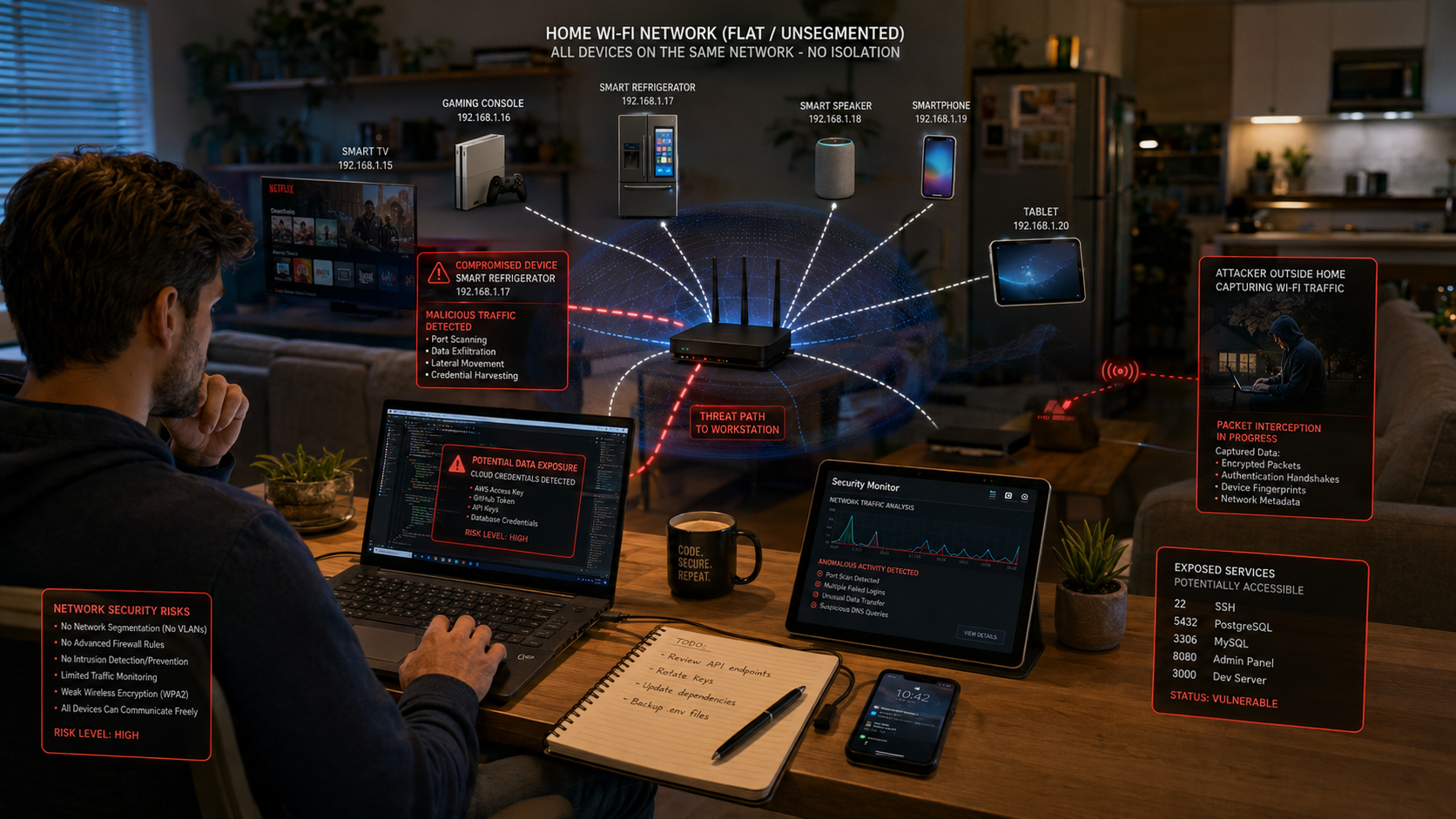

Most consumer home networks operate on a completely flat architecture, which means every connected device can talk to every other device freely. Consequently, if your smart refrigerator, a guest’s phone, or a family member’s tablet gets infected with malware, an attacker can easily scan your network for open SSH ports or unencrypted local databases running on your development machine. This lack of isolation turns a minor smart-home vulnerability into a major corporate risk.
Furthermore, default ISP routers often lack the processing power and advanced firmware updates necessary to block modern automated exploits. Indeed, they rarely support custom firewall rules, granular logging, or virtual local area networks (VLANs). For a software engineer handling highly sensitive API keys, cloud credentials, and deployment tokens, relying on default configurations is, therefore, a massive professional liability. Attackers know these devices are weak links and actively exploit them to gain initial access.
Additionally, consumer routers usually have weak encryption protocols enabled by default for backward compatibility with older devices. This vulnerability allows close-range attackers to sniff wireless packets and potentially capture sensitive data in transit. Therefore, standard home setups inherently fail to meet the rigorous security baselines required for handling modern enterprise software repositories.
Secure Home Network Guide for Remote Engineers: Essential Security Setup
1. Implement Network Segmentation via VLANs
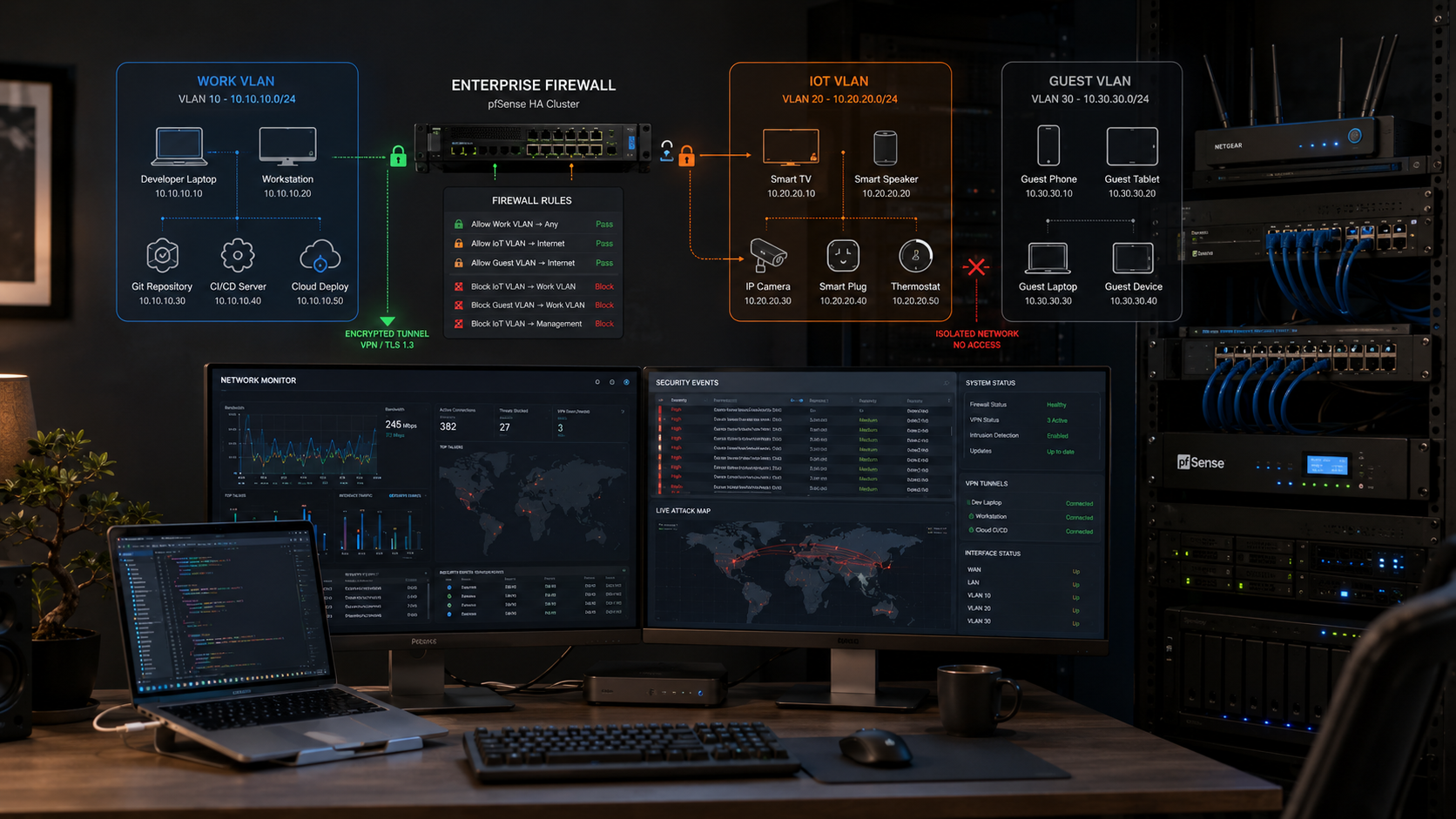
The most effective way to secure your workspace is to isolate your development machine from the rest of your chaotic household traffic. Accordingly, you can achieve this by creating Virtual Local Area Networks (VLANs) on a managed switch or a prosumer router. This layout ensures that even if another device on your network is compromised, the threat remains safely contained.
-
Production/Work VLAN: Dedicate this exclusively to your work laptop, test local servers, and production deployment tools.
-
IoT VLAN: Move all smart TVs, smart plugs, and voice assistants to a separate network so they cannot communicate with your workstation.
-
Guest VLAN: Keep friends and family on an isolated channel that only grants internet access without local visibility.
By establishing these boundaries, you build a resilient defense-in-depth architecture. Consequently, a compromised smart bulb on your IoT network cannot execute code or scan ports on your primary machine. This simple logical separation dramatically reduces your overall attack surface.
2. Upgrade to a Prosumer Router or Firewall
Ditch the basic router provided by your internet service provider immediately. Instead, invest in dedicated hardware running open-source or prosumer firmware like pfSense, OPNSense, or Ubiquiti UniFi. These platforms are excellent because they allow you to configure strict firewall rules, monitor real-time traffic spikes, and run network-wide intrusion detection systems.
Prosumer routing hardware offers frequent security patches and robust processing power to handle encrypted tunnels without slowing down your internet speed. Moreover, they give you deep visibility into packet traffic, allowing you to spot unauthorized outbound connections from your network. This level of control is absolutely essential for diagnosing anomalous behavior before it turns into a severe breach.
Furthermore, professional hardware allows you to configure multiple service set identifiers (SSIDs) mapped directly to your custom VLANs. This means your work Wi-Fi network can remain invisible to unauthorized devices. Ultimately, upgrading your hardware transitions your home office from a hobbyist setup into a hardened enterprise micro-branch.
3. Enforce Strict Firewall Rules
Once you segment your network, you must establish explicit firewall rules to control the traffic moving between your newly created subnets. By default, you should adopt a posture of implicit deny, which blocks all traffic unless it is explicitly permitted by a rule.
-
Block all inbound traffic from the IoT and Guest VLANs directly to the Work VLAN.
-
Allow the Work VLAN to establish connections to the internet, but completely restrict local broadcast discovery protocols.
-
Change all default management ports on your router and restrict router dashboard access to a physical, wired ethernet connection only.
Regularly auditing these firewall logs helps you identify rogue devices attempting to communicate across boundaries. Similarly, restricting configuration access ensures that an unauthenticated wireless user cannot tamper with your routing tables. Consequently, these rules ensure your development assets remain completely dark to the rest of the house.
Advanced Device Hardening and Safe Remote Access
Utilizing Dedicated Hardware VPNs
While software VPNs protect your laptop’s data in transit, running a dedicated hardware-level VPN client on your prosumer router provides a reliable extra layer of defense. For this reason, it ensures that every piece of data leaving your workspace is automatically encrypted before it even hits the public internet. This setup removes the risk of human error, such as forgetting to turn on your desktop VPN client before pulling code.
Moreover, a hardware-to-hardware VPN tunnel allows you to seamlessly connect your entire local development subnet to your company’s cloud VPC. This approach provides a stable, encrypted pipeline for staging environments and remote databases. Consequently, your development tools communicate securely without exposing open ports to the broader internet.
Additionally, this method protects your metadata by hiding your true destination IP addresses from your local ISP. Therefore, even if your local machine suffers from a software misconfiguration, the underlying hardware routing layer acts as a safety net to keep your development traffic thoroughly encrypted.
Transitioning to a Zero Trust Network Architecture
Modern corporate security is rapidly shifting away from traditional network perimeters toward a comprehensive Zero Trust Network Access (ZTNA) model. Therefore, you should implement tools like Tailscale, Perimeter 81, or Cloudflare Tunnels for your personal development projects and remote work flows. These tools ensure that devices must continuously verify their identity, device posture, and context before gaining access to any local development servers.
Under a Zero Trust framework, being on the correct physical network or VLAN is no longer enough to grant implicit trust. Every single request is authenticated, authorized, and encrypted from end to end. Consequently, this model completely neutralizes the threat of stolen credentials being used from an unrecognized or unverified device.
Furthermore, using lightweight mesh networks allows you to access your home development rig securely from anywhere in the world without opening risky firewall ports. As a result, transitioning to Zero Trust principles ensures that your home coding workspace aligns perfectly with modern enterprise-grade security standards.
Frequently Asked Questions
Why should a remote software engineer segment their home network?
Network segmentation is one of the best ways to improve home network security. Many home networks use a flat structure where all devices communicate freely. This setup creates unnecessary risks for remote software engineers. If a smart TV, gaming console, or IoT device becomes infected with malware, an attacker may use it as a starting point to target more valuable systems.
Creating separate network segments reduces this risk. A dedicated work VLAN can isolate development machines, testing environments, and deployment tools. Personal devices and smart-home equipment can remain on separate networks. This isolation limits the impact of a security incident and prevents attackers from moving freely across your network.
Segmentation also improves visibility and control. You can apply custom firewall rules to each network segment. This makes it easier to monitor suspicious activity and block unauthorized connections. Since remote engineers often manage source code, API keys, and cloud infrastructure, network segmentation provides an important layer of protection. It is a simple but highly effective way to strengthen home office security.
Can I secure my home development network using a standard ISP router?
A standard ISP router can provide basic protection for everyday internet use. However, it is often not enough for remote software engineers who handle sensitive data and production systems. Most ISP-provided routers focus on convenience rather than advanced security. As a result, they usually lack features such as VLAN support, detailed traffic monitoring, intrusion detection, and advanced firewall controls.
Firmware updates are another concern. Some ISP routers receive updates infrequently, which can leave known vulnerabilities unpatched. Attackers frequently target outdated networking equipment because it often contains security weaknesses.
Upgrading to a prosumer router or firewall can significantly improve protection. Platforms such as pfSense and OPNsense offer advanced security features. These include custom firewall rules, VPN support, network segmentation, and detailed logging. Such tools provide greater visibility into network activity and help identify unusual behavior. While a standard router may be acceptable for casual users, developers should consider more advanced hardware to protect valuable company assets and development resources.
How does a hardware firewall differ from a software firewall for developers?
Hardware and software firewalls serve different purposes, but both are important for security. A software firewall runs on a specific device. It monitors incoming and outgoing traffic for that machine. This helps block unauthorized access and restrict potentially harmful applications.
A hardware firewall operates at the network level. It sits between your internet connection and your local network. All traffic passes through it before reaching connected devices. This allows it to protect multiple systems at the same time.
Using both solutions creates a layered security model. The hardware firewall serves as the first line of defense. It filters malicious traffic before it enters the network. The software firewall then provides device-specific protection. This combination helps reduce risk and improve overall security.
For remote software engineers, layered protection is especially valuable. Development systems often connect to cloud services, repositories, and production environments. If one security layer fails, the other continues to provide protection. This approach makes it more difficult for attackers to gain access to sensitive systems and data.
Is changing the default Wi-Fi password enough to protect my work?
Changing the default Wi-Fi password is an important security step. However, it is only the beginning. Modern cyber threats target many areas beyond wireless passwords. Attackers often look for weak router settings, outdated firmware, and unsecured devices connected to the network.
A strong and unique Wi-Fi password helps prevent unauthorized access. However, additional measures are necessary. Disable Wi-Fi Protected Setup (WPS) because it has known security weaknesses. Change the default administrator credentials used to manage your router. Keep router firmware updated to patch security vulnerabilities. Whenever possible, enable WPA3 encryption for stronger wireless protection.
You should also separate work devices from personal and IoT devices. VLANs and guest networks make this process easier. A properly configured firewall adds another layer of defense. Multi-factor authentication further protects important accounts and services.
For remote software engineers, protecting source code and company resources requires a layered approach. A strong password is essential, but it should be part of a broader security strategy. Combining multiple protections provides much stronger defense against modern threats.
Should I use a separate internet connection for remote engineering work?
A separate internet connection can improve isolation and security. However, it is not necessary for most remote software engineers. The main advantage is physical separation between work and personal activities. This can reduce risk and simplify compliance requirements for certain industries.
The downside is cost. Maintaining a second internet connection increases monthly expenses. It may also require additional networking equipment and configuration. For many professionals, these costs outweigh the benefits.
A properly configured home network often provides sufficient protection. VLANs, dedicated work Wi-Fi networks, VPNs, and strong firewall rules can isolate development systems from personal devices. These measures create a secure environment while using a single internet connection.
A dedicated connection may be appropriate for government contractors or organizations with strict compliance requirements. Some employers may require complete physical separation of work systems. However, most remote engineers can achieve excellent security through network segmentation and modern security controls. The right choice depends on your risk profile, budget, and organizational requirements.
Conclusion
Building a secure home workspace requires planning and consistent effort. Remote software engineers work with valuable assets such as source code, credentials, and production systems. Protecting these resources should be a top priority.
This Secure Home Network Guide for Remote Engineers highlights several key security practices. Network segmentation helps isolate critical systems. Advanced routers and firewalls provide greater visibility and control. VPNs and Zero Trust solutions strengthen secure remote access. Together, these measures reduce the risk of cyberattacks and unauthorized access.
Home networks are no longer used only for personal activities. They now serve as extensions of corporate infrastructure. A single security weakness can expose sensitive information and disrupt business operations.
Take time to review your current network setup. Update firmware regularly. Use strong authentication methods. Monitor network activity and apply security updates promptly. By following this Secure Home Network Guide for Remote Engineers, you can create a safer development environment and protect both personal and professional assets from evolving cyber threats.
A secure digital workspace is also about maintaining a healthy balance between productivity, focus, and personal responsibilities while working remotely. For more practical advice on creating an efficient remote work routine, check out our guide on scheduling your work-from-home day around kids.