Should You Replace a Samsung Tablet Battery?
Few hardware problems feel as frustrating as a tablet that drops from 80% to zero within minutes. If you need to replace a Samsung tablet battery, you may wonder whether repairing your Galaxy Tab is worth the cost. Your tablet may die during a movie, require frequent charging, or take hours to reach a full charge.
Deciding whether to replace a Samsung tablet battery depends on several factors. Repair cost, tablet age, performance, software support, and battery condition all matter.
Lithium-ion batteries naturally lose capacity as they age. Repeated charging and discharging gradually reduce the energy they can store. Samsung also notes that reduced battery capacity cannot be restored once the battery has deteriorated.
This guide explains when a Galaxy tablet battery needs replacement. It also covers battery lifespan, replacement costs, repair considerations, and ways to decide if the repair is worthwhile.
Can a Samsung tablet battery be replaced?
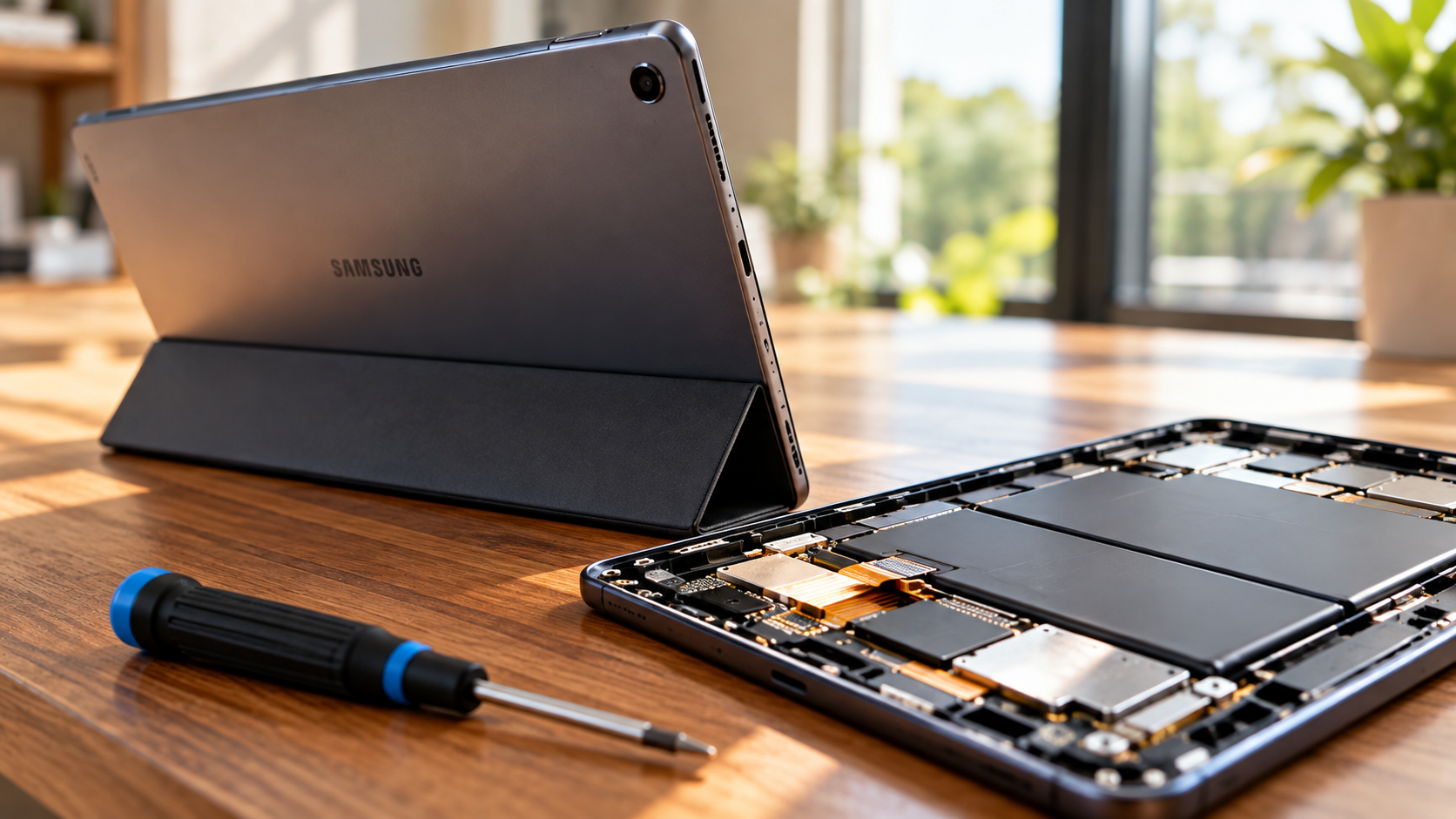
Yes, you can replace a Samsung tablet battery, but most Galaxy tablets do not have user-removable batteries. If you are wondering why modern devices use sealed batteries, see our guide to why tech companies stopped using removable batteries. Samsung identifies some Galaxy Tab models as having non-removable batteries and recommends using a service provider or authorized repair agent for replacement.
Modern tablets use tightly fitted displays and internal adhesive. Opening the device requires careful disassembly. A technician may need to separate the display before accessing the battery and other internal components.
That process creates several risks for inexperienced users. Excessive heat or force can damage the display, cables, connectors, or battery.
For that reason, professional repair is usually safer than attempting a battery replacement without suitable tools or experience. Samsung also recommends professional inspection when a Galaxy device shows battery problems or reduced performance.
Before booking a repair, check the exact Galaxy Tab model. Battery availability, repair procedures, parts, and service pricing can differ between models.
Why Certified Technicians Matter for Sealed Galaxy Tabs
Opening a sealed Galaxy tablet is more complicated than removing a conventional battery cover. The display and internal components can be delicate, while the battery is secured inside the chassis.
A trained technician has the appropriate tools and experience to separate these components safely. This reduces the chance of damaging the screen or internal connectors during the repair.
Professional service can also provide additional benefits:
- Proper battery handling: Lithium-ion cells require careful removal and installation.
- Correct replacement parts: Service centers can use compatible batteries for the specific model.
- Diagnostic testing: Technicians can check whether the battery is actually causing the problem.
- Repair protection: Authorized service may provide warranty or after-service support.
Samsung recommends service-center inspection when a Galaxy device experiences unexpected shutdowns, rapid battery drain, or charging problems.
DIY replacement may appear cheaper, but a damaged screen can quickly make the repair more expensive. If you lack repair experience, professional service is the safer option.
What is the lifespan of a Samsung tablet battery?
A Samsung tablet battery does not have one fixed lifespan. Usage patterns, charging habits, temperature, software activity, and the tablet model all affect battery aging. For broader context, learn how long Android tablets typically last and what can affect their useful life.
Lithium-ion batteries gradually lose capacity through repeated charging and discharging. Samsung describes the battery as a consumable component whose capacity decreases over time.
Many users may notice meaningful battery degradation after several years. However, the exact point varies considerably. Heavy gaming, high screen brightness, frequent charging, and hot environments can increase battery wear.
Common signs of an aging tablet battery include:
- Battery percentage falling unusually quickly.
- Unexpected shutdowns during normal use.
- The tablet requiring frequent charging.
- Charging behavior becoming inconsistent.
- Much shorter runtime than when the tablet was new.
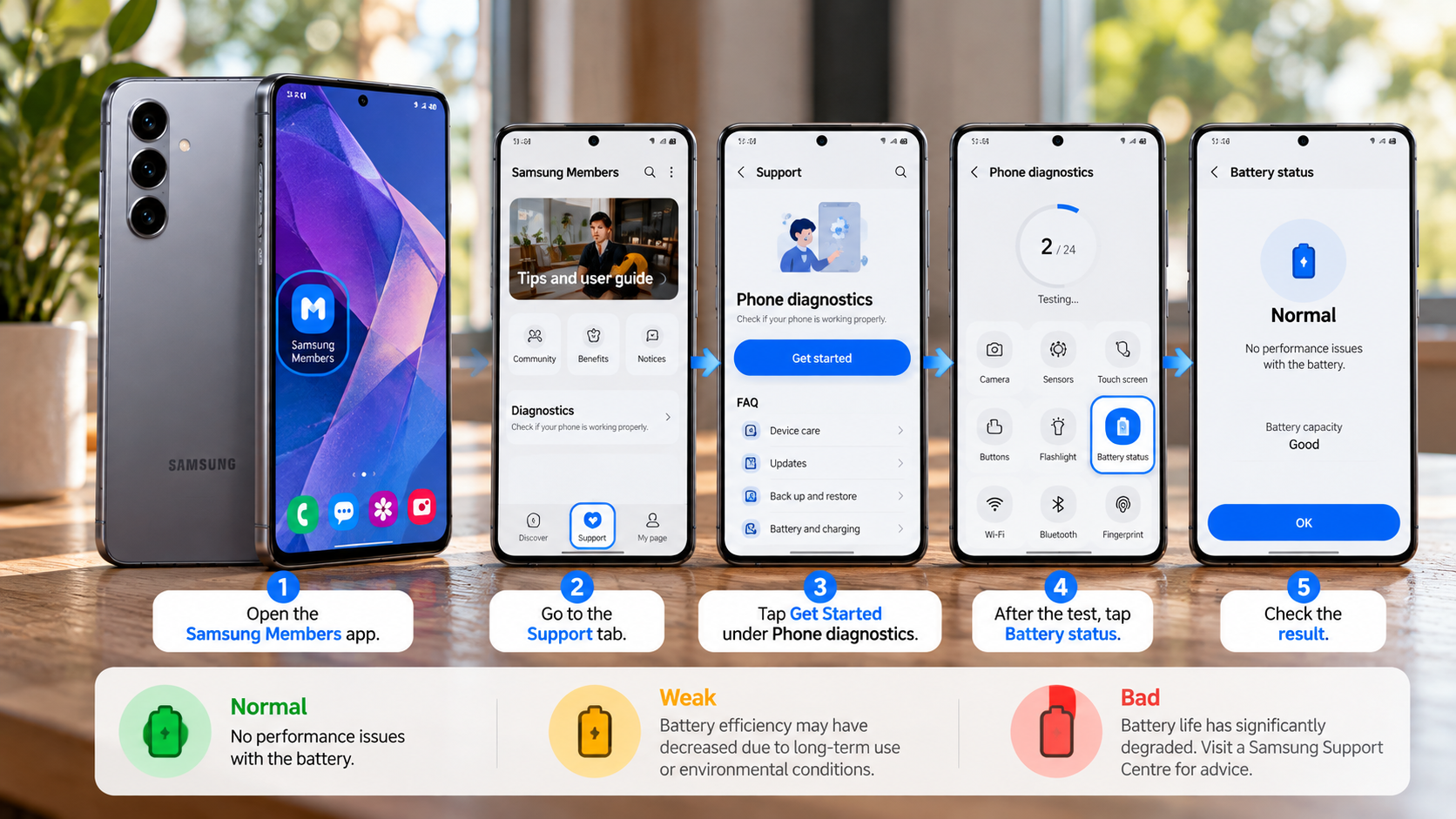
Battery drain does not always mean the battery itself has failed. Background apps and system activity can also increase consumption. Samsung recommends checking the device before assuming that a replacement battery is necessary.
Practical Tips to Maximize Galaxy Tablet Battery Health
You can reduce unnecessary battery wear by changing how you charge and store your Galaxy tablet. Samsung provides Battery Protection features that manage charging behavior on supported Galaxy devices. You can also learn more about the 80-20 rule for rechargeable batteries and how charging habits relate to battery longevity. Available options can vary by model and software version.
Depending on your device, Battery Protection may allow you to set a maximum charging level below 100%. Current Samsung guidance lists several possible limits, including 80%, 85%, 90%, and 95% on supported software.
Other useful habits include:
- Keep the tablet away from excessive heat.
- Avoid leaving it fully discharged for long periods.
- Use a compatible charger and power adapter.
- Avoid keeping the tablet at 100% for extended periods.
- Store an unused tablet around 50–70% charge.
Samsung recommends charging a device to approximately 50–70% for long-term storage. It also advises occasional charging during extended storage.
These habits cannot stop battery aging, but they can help manage long-term battery wear.
What does it cost to replace a Samsung tablet battery?
The cost to replace a Samsung tablet battery varies significantly by model, country, battery availability, and repair provider. A single universal price does not apply to every Galaxy Tab.
Independent repair shops may charge less than authorized service centers. However, the cheapest quote may not include the same parts, warranty, diagnostics, or repair standards.
Before approving the repair, ask for a complete estimate. Confirm whether the quoted price includes the battery, labor, adhesive, diagnostics, taxes, and any additional parts.
You should also check the exact Galaxy Tab model. A battery replacement for an older budget tablet may have a very different cost from one for a premium Galaxy Tab S model.
Samsung provides service-center support for tablets and lets customers check service options and parts information.
Avoid choosing a replacement solely because it has the lowest price. A damaged display or poor-quality battery can create additional costs. Compare the repair quote with the tablet’s current value and remaining software support before deciding.
Breaking Down Labor Expenses Versus Component Pricing
The battery itself is only one part of the total replacement cost. Labor can account for a significant portion because technicians must carefully access the internal battery.
Sealed tablets require more disassembly than devices with removable rear covers. A technician may need to separate the display, disconnect internal cables, remove adhesive, replace the battery, and reassemble the device.
Your final repair quote may therefore include:
- Replacement battery: The compatible battery for your specific Galaxy Tab model.
- Labor: Time required to safely open and reassemble the tablet.
- Adhesive: Materials used to secure components during reassembly.
- Diagnostics: Testing to confirm proper charging and battery operation.
- Additional repairs: Possible costs if the inspection finds other damaged components.
Samsung recommends professional inspection when battery problems appear because rapid drain or shutdowns can have causes other than battery degradation. If charging behavior is also a concern, understanding whether third-party chargers are safe can help you avoid blaming the battery for every charging problem.
Always request the total repair price before authorizing the work. This makes it easier to compare repair costs with buying another tablet.
Is it good to replace a Samsung battery?
Replacing a Samsung tablet battery can make financial sense when the rest of the device still performs well. A new battery can restore much of the tablet’s original runtime when capacity has significantly declined.
However, battery replacement does not upgrade the processor, display, storage, cameras, or software capabilities. That distinction matters when deciding whether to repair an older Galaxy Tab.
Consider a battery replacement when:
- The tablet still handles your everyday apps smoothly.
- The display and charging port remain in good condition.
- You like the tablet’s size and features.
- The repair cost is reasonable compared with another device.
- You expect to keep using the tablet for several more years.
Replacement becomes harder to justify when the tablet has multiple hardware problems. An aging processor, limited storage, poor software support, and a worn battery can make a new device more practical.
Samsung recommends professional battery inspection when devices show rapid drain, unexpected shutdowns, or charging problems.
Environmental and Financial Benefits of Device Repair
Repairing a working tablet can extend its useful life and delay the need for another device. That can reduce the amount of electronic waste generated when functioning hardware gets replaced.
A battery replacement also lets you keep the tablet’s existing display, processor, memory, storage, and other components. If those parts still meet your needs, replacing one worn component may be more practical than replacing the entire device. Before deciding whether to repair or replace the tablet, consider the disadvantages of using a tablet as a laptop replacement if you rely on it for more demanding work.
There are also financial considerations. A battery repair can cost substantially less than purchasing another tablet, but the comparison depends on the repair quote and your tablet’s current value.
Before making a decision, compare:
- Battery replacement cost
- Tablet’s current condition
- Remaining software support
- Performance for your everyday tasks
- Cost of a suitable replacement tablet
Do not repair a tablet solely because the battery is replaceable. Consider the entire device.
If the screen, processor, storage, and software remain suitable, a battery replacement can extend its useful life. If several major components are aging, putting money toward another tablet may make more financial sense.
Conclusion
The decision depends on more than battery life. Repair cost, tablet age, performance, software support, and overall condition all matter. Samsung explains that rapid battery drain, unexpected shutdowns, and other battery problems can indicate that a battery needs inspection or replacement. Samsung’s battery replacement guide
Before booking a repair, check these factors:
- Replace the battery if the tablet works well but has poor battery life or unexpected shutdowns.
- Consider repairing it if the screen, charging port, storage, and other hardware remain in good condition.
- Compare costs carefully if the repair quote approaches the price of a suitable replacement tablet.
- Consider upgrading if the tablet has several hardware problems, poor performance, or limited software support.
- Get a professional inspection if the battery is swollen, overheating, or behaving unpredictably.
A battery replacement does not make an old tablet new. It only restores the battery component. However, when the rest of the Galaxy Tab still meets your needs, replacing the battery can extend its useful life without replacing the entire device.
The simplest rule is this: if the battery is the main problem and the tablet still meets your needs, repair it. If several major problems exist, compare the total repair cost with a replacement before spending money.