What Is the 80-20 Rule for Rechargeable Batteries?
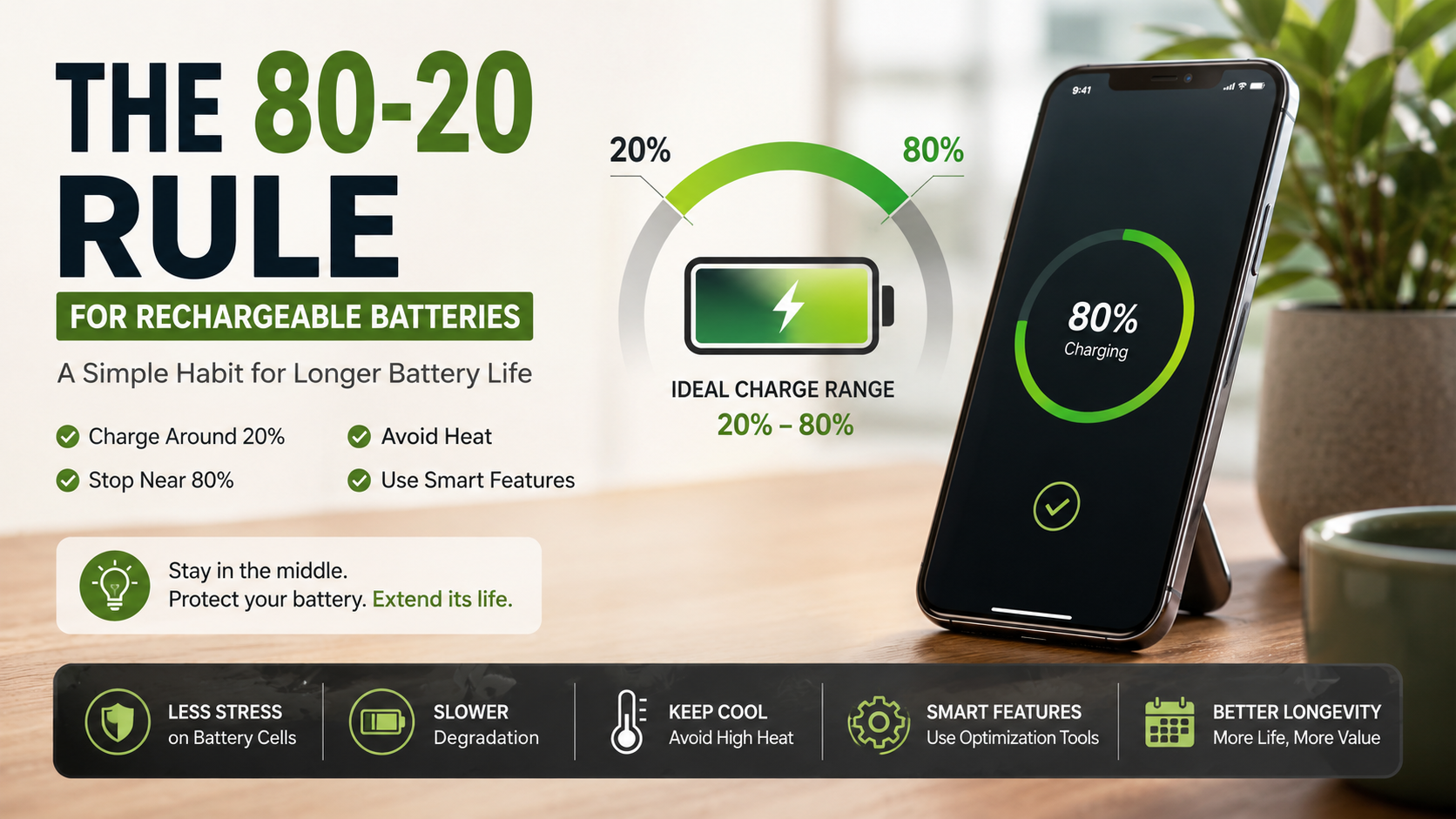
The 80-20 rule for rechargeable batteries is a simple charging guideline for improving long-term battery health. It recommends keeping lithium-ion batteries between roughly 20% and 80% charge whenever practical. This approach can reduce prolonged exposure to the high and low charge levels that contribute to battery aging.
Modern consumer electronics rely heavily on lithium-ion batteries. They power smartphones, laptops, tablets, wearables, and electric vehicles. Over time, their capacity naturally declines because of chemical and physical changes inside the cells.
Your charging habits can influence how quickly that decline occurs. Following the 80-20 rule for rechargeable batteries can help reduce unnecessary battery stress during everyday use.
The guideline does not mean you should never charge to 100%. A full charge is useful when you need maximum runtime. The goal is to avoid keeping a battery at extreme charge levels when you do not need to.
For additional guidance, the U.S. Department of Energy’s Energy Saver resources on batteries and energy efficiency provide useful information about battery-powered devices and efficient energy use.
Technical research and guidance from sources such as Battery University show that lithium-based cells experience greater stress near voltage extremes. Heat can also accelerate battery degradation, making temperature an important part of battery care.
In this guide, we explain how the 80-20 rule for rechargeable batteries works and whether charging to 100% causes damage. We also cover the 40-80 rule for laptops, iPhone charging limits, overnight charging, and practical ways to extend rechargeable battery life.
What is the 80/20 rule for charging batteries?
The 80/20 rule for rechargeable batteries recommends keeping a lithium-ion battery between about 20% and 80% charge. This range is a practical guideline, not a strict requirement. Its goal is to reduce the time a battery spends at stressful charge levels. For more everyday charging guidance, see these common myths about charging your phone.
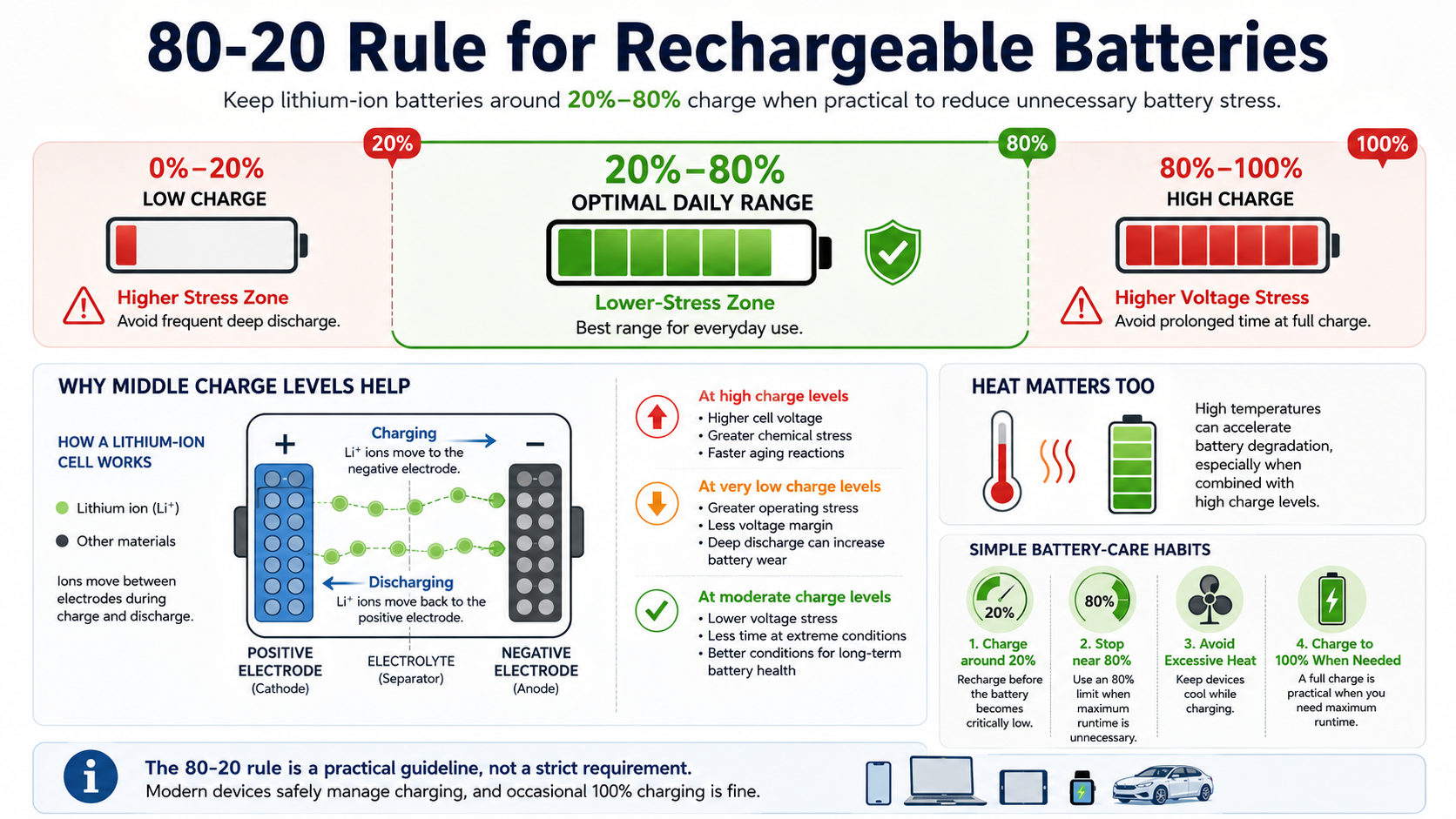
Lithium-ion cells experience higher voltage-related stress near full charge. Very low charge levels can also increase stress and leave less operating margin. Keeping the battery within the middle portion of its range can therefore support longer-term battery health.
You do not need to follow the rule perfectly. Charging to 100% when you need extra runtime is completely reasonable. The main benefit comes from avoiding unnecessary time at extreme charge levels.
For everyday use, these habits can help:
- Charge around 20% when convenient.
- Stop near 80% when maximum runtime is unnecessary.
- Avoid prolonged exposure to high temperatures.
- Use built-in battery optimization features when available.
The 80-20 rule works best as a flexible habit rather than an absolute charging requirement.
Why Middle Voltage States Reduce Cell Strain
Lithium-ion batteries move lithium ions between two electrodes during charging and discharging. This electrochemical process naturally causes changes inside the cell. Repeated exposure to extreme states of charge can accelerate unwanted chemical reactions and physical changes.
High states of charge generally create greater voltage stress. They can also accelerate electrolyte oxidation and other aging reactions. Low states of charge can increase stress when the battery approaches its lower voltage limit.
A middle charge range reduces the amount of time the battery spends under these conditions. That does not stop degradation completely. Every lithium-ion battery gradually loses capacity through normal use and aging.
Temperature also matters. High heat can accelerate many degradation reactions, especially when combined with high charge levels. Keeping a device cool can therefore be just as important as following a specific percentage range.
The practical takeaway is simple: moderate charge levels and moderate temperatures are generally easier on lithium-ion cells. You do not need to monitor the battery constantly. Small changes to daily charging habits can reduce unnecessary stress over time.
Is charging to 80% or 100% better for battery life?
Charging to 80% is generally better for long-term battery longevity than keeping a lithium-ion battery at 100% for extended periods. The reason is linked to cell voltage. Lithium-ion batteries reach their highest voltage near full charge, which can accelerate certain aging reactions. Your charger also matters, so understanding 5V 1A vs. 5V 2A charging can help you choose the right option.
A typical lithium-ion cell may reach about 4.2 volts at full charge. The exact voltage varies by battery chemistry and device design. An 80% charge does not always correspond to one fixed voltage, either.
The important point is that reducing the maximum state of charge can reduce high-voltage exposure. Many manufacturers now offer charge limits for this reason.
However, charging to 100% is not inherently harmful. Modern devices are designed to manage full charging safely. If you need maximum runtime for travel or a long workday, charging fully makes sense.
For daily use, an 80% limit may be worthwhile if your device supports it. If you frequently need the extra capacity, convenience should take priority. You can also learn more about battery health versus cycle count when evaluating long-term battery wear.
Balancing Daily Screen Time and Cell Longevity
Stopping at 80% gives you less immediate runtime than a full charge. That trade-off can be worthwhile when your device stays close to a charger throughout the day.
For example, someone working at a desk may rarely need more than 80%. A lower charging limit can reduce the battery’s exposure to high voltage without affecting daily productivity.
Travel creates a different situation. You may need every available percentage when outlets are unavailable. In that case, charging to 100% before leaving is perfectly practical.
The same principle applies to demanding activities. Long flights, outdoor trips, navigation, gaming sessions, and extended workdays may require maximum capacity.
Think of the 80% limit as a battery longevity option, rather than a rule you must follow every day.
A practical approach is:
- Use an 80% limit during normal routines.
- Charge to 100% when extra runtime matters.
- Avoid leaving a fully charged device in excessive heat.
- Enable automatic charging optimization when your device provides it.
This flexible approach balances battery health with convenience. You gain the benefits of reduced high-voltage exposure without sacrificing useful runtime when you actually need it.
What is the 40-80 rule for laptop batteries?
The 40-80 rule for laptop batteries is a more conservative version of the 80-20 approach. It suggests keeping a laptop between approximately 40% and 80% charge during regular use.
The idea is especially useful for laptops that spend most of their time connected to AC power. Keeping a lithium-ion battery at 100% for long periods can increase high-voltage stress. Laptop heat can add another source of battery wear.
Modern laptops often include battery health or charge-limit features. These tools can restrict charging to a set percentage. Some systems can also learn charging patterns and reduce the time spent at full capacity.
You do not need to follow 40-80 perfectly. Allowing the battery to fall below 40% occasionally does not cause immediate damage. Likewise, charging beyond 80% is sometimes useful.
The guideline is best viewed as a long-term battery maintenance strategy. It is particularly helpful for users who keep their laptops plugged in for much of the day.
Managing Continuous AC Power on Modern Laptops
Keeping a laptop connected to AC power does not automatically mean the battery is constantly charging. Modern laptops use power-management systems to control charging and protect the battery. If you use a laptop charger regularly, it also helps to understand why laptop chargers have a box in the middle of the cable.
Many manufacturers provide a battery charge limit that stops charging around 80%. Once enabled, the laptop can run from external power while reducing unnecessary high-voltage exposure.
The exact feature name varies between manufacturers and operating systems. Some laptops offer settings through firmware or manufacturer software. Others provide battery-health options directly within the operating system.
Heat remains important. A laptop running demanding software can become warm even while connected to AC power. Excessive heat can accelerate battery aging, particularly when the battery is also maintained at a high charge level.
For better battery care:
- Enable the laptop’s charge limit if available.
- Keep ventilation openings clear.
- Avoid prolonged exposure to high temperatures.
- Allow the battery to operate within a moderate range when practical.
You do not need to repeatedly unplug and reconnect the charger. Built-in battery management is designed to handle this process automatically.
Is it better to charge to 80% or 100% on an iPhone?
Charging an iPhone to 80% can help reduce long-term battery aging, especially if you plan to keep the device for several years. Apple provides charging-management features that make this easier.
On supported iPhone models, users can set an 80% Charge Limit. The device can also use Optimized Battery Charging to reduce the amount of time the battery remains fully charged.
An 80% limit is most useful when your normal routine provides enough battery capacity. If you regularly run out of power before the end of the day, charging to a higher level may be more practical.
Charging an iPhone to 100% does not mean the battery is being damaged immediately. Modern iPhones include battery-management systems designed to control charging safely.
Your ideal setting depends on how you use the phone. Heavy users may benefit more from maximum capacity. Light or moderate users may prefer the 80% limit for long-term battery care.
Apple’s built-in tools make it easier to balance battery longevity and daily convenience without manually monitoring the charge percentage all day.
Utilizing Built-in iOS Charging Management Tools
Apple includes several features designed to manage iPhone charging and battery aging. Optimized Battery Charging can reduce the amount of time an iPhone remains fully charged. On supported models, an 80% Charge Limit provides a more direct way to reduce high-charge exposure.
Optimized Battery Charging learns from your routine. When enabled, the iPhone may pause charging around 80% and complete charging closer to when you normally need the phone.
The 80% Charge Limit works differently. It establishes a maximum charging level for everyday use. You can still override the limit when you need additional battery capacity.
These features are useful because they automate battery management. You do not need to constantly check the battery percentage or disconnect the charger manually.
For everyday iPhone use:
- Enable Optimized Battery Charging when it suits your routine.
- Consider an 80% Charge Limit if you rarely need a full charge.
- Charge to 100% when additional runtime is important.
- Keep the phone away from excessive heat while charging.
Using these tools can reduce unnecessary high-charge exposure while preserving convenience.
Does charging to 100% damage the battery?
Charging a modern lithium-ion battery to 100% does not cause immediate damage. Consumer devices include charging controls that prevent unsafe overcharging. However, regularly keeping the battery at a very high state of charge can accelerate long-term aging.
The concern is not that the battery suddenly becomes damaged at 100%. Instead, high voltage can increase the rate of certain chemical reactions inside the cell. The effect accumulates gradually over many months and charging cycles.
Heat can make this process worse. Charging a device while it is exposed to high temperatures can increase battery stress. This is why temperature management matters alongside charging percentages.
Occasionally charging to 100% is completely reasonable. You may need maximum capacity before traveling, working remotely, or spending a long day away from a charger.
For regular charging, an 80% limit can reduce high-voltage exposure. The best approach depends on your priorities. If maximum daily runtime matters most, use the full capacity. If longevity matters more, consider a lower charge limit. For users with several devices, multi-port chargers can also be useful when charging multiple batteries at once.
Understanding Modern Battery Management Systems
Modern smartphones, laptops, and other rechargeable devices use sophisticated battery management systems (BMS). These systems monitor factors such as voltage, current, temperature, and charging conditions.
A BMS helps prevent unsafe charging conditions. It does not mean that charging to 100% has no effect on battery aging. The system manages safety, while normal electrochemical aging continues inside the cells.
Once a battery reaches its intended maximum charge, the device controls the charging process. It can reduce or stop charging current as needed. Some devices also adjust charging behavior based on temperature and usage patterns.
The main distinction is between safety and longevity. A device can safely reach 100% while still experiencing more long-term wear than it would at a lower charge limit.
You therefore do not need to worry about accidentally overcharging a modern consumer device. Instead, focus on the factors you can control:
- Avoid excessive heat.
- Use charge limits when practical.
- Avoid unnecessary time at 100%.
- Keep software and battery-management features enabled.
These habits support battery longevity without making everyday charging complicated.
Frequently Asked Questions
Can I leave my smartphone charging overnight safely?
Leaving your phone plugged in overnight is safe because internal protection circuits prevent overcharging. However, the battery remains at 100% charge for several hours, which causes mild chemical strain and slight thermal buildup. To minimize wear, enable optimized charging features in your device settings or use a smart plug to stop power delivery early.
Does fast charging degrade rechargeable batteries faster?
Fast charging produces higher thermal output and greater current density, which can accelerate wear if thermal management is poor. Modern fast chargers communicate directly with device hardware to scale down current as the battery fills. Using standard charging speeds overnight and saving rapid charging for emergencies preserves cell life.
Should I occasionally discharge my battery to zero percent?
Modern lithium-ion batteries do not suffer from the “memory effect” common in older nickel-cadmium cells. Discharging a modern cell to zero percent places extreme mechanical strain on the electrodes and risks triggering low-voltage protection locks. It is best to reconnect your device before the remaining power falls below 20%.
At what battery health percentage should I replace my battery?
Most hardware manufacturers recommend replacing a rechargeable battery once maximum capacity drops below 80%. At this threshold, internal resistance rises, leading to unexpected shutdowns, reduced processing performance, and noticeably shorter runtime. Replacing the cell at 80% restores original performance and prevents system instability.
Conclusion
Understanding how lithium-ion batteries age can help you make smarter charging decisions. Both very high and very low states of charge can increase battery stress. Heat can further accelerate the aging process.
The 80-20 rule for rechargeable batteries offers a simple way to reduce unnecessary exposure to these conditions. Keeping a battery around 20% to 80% can support long-term battery health. It is a guideline rather than a requirement.
Charging to 100% remains safe when you need maximum runtime. The main concern is prolonged exposure to high charge levels, especially in warm conditions. Occasional full charging is therefore perfectly reasonable.
For better everyday battery care:
- Keep your battery around 20% to 80% when practical.
- Use an 80% charge limit when your device supports it.
- Avoid excessive heat during charging.
- Use fast charging when convenience requires it.
- Do not deliberately discharge lithium-ion batteries to zero.
- Follow your device manufacturer’s battery-health recommendations.
Modern smartphones and laptops already include useful charging controls. Enable these features when they fit your routine.
Small changes can reduce unnecessary battery stress. More importantly, they can help you get useful service from your devices for longer.