4 Bluetooth Myths You Should Stop Falling For
Wireless audio gear, smartwatches, and hands-free car connections are part of everyday life. Yet, persistent Bluetooth myths still circulate across social media and online forums. Some people worry about radiation, battery drain, hearing damage, or wireless hacking.
These misconceptions can create unnecessary stress. They can also encourage users to change settings without understanding the actual risks.
Bluetooth uses low-power radiofrequency signals to connect nearby devices. Consumer devices must comply with applicable radiofrequency exposure and transmission requirements. The Federal Communications Commission (FCC), for example, regulates radiofrequency exposure from wireless devices in the United States.
Health questions about radiofrequency exposure are also studied by the World Health Organization (WHO). WHO explains that radiofrequency fields are part of the non-ionizing portion of the electromagnetic spectrum and continues to assess the available scientific evidence.
Understanding how Bluetooth works makes it easier to separate genuine limitations from internet rumors. Some concerns have a practical basis, while others are based on misunderstandings about wireless technology.
This guide examines four common Bluetooth myths. You will learn about Bluetooth security, wireless headphones, radiofrequency exposure, and practical reasons to disable Bluetooth. You will also discover the limitations that Bluetooth users may actually notice.
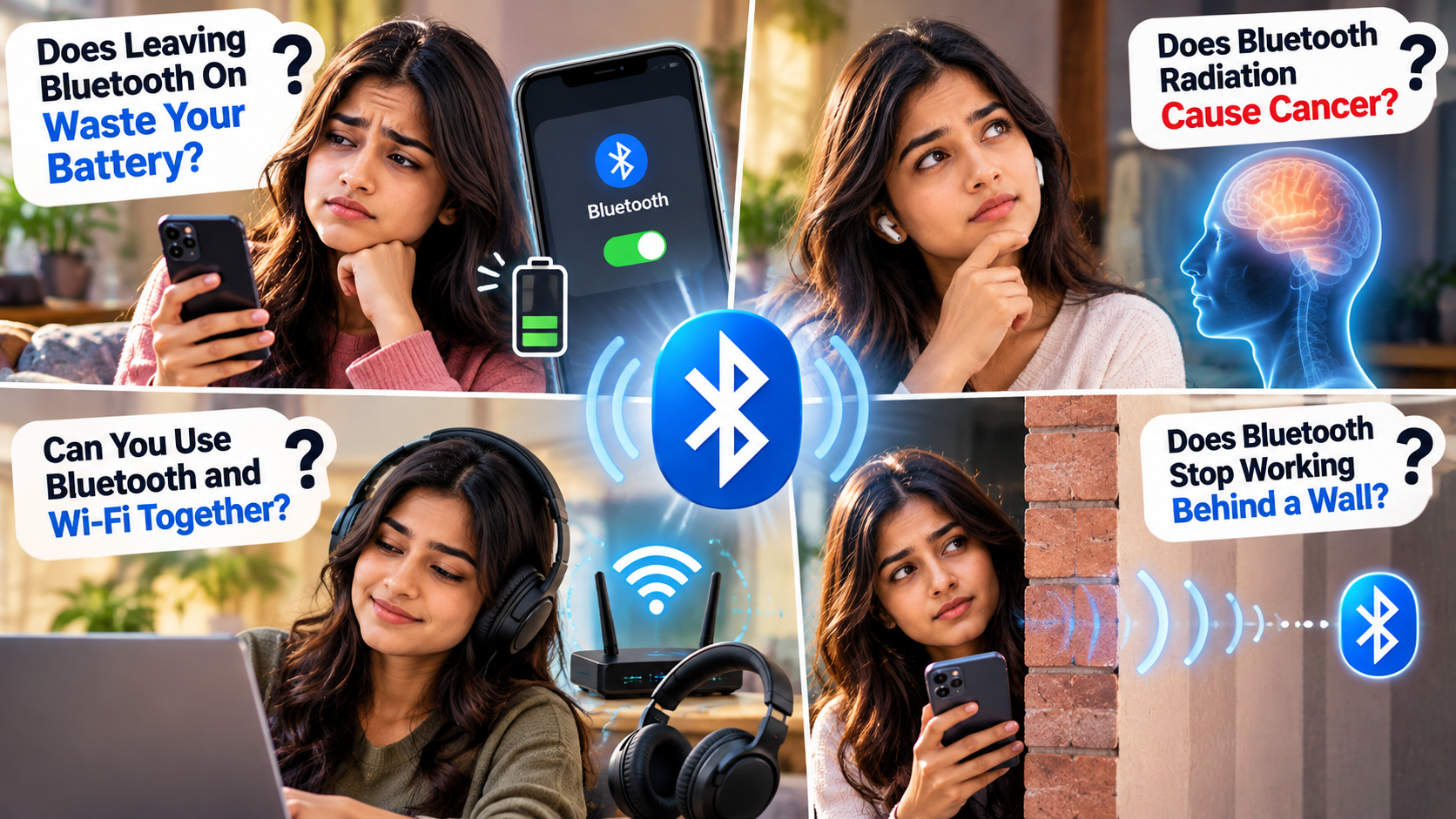
1. Bluetooth Battery Drain: Does Leaving Bluetooth On Waste Your Battery?
One of the most common Bluetooth myths is that leaving Bluetooth enabled quickly drains your smartphone battery. This belief comes partly from older wireless technologies that were less power-efficient than modern Bluetooth.
Today, Bluetooth Low Energy (BLE) is designed to use very little power. It is widely used in smartwatches, fitness trackers, keyboards, earbuds, and other connected devices.
When Bluetooth is switched on but not actively communicating with an accessory, its battery impact is generally small. However, the exact amount of power used varies between devices and usage patterns. If your phone battery is draining unusually fast, other factors may also be involved, such as background apps or battery health. You can also learn more about why your laptop battery drains so fast when investigating broader battery problems.
Your phone model, Bluetooth version, connected accessories, signal strength, and communication frequency can all affect battery consumption. Therefore, claims that Bluetooth always uses a specific percentage of battery should not be treated as universal.
Active Bluetooth connections can use more power than simply leaving the Bluetooth radio enabled. Even so, most users are unlikely to notice dramatic battery loss from Bluetooth alone.
Turning Bluetooth off can provide a small saving when your battery is critically low. Under normal conditions, however, battery drain is not a strong reason to avoid Bluetooth.
2. Health Risks and Cancer: Does Bluetooth Radiation Cause Cancer?
Health concerns are among the most persistent Bluetooth myths found online. One common claim suggests that wireless earbuds cause cancer or brain tumors because they transmit radiofrequency radiation.
Bluetooth uses radiofrequency electromagnetic energy, which is classified as non-ionizing radiation. Unlike ionizing radiation from X-rays, these signals do not have enough energy per photon to directly ionize atoms or break chemical bonds.
Bluetooth devices also generally transmit at relatively low power. However, it would be inaccurate to claim that wireless technology has absolutely no biological interaction under every possible exposure condition.
Radiofrequency exposure continues to be studied, and safety standards are designed around established exposure limits. For ordinary Bluetooth use, current evidence does not establish that Bluetooth earbuds cause cancer or brain tumors.
There is a more established concern with headphones: excessive sound exposure. Listening to loud audio for extended periods can damage hearing, regardless of whether headphones use Bluetooth or a cable. If you are deciding between the two connection types, understanding the differences between wired and wireless audio can also help you choose the right option for your listening habits.
For safer use, keep your volume comfortable and take regular listening breaks. These practical habits matter more than worrying about unsupported Bluetooth radiation claims.
3. Wi-Fi Interference: Can You Use Bluetooth and Wi-Fi Together?
Another common example of Bluetooth myths involves Wi-Fi interference. Some people believe Bluetooth and Wi-Fi cannot operate properly at the same time because both technologies can use the 2.4 GHz frequency band.
The reality is more practical. Bluetooth and Wi-Fi are designed to coexist, although they can sometimes interfere with each other when the wireless environment becomes crowded.
Bluetooth uses frequency-hopping techniques to communicate across different parts of its available spectrum. Wi-Fi uses its own channels and interference-management methods. Modern devices also include coexistence techniques that help manage simultaneous wireless activity.
This means you can normally use Bluetooth headphones while your phone remains connected to Wi-Fi. For example, you can stream music through Bluetooth while browsing the internet over Wi-Fi.
Problems can still appear in environments containing many wireless devices. You may experience occasional audio stuttering, slower connections, or temporary dropouts. If your Bluetooth connection repeatedly fails or disconnects, understanding the reasons your Bluetooth keeps disconnecting can help you identify and fix the problem.
Distance, network congestion, device quality, and physical obstacles can also affect performance. Moving closer to your Bluetooth accessory may improve the connection.
So, Bluetooth and Wi-Fi can work together. Sharing the same frequency band does not mean you must choose one technology over the other.
4. Walls Block Bluetooth Signals: Does Bluetooth Stop Working Behind a Wall?
The idea that Bluetooth immediately stops working behind a wall is another one of the common Bluetooth myths. In reality, Bluetooth signals can pass through many ordinary building materials, although walls can weaken the signal.
Several factors determine how well a Bluetooth connection performs. These include distance, device power, antenna design, obstacles, and interference from other wireless equipment.
A thin interior wall may have only a modest effect on signal strength. Thick concrete walls, reinforced structures, and metal barriers can have a much stronger effect.
Distance remains another important factor. Bluetooth is designed mainly for short-range communication, so moving farther away from the connected device generally increases the chance of a weaker connection.
The practical range also varies between products. Some Bluetooth devices can maintain connections beyond the commonly quoted 10-meter range under favorable conditions. Obstacles can reduce that range considerably.
If your connection drops when you move between rooms, the wall may not be the only cause. Distance, interference, antenna placement, and building materials can all contribute.
Therefore, walls can weaken Bluetooth signals, but they do not automatically block them. Connection quality depends on the entire wireless environment.
Is Bluetooth Risky?
Bluetooth is generally considered safe for typical everyday use, but that does not mean it is completely risk-free. Like other wireless technologies, it can have security vulnerabilities. This is one reason why some Bluetooth myths about hacking and privacy continue to spread.
Modern Bluetooth devices can use encryption, authentication, frequency hopping, and privacy features. The exact protections depend on the Bluetooth version, operating system, device, and connection method.
Most users can reduce security risks by keeping their devices updated. They should also avoid accepting unexpected pairing requests or connecting to unfamiliar devices.
Security vulnerabilities such as bluebugging have existed, but they usually require specific conditions or exploitable weaknesses. Simply leaving Bluetooth enabled does not automatically expose your phone to attackers.
For safer everyday use:
- Keep your phone and Bluetooth accessories updated.
- Avoid unknown pairing requests.
- Remove devices you no longer use.
- Be cautious with unfamiliar public devices.
- Disable discoverability when it is unnecessary.
Understanding these basic precautions is more useful than worrying about exaggerated Bluetooth myths.
Are Bluetooth Headphones Unhealthy?
Bluetooth headphones are not known to cause health problems simply because they use wireless signals. They transmit non-ionizing radiofrequency energy at relatively low power levels.
One of the most common Bluetooth myths is that wireless earbuds expose the brain to dangerous radiation. Bluetooth generally operates at much lower transmission power than a smartphone during cellular communication.
Current evidence has not established that normal Bluetooth exposure causes the cellular or genetic damage often claimed online. However, research into radiofrequency exposure continues, so absolute claims should be avoided.
The more established concern with headphones is excessive sound exposure. Listening to loud audio for extended periods can damage hearing. This applies to both wired and wireless headphones.
For safer listening:
- Keep the volume at a comfortable level.
- Take regular listening breaks.
- Avoid prolonged exposure to very loud sounds.
- Use noise cancellation when it helps you avoid increasing volume. Understanding how noise cancellation works can also help you use this feature effectively without simply increasing the volume.
Therefore, managing listening volume is a more practical concern than worrying about unsupported Bluetooth radiation claims.
What Does Bluetooth Do to the Human Body?
Bluetooth devices communicate using radiofrequency electromagnetic fields. These signals are classified as non-ionizing radiation. They do not have enough photon energy to directly ionize atoms like X-rays can.
X-rays are an example of ionizing radiation. At sufficient exposure levels, they can damage biological tissue. Bluetooth operates at much lower photon energies and uses relatively low transmission power.
Radiofrequency energy can interact with biological tissue. At sufficiently high exposure levels, its established effect is heating. Consumer Bluetooth devices operate at power levels intended for short-range communication.
However, saying Bluetooth has absolutely zero biological effect would be too broad. Research into radiofrequency exposure continues, while safety standards are based on established exposure limits and available evidence.
For everyday users, the important distinction is between ionizing and non-ionizing radiation. Bluetooth should not be treated like an X-ray source.
Normal Bluetooth use also does not provide established evidence that it causes genetic mutations or cellular breakdown. Such claims remain among the more serious Bluetooth myths found online.
What Are the Disadvantages of Bluetooth?
Bluetooth is convenient, but it has some practical disadvantages. These limitations are often more relevant to users than many common Bluetooth myths about health or safety. Issues such as battery dependence, pairing problems, latency, and compatibility are discussed in more detail in our guide to the disadvantages of using Bluetooth for everything.
One issue is audio latency. A small delay can become noticeable during gaming, musical performance, or other activities requiring precise synchronization. Modern Bluetooth standards and codecs can reduce latency, but they cannot eliminate it in every situation.
Audio quality can also vary. Bluetooth uses codecs to transmit audio efficiently, and the result depends on the codec, source device, headphones, and settings.
Interference can cause another problem. Bluetooth operates in the 2.4 GHz frequency band, which is also used by Wi-Fi and other wireless devices. Crowded environments can sometimes cause connection problems or audio interruptions.
Other disadvantages include:
- Battery dependence for many wireless accessories.
- Pairing problems between devices.
- Compatibility differences between operating systems.
- Delays when switching between devices.
- Loss of use when an accessory runs out of power.
Modern Bluetooth has improved considerably. Still, wired connections can remain useful when you need reliable performance, very low latency, or continuous operation.
Why Should I Turn Off Bluetooth?
You generally do not need to turn off Bluetooth because of radiation concerns. Many Bluetooth myths suggest that disabling it protects your health, but ordinary Bluetooth use is not a reason to constantly switch the feature off.
There are practical reasons to disable Bluetooth temporarily. Turning it off can stop unwanted connections, prevent accidental connections, and eliminate the small amount of power used by an active wireless connection. If you are using Bluetooth to share an internet connection rather than connect accessories, understanding what Bluetooth tethering is can help you decide whether you actually need the feature enabled.
It can also help when troubleshooting pairing problems. If your phone repeatedly connects to the wrong accessory, switching Bluetooth off can interrupt those connections.
Privacy can be another consideration. Limiting discoverability can reduce unnecessary connection requests. However, leaving Bluetooth enabled does not mean strangers can automatically access your phone.
You might turn Bluetooth off when:
- You are not using Bluetooth accessories.
- Your battery is critically low.
- A device keeps connecting incorrectly.
- You are troubleshooting connection problems.
- You want to reduce unnecessary wireless activity.
For most users, Bluetooth can remain enabled when needed. The practical reasons to disable it involve battery, connectivity, privacy, or troubleshooting, not unsupported health fears.
Why These Bluetooth Myths Continue to Spread
These Bluetooth myths often survive because wireless technology is invisible. Users cannot see radio signals, so technical explanations can easily be replaced by assumptions or exaggerated claims.
Some myths also contain a small amount of truth. Bluetooth can consume power, wireless signals can experience interference, and radiofrequency exposure is a legitimate area of scientific research. The problem begins when these facts are exaggerated into claims that Bluetooth is inherently dangerous.
Understanding the technology provides a more useful perspective. Modern Bluetooth is designed for short-range, low-power communication. It also includes security and coexistence features that help it work alongside other wireless technologies.
That does not mean Bluetooth is perfect. Battery consumption, connection problems, interference, latency, and hearing damage from excessive volume are genuine issues users may encounter.
The best approach is therefore to separate real Bluetooth limitations from unsupported Bluetooth myths. Keep your devices updated, use reasonable listening volumes, and manage wireless connections carefully.
You do not need to constantly disable Bluetooth because of ordinary health fears. Instead, base your decision on practical factors such as battery life, connectivity, privacy, and whether you actually need the connection.