Does the Pixel Tag Have a Replaceable Battery?
Bluetooth trackers make it easier to keep track of everyday essentials. You can attach them to your keys, slip them into your wallet, or place them inside your luggage. If you’re considering Google’s tracker, explore its features, price, availability, and alternatives before purchasing. However, battery replacement is another important consideration. So, does the Pixel Tag have a replaceable battery?
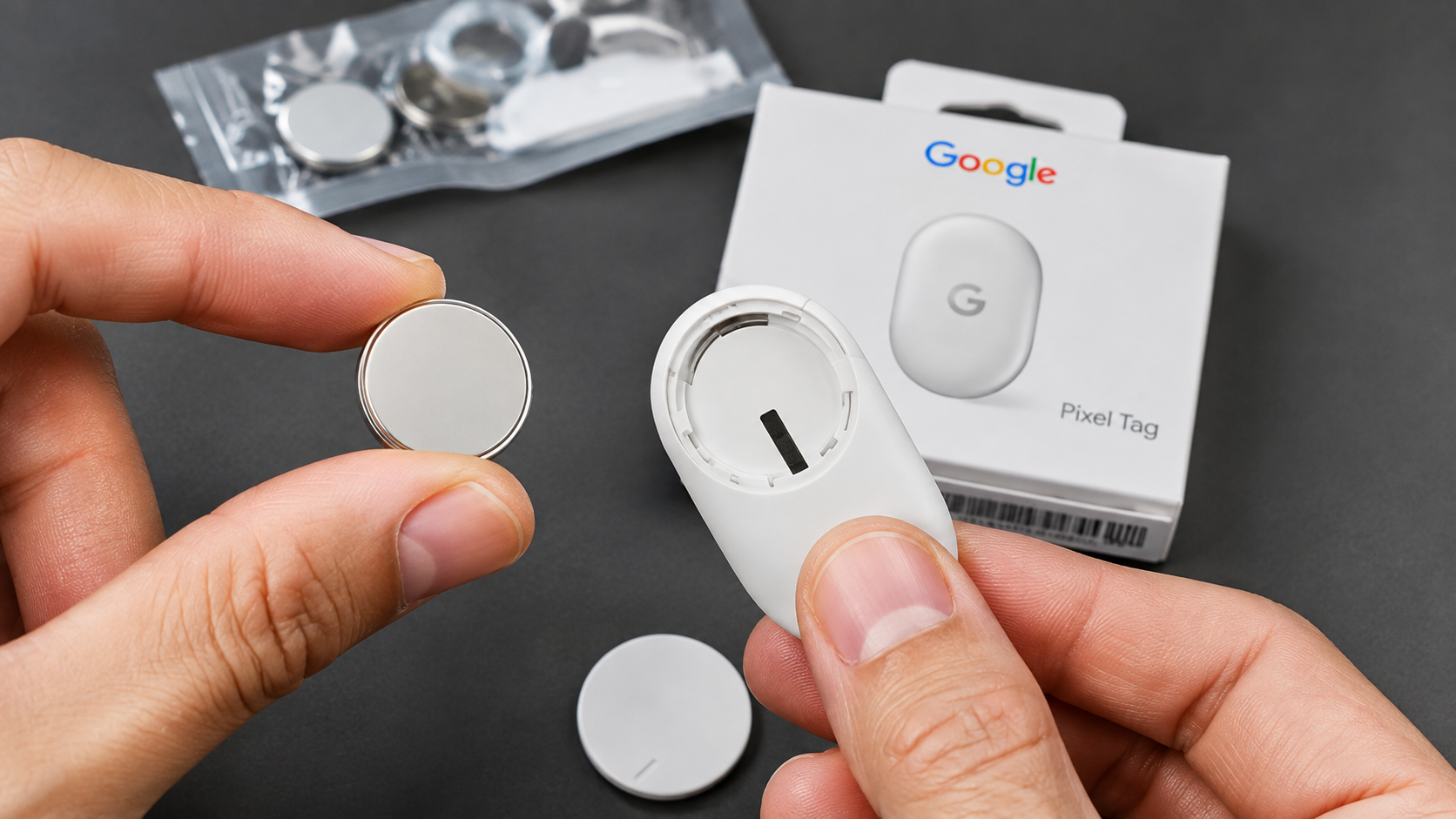
Yes, the Google Pixel Tag has a user-replaceable CR2032 coin cell battery. You don’t need to replace the entire tracker when its battery runs out. Google designed the device with a removable battery cover for convenient maintenance.
In this guide, we’ll explain how long the Pixel Tag battery lasts, which replacement battery you need, and how to install it. We’ll also examine unusual battery drain and explain how to troubleshoot potential problems.
How Long Does a Pixel Tag Battery Last?
The Google Pixel Tag battery lasts over one year under typical usage conditions. Google uses a replaceable CR2032 lithium coin cell to power the tracker. This battery supports everyday tracking without requiring regular charging. Unlike rechargeable Bluetooth devices, the Pixel Tag doesn’t need a charging cable or charging dock.
According to Google’s testing, battery life accounts for everyday use of sound playback and Precision Finding. However, actual results can vary depending on your tracking habits and environmental conditions.
Several factors influence how long your battery lasts:
- Sound playback: Frequently playing the tracker’s speaker can increase battery consumption.
- Precision Finding: Regularly using directional tracking features can affect battery life.
- Temperature: Extreme heat or cold can affect coin cell performance.
- Battery quality: Different CR2032 manufacturers may deliver different results.
Google doesn’t guarantee a specific lifespan for every usage pattern. Therefore, treat one year as a general expectation rather than a fixed replacement schedule.
Factors That Impact Pixel Tag Battery Life
Your Pixel Tag battery life depends on more than its battery capacity. Everyday usage, environmental conditions, and replacement battery quality can influence its performance. Understanding these factors helps you maintain reliable tracking without replacing batteries unnecessarily.
Here are some important considerations:
- Frequent sound alerts: Playing the built-in speaker repeatedly consumes additional energy.
- Precision Finding: Using Ultra-Wideband features regularly contributes to battery consumption.
- Extreme temperatures: Prolonged exposure to excessive heat or cold can affect lithium battery performance.
- Battery storage: Old or improperly stored coin cells may deliver shorter operating times.
- Battery manufacturer: Replacement batteries can differ in quality and performance.
Keep your tracker away from extreme temperatures whenever possible. Also, purchase fresh CR2032 batteries from reputable manufacturers. Avoid assuming that every unusual battery warning indicates defective hardware. Check the battery first before considering repairs or replacement.
Does the Pixel Tag Have a Replaceable Battery?
Yes, the Google Pixel Tag features a user-replaceable CR2032 lithium coin cell battery. You don’t need professional assistance or specialized equipment to replace it. The tracker includes a circular battery cover that you can open by twisting it counterclockwise.
Once you remove the cover, you’ll find the coin cell inside the battery compartment. Remove the depleted battery and insert a fresh CR2032 cell. Make sure its positive (+) side faces upward before securing the cover.
Google designed this system to simplify battery maintenance. Instead of purchasing another tracker when the battery expires, you can replace the coin cell yourself. The company also provides official replacement instructions through its Pixel Tag battery replacement guide.
The removable battery also makes long-term ownership more convenient. You can keep using the same tracker through multiple battery replacement cycles.
Why User-Replaceable Batteries Matter
A replaceable battery makes a Bluetooth tracker easier and more affordable to maintain. Some electronic devices use sealed batteries that require professional servicing or complete device replacement. The Pixel Tag avoids this inconvenience through its removable battery compartment.
Here are some practical benefits of this design:
- Lower maintenance costs: You only need to purchase a replacement CR2032 battery.
- Less electronic waste: You can continue using the same tracker instead of discarding it.
- Convenient replacement: You can change the battery at home without specialized tools.
- Reduced downtime: Keeping a spare coin cell helps you restore tracking quickly.
- Longer device usability: Multiple battery replacements can extend the tracker’s useful life.
These benefits make battery maintenance straightforward. However, remember that the battery compartment also contains a protective seal. Always close it correctly after replacement to maintain the tracker’s IP67 dust and water resistance.
How to Replace Your Google Pixel Tag Battery?
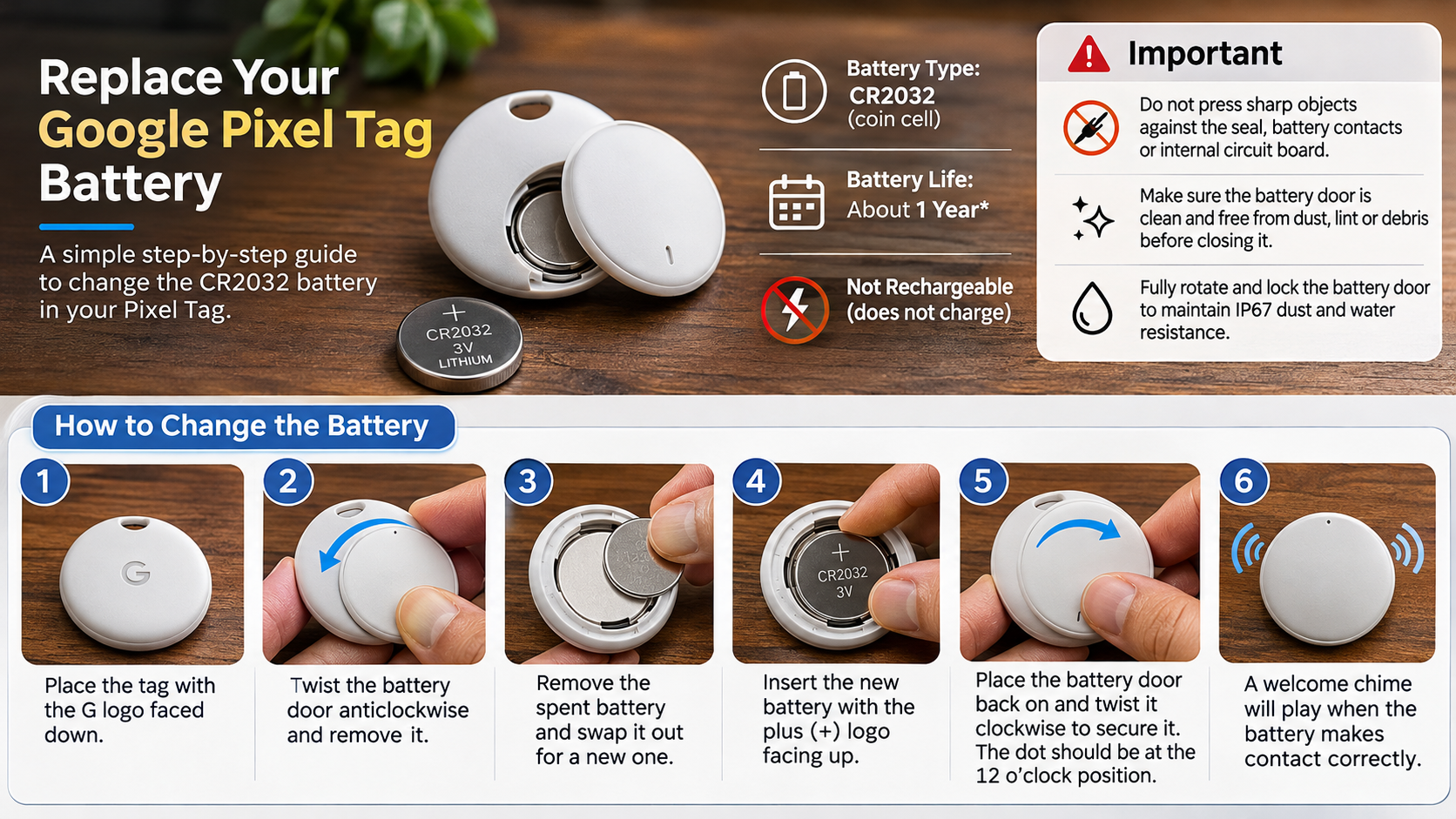
Replacing your Google Pixel Tag battery takes only a few minutes. You don’t need a screwdriver or specialized repair equipment. However, follow Google’s recommended procedure to avoid damaging the battery contacts or protective seal.
Follow these steps to replace your old CR2032 battery:
- Turn the tracker over: Place the Pixel Tag with the Google G logo facing downward.
- Open the battery cover: Rotate the circular battery door counterclockwise until it comes loose.
- Remove the old battery: Carefully lift the depleted CR2032 coin cell from its compartment.
- Insert a replacement: Place a fresh CR2032 battery inside with its positive (+) symbol facing upward.
- Reattach the cover: Align the battery door with the compartment and rotate it clockwise.
- Secure the cover: Continue turning until the cover locks into position. The small dot should point toward the 12 o’clock position.
A welcome chime confirms that the battery has made proper contact.
Important Safety Tips During Replacement
Although replacing a Pixel Tag battery is straightforward, careful handling helps prevent unnecessary damage. The battery compartment contains electrical contacts and a rubber sealing O-ring. Damaging either component can affect the tracker’s operation or water resistance.
Keep these precautions in mind during replacement:
- Avoid sharp objects: Don’t use knives, scissors, or other sharp tools near the battery contacts or internal components.
- Check the rubber seal: Ensure the O-ring is clean and free from dust, lint, or debris.
- Use the correct battery: Always select a compatible CR2032 lithium coin cell.
- Check the battery orientation: The positive (+) side must face upward.
- Secure the battery door: Rotate the cover completely until it locks into position.
Google rates the Pixel Tag IP67 for dust and water resistance. However, this protection depends on the condition of the device and its properly secured battery cover. Water resistance can decrease through normal wear, damage, or improper handling. Never assume that opening the battery compartment leaves its original protection unchanged.
Is a 1% Battery Drain in 3 Minutes Normal?
No, losing 1% battery power every three minutes would be unusual for a Bluetooth tracker. At that rate, a battery would theoretically reach zero in approximately five hours. This is considerably shorter than Google’s advertised battery life of over one year.
However, first identify which device is reporting the percentage. Your Android phone, tracking application, and Pixel Tag have different power systems. A rapid percentage change on your phone doesn’t necessarily indicate a problem with the tracker.
Google’s official Pixel Tag battery guidance describes a low-battery chime rather than continuous percentage-based battery monitoring. Therefore, check whether the reported percentage actually belongs to your tracker.
If your Pixel Tag repeatedly plays its low-battery warning shortly after installing a fresh battery, investigate further. A faulty battery, poor electrical contact, or damaged compartment could explain the problem.
Troubleshooting Rapid Battery Drain
If your Pixel Tag appears to lose battery power unusually quickly, investigate the issue before purchasing another tracker. Start with the simplest checks and work toward more involved troubleshooting. This approach helps identify battery-related problems without risking damage to internal components.
Try these troubleshooting steps:
- Check the battery: Confirm that you’re using a fresh, compatible CR2032 coin cell.
- Inspect the orientation: Make sure the positive (+) side faces upward.
- Examine the contacts: Look for visible dirt or damage around the battery compartment.
- Secure the cover: Ensure the battery door is fully locked into position.
- Check Find Hub: Open the application and confirm that your tracker connects correctly.
- Follow Google’s reset instructions: If the problem continues, use Google’s official Pixel Tag reset procedure.
Avoid repeatedly removing the battery or attempting an unofficial hardware reset. If a fresh battery doesn’t resolve the issue, contact Google Support. A technician can help determine whether your tracker needs warranty service or replacement.
Conclusion
The Google Pixel Tag makes battery maintenance simple with its user-replaceable CR2032 coin cell. Instead of replacing the entire tracker, you can install a new battery at home and continue using your device. With a battery life of over one year under typical usage, it offers convenient, long-term tracking without frequent charging.
If you’re wondering, does the Pixel Tag have a replaceable battery? The answer is yes. Just use a compatible CR2032 battery, follow the correct replacement steps, and ensure the battery cover is securely locked. These simple precautions help keep your tracker working reliably while reducing unnecessary replacement costs and electronic waste.