Bluetooth Range: How Far Does It Really Reach?
We rely on wireless accessories every day, yet connection dropouts can happen when we move into another room. Understanding bluetooth range helps you position smart home devices, wireless headphones, and speakers for stable performance. According to the Bluetooth Special Interest Group (SIG), Bluetooth supports different power levels and features for applications ranging from personal devices to industrial systems.
Manufacturers often advertise maximum distances on product packaging. However, real-world performance can fall well below those theoretical figures. Walls, furniture, radio interference, device power, antenna design, and Bluetooth features all affect connection stability.
Your environment also makes a noticeable difference. Moving wireless earbuds away from a phone or taking a portable speaker outdoors can produce very different results.
This guide explains how far Bluetooth can reach in everyday conditions. It also covers walls, Wi-Fi comparisons, long-range Bluetooth technology, and practical ways to improve weak connections.
How far can Bluetooth range go?
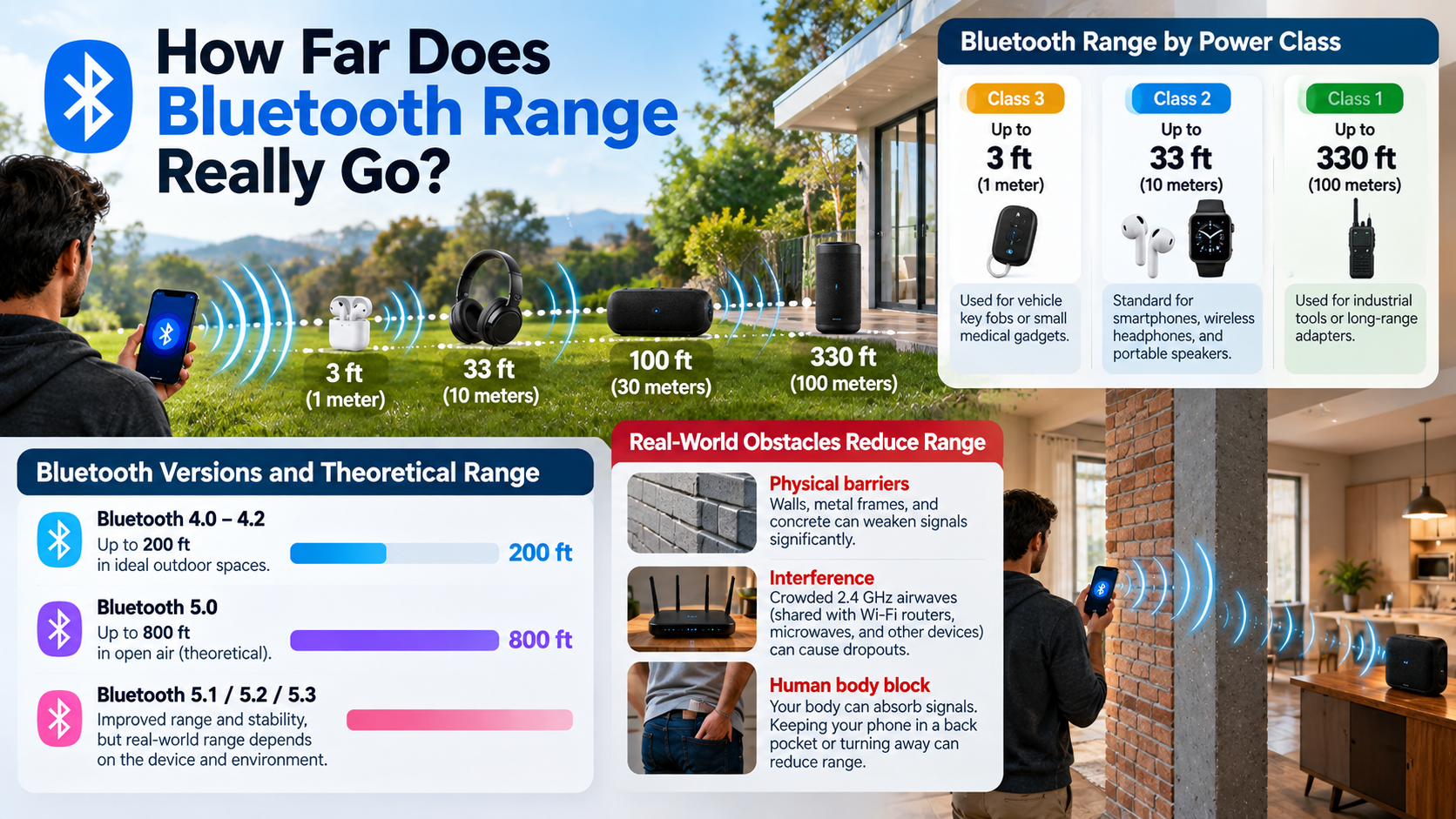
Most everyday Bluetooth devices provide a practical range of around 10 meters (33 feet) under typical conditions. This distance is common with Class 2 hardware used in smartphones, keyboards, mice, earbuds, and other consumer devices. However, this figure should not be treated as a fixed limit. When devices regularly move beyond their practical range, connection problems can occur, similar to the issues covered in 5 Reasons Your Bluetooth Keeps Disconnecting.
Open outdoor spaces can provide much greater distances when compatible hardware uses higher transmit power, suitable antennas, and long-range Bluetooth features. Bluetooth 5 introduced capabilities that can significantly extend range under favorable conditions. The actual result still depends on both connected devices.
Indoor environments usually reduce the effective bluetooth range. Walls, furniture, people, and electronic interference can weaken the signal. Your phone may also behave differently from a dedicated Bluetooth transmitter.
The Role of Device Power Classes
Bluetooth power classes describe maximum transmit power rather than guaranteeing a specific connection distance. Class 1 devices can reach around 100 meters under suitable conditions, while Class 2 devices typically reach about 10 meters. Class 3 devices use much lower power and generally support very short-range connections.
Most consumer Bluetooth products use Class 2 because it balances range and battery consumption. This balance is one reason Bluetooth can be useful for everyday accessories, although there are also Disadvantages Of Using Bluetooth For Everything. Actual performance can still vary because antenna quality, receiver sensitivity, obstacles, and interference affect the connection.
Can Bluetooth signal go through walls?
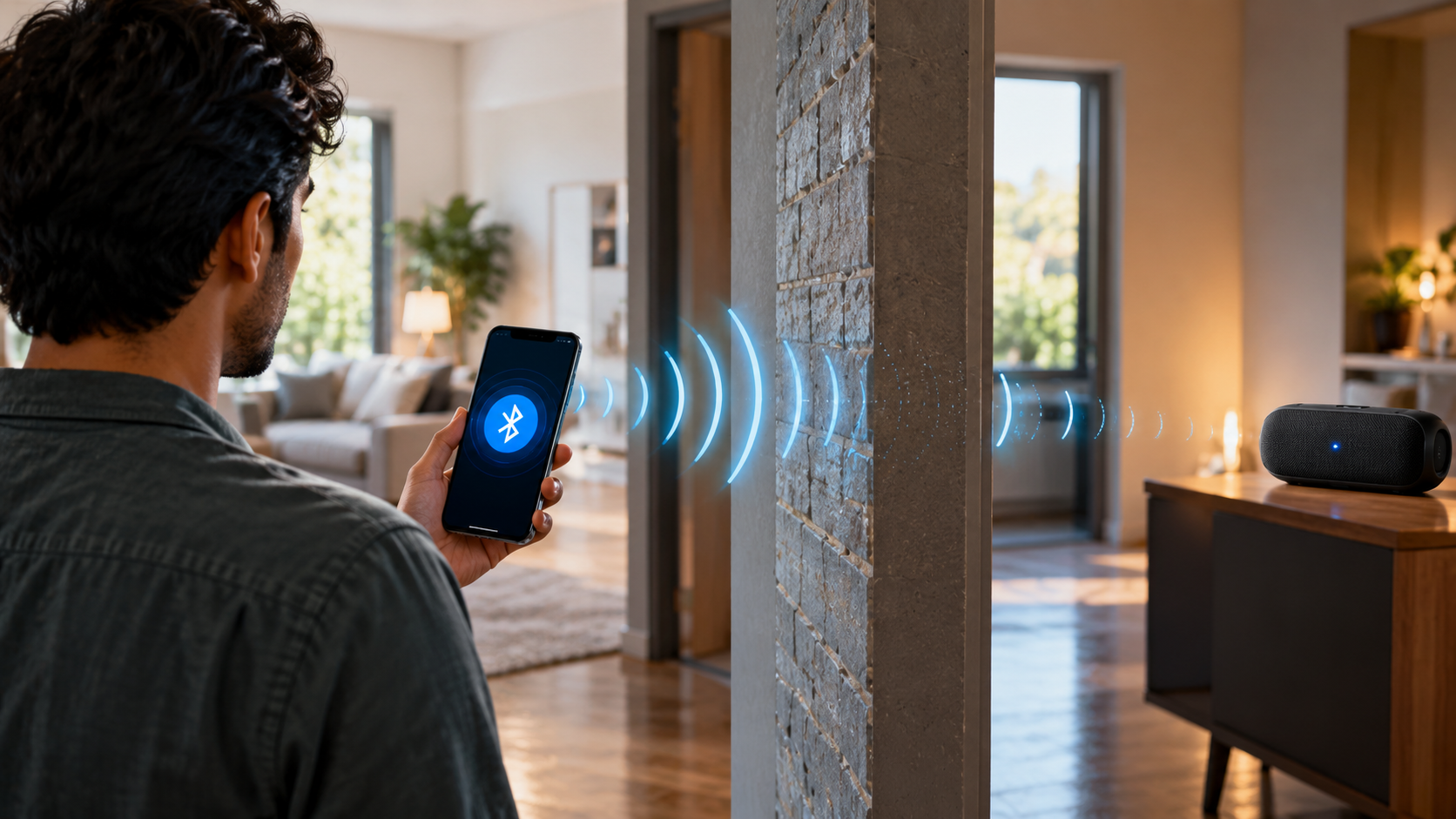
Yes, Bluetooth signals can pass through walls, but each wall can reduce signal strength. Bluetooth operates in the 2.4 GHz radio band, which can pass through many common household materials. Thin drywall, wood, and glass usually create less interference than dense construction materials.
Concrete, brick, metal, and reinforced structures can weaken Bluetooth signals much more significantly. Metal can also reflect radio waves and create areas with poor reception. This can make a connection unstable even when the devices appear relatively close.
The number of obstacles matters as well. One interior wall may cause only a small reduction, while several walls can create noticeable dropouts. Human bodies can also absorb some radio energy when they block the direct path between devices.
For reliable performance, keep the transmitter and receiver as close to an unobstructed path as possible.
Minimizing Common Indoor Wall Interference
You can improve indoor bluetooth range by changing the position of your devices. Keep Bluetooth transmitters away from thick concrete walls, metal objects, and large appliances whenever possible.
Placing a speaker or transmitter on a shelf can provide a clearer path than keeping it behind furniture. Open doors can also reduce physical obstruction between connected devices.
Try to keep your phone, computer, or Bluetooth transmitter in an open location. Avoid placing it inside a drawer, cabinet, or crowded bag. These small changes can improve connection stability without requiring new hardware.
If a connection repeatedly drops in one particular room, test the devices from several positions. A small change in placement may move the signal away from a reflective surface or obstruction.
You should also keep both devices reasonably close together. Bluetooth does not need a perfect line of sight, but fewer obstacles generally produce a more reliable connection.
Which has longer range, Bluetooth or Wi-Fi?
Wi-Fi generally has a longer practical range than standard Bluetooth in typical homes. A residential Wi-Fi network can often cover multiple rooms, while many everyday Bluetooth devices are designed for much shorter distances. Bluetooth can still provide useful connectivity when Wi-Fi is unavailable, including through What Exactly Is Bluetooth Tethering?
The difference comes partly from how the technologies are designed. Wi-Fi usually operates with higher power and supports communication across larger areas. Home routers also use antennas designed to distribute signals throughout a building.
Bluetooth focuses more heavily on low power consumption and convenient device-to-device connections. This makes it suitable for wireless earbuds, keyboards, fitness trackers, smart tags, and similar accessories.
However, neither technology has one universal range. Wi-Fi coverage depends on router power, antenna design, frequency band, building materials, and network configuration. Bluetooth performance depends on device classes, transmit power, antennas, Bluetooth features, and environmental interference.
Specialized Bluetooth Low Energy configurations can achieve much longer distances than ordinary consumer connections. Therefore, comparing only the technologies does not tell the whole story.
Power Consumption Versus Transmission Distance
Bluetooth and Wi-Fi make different trade-offs between power consumption and range. Wi-Fi devices generally use more power because they support higher data rates and broader network coverage. These trade-offs are also important when choosing between wired and wireless listening, as explained in Wired vs Wireless Audio: Which Option Is Right For You?
This makes Wi-Fi practical for laptops, televisions, phones, and other devices that need continuous network access. Many Wi-Fi routers also remain connected to mains power.
Bluetooth is designed for lower-power connections. Bluetooth Low Energy can allow devices such as fitness trackers, sensors, and smart tags to operate for long periods using small batteries.
That efficiency comes with trade-offs. A small battery-powered Bluetooth device may not provide the same range as a powered Wi-Fi router.
Bluetooth Low Energy can still achieve impressive distances when suitable hardware and long-range features are used. The bluetooth range therefore depends on more than the Bluetooth name alone.
The right technology depends on the application. Wi-Fi suits broader network coverage, while Bluetooth works well for nearby accessories and low-power devices.
What is the highest Bluetooth range?
There is no single maximum distance that applies to every Bluetooth device. Under suitable conditions, specialized Bluetooth systems can achieve hundreds of meters, while some long-range Bluetooth Low Energy implementations can reach much farther than ordinary consumer devices.
Bluetooth 5 introduced features such as the LE Coded PHY, which can increase communication range by adding stronger error correction and using more robust signaling. The trade-off is lower data throughput compared with faster configurations.
Actual range depends on transmit power, receiver sensitivity, antenna design, radio conditions, and whether the connection has a clear line of sight. Specialized equipment can therefore achieve distances that ordinary smartphones and earbuds cannot.
Some industrial and research applications have demonstrated Bluetooth connections over very long distances. These setups can use carefully positioned antennas, elevated equipment, and favorable outdoor conditions.
For everyday users, these figures should not be confused with normal consumer performance. A smartphone and pair of earbuds will usually operate over a much shorter distance.
Industrial Hardware Versus Everyday Consumer Gadgets
Industrial Bluetooth equipment can use specialized hardware to achieve longer bluetooth range than ordinary consumer accessories. These systems may use stronger transmitters, better antennas, optimized receivers, and long-range Bluetooth configurations.
Industrial sensors can use Bluetooth Low Energy to transmit information across warehouses, agricultural areas, and other large environments. Long-range modes can be useful when devices need to communicate over substantial distances while conserving energy.
Consumer devices have different priorities. Wireless earbuds, smartwatches, and phones need compact antennas, low power consumption, and convenient operation. Manufacturers therefore do not normally optimize them for extreme distances.
Long-range communication can also reduce data rates. This makes it more suitable for sensor readings and control information than demanding applications such as high-quality audio.
As a result, advertised maximum distances from specialized equipment should not be used as a realistic expectation for everyday Bluetooth accessories.
Is it possible to extend the range of Bluetooth?
Yes, but the most effective method depends on the device and the type of Bluetooth connection. A compatible long-range Bluetooth adapter can improve coverage when the original transmitter has limited power or antenna performance.
Some desktop computers and audio systems can use external Bluetooth adapters with better antenna designs. This can provide more reliable connections than an internal adapter hidden behind a computer case or other equipment.
Bluetooth range extenders and specialized receivers may also help in certain audio and smart-home setups. However, compatibility matters. Not every Bluetooth device supports repeaters or long-range communication.
For larger homes, another practical option is choosing smart devices designed around a suitable mesh technology. Bluetooth mesh can allow compatible devices to communicate through multiple nodes rather than relying on one direct connection.
Before buying additional equipment, identify the actual problem. Moving the transmitter, reducing interference, or updating outdated hardware may solve the issue without extra equipment.
Simple Fixes to Maximize Existing Reception
You can often improve bluetooth range without buying new hardware. Start by moving the transmitter and receiver closer together. Remove large physical obstacles between them whenever possible.
Keep Bluetooth devices away from sources of 2.4 GHz interference. Wi-Fi routers, microwave ovens, and other wireless equipment can contribute to congestion in the same frequency band.
Avoid placing your phone or Bluetooth adapter inside bags, drawers, or enclosed cabinets. Your body can also weaken the signal when it blocks the direct path between devices.
Try these practical adjustments:
- Reduce distance: Keep connected devices closer together.
- Remove obstacles: Avoid thick walls, metal objects, and large furniture.
- Change positioning: Place transmitters in open, elevated locations.
- Reduce interference: Keep devices away from crowded wireless areas.
- Update hardware: Use newer Bluetooth versions when practical.
- Check compatibility: Make sure both devices support the required Bluetooth features.
These simple changes can make a noticeable difference without replacing your entire setup.
Conclusion
Bluetooth range depends on more than the Bluetooth version alone. Device power, antenna quality, obstacles, interference, and connection settings all affect real-world performance. Most everyday Bluetooth devices work reliably within about 10 meters, but compatible long-range hardware can reach much farther under suitable conditions.
Walls, metal objects, furniture, and other wireless devices can reduce signal strength. Simple changes, such as moving devices closer, removing obstacles, and reducing interference, can often improve connection stability.
For longer distances, consider hardware that supports Bluetooth Low Energy long-range features or suitable external adapters. Understanding these factors helps you choose the right setup and get more reliable Bluetooth performance at home, at work, or outdoors.