Does Overnight Charging Ruin Your Smartphone Battery?
Almost everyone plugs in their phone before going to sleep. It is convenient to wake up with a full battery. However, many people worry that overnight charging damages lithium-ion batteries. Modern smartphones include advanced charging controls, but battery aging remains unavoidable. Heat, high voltage, and repeated stress can gradually reduce battery capacity.
So, does leaving your phone connected all night actually damage it? The short answer is no, not suddenly or dangerously. Modern devices regulate charging and prevent traditional overcharging. However, keeping a battery at 100% for long periods can contribute to faster chemical aging.
Your everyday charging habits can still affect long-term battery health. This guide explains how overnight charging works and what really damages smartphone batteries. We will also cover the benefits of an 80% charge limit, frequent top-ups, fast charging, and wireless charging.
According to battery research documented by Battery University, elevated temperatures combined with high operating voltages speed up capacity loss over prolonged periods.
By making a few simple changes, you can reduce unnecessary battery stress and help your smartphone maintain useful capacity for longer.
Does charging a phone overnight ruin the battery?
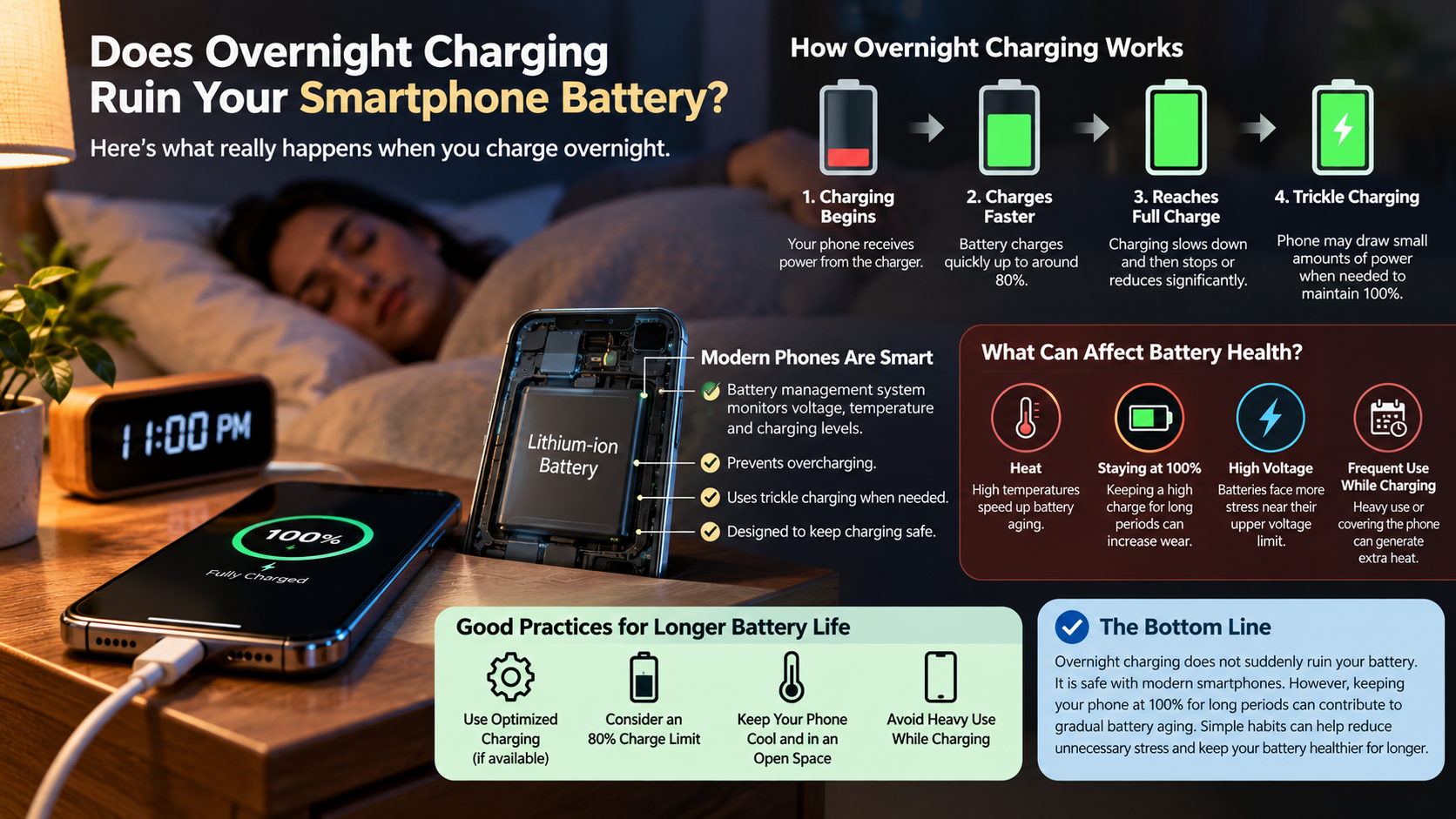
No, overnight charging does not suddenly ruin your smartphone battery. Modern phones use battery management systems that monitor voltage, temperature, and charging levels. When the battery reaches full capacity, the charging system reduces or stops the main charging current. The phone may then draw small amounts of power when needed.
However, this does not mean prolonged charging has zero effect. Lithium-ion batteries naturally age faster when they remain at a high state of charge for extended periods. Keeping a battery near 100% also means it stays at a relatively high voltage. For more charging guidance, see Stop Believing These 5 Myths About Charging Your Phone.
This process will not destroy your phone overnight. Instead, it can contribute to gradual capacity loss over months and years. Heat makes this effect more significant, especially when the phone is covered or used heavily while charging.
If you regularly charge overnight, enabling your phone’s optimized charging feature can help reduce unnecessary high-voltage exposure.
The Role of Trickle Charging
After reaching full capacity, many smartphones do not continuously receive maximum charging power. Instead, their charging systems carefully manage the battery and may provide small amounts of energy when the charge level drops. This behavior is often described as trickle charging, although the exact method varies between devices.
These small charging events are generally safe. Modern battery management systems are designed to prevent excessive current and dangerous overcharging. The bigger concern is prolonged exposure to a very high state of charge.
Lithium-ion batteries experience more chemical stress near their upper voltage limit. Repeatedly keeping a phone at 100% for long periods can therefore contribute to faster capacity loss.
You do not need to unplug your phone immediately after it reaches full charge. However, using optimized charging or an 80% charge limit can reduce high-voltage exposure.
For most users, overnight charging remains safe. The goal is simply to minimize unnecessary heat and prolonged time at maximum charge.
Can I charge my phone for 7 hours?
Yes, you can generally leave a modern smartphone connected to a charger for seven hours. Modern charging systems prevent traditional overcharging by controlling the current once the battery reaches its target level. A properly designed phone and compatible charger should not suddenly become damaged simply because they remain connected overnight.
The more important issue is long-term battery aging. Lithium-ion batteries experience greater chemical stress when they remain at very high charge levels. Keeping your phone near 100% for several hours can therefore contribute to gradual capacity loss.
Temperature also matters. A phone charging on a cool, open surface is in a better position than one charging under a pillow or blanket. Heat can significantly accelerate battery degradation.
If you charge for seven hours regularly, consider using your phone’s optimized charging feature. Some devices learn your routine and delay the final part of charging until shortly before you normally wake up. This approach gives you a full battery while reducing unnecessary time at maximum charge.
Built-In Safety Cutoffs
Modern smartphones contain battery management hardware and software that monitor charging conditions. These systems track factors such as battery voltage, temperature, and current. When the battery reaches its target level, the charging system adjusts the power supplied to the device.
These protections make overnight charging considerably safer than it was with older battery technologies. A properly functioning phone should not continue receiving unlimited maximum current after reaching full capacity.
Charging safety also depends on the accessories you use. Poor-quality or damaged cables and charging adapters can create electrical or thermal problems. Whenever possible, use the charger supplied by the manufacturer or a reputable, compatible alternative. You can also learn Is a Third-Party Charger Safe? before choosing another charging accessory.
You should also pay attention to unusual heat. If your phone becomes excessively hot while charging, disconnect it and investigate the cause.
Seven hours of charging does not normally create an immediate safety problem. Still, reducing heat and avoiding unnecessary time at 100% can help protect long-term battery health.
What kills the phone battery most?
Extreme heat is one of the biggest enemies of lithium-ion batteries. High temperatures can accelerate chemical reactions inside battery cells and cause permanent capacity loss. Charging and using a phone in a hot environment can therefore be more damaging than ordinary overnight charging.
Keeping the battery at a very high charge level for long periods can also accelerate aging. High voltage places additional stress on the battery’s internal materials. Deep discharges can contribute to wear as well, although modern phones usually shut down before the battery reaches a truly damaging zero-voltage state.
Fast charging is not automatically harmful. However, charging at high power can produce additional heat, particularly when the phone is warm or heavily used. Understanding 5V 1A Vs. 5V 2A charging can also help explain how charging power differs between adapters.
To protect your battery, focus on the factors you can control:
- Avoid excessive heat during charging.
- Reduce prolonged periods at 100% when practical.
- Avoid regularly draining the battery completely.
- Use compatible, reputable charging accessories.
- Keep ventilation around the phone while charging.
These habits matter more than worrying about one overnight charging session.
Managing Temperature While Charging
Keeping your phone cool is one of the simplest ways to support battery longevity. Charging naturally produces some heat, and intensive phone use can raise temperatures further. Combining both activities can place additional thermal stress on the battery.
Avoid charging your phone underneath pillows, blankets, or other materials that trap heat. A hard, open surface allows heat to escape more easily. If a thick case causes your phone to become unusually warm, removing it during charging may help.
Direct sunlight and hot cars should also be avoided. High surrounding temperatures can raise the battery temperature even when you are not using the phone heavily.
You do not need to keep your smartphone cold. Normal warmth during charging is expected. The concern is excessive or persistent heat.
If your phone regularly becomes very hot while charging, check the charger, cable, case, and charging environment. Addressing the heat source can help prevent unnecessary battery degradation and improve long-term charging performance. Choosing chargers with multiple ports may also affect how you manage your devices while charging.
Is it better to charge a phone to 80% or 100%?
For long-term battery health, stopping around 80% can be better than charging to 100% every time. Lithium-ion batteries generally experience less stress when they operate within a moderate charge range. Higher charge levels require higher cell voltage, which can accelerate chemical aging. The 80-20 rule for rechargeable batteries provides additional context for managing charge levels.
This does not mean charging to 100% is harmful every time. A full charge is perfectly reasonable when you need maximum battery life for travel, work, or a long day. The difference becomes more meaningful when a phone spends many hours at 100% on a regular basis.
If you plan to keep your smartphone for several years, an 80% charge limit can help slow capacity loss. However, the exact benefit varies by battery design, temperature, charging habits, and device software.
For users who replace phones frequently, the practical difference may be less noticeable. For long-term owners, reducing time at maximum charge can be a useful battery-saving strategy.
Smart Charging Features
Many modern smartphones include optimized charging or charge-limit features. These tools are designed to reduce the amount of time the battery spends at very high charge levels.
Optimized charging can learn your regular schedule. Instead of immediately charging the battery to 100%, the phone may pause near a lower level. It then completes the final portion closer to the time you normally unplug the device.
Some phones also offer a fixed charge limit, such as 80%. This option can be particularly useful if you usually have access to a charger throughout the day and do not need maximum capacity.
These features make battery care easier because you do not have to monitor the charging percentage yourself. They also work well for people who routinely charge their phones overnight.
If your smartphone provides a battery protection setting, it is worth checking the available options. Using built-in charging controls can reduce high-voltage exposure while preserving everyday convenience.
Is charging 3 times a day okay?
Yes, charging your smartphone three times a day is completely fine. Frequent partial charging does not damage modern lithium-ion batteries simply because you connect the charger several times. In fact, smaller top-ups can help you avoid deep discharges and keep the battery within a moderate charge range.
Battery cycles are also different from charging sessions. One cycle generally represents the equivalent of using 100% of the battery’s capacity over time. For example, using 50% today and another 50% later contributes roughly one complete cycle.
This means connecting your phone at 40%, 60%, or 70% does not create a full battery cycle each time. Short charging sessions can therefore be a practical way to maintain your battery.
The main thing to watch is temperature. Frequent charging is less concerning than repeatedly exposing the phone to excessive heat.
If your routine requires three top-ups, there is no need to avoid them. Charge when convenient, keep the phone reasonably cool, and avoid regularly running the battery down to empty.
The Benefit of Shallow Cycles
Shallow charging and discharge cycles can reduce stress on lithium-ion batteries. Instead of waiting until the battery is nearly empty, you can recharge it whenever convenient. For example, charging from 40% to 70% is a relatively small cycle.
This approach helps keep the battery away from its more stressful extremes. It also means you do not have to wait for the phone to become nearly unusable before connecting a charger.
A battery cycle measures cumulative energy usage rather than the number of times you connect a cable. Several small charging sessions can therefore add up to roughly one cycle without creating several complete cycles.
For everyday use, there is no need to follow an exact percentage every time. Moderate charge levels are a helpful target, not a strict rule.
If you need 100% capacity for a long day, charge fully. If you have regular access to power, smaller top-ups can help reduce deep discharges and keep your phone comfortably charged throughout the day.
Frequently Asked Questions
Does fast charging damage smartphone batteries faster?
Fast charging produces additional thermal energy, which can slightly accelerate chemical aging if unmanaged. However, modern fast chargers supply maximum speed only while the battery sits below 50% capacity. Once levels climb higher, the system automatically slows wattage input to safeguard the cells from overheating and voltage strain.
Should I let my smartphone battery drop to 0% before charging?
No, letting your phone drop to 0% causes deep discharge stress that harms lithium-ion batteries. Older nickel-cadmium batteries suffered from memory effects, but modern lithium packs degrade faster from complete depletion. For optimal longevity, try to reconnect your charger before the power indicator drops below 20%.
Can I safely use my phone while it is plugged in?
You can safely use your phone while it charges, but running heavy games or streaming video generates substantial heat. Combining high processing temperatures with charging thermals places extra strain on internal cells. For regular texting or browsing, light usage while plugged in causes no meaningful damage. If your phone has started slowing down, see Why Your Phone Slows Down Over Time and How to Fix It.
Does wireless charging degrade batteries faster than wired cables?
Wireless charging creates slightly more ambient heat than wired cables because inductive energy transfer is less efficient. Poor alignment on wireless pads exacerbates this problem by generating excess warmth. As long as the charger remains well-ventilated and cool, wireless charging will not drastically shorten battery lifespan. If you use multiple devices, 5 Useful Accessories Every OnePlus Owner Needs IN 2026 may also offer relevant charging accessory ideas.
Conclusion
Protecting your smartphone battery does not require major lifestyle changes. Overnight charging is generally safe because modern smartphones regulate charging and prevent traditional overcharging. However, keeping a lithium-ion battery at 100% for long periods can contribute to gradual chemical aging.
Heat remains one of the most important factors to control. Avoid charging under pillows, in direct sunlight, or in other environments that trap excessive warmth. It is also helpful to avoid regularly draining the battery completely.
When convenient, keep your phone within a moderate charge range, such as 20% to 80%. You can also enable optimized charging or an 80% charge limit if your device supports it.
Frequent daytime top-ups are perfectly acceptable. You do not need to wait for the battery to become nearly empty before charging.
Ultimately, smart charging habits are about reducing unnecessary stress, not following rigid rules. A little attention to temperature and charge levels can help your smartphone battery retain useful capacity for longer.