
iCloud Photos vs Google Photos: Which Cloud Is Best?
Choosing the right cloud service for your memories often comes down to iCloud Photos vs Google Photos. Most smartphone owners capture thousands of photos and videos each year. A dependable cloud service helps keep those memories available across devices.
Both platforms offer automatic syncing, online storage, and convenient access. However, they handle photo management, backups, sharing, and device compatibility differently.
Apple designed iCloud Photos primarily for people using iPhone, iPad, and Mac devices. Google Photos takes a more cross-platform approach. It works across Android, iOS, Windows, and the web.
This comparison examines the most important differences between iCloud Photos and Google Photos. We cover storage, search tools, security, deletion, photo quality, and device compatibility.
We also explain whether using both services makes sense. By understanding how each platform works, you can choose the setup that best protects your photos and fits your daily workflow.
Which Is Better, Google Photos or iCloud?
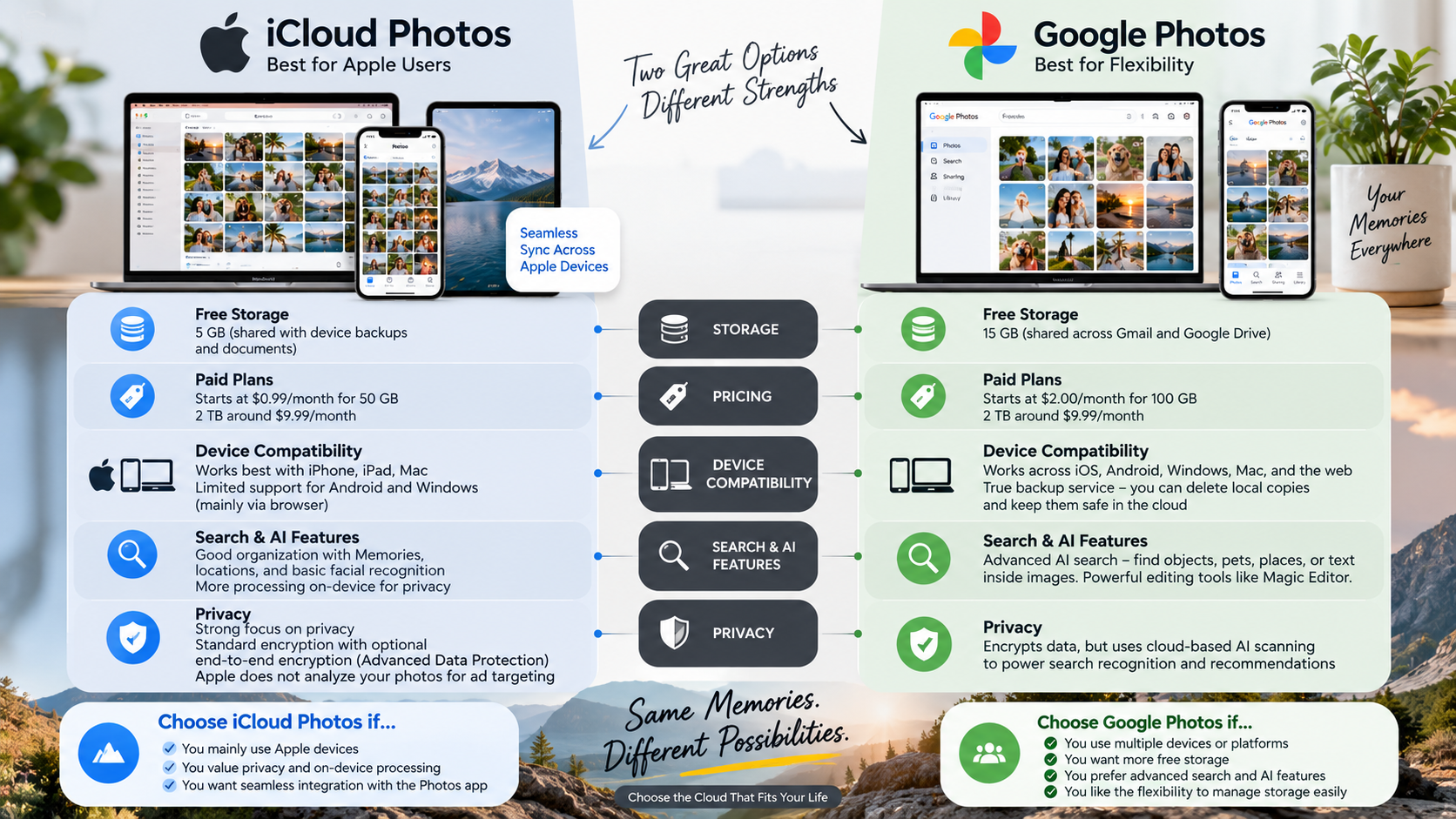
The better option depends largely on your devices, storage needs, and preferred way of managing photos. In the iCloud Photos vs Google Photos comparison, iCloud is usually the more natural choice for people who use Apple devices exclusively.
iCloud Photos integrates directly with the Photos app on iPhone, iPad, and Mac. Your library stays synchronized across those devices, including edits and organizational changes.
Google Photos offers stronger flexibility for people who use different operating systems. Its search tools can identify objects, people, places, and other visual details. This makes large libraries easier to explore. For Android users in particular, understanding the difference between an APK and an app can help clarify how Android applications are installed and accessed.
Google Photos also provides convenient web access and works well across Android, iOS, Windows, and other platforms.
Choose iCloud Photos if seamless Apple integration is your priority. Choose Google Photos if cross-platform access and advanced search are more important.
For many users, the decision ultimately depends on whether convenience or flexibility matters more.

Search and Smart Album Capabilities
Google Photos has a strong advantage when it comes to photo search and automatic organization. Its search system can help users find pictures based on people, locations, objects, activities, and other visual information.
For example, you can search for pictures involving pets, beaches, cars, documents, or specific places. This reduces the need to manually create folders or add tags.
iCloud Photos also includes powerful search and organization features. Apple uses on-device intelligence to recognize subjects, scenes, people, and other details. However, the overall experience differs from Google’s approach.
Google Photos can be especially useful when you have a large and disorganized library. Its search tools make finding older memories faster.
This difference matters more as your library grows. A collection containing several thousand photos can become difficult to manage manually.
If smart search and automated organization are major priorities, Google Photos generally has the stronger overall experience.
Will I Lose My iCloud Photos If I Delete Google Photos?
Deleting the Google Photos app itself does not delete your iCloud Photos library. However, the situation becomes more complicated when you delete individual photos from the Google Photos app.
Both services can interact with the photos stored on your physical device. If Google Photos removes a local photo from your iPhone, iCloud Photos can synchronize that deletion to your other Apple devices.
This means the important distinction is between deleting the Google Photos app and deleting photos through the Google Photos app.
If you want to remove photos from Google Photos while keeping them on your Apple devices, take extra care before deleting anything.
A safer approach is to manage your Google Photos library from the web when appropriate. You should also check exactly what deletion option the app presents before confirming it.
When using two photo services, test the process with an unimportant image first. This can help you understand how local files and cloud libraries interact before making large changes.
Safe Deletion Practices for Dual Users
Managing Google Photos and iCloud Photos together requires careful deletion habits. The biggest risk comes from confusing a cloud copy with the local photo stored on your device.
Before deleting anything, check whether Google Photos is asking to remove the item from Google Photos only or from the device. The wording can vary depending on the action and device.
If your goal is to remove backed-up photos from Google Photos while retaining them on your iPhone, consider using the Google Photos website. This can give you greater control over which cloud library you are managing.
You can also review Google Photos backup and device-access settings before making major changes.
Avoid deleting hundreds of photos at once until you understand the process. Start with one unimportant image and confirm where it remains afterward.
These precautions are especially important when iCloud Photos is your primary Apple photo library. A few minutes of testing can prevent accidental deletion across multiple connected devices.
What Are the Disadvantages of iCloud Storage?
The biggest disadvantage of iCloud storage is its limited 5GB free storage allowance. That space is shared across services such as photos, device backups, and documents. It can fill quickly for users with large photo libraries. If you’re managing a Mac with limited local space as well, learning how to clear system storage space on your Mac can also help you manage storage more effectively.
Another limitation is Apple’s ecosystem focus. iCloud Photos works best with iPhone, iPad, and Mac devices. Android users do not get a native iCloud Photos app with the same background experience.
Windows users can access iCloud services, but the experience is generally less integrated than it is on Apple hardware.
iCloud Photos also works primarily as a synchronization service. When you delete or modify a photo, that change can synchronize across your connected Apple devices.
This behavior is convenient but requires careful management. Users should not treat synchronization as a replacement for a separate, independent backup.
Sharing can also be less convenient when your friends or family primarily use Android devices.
For Apple users, these limitations may be minor. For mixed-device households, they can become more noticeable.
Synchronization Versus True Cloud Backup
One of the most important concepts in iCloud Photos vs Google Photos is the difference between synchronization and independent backup.
iCloud Photos is designed to keep your photo library synchronized across Apple devices. Changes made on one connected device can appear on your other devices. This includes edits, organization changes, and deletions.
That convenience does not mean iCloud Photos should be considered your only backup strategy. If you accidentally delete something and the deletion synchronizes, every connected device can reflect the same change.
An independent backup works differently. It maintains another copy that is not automatically changed by every action in your primary library. For important photos, you may also want to compare cloud storage vs external hard drives when deciding how to maintain an additional copy of your files.
This distinction matters when protecting important family photos, professional work, or irreplaceable memories.
If your photos are especially valuable, consider maintaining an additional backup outside your primary synchronized library.
Using iCloud Photos for synchronization and another service for an independent copy can provide stronger protection against accidental deletion, device problems, or account-related issues.
Which Is More Secure, iCloud or Google Photos?
Both iCloud Photos and Google Photos use strong security measures to protect stored data and user accounts. However, their privacy approaches differ.
Apple offers Advanced Data Protection for iCloud. When enabled, it provides end-to-end encryption for several iCloud data categories, including Photos. With this protection, encryption keys remain under the user’s control through trusted devices.
Google also encrypts data during transfer and while it is stored on its servers. Its security system includes features such as two-step verification and account protection.
The main difference is not simply whether one service is secure. Both companies invest heavily in account and data security. The more useful question is which privacy model matches your preferences.
Apple places a stronger emphasis on end-to-end encryption and limiting access to protected data. Google focuses heavily on cloud-based services, search, organization, and automated features.
For users who prioritize maximum control over encrypted iCloud data, Apple’s Advanced Data Protection is an important advantage.
Understanding Advanced Data Protection
Advanced Data Protection is Apple’s optional security feature for iCloud. When enabled, it provides end-to-end encryption for additional categories of iCloud data.
For protected data, the encryption keys are controlled through your trusted devices rather than being available to Apple in a way that allows routine access to the underlying content.
This creates an important privacy advantage for users who want stronger protection against unauthorized access to cloud-stored information.
However, Advanced Data Protection also places greater responsibility on the user. If you lose access to your trusted devices and recovery methods, recovering protected data can become more difficult.
Google Photos also provides strong security and account protection. Its cloud infrastructure supports automated search, organization, and other features.
The difference is therefore about security architecture and privacy priorities, not whether one platform has security and the other does not.
If privacy and end-to-end encryption are your highest priorities, reviewing Apple’s Advanced Data Protection options is worthwhile. If convenience and intelligent cloud features matter more, Google Photos remains a strong choice.
Should I Use Both iCloud and Google Photos?
Using both services can make sense, but it is not automatically a better solution. In an iCloud Photos vs Google Photos setup, running two photo platforms adds another storage system to manage. It can also create confusion if you are not careful about deletion and synchronization.
The main advantage is redundancy. You can use iCloud Photos as your primary library across Apple devices while maintaining a separate copy through Google Photos.
This setup can protect your memories if something goes wrong with one account or service. It also lets you use different strengths from each platform.
iCloud provides deep integration with Apple’s Photos app and connected hardware. Google Photos provides strong cross-platform access, search, and sharing features.
The biggest drawback is storage management. You may eventually need to pay for storage on both platforms.
You also need to understand which service is responsible for your primary library and which one serves as an additional copy.
For users with valuable photo collections, the dual-service approach can be useful. Just remember that two cloud services are not automatically two independent backups unless their copies are managed separately.
Managing Background Synchronization and Battery
Running iCloud Photos and Google Photos together can increase background activity on your phone. Both services may need to process and upload photos, especially after you capture large batches of images or videos.
Google Photos needs appropriate permissions and background access to upload your library automatically. If those permissions are restricted, uploads may pause until the app becomes active.
Large photo libraries can also consume battery and mobile data during initial synchronization. This is especially noticeable when uploading high-resolution images and videos. If your phone or computer is already experiencing unusually fast battery drain, it may also be useful to understand why your laptop battery drains so fast and which background processes can contribute to the problem.
For a smoother setup, perform the first large upload while connected to Wi-Fi and power. Check your device settings to ensure background activity works as expected.
It is also useful to monitor storage usage in both accounts. Two services can create additional monthly costs if both free storage limits are exceeded.
You do not need to keep both services constantly active for every task. Decide which platform is your primary photo library and which one provides additional storage or access.
That approach makes dual-cloud management easier and reduces unnecessary background activity.
Frequently Asked Questions
Can I transfer my pictures from Google Photos directly to iCloud?
Yes, you can transfer your library using Apple’s official self-service migration tool found within Google Takeout. After requesting the data transfer online, Google moves your photos and videos directly to your iCloud account in the background. The migration process requires several hours or days, depending on your total storage size, without consuming local device bandwidth.
Does Google Photos compress my uploaded images automatically?
Google Photos offers two storage options: “Original Quality” and “Storage Saver.” The Storage Saver tier compresses images above 16 megapixels down to 16 megapixels and reduces video resolution to standard high definition (1080p). If you select Original Quality, Google preserves full file resolution without compression, counting the exact file size against your cloud storage quota.
How much free storage do both platforms offer new accounts?
Apple provides 5GB of free storage with every standard Apple ID, which covers device backups, documents, and photos combined. In contrast, Google provides 15GB of free storage per account. However, Google shares this 15GB allowance across Google Drive files, Gmail messages, and Google Photos, meaning active email accounts consume this space quickly.
Can Android users access Apple iCloud Photos easily?
Android users cannot install a native iCloud Photos application. To view or download images, they must sign in through a mobile web browser at iCloud.com. This web interface offers basic viewing, downloading, and uploading functions, but it lacks background synchronization, automated uploads, and the smooth responsiveness found on native Android apps.
Conclusion
Choosing between iCloud Photos vs Google Photos depends on your devices, storage requirements, organization preferences, and privacy priorities.
iCloud Photos is the more integrated option for people who primarily use iPhone, iPad, and Mac. It keeps your Apple photo library synchronized across connected devices and works naturally with Apple’s Photos app.
Google Photos is more flexible for mixed-device households. Its cross-platform access and powerful search tools make large libraries easier to explore.
Neither service is perfect for every user. iCloud has a smaller free storage allowance and a stronger dependence on the Apple ecosystem. Google offers greater platform flexibility but uses a different privacy and cloud-processing model.
Using both services can also be worthwhile when you need redundancy. However, you should understand how synchronization and deletion work before treating them as backup solutions.
Review your current devices, storage usage, and backup needs before choosing. A clear photo-management strategy can help protect your most important memories while keeping everyday access simple.