
The Complete Guide to Understanding APK and App Technologies
Navigating mobile technology often means encountering the terms APK and app. Whether you download software or manage smartphone storage, understanding these terms can help. Mobile applications support communication, entertainment, productivity, and many everyday tasks.
However, many users remain unsure about how mobile software works behind the scenes. This guide explains what an APK is and whether APK files are legal. It also explains whether APK files work only on Android and how they function.
Most importantly, we will clarify the difference between an APK file and an app. For official information about Android software development and security, visit Android Developers.
By understanding these fundamentals, you can manage mobile software more confidently. You can also make safer decisions when downloading and installing applications.
What Is the Difference Between an APK and an App?
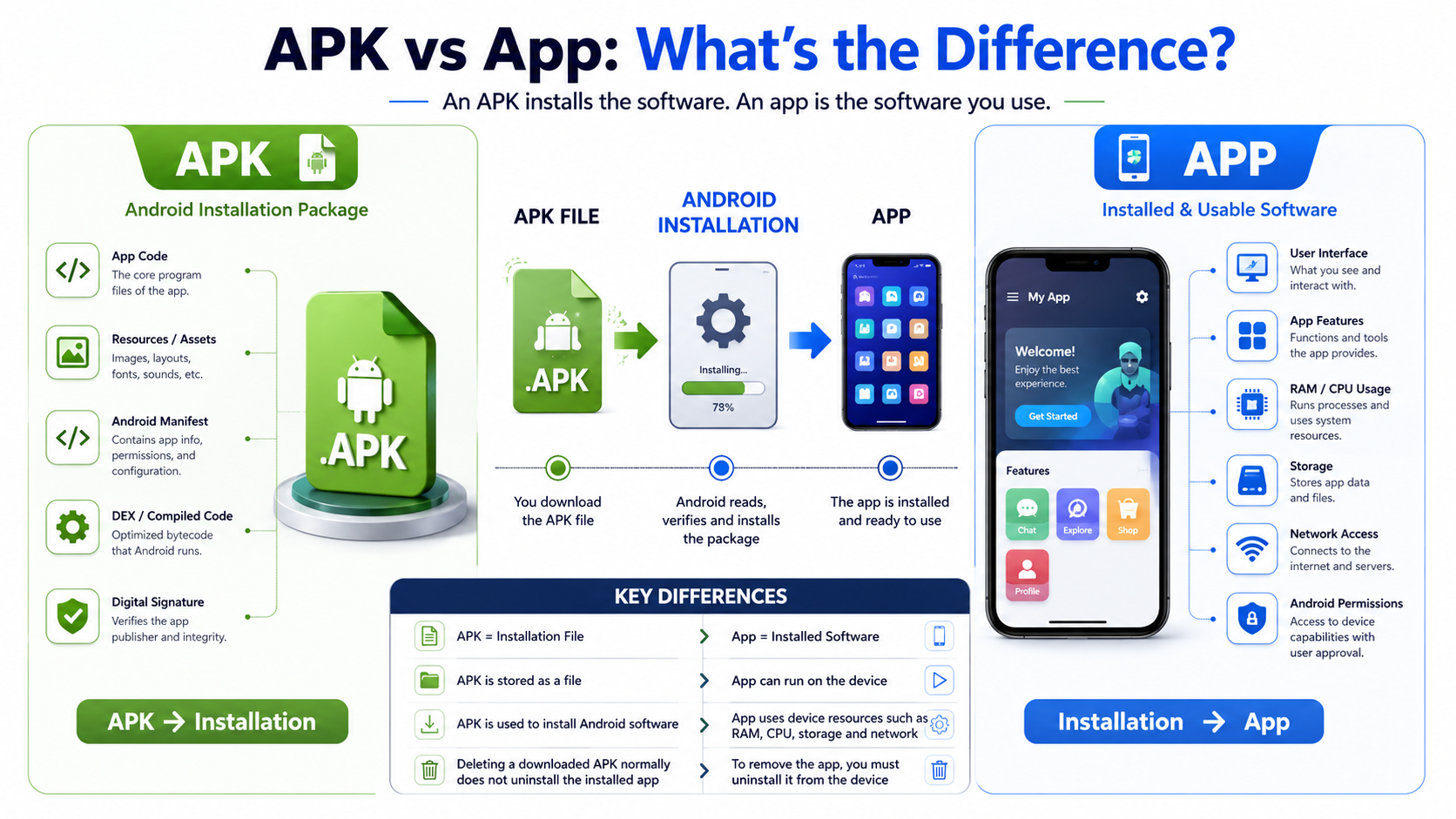
The main difference between an APK and an app is their role. An APK is an installation package, while an app is the software users install and interact with.
An APK contains the files required to install an Android application. It works much like a delivery package that carries software components to the device.
After installation, Android extracts and registers the necessary components. You then interact with the installed application through its interface.
People often use the terms APK and app interchangeably in everyday conversation. Technically, however, they describe different things, especially when comparing free Android apps and their installation methods.
An APK is a file stored or downloaded for installation. An app is the functional software installed on the device.
This distinction also helps explain storage management. An APK can remain in storage after download, while the installed application uses system storage and active device resources.
Understanding this difference makes mobile software terminology easier to follow. It also helps users understand what they are downloading and installing.

Distinguishing Storage Files from Active Software Processes
An installation package is a file stored on a device. It does not normally perform application tasks simply because it exists in storage.
An installed app, however, can run processes and use resources such as RAM, CPU time, storage, and network access. These resources support the application’s features.
Deleting a downloaded APK after successful installation does not normally remove the installed application. The installed application has already been processed by Android.
This distinction can help users manage device storage more effectively. Large installation files can consume space even after an application has been installed.
It is also useful when troubleshooting installation problems. A corrupted APK may fail during installation, while an installed application can experience separate runtime issues, including apps that keep crashing after installation.
In short, the APK is the installation file, and the app is the installed software. Keeping these roles separate makes Android software management easier.
What Is APK Full Form?
The full form of APK is Android Package Kit. It is the file format Android uses to distribute and install mobile applications. Developers package application code, resources, assets, and other required files into an APK.
You can think of an APK as a digital container. It holds the components needed to install a specific Android application. The operating system reads this package and uses its contents during installation.
Users often encounter APK files when downloading applications outside the official Google Play Store. Developers may also use APK files for testing and direct software distribution. The format makes software deployment easier because multiple components stay together.
Understanding the APK full form helps explain its purpose. An APK is not the application experience itself. Instead, it is the installation package that delivers the application to an Android device.
The Role of Package Kits in Mobile Deployment
Package kits simplify mobile software distribution by combining important application components. These components can include compiled code, resources, certificates, and manifest information.
This structure helps Android identify and install applications correctly. It also allows the system to verify the package and its digital signature before installation.
Developers use standardized package formats to support different devices and configurations. An APK can contain resources for different screen sizes, languages, and hardware capabilities.
The package also includes information that tells Android how the application should operate. This information helps the operating system manage permissions and application components.
In simple terms, an APK works as a delivery package for Android software. It gathers the required files into a format that Android can process.
Are APKs Illegal?
Downloading or sharing an APK is not automatically illegal. An APK is simply a file format used to distribute Android software. Its legality depends on the software inside the package and how it is distributed.
Many legitimate developers distribute APK files directly. Users may download them to install applications unavailable through their region’s official store. Developers may also provide APK files for testing purposes, just as developers may use other mobile apps for business purposes.
Problems arise when an APK contains pirated, modified, or unauthorized software. For example, distributing a cracked version of paid software can violate copyright law. Modified packages may also contain malicious code or remove important security protections.
Therefore, APK legality depends on the source, contents, and distribution rights. The file format itself is not illegal.
To reduce legal and security risks, download applications from trusted sources. Avoid packages that offer paid software for free without the developer’s permission.
Understanding Copyright and Third-Party Sources
Copyright protects software and other digital content. Developers generally control how their applications are copied, modified, and distributed.
Downloading or distributing unauthorized copies of paid software can therefore create legal problems. The same applies to modified packages that contain copyrighted material without permission.
Third-party repositories also create security concerns. Some websites distribute files without adequate malware screening or developer verification.
Before installing an APK, consider these factors:
- Source: Prefer the developer’s official website or trusted distribution channel.
- Copyright: Avoid unauthorized copies of paid applications.
- Security: Check whether the source provides reliable file verification.
- Permissions: Review the permissions requested after installation.
Using legitimate software protects both your device and the developer’s intellectual property, while also helping you avoid problems associated with apps that are not updated.
Is APK Only for Android?
APK files are designed specifically for the Android operating system and compatible Android devices. They are not the native installation format for Apple’s iOS platform.
Apple uses a different application package format called IPA for iPhone and iPad applications. Android and iOS use different software architectures, security systems, and runtime environments.
Because of these differences, an Android APK cannot normally run directly on an iPhone or iPad. Installing an APK on an Apple device does not work through the standard iOS installation process.
Cross-platform development does not change this basic principle. Developers can create applications using frameworks that support multiple operating systems. However, the final software must still use a format compatible with its target platform.
This distinction explains why APK files remain closely associated with Android. They are built for the Android software environment rather than mobile devices in general.
Cross-Platform Limitations and Operating System Architecture
Different mobile operating systems use different runtime environments and security frameworks. Each platform expects software to follow its own packaging and execution requirements.
Cross-platform development tools can simplify application creation. However, developers still produce platform-specific builds for Android and iOS.
An Android application may therefore be distributed as an APK. An iOS application uses the appropriate Apple package and distribution system.
These differences also affect installation, permissions, and application security. Operating systems isolate applications to protect system resources and user data.
As a result, an APK cannot simply be renamed or transferred to another platform. The software must be built for the target operating system.
Understanding this limitation helps explain why APK and iOS application files are not interchangeable. Each format works within the technical environment for which it was created.
How Do APK Apps Work?
An APK packages the components an Android application needs for installation. These components can include compiled code, resources, graphics, and configuration information.
The package commonly contains DEX bytecode, an Android manifest, and application resources. The manifest provides important information about the application and its components.
When you install an APK, Android processes the package and checks its signature. The system then installs the application’s components in the appropriate location.
Android’s runtime environment executes the application’s compiled code after installation. Modern Android devices primarily use Android Runtime (ART) to run application code.
The operating system also applies security controls during execution. Applications operate within controlled environments called sandboxes. These boundaries help limit access to system resources and other applications.
Understanding this process makes the relationship between an APK and an app clearer. The APK delivers the software, while Android manages its installation and execution.
The Mechanics of Bytecode Execution and Installation
Android applications contain compiled code that the operating system can process. DEX files store this compiled bytecode for use within the Android runtime environment.
During installation, Android reads information from the application manifest. The manifest can define components, permissions, supported features, and other requirements.
The system also checks package integrity and signing information. These checks help Android determine whether the package can be installed.
After installation, Android manages application processes and resources. ART executes the application’s code while applying the platform’s security and memory controls, helping applications function reliably alongside other productivity apps for Windows 11 on users’ broader device ecosystems.
This process allows applications to use device features without unrestricted system access. Permissions help determine which resources an application can access.
In simple terms, installation prepares the application, while the Android runtime handles its execution. This separation supports both functionality and platform security.
FAQ Section
Can I Install These Installation Files on My Computer?
Standard APK files do not run natively on most desktop operating systems. To use Android software on a computer, you generally need an Android emulator or compatible Android environment.
These tools create an environment that can process Android applications. The exact compatibility depends on the computer, operating system, and software being used.
Why Do Some Installations Fail on My Device?
APK installations can fail for several reasons. Common causes include corrupted files, incompatible Android versions, unsupported device architectures, or restricted installation settings.
The application may also require features that your device does not support. Checking the source and compatibility information can help identify the problem.
Are Third-Party Repositories Safe to Use?
Third-party repositories vary significantly in quality and security. Some provide legitimate software, while others may distribute malware, adware, or modified applications.
Official app stores and developer websites are generally safer choices. If you use another source, verify its reputation and scan downloaded files when possible.
Do These Packages Update Automatically?
Manually downloaded APK files generally do not receive automatic updates through the same official process. You may need to download and install a newer version yourself.
Using an official app distribution channel usually provides a simpler update experience. It can also make security patches and new versions easier to manage, particularly when choosing educational apps for students that may receive regular updates.
Conclusion
Understanding APK and app technologies makes mobile software easier to navigate. An APK is an Android installation package, while an app is the software installed on your device.
This guide covered the APK full form, its purpose, legality, Android compatibility, installation process, and key differences from an app. These concepts provide a useful foundation for understanding mobile software.
APK files can offer flexibility when developers distribute software outside official app stores. However, that flexibility also requires careful attention to security, copyright, and source reliability.
Always use legitimate software and trusted download sources. Avoid pirated or suspicious packages that could expose your device or personal information.
With these fundamentals in mind, you can make more informed decisions when downloading, installing, and managing Android software.