How to Safely Clean Your Electronics With Compressed Air
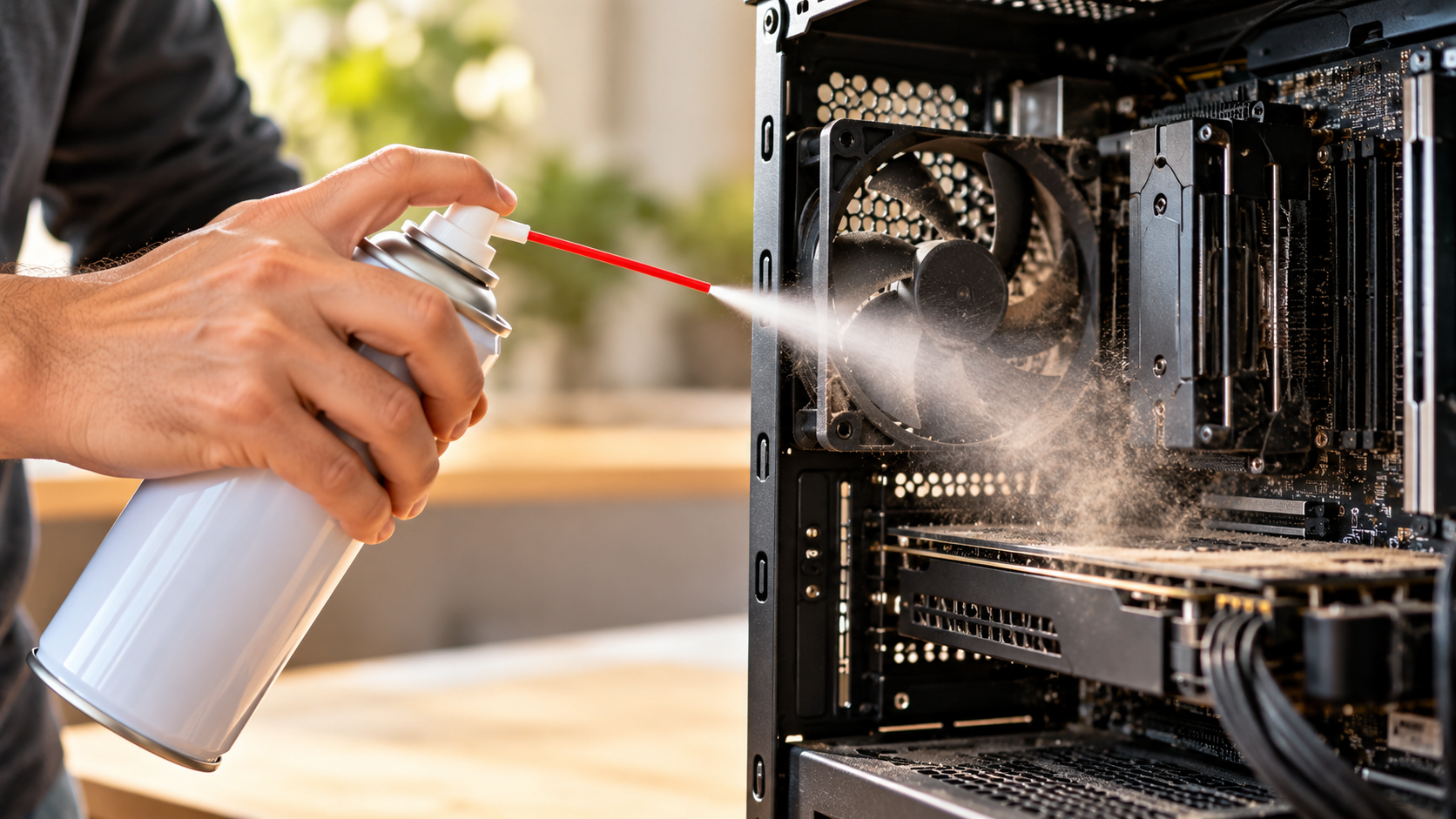
If you want to clean your electronics with compressed air, you need the right technique. Dust buildup can cause overheating, noisy fans, and reduced hardware performance. It can also collect inside keyboards, game consoles, desktop PCs, and other electronics.
A can of compressed air, often called canned air or a gas duster, is a convenient way to remove loose dust from hard-to-reach areas. Some products are specifically designed for cleaning electronics and sensitive equipment. For example, 3M’s compressed air cleaning product information explains its intended use and handling precautions.
However, these cans do not usually contain ordinary atmospheric air. They use pressurized chemical propellants that can become extremely cold during use. Incorrect spraying can also force liquid propellant onto sensitive components.
You also need to control how fans move during cleaning. A rapidly spinning fan can create unnecessary mechanical stress and electrical effects.
Learning how to clean your electronics with compressed air safely means more than pointing the nozzle at the dust. The right technique helps reduce risks to both your hardware and yourself.
Can I Use Compressed Air to Clean Electronics, and If So, How?
Yes, you can use compressed air to clean electronics when you follow the correct precautions. It works especially well for removing loose, dry dust from hard-to-reach areas, including headphones and other small devices. For better results, combine compressed-air cleaning with proper methods for cleaning and maintaining premium headphones.
The main advantage is simple. The airflow moves debris without requiring direct contact with delicate circuit boards, connectors, and other small components.
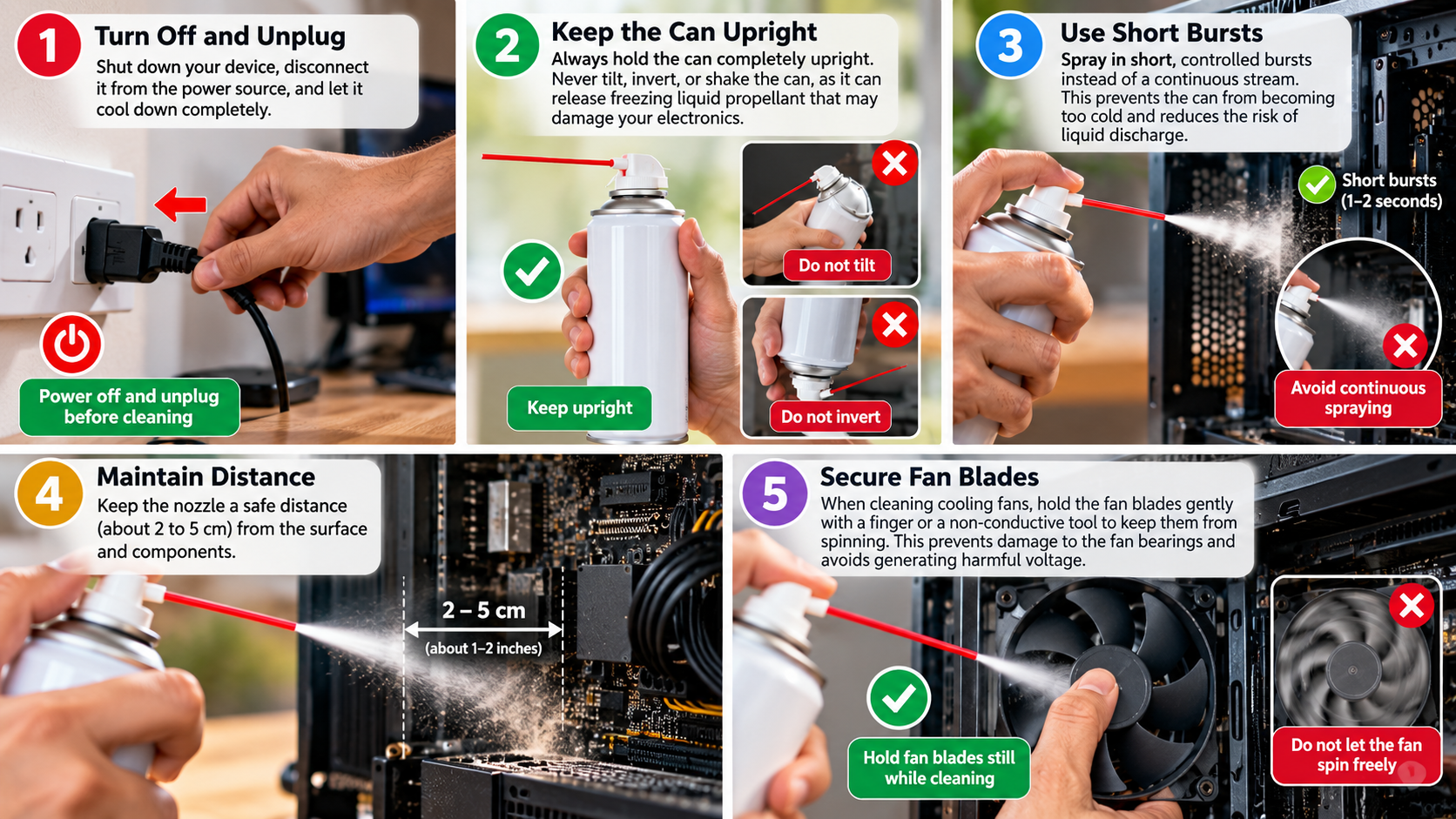
Before cleaning, turn the device off and disconnect it from power. Work in a well-ventilated area and keep the can upright. Use short bursts instead of holding the nozzle down continuously.
Avoid spraying extremely close to components. Follow the distance instructions printed on the specific product.
Fans also need special attention. Hold fan blades still while cleaning them to prevent excessive rotation.
The goal is to remove dust without introducing liquid propellant, excessive force, static, or unnecessary mechanical movement. These precautions make compressed air a practical option for routine electronics maintenance.
What Is Actually Inside the Can?
The phrase “compressed air” can be misleading. Many retail dusters do not contain ordinary atmospheric air. Instead, manufacturers fill them with liquefied gas propellant under pressure.
Common formulations include substances such as 1,1-difluoroethane (HFC-152a) or HFO-1234ze, although the exact contents vary by product. Always check the label or safety information for the can you use.
Inside the container, much of the propellant exists as a liquid. When you press the nozzle, the material expands and changes phase as it leaves the can. This process can make the can and spray extremely cold.
Improper handling increases the chance of releasing liquid propellant. Shaking, inverting, or tilting a can beyond the manufacturer’s recommended position can cause this problem.
Liquid propellant can leave an extremely cold residue on electronics. It can also create condensation when cold surfaces meet moisture in the surrounding air.
For that reason, keep the can upright and follow the manufacturer’s instructions. Different dusters can have different operating requirements.
Step-by-Step Procedure for Electronics
Use the following process when you need to clean your electronics with compressed air, especially when removing dust from devices such as laptops. If you regularly clean a laptop, these steps can complement other practices for cleaning laptop keyboards safely.
- Power down completely: Shut the device down and disconnect it from its power source. Remove a detachable laptop battery when appropriate.
- Choose a ventilated area: Clean outdoors, in an open garage, or in another well-ventilated location when practical.
- Keep the can upright: Follow the position specified by the manufacturer. Avoid turning the can upside down.
- Test the spray first: Point the nozzle away from the device and briefly spray into open space.
- Use short bursts: Apply controlled bursts instead of holding the trigger continuously.
- Keep some distance: Follow the product instructions and avoid placing the nozzle directly against components.
- Hold fans still: Prevent CPU, GPU, case, and laptop fans from spinning freely while you clean them.
- Work systematically: Move dust outward instead of pushing it deeper into the device.
- Let moisture clear: If liquid propellant or visible condensation appears, stop spraying. Let the affected area dry completely before reconnecting power.
These steps reduce the main risks associated with cold propellant, excessive airflow, and uncontrolled fan rotation.
Are You Allowed to Clean Yourself With Compressed Air?
No. Never use compressed air to blow dust from your skin, hair, clothing, or other parts of your body.
The risk depends on the equipment involved. Retail gas dusters contain pressurized chemical propellants, while industrial compressors can deliver air at much higher pressures. Neither product should serve as a personal cleaning tool.
A concentrated air stream can injure the eyes, ears, skin, or other soft tissue. A liquid propellant released from a duster can also become extremely cold and cause a cold-burn or frostbite-like injury.
Industrial environments have additional safety requirements for compressed-air use. For example, OSHA’s workplace rules address compressed-air cleaning and restrict certain unsafe practices.
If dust gets on you while cleaning electronics, use ordinary cleaning methods instead. Move to a ventilated area, remove loose dust manually, and wash exposed skin with soap and water.
The important distinction is simple: compressed air is a tool for cleaning suitable equipment, not your body.
Never point a high-pressure air stream toward your face or another person’s body.
The Dangers of Cleaning Yourself With Air
Different compressed-air products create different hazards, but neither type belongs in personal cleaning.
Retail gas-duster cans can create several problems:
- Cold propellant: Tilting or inverting some cans can release liquid propellant. The liquid can become extremely cold and injure exposed skin.
- Inhalation risk: Gas-duster products are not intended for breathing. Their ingredients and additives can irritate the eyes and respiratory system.
- Eye exposure: A concentrated spray can irritate or injure the eyes, especially when it carries dust or debris.
Industrial air compressors present additional risks:
- High-pressure injury: Compressed air can damage skin and soft tissue when you direct it at the body.
- Eye injuries: Air can propel metal particles, dust, and other debris toward the eyes at high speed.
- Ear damage: A strong air stream directed toward the ear can cause serious injury.
The safest approach is to keep compressed air away from your body altogether.
If dust gets onto your clothes or skin, use manual cleaning methods instead. Shake out clothing away from your electronics and wash your hands and face afterward.
These alternatives remove the need to expose yourself to unnecessary pressure or chemical hazards while you maintain your equipment.
Is WD-40 Just Compressed Air?
No. WD-40 and compressed-air dusters are different products with different purposes.
Standard WD-40 Multi-Use Product contains a liquid chemical formulation that comes from an aerosol container. It serves purposes such as water displacement, lubrication, corrosion protection, and loosening certain materials.
Compressed-air dusters serve a different purpose. They move loose dust and debris with a directed gas stream rather than applying a lubricating coating.
This difference matters when cleaning electronics. Applying a general-purpose lubricant to a motherboard, keyboard switch, connector, or other sensitive component can leave unwanted residue. If you are considering a chemical cleaner instead, learn whether it is safe to use alcohol to clean your PC before applying it to electronic components.
That residue may attract dust and interfere with surfaces that need to remain clean and dry. Some solvents can also affect certain plastics, rubber, coatings, or other materials.
Flammability also deserves attention. Always read the product label before using any chemical around electronics.
If your goal is simply to remove loose dust, use an appropriate electronics duster instead of a general-purpose lubricant.
Why Standard WD-40 Should Not Be Used for Routine Electronics Cleaning
Standard WD-40 should not serve as an electronics dusting product. Its formulation targets different jobs, and applying it to sensitive components can create problems.
One concern is residue. Unlike a dedicated dusting product, a general-purpose lubricant leaves protective properties on the treated surface. That residue can collect dust and grime over time.
Material compatibility creates another concern. Solvents and petroleum-based ingredients can interact differently with plastics, rubber, coatings, and other materials. Electronics contain many different materials, so an unsuitable chemical may cause unwanted swelling, softening, or surface changes.
Aerosol products also create a flammability concern. Applying flammable material around powered equipment, heat sources, or electrical contacts adds an unnecessary risk.
If you need to remove loose dust, use compressed air or an appropriate electric electronics blower. If a component requires chemical cleaning, choose a product specifically designed for that purpose.
Never assume a product is electronics-safe simply because it comes in an aerosol can or carries a familiar brand name.
The Exception: WD-40 Specialist Contact Cleaner
The confusion often comes from the WD-40 brand name. The company also sells specialized products intended for electrical and electronic cleaning.
WD-40 Specialist Electrical Contact Cleaner differs from the standard WD-40 Multi-Use Product. Contact cleaners target specific cleaning tasks involving electrical contacts and related components.
These products can help remove contaminants such as oil, grime, and certain residues. They are not substitutes for ordinary dusters, however.
This distinction matters because different cleaning problems require different products. Loose dust inside a PC case usually does not require a solvent. A contaminated electrical contact may require a dedicated contact cleaner instead.
Always read the product label before applying any chemical to electronics. Check whether the product works with the specific material or component.
Also remember that contact cleaner is not a general-purpose compressed-air replacement. It targets grime and residue rather than loose dust inside heatsinks, fans, vents, or keyboards.
Using the correct product for the correct task reduces the chance of leaving residue or damaging sensitive materials.
Can I Use Compressed Air to Clean My PC While It’s On?
No. It is safer to clean a PC after you completely shut it down and disconnect it from power.
Cleaning a running computer introduces unnecessary electrical and mechanical risks. The fans are also operating, so compressed air can force them to spin faster than intended.
Another concern involves liquid propellant. If a duster releases liquid instead of mostly gas, the cold material can contact sensitive components. Rapid temperature changes and moisture condensation can create problems inside electronic equipment.
Dust can also become airborne and move across the motherboard, power supply area, and other components. Keeping the system powered off removes one source of electrical risk while you work.
Before cleaning a desktop, shut down the operating system. Turn off the PSU switch if the system has one, unplug the power cable, and disconnect other external connections as appropriate.
Do not reconnect the computer immediately after cleaning. Inspect the hardware first and check for visible moisture or loose debris.
Key Risks of Cleaning a Running System
Cleaning a powered PC with compressed air creates several avoidable risks.
- Fan overspeed: Air can make cooling fans spin much faster than normal. Excessive rotation can place unnecessary stress on bearings and fan electronics.
- Back-EMF: A fan motor can generate electrical energy when mechanical airflow drives it. Uncontrolled spinning can therefore create unwanted electrical effects.
- Liquid propellant: Some gas dusters can release liquid when you use them incorrectly. The liquid can become extremely cold and may cause condensation on components.
- Dust movement: Blowing dust through an operating system can move debris across energized components and connectors.
- Flammability: Some gas-duster formulations are flammable. Check their labels before using them near electrical equipment.
For these reasons, power the computer down before cleaning.
After shutdown, unplug the system and give yourself enough working space. Hold fans still while spraying and use short bursts.
Do not spray continuously into one area. Move methodically through the case and direct dust away from sensitive components.
Finally, inspect the PC before restoring power. This check can catch visible moisture, trapped debris, or other problems before the system starts again.
Is It Better to Clean My Computer With a Vacuum or Compressed Air?
For routine internal PC cleaning, compressed air or a purpose-built electronics blower is generally more appropriate than a household vacuum.
A vacuum may seem convenient because it collects dust instead of blowing it around. However, a household vacuum does not target direct cleaning of sensitive electronic components.
Static electricity creates one concern. Plastic hoses and attachments can accumulate electrostatic charge as air and dust move through them. Bringing a charged nozzle close to exposed electronics can create an unwanted discharge.
Physical contact creates another problem. Household vacuum attachments often have rigid surfaces. Accidentally touching a motherboard, connector, capacitor, or other component can cause mechanical damage.
Compressed air avoids direct nozzle contact, although it has its own risks. Canned air can become very cold, especially when you use it incorrectly.
A purpose-built electric electronics blower provides another option for regular maintenance. Choose a device designed for electronics and follow its safety instructions.
For removable dust filters, however, a household vacuum can work well when you remove the filters from the computer first.
Comparison: Compressed Air vs. Vacuums for PC Cleaning
| Feature / Factor | Disposable Canned Air | Household Vacuum Cleaner | Electronics Air Blower |
|---|---|---|---|
| Static risk | Generally low when used correctly | Can create static through plastic components | Designed for electronics use |
| Physical contact | Non-contact cleaning | Rigid nozzle can contact components | Non-contact cleaning |
| Cold spray risk | Possible if used incorrectly | None | Usually none from phase-change propellant |
| Ongoing cost | Requires replacement cans | Uses existing household equipment | Usually a one-time purchase |
| Dust control | Blows dust into the surrounding area | Collects dust in the vacuum | Blows dust into the surrounding area |
| Best use | Detailed cleaning of vents, heatsinks, and keyboards | Cleaning removed filters and surrounding areas | Regular internal electronics maintenance |
The right choice depends on the equipment and cleaning task.
For occasional maintenance, canned air can be convenient. For frequent PC cleaning, an electronics blower can reduce recurring can costs.
A household vacuum is better suited to floors, surfaces around the computer, and removable filters rather than direct contact with exposed electronics.