How to Choose the Perfect Gaming Monitor
Learning how to choose the perfect gaming monitor can transform your gaming experience. Whether you play competitive shooters or immersive open-world games, your monitor matters. It affects visual clarity, responsiveness, motion smoothness, and overall immersion.
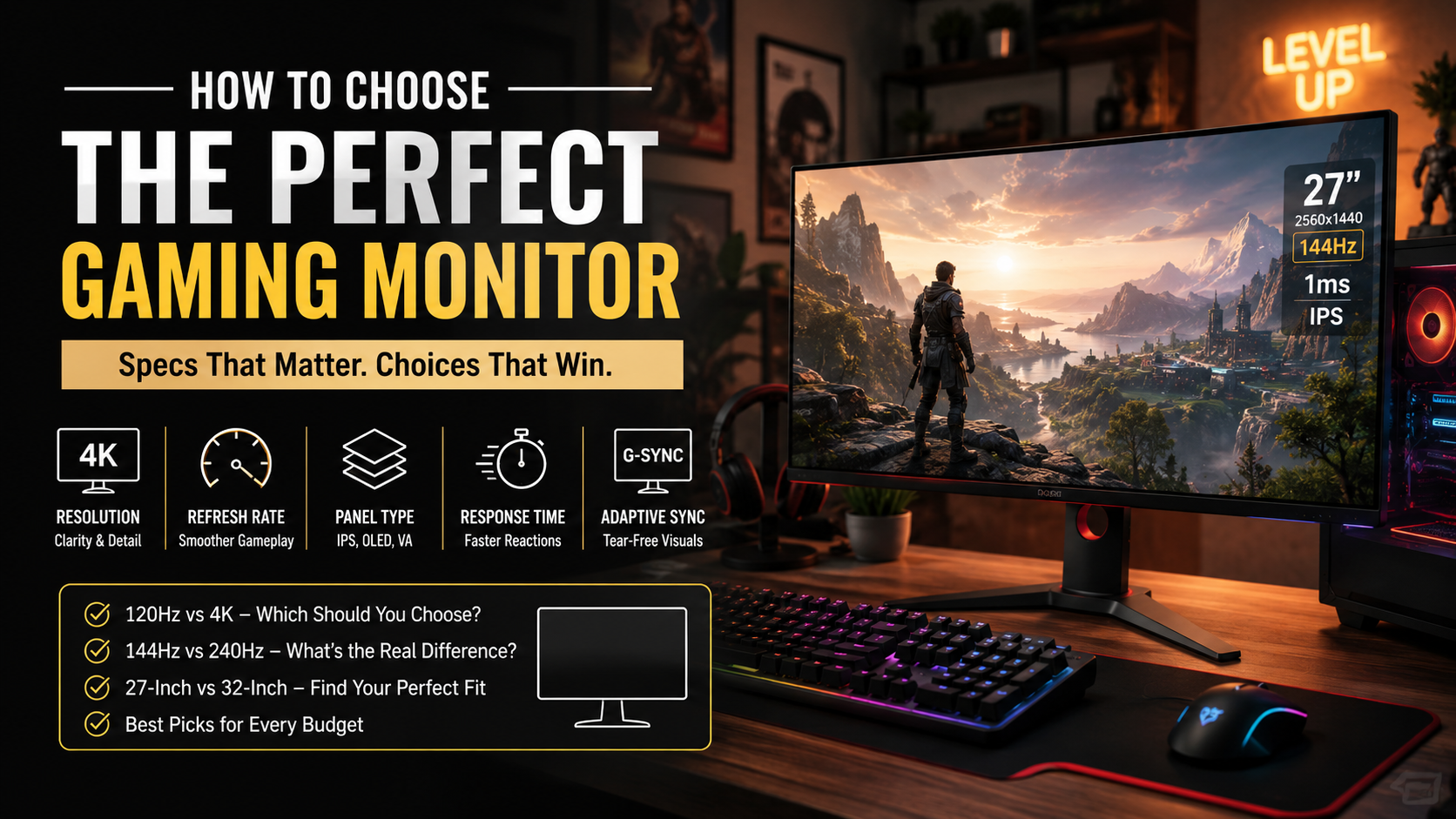
To choose the perfect gaming monitor, start by understanding the specifications that matter most. Consider resolution, refresh rate, panel type, response time, adaptive sync, and screen size.
Your graphics card also plays an important role. A powerful GPU can take better advantage of high resolutions and faster refresh rates. Before buying, compare your hardware with the monitor’s native specifications and learn more about integrated and discrete graphics.
It also helps to understand modern display standards and technologies. Resources from the Video Electronics Standards Association can provide useful background on current display benchmarks. You can also check the official VESA Association standards for more information about modern video electronics.
This guide explains how to pick a good gaming monitor for different needs and budgets. We will compare 120Hz versus 4K, 144Hz versus 240Hz, and 27-inch versus 32-inch displays. You will also learn whether a 27-inch monitor is too large for gaming.
How to Pick a Good Gaming Monitor
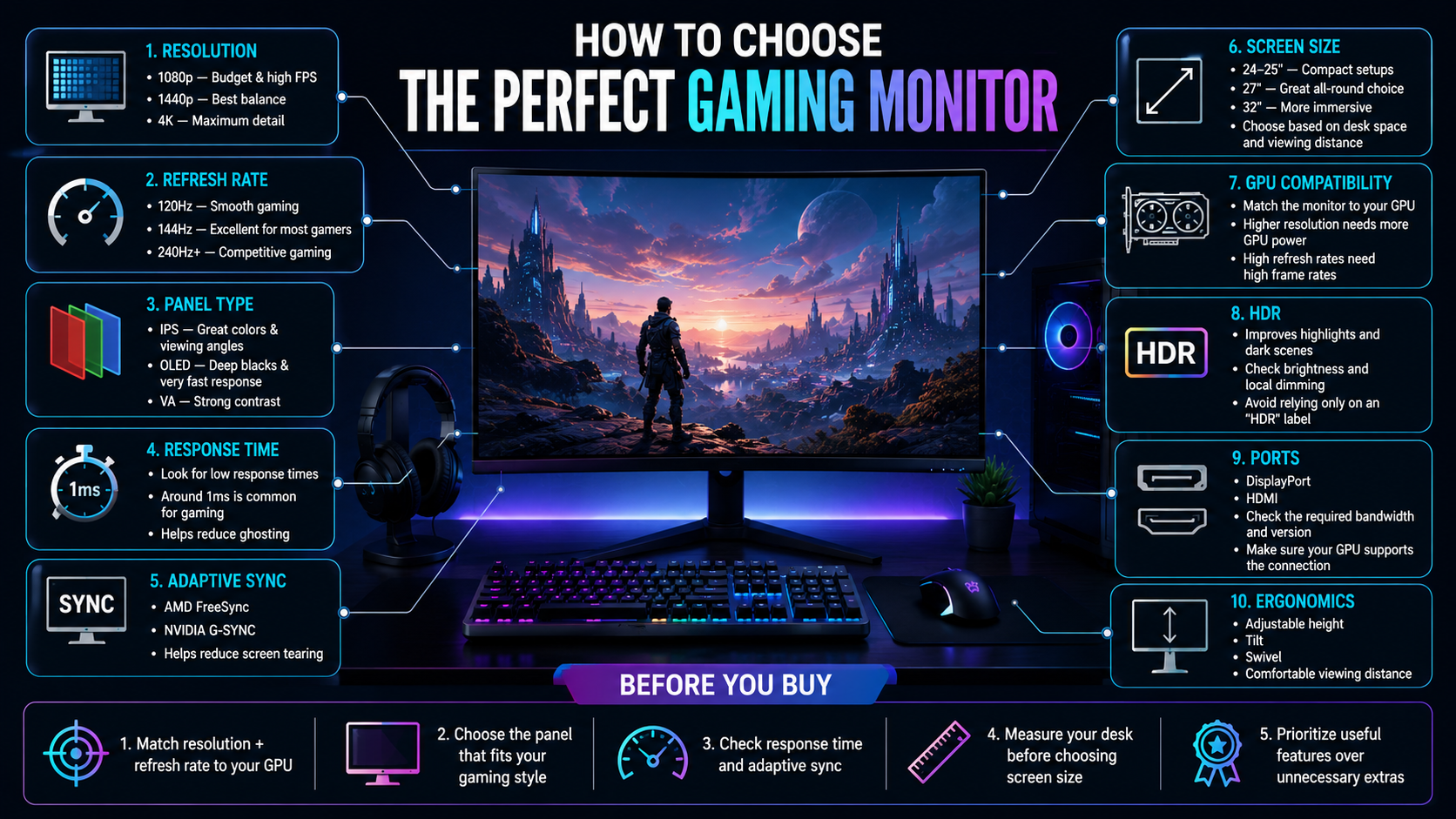
Picking a good gaming monitor starts with identifying the features that affect your actual gaming experience. If you want to choose the perfect gaming monitor, begin with the panel type. IPS, OLED, and VA panels each offer different strengths. IPS panels provide strong colors and wide viewing angles. OLED panels deliver exceptional contrast and fast pixel response. VA panels typically offer strong contrast and deep blacks.
Next, consider your graphics card. Your GPU should be capable of producing suitable frame rates at the monitor’s native resolution. Buying a high-refresh display makes little sense if your system cannot deliver enough frames.
Adaptive sync is another important feature. Technologies such as AMD FreeSync and NVIDIA G-SYNC can reduce tearing and stuttering. They help synchronize the monitor’s refresh rate with your GPU’s frame output.
Also check the monitor’s response time, ports, stand, and adjustment options. Your budget should guide the final decision. However, avoid sacrificing essential features for unnecessary extras.
Essential Panel Technologies and Sync Features
Panel technology has a direct effect on image quality, motion performance, and contrast. IPS monitors are popular because they offer accurate colors and wide viewing angles. They work well for gaming, general use, and content creation.
OLED monitors provide excellent contrast because individual pixels can turn off completely. This produces deep blacks and impressive image quality. OLED panels can also offer extremely fast response times, making them attractive for competitive gaming.
VA panels provide strong contrast and can be a good choice for players who enjoy darker games. However, motion performance can vary between models.
Adaptive sync is equally important for smooth gameplay. FreeSync and G-SYNC help match the monitor’s refresh rate to your graphics card’s output. This reduces visible tearing and inconsistent motion.
When comparing monitors, look beyond one specification. Consider the panel, resolution, refresh rate, response time, and sync support together. A balanced combination will usually provide a better experience than an expensive monitor with one standout feature.
Is 120Hz or 4K Better for Gaming?
Choosing between 120Hz and 4K depends on your gaming priorities and hardware. These specifications improve different parts of the experience, so neither option is automatically better.
A 120Hz monitor refreshes the image up to 120 times per second. This can make fast movement appear smoother and more responsive. It is especially useful for competitive shooters, racing games, and other fast-paced titles.
A 4K monitor focuses on image detail instead. With 3840 × 2160 resolution, it provides four times as many pixels as 1920 × 1080. This creates sharper textures, clearer environments, and more detailed images.
The main limitation is GPU performance. Running modern games at native 4K can require significantly more graphics power. Some systems may need reduced settings or upscaling to maintain high frame rates.
Competitive players often prioritize refresh rate and responsiveness. Players who value cinematic visuals may prefer 4K. Your GPU, favorite games, and desired frame rate should determine the better choice.
Balancing Refresh Rates and Pixel Resolution
Finding the right balance between refresh rate and resolution is essential when choosing a gaming monitor. Higher refresh rates improve motion smoothness, while higher resolutions improve image detail.
A high refresh rate is especially valuable when your system can consistently produce matching frame rates. For example, a 144Hz monitor becomes more useful when your GPU can regularly deliver well over 100 frames per second.
Resolution matters more when you prioritize visual quality. A 1440p monitor can provide a noticeable sharpness improvement over 1080p without demanding as much GPU power as 4K. This makes 1440p a popular choice for modern gaming PCs.
Your preferred games should also influence the decision. Competitive titles often benefit from high frame rates and quick response. Story-driven games can benefit more from higher resolution and stronger image quality.
Before upgrading, check your graphics card’s typical performance. Choosing specifications your hardware cannot use effectively can waste money. Aim for a monitor that matches your GPU performance, gaming style, and budget.
Is 144Hz or 240Hz Better for Gaming?
The choice between 144Hz and 240Hz depends on your gaming habits, hardware, and sensitivity to motion. Both refresh rates provide a major improvement over traditional 60Hz displays.
A 144Hz monitor refreshes the image 144 times each second. It delivers smoother movement and lower perceived latency than 60Hz. For most gamers, this already provides a highly responsive experience.
A 240Hz monitor pushes motion smoothness even further. The improvement is most noticeable in fast competitive games, where rapid camera movements and precise tracking are important. However, the difference between 144Hz and 240Hz is less dramatic than the jump from 60Hz to 144Hz.
Your computer also needs to produce enough frames to benefit from 240Hz. If your system regularly falls below 200 frames per second, the extra refresh capacity may provide limited value, making it important to consider your CPU performance alongside your graphics hardware.
For casual and general gaming, 144Hz is usually more than sufficient. Competitive players with powerful hardware may prefer 240Hz for additional responsiveness and motion clarity.
Understanding Motion Clarity and Frame Rates
Refresh rate and frame rate work closely together when determining gaming smoothness. Refresh rate describes how often your monitor can update the image. Frame rate describes how many frames your computer generates.
A higher refresh rate can improve motion clarity when your system produces enough frames. This is particularly noticeable during quick camera movements, tracking targets, or turning rapidly in competitive games.
However, buying a faster monitor does not automatically increase your frame rate. Your CPU and GPU still determine how many frames your system can render.
Before choosing a 240Hz monitor, check your typical performance in the games you play. If your system consistently produces 240 frames per second, you can take fuller advantage of the display.
Response time also affects motion clarity. A low response time helps reduce ghosting and trailing behind moving objects.
For competitive gaming, prioritize a combination of high refresh rate, strong frame rates, low response time, and adaptive sync. These features work together to create a responsive experience. For casual gaming, a balanced 144Hz display can provide excellent performance without unnecessary expense.
Is a 27 or 32 Better for Gaming?
Choosing between a 27-inch and 32-inch gaming monitor depends on your desk, viewing distance, and preferred level of immersion. Both sizes can work well, but they suit different setups.
A 27-inch monitor is a popular desktop gaming choice. It provides plenty of screen space while remaining easy to view from a typical desk position. At 1440p, it also offers a strong balance between sharpness and performance.
A 32-inch monitor provides a larger viewing area. This can create a more immersive experience in open-world, simulation, and cinematic games. However, the larger panel may require a deeper desk and greater viewing distance.
Your resolution should also match the screen size. A 27-inch 1440p monitor can look very sharp for gaming. A 32-inch display can benefit from 1440p or 4K, depending on your viewing distance and hardware.
Before buying, measure your desk depth and available width. Consider how far you normally sit from the screen. The best gaming monitor size is the one that provides comfortable viewing without excessive head or eye movement.
Evaluating Desk Space and Viewing Distances
Your physical gaming setup should influence your monitor choice as much as technical specifications. A monitor that looks excellent on paper may feel uncomfortable if it does not suit your desk.
Start by measuring your desk depth and width. Larger monitors need enough space to maintain a comfortable viewing distance. A 32-inch display can feel overwhelming when positioned too close to your eyes.
Your seating position also matters. You should be able to view the entire screen comfortably without constantly moving your head. This becomes increasingly important with larger screens and ultrawide displays.
Monitor stands can make a difference too. Look for adjustable height, tilt, swivel, and rotation features when possible. These adjustments can help you create a more comfortable posture.
Consider your room and surrounding equipment as well. Speakers, a keyboard, a mouse, and other gaming equipment all compete for desk space.
A practical setup should balance screen size, viewing distance, ergonomics, and available space. Taking measurements before shopping can prevent an expensive monitor from becoming an awkward addition to your gaming desk.
Is 27-Inch Too Big for Gaming?
A 27-inch gaming monitor is not generally too big for a desktop setup. In fact, it has become one of the most popular sizes for modern PC gaming.
The size offers a useful balance between immersion and practicality. It provides more screen space than smaller displays without requiring the viewing distance of a much larger panel.
Resolution also affects how a 27-inch monitor looks. At 1440p, the screen provides a high pixel density that keeps games, text, and interface elements sharp. It also avoids some of the performance demands associated with 4K gaming.
Players moving from a laptop or smaller monitor may need a short adjustment period. Once accustomed to the larger screen, many users appreciate the additional space for games and multitasking.
Your desk depth remains important. A 27-inch monitor should sit at a comfortable distance so you can view the whole screen naturally.
If your desk can accommodate it, 27 inches is an excellent all-around gaming size. It works particularly well with 1440p resolution and refresh rates from 144Hz upward. For many desktop gamers, it offers one of the best combinations of size, sharpness, and performance.
Adapting to Modern Display Dimensions
Moving to a larger monitor can change how you interact with games, applications, and desktop interfaces. The larger viewing area may feel different initially, especially if you previously used a small laptop or compact display. If you’re upgrading from a portable gaming setup, choosing the right gaming laptop can also help you compare display and hardware considerations.
Most players can adjust quickly once the monitor is positioned correctly. The key is maintaining a comfortable viewing distance and eye level.
Monitor placement can have a greater effect on comfort than screen size alone. Position the display so you can see the entire image without excessive head movement. Adjust the stand height and tilt to suit your natural sitting position.
A larger screen can also improve multitasking. You have more space for game windows, communication apps, browsers, and other tools. However, larger dimensions are not always better if your desk cannot support them comfortably.
Before purchasing, measure your setup and consider your typical viewing distance. Think about how the monitor will fit alongside your keyboard, mouse, speakers, and other accessories.
A well-positioned 27-inch or 32-inch monitor can provide excellent immersion without sacrificing comfort. Your physical setup should always support the specifications you are paying for.
Frequently Asked Questions About Gaming Monitors
What resolution should I look for in a gaming monitor?
Resolution depends heavily on your graphics card capabilities and screen size preferences. 1080p works well for budget setups and high frame rates. 1440p offers the best balance of visual sharpness and performance. 4K delivers stunning clarity but demands top-tier hardware to run smoothly.
Do I need HDR on my gaming monitor?
High Dynamic Range improves contrast and color depth, making bright highlights pop and dark scenes look richer. However, entry-level HDR monitors often lack the local dimming zones needed to make a noticeable difference. Look for high peak brightness specifications for true HDR performance.
What response time is best for gaming?
A lower response time reduces motion blur and ghosting behind fast-moving objects on screen. Look for monitors with a gray-to-gray response time of 1ms or lower. IPS and OLED panels generally offer excellent response times suitable for fast competitive gameplay.
Are curved monitors better for gaming?
Curved monitors wrap slightly around your field of view, creating a more immersive experience on ultrawide or large screens. They also help maintain uniform viewing angles across the entire display. However, flat screens remain better if you do professional photo editing alongside gaming.
Conclusion
choose the perfect gaming monitor requires a balance between your budget, hardware, and gaming preferences. Learning how to choose the perfect gaming monitor makes it easier to compare specifications without getting overwhelmed.
Start with the features that matter most to your setup. Consider resolution, refresh rate, panel technology, response time, adaptive sync, and screen size. Your graphics card should also influence your final decision.
Competitive gamers may benefit from high refresh rates such as 144Hz or 240Hz. Players focused on cinematic visuals may prefer 1440p or 4K resolution. For many desktop users, a 27-inch 1440p monitor offers an excellent balance.
Remember to consider your physical setup too. Measure your desk, check your viewing distance, and choose a monitor that fits comfortably.
The perfect gaming monitor is not necessarily the most expensive model. It is the display that matches your hardware, games, space, and personal priorities.
Take time to compare your options before buying. With the right combination of performance and image quality, your new monitor can make every gaming session smoother, sharper, and more enjoyable.