First-Party vs Third-Party Cookies: What Every Web User Needs to Know
Every time you browse the web, small data files help websites remember your activity. Understanding first-party vs third-party cookies can help you make better privacy decisions.
Cookies can keep you signed in, remember your preferences, and preserve items in your shopping cart. They can also support advertising and cross-site tracking when third-party services use them.
According to guidelines published by the Federal Trade Commission, understanding commercial data collection helps consumers safeguard their digital privacy and prevent cross-site profiling.
The key difference is simple. First-party cookies come from the website you visit, while third-party cookies come from other services embedded on that website.
This guide explains how both cookie types work. You will also learn how to check your browser settings and what changes when you block third-party cookies.
By the end, you should understand which cookies are useful, which raise privacy concerns, and how to manage them without unnecessarily disrupting your browsing experience.
What is the difference between 1st and 3rd party cookies?
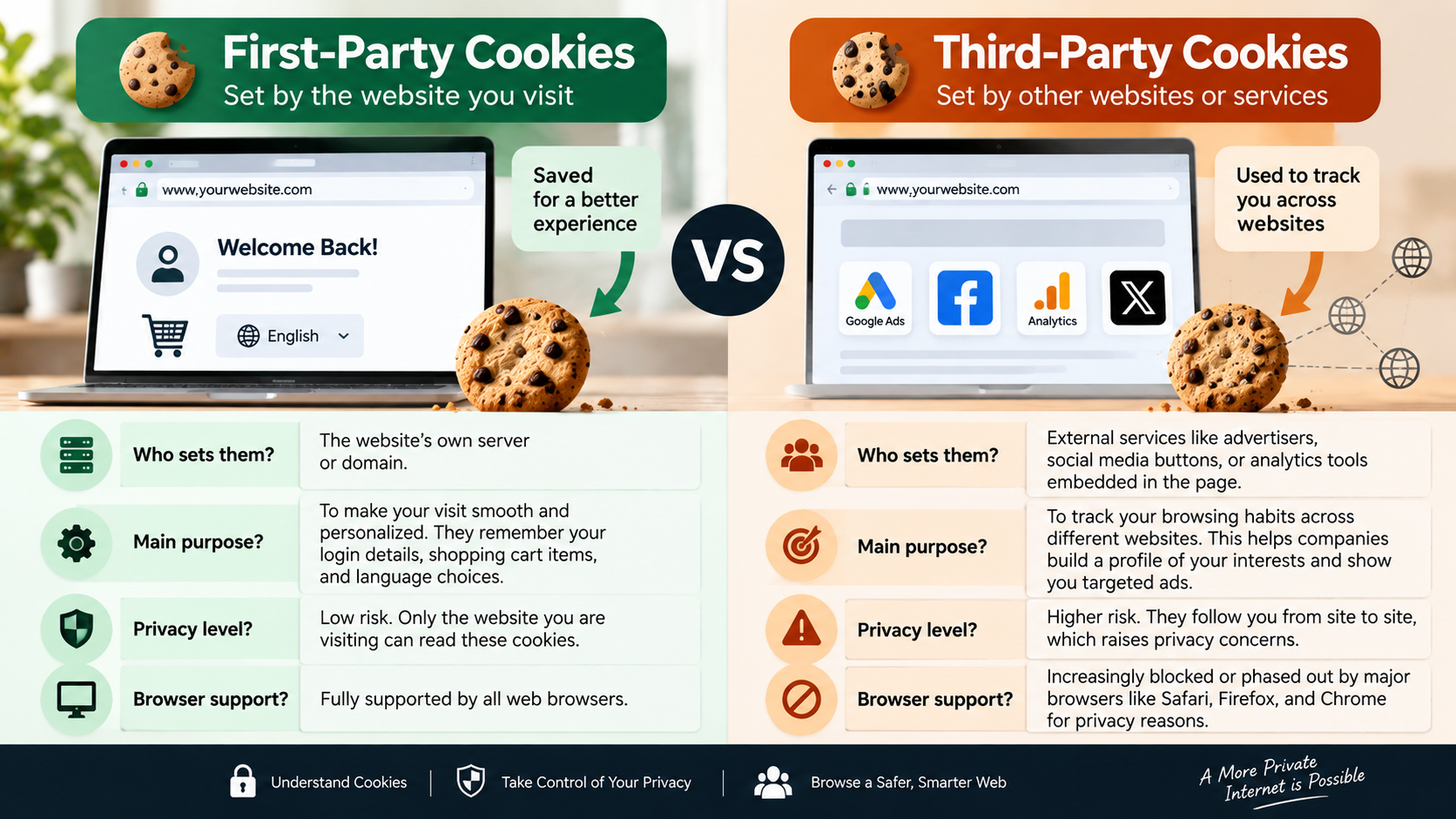
The main difference between first-party vs third-party cookies is the website associated with the cookie. A first-party cookie comes from the site you are visiting. Your browser can use it to remember settings, maintain a login session, or keep products in your shopping cart.
A third-party cookie comes from another site or service embedded within the page. For example, a website might include advertising, social media, or payment content from another domain. That external service may use cookies when your browser permits them.
First-party cookies usually support the website’s direct functions. Third-party cookies have traditionally supported advertising, analytics, personalization, and cross-site tracking.
However, not every third-party cookie is automatically harmful. Some provide useful features, such as payment services or authentication.
The important privacy issue is cross-site tracking. When the same third party appears across many websites, it can potentially connect activity from those sites. Modern browsers increasingly restrict this behavior through cookie blocking, tracking protection, and storage isolation.
Domain Ownership and Primary Purpose
The domain associated with a cookie helps determine whether it is first-party or third-party. A first-party cookie is associated with the website you are currently visiting. For example, a shopping website may use one to remember your cart or language preference.
A third-party cookie is associated with another domain that appears within the website. Advertising networks, embedded services, and other external providers may use these cookies.
The purpose also tends to differ. First-party cookies often support functions such as:
- Login and session management
- Shopping carts and checkout preferences
- Language and accessibility settings
- Website personalization
- Security-related functions
Third-party cookies have historically played a larger role in advertising and cross-site measurement. A company with content or tracking code across multiple websites could use identifiers to recognize a browser across those sites.
That distinction is becoming less important for some modern tracking systems. Browsers now use additional protections, such as cookie partitioning and tracking prevention. As a result, third-party access does not always mean unrestricted cross-site tracking.
Should I have third-party cookies on or off?
For most privacy-conscious users, blocking third-party cookies is a reasonable default. It reduces one traditional method of cross-site tracking without requiring you to disable all cookies. For more context on cookie choices, see Should You Accept Or Reject Cookies From A Website?
When considering first-party vs third-party cookies, remember that blocking third-party cookies does not mean every tracking technique disappears. Websites can use other technologies, including browser storage, pixels, and server-side measurement.
There can also be compatibility issues. Some websites rely on cross-site access for services such as authentication or payments. If a trusted website stops working, consider creating a site-specific exception rather than enabling third-party cookies everywhere.
For everyday browsing, blocking third-party cookies offers a useful balance. You retain most normal website functions while limiting an important cross-site tracking mechanism.
The best setting depends on your browser and the websites you use. Privacy-focused users can generally block third-party cookies and make exceptions only when necessary.
Balancing User Privacy with Routine Convenience
Privacy settings always involve some balance between protection and convenience. Blocking third-party cookies can reduce certain forms of cross-site tracking, but it may occasionally affect websites that depend on external services.
For example, a website might embed a payment provider, authentication system, video player, or other interactive service. That service may need limited cross-site access to complete a specific task.
The good news is that you usually do not need to weaken your entire browser configuration. Modern browsers provide ways to create exceptions for trusted websites.
A practical privacy-first approach is:
- Keep third-party cookies blocked when possible.
- Allow exceptions only for trusted websites.
- Test important services after changing settings.
- Remove exceptions that you no longer need.
- Keep your browser updated.
This approach gives you stronger privacy without treating every cookie as dangerous. It also recognizes an important distinction: privacy protection should reduce unnecessary tracking without preventing legitimate website functions.
How do I check if my browser is blocking 3rd party cookies?
You can check your browser’s cookie and privacy settings in a few steps. The exact menus vary by browser and operating system. If you also want to understand stored browser data, Clear Cache and Clear Data Difference: What to Know explains how these two options differ.
In current Chrome versions, open Settings, choose Privacy and security, and select Third-party cookies. Chrome lets you choose whether to allow or block these cookies and add individual site exceptions.
Firefox uses Enhanced Tracking Protection and Total Cookie Protection to limit cross-site tracking. Its current protections are designed to isolate or block cookies used by trackers.
Safari also includes privacy controls designed to limit cross-site tracking.
When checking your settings, look for options mentioning:
- Third-party cookies
- Cross-site tracking
- Tracking protection
- Cookies and site data
- Site permissions
You can also inspect individual websites through your browser’s address-bar controls. These panels can show stored site data and available permissions.
Browser interfaces change over time, so the exact wording may differ. If you cannot find a setting, search your browser’s help documentation for its current cookie controls.
Reading Your Real-Time Browser Site Data
Your browser can often show which sites have stored data on the page you are viewing. This provides a practical way to understand what happens during a browsing session. You can also learn how long web cookies last to better understand how long this stored information may remain.
In Chrome, for example, you can open the site information controls beside the address bar and review cookies and site data. Chrome also provides controls for managing third-party cookie access and creating site-specific exceptions.
The information you see can include cookies, local storage, and data associated with embedded services. Some domains may belong to advertising, analytics, payment, authentication, or other providers.
Do not assume that every unfamiliar domain represents malicious activity. Websites often rely on legitimate external services. Instead, look for repeated trackers or services that appear across many unrelated websites.
You can use these browser controls to:
- Review stored site data.
- Remove individual cookies.
- Check permissions.
- Identify external services.
- Adjust third-party cookie access.
This inspection process gives you more useful information than simply deleting everything. It helps you understand which services interact with a website and why a particular privacy setting may affect functionality.
Is it safe to allow 3rd party cookies?
Allowing third-party cookies is not the same as installing malware. Cookies are ordinary browser data, and their presence does not automatically mean your device is infected or compromised. However, it is still useful to understand the 5 disadvantages of using a VPN when comparing different approaches to online privacy and security.
The larger concern is privacy. Third-party cookies can support cross-site tracking when the same service appears across different websites. That activity can help companies understand browsing patterns and build advertising or measurement profiles.
When comparing first-party vs third-party cookies, it is also important to separate privacy risks from direct security threats. Simply allowing a third-party cookie does not automatically cause malware, session hijacking, or a security breach.
There are security considerations around cookies in general. Session cookies can become sensitive if an attacker obtains them, particularly when they provide access to an authenticated account.
Modern cookie protections also reduce some risks. Website developers can use security attributes such as Secure and HttpOnly, while browsers enforce restrictions on cross-site cookie behavior.
For privacy-focused browsing, blocking unnecessary third-party cookies remains sensible. It limits one established tracking mechanism without claiming that every third-party cookie is malicious or inherently unsafe.
The Problem with Behavioral Profiling and Cross-Site Leaks
Cross-site tracking becomes more concerning when the same company or advertising network appears across many websites. Each individual visit may reveal limited information, but repeated activity can create a broader behavioral picture.
For example, an advertising service could appear on several shopping websites. If its tracking mechanisms can recognize the same browser across those sites, it may connect separate browsing events. This can help advertisers understand interests and deliver more personalized advertising.
This does not mean every third-party service creates a detailed personal dossier. Modern browsers increasingly restrict cross-site tracking, and websites can use privacy-preserving alternatives.
Still, reducing unnecessary third-party access can limit exposure to this type of tracking.
The main privacy concerns include:
- Cross-site behavioral profiling
- Persistent advertising identifiers
- Unwanted personalization
- Greater exposure to data collection
- Loss of control over how browsing activity is connected
Understanding first-party vs third-party cookies helps you recognize why these tracking differences matter. Blocking third-party cookies can therefore provide a useful layer of privacy protection.
What happens if I block 3rd party cookies?
When you block third-party cookies, your browser prevents many external services from storing or accessing cookies across websites. Your first-party cookies can continue working, so common functions usually remain available. If you want broader privacy protection while browsing, understanding what a VPN is and why you need it can help you explore another layer of online security.
You can generally stay signed in, retain website preferences, and keep shopping carts. Blocking third-party cookies may cause some sites to work differently, while browsers allow users to create exceptions for specific websites.
You may notice changes in advertising and embedded services. Some personalized ads may become less targeted, while certain widgets or authentication systems may require additional permissions.
Blocking cookies also does not guarantee complete privacy. Websites can use other tracking methods, including first-party analytics, pixels, fingerprinting, and server-side identifiers.
If a website breaks after you enable blocking, avoid immediately restoring unrestricted access. Instead, check whether the browser offers a temporary or site-specific exception.
The likely results include:
- Less cookie-based cross-site tracking
- Fewer persistent third-party identifiers
- More privacy during everyday browsing
- Occasional compatibility issues
- Greater need for targeted site exceptions
Managing Minor Single Sign-On and Widget Breakage
Some websites depend on external services to provide specific functions. Blocking third-party cookies can occasionally interfere with these services, especially when they need cross-site access.
Common examples include single sign-on systems, embedded payment services, social login tools, and interactive widgets. Some services may need cross-site cookies for functions such as payment processing or authentication.
If a trusted website stops working, first identify whether cookies are responsible. Try the browser’s site permissions or cookie controls before changing your global privacy settings.
A targeted exception is usually the better solution. Many browsers allow users to add individual websites to a third-party cookie exception list.
You can also remove the exception later if you no longer need it.
This approach follows a simple principle: block broadly, allow selectively.
Instead of weakening your privacy settings for every website, give only the required service temporary or limited access. This keeps your normal browsing environment more private while preserving important features when you genuinely need them.
Frequently Asked Questions
Do first-party cookies pose any privacy risks?
First-party cookies can still create privacy risks, even though they are generally less associated with cross-site tracking. A website can use them to remember your activity, preferences, or login state.
A first-party cookie may also contain a session identifier. If an attacker obtains a sensitive session cookie, that could create an account security risk. Proper website security and cookie protections therefore remain important.
When comparing first-party vs third-party cookies, remember that first-party cookies can still collect information about your activity on the website that sets them.
You do not need to delete every first-party cookie automatically. Instead, manage them based on your privacy needs.
Will blocking third-party cookies break every website I visit?
No. Blocking third-party cookies will not break every website. Most ordinary website functions can continue using first-party cookies or other storage methods.
However, some services may depend on cross-site access. Authentication, payment tools, embedded content, and certain widgets can occasionally require exceptions.
If something breaks, allow access only for the affected trusted website when possible.
Why are tech companies phasing out third-party cookies?
The web industry has been moving away from unrestricted third-party tracking. Privacy concerns, regulatory pressure, and changes in browser technology have all contributed to this shift.
The broader direction is clear: browsers increasingly aim to reduce unrestricted cross-site tracking while supporting legitimate advertising and measurement.
This makes understanding first-party vs third-party cookies increasingly important for everyday internet users. Browser privacy controls are also becoming more important as tracking technologies evolve.
How often should I clear cookies from my web browser?
There is no universal requirement to clear cookies every month. Regular deletion is optional and depends on your privacy preferences and browsing habits.
Clearing cookies can remove stored sessions and preferences, which means you may need to sign in again. It can also remove useful website settings.
If privacy is your priority, managing third-party cookies and tracking protection is often more useful than repeatedly deleting all cookies.
Consider clearing cookies when you want to remove stored site data, troubleshoot a website, sign out from multiple services, or reduce persistent local data.
For routine browsing, you can keep useful first-party data while limiting unnecessary third-party access. This provides a better balance between privacy, convenience, and website functionality.
Conclusion
Understanding first-party vs third-party cookies is an important step toward better online privacy. First-party cookies generally help websites remember useful information. They can maintain sessions, preserve preferences, and support shopping features.
Third-party cookies have traditionally played a larger role in advertising and cross-site tracking. Modern browsers increasingly restrict this behavior through tracking protection, cookie blocking, and storage isolation.
For most privacy-conscious users, blocking third-party cookies is a sensible starting point. You can still create exceptions when a trusted website needs cross-site access for authentication, payments, or another feature.
Remember that cookies are only one part of online tracking. Blocking them does not eliminate every tracking method.
For stronger privacy, review your browser’s tracking protection, site permissions, and cookie settings. Check Chrome, Firefox, Safari, or your preferred browser regularly.
The goal is not to eliminate every cookie. It is to keep useful website functionality while reducing unnecessary tracking.