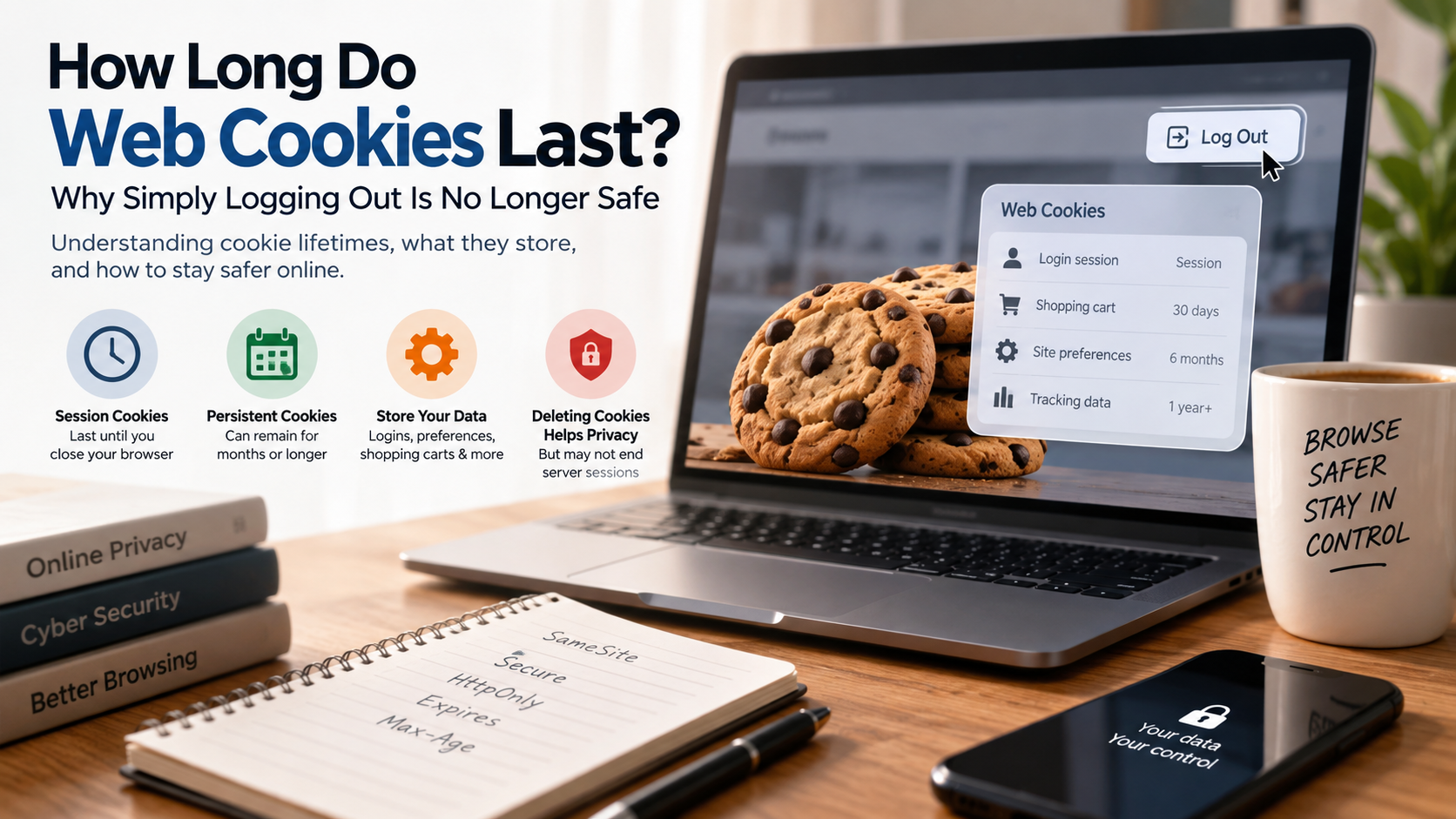
How Long Do Web Cookies Last? Why Simply Logging Out Is No Longer Safe
Most internet users assume clicking “Log Out” ends their online session immediately. In reality, logout behavior depends on how each website manages authentication. If you ask how long do web cookies last, the answer depends on the cookie type, website settings, and browser rules.
Some cookies last only for a browser session. Others can remain stored for months or longer. Cookies help websites remember logins, shopping carts, preferences, and other information. Their lifetime often depends on attributes such as Max-Age and Expires.
According to official web standards maintained by the World Wide Web Consortium (W3C), cookies function as the stateful backbone of the stateless HTTP protocol. They quietly track your logins, shopping carts, and behavioral profiles across every tab you open.
Cybercriminals may also target stolen session cookies instead of cracking passwords. Infostealer malware can extract browser data and authentication tokens from infected devices. A stolen authentication token may remain useful until the website invalidates the related server-side session.
This guide explains how long do web cookies last, how cookie expiration works, and what happens after deletion. It also explains whether blocking cookies improves security. Understanding how long do web cookies last in a browser can help you make smarter privacy and security decisions.
How long should a web cookie last?
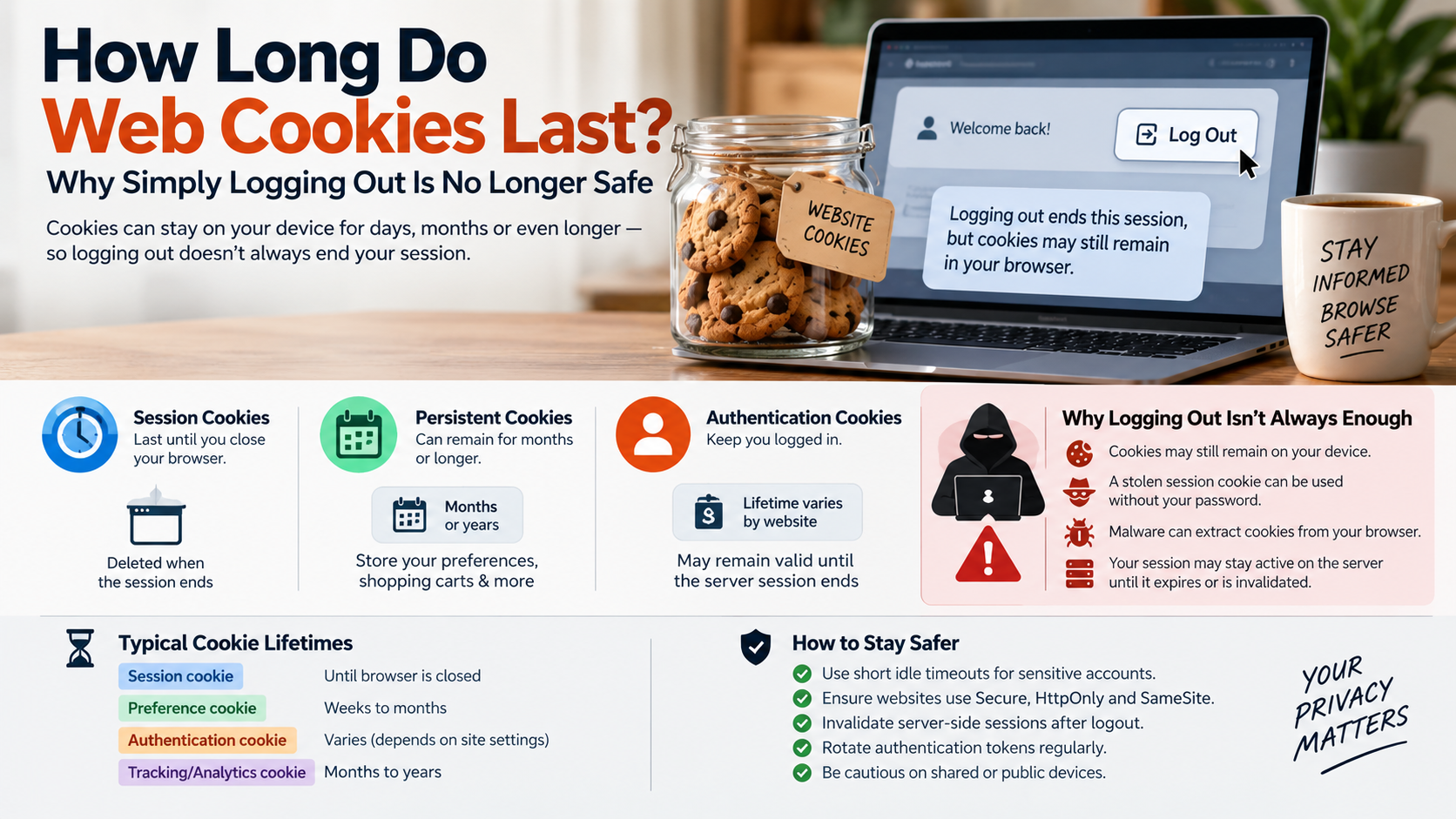
A web cookie should last only as long as necessary for its intended purpose. There is no universal answer to how long do web cookies last because different cookies perform different jobs. A temporary session cookie may disappear when the browser session ends. A persistent preference cookie may remain for months.
Authentication cookies need greater security controls. Websites handling sensitive information should use appropriate expiration periods and server-side session timeouts. High-risk services may also require reauthentication after periods of inactivity.
When considering how long do web cookies last, developers should avoid unnecessarily long lifetimes for sensitive authentication tokens. A stolen token could allow unauthorized access without exposing the user’s password.
Cookie duration should therefore match the level of risk. A simple preference cookie can have a longer lifetime. An authentication cookie protecting sensitive information should receive stricter controls.
Good cookie management considers both convenience and security. The goal is to provide a smooth experience without leaving sensitive sessions active longer than necessary.
Balancing User Experience With Session Security
Website operators must balance convenience with session security when deciding how long cookies should last. Long-lived cookies reduce repeated login prompts. However, they can increase exposure if a device or authentication token becomes compromised.
Shorter cookie lifetimes reduce that exposure. They can also create more login requests for users. The right balance depends on the website, account type, and potential impact of unauthorized access.
When deciding how long do web cookies last, administrators should consider several safeguards:
- Use short idle timeouts for sensitive sessions.
- Invalidate server-side sessions after logout.
- Use
SecureandHttpOnlywhere appropriate. - Apply suitable
SameSitesettings. - Rotate authentication tokens after important events.
- Require reauthentication for high-risk actions.
A critical distinction remains between browser cookies and server sessions. Deleting a cookie does not automatically guarantee that the server session has ended.
Understanding how long do web cookies last therefore requires looking beyond browser storage. Strong session security combines appropriate cookie settings with proper server-side controls.
What will I lose if I delete cookies?
Deleting browser cookies removes stored cookie data for the affected websites. In many cases, this signs you out and requires you to enter your credentials again. You may also lose preferences stored inside cookies.
Those preferences can include language choices, themes, regional settings, and other customization options. Guest shopping carts may also disappear when a website stores cart information in cookies.
However, deleting cookies does not normally delete your online accounts. It also does not remove server-side files, browser bookmarks, or passwords stored separately in a password manager.
The exact effect depends on the website. Some information may be stored through local storage or other browser technologies instead of cookies. If you are clearing browser data, understanding the difference between clearing cache and clearing data can help you avoid removing more information than necessary.
Knowing how long do web cookies last also helps explain why deleting them can affect your browsing experience. Removing a persistent cookie breaks the local connection between your browser and the website.
Cookie deletion can improve privacy on shared devices. However, it is not a complete cybersecurity solution. Malware, server-side sessions, browser fingerprints, and previously collected data can remain unaffected.
The Immediate Privacy Benefits of Clearing Local Storage
Clearing cookies and other site data can reduce information stored locally on your device. It may remove persistent identifiers, saved preferences, and certain tracking data associated with websites.
This can be particularly useful after using a shared or public computer. Removing stored data reduces the chance that another person can access an existing browser session.
Understanding how long do web cookies last makes this benefit easier to understand. Persistent cookies can remain available across browser restarts. Clearing them removes those locally stored identifiers before their normal expiration.
However, clearing local storage does not erase information already stored on a website’s servers. It also cannot remove data that third parties collected before deletion.
For stronger privacy, combine cookie cleanup with broader security practices. If you use public networks, also learn about public Wi-Fi risks and how to protect your connection:
- Sign out of important accounts after use.
- Clear site data on shared devices.
- Review active account sessions regularly.
- Enable multi-factor authentication.
- Keep your browser and operating system updated.
These steps provide broader protection than cookie deletion alone. They also help reduce the risks associated with stolen or forgotten browser sessions.
How long do cookies last in a browser?
If you wonder how long do web cookies last in a browser, the answer depends on their expiration settings. A session cookie generally remains available during a browser session. A persistent cookie includes an expiration time through Max-Age or Expires.
There is no single standard duration for every persistent cookie. Some cookies expire within minutes. Others can remain stored for months or longer. Browser privacy controls can also affect how long certain cookies remain available.
The browser may remove cookies because of user settings, privacy protections, storage management, or manual deletion. Websites can also replace or remove cookies through new Set-Cookie instructions.
Therefore, how long do web cookies last depends on several factors. These include the website’s configuration, cookie type, browser behavior, and privacy settings.
A cookie’s intended lifetime is not always its actual lifetime. Browser policies can limit certain tracking technologies. Users can also manually clear cookies whenever they choose.
Understanding these differences helps explain why cookie expiration varies between websites and browsers.
How Modern Browsers Enforce Strict Storage Limits
Modern browsers increasingly use privacy protections that affect how websites and third parties use cookies. These protections can include third-party cookie restrictions, storage partitioning, and other anti-tracking measures.
This means a website cannot always assume that a cookie will remain available for its requested lifetime. Browser policies may restrict or remove certain third-party cookies earlier than expected.
These controls are especially important when considering how long do web cookies last for advertising and cross-site tracking. Partitioning can limit how third parties connect identifiers across unrelated websites.
However, privacy protections do not eliminate every form of tracking. First-party cookies can still support legitimate functions such as authentication, preferences, and shopping carts.
Users should therefore focus on selective privacy controls rather than assuming every cookie is harmful. Essential cookies can remain available while unnecessary tracking can be restricted.
Browser privacy settings can help create this balance. They can reduce unwanted tracking while preserving important website functions.
Ultimately, how long do web cookies last depends partly on browser policies. The server sets cookie instructions, but the browser controls how those instructions are handled locally.
Is blocking all cookies a good idea?
Blocking every cookie may sound like the strongest privacy option. However, completely blocking cookies can break many modern website functions. Websites often use first-party cookies to manage login sessions, shopping carts, preferences, and other essential features.
Without these cookies, websites may repeatedly forget your settings. Some services may also prevent you from staying logged in or completing certain transactions.
Understanding how long do web cookies last is more useful than simply blocking all cookies. Cookie duration, purpose, and source all matter when evaluating privacy risks.
A practical approach is to distinguish between essential first-party cookies and third-party tracking cookies. First-party cookies often support functions you intentionally request. Third-party cookies may support advertising, analytics, and cross-site tracking. You can also learn more about VPNs and why you may need one when protecting your privacy online.
Instead of blocking everything, consider using:
- Built-in browser tracking protection.
- Third-party cookie restrictions.
- Site-specific cookie permissions.
- Automatic deletion of selected site data.
- Separate browser profiles for sensitive activities.
These controls can improve privacy without breaking essential website features. They also give users more control over how long do web cookies last on their devices.
Choosing Granular Partitioning Over Total Cookie Rejection
Cookie partitioning provides a more targeted alternative to completely blocking cookies. It can isolate stored data based on the website context where the data was created.
This limits the ability of third parties to connect activity across unrelated websites. It can therefore reduce the usefulness of cross-site identifiers while allowing necessary website functions to continue.
When considering how long do web cookies last, partitioning adds another important layer. A cookie may still have an expiration date, but its accessibility can be restricted by the browser’s storage rules.
Users can combine partitioning with tracking protection and sensible cookie controls. Private browsing can also provide temporary isolation for specific browsing sessions.
However, partitioning does not make you anonymous. Websites can still collect information through account activity, network requests, and other technologies.
The goal should be controlled cookie storage, rather than simply deleting everything. Keep cookies that support trusted services while limiting unnecessary tracking.
This approach provides a practical balance between privacy, usability, and security. It also makes cookie management more effective than blanket blocking.
How quickly do cookies expire?
Cookies can expire almost immediately or remain stored for a long time. If you ask how long do web cookies last, their expiration depends mainly on the instructions provided by the website and the browser’s handling of those instructions.
The Max-Age attribute specifies how many seconds a cookie should remain valid. The Expires attribute provides a specific expiration date and time.
If a cookie does not include either attribute, it is generally treated as a session cookie. Such cookies are intended to remain available during the browser session.
Websites can also remove cookies by sending a new Set-Cookie response with an appropriate expiration value. Server-side authentication sessions may follow completely separate expiration rules.
This creates an important distinction. Cookie expiration does not always equal session expiration. A browser can remove a cookie while a server-side session remains active.
Conversely, a server can invalidate a session while the browser still stores the related cookie.
Understanding how long do web cookies last therefore requires looking at both browser storage and server-side session management.
Understanding Server Max-Age Directives and Expiration Headers
Websites send cookie instructions through the HTTP Set-Cookie response header. Two important attributes control cookie persistence: Max-Age and Expires.
Max-Age specifies how long the cookie should remain valid in seconds. When the specified period ends, the browser treats the cookie as expired.
Expires specifies a particular date and time for expiration. A website can use either attribute according to its implementation needs.
When considering how long do web cookies last, these attributes provide the basic answer for persistent cookies. However, browser privacy policies and user settings can also affect actual storage.
Developers should also configure security attributes such as Secure, HttpOnly, and appropriate SameSite values. These settings do not determine cookie lifetime. They can, however, reduce certain security risks.
Most importantly, authentication should be controlled on the server. Expiring a browser cookie alone should not be considered equivalent to invalidating an account session.
A secure application should combine proper cookie expiration with server-side session controls. This approach provides stronger protection against stolen authentication tokens.
Frequently Asked Questions
Can hackers steal my cookies even after I log out?
Yes, attackers can abuse stolen cookies if the host application fails to invalidate the session token on the server side. Poorly designed websites simply delete the cookie from your local browser when you click log out, while leaving the backend authorization active. If spyware extracted the token prior to logout, that stolen string can grant unauthorized access until the server session officially expires.
What is the difference between session cookies and persistent cookies?
Session cookies exist temporarily in your computer’s random-access memory and disappear automatically whenever you exit your web browser. Persistent cookies write directly to your local drive and remain intact across multiple browsing sessions until reaching their predetermined expiration date. Persistent tokens remember recurring logins and custom configurations, whereas session cookies manage immediate tasks like keeping items in a checkout cart.
How often should I manually clear my browser cookies?
Clearing your browser cookies once every month strikes an ideal balance between convenience and proactive security hygiene. However, you should immediately purge local storage after using shared computers, public Wi-Fi networks, or resolving suspicious browser redirects. Regularly emptying this local data limits the damage of infostealer malware and forces servers to issue fresh, uncompromised authentication identifiers.
Do private browsing or incognito windows save cookies?
Incognito and private browsing windows isolate cookies within a temporary holding container that operates separately from your standard profiles. While websites can read and store cookies during your private session, the browser permanently destroys that entire temporary storage vault the instant you close the window. No persistent trackers, login records, or browsing history survive after window termination.
Conclusion
Understanding how long do web cookies last reveals an important point about modern browser security: logging out does not always tell the whole story. Cookies are not inherently malicious. They help websites manage authentication, preferences, shopping carts, and other essential functions.
The security risk depends on how cookies and server-side sessions are designed. Long-lived authentication tokens can increase exposure if attackers steal them. Poor logout implementations can also leave server sessions active after a browser cookie disappears.
Protecting your online accounts requires more than regularly deleting cookies. Review active sessions, clear site data on shared devices, and use browser privacy controls to limit unnecessary tracking. Enable multi-factor authentication on important accounts and keep your browser and operating system updated.
Cookie technology will continue to evolve as browsers strengthen privacy protections. By understanding cookie expiration, session security, and browser storage, you can make better choices about your digital privacy without sacrificing everyday web functionality.