
CPU Cores and Threads Explained: The Ultimate Processor Guide
Understanding how computer processors work can feel overwhelming when you compare modern hardware specifications. Learning about CPU cores and threads explained in simple terms helps you choose the right computer. These components influence how smoothly your system handles gaming, multitasking, and demanding applications.
A processor’s architecture determines how efficiently it executes instructions and manages workloads. According to resources from Intel, modern processor designs support increasingly complex computing demands. Whether you’re building a gaming PC or upgrading a work laptop, understanding processor specifications helps you make informed decisions.
However, more cores or threads don’t automatically guarantee better performance. Clock speed, processor architecture, software optimization, and cooling also affect results. This guide answers four important questions about CPU cores and threads to help you understand processor performance.

Is It Better to Have More Cores or Threads?
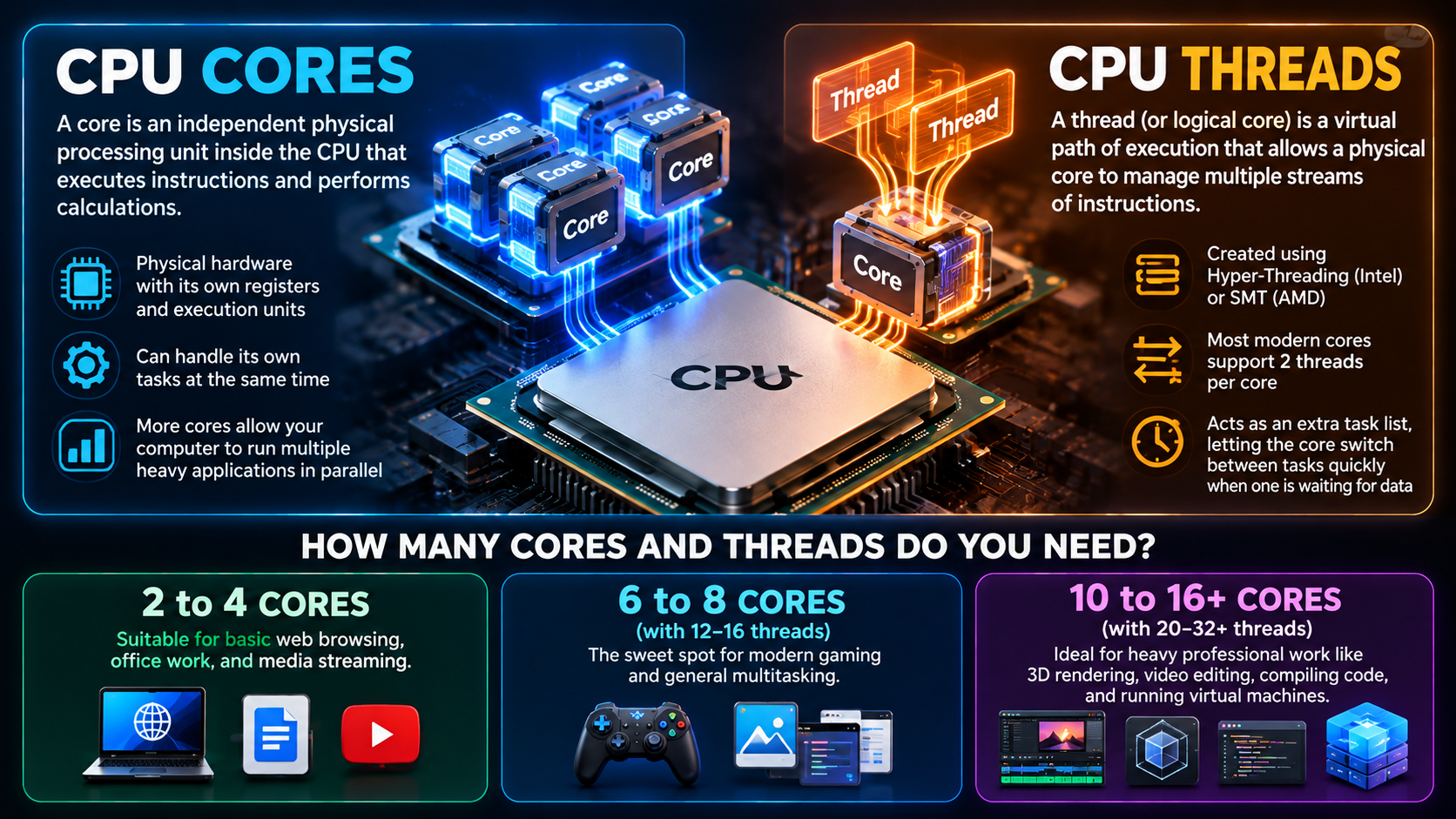
Having more physical cores generally benefits demanding workloads, while additional threads can improve resource utilization and multitasking. A CPU core is a physical processing unit that executes program instructions. A thread represents a sequence of instructions that the operating system schedules for execution.
Modern processors can use simultaneous multithreading (SMT) to execute instructions from multiple threads on one physical core. Intel calls its implementation Hyper-Threading. However, two threads sharing one core don’t provide the same performance as two separate physical cores.
The right balance depends on how you use your computer. Gaming performance often depends on single-core speed, cache, and game optimization. Video editing, rendering, and other parallel workloads can benefit from additional cores and threads.
Before upgrading, consider these factors:
- Gaming: Prioritize strong per-core performance and sufficient cores.
- Video editing: Look for enough cores to handle demanding workloads.
- Multitasking: Consider both core count and thread support.
- Everyday computing: A modern mid-range processor is often sufficient.
Balancing Multi-Core and Multi-Threading
Choosing between more cores and more threads depends on your software and workload. Physical cores provide independent processing resources, while simultaneous multithreading helps each core use its resources more efficiently.
For gaming, a processor with fewer powerful cores can outperform one with more slower cores. However, demanding modern games may benefit from additional cores when handling physics, background tasks, and complex game environments. If you’re choosing a processor for your gaming PC, compare the options in our guide to which AMD CPU is best for gaming in 2026.
Video editors, 3D artists, and developers often benefit from higher core counts. Rendering, encoding, and compiling can distribute work across multiple cores when applications support parallel processing.
Consider your typical workload before spending more on a processor. Check application requirements, independent performance benchmarks, and power consumption. A balanced processor usually offers better value than choosing hardware based on core or thread counts alone.
How Do CPU Cores and Threads Work?
CPU cores and threads work together to execute instructions and manage software workloads. Think of each physical core as a worker capable of processing instructions. Threads represent separate sequences of instructions that need processing.
When you open an application, its software creates one or more threads. The operating system schedules these threads across available logical processors. Background applications also compete for processing time, so understanding how PC background processes work and impact performance can help explain why your computer slows down during multitasking.
A processor without simultaneous multithreading can generally execute instructions from one hardware thread per core at a time. A processor with SMT can maintain multiple hardware threads on each core. These threads share execution resources but may use them more efficiently when one thread cannot keep every resource busy.
This arrangement improves throughput in suitable workloads. However, performance gains vary by application. Threads do not automatically double processing power, and performance depends on architecture, scheduling, and available resources.
The Role of Simultaneous Multithreading
Simultaneous multithreading (SMT) allows a single physical CPU core to manage multiple hardware threads. On supported processors, each core can expose two logical processors to the operating system. Intel’s Hyper-Threading is one example of this technology.
SMT helps a processor use its execution resources more effectively. One thread may pause while waiting for data from memory. During that time, another thread may use resources that would otherwise remain idle.
This can improve overall throughput without requiring a separate physical core for every thread. However, the two threads still share important resources, including execution units and cache capacity.
The actual benefit depends on the workload. Some applications gain noticeable performance improvements, while others see smaller gains. Certain workloads may even experience limited benefits because competing threads need the same resources.
Therefore, more logical processors do not mean proportionally more processing power. When comparing CPUs, examine independent benchmarks alongside core and thread counts to understand their real-world performance. If you’re experiencing poor gaming performance, learn how to tell if your CPU is bottlenecking before upgrading your hardware.
What Does 6 Cores and 12 Threads Mean?
A processor with 6 cores and 12 threads contains six physical processing cores and supports twelve hardware execution contexts through simultaneous multithreading. Each physical core can manage two hardware threads when the processor supports this configuration.
The operating system typically identifies these twelve hardware threads as logical processors. This allows it to schedule work across more execution contexts. However, the processor still contains six physical cores, not twelve independent cores.
This configuration can suit gaming, everyday productivity, and moderate creative workloads. Six cores provide independent processing resources, while twelve threads can improve utilization during suitable multitasking and parallel workloads.
Actual performance depends on the processor’s generation, clock speed, architecture, and thermal limits. Software optimization also matters. A newer six-core processor can outperform an older model with the same core and thread counts.
Before purchasing, compare benchmark results for your intended applications. Consider graphics requirements, memory capacity, and storage performance as well. Core and thread counts provide useful context, but they don’t tell the complete performance story.
Real-World Benefits of This Setup
A six-core, twelve-thread processor can handle several demanding activities without requiring a high-end workstation. For example, it may support gaming while running voice chat, browser tabs, and background applications.
The experience depends on the game, graphics card, and processor performance. Some games rely heavily on a few fast cores, while others distribute workloads across more cores. Background applications also compete for processing time and memory resources. For example, if your browser consumes excessive processing power, understanding why Google Chrome uses so much CPU can help you identify a potential source of slowdowns.
For content creators, this configuration can support photo editing, light video editing, streaming, and everyday development tasks. More demanding rendering projects may benefit from processors with additional cores.
Consider these practical advantages:
- Gaming: Sufficient processing capacity for many modern games.
- Multitasking: Multiple applications can share available processing resources.
- Content creation: Suitable for many entry-level and moderate creative workloads.
- Value: Often offers a useful balance between performance and cost.
For most buyers, the best choice depends on current benchmarks, budget, and intended applications rather than thread count alone.
How Many Cores Does One CPU Have?
One CPU can contain multiple physical cores. A CPU, or central processing unit, is the processor responsible for executing instructions and coordinating computing tasks. A core is an individual processing unit within that processor.
Older consumer processors often featured a single core. Modern processors commonly contain multiple cores, allowing them to handle independent workloads more efficiently. Depending on the product category, a single CPU may have two, four, six, eight, sixteen, or even more cores.
The exact number varies by model. Mainstream desktop processors, laptop chips, and high-end workstation CPUs offer different core configurations. Some modern processors also combine performance cores and efficiency cores to balance speed and power consumption.
It’s important to distinguish a CPU from a core. One processor package may contain many cores, and each core may support one or more hardware threads. Therefore, seeing several logical processors in your operating system doesn’t mean your computer contains that many physical CPU chips.
Understanding Multi-Core Chip Architecture
Modern multi-core processors combine several computing components within one processor package. These components can include CPU cores, cache memory, memory controllers, and other supporting hardware. Their exact arrangement depends on the processor architecture.
Cache memory stores frequently needed data and instructions close to the cores. This reduces the need to retrieve every item from system memory. Larger or more effective caches can improve performance in workloads that benefit from faster data access.
Memory controllers coordinate communication between the processor and system RAM. Keeping these components closely integrated can reduce communication overhead and improve efficiency. However, not every processor uses the same physical layout, and some designs place components on separate chiplets.
Multi-core architecture allows a processor to distribute suitable workloads across several cores. This improves performance when software can execute tasks in parallel. However, some tasks depend on sequential processing and gain less from additional cores.
Understanding this architecture helps explain why core count alone cannot determine CPU performance. Architecture, cache, clock speed, memory bandwidth, and software optimization all contribute to the final result.