
5 of the Best Web Browser Apps for Android
Finding the best web browser apps for Android can improve speed, privacy, and everyday browsing. Most Android phones include a default browser, but it may not suit every user. Alternative browsers can offer stronger tracker blocking, better customization, or improved cross-device syncing. If your phone feels slow beyond browsing, understanding why your phone slows down over time can also help improve overall performance.
Your browser handles sensitive data every day. This includes cookies, saved passwords, autofill information, website permissions, and browsing sessions. It also processes scripts, images, videos, and other demanding web content.
Tracking methods continue to evolve, making browser privacy features increasingly important. Tools such as tracker blockers can reduce unwanted tracking and limit some forms of browser fingerprinting.
A good mobile browser should feel responsive and protect your privacy without creating unnecessary complexity. Some users prioritize extensions, while others want seamless account syncing or stronger anonymity.
This guide explores the top Android browsers, their strengths, and their limitations. It also explains which browsers suit everyday browsing, customization, privacy, and anonymity.
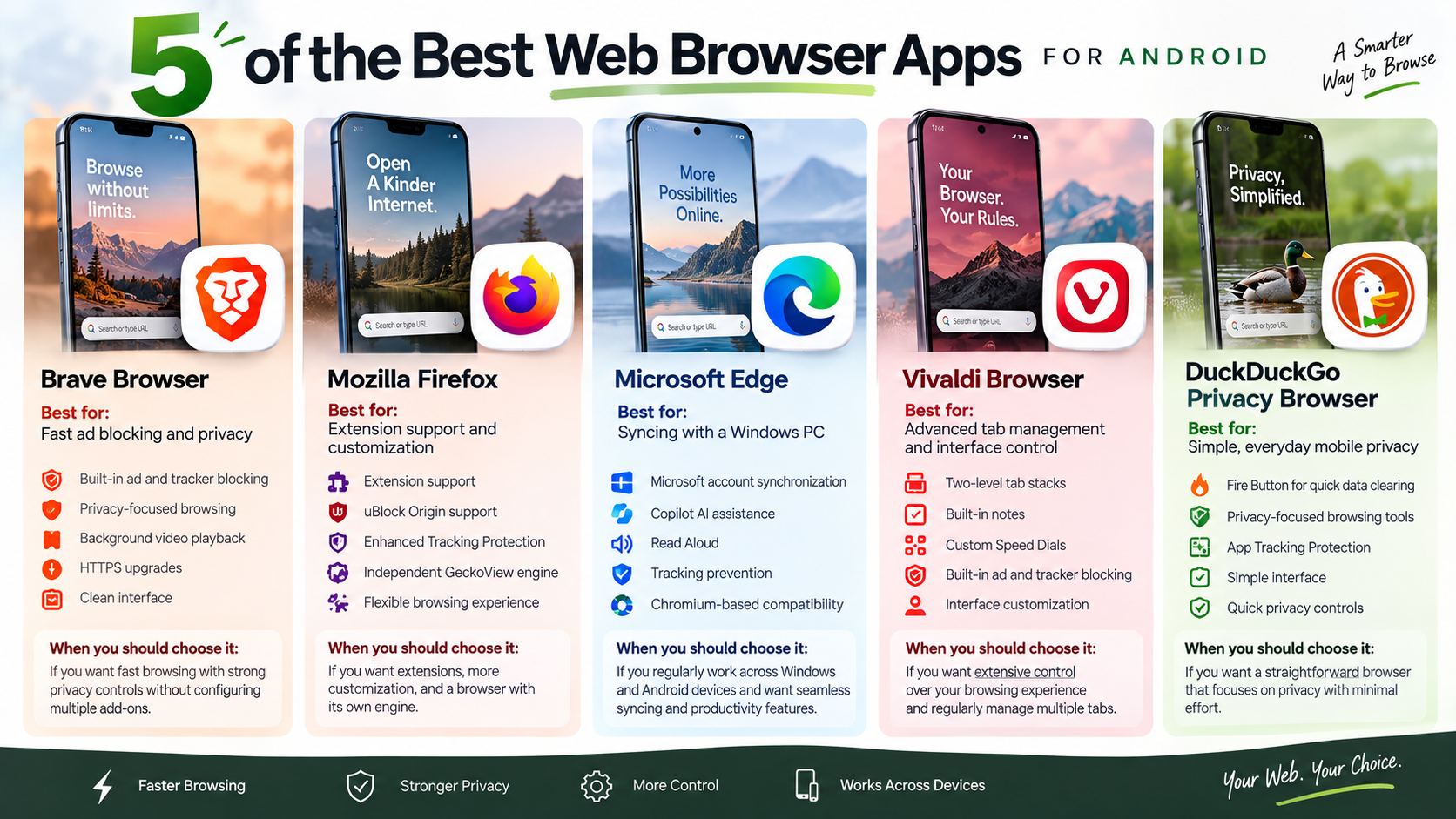

1. Brave Browser
Best for: Fast ad blocking and privacy
Brave Browser is a strong option for Android users who want fast browsing with built-in privacy protection. Its integrated Shields feature automatically blocks many advertisements, trackers, cookies, and intrusive scripts. This can make websites cleaner and may reduce the amount of unnecessary content your phone needs to load. If you want broader protection beyond browser-based tracking, malware protection tips for home and business users can help you follow safer security practices
Key features include:
- Built-in ad and tracker blocking without requiring separate extensions.
- Privacy-focused browsing that limits many common tracking technologies.
- Background video playback for supported websites and media.
- HTTPS upgrades that help establish more secure connections when available.
- Clean interface designed for quick and straightforward mobile browsing.
Brave is particularly useful for users who want stronger privacy controls without spending time configuring multiple add-ons.
2. Mozilla Firefox
Best for: Extension support and customization
Mozilla Firefox is one of the best choices for Android users who want extensions and greater browser customization. Unlike many mobile browsers, Firefox supports a selection of compatible extensions. This allows users to add tools for content blocking, privacy, productivity, and other browsing tasks. For users who want to understand how stored browser information works, learning the difference between clearing cache and clearing data can also be useful.
Key features include:
- Extension support for compatible Android add-ons.
- uBlock Origin support for advanced content and tracker blocking.
- Enhanced Tracking Protection to reduce unwanted online tracking.
- Independent GeckoView engine, providing an alternative to Chromium-based browsers.
- Flexible browsing experience for users who want more control.
Firefox is a particularly good option for privacy-conscious users and anyone who relies on browser extensions. Its independent engine also provides greater diversity within the Android browser ecosystem.
3. Microsoft Edge
Best for: Syncing with a Windows PC
Microsoft Edge is a convenient choice for Android users who regularly work across Windows computers and mobile devices. When you sign in with your Microsoft account, Edge can synchronize supported information between devices. This makes it easier to continue browsing without manually transferring important data.
Key features include:
- Microsoft account synchronization for supported tabs, passwords, and browsing information.
- Copilot AI for assistance with supported browsing tasks.
- Read Aloud for listening to compatible web content.
- Tracking prevention to help limit unwanted online tracking.
- Chromium-based compatibility for modern websites and web applications.
Edge is especially useful for people already using Microsoft services. Its combination of productivity features, synchronization, and privacy controls makes it a practical everyday Android browser.
4. Vivaldi Browser
Best for: Advanced tab management and interface control
Vivaldi Browser is designed for users who want extensive control over their mobile browsing experience. Instead of keeping the interface extremely simple, Vivaldi provides several customization and organization tools. These features make it particularly useful for people who regularly manage multiple websites and tabs.
Key features include:
- Two-level tab stacks for organizing multiple tabs more efficiently.
- Built-in notes for saving information while browsing.
- Custom Speed Dials for quickly accessing favorite websites.
- Built-in ad and tracker blocking for a cleaner browsing experience.
- Interface customization that gives users more control over browser appearance and navigation.
Vivaldi is a good fit for power users who want more than basic browsing. Its combination of tab management, built-in tools, and customization makes it one of the more flexible Android browser options.
5. DuckDuckGo Privacy Browser
Best for: Simple, everyday mobile privacy
DuckDuckGo Privacy Browser focuses on providing simple privacy tools without complicated settings. It is designed for Android users who want greater control over their browsing data while keeping the interface easy to understand. One of its most recognizable features is the Fire Button.
Key features include:
- Fire Button for quickly clearing open tabs and browsing data.
- Privacy-focused browsing tools that help limit unwanted tracking.
- App Tracking Protection on supported Android devices to help block certain tracking attempts from other apps.
- Simple interface that is easy for beginners to navigate.
- Quick privacy controls for managing browsing data with minimal effort.
DuckDuckGo is a good choice for users who value simplicity. It may not offer the extensive customization of Vivaldi or the extension ecosystem of Firefox, but its straightforward privacy features make it a practical option for everyday Android browsing.
What are the top 5 web browsers?
The top five web browsers can vary depending on whether you measure market share, privacy, speed, features, or platform integration. For Android users, five particularly important options are Google Chrome, Mozilla Firefox, Brave, Microsoft Edge, and Samsung Internet.
Google Chrome remains one of the most widely used browsers. It offers strong website compatibility, account synchronization, password management, and integration with Google’s services.
Firefox provides an important alternative because it uses the independent Gecko engine. It also supports compatible Android extensions and emphasizes user privacy.
Brave focuses on privacy with built-in blocking features. Microsoft Edge combines Chromium compatibility with productivity tools and Microsoft account integration.
Samsung Internet is designed with Samsung devices in mind. It also works on many other Android phones and offers a polished mobile browsing experience.
Rather than treating one browser as universally superior, compare them based on your needs:
- Chrome: Best for Google integration.
- Firefox: Best for extensions and an independent engine.
- Brave: Best for built-in privacy controls.
- Edge: Best for Microsoft ecosystem integration.
- Samsung Internet: Best for a polished Samsung-focused experience.
What are the best web browser apps for Android?
The best web browser apps for Android depend on the features you value most. For example, Google Chrome remains a strong choice for users who want seamless Google account synchronization and broad website compatibility. Meanwhile, Mozilla Firefox appeals to users who value an independent browser engine, open-source development, and extension support.
Similarly, Brave is a popular option for privacy-focused browsing. Its built-in Shields can block many unwanted ads and trackers without requiring separate extensions. In addition, Vivaldi targets power users with extensive interface and tab customization.
On the other hand, DuckDuckGo takes a simpler approach. Its browser focuses heavily on privacy features and tracker protection while keeping the interface easy to understand.
Ultimately, your ideal choice depends on your browsing habits. Before switching, consider these priorities:
- Privacy: Look for tracker blocking and strong privacy controls.
- Performance: Consider page loading and resource usage.
- Extensions: Check whether your preferred add-ons work on Android.
- Sync: Choose a browser that supports your devices and accounts.
- Customization: Power users may prefer more interface controls.
If privacy is your main concern, it may also help to understand what a VPN is and why you might need one before choosing additional privacy tools.
However, no single browser wins every category. Instead, the best choice balances privacy, speed, compatibility, and convenience based on your specific needs.
What are 10 popular web browsers?
Popular web browsers serve different audiences, platforms, and privacy preferences. For instance, Google Chrome remains a major choice worldwide, while Safari dominates browsing across Apple devices. Meanwhile, Mozilla Firefox continues to attract users who value open web standards and an independent browser engine. ChromeOS features and comparisons may also be useful for readers choosing a browser for Chromebook-based browsing.
In addition, Microsoft Edge has become a significant option for users who work within Microsoft’s ecosystem. Opera offers built-in tools and interface features designed for convenience. Similarly, Opera GX targets users who want gaming-focused controls and resource management.
At the same time, Brave attracts privacy-conscious users with built-in ad and tracker blocking. Samsung Internet remains an important Android browser, particularly among Samsung users. Likewise, Vivaldi appeals to people who want extensive customization.
Beyond these options, DuckDuckGo focuses on simpler private browsing and tracker protection. Tor Browser, on the other hand, serves users with stronger anonymity requirements and routes traffic through the Tor network.
The popular browsers include:
- Google Chrome
- Safari
- Mozilla Firefox
- Microsoft Edge
- Opera
- Opera GX
- Brave
- Samsung Internet
- Vivaldi
- DuckDuckGo and Tor Browser
Nevertheless, popularity does not automatically make a browser better. Therefore, consider privacy, compatibility, features, support, and update frequency before choosing one.
What is the No. 1 safe browser?
There is no browser that is completely safe or anonymous. However, Tor Browser is one of the strongest choices for users who prioritize anonymity and resistance to tracking.
First, Tor Browser routes traffic through the Tor network. A typical Tor circuit uses three relays, with layered encryption applied as traffic moves through the network. As a result, this design helps hide your real IP address from websites and makes network monitoring more difficult.
Furthermore, Tor Browser includes privacy protections designed to reduce tracking and browser fingerprinting. It limits persistent browsing data and aims to make users appear more similar to one another.
However, Tor can be slower than conventional browsers. In some cases, websites may also restrict access or display additional security checks.
For everyday browsing, Chrome, Firefox, Brave, Edge, or Samsung Internet may be more convenient. By contrast, for sensitive research or situations requiring stronger anonymity, Tor Browser can provide significant advantages. However, users should also understand the disadvantages of using a VPN before relying on a VPN as an additional privacy solution.
Even so, your own actions still matter. For example, signing into personal accounts can identify you even when you use privacy-focused technology.
What is the most unsafe browser?
The most unsafe browser is usually not a specific mainstream product. Instead, the greatest risk comes from abandoned, outdated, modified, or untrusted browser software.
For example, old browsers may contain known security vulnerabilities that developers no longer patch. As a result, they can expose users to malicious websites, drive-by downloads, phishing attacks, and other threats.
Additionally, users should be cautious with obscure browser apps from unofficial sources. An application promising free VPN access or unlimited privacy does not automatically provide either benefit. Therefore, its privacy policy, developer reputation, permissions, and update history deserve careful attention.
Internet Explorer is often cited as an unsafe legacy browser. However, it is not a relevant Android browser choice. Similarly, old versions of Android’s browser should not be treated as modern software.
Instead, choose a browser that receives regular security updates from a reputable developer. At the same time, keep Android itself updated whenever possible.
Avoid browsers that:
- Have not received updates for a long period.
- Come from unknown or unofficial sources.
- Request excessive permissions.
- Make unrealistic privacy promises.
- Lack clear developer or privacy information.
Ultimately, security depends on more than the browser alone. Updated software, safe websites, strong passwords, and careful downloads all help reduce risk.
Conclusion
Choosing the right mobile browser can affect your privacy, security, performance, and everyday browsing experience. Therefore, the best web browser apps for Android are not identical because users have different priorities.
For example, Chrome remains a strong option for Google integration and broad compatibility. Meanwhile, Firefox is appealing for extension support and an independent browser engine. Brave offers built-in privacy features, while Edge provides useful Microsoft ecosystem integration.
Similarly, Samsung Internet can be a polished choice for Android users, especially those using Samsung devices. For users who need stronger anonymity, Tor Browser provides specialized protections that conventional browsers do not offer.
Ultimately, your final choice should reflect how you browse. Before switching, consider speed, extensions, synchronization, customization, privacy, and security updates.
Most importantly, keep your browser current and download software from trusted sources. In addition, review permissions, avoid suspicious websites, and use strong passwords.
As a result, choosing from the best web browser apps for Android can make mobile browsing faster, cleaner, and more private without sacrificing the features you need every day.