
Best Malware Protection Tips for Home and Business Users in 2026
Finding reliable malware protection tips is essential for protecting your devices, accounts, and personal data in 2026. Cyber threats continue to evolve, targeting home users, businesses, and connected devices. Attackers now combine malware with phishing, credential theft, and social engineering tactics.
Strong protection requires more than installing antivirus software. You also need regular updates, secure backups, strong passwords, and careful browsing habits. Guidance from the Cybersecurity and Infrastructure Security Agency (CISA) supports a proactive approach to cybersecurity.
This guide explains the best strategy for malware protection and why antivirus still matters. It also covers leading antivirus options and practical ways to reduce infection risks. Finally, you will learn about the seven main malware types and how to recognize them. These malware protection tips can help individuals and businesses build a stronger security routine.

What Is the Best Strategy for Protection Against Malware?
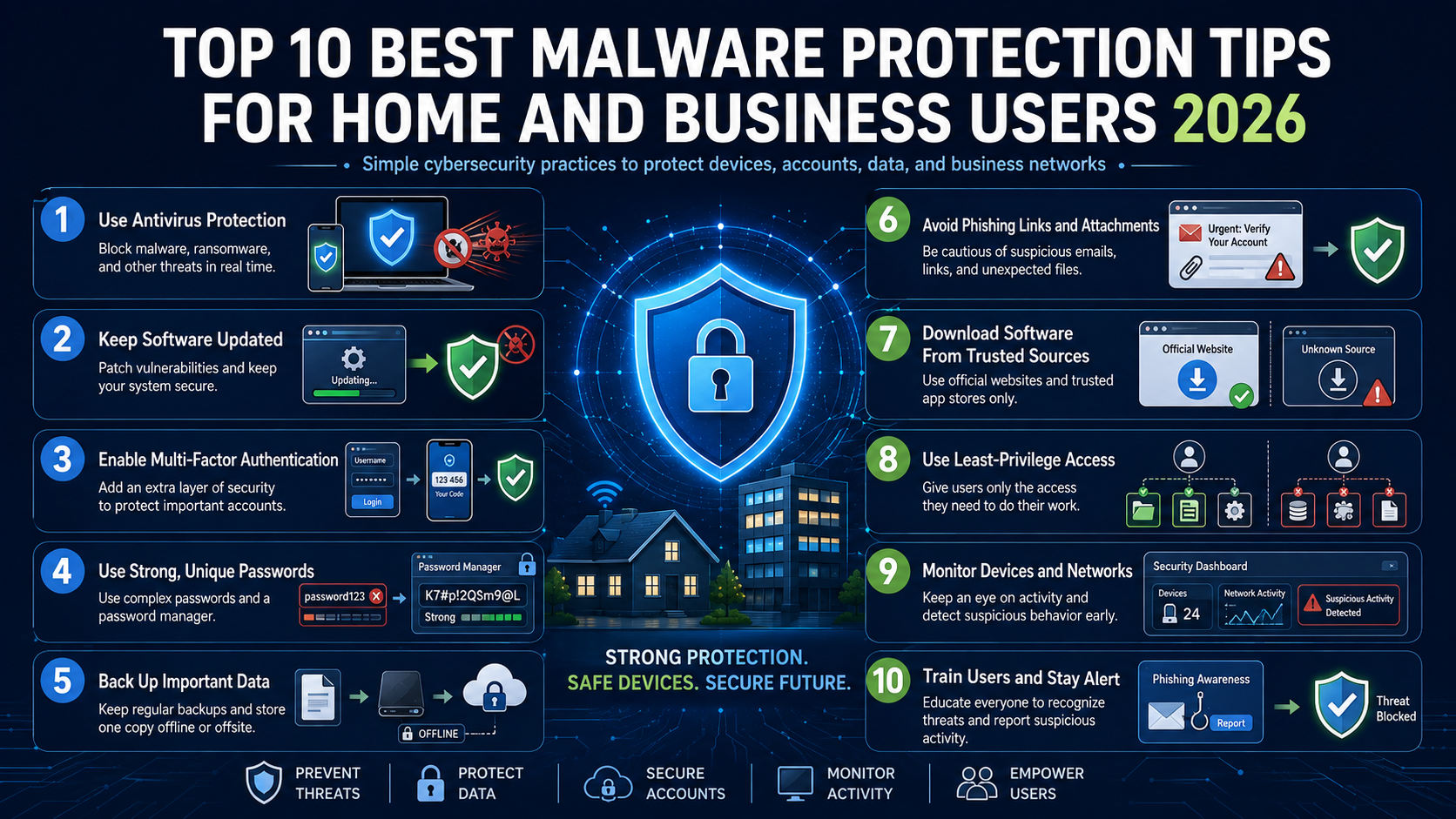
The best strategy for protection against malware uses several security layers instead of relying on one tool. Start by protecting every connected device with reputable endpoint or antivirus security. Keep operating systems, browsers, applications, and security software updated. These updates often fix vulnerabilities that attackers can exploit.
Enable multi-factor authentication (MFA) on important accounts. MFA adds another verification step if a password becomes compromised. Businesses should also apply least-privilege access and separate critical systems through network segmentation.
Regular backups provide another essential defense against ransomware and destructive attacks. Keep multiple backup copies and protect at least one copy from direct network access. CISA also recommends measures such as zero trust principles and strong access controls for reducing unauthorized access. Learn more about how malware spreads and the methods attackers use to understand why these layered defenses matter.
Finally, train users to recognize phishing, suspicious downloads, and social engineering attempts. Combining technology with informed user behavior creates a stronger malware defense strategy and limits the damage caused by successful attacks.
Malware Protection Tips:
- Use reputable antivirus or endpoint security on every device.
- Keep your operating system, browser, and applications updated.
- Enable MFA on email, banking, cloud, and administrator accounts.
- Create regular backups and keep one copy isolated from your network.
- Use least-privilege access to limit unnecessary permissions.
- Train users to identify phishing emails and suspicious downloads.
- Monitor devices and accounts for unusual activity.
- Avoid installing software from unknown or untrusted sources.
Zero Trust Architecture Principles
Zero trust architecture strengthens malware protection by removing automatic trust from users, devices, and network locations. Instead, every access request must meet defined security requirements before resources become available. This approach can limit the damage caused by stolen credentials or compromised devices.
CISA describes zero trust as an approach based on least-privilege, per-request access decisions. It also emphasizes continuous validation and monitoring.
For businesses, zero trust can protect sensitive applications, databases, and cloud resources. Start by identifying critical assets and limiting access to only what each user needs. Require MFA for important accounts and monitor unusual login activity.
Device security also matters. Organizations should verify device health before allowing access to sensitive resources. Regularly review permissions and remove unnecessary accounts or privileges.
Home users can apply simpler zero trust principles too. Use separate accounts, enable MFA, restrict unnecessary permissions, and avoid giving unknown applications administrative access. These steps reduce opportunities for malware to move between accounts, devices, and services.
Malware Protection Tips for Zero Trust:
- Verify users and devices before granting access.
- Apply least-privilege permissions to sensitive resources.
- Require MFA for important accounts and services.
- Review account permissions regularly.
- Remove inactive accounts and unnecessary administrator access.
- Monitor unusual login attempts and device activity.
- Separate sensitive systems from general network traffic.
What Is the Best Way to Protect Yourself From Malware?
The best way to protect yourself from malware is to combine secure habits with reliable security technology. Start by avoiding unexpected links, attachments, downloads, and software from untrusted sources. Phishing remains a major pathway for attackers, so learn how to identify a phishing attack email before taking action.
Keep your operating system, browser, applications, and security software updated. Software patches often address vulnerabilities that criminals can exploit. Turn on automatic updates whenever the option is available.
Use strong, unique passwords for important accounts. A reputable password manager can create and store complex passwords for you. Add MFA wherever possible, especially for email, banking, cloud storage, and administrator accounts.
Back up important files regularly. Keep at least one backup separated from the device or network. This can reduce the impact of ransomware and hardware failure.
Avoid unknown USB drives and suspicious pop-ups. Download applications from trusted sources and review permissions before installation. Businesses should also train employees to recognize social engineering attacks. If you suspect an infection, knowing the warning signs your computer has malware can help you respond quickly.
These practical malware protection tips work best when followed consistently. No single tool can eliminate every risk, but layered defenses can significantly reduce the likelihood and impact of an infection.
Malware Protection Tips for Everyday Security:
- Never open unexpected email attachments or suspicious links.
- Download software only from trusted sources.
- Enable automatic security and software updates.
- Use a password manager for strong, unique passwords.
- Turn on MFA for important online accounts.
- Avoid unknown USB drives and suspicious pop-ups.
- Back up important files regularly.
- Report suspicious messages or security incidents promptly.
Essential Software Patch Management
Software patch management is one of the simplest and most important malware protection practices. Developers regularly release updates to fix security vulnerabilities, improve stability, and address newly discovered threats. Delaying those updates can leave known weaknesses exposed.
Home users should enable automatic updates for operating systems, browsers, applications, and security tools. Restart devices when required so important patches can finish installing. Remove applications that you no longer use because unsupported software may remain vulnerable. For Windows users, understanding what happens if you skip Windows updates can reinforce why timely patching matters.
Businesses need a more structured approach. Maintain an inventory of hardware and software across the organization. Prioritize critical vulnerabilities and apply patches according to risk. Test important updates when necessary, but avoid unnecessary delays.
Patch management should also cover third-party applications. Attackers can exploit weaknesses in browsers, document tools, media software, and other commonly installed programs.
CISA’s cybersecurity guidance emphasizes maintaining secure systems and reducing exploitable weaknesses.
A consistent update routine reduces the attack surface across your environment. Combine patching with endpoint protection, backups, MFA, and user awareness. Together, these controls form a practical malware prevention strategy for homes and businesses.
Malware Protection Tips for Software Updates:
- Turn on automatic updates whenever possible.
- Install critical security patches without unnecessary delays.
- Keep browsers and third-party applications updated.
- Remove unsupported or unused software.
- Maintain an inventory of business applications and devices.
- Prioritize patches for critical vulnerabilities.
- Restart devices when updates require it.
- Review update settings regularly to ensure protection remains active.
Is Antivirus Needed in 2026?
Yes, antivirus protection remains useful in 2026, although it works best as part of a broader security strategy. Modern security software does more than detect traditional viruses. Many products monitor applications, files, websites, and system behavior for suspicious activity.
Current independent testing supports the value of modern antivirus solutions. In its June 2026 Windows 11 testing, AV-TEST evaluated 14 security products against malware and other threats. Several products achieved strong protection, performance, and usability scores.
Built-in protections can provide a solid baseline for many users. However, additional security suites may offer features such as ransomware protection, password tools, identity monitoring, VPN services, or centralized management.
Businesses often need more advanced endpoint protection. These platforms can provide centralized monitoring and alerts across many devices. Home users should choose software that fits their operating system, budget, and usage habits.
Most importantly, antivirus cannot replace safe browsing, software updates, MFA, or reliable backups. Effective malware protection depends on combining these defenses rather than relying on one application. Adding multi-factor authentication (MFA) provides another important layer for protecting accounts if passwords are compromised.
Behavioral Analysis and AI Detection
Modern antivirus products increasingly use behavioral analysis to identify suspicious activity. Instead of depending only on known malware signatures, these systems examine how applications behave. This approach can help identify previously unseen or modified threats.
For example, security software may flag an application that suddenly changes many files, modifies protected settings, or attempts unusual network connections. Such behavior can indicate ransomware or another malicious process.
Artificial intelligence and machine learning can support this analysis by identifying patterns across large amounts of security data. However, these technologies are not perfect. Legitimate applications can sometimes behave unusually and trigger false positives.
That is why reputable security tools combine multiple detection methods. These can include signatures, cloud intelligence, behavioral monitoring, reputation systems, and exploit protection.
Users should also keep security software updated. Detection technologies depend on current threat intelligence and software improvements. Businesses should monitor alerts instead of ignoring repeated warnings.
For home users, automatic real-time protection is usually the most practical choice. It can monitor threats continuously without requiring manual scans throughout the day. This makes AI-powered malware detection a useful layer within a broader security strategy.
What Are the Top 5 Antivirus Programs?
There is no universal top-five antivirus ranking because performance varies by operating system, test methodology, features, and user requirements. However, several established products performed strongly in recent independent testing. AV-TEST’s June 2026 Windows 11 results included Bitdefender, ESET, Kaspersky, McAfee, and Norton among its tested products.
Five strong options to consider include:
- Bitdefender Total Security: Strong malware protection with broad security features.
- Kaspersky Premium: Comprehensive protection with multiple security and privacy tools.
- Norton 360 Deluxe: Useful for users seeking security, backup, and privacy features.
- McAfee Total Protection: Designed for multi-device protection and family use.
- ESET Security: A lightweight option with strong detection and configuration controls.
These products should not be treated as permanent rankings. Independent testing changes as vendors release new versions. Your choice should depend on device compatibility, features, performance, pricing, and support.
Availability can also vary by country and platform. Before purchasing, check the vendor’s current product offering and licensing terms. If you accidentally encounter a suspicious URL, follow these smart steps after clicking a suspicious link to reduce potential risks.
Choosing the Right Security Suite
Choosing the right security suite depends on how you use your devices. A household with several computers and phones may benefit from multi-device protection. Families may also value parental controls, password management, and identity monitoring.
Performance is another important consideration. A security product should protect your device without creating unnecessary slowdowns. Independent testing can help compare protection, performance, and usability. AV-TEST evaluates these areas separately when assessing consumer security products.
Businesses usually need more than consumer antivirus software. Look for centralized management, endpoint monitoring, policy controls, threat alerts, and administrative reporting. Larger organizations may also require endpoint detection and response capabilities.
Consider your operating system before selecting a product. Protection and available features can differ between Windows, macOS, Android, and other platforms. Recent AV-TEST evaluations cover Windows, macOS, and Android security products.
Finally, compare the total cost rather than focusing only on introductory pricing. Check renewal rates, device limits, included features, and support. The best antivirus software is the one that provides suitable protection without making security difficult to maintain.
What Are the 7 Main Types of Malware?
Understanding the seven main types of malware makes suspicious activity easier to recognize. Each type uses different methods and can cause different kinds of damage.
- Ransomware: Encrypts or locks data and demands payment from victims.
- Trojans: Pretend to be legitimate programs while delivering malicious actions.
- Spyware: Secretly monitors activity and can collect sensitive information.
- Adware: Displays unwanted advertisements and may track browsing behavior.
- Worms: Replicate automatically and can spread between connected systems.
- Rootkits: Hide malicious activity and can maintain privileged system access.
- Keyloggers: Record keystrokes to capture passwords, messages, and other information.
Some malware can combine several of these behaviors. For example, a Trojan may install spyware after a user launches a malicious file. A ransomware attack may also begin with stolen credentials or a phishing message.
Recognizing these malware types helps users understand why layered protection matters. Antivirus software can detect many malicious files and behaviors, while backups can reduce the consequences of ransomware. Safe browsing and regular updates can further reduce common infection routes.
Recognizing Ransomware and Trojans
Ransomware and Trojans remain important threats because attackers can disguise malicious activity as something legitimate. A Trojan may appear as a useful application, software update, document, or email attachment. Once opened, it can install additional malware or provide unauthorized access.
Ransomware focuses on disrupting access to files or systems. Attackers may encrypt important data and demand payment for recovery. Some campaigns also threaten to publish stolen information.
Watch for warning signs such as unexpected software installation, unusual file extensions, disabled security tools, or sudden system slowdowns. Suspicious email attachments and unofficial software downloads deserve particular caution.
The strongest protection combines several controls. Keep security software active and update your operating system regularly. Use MFA to protect important accounts and limit administrator privileges where possible.
Most importantly, maintain offline or otherwise isolated backups of critical data. Backups can provide a recovery option when ransomware affects connected systems. CISA’s StopRansomware guidance also recommends protective measures such as access controls and zero trust principles.
Early recognition, layered defenses, and reliable recovery plans can significantly reduce the impact of these threats.
Frequently Asked Questions
How often should I run a full system virus scan?
Running a full system scan once a week is generally recommended for optimal security. However, modern antivirus software runs continuous real-time background protection, catching active threats instantly. Manual full scans serve as a secondary health check to locate dormant files.
Can Apple Mac computers get infected with malware?
Mac computers can definitely get infected with malware, contrary to popular belief. Cybercriminals increasingly target macOS systems with trojans, adware, and specialized spyware variants. Using dedicated security software on Apple devices ensures complete protection across all platforms.
What should I do if my device gets infected?
Disconnect your infected device from the internet immediately to prevent lateral network spread. Boot the machine into safe mode and run a deep scan using your trusted antivirus program. If the threat persists, wipe the system clean and restore data from a verified backup.
Are free antivirus programs safe to use?
Reputable free antivirus programs provide basic malware detection for everyday home users safely. However, they often lack advanced features like firewalls, secure VPNs, and identity theft monitoring. Premium paid versions offer comprehensive protection required for complete digital peace of mind.
Conclusion
Applying effective malware protection tips can help protect home devices, business systems, and valuable personal information. Strong cybersecurity begins with simple habits. Keep software updated, use reputable security tools, enable MFA, and avoid suspicious links or downloads.
Businesses should build additional layers around these basics. Use least-privilege access, monitor endpoints, segment important systems, and maintain reliable backups. Zero trust principles can further reduce unauthorized access and limit the movement of attackers after a compromise.
Remember that antivirus is only one part of malware protection. Current independent testing shows that many reputable security products can provide strong protection, but no product eliminates every cyber risk.
Your security strategy should also evolve as threats change. Review account permissions, update recovery plans, remove unused software, and educate users about phishing and social engineering.
Start with the basics today. Then strengthen your defenses based on your devices, accounts, data, and risk level. Consistent malware prevention is far more effective than reacting after an attack has already caused damage. Staying informed about how AI phishing attacks are becoming more dangerous can also help you prepare for increasingly sophisticated threats.