Secret VPN Tricks to Make VPN Speed Faster Without Losing Protection
A slow VPN can interrupt downloads, cause streaming buffers, and increase gaming latency. Fortunately, you can often improve your connection without sacrificing online privacy. Learning how to make VPN speed faster starts with understanding why your connection slows down.
A VPN encrypts your internet traffic and routes it through a remote server. This process can increase latency and reduce download speeds. Server distance, congestion, your internet connection, and the VPN protocol can all affect performance.
You do not need to disable your VPN to improve speed. Instead, try a faster protocol, choose a suitable server, and adjust your connection settings. These changes can improve everyday browsing while preserving essential security protections.
This guide also answers common questions about VPN tracking, free VPN data allowances, and VPN legality in India. You will learn how to improve performance while understanding the limitations of free VPN services.
How to Make VPN Speed Faster?
The best way to make VPN speed faster is to identify what causes the slowdown. Start by testing your internet speed with the VPN disconnected. Then connect to your VPN and repeat the test using the same device and network. If your downloads remain slow despite a fast internet connection, understanding why your internet is fast but downloads are slow can help you identify other possible causes. This comparison helps you understand how much performance the VPN affects.
Next, try these practical adjustments:
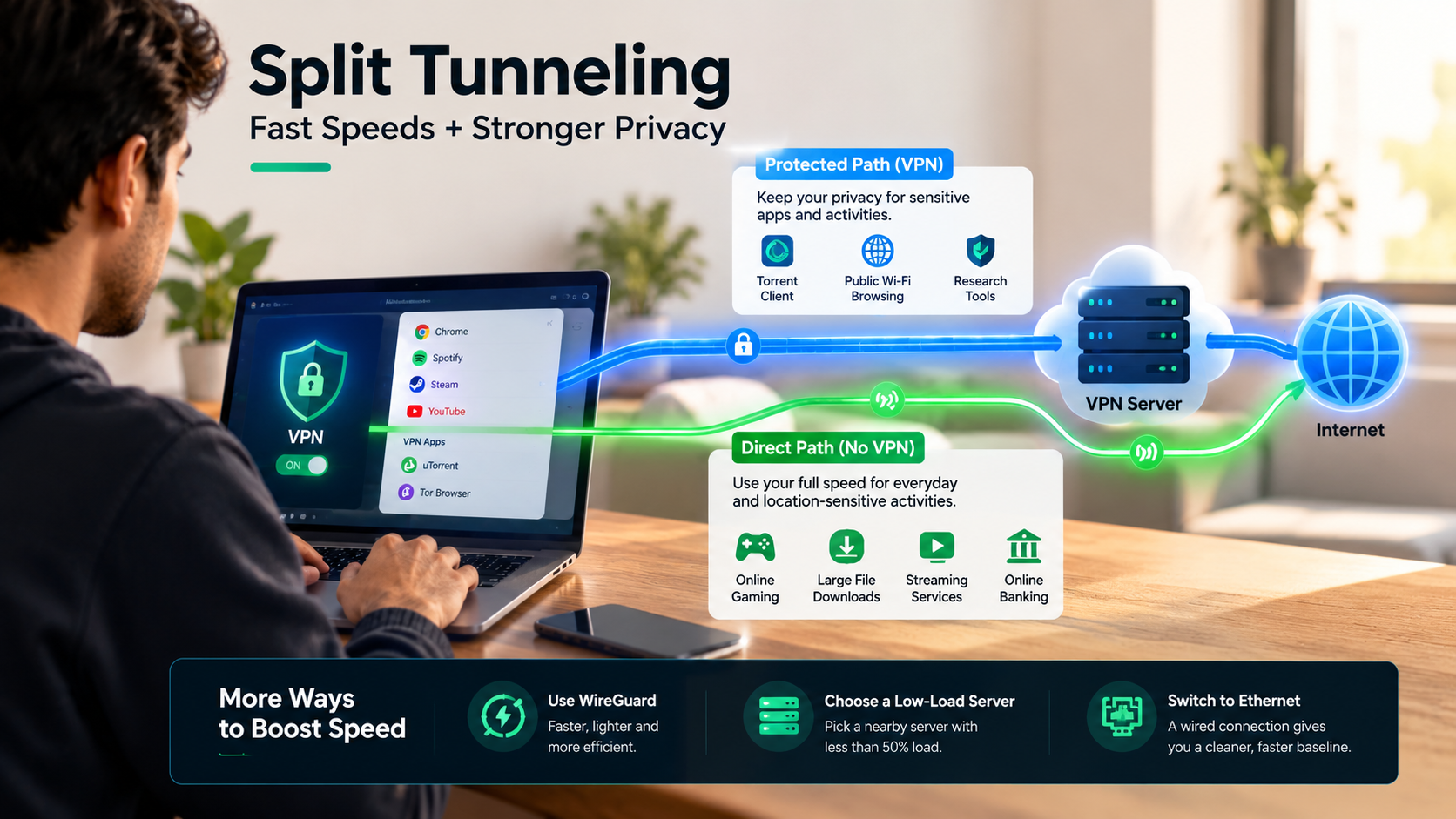
- Change your VPN protocol: Choose WireGuard if your provider supports it. It often delivers a good balance of speed and security.
- Select a nearby server: A closer server can reduce latency, although network congestion also matters.
- Try another server: A busy server may perform worse than a more distant alternative.
- Use split tunneling carefully: Route selected apps outside the VPN only when their traffic does not need VPN protection.
- Check your internet connection: Restart your router and test your Wi-Fi or Ethernet connection.
Avoid weakening encryption solely to improve speed. Modern devices usually handle strong encryption efficiently. Your actual results will depend on your internet provider, device, server load, and VPN service.
Switch to Nearby WireGuard Servers
WireGuard is a modern VPN protocol designed for efficient, secure connections. It uses a relatively small codebase and modern cryptographic methods. These design choices can reduce overhead compared with some traditional VPN configurations.
Open your VPN application and look for its protocol settings. If WireGuard is available, select it and reconnect. Test your download speed, upload speed, and latency before deciding whether it improves performance.
Choosing a nearby server can also help. Data generally travels through fewer or shorter network paths when the server is geographically close. This often reduces ping times, which matters for gaming, video calls, and other real-time activities.
However, distance alone does not determine speed. A nearby server may be congested, while a more distant server may have better routing or available capacity. Test two or three suitable servers before choosing one.
If WireGuard is unavailable, try another modern protocol supported by your provider. Keep the VPN’s security features enabled, including its kill switch when appropriate. The goal is to improve performance without exposing traffic that should remain private.
Can the FBI Track a VPN?
A VPN can make internet traffic harder to observe, but it does not make you completely untraceable. A VPN encrypts traffic between your device and the VPN server. It also replaces your visible IP address with the server’s IP address for many external connections. Understanding what a VPN does and why you need it can help you assess its privacy benefits and limitations.
However, encryption does not prevent every form of investigation. Authorities may seek information from VPN providers, internet service providers, websites, or other relevant parties through applicable legal processes. The information available depends on what those organizations collect, retain, and can lawfully disclose.
Investigators may also use evidence from devices, account records, payment transactions, or malware. In some circumstances, traffic timing and volume can help correlate activity across networks. These techniques do not guarantee identification, but they show why a VPN alone cannot ensure anonymity.
Your level of protection depends on your provider, device security, account practices, and threat model. A reputable VPN can improve privacy, but it cannot guarantee that the FBI or another law enforcement agency will never identify a user.
The Limits of Zero-Logs Protection
A no-logs policy generally means a VPN provider does not retain specified records of users’ online activities. However, the precise meaning varies between providers. Some may collect limited diagnostic data, account details, payment information, or operational metadata.
An independently audited policy can provide useful evidence, but an audit is not a guarantee against every privacy risk. Check what the audit examined, when it occurred, and whether its scope covered the provider’s current infrastructure and logging practices.
Before choosing a VPN, examine its privacy policy and jurisdiction. Understand what information it collects, how long it retains that information, and under what circumstances it may disclose records.
Also, avoid assuming that cryptocurrency payments or RAM-only servers make you anonymous. Cryptocurrency transactions can sometimes be traced, and server architecture does not eliminate every source of identifying information.
For better privacy, combine a trustworthy VPN with updated software, strong account passwords, multifactor authentication, and careful browsing habits. Following malware protection tips for home and business users can help you strengthen device security alongside your VPN. These measures reduce different risks rather than relying on a single privacy tool.
Which VPN Gives Free 10GB?
Windscribe offers a free VPN plan with a monthly allowance of 10GB when you register and confirm your email address. Accounts without a confirmed email generally receive 2GB per month. These allowances are subject to the provider’s current terms.
The free plan provides access to selected server locations and encrypted connections. It can suit users who want to protect occasional browsing, use public Wi-Fi more safely, or access the internet through a different IP address. When connecting to open networks, understanding the risks of public Wi-Fi can help you take additional precautions to protect your personal information.
However, 10GB is a data allowance, not a separate mobile internet plan. You still need an existing internet connection through Wi-Fi or mobile data. VPN usage may also count toward your internet provider’s data allowance.
To get started, download Windscribe from its official website or an authorized app store. Create an account, confirm your email address, and connect to a suitable free server.
Check your remaining allowance before downloading large files or streaming videos. High-resolution video can consume data quickly. If you need unlimited VPN data, consider a reputable unlimited free plan instead. Always compare the provider’s privacy policy, server availability, and performance before choosing a service.
Is VPN Illegal in India?
Using a VPN in India is generally legal for legitimate activities such as private browsing, remote work, and secure business access. However, using a VPN does not make an otherwise illegal activity lawful. Users must still follow applicable Indian laws.
India’s cybersecurity rules also affect certain VPN service providers. Under the 2022 CERT-In directions, specified service providers, including covered VPN providers, must maintain certain subscriber information and records for five years. The requirements include customer registration details and specified records, subject to the applicable rules and scope.
These requirements have led some privacy-focused VPN providers to remove physical servers from India or offer Indian IP addresses through infrastructure located elsewhere. An Indian IP address does not necessarily mean the server is physically hosted in India.
The legal and technical details can vary by provider and service model. Do not assume that every VPN company faces identical obligations or that an offshore server automatically removes every legal consideration.
For personal use, choose a reputable provider and understand its privacy policy. If your use involves regulated business activity or a specific legal concern, consult a qualified Indian legal professional for advice relevant to your circumstances.
Which VPN Is 100% Free?
Proton VPN offers a free plan with unlimited data and no fixed monthly data allowance. This makes it useful for people who want ongoing VPN protection without paying a subscription fee or monitoring a monthly data cap. Before choosing a service, consider the disadvantages of using a VPN, including potential speed reductions and restrictions that may affect your browsing experience.
The free plan includes encrypted connections and the provider’s no-logs policy. However, unlimited data does not mean unlimited speed, unrestricted server choice, or guaranteed access to every streaming platform.
Free users have access to selected server locations. The application generally chooses a suitable server automatically, and available capacity can affect performance. Speeds may vary depending on server load, your internet connection, and your physical location.
To use the service, download the official Proton VPN application, create a free account, and connect through the app. Start with its recommended connection, then test performance during the activities you regularly perform.
Proton VPN can be a useful choice for everyday browsing, public Wi-Fi protection, and general privacy. Nevertheless, compare its free-plan limitations with your needs before deciding. If you require specific streaming locations, advanced routing features, or more control over server selection, you may need a paid plan.
The Trade-Offs of Free Proton VPN
Proton VPN’s free plan removes the monthly data cap, but it still has limitations. Its available server locations and connection options are more restricted than those offered by paid subscriptions. Server congestion can also affect performance during busy periods.
Before choosing a free VPN, consider what you actually need. For everyday browsing and protecting traffic on public Wi-Fi, a reliable unlimited plan may be sufficient. For demanding tasks, you should evaluate performance and feature restrictions more carefully.
Here are the main trade-offs to consider:
- Server selection: Free users have access to selected locations, with some restrictions on changing servers.
- Streaming: Access to individual streaming services is not guaranteed on the free plan.
- Advanced features: Some premium capabilities, including Secure Core, are reserved for paid plans.
- Performance: Unlimited data does not guarantee the fastest possible connection.
- Privacy: Proton states that its no-logs policy and core encryption protections apply to free users as well.
Choose a free VPN based on its documented privacy practices, not just its price. Download it from the official provider and keep its software updated. If you need predictable performance or specialized features, compare paid plans before committing.
Conclusion
Learning how to make VPN speed faster doesn’t mean sacrificing your online privacy. Simple changes, such as switching to WireGuard, choosing a less congested server, and optimizing your connection settings, can improve performance while maintaining strong security. If you’re looking for a free VPN, Windscribe offers a limited monthly data allowance, while Proton VPN provides unlimited data on its free plan.
Remember that no VPN guarantees complete anonymity or protection from every form of tracking. Choose a trustworthy provider, review its privacy policy, and keep essential security features enabled. With the right settings and a reliable VPN, you can enjoy faster browsing, smoother streaming, and better privacy without compromising your digital safety.