Are USB-C Cables More Reliable Than Lightning Cables?
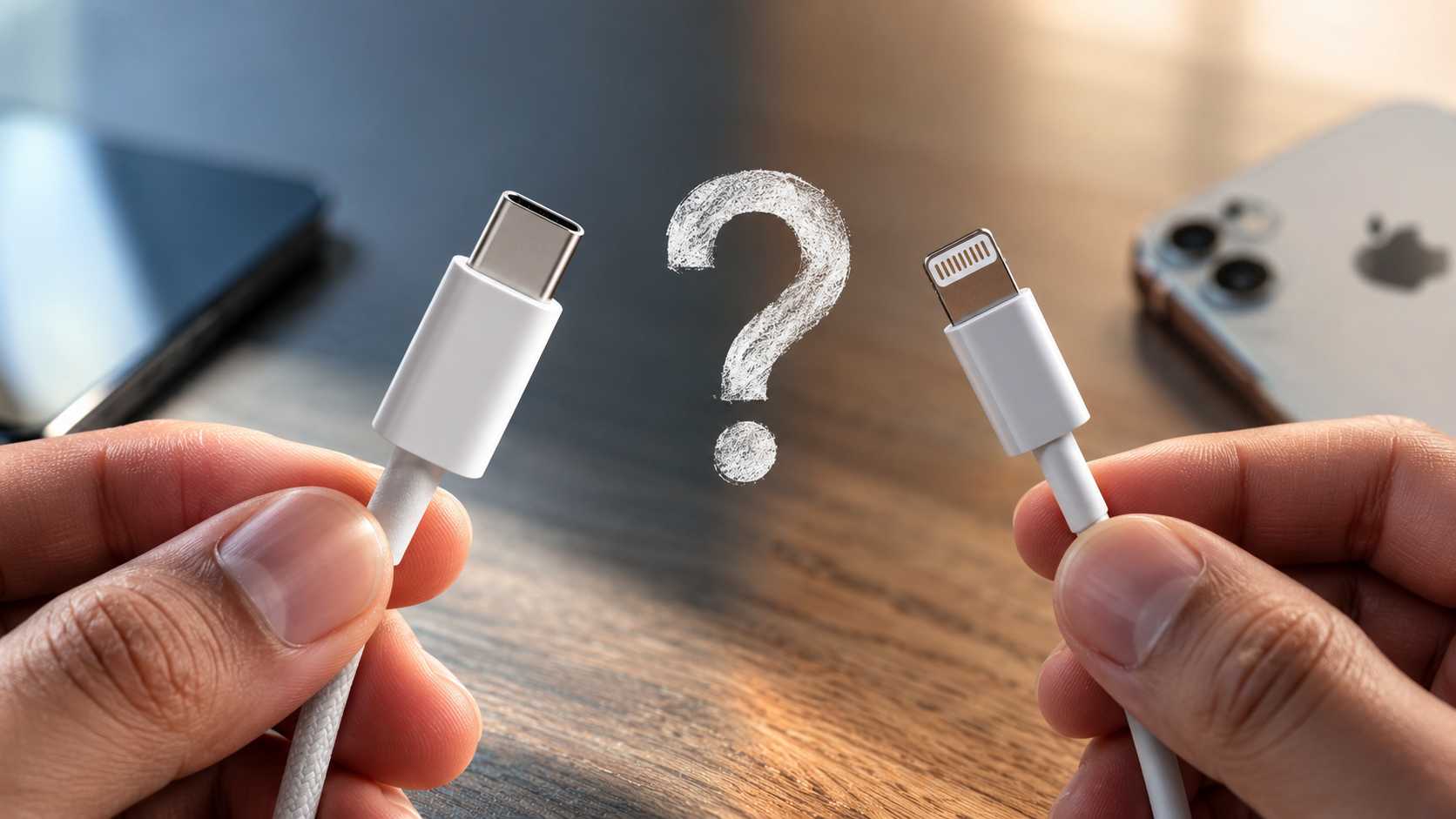
For more than a decade, Apple users relied on Lightning for its compact design and simple connection. Meanwhile, the wider technology industry moved toward USB-C as a universal connector. This shift has raised an important question: Are USB-C cables more reliable than Lightning cables?
Cable reliability depends on more than the connector itself. Physical wear, contact design, cable construction, bending, corrosion, and charging conditions all matter. USB-C and Lightning use different connector architectures, which gives each one distinct strengths and limitations.
The USB Implementers Forum (USB-IF) describes USB-C as a reversible connector designed for modern devices, with scalable power and performance capabilities. Its official USB Type-C specification also outlines the connector and cable requirements behind the standard.
USB-C has a major advantage in versatility. Depending on the device and cable, it can support much higher charging power and faster data speeds. Lightning, by comparison, was commonly limited to USB 2.0 data speeds on older Apple devices.
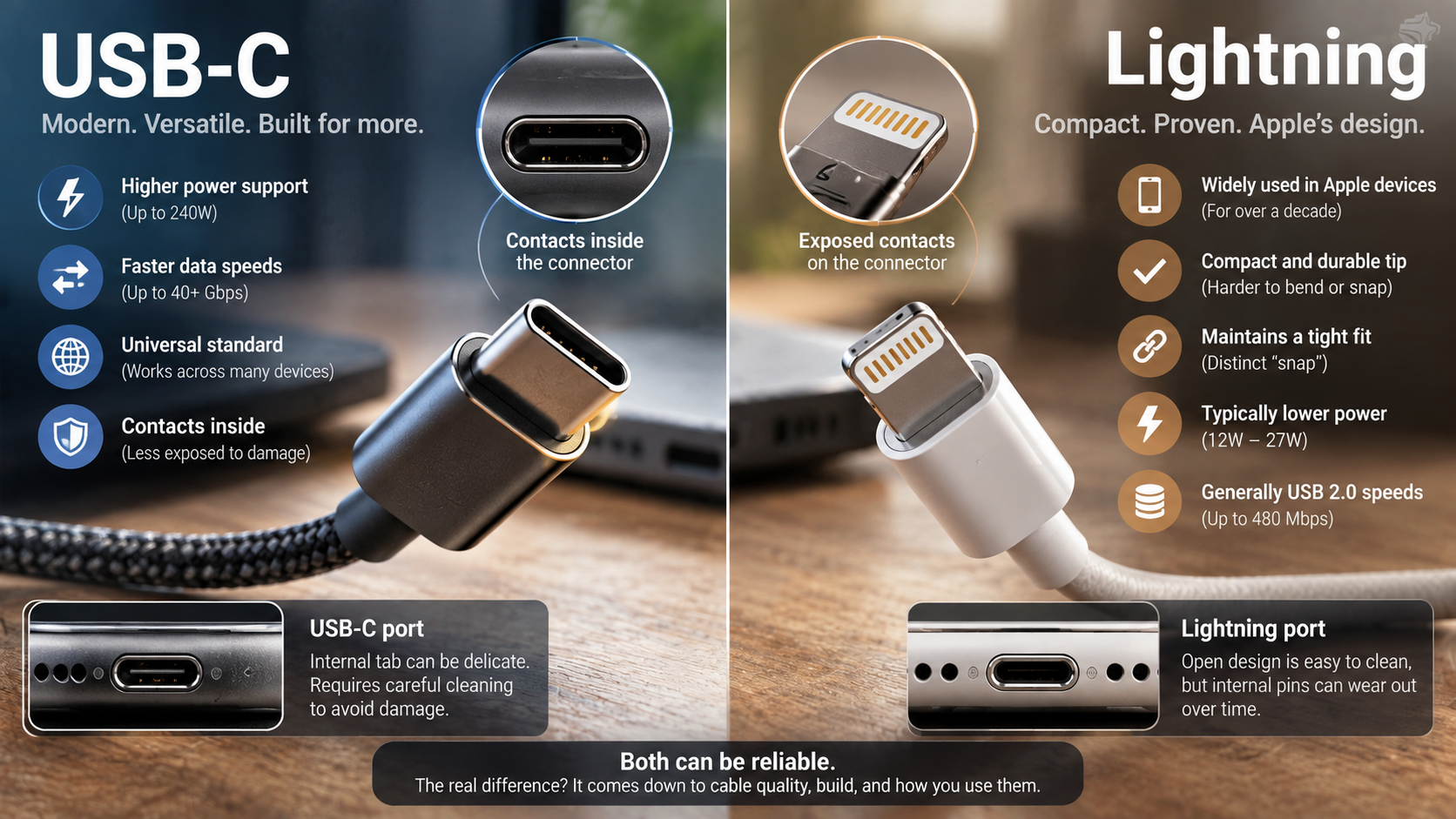
However, connector design alone does not determine cable lifespan. A well-built Lightning cable can outlast a poorly made USB-C cable. Here is how the two standards compare in everyday use.
Is USB-C Really Better Than Lightning?
USB-C is generally more versatile than Lightning, but saying it is always more reliable would be too broad. USB-C cables more reliable than Lightning is a reasonable conclusion for many modern use cases. However, reliability still depends on cable quality, construction, and how the connector is used.
USB-C has a compact, reversible design with contacts positioned inside the connector. Lightning uses exposed contacts on the plug. This difference can affect how the connectors handle dirt, moisture, bending, and repeated insertion.
USB-C also supports modern standards such as USB 3.x and USB4 on compatible devices. Some implementations support very high data rates and power levels. However, not every USB-C cable supports these capabilities.
Lightning has practical advantages too. Its connector is small and remained reliable across many Apple products. A quality Lightning cable can handle extensive everyday use.
For a fair comparison:
- USB-C: greater potential for power and data performance.
- Lightning: compact design and long-established Apple compatibility.
- Both: cable quality and connector care affect durability.
USB-C therefore has greater technical headroom, but the connector alone does not guarantee a longer lifespan.
Enclosed Pin Architecture vs. Exposed Contacts
One major difference between USB-C and Lightning is the position of their electrical contacts. Lightning places its contacts on the outside of the connector tongue. USB-C places its contacts inside the connector housing.
This design gives USB-C a physical advantage because its contacts are less directly exposed to external surfaces. However, that does not make USB-C immune to damage. Dust, moisture, repeated insertion, and mechanical stress can still cause connection problems.
Lightning connectors can also collect debris or experience contact wear. Dirt inside the device port can prevent the connector from making consistent electrical contact. In some cases, carefully cleaning the port can restore normal charging.
Claims that a particular Lightning pin will universally “burn out” are too broad. Connector failures can have several causes, including contamination, moisture, poor-quality accessories, and electrical problems.
The practical differences are easier to understand:
- USB-C uses internally positioned contacts.
- Lightning uses externally exposed contacts.
- Both connectors can experience mechanical wear.
- Both can be affected by moisture and debris.
- Cable and port quality remain important.
The enclosed USB-C design can provide durability benefits, but it does not guarantee longer cable life.
Is USB-C Better Than an Apple Charger?
USB-C is not a charger by itself. It is a connector and interface standard used by chargers, cables, phones, tablets, computers, and other devices. A more accurate comparison is USB-C charging versus older Lightning-based charging systems. When choosing a compatible charger, it is also worth understanding whether a third-party charger is safe for your device.
Modern USB-C chargers commonly use USB Power Delivery (USB-PD). This standard allows compatible chargers and devices to negotiate suitable voltage and current levels. It makes USB-C suitable for everything from smartphones to laptops.
USB-C also supports much higher power levels than older Lightning charging setups. The exact charging capability depends on the charger, cable, device, and supported USB-PD version.
However, USB-C does not automatically mean faster charging. A basic USB-C cable connected to a low-power charger may charge more slowly than another charging system.
The complete setup matters:
- USB-C: supports flexible standards such as USB-PD.
- Lightning: remains compatible with Apple’s Lightning ecosystem.
- Charging speed: depends on the charger, cable, and device.
- Cable quality: affects safe and consistent power delivery.
For users asking whether USB-C cables more reliable than Lightning are worth choosing, charging capability is one important factor. However, higher power does not automatically mean greater physical durability.
Universal Cross-Device Compatibility Can Reduce Cable Clutter
One of USB-C’s biggest practical advantages is its broad compatibility. The same connector can be used across smartphones, tablets, laptops, headphones, cameras, displays, and other accessories. This is particularly useful for people who want to use wired headphones without losing their charging port.
This can reduce the number of cables and chargers people need to carry. It can also simplify travel because one compatible charger may power several different devices.
However, USB-C compatibility has an important limitation. A USB-C connector does not guarantee identical capabilities. Two cables can look almost identical while supporting different charging and data speeds.
Some cables support only USB 2.0 data. Others support USB 3.x or USB4. Power ratings can also differ substantially.
Before buying a USB-C cable, check:
- Power rating for your charging requirements.
- Data speed for large file transfers.
- Video support when connecting displays.
- Cable length for demanding connections.
- Build quality for everyday durability.
USB-C makes cross-device compatibility easier, but consumers still need to check specifications. The connector shape alone tells you very little about actual performance.
Why Is Apple Getting Rid of the Lightning Cable?
Apple moved away from Lightning and adopted USB-C on newer iPhone models after the European Union introduced common-charging requirements. EU rules require certain electronic devices sold in the region to use USB-C for wired charging.
The move also gives Apple devices access to a broader industry-standard connector. USB-C can support higher data rates and charging capabilities than the Lightning implementations used on many older Apple devices.
However, it would be inaccurate to claim that Lightning itself could never support better performance. The actual limitation depends on the implementation. Many Lightning-equipped Apple devices were limited to USB 2.0 data speeds.
Newer USB-C devices can offer substantially faster transfers when the device and cable support higher-speed standards. This is especially useful for users who move large photos and video files.
The transition also makes accessory compatibility easier across Apple’s newer product lineup.
Apple’s move reflects several factors:
- EU common-charging legislation
- Wider industry adoption of USB-C
- Higher potential data-transfer speeds
- Greater charging flexibility
- Compatibility with a wider accessory ecosystem
The switch was not simply a statement that Lightning was unusable. It reflected changing regulations, standards, and hardware requirements.
The Physical Limits of Apple’s Older Lightning Implementation
Lightning debuted with the iPhone 5 in 2012. Its small reversible connector replaced Apple’s older 30-pin interface and became standard across many Apple mobile products.
However, many Lightning-equipped devices used USB 2.0 data speeds. That limited transfer performance compared with newer USB-C implementations.
The difference became more noticeable as smartphones began producing larger files. High-resolution photos and video can consume substantial storage. Moving those files quickly requires greater bandwidth.
USB-C provides a broader path to modern high-speed standards. On supported devices, it can deliver substantially faster transfers than older Lightning implementations.
Still, the connector itself does not determine performance. The device hardware, cable specification, and connected equipment all matter.
For example, a USB-C cable can still be limited to USB 2.0 speeds. Another USB-C cable may support USB 3.x or USB4.
Therefore, users should look beyond the connector name. Checking the advertised data rate is more useful when large file transfers matter.
This is also why USB-C cables more reliable than Lightning should not be treated as a universal rule. USB-C provides greater technical flexibility, but the actual cable still matters.
Why Is Everyone Switching to USB-C?
USB-C has become widely adopted because it combines a compact reversible connector with broad technical capabilities. It can carry power, data, and video through the same physical interface.
That flexibility makes USB-C useful across many product categories. Smartphones, tablets, laptops, monitors, cameras, gaming devices, and accessories increasingly use the connector.
Another advantage is ecosystem compatibility. A single USB-C charger can often serve multiple devices. This can reduce the number of charging accessories people need.
However, USB-C is not a single performance standard. The connector can support different USB generations, power levels, and optional features. This creates confusion when shoppers compare cables, especially because USB ports can be color-coded for different capabilities.
A USB-C cable may support:
- Basic USB 2.0 data speeds
- Faster USB 3.x transfers
- USB4 on compatible equipment
- USB Power Delivery
- DisplayPort video output
- Higher power levels on supported cables
The exact features depend on the cable and connected devices.
For people comparing USB-C cables more reliable than Lightning, the wider USB-C ecosystem is an important consideration. Its compatibility with modern charging and data standards makes it useful across more types of hardware.
USB-C’s popularity therefore comes from flexibility, industry adoption, and performance potential rather than from the connector shape alone.
Less Cable Clutter and Simpler Everyday Charging
USB-C can reduce cable clutter because one connector type can serve several devices. Someone carrying a laptop, smartphone, tablet, and headphones may be able to use one charging ecosystem for all of them. This also makes chargers with multiple ports useful when several devices need to be powered at once.
This can simplify travel as well. Instead of packing several proprietary cables, users can often carry fewer USB-C accessories.
Standardization may also reduce unnecessary accessory production and replacement. However, the environmental benefit depends on consumer behavior and how quickly older accessories are replaced.
USB-C also provides consumers with a wider accessory market. Many manufacturers produce compatible cables, chargers, hubs, docks, and adapters.
Still, users should not assume that every USB-C accessory performs the same way. Some inexpensive cables have limited data speeds or power ratings.
Before purchasing a cable, check:
- Maximum supported wattage
- USB data standard
- Video compatibility
- Cable length
- Build quality
- Certification where relevant
USB-C can make everyday charging simpler, but informed purchasing remains important. The connector provides compatibility, while the cable’s specifications determine much of its performance.
Does USB-C Degrade Over Distance?
USB-C performance can decrease as cable length increases, especially at higher data rates. Longer cables introduce additional electrical resistance and signal loss. These effects become more important with USB4, Thunderbolt, and high-resolution display connections. When using USB-C for displays, it is also important to understand that not all USB-C ports support video.
However, it is incorrect to claim that every USB-C cable longer than one meter automatically loses performance. The practical limit depends on the cable’s construction and supported standard.
Some passive cables can maintain high-speed performance beyond one meter. Other applications may require active electronics to maintain signal integrity over longer distances.
Power delivery can also be affected by cable length. Longer conductors can create greater voltage drop, especially when carrying higher current. High-quality cables use suitable conductor sizes to reduce these losses.
For demanding connections, users should check the cable’s specifications instead of relying only on length.
Important factors include:
- USB generation
- Maximum data rate
- Power rating
- Cable construction
- Passive or active design
- Display requirements
For everyday charging, a longer cable may work perfectly well. For high-speed data or video, choosing a properly rated cable becomes more important.
This means USB-C cables more reliable than Lightning can still perform poorly when the cable is unsuitable for the required distance or workload.
Choosing Active, Passive, or Optical Cables for Longer Runs
For short connections, a quality passive USB-C cable is usually sufficient. These cables do not require additional signal-processing electronics and can provide reliable performance within their rated specifications.
Longer high-speed connections are more complicated. Signal attenuation increases with distance, especially with demanding USB4 and display applications. Active cables can use electronic components to maintain signal quality over longer runs. These display connections are also relevant when considering why some laptops don’t have HDMI ports and instead rely on USB-C for external displays.
Optical and active optical cables can extend certain high-speed connections even farther. They are designed for specialized applications where standard passive copper cables may not provide the required performance.
The right choice depends on the connection:
- Short charging: a quality passive cable is usually sufficient.
- High-speed data: check the cable’s certified data rate.
- Long display connections: consider an active or optical cable.
- High-power charging: verify the cable’s power rating.
An expensive cable is not automatically better or faster. Look for clear specifications that match your device and use case.
For most phones and laptops, a short, properly rated USB-C cable offers a strong balance of reliability, performance, and convenience. In practical terms, USB-C cables more reliable than Lightning can be a useful choice when you need modern charging, faster data, and broad device compatibility.
Final Verdict: Are USB-C Cables More Reliable Than Lightning?
USB-C is the better choice for most modern devices, but it is not automatically more reliable than every Lightning cable. Its main advantages are broader compatibility, higher potential charging power, faster data standards, and a connector design that keeps electrical contacts inside the housing.
Lightning still offers reliable everyday performance when paired with a well-made cable and compatible Apple device. Its smaller ecosystem and lower data capabilities are the bigger limitations today, rather than basic connector reliability.
When comparing USB-C cables more reliable than Lightning, the most important factor is the specific cable. A poorly built USB-C cable can fail sooner than a high-quality Lightning cable. Cable construction, strain relief, power rating, data standard, and proper handling all affect long-term performance.
For most new devices, USB-C makes more sense because it provides greater flexibility and supports the direction modern hardware is taking. If you already own a reliable Lightning setup, however, there is no need to replace it solely because USB-C exists.
In short: USB-C wins on versatility and performance potential, while actual reliability depends heavily on cable quality and usage.