You Can Use Wired Headphones Without Losing Your Phone’s Charging Port – Here’s How
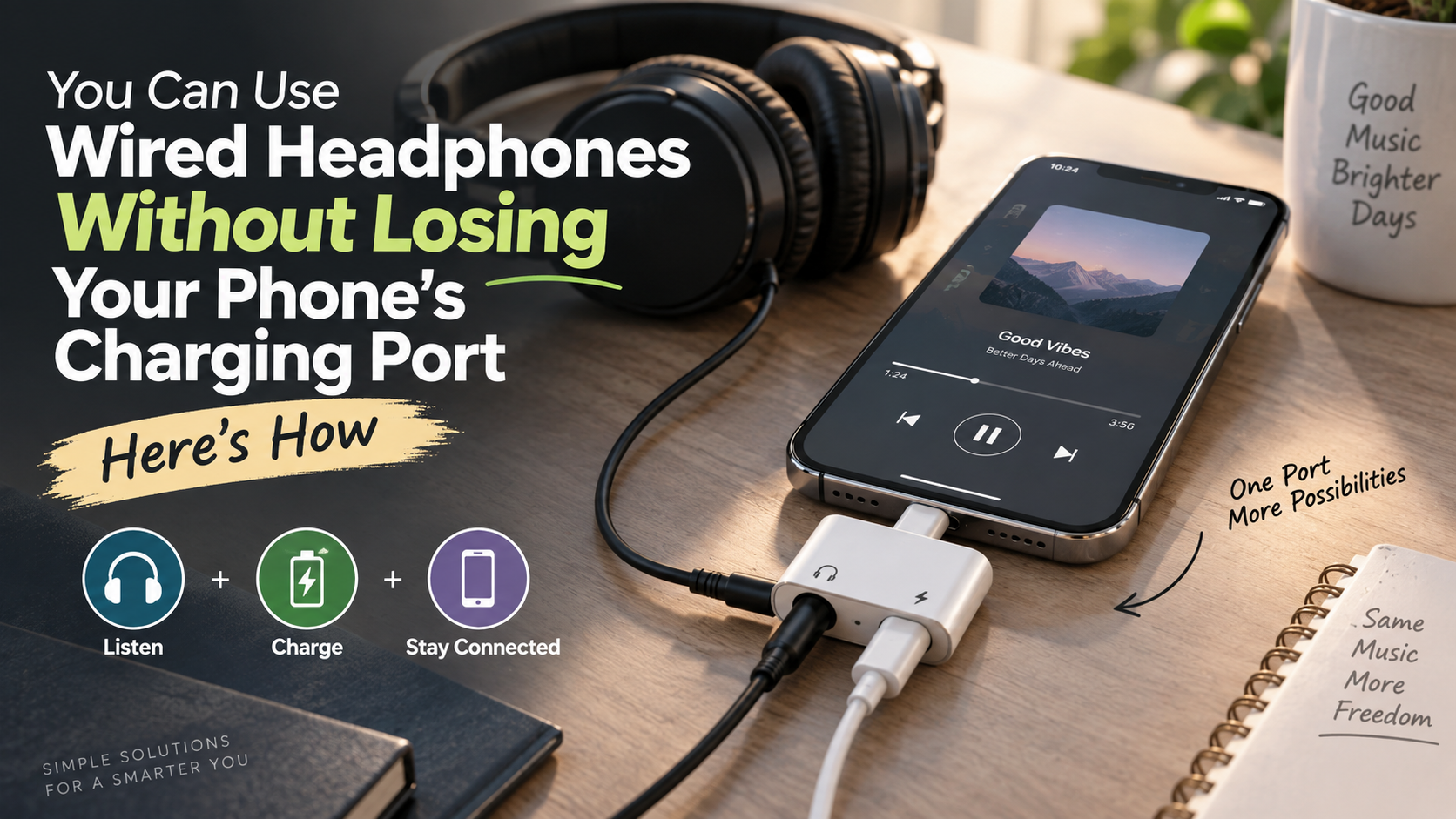
You can use wired headphones without losing your phone’s charging port, even if your smartphone has no 3.5mm headphone jack. Many modern phones use one USB-C or Lightning port for both charging and wired audio. This can make listening while charging seem impossible.
Fortunately, a compatible dual-port adapter can solve the problem. These accessories connect to your phone’s charging port and provide separate connections for power and audio. Depending on your phone and headphones, you may need a USB-C or Lightning adapter with built-in audio support.
Major device manufacturers like Apple Support now rely entirely on unified ports for both power delivery and media playback. Because of this design, millions of users assume they must choose between wired audio and keeping their battery full.
Using wired headphones without losing your phone’s charging port is useful during long calls, gaming sessions, commutes, and streaming. The right setup lets you charge your phone while keeping your wired headphones connected.
This guide explains how audio and charging splitters work. We will also cover Gen Z’s renewed interest in wired headphones, their disadvantages, iPhone solutions, sound quality, and battery consumption.
Can we use wired headphones while charging a phone?
Yes, you can use wired headphones without losing your phone’s charging port with a compatible dual-port adapter. The adapter connects to your phone’s USB-C or Lightning port. It then provides separate connections for charging and wired audio.
For USB-C phones, choose an adapter that supports both audio and power delivery. Some models include a 3.5mm headphone jack. Others provide an additional USB-C audio connection.
For Lightning iPhones, you need a compatible Lightning audio and charging adapter. Compatibility is important because not every splitter supports audio and charging at the same time.
Before buying an adapter, check for:
- USB Power Delivery (USB-PD) support for fast charging.
- Built-in DAC support for traditional 3.5mm headphones.
- Compatibility with your specific phone model.
- Support for your headphone connector.
- Simultaneous charging and audio support.
A suitable adapter makes it easy to use wired headphones without losing your phone’s charging port while keeping your device charged.
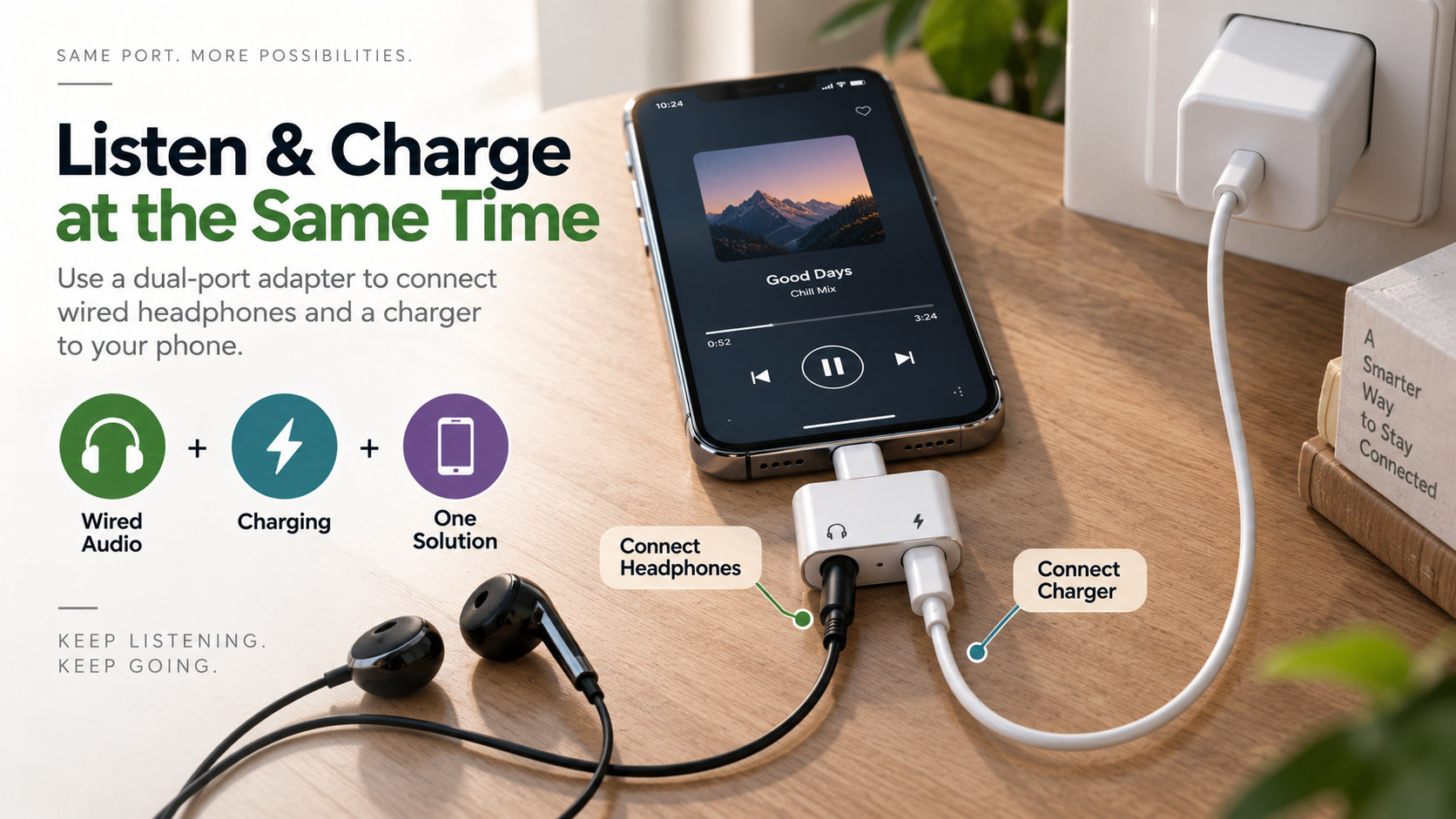
Choosing the Right Dual Adapter
Choosing the right adapter matters because USB-C and Lightning accessories can work differently. A good audio and charging splitter should clearly support simultaneous charging and audio output.
If you use 3.5mm headphones with a USB-C phone, the adapter generally needs a digital-to-analog converter (DAC). USB-C sends digital audio, while traditional 3.5mm headphones use an analog signal. The DAC converts the signal for your headphones.
If fast charging matters, look for USB Power Delivery (USB-PD) support. Also check the adapter’s maximum supported wattage. This helps ensure that charging performance meets your needs, especially when considering Are Chargers With Multiple Ports Slower Than Normal Ones?
Avoid accessories with unclear specifications. Poorly designed adapters may cause audio noise, connection problems, or slower charging.
Before purchasing, verify your phone model, headphone type, charging standard, and adapter specifications. These simple checks can help you choose a reliable adapter.
Why are Gen Z wearing wired headphones?
Gen Z’s renewed interest in wired headphones combines fashion, convenience, affordability, and a preference for simpler technology. Corded earbuds can create a Y2K or retro-inspired appearance. They also offer a noticeable alternative to today’s popular wireless earbuds, as explored in Why Is Gen Z Using Wired Headphones? The Retro Trend.
Social media has helped bring wired earphones back into the spotlight. Creators and influencers often feature them with casual, vintage, or alternative outfits. The visible cable can become part of the overall look.
There are practical reasons for the trend as well. Wired headphones do not need a separate battery, charging case, or Bluetooth connection. They are often affordable and easy to replace.
Many listeners also like their reliable connection. Wired headphones do not depend on Bluetooth pairing or wireless signal stability.
The cable can also provide a simple social signal. Someone wearing wired earbuds may appear clearly occupied and less open to casual conversation.
For people who prefer fewer connected devices, wired audio can feel refreshingly simple. It provides reliable listening without another battery-powered accessory.
Escaping Constant Device Management
One reason wired earbuds appeal to younger listeners is their simplicity. Wireless earbuds require charging, Bluetooth pairing, and sometimes companion apps or software updates. Wired models remove many of those extra steps.
A wired pair works whenever you plug it in. There is no charging case to remember and no separate earbud battery to monitor. This can be convenient during travel, school, work, and daily commutes.
Wired headphones can also create a sense of digital separation. You can listen without managing another wireless device or checking its battery level. For people seeking less technology in their routines, that simplicity can be appealing.
The visible cable may also help signal that you are listening to something. This can discourage casual interruptions in shared spaces or public areas.
Wired headphones are not completely maintenance-free, however. Cables can tangle, connectors can wear, and newer phones may require adapters.
Even so, their plug-and-play design remains attractive. Users can connect them and start listening without worrying about another device’s battery.
What are the disadvantages of using wired headphones?
The biggest disadvantage of wired headphones is the physical cable. It can catch on clothing, furniture, bags, and other objects. This can make wired listening less convenient during exercise or other active tasks.
Cable durability is another concern. Repeated bending near the connector can eventually damage internal wires. This may lead to intermittent audio, channel dropouts, or complete failure.
Modern smartphones can create another inconvenience. Many devices no longer include a dedicated 3.5mm headphone jack. Users may therefore need a USB-C or Lightning adapter for traditional headphones. The broader differences between these two listening methods are covered in Wired vs Wireless Audio: Which Option Is Right For You?
Adapters also add another accessory to carry. A connected adapter can experience extra physical stress if the headphone cable gets pulled sharply.
Wired headphones can also restrict movement. Your phone needs to stay within the cable’s reach unless you use an extension.
Despite these drawbacks, many users still prefer wired audio. The reliable connection, lack of headphone batteries, and affordable pricing can outweigh the inconvenience. For a broader comparison of wireless limitations, see 4 Disadvantages Of Using Bluetooth For Everything.
Choosing a durable cable and compatible adapter can reduce many common problems. Proper storage and careful handling can also extend the life of your headphones.
Physical Snags and Jack Wear
Cable tangling and connector wear are common problems with wired headphones. Keeping a cable in a pocket or bag can create repeated bends and knots. Over time, this can weaken the internal wiring.
The connector is especially vulnerable. Pulling the cable instead of the plug places additional stress on the connection. Repeated bending near the connector can eventually cause intermittent or one-sided audio.
Adapters create another consideration for modern smartphones. A USB-C or Lightning adapter extends the connection away from the phone. A sudden pull can place additional leverage on the phone’s port.
You can reduce these risks with a few simple habits:
- Store headphones loosely instead of tightly wrapping them.
- Disconnect them by holding the plug.
- Avoid placing heavy objects on the cable.
- Choose cables with reinforced strain relief.
- Remove adapters carefully instead of pulling the cable.
These habits can help extend the life of both your headphones and adapter. They can also reduce unnecessary stress on your phone’s charging port.
When handled carefully, wired headphones can remain reliable for years. Good storage and a durable cable make a noticeable difference. For more detailed maintenance advice, see How to Clean and Maintain Your Premium Headphones.
Can I charge my iPhone while using wired headphones?
Yes, you can charge an iPhone while using wired headphones. The best solution depends on your iPhone model and the type of headphones you use.
USB-C iPhones can work with compatible USB-C audio and charging adapters. These accessories provide separate connections for power and wired audio. If you use 3.5mm headphones, choose an adapter with the required DAC.
Older Lightning iPhones require compatible Lightning accessories. Not every Lightning adapter supports simultaneous charging and audio, so check the product specifications before buying.
Another option is wireless charging. You can connect wired headphones to the iPhone’s physical port while charging the device with a compatible wireless charging pad.
This approach can be useful if you already own a Qi or MagSafe charger. It avoids the need for a charging splitter and leaves the physical connector available for your headphones.
For people who frequently charge while listening, a dual-port adapter can be convenient. Wireless charging may be better for stationary use.
The best choice depends on your phone, headphones, charging habits, and preferred setup.
Using MFi Certified iPhone Adapters
When choosing an adapter for an older Lightning iPhone, MFi certification can provide additional assurance. It indicates that the accessory is part of Apple’s certified accessory ecosystem.
MFi is mainly relevant to Lightning accessories. It does not apply to USB-C accessories in the same way. For USB-C iPhones, focus instead on the adapter’s published audio, charging, and compatibility specifications.
If you use 3.5mm headphones, make sure the adapter supports the required audio conversion. A charging-only adapter will not automatically provide analog headphone output.
You should also check the adapter’s charging capabilities. If you want fast charging, verify its supported power-delivery standard and maximum wattage.
Avoid choosing an adapter based only on price. Poorly designed accessories can cause audio interruptions, charging limitations, or compatibility problems.
Before purchasing, confirm:
- Your iPhone model and port.
- Your headphone connector.
- Simultaneous audio and charging support.
- Required charging speed.
- DAC support for 3.5mm headphones.
These checks can make your wired headphone setup more reliable and easier to use.
Do wired headphones drain an iPhone battery?
Yes, wired headphones use some iPhone power, but their energy requirements are generally modest. Traditional wired headphones do not have their own rechargeable battery. Instead, the phone provides the electrical signal needed to produce sound.
The exact power consumption varies by headphone design, listening volume, impedance, and the phone’s audio hardware. For this reason, there is no single power figure that applies to every pair of wired headphones.
Bluetooth headphones also require the iPhone to maintain a wireless connection. However, the difference in battery use varies between phones, headphones, codecs, and listening conditions.
Other phone activities often have a much greater effect on battery life. Screen brightness, gaming, video playback, cellular reception, and background activity can all consume significant power.
Wired headphones can still be useful when you want to avoid charging another device. They are particularly convenient during long listening sessions when paired with a suitable charging adapter.
For most users, the battery difference between wired and Bluetooth audio is relatively small compared with the phone’s overall workload.
Negligible Power Draw in Practice
Ordinary wired earbuds generally require a modest amount of power to produce audio. The exact amount depends on their electrical characteristics and the volume you choose.
Your phone may consume considerably more energy through its display, processor, cellular connection, GPS, or demanding applications. As a result, wired audio usually represents only a small part of total battery consumption.
That does not mean wired headphones use zero power. The phone still needs to generate and amplify the audio signal. Headphones with higher impedance can also require more output power than basic earbuds.
High-impedance studio headphones are a different situation. Some models benefit from a dedicated headphone amplifier. A phone may not provide enough output for the desired volume or performance.
For typical earbuds and portable headphones, this is rarely an issue. Their power requirements are generally low enough for everyday listening.
If battery life is your priority, focus on larger sources of consumption:
- Lower unnecessary screen brightness.
- Limit demanding background applications.
- Use Wi-Fi when practical.
- Avoid poor cellular reception when possible.
- Reduce unnecessary location activity.
Wired headphones remain a simple, low-maintenance option for everyday audio.
Frequently Asked Questions
Does using an audio and charging splitter reduce sound quality?
No, a high-quality splitter will not reduce your sound quality. Premium splitters feature isolated circuitry that keeps electrical current from bleeding into the audio pathway. As long as the adapter contains a clean digital-to-analog converter (DAC), your audio remains crisp, dynamic, and completely free of background hum or distortion.
Can I charge my phone wirelessly while using wired headphones?
Yes, wireless charging works perfectly while using wired headphones. You can simply rest your smartphone on any standard Qi or MagSafe charging pad while your wired earbuds remain plugged into the bottom USB-C or Lightning port. This hands-free approach bypasses the need for dual-adapter splitters entirely.
Why does my audio crackle when I plug in the charger?
Audio crackling usually occurs due to ground loop interference or cheap, unshielded internal adapter wiring. Low-cost splitters frequently lack proper electrical insulation, allowing high-frequency current from the charging brick to leak into sensitive audio lines. Switching to a certified, well-shielded adapter immediately resolves this irritating buzzing sound.
Can fast charging damage wired headphones plugged into a splitter?
Fast charging will not damage your wired headphones when using a certified splitter. High-end splitters feature dedicated power management chips that negotiate safe charging rates with your phone. These chips isolate high voltage, sending pure power straight to the battery while routing safe, low-power audio signals directly to your ears.
Conclusion
Losing the 3.5mm headphone jack does not mean you must abandon wired audio. With the right adapter, you can use wired headphones without losing your phone’s charging port.
USB-C and Lightning accessories can provide separate connections for charging and audio. The best option depends on your phone, headphone connector, and charging requirements.
Wired headphones still offer several practical benefits. They do not require a separate battery, avoid Bluetooth pairing issues, and can provide a consistent connection. They can also be more affordable than many wireless alternatives.
There are drawbacks, including tangled cables, limited movement, and connector wear. Modern phones may also require an additional adapter.
For frequent charging, choose a compatible dual-port audio adapter with appropriate charging support. If you prefer fewer accessories, wireless charging can keep the physical port available for headphones.
Ultimately, the right setup lets you enjoy the simplicity and reliability of wired audio without constantly choosing between listening and charging. With a compatible adapter or wireless charger, both can work together.