Should You Clean Both Sides of a Camera Lens? Complete Expert Guide
Getting sharp, clear photographs starts with proper camera maintenance. Dust, fingerprints, smudges, and moisture can affect image quality. Knowing how to clean both sides of a camera lens helps protect your equipment and maintain clear photographs.
However, cleaning the front and rear glass elements differs from cleaning the internal elements inside a lens barrel. The exterior surfaces usually need occasional cleaning, while internal dust often requires professional attention.
In this guide, you’ll learn how to clean a camera lens safely, which tools to use, and what mistakes to avoid. We’ll also explain whether 70% isopropyl alcohol is suitable for lens cleaning and when a microfiber cloth is safe to use.
By following these practical tips, you can protect delicate optical coatings, reduce unnecessary wear, and keep your photography equipment in good condition.
How to Correctly Clean a Camera Lens
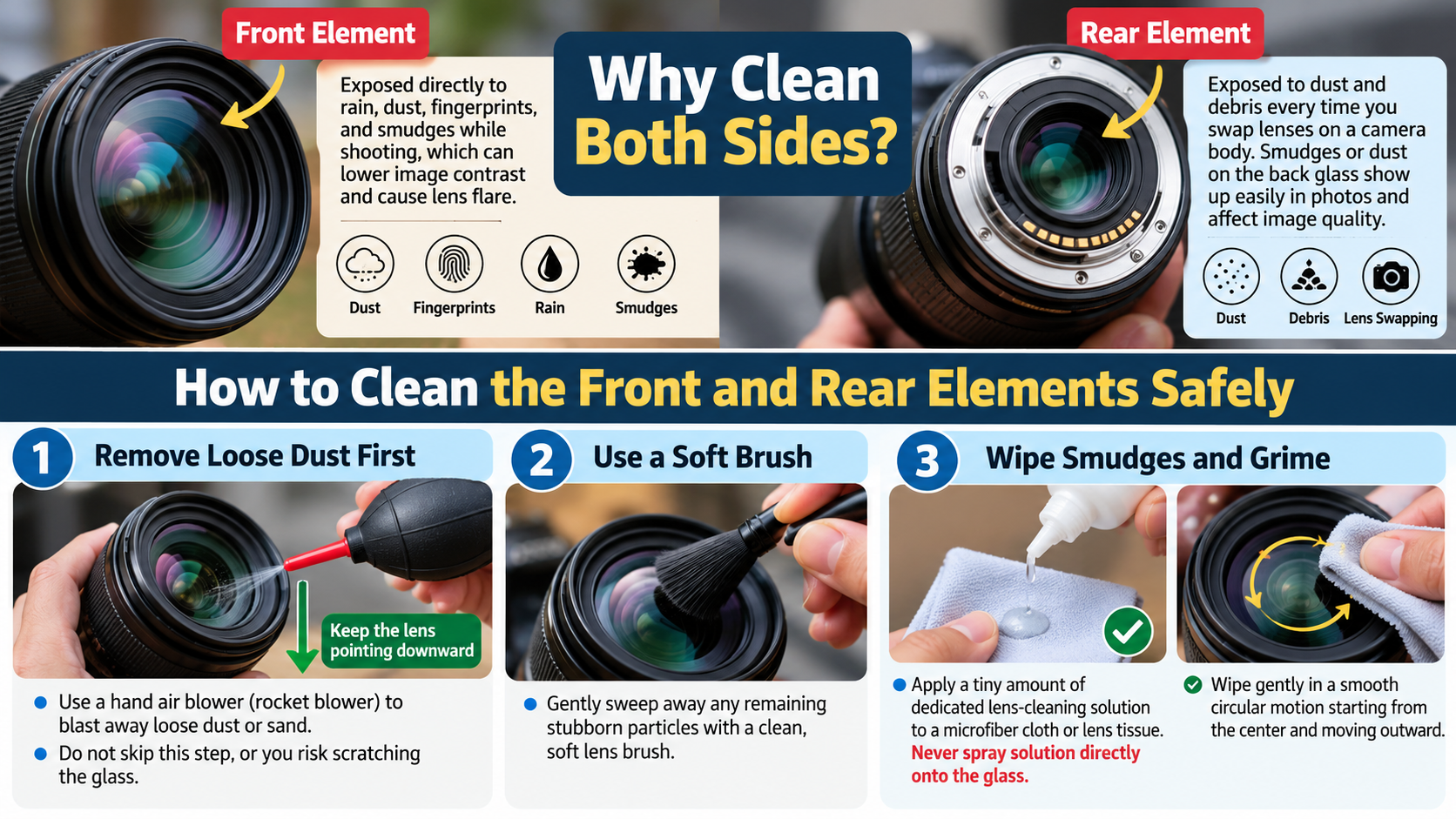
Cleaning a camera lens requires a gentle approach. Dust and grit can scratch delicate optical surfaces if you wipe them away without preparation. Always remove loose particles before touching the glass.
Follow these steps to clean your camera lens safely:
- Remove loose dust: Use a clean manual air blower to remove dust and debris. Avoid compressed air cans, which may release propellant or create excessive pressure.
- Inspect the glass: Check for fingerprints, grease, and stubborn marks under good lighting. Clean the lens only when necessary.
- Apply lens cleaner: Put a small amount of manufacturer-approved lens cleaning solution on a clean microfiber cloth or lens tissue.
- Wipe gently: Use light, circular motions, moving from the center toward the edges. Avoid applying excessive pressure.
- Inspect the result: Check the glass under good lighting. Repeat the process gently if streaks remain.
Never spray cleaning liquid directly onto the lens. Excess fluid can enter the lens barrel and damage internal components.
Essential Tools for Safe Camera Lens Maintenance
Using the right tools helps prevent scratches, streaks, and residue. You don’t need an expensive professional kit for routine maintenance. A few reliable accessories are usually enough to keep your equipment clean.
Consider keeping these items in your camera bag:
- Manual air blower: Removes loose dust without touching the glass.
- Optical-grade microfiber cloth: Helps remove fingerprints and light smudges.
- Lens cleaning solution: Choose a product approved for your lens’s optical coatings.
- Lens tissue: Provides a disposable option for removing stubborn marks.
- Lens cap: Protects the glass when you’re not using your camera.
Avoid paper towels, household tissues, and ordinary clothing. These materials may contain abrasive particles or trap grit against the glass. Never use a dirty microfiber cloth, even if it looks clean.
Store your cleaning accessories in a clean pouch or sealed bag. Wash or replace cloths when they become dirty. Always follow the manufacturer’s instructions, particularly when dealing with specialized optical coatings.
Should You Clean Both Sides of a Camera Lens?
Yes, you can clean both sides of a camera lens when the front or rear glass element needs attention. Both surfaces can collect dust, fingerprints, and smudges. However, you should not dismantle the lens to reach its internal elements unless you have the necessary training and tools.
The front element faces the environment and often collects fingerprints, dust, and water spots. The rear element can also accumulate dirt when you change lenses. Since the rear glass sits close to the camera sensor, keeping it clean is particularly important.
Before cleaning the rear element, turn off your camera and detach the lens carefully. Hold the lens securely and avoid touching the glass with your fingers. Use a manual air blower first, followed by an appropriate optical cleaning method if needed.
Internal dust is a different matter. Small particles inside a lens often have little visible effect on photographs. If you notice persistent haze, fungus, or unusual image problems, consult a qualified camera technician instead of opening the lens yourself.
Risks of Internal Lens Disassembly
Opening a camera lens without the proper knowledge can cause expensive damage. Modern lenses contain carefully aligned optical elements, delicate electrical connections, and precision focusing mechanisms. Some models also include image stabilization components that require specialized handling.
Disassembly can introduce additional dust, damage delicate parts, or affect optical alignment. Incorrect reassembly may cause focusing problems, reduced sharpness, or mechanical failure. These risks are especially significant with complex zoom lenses and lenses containing electronic components.
Avoid opening your lens solely to remove a small internal dust particle. Such particles often have no noticeable impact on image quality. Cleaning the exterior glass is usually sufficient for routine maintenance.
Professional servicing is more appropriate when you notice:
- Persistent haze that affects photographs.
- Visible fungus or unusual internal growth.
- Moisture trapped inside the lens.
- Significant internal contamination.
- Focusing problems or unexplained image-quality changes.
A qualified technician can inspect the lens and determine whether internal cleaning is necessary. This approach helps protect your equipment and avoids unnecessary repairs.
What Can Ruin a Camera Lens?
Several environmental conditions and maintenance mistakes can damage a camera lens. Moisture, fungal growth, abrasive cleaning materials, physical impacts, and excessive heat are among the main risks. Knowing how to clean both sides of a camera lens safely can help prevent avoidable damage and maintain image quality.
Humidity is a particular concern when storing lenses in damp environments for extended periods. Under suitable conditions, fungal growth can develop inside a lens and damage its optical coatings. Once the coatings are affected, cleaning may not fully restore their original condition.
Physical damage is another common problem. Dropping a lens can break glass elements, damage the mount, or affect the focusing mechanism. Even when the exterior looks intact, an impact can cause internal misalignment. Smartphone cameras face other risks, too; learn what a laser does to your phone’s camera and why direct laser exposure can be dangerous.
Poor cleaning habits can also reduce image quality. Wiping dusty glass with a dirty cloth may cause scratches. Using unsuitable solvents can damage coatings, rubber components, or other materials.
To protect your lens, follow these precautions:
- Keep lens caps on when the lens is not in use.
- Use a padded camera bag during transport.
- Avoid excessive heat and prolonged exposure to direct sunlight.
- Protect your equipment from rain, splashes, and condensation.
- Clean the glass only when necessary and use suitable tools.
Regular inspection and careful storage can help prevent avoidable damage.
Preventing Fungal Growth and Moisture Damage
Lens fungus develops when moisture and suitable environmental conditions allow fungal growth. Warm, humid storage environments can increase the risk, especially when equipment remains damp for long periods.
After photographing in rain or humid conditions, wipe the exterior of your equipment with a clean, dry cloth. Let the equipment acclimatize gradually when moving between cold and warm environments. This helps reduce condensation.
For long-term storage, consider using a dry cabinet with adjustable humidity control. Follow the camera manufacturer’s storage recommendations and avoid excessively dry conditions that may affect certain materials or lubricants.
Silica gel packets can help absorb moisture in a suitable storage container. However, they are not a substitute for monitoring humidity or allowing wet equipment to dry properly.
Avoid leaving lenses in damp basements, wet bags, or poorly ventilated cases for extended periods. Inspect stored equipment occasionally for unusual spots, haze, or other signs of fungal growth.
If you discover suspected fungus inside a lens, avoid opening it yourself. Arrange a professional inspection to assess the damage and determine whether cleaning is possible. Understanding when to clean both sides of a camera lens and when to seek professional help can protect your equipment and prevent unnecessary damage. Early attention may prevent the problem from becoming more severe.
Can I Use 70% Alcohol to Clean a Camera Lens?
Avoid using 70% isopropyl alcohol on camera lens glass unless the manufacturer specifically approves it. Although alcohol can dissolve grease, not every optical coating or lens material reacts the same way to solvents.
The main concern is not simply the alcohol concentration. The formulation may contain additives, and repeated exposure to an unsuitable solvent can damage coatings, seals, adhesives, or nearby plastic components.
For routine lens cleaning, choose a solution designed for camera optics. Apply a small amount to a clean microfiber cloth or lens tissue instead of pouring or spraying liquid directly onto the glass.
If you notice fingerprints on the lens, start with a manual air blower. Then use an approved optical cleaner if necessary. Avoid scrubbing stubborn marks aggressively, as pressure and trapped debris can cause damage.
Always check the manufacturer’s guidance before using any solvent. Recommendations can differ between lenses, filters, and optical coatings. When in doubt, use a product specifically approved for your equipment.
Risks of Using High-Concentration Solvents
Strong solvents can damage certain optical coatings, adhesives, plastics, and rubber components. Their effects depend on the chemical formulation and the materials used in your particular lens.
Avoid using acetone, household window cleaners, or other aggressive cleaning chemicals on camera optics. These products are not necessarily formulated for delicate optical coatings and may leave residue or cause permanent damage.
High-concentration isopropyl alcohol is not automatically safe simply because it evaporates quickly. Its suitability depends on the lens manufacturer’s recommendations and the product’s formulation.
You should also avoid pouring cleaning liquid directly onto the glass. Excess fluid can seep into the lens barrel and reach internal components.
For safer results, follow these guidelines:
- Use manufacturer-approved optical cleaning products.
- Apply cleaner sparingly to a suitable cloth or lens tissue.
- Avoid mixing different cleaning chemicals.
- Never use an untested solvent on an expensive lens.
- Seek professional advice when dealing with stubborn residue or suspected coating damage.
These precautions help preserve optical performance and reduce the risk of costly repairs.
Can I Wipe My Camera Lens With a Microfiber Cloth?
Yes, you can use a clean microfiber cloth to wipe a camera lens, provided you remove loose dust first. Optical-grade microfiber cloths are designed to lift fingerprints, grease, and light smudges without requiring heavy pressure.
However, the cloth must be clean. A microfiber cloth that has collected dust, grit, or oily residue can transfer those contaminants onto the glass. Rubbing trapped particles against the surface may scratch the lens or damage its coatings.
Start by using a manual air blower to remove loose debris. Then inspect the glass under good lighting. If fingerprints remain, use a clean microfiber cloth with an approved lens cleaning solution when necessary.
Wipe gently using circular motions, moving from the center toward the edges. Avoid pressing hard or repeatedly rubbing the same area. If the cloth becomes dirty during cleaning, replace it with a clean one.
Store microfiber cloths in a clean pouch or sealed bag between uses. Keep them away from pockets, dusty surfaces, and other materials that may transfer grit.
Remember that not every microfiber cloth is designed for optical glass. Choose one specifically intended for camera lenses or other delicate optical surfaces.
Proper Care and Washing of Microfiber Cloths
Regularly washing your microfiber cloths helps prevent dirt and oily residue from transferring onto your camera lens. However, improper washing can make them less effective or introduce new contaminants.
Follow these care tips to keep your cloths clean:
- Wash separately: Clean lens cloths separately from heavily soiled laundry when possible.
- Use mild detergent: Choose a gentle detergent without added oils or fabric softeners.
- Avoid fabric softener: It can leave residue on the fibers and cause streaks on the glass.
- Follow care instructions: Use the temperature recommended by the cloth manufacturer.
- Air-dry when appropriate: Avoid high heat if the manufacturer’s instructions prohibit it.
- Store carefully: Keep the clean, dry cloth in a sealed pouch or container.
Never use a cloth that has touched dirty surfaces or collected visible grit. If you are unsure whether a cloth is clean, use a fresh one instead.
For stubborn lens marks, do not compensate by scrubbing harder. Use an appropriate optical cleaning solution and gentle pressure. Replacing a contaminated cloth is much cheaper than risking damage to an expensive lens.
With proper washing and storage, microfiber cloths can remain useful for repeated lens-cleaning tasks.
Conclusion
Keeping your camera lens clean is essential for capturing sharp, clear photographs and protecting your equipment. You can safely clean both the front and rear glass elements using a manual air blower, a clean microfiber cloth, and a manufacturer-approved cleaning solution. Always remove loose dust before wiping the glass, and avoid unsuitable chemicals that may damage delicate optical coatings.
For additional guidance, read Canon’s official guide to basic camera care and lens cleaning. It explains how to remove dust safely and when to seek professional assistance.
Remember, clean both sides of a camera lens only when necessary, and never dismantle it to remove internal dust without the proper knowledge and tools. Store your equipment in a dry, protected environment to reduce the risk of moisture damage and lens fungus.
With the right cleaning techniques and regular care, you can maintain your lens’s performance and enjoy better photography for years to come.