
The Real Reason the Mac mini Is Cheaper Than a MacBook
When comparing Apple’s computers, shoppers quickly notice a major price difference between the Mac mini and MacBook. Understanding the reason the Mac mini is cheaper than a MacBook comes down mainly to design, components, and portability. Both use Apple silicon, but they serve very different purposes.
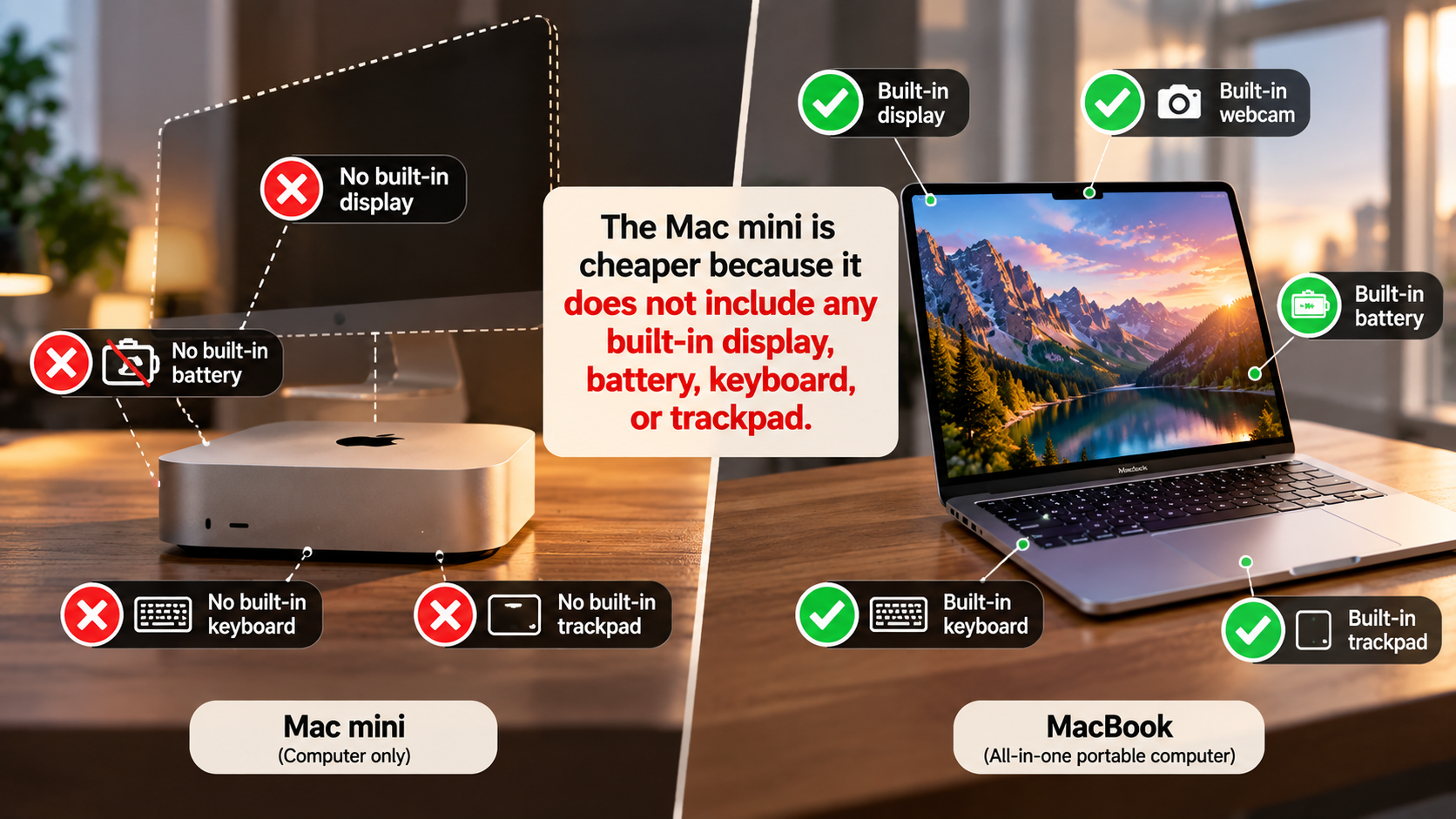
A MacBook combines a computer with a display, battery, keyboard, trackpad, speakers, webcam, and other portable components. The Mac mini focuses on the computer itself. You provide the monitor and other accessories separately.
That difference helps explain much of the price gap. A desktop does not need the compact battery system or integrated display found in a laptop. It also does not need hinges, a built-in keyboard, or a precision trackpad.
This distinction matters when comparing total costs. A Mac mini can be cheaper if you already own the required accessories. A MacBook can offer better value if you need an all-in-one portable computer.
Is it better to buy a Mac mini or a MacBook?
Choosing between a Mac mini and a MacBook depends on how and where you use your computer. The Mac mini makes more sense for people who work mainly from one desk. You can connect it to your preferred monitor, keyboard, mouse, speakers, and other accessories. Students comparing computers for school can also consider factors such as portability, software compatibility, and price in this Mac or Windows comparison for students.
A MacBook serves a different purpose. It combines the computer, display, keyboard, trackpad, speakers, battery, and webcam into one portable device. That convenience explains part of its higher price.
Consider these factors before making a decision:
- Choose a Mac mini if you already have a monitor and desk accessories.
- Choose a MacBook if you regularly work away from home.
- Choose a Mac mini if you prefer a larger external display.
- Choose a MacBook if you need an all-in-one setup.
Your actual workflow matters more than the headline price. If your computer stays connected to a desk most of the time, a Mac mini can reduce unnecessary spending. If you travel often, the extra cost of a MacBook buys meaningful convenience.
Matching Hardware to Your Workflow
A desktop setup gives you more freedom to choose individual components. You can select a large monitor, mechanical keyboard, ergonomic mouse, external speakers, and other accessories that suit your workspace.
The Mac mini also avoids the need to carry a built-in screen and keyboard everywhere. It can remain permanently connected to your desk, which makes it convenient for a dedicated home office.
A MacBook takes the opposite approach. Its hardware is designed around portability. You can close the lid, put the computer in a bag, and continue working somewhere else.
Think about where you actually spend your computing time. If you work from one location, the Mac mini may provide the better hardware-to-price balance. If your work involves commuting, travel, college, or multiple offices, portability becomes much more important.
The key point is simple: the cheaper computer is not automatically the better purchase. You need to compare the hardware and accessories against your actual workflow.
Why is the Mac mini cheaper?
The primary reason the Mac mini is cheaper than a MacBook is that it does not include many expensive components required for a portable computer. A MacBook includes a built-in display, battery, keyboard, trackpad, speakers, webcam, and portable chassis. Apple’s pricing can also change over time, making it useful to consider broader Apple price changes in India when comparing current Mac costs.
The Mac mini does not need those components. Its enclosure mainly contains the computing hardware, power components, cooling system, and necessary connectivity.
This difference reduces the amount of hardware Apple needs to package into the product. A desktop also does not need the same space-saving engineering required by a thin laptop.
The Mac mini’s lower price therefore does not mean Apple is simply selling the same computer for less. You are buying a different type of product.
When you purchase a MacBook, part of the price pays for its complete mobile experience. With a Mac mini, Apple leaves the display and input devices to you.
That is the central explanation behind the price difference. The Mac mini removes components rather than simply reducing the quality of the computer.

Manufacturing and Component Cost Disparities
Portable computers require careful engineering because many components must fit inside a thin enclosure. Manufacturers must account for battery placement, thermal management, display integration, hinges, speakers, keyboards, and other internal components.
A desktop computer has fewer physical constraints. The Mac mini can use a compact enclosure without needing to accommodate a built-in display or battery.
This simpler design can reduce the number of components and mechanical systems required. It also gives Apple more flexibility when arranging the internal hardware.
However, it would be inaccurate to assume that manufacturing complexity alone explains every dollar of the price difference. Apple’s pricing also reflects product positioning, specifications, storage, memory, display technology, and other business factors.
The important comparison is between the complete products. A MacBook is an all-in-one portable computer, while the Mac mini is a desktop computer that relies on external accessories.
That distinction explains why comparing their starting prices without considering included hardware can produce a misleading conclusion.
Is the Mac mini better than a MacBook Pro?
The Mac mini is not automatically better than a MacBook Pro. They target different types of users. A Mac mini can provide strong desktop performance without requiring you to pay for a built-in display, battery, keyboard, and trackpad.
A MacBook Pro, however, combines high-performance hardware with a premium portable workstation. Its display, speakers, battery system, keyboard, trackpad, and compact design are valuable if you need to work in different locations.
For a fixed desktop setup, the Mac mini can offer an attractive price-to-performance ratio. You can also choose your own monitor and input devices.
The MacBook Pro becomes more compelling when portability and an integrated workspace matter. You do not need to purchase or carry a separate display, keyboard, or trackpad.
Your decision should therefore depend on your priorities. If performance at a permanent desk matters most, compare the Mac mini with the cost of your existing accessories. If mobility matters, the MacBook Pro provides a much more complete solution.
Thermal Headroom and Peak Performance
Desktop computers can have an advantage when sustained workloads are important. A permanent power connection and desktop-oriented cooling design can support consistent performance during demanding tasks.
However, the exact performance difference depends on the specific Mac mini and MacBook Pro models being compared. Apple uses different chips, cooling systems, memory configurations, and power limits across its lineup.
It is therefore misleading to assume that every Mac mini will outperform every MacBook Pro during long workloads. A higher-end MacBook Pro can deliver substantial sustained performance of its own.
The better comparison is between equivalent configurations. Look at the processor, memory, storage, cooling design, and workload before drawing conclusions.
For tasks such as video editing, software development, 3D work, or large exports, sustained performance can matter more than short benchmark bursts.
If your workload runs for hours at a time, examine independent performance tests for the exact models you are considering. The Mac mini’s desktop design can be an advantage, but it is not a guarantee of higher performance.
Is it worth buying a Mac mini?
A Mac mini can be worth buying when you already have a suitable monitor and desk accessories. Its main advantage is that you pay for the computer itself instead of purchasing a complete portable workstation. If you are also comparing Apple’s computers with Windows alternatives, consider how your software needs and preferred ecosystem affect the overall value.
It can work well as a primary desktop, development machine, home office computer, media system, or general-purpose workstation. You can also choose accessories based on your personal preferences and budget.
The calculation changes if you need everything from scratch. A monitor, keyboard, mouse, webcam, speakers, and other accessories can increase the total cost considerably.
Before buying, calculate the total setup cost, not just the Mac mini’s advertised price. Ask yourself which accessories you already own and which ones you genuinely need.
A Mac mini can make financial sense when your existing equipment remains useful. It can also give you more flexibility because you can replace individual accessories without replacing the entire computer.
For buyers who value portability, however, a MacBook may justify its higher starting price. The right choice depends on whether you need a desktop computer or a complete mobile workstation.
Long-Term Value and Peripheral Flexibility
One advantage of a desktop setup is that your accessories can often remain useful across multiple computers. A good monitor, keyboard, mouse, speakers, or webcam does not necessarily become obsolete when you replace the computer itself.
This can make the Mac mini attractive for people who gradually build a workstation. You might invest in a better monitor today and upgrade the computer several years later.
The opposite can happen with a laptop. A MacBook includes most of the components you need, but replacing the computer also means replacing the built-in display, keyboard, trackpad, battery, and other integrated hardware.
Neither approach is automatically cheaper over the long term. Your total cost depends on how long you keep each device and what accessories you already own.
Consider your existing equipment before deciding. If you already have a good display and peripherals, the Mac mini becomes easier to justify.
If you need a complete setup immediately, compare the combined cost of the Mac mini and accessories against the price of a similarly capable MacBook.
What are the disadvantages of a Mac mini?
The biggest disadvantage of a Mac mini is that it is not a complete computer setup by itself. You need an external display, keyboard, and pointing device to use it comfortably. Depending on your needs, you may also want speakers, a webcam, and other accessories.
Portability is another major limitation. You cannot use a Mac mini on a train or in a coffee shop without transporting the computer and the necessary peripherals.
The lower starting price can therefore be misleading for first-time buyers. Someone who owns no accessories may need to spend several hundred dollars on a complete workstation.
There are also hardware upgrade limitations. Modern Mac mini configurations use integrated components that are not designed for simple user upgrades. You should therefore choose memory and storage carefully when purchasing.
The Mac mini makes the most sense when its desktop design matches your lifestyle. If you need a computer that works immediately in different locations, a MacBook may be more practical.
The Hidden Expense of Desk Peripherals
The Mac mini’s low entry price does not include everything required for a typical desktop workspace. You may need several additional products before you can start working comfortably.
Common additional purchases include:
- Monitor: Required for visual output.
- Keyboard: Needed for typing and shortcuts.
- Mouse or trackpad: Required for navigation.
- Webcam: Useful for video meetings.
- Speakers or headphones: Needed for audio.
- USB accessories: Helpful for connecting additional devices.
The final cost can rise quickly if you choose premium accessories. A high-quality 4K monitor alone can represent a significant part of the overall budget.
That does not make the Mac mini a poor value. It simply means you should compare complete setup costs rather than comparing the base computer prices alone.
If you already own a suitable monitor and peripherals, the Mac mini can remain considerably cheaper. If you need an entirely new workstation, calculate the combined price before making your decision.
Ultimately, the reason the Mac mini is cheaper than a MacBook is straightforward: you are not buying the same package of hardware. The Mac mini provides the computer, while the MacBook provides a complete portable computing system.
Conclusion
The reason the Mac mini is cheaper than a MacBook is mainly the difference in what each computer includes. The Mac mini focuses on core computing hardware, while a MacBook also includes a display, battery, keyboard, trackpad, speakers, and portable design.
That lower price makes the Mac mini appealing for people who already have a monitor and other accessories. It can deliver strong performance while giving you more freedom to build your preferred desktop setup.
However, the Mac mini is not automatically the better deal. If you need portability or do not already own desktop accessories, a MacBook may provide better overall value despite its higher price.
Before buying, compare the total cost of your setup, not just the computer’s starting price. You can also check Apple’s official Mac mini technical specifications to compare the hardware, ports, configurations, and included components.
Ultimately, the right choice depends on whether you value lower upfront cost and desktop flexibility or portability and an all-in-one experience.