
Lifespan of a Gaming Headset: Realistic Expectations and Care Guide
A reliable gaming headset delivers clear audio, immersive sound, and crisp team communication. However, daily use, cable damage, and battery wear can reduce its performance over time. Understanding the lifespan of a gaming headset helps you plan upgrades and get better value from your purchase.
When ear cushions start peeling or audio suddenly cuts out, you might wonder whether to repair or replace your headset. Can a wired model last for decades? Why do wireless batteries sometimes lose their charge quickly?
This guide explains how long gaming headsets typically last and which factors affect their durability. You’ll also learn when to replace your headset, how to improve wireless battery life, and whether older headphones can remain usable for 20 years.

What Is the Lifespan of a Gaming Headset?
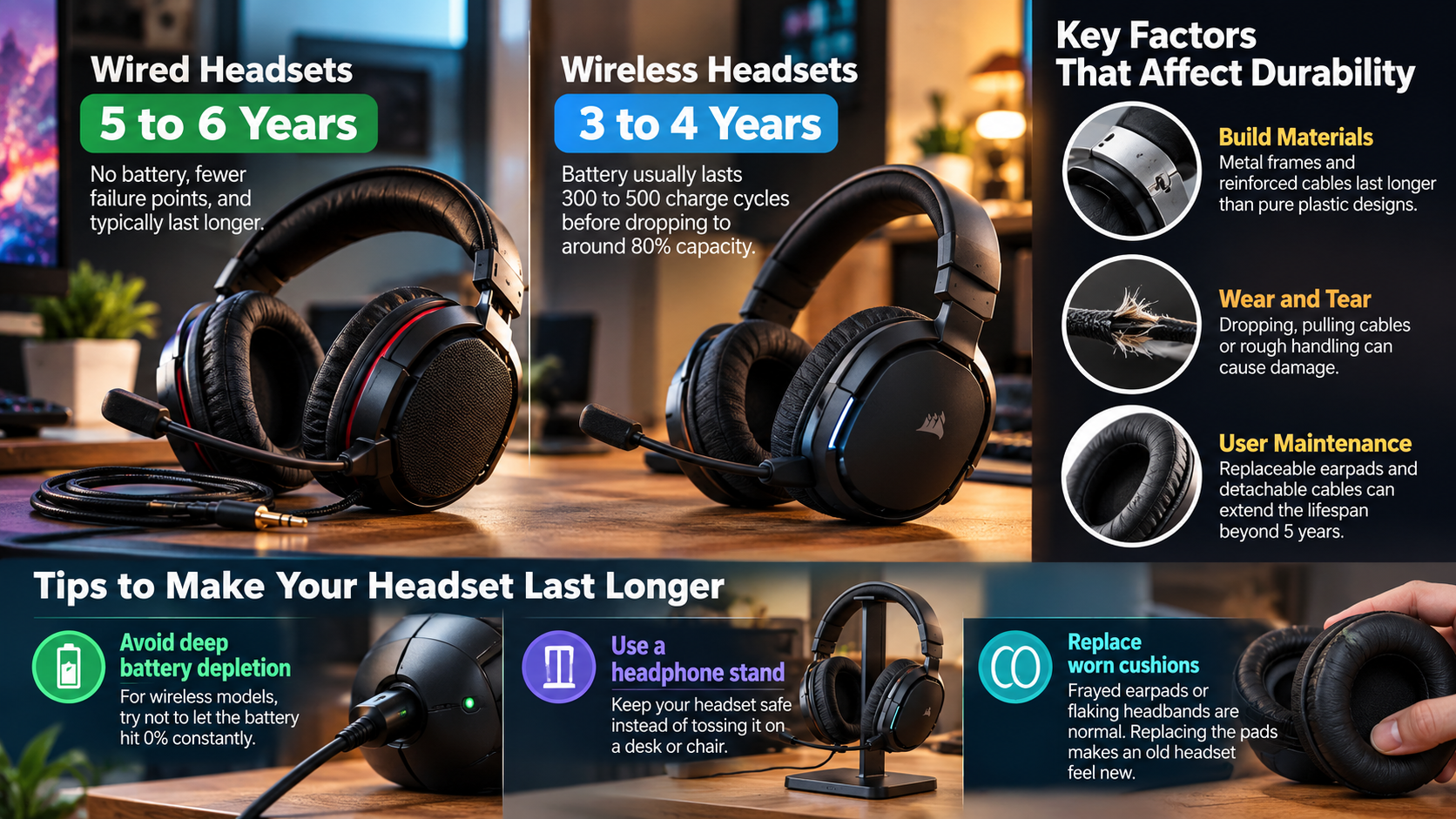
The typical lifespan of a gaming headset ranges from two to five years, depending on its build quality, usage, and maintenance. Budget models may develop cracked headbands, damaged cables, or connection problems sooner. Better-built headsets with reinforced frames and replaceable components can last much longer.
Wired and wireless headsets also have different limitations. Wired models avoid rechargeable battery degradation, while wireless versions eventually lose battery capacity. However, neither type has a fixed expiration date.
Your gaming habits also influence durability. Frequent use, accidental drops, excessive moisture, and poor storage can accelerate wear. Regular cleaning and careful handling help prevent unnecessary damage.
Impact of Build Materials on Device Durability
The materials used in a gaming headset affect how well it withstands everyday use. Metal-reinforced headbands generally resist bending better than thin plastic designs. Detachable cables also make repairs easier because you can replace a damaged cable without buying an entirely new headset.
Ear cushions require attention, too. Synthetic leather may peel or crack after prolonged exposure to sweat, heat, and friction. Following these headphone cleaning and maintenance practices can help preserve comfort and extend your headset’s useful life.
When choosing a durable model, look for these features:
- Reinforced headband: Helps resist bending and cracking.
- Detachable cable: Makes cable replacement easier.
- Replaceable ear cushions: Helps maintain comfort over time.
- Repairable components: Reduces the need to replace the entire device.
Choosing sturdy materials and replaceable parts can lower long-term costs.
How Often Should I Replace My Gaming Headset?
You should replace your gaming headset when its performance, comfort, or reliability becomes unacceptable. Many gamers consider upgrading every three to five years, but age alone does not determine whether a replacement is necessary.
First, identify the problem. Damaged cables, worn ear cushions, and loose connectors may be inexpensive to repair. Persistent audio distortion, a broken frame, or a failing internal battery may make replacement more practical.
Wireless headset owners should monitor battery performance. If the headset no longer lasts through a normal gaming session, compare the cost of battery replacement with that of a new model.
Consider replacing your headset when:
- Audio quality remains poor after troubleshooting.
- The microphone repeatedly disconnects or produces static.
- The headband becomes damaged or uncomfortable.
- Battery life becomes insufficient for your gaming sessions.
- Repair costs approach the price of a suitable replacement.
If your headset remains comfortable, sounds clear, and works reliably, you don’t need to upgrade simply because a newer model is available.
Audio Driver Degradation and Critical Upgrade Signals
Gaming headset drivers convert electrical signals into sound. Although they can last for years, physical damage, moisture, excessive volume, and manufacturing defects may affect their performance. For safer listening during long gaming sessions, consider following the 60-60 rule for headphones to help manage your listening volume and duration.
Persistent buzzing, crackling, rattling, or distortion can indicate a problem. However, damaged drivers are not always responsible. Faulty cables, loose connections, wireless interference, and incorrect audio settings can produce similar symptoms.
Before replacing your headset, try these troubleshooting steps:
- Test it with another computer, console, or compatible device.
- Inspect the cable and connectors for visible damage.
- Disable audio enhancements and test different settings.
- Reduce the volume to check whether distortion disappears.
- Contact the manufacturer if the problem continues.
Replace the headset when troubleshooting fails and repairs are impractical. Persistent audio problems deserve attention, but they do not automatically mean the drivers have failed.
Can Headphones Last 20 Years?
Yes, some well-built headphones can last 20 years or longer with proper care. Passive wired headphones have an advantage because they do not depend on rechargeable batteries or wireless connectivity.
However, a 20-year lifespan is possible, not guaranteed. Headbands, cables, connectors, and ear cushions can deteriorate over time. Internal components may also require repair or replacement.
Studio headphones often demonstrate long-term durability because many models offer replaceable cables and cushions. Their lifespan depends on construction, maintenance, and frequency of use.
Gaming headsets face additional challenges when they include microphones, RGB lighting, wireless receivers, and electronic controls. These extra components create more potential failure points. Understanding why some gamers prefer wired headphones over wireless models can help you evaluate the long-term maintenance and durability trade-offs before purchasing your next headset.
If longevity matters, choose a wired headset with a sturdy frame and readily available replacement parts. Regular cleaning and careful storage can help extend the lifespan of a gaming headset without requiring frequent upgrades.
The Essential Advantage of Analog Audio Systems
Passive analog headphones avoid several potential failure points found in wireless headsets. They do not require rechargeable batteries, Bluetooth firmware, or wireless electronics to produce sound. Before choosing your next pair, compare wired and wireless audio options to understand their differences in convenience, connectivity, and long-term maintenance.
A standard 3.5 mm connector also works with many compatible computers, controllers, and audio devices. However, compatibility depends on the available ports and audio support. Some devices require an adapter.
Analog headphones can still develop problems. Cables may fray, connectors may loosen, and ear cushions can deteriorate. Drivers may also fail because of physical damage or excessive volume.
It’s also important to understand that wired does not always mean analog. Some USB headsets contain digital audio electronics and depend on compatible software.
For long-term use, choose a headset with replaceable cables and cushions. Check whether replacement parts are available before purchasing. These features can matter more than the connection type alone.
Why Is My Headset Dying Fast?
A wireless gaming headset may lose charge quickly because of battery aging, power-hungry features, or heavy usage. However, rapid battery drain does not always mean the battery is defective.
Lithium-ion batteries gradually lose capacity as they age and undergo charging cycles. Their degradation depends on battery quality, temperature, charging habits, and usage. There is no universal cycle count at which every headset battery begins to fail.
Several features can also increase power consumption. RGB lighting, active noise cancellation, high volume, and advanced audio processing may shorten operating time. The effect varies by model.
Common causes of rapid battery drain include:
- Battery aging: Older batteries may hold less charge.
- RGB lighting: Illumination can increase power consumption.
- High volume: Louder playback may require more energy.
- Wireless features: Noise cancellation and other processing can consume additional power.
- Temperature extremes: Excessive heat or cold can affect battery performance.
- Charging or firmware problems: These may affect charging behavior or battery readings.
Compare your actual runtime with the manufacturer’s specifications under similar conditions. If the battery still drains unusually quickly, consult the manufacturer’s troubleshooting guidance.
Battery Longevity and Proper Power Cycle Habits
Good charging habits can help preserve a wireless headset’s battery capacity. Lithium-ion batteries generally age faster when exposed to high temperatures or kept fully charged for extended periods.
You do not need to follow a strict charging schedule for every headset. Many modern devices include charging controls that help manage battery health. Leaving a compatible headset connected overnight is not automatically harmful when it functions correctly and follows the manufacturer’s instructions.
To help extend battery life:
- Avoid direct sunlight and excessive heat.
- Use the recommended charger and cable.
- Follow the manufacturer’s charging instructions.
- Enable battery-saving features when available.
- Avoid storing the headset fully discharged for long periods.
- Use battery protection modes if your device offers them.
Some headsets support charging limits around 80%. If yours includes this feature, using it may help reduce long-term battery wear.
Temperature management and manufacturer-approved charging practices are more useful than following an inflexible charging rule.
Is a 1% Battery Drain in 3 Minutes Normal?
A battery drain of 1% every three minutes equals approximately 20 percentage points per hour. If that rate remains constant, your headset would run for about five hours from a full charge.
Whether this is normal depends on the headset’s advertised battery life and the features you use. A model rated for five to eight hours may perform as expected at this rate. However, a headset advertised to last 20 hours should generally provide substantially longer runtime under comparable conditions. If active noise cancellation is one of your priorities, compare noise-cancelling headphone features and battery expectations before choosing a replacement.
Battery indicators can also be inaccurate. Some headsets display rounded percentages, so the reported change may not reflect the exact energy consumed.
Before concluding that your battery is defective, consider these factors:
- RGB lighting: May increase power consumption.
- Active noise cancellation: Can shorten runtime on supported models.
- High volume: May increase energy use.
- Battery age: Older batteries often have reduced capacity.
- Usage conditions: Advertised runtime may assume specific settings.
If your headset drains rapidly while idle, even with unnecessary features disabled, investigate further. Check for firmware updates and contact the manufacturer if the problem continues.
Calculating Operating Run Time from Drain Rates
You can estimate your wireless headset’s operating time by tracking its battery percentage over a measured period.
For example, a drop from 100% to 80% over one hour indicates an average consumption of approximately 20 percentage points per hour. If that rate remains constant, the headset would provide roughly five hours from a full charge.
Use this simple formula:
Estimated runtime in hours = 100 ÷ percentage points consumed per hour
For example:
- 10 percentage points per hour: Approximately 10 hours.
- 20 percentage points per hour: Approximately 5 hours.
- 25 percentage points per hour: Approximately 4 hours.
These estimates assume a constant discharge rate, which real batteries may not maintain. Battery indicators, operating conditions, and usage patterns can affect the results.
If your headset is rated for 20 hours but lasts only five, compare your settings with the manufacturer’s testing conditions. Disable optional lighting and reduce unnecessary processing features.
If runtime remains far below expectations, the battery may have degraded or the device may need troubleshooting. Contact the manufacturer before deciding whether to repair or replace your headset.
Final Thoughts
The lifespan of a gaming headset depends on its construction, usage, maintenance, and power source. Many models remain useful for several years, while well-built wired headphones can last much longer with proper care.
To extend your headset’s lifespan, clean it regularly, store it carefully, and protect it from excessive heat and moisture. For wireless models, monitor battery performance and follow the manufacturer’s charging recommendations. For additional troubleshooting and maintenance advice, consult the official Sony Headphones Help Guide or your headset manufacturer’s support documentation.
You don’t need to replace a headset simply because it is old. If it remains comfortable, delivers clear sound, and works reliably, continuing to use it is often the most practical choice.