How Malware Spreads and Infects Digital Systems Today
Understanding how malware spreads is essential for protecting personal information and business networks in today’s digital world. Cybercriminals continually develop new techniques to bypass traditional security measures. They often target everyday activities, such as browsing the internet, downloading files, or opening email attachments.
As cyber threats become more advanced, understanding how malware spreads helps you recognize potential risks before they become serious problems. If you’re unsure whether your device has already been compromised, learn the warning signs your computer has malware before the infection worsens. This knowledge also supports stronger security habits and better decision-making. According to the Cybersecurity and Infrastructure Security Agency (CISA), user awareness remains one of the most effective defenses against modern cyber threats.
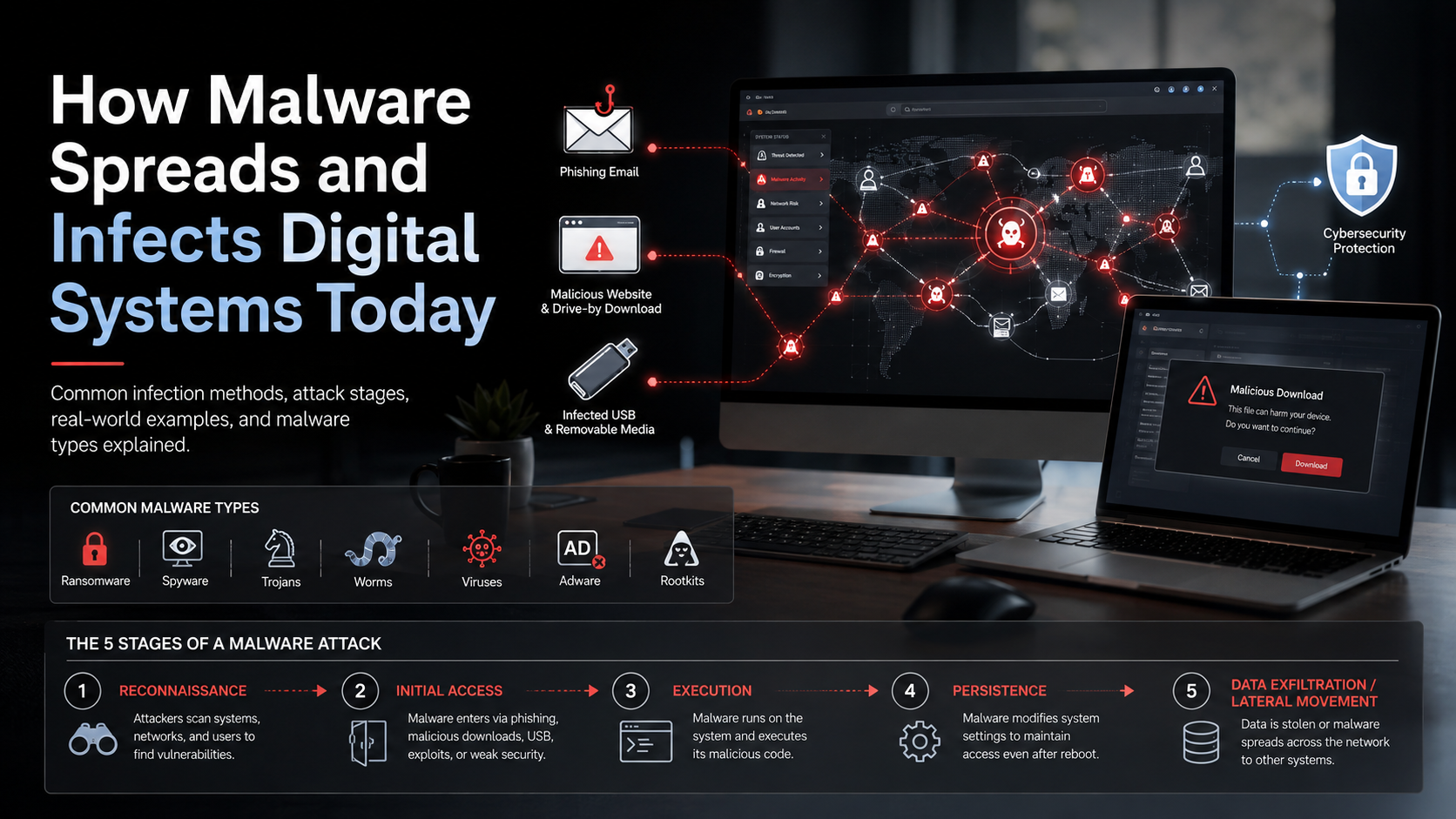
This guide explains how malware spreads, the most common infection methods, the five stages of a malware attack, real-world examples of malware outbreaks, and the seven primary types of malware you should know.
How Does Malware Spread?
Malware spreads by exploiting software vulnerabilities, insecure network connections, and human mistakes to gain unauthorized access to devices and systems. Attackers design malicious programs to move from one device to another through digital communication channels. Common delivery methods include phishing emails, compromised websites, infected software downloads, removable storage devices, and vulnerable network services.
Once malware reaches a target device, it attempts to execute its malicious code. Depending on its purpose, it may steal sensitive information, encrypt files, monitor user activity, or disrupt normal operations. Some malware also replicates automatically, allowing it to spread across multiple systems without additional user interaction.
Modern cybercriminals constantly adapt their techniques to evade antivirus software and security controls. They often combine technical exploits with social engineering to increase infection success. Keeping operating systems updated, applying security patches promptly, and educating users about common threats significantly reduce the opportunities for malware to spread across personal and business networks.
The Role of Network Vulnerabilities
Network vulnerabilities provide attackers with opportunities to spread malware quickly across connected systems. Unpatched operating systems, outdated software, weak passwords, and misconfigured network devices create entry points that malicious programs can exploit.
Once attackers identify these weaknesses, some malware can scan nearby devices automatically and install itself without requiring user approval. This rapid propagation is especially dangerous in business environments where many devices share the same network.
Regular security updates, vulnerability assessments, strong authentication policies, and network segmentation help reduce these risks. Closing known security gaps makes it much harder for malware to move between connected devices.
What Is the Most Common Method of Spreading Malware?
Phishing emails remain the most common method of spreading malware because they exploit human trust rather than technical weaknesses. Attackers create convincing emails that appear to come from trusted organizations, coworkers, banks, or online services. These messages encourage recipients to click malicious links or download infected attachments disguised as invoices, receipts, shipping notices, or official documents. Since phishing remains the leading malware delivery method, it’s important to recognize suspicious messages before interacting with them. Our guide on how to identify a phishing attack email explains the most common warning signs and how to avoid falling victim.
Once a victim opens the attachment or follows the link, hidden scripts or malicious files can install malware on the device. The infection may steal credentials, monitor activity, encrypt files, or create backdoor access for future attacks.
Organizations continue to prioritize phishing awareness because human error remains one of the easiest ways for attackers to gain initial access. Regular employee training, spam filtering, email authentication technologies, and careful verification of unexpected messages significantly reduce the success of phishing campaigns.
The Danger of Malicious Attachments
Malicious attachments often appear as harmless Office documents, PDFs, ZIP archives, or executable files. Some documents ask users to enable macros or editing features before displaying their contents.
Once those permissions are granted, hidden scripts can silently download additional malware and execute it in the background. The user may not notice any suspicious activity until sensitive information is stolen or system files become encrypted.
Avoid opening unexpected attachments, even if they appear to come from familiar contacts. If you’ve already clicked a suspicious email or webpage, follow these smart steps after clicking a suspicious link to reduce the risk of malware infection. When in doubt, verify the sender through another communication channel before opening the file.
What Are the 5 Stages of a Malware Attack?
A malware attack typically follows a series of stages that allow attackers to compromise systems, maintain access, and achieve their objectives. While the exact sequence may vary, most attacks include reconnaissance, initial access, execution, persistence, and lateral movement or data exfiltration. Understanding these stages helps individuals and organizations identify suspicious activity before significant damage occurs.
During reconnaissance, attackers gather information about their target to identify weaknesses. They may scan networks, research employees, or look for outdated software. Initial access occurs when malware enters the system through phishing emails, compromised websites, or software vulnerabilities.
After gaining entry, the malware executes its payload and establishes persistence by modifying system settings or creating hidden processes. Finally, it spreads to other devices or steals valuable data. Monitoring networks, limiting user privileges, and responding quickly to suspicious behavior can interrupt these stages before an attack escalates.
Understanding the Initial Foothold
The initial foothold is the point where attackers successfully gain access to a device or network. This stage often determines whether the attack succeeds or fails. Cybercriminals commonly achieve this through phishing emails, weak passwords, unpatched software, or exposed remote access services.
Once inside, attackers attempt to avoid detection while preparing the system for additional malicious activity. They may install backdoors, create unauthorized user accounts, or disable security tools to strengthen their position.
Organizations can reduce the risk of an initial foothold by enforcing multi-factor authentication (MFA), applying software updates promptly, restricting administrative privileges, and monitoring login activity. Strong access controls make it much harder for attackers to establish a lasting presence.
What Are Examples of Malware Spreads?
Several well-known cyberattacks demonstrate how malware spreads and how quickly infections can disrupt organizations worldwide. Two of the most famous examples are the WannaCry ransomware outbreak and the ILOVEYOU email worm. Although they used different techniques, both incidents showed how technical vulnerabilities and human behavior contribute to widespread malware infections.
WannaCry spread automatically by exploiting a known vulnerability in the Windows Server Message Block (SMB) protocol. WannaCry demonstrated how devastating ransomware attacks can become once they enter a network. You can also learn how ransomware infects a computer through email attacks and why phishing remains one of the most successful delivery methods. It rapidly infected thousands of unpatched computers across hospitals, businesses, and government organizations. The attack caused major operational disruptions and significant financial losses.
The ILOVEYOU worm relied on social engineering instead of software flaws. Victims received an email containing a Visual Basic Script attachment disguised as a love letter. Once opened, the worm copied itself and emailed every contact in the victim’s address book. These examples highlight the importance of timely software updates and cautious handling of unexpected emails.
The Impact of Automated Worms
Automated worms are among the fastest-spreading forms of malware because they replicate without requiring additional user interaction. After the first infection, they scan networks for vulnerable devices and copy themselves automatically.
This self-propagating behavior allows worms to compromise hundreds or even thousands of systems within a short period. As infections grow, network performance may slow significantly, critical services can become unavailable, and sensitive data may be exposed.
Preventing worm outbreaks requires a layered security approach. Organizations should install security patches quickly, segment networks, monitor unusual traffic, and deploy endpoint protection capable of detecting suspicious behavior before it spreads.
What Are the 7 Types of Malware?
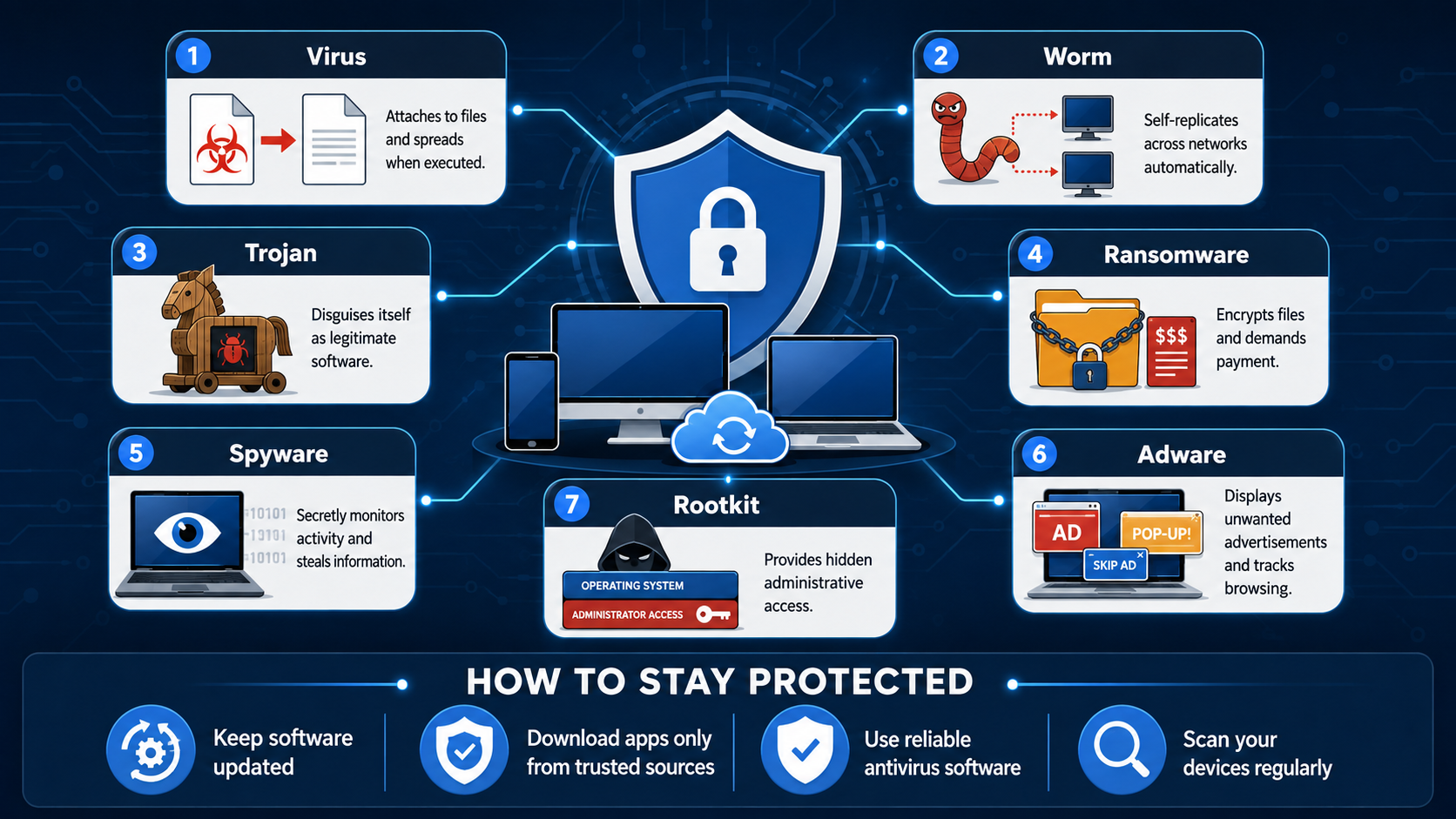
Understanding the different types of malware helps users recognize threats and respond appropriately. Although malware comes in many forms, seven categories account for most cyberattacks: viruses, worms, trojans, ransomware, spyware, adware, and rootkits. Each type uses a different method to infect systems and achieve its objective.
- Viruses attach themselves to legitimate files and spread when those files are executed.
- Worms replicate independently and spread across vulnerable networks without user interaction.
- Trojans disguise themselves as legitimate software to trick users into installing them.
- Ransomware encrypts files and demands payment for their recovery.
- Spyware secretly monitors user activity and steals sensitive information.
- Adware displays unwanted advertisements and may track browsing behavior.
- Rootkits provide attackers with hidden administrative access to compromised systems.
Knowing how each type operates helps users identify suspicious behavior and apply the appropriate security measures before significant damage occurs.
Recognizing Spyware and Adware
Spyware and adware often focus on collecting information or generating advertising revenue rather than causing immediate system damage. Despite appearing less destructive than ransomware, they can still compromise privacy, reduce system performance, and expose sensitive information.
Spyware silently records user activity, including browsing habits, login credentials, and keystrokes. The collected data may be transmitted to attackers without the user’s knowledge. Adware, in contrast, floods devices with unwanted advertisements, redirects web traffic, and may install additional unwanted software.
Downloading applications only from trusted sources, reviewing app permissions, keeping security software updated, and scanning devices regularly help reduce the risk of spyware and adware infections.
Frequently Asked Questions
What Is the Difference Between a Virus and a Worm?
A virus requires a host file or program to spread and usually needs user interaction before it becomes active. A worm is a standalone program that spreads automatically by exploiting network vulnerabilities.
Because worms do not rely on users to transfer infected files, they typically spread much faster than traditional viruses and can infect large networks within a short period.
How Can I Protect My Devices From Malware?
Protecting your devices requires a combination of good security practices and reliable software.
Some of the most effective steps include:
- Keep your operating system and applications updated.
- Install reputable antivirus or endpoint protection software.
- Avoid opening suspicious email attachments or links.
- Enabling two-factor authentication (2FA) provides another layer of protection. Even if attackers steal your password, they cannot easily access your accounts without the second verification step.
- Back up important files regularly.
- Download software only from trusted sources.
Following these practices significantly reduces the risk of malware infections and helps minimize damage if an attack occurs.
Can Smartphones Get Infected With Malware?
Yes. Smartphones are common targets for mobile malware. Attackers distribute malicious apps through unofficial app stores, phishing messages, fake software updates, and compromised websites.
Keeping your mobile operating system updated, installing apps only from official stores, reviewing app permissions, and avoiding suspicious links greatly improve your device’s security.
What Should I Do If My Computer Gets Infected?
If you suspect a malware infection, disconnect your computer from the internet immediately. This helps prevent the malware from spreading to other devices or communicating with attackers.
Next, perform a full scan using reputable antivirus software. Remove detected threats, install available security updates, and change passwords for important accounts after confirming the system is clean. If the infection persists or involves sensitive business data, seek assistance from a qualified cybersecurity professional.
Conclusion
Understanding how malware spreads is one of the most effective ways to strengthen your cybersecurity. Modern malware uses phishing emails, software vulnerabilities, malicious downloads, and network weaknesses to infect devices and compromise sensitive information. Recognizing these attack methods allows you to respond before a small security issue becomes a serious incident.
Learning the five stages of a malware attack and the seven major types of malware also helps you identify suspicious behavior more quickly. Combined with regular software updates, strong passwords, multi-factor authentication, reliable security software, and cautious online habits, this knowledge forms a strong defense against evolving cyber threats.
If you suspect your Windows PC has already been infected, follow our step-by-step guide on how to remove malware from Windows 11 safely before the infection spreads or causes additional damage.
By staying informed and following cybersecurity best practices, you can reduce your risk of infection and better protect your personal data, business systems, and digital assets from modern malware attacks.