5 Smart Things to Do Before Clicking on a Suspicious Link
Receiving an unexpected email, urgent text message, or social media notification with a link can be unsettling. Before clicking on a suspicious link, take a few seconds to verify where it leads. That brief pause can prevent malware infections, identity theft, financial fraud, or unauthorized access to your online accounts.
Cybercriminals often rely on urgency and curiosity to manipulate people into acting quickly. Messages may claim your account is locked, a package is waiting, or a payment requires immediate attention. According to the Cybersecurity and Infrastructure Security Agency (CISA), phishing remains one of the most common ways attackers gain access to personal and business information. Developing safe browsing habits is one of the most effective ways to reduce this risk.
Modern phishing campaigns have become increasingly convincing. Fake websites often copy the appearance of trusted brands, while deceptive URLs can look almost identical to legitimate ones. Fortunately, a few simple checks can help you recognize warning signs before interacting with a suspicious website.
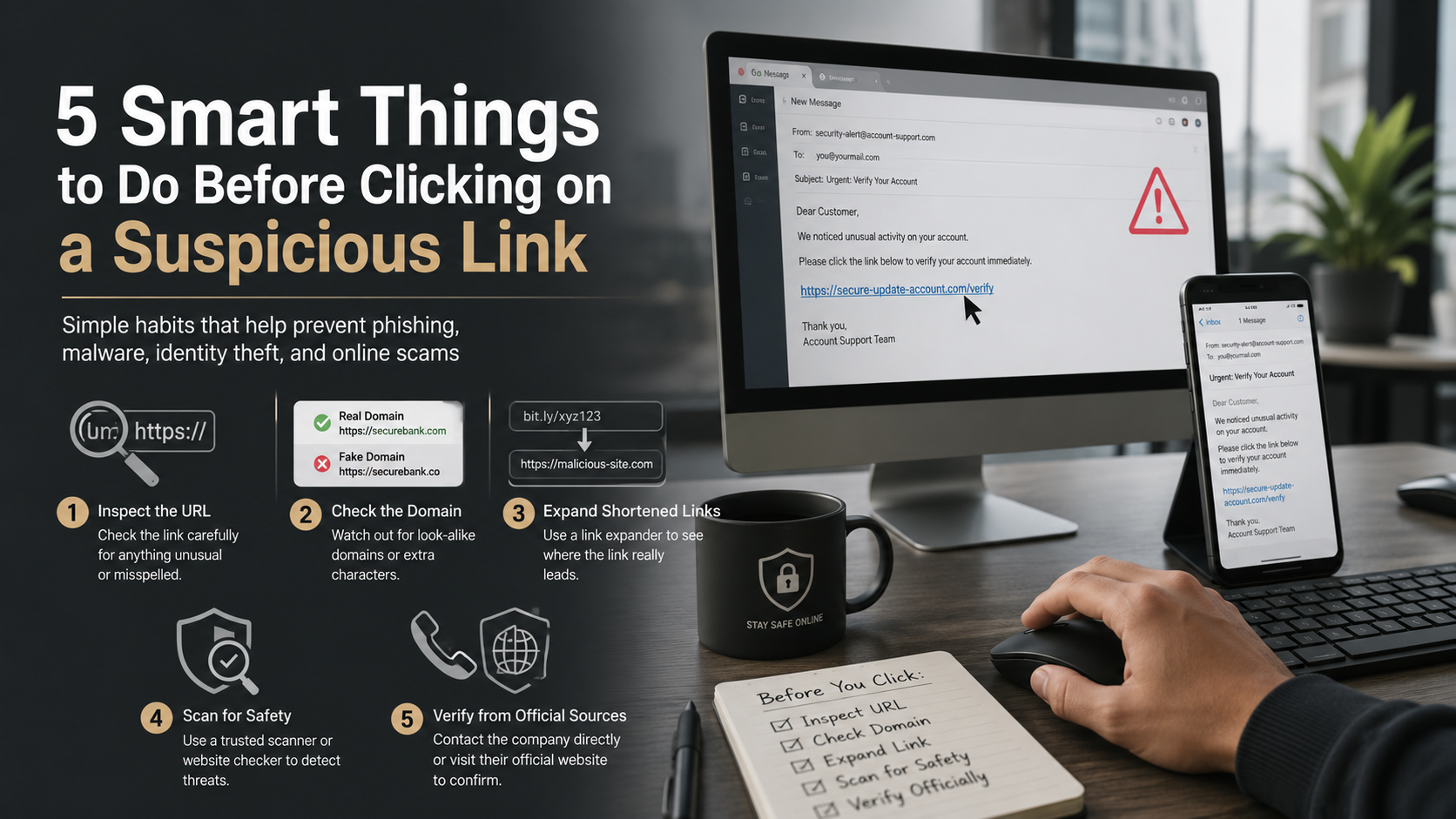
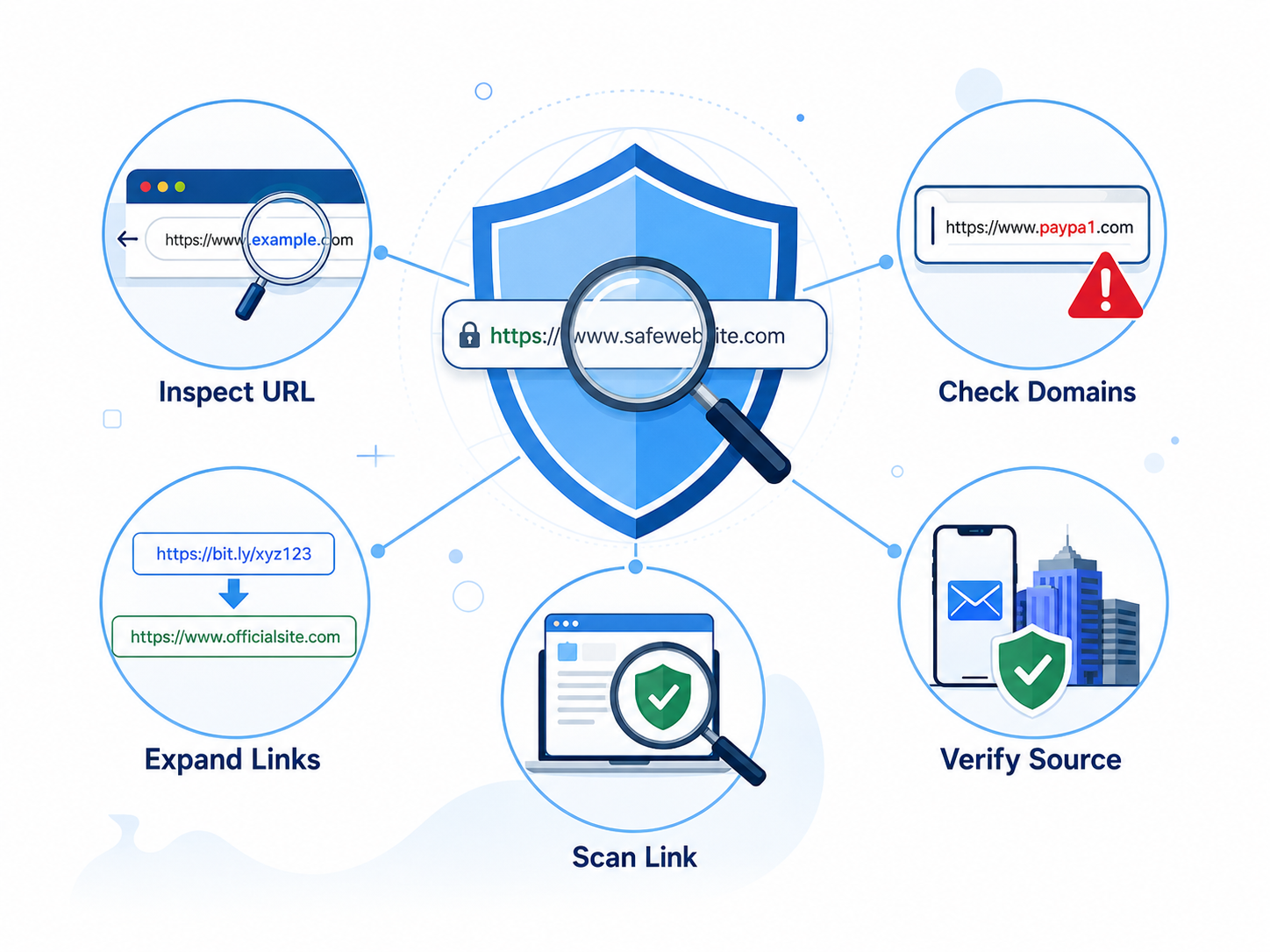
This guide explains five practical steps to help you inspect unknown links safely. You’ll learn how to preview URLs, identify fake domains, verify shortened links, use trusted security scanners, and confirm messages through official channels. Following these simple practices will help protect your devices, accounts, and personal information from today’s most common online threats.
1. Before Clicking on a Suspicious Link, Inspect the Destination URL
One of the easiest ways to avoid clicking on a suspicious link is to inspect its destination before opening it. Many phishing emails and scam messages disguise malicious URLs behind buttons, images, or convincing text. Although the visible text may appear legitimate, the hidden link can direct you to a fake website designed to steal passwords, payment details, or other sensitive information. Taking a few seconds to preview the URL can help you spot suspicious domains before any damage occurs. This simple habit is one of the most effective ways to identify phishing attempts and improve your overall online security.
How Link Masking Works
Cybercriminals frequently hide dangerous URLs behind trusted-looking text, logos, or call-to-action buttons. For example, a button labeled “Verify Your Bank Account” may actually lead to a fraudulent website. On a desktop computer, move your mouse pointer over the link without clicking. Most browsers and email applications display the actual destination URL in the bottom corner or status bar. Compare the displayed web address with the official domain. If the URL contains unusual words, random characters, or unexpected domain names, avoid opening it.
How to Preview Links on Mobile Devices
Mobile devices do not support traditional mouse hovering, but you can still inspect links safely before opening them.
- Press and hold the link instead of tapping it.
- Wait for the preview window or context menu to appear.
- Review the complete web address carefully.
- Check for spelling mistakes or unfamiliar domains.
- Close the preview if anything looks suspicious.
Using this quick check before opening unknown links can significantly reduce your risk of phishing attacks and malicious websites.
2. Avoid Clicking on a Suspicious Link by Checking Fake Domains
Before clicking on a suspicious link, examine the website address carefully. Many phishing attacks rely on fake domains that closely resemble trusted brands. At first glance, these URLs may appear genuine, but small spelling changes often reveal the scam. Attackers commonly replace letters with similar-looking numbers or symbols to fool users. This tactic, known as typosquatting, is designed to trick people into sharing passwords, payment details, or other sensitive information. Some scammers also use deceptive subdomains to make a malicious website look legitimate. Learning how to recognize these domain tricks is a simple but effective way to avoid phishing websites and protect your personal information.
Common Typosquatting Examples
Typosquatting involves registering domains that differ from legitimate websites by only one or two characters. These changes are easy to overlook, especially when you’re in a hurry.
| Legitimate Domain | Malicious Domain | Cybercrime Trick |
|---|---|---|
| paypal.com | paypa1.com | Replaces the letter l with the number 1 |
| netflix.com | netfIix.com | Replaces the lowercase l with an uppercase I |
| amazon.com | amaz0n.com | Replaces the letter o with the number 0 |
Always read the entire domain name instead of relying on its appearance. A single altered character can redirect you to a fraudulent website.
Watch Out for Deceptive Subdomains
Scammers also misuse subdomains to make fake URLs appear trustworthy. Remember that the actual domain is the name immediately before the extension, such as .com, .org, or .net.
For example, bank.of.america.security-update-login.com may look convincing. However, the real domain is security-update-login.com, not bankofamerica.com. When a URL contains multiple words or extra sections before the main domain, inspect it carefully before opening the page.
3. Before Clicking on a Suspicious Link, Expand Shortened URLs Safely
Shortened links can hide their true destination, making them a common tool in phishing campaigns and online scams. Before clicking on a suspicious link, check where a shortened URL actually leads. While services such as Bitly and TinyURL are widely used for legitimate purposes, cybercriminals also use them to disguise malicious websites. Because the destination remains hidden, you cannot judge a link’s safety by its appearance alone. Expanding and scanning the URL first helps you identify potential threats without exposing your device or personal information. This simple precaution significantly reduces the risk of visiting fake websites or downloading malicious content.
Why Shortened Links Can Be Risky
URL shortening services replace long web addresses with compact links that are easier to share. Although they are useful for marketing and social media, they also conceal the final destination. Attackers often exploit this feature to hide phishing pages, malware downloads, or fake login portals. If you receive a shortened link from an unknown or unexpected source, avoid opening it until you verify where it leads.
Use Trusted URL Scanners Before Opening a Link
Instead of opening a shortened URL directly, copy and paste it into a trusted online scanner. These tools reveal the final destination without loading the website in your browser.
Popular options include:
- VirusTotal
- URLScan.io
- CheckShortURL (for expanding shortened links)
These services also compare the URL against multiple threat databases. If the link has been reported for phishing, malware, or other malicious activity, you’ll receive a warning before visiting the site.
4. Scan a Suspicious Link Before Clicking to Protect Your Device
Sometimes a link appears genuine but still raises concerns. Before clicking on a suspicious link, let a trusted security tool analyze it first. URL scanners and security sandboxes examine websites for phishing attempts, malware, and other online threats without exposing your primary device. These tools use real-time threat intelligence and reputation databases to identify suspicious domains. They provide an extra layer of protection when you are unsure whether a website is safe. Taking a few minutes to scan an unfamiliar URL can prevent malware infections, data theft, and unauthorized account access.
Scan the URL with a Trusted Security Tool
Copy the suspicious URL without opening it and paste it into a reputable scanning service. These platforms inspect the website for known security risks before you visit it.
Popular scanning tools include:
- Google Safe Browsing
- VirusTotal
- URLScan.io
These services evaluate domain reputation, SSL certificate validity, malware reports, and phishing activity. If the link has been flagged by security researchers, you’ll receive a warning before opening it.
Test Suspicious Websites in a Security Sandbox
If you must access an unknown website for work or research, use an isolated environment instead of your primary device.
Safer options include:
- Browser sandboxes that isolate web sessions.
- Virtual machines (VMs) that run separately from your operating system.
- Antivirus software with real-time web protection enabled.
These security measures help contain malicious code and reduce the risk of compromising your computer or personal data.
5. Verify the Source Before Clicking on a Suspicious Link
Before clicking on a suspicious link, confirm that the message is genuine through a trusted source. Phishing emails and text messages often impersonate banks, employers, online stores, and streaming services to create a false sense of urgency. Instead of responding immediately, verify the request using official communication channels. A legitimate organization will not pressure you to act within minutes or threaten account closure without providing other ways to contact them. Taking a few extra moments to confirm the sender’s identity can prevent fraud, identity theft, and unauthorized access to your accounts. Independent verification is one of the simplest and most effective defenses against phishing scams.
Never Trust the Contact Information in the Message
Avoid calling phone numbers, replying to email addresses, or clicking contact links included in suspicious messages. These details may belong to scammers rather than the organization they claim to represent. Using them can lead directly to a phishing operation or social engineering attack.
Safe Ways to Verify a Request
Instead of relying on the message, contact the organization through trusted sources.
- Type the official website address directly into your browser.
- Sign in using your saved bookmark or the company’s official mobile app.
- Call customer support using the number printed on your bank card, bill, or official statement.
- Ask the organization whether the message or request is legitimate before taking any action.
Verifying requests through independent channels helps you avoid fake websites and protects your personal and financial information.
Frequently Asked Questions
What should I do if I already clicked on a suspicious link?
If you accidentally clicked on a suspicious link, take immediate action to protect your device and personal information. First, disconnect your device from the internet if you notice unusual activity or suspect malware is being downloaded. This can help prevent further communication between malicious software and external servers.
Next, run a complete antivirus scan using updated security software to detect and remove potential threats. If you entered sensitive details, such as your username, password, or payment information, change those credentials immediately using a different trusted device.
You should also enable multi-factor authentication (MFA) on affected accounts to add an extra layer of protection. Monitor your accounts for unusual logins, suspicious transactions, or unexpected changes. Acting quickly after clicking a suspicious link can reduce the chances of identity theft, financial loss, and unauthorized access.
Can simply clicking a link infect my device with malware?
Yes, clicking a link can potentially infect your device with malware, although the level of risk depends on your device security, browser settings, and software updates. Some cybercriminals exploit zero-day vulnerabilities or use drive-by download attacks that can install malicious software without requiring much user interaction.
Modern browsers include advanced security features that block many online threats, but outdated systems and unpatched software remain more vulnerable to attacks. A malicious link may redirect you to a compromised website, trigger unwanted downloads, or attempt to exploit weaknesses in your device.
To reduce the risk of malware infections, keep your operating system, web browser, and antivirus software updated. Avoid opening unknown links, especially from unexpected emails, messages, or social media accounts. Regular security updates and cautious browsing habits provide strong protection against malicious websites.
Does HTTPS mean a website is completely safe?
No, HTTPS does not guarantee that a website is completely safe or trustworthy. It only means that the connection between your browser and the website is encrypted. This encryption helps protect data from being intercepted while it travels between your device and the website. However, it does not confirm that the website itself is legitimate.
Cybercriminals can obtain valid SSL/TLS certificates for phishing websites, allowing fake pages to display the HTTPS padlock symbol. Attackers often use this technique to create a false sense of security and convince users to enter passwords, payment details, or other sensitive information.
Before trusting any website, carefully check the domain name, review the URL for suspicious changes, and look for other phishing warning signs. Always verify the source before sharing personal information, even when a website uses HTTPS.
How can I report a phishing link or scam website?
If you discover a phishing link or scam website, reporting it can help protect other users from similar attacks. Start by submitting the suspicious URL to trusted security organizations and threat-reporting platforms. You can report malicious links to Google Safe Browsing, the Anti-Phishing Working Group (APWG), or your country’s official cybersecurity agency.
You should also report the message directly through the platform where you received it. Mark suspicious emails as Spam or Phishing in your email service, and use reporting options available in messaging apps or social media platforms.
Providing accurate details, such as the suspicious URL and the source of the message, helps security teams investigate the threat. Reporting phishing attempts allows security providers to identify harmful websites faster, remove dangerous content, and improve protection for internet users worldwide.
What is the difference between phishing and smishing?
Phishing and smishing are both forms of social engineering attacks designed to trick people into sharing sensitive information or taking unsafe actions. Phishing is a general term used for fraudulent messages, often delivered through email, that attempt to steal passwords, financial details, or personal data. These messages may contain fake links, attachments, or websites designed to collect user information.
Smishing is a specific type of phishing attack that uses SMS text messages instead of email. Attackers may send urgent messages claiming to be from banks, delivery services, or online platforms. These messages often include suspicious links that redirect users to fake login pages or malicious websites.
Both phishing and smishing depend on deception, urgency, and user trust. To stay protected, avoid opening unknown links, verify unexpected messages, and confirm requests through official channels before providing any personal information.
Conclusion
Knowing what to do before clicking on a suspicious link is one of the simplest ways to protect yourself online. Cybercriminals constantly refine their phishing tactics, but a few careful checks can help you avoid most scams. Inspect the destination URL, look for misspellings, expand shortened links, scan suspicious websites, and verify unexpected messages through official channels before taking any action.
No single warning sign can identify every phishing attempt. However, combining these five safety habits greatly reduces your risk of malware infections, identity theft, and financial fraud. Staying cautious is far more effective than reacting after your personal information has been compromised.
Remember, legitimate organizations rarely pressure you to click a link immediately or threaten immediate consequences for delaying your response. When in doubt, open your browser and visit the company’s official website directly instead of using the link provided in an email or text message.
By making these simple checks part of your daily browsing routine, you can browse with greater confidence and keep your devices, accounts, and personal information protected from evolving cyber threats.
For more guidance on staying safe from online scams, learn how to identify a phishing attack email and recognize common warning signs to improve your email security awareness.