

How Long Does Spotify Keep Your Spotify Listening History?
Have you ever discovered an amazing song on Spotify, forgotten to save it, and struggled to find it later? Understanding your Spotify listening history can help you rediscover forgotten tracks. When you stream music daily, remembering every song title or artist becomes difficult.
Many listeners assume Spotify keeps an endless list of every track they’ve played. However, Spotify separates recently played activity from downloadable account records. These two features serve different purposes.
Knowing how they work helps you recover forgotten songs and understand your listening habits. You can also explore your older playback records through Spotify’s privacy tools.
In this guide, we’ll answer common questions about Spotify listening history. You’ll learn how long recently played songs remain visible and what happens to older records. We’ll also explain the 30-second streaming rule and whether 30,000 listening minutes count as heavy usage. Finally, you’ll discover how to request your extended streaming history.
How Long Does Recently Played Stay on Spotify?
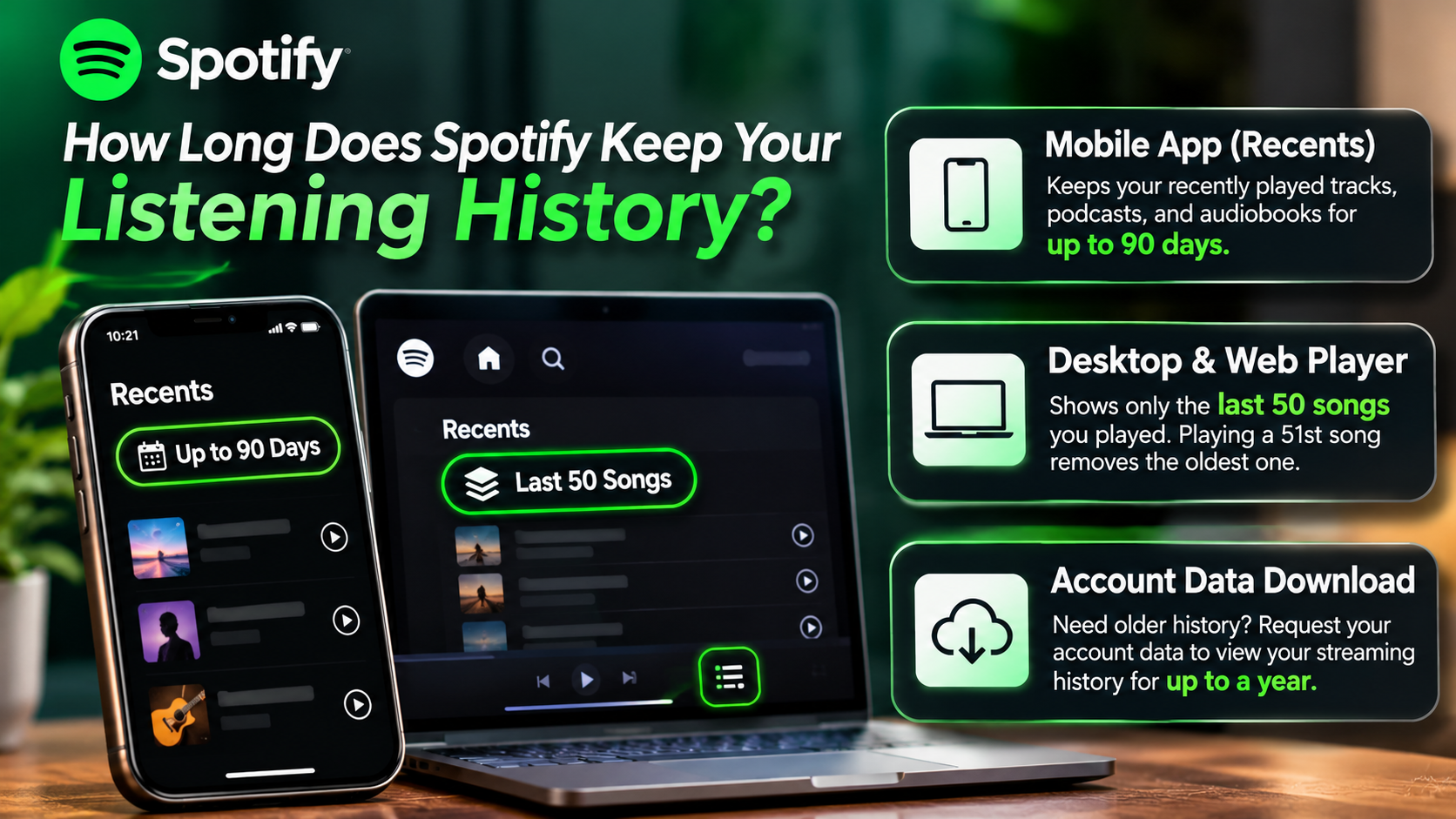
Spotify’s Recently Played section helps you find music you’ve listened to recently. However, it doesn’t provide an unlimited playback archive. The desktop version displays your last 50 songs, according to Spotify’s support documentation. The mobile app provides a Recents section with additional ways to browse recent activity.
Spotify previously introduced a three-month browsing experience for recently played music. However, you shouldn’t assume every version currently displays the same history or guarantees three months of individual tracks.
Your visible history also changes as you listen to more music. New playback activity gradually replaces older entries within limited views. Therefore, someone who streams music throughout the day may lose access to older tracks much faster.
If you discover a song you enjoy, consider saving it immediately. Add it to your library or a personal playlist. This simple habit prevents you from relying entirely on your recently played feed.
How to Check Your Recently Played Feed
You can check your Spotify listening history directly through the mobile or desktop application. The exact navigation differs slightly between devices, but finding recent activity takes only a few steps.
On mobile:
- Open the Spotify application on your phone.
- Tap your profile picture near the top-left corner.
- Select Recents to view your recent activity.
- Use the available filters to find music, podcasts, or other content.
On desktop:
- Open the Spotify desktop application.
- Click the Play Queue icon near the bottom-right corner.
- Select the Recents tab.
- Browse your recently played tracks.
Spotify’s desktop support documentation specifically describes this view as showing your last 50 songs. The mobile experience offers a different browsing interface.
Remember that recently played activity isn’t the same as your complete streaming history. If an older song disappears, you may need Spotify’s extended data export to find it. You can also save interesting discoveries immediately to avoid losing them.
Is 30,000 Minutes of Listening on Spotify Considered a Lot?
Yes, 30,000 minutes represents a substantial amount of annual music streaming. However, Spotify doesn’t publish a universal ranking that places everyone with this total into a specific listener percentile.
To understand the number, convert those minutes into hours. 30,000 minutes equals 500 hours of listening. That’s approximately 82 minutes every day throughout a 365-day year.
This amount suggests that music plays a regular role in your daily routine. You might listen during your commute, exercise sessions, household activities, or working hours. If you listen while working or studying, you may also find it interesting to understand how rhythm improves memory and focus.
However, listening habits differ significantly between users. Some people actively listen to individual songs, while others play music in the background for several hours. Both habits can produce similar annual totals.
Therefore, 30,000 minutes is a useful personal benchmark rather than an official Spotify ranking. Your Wrapped statistics can help you compare your listening activity across different years.
Putting 30,000 Minutes Into Perspective
Looking at annual listening time in smaller measurements makes the total easier to understand. Thirty thousand minutes might initially sound like an unusually large number. However, breaking it down reveals how much time you actually spend enjoying music.
Here’s what that listening total represents:
- 500 hours: Your total annual listening time.
- Approximately 41.7 hours monthly: Your average monthly listening time.
- Approximately 9.6 hours weekly: Your average weekly listening time.
- Approximately 82 minutes daily: Your average daily listening time.
You can also estimate the number of songs you’ve heard. Assuming an average track lasts three minutes, 30,000 minutes represents approximately 10,000 song-lengths.
However, this calculation is only an estimate. Actual track lengths, repeated songs, skipped tracks, and playback patterns affect the total.
Spotify Wrapped provides another way to understand your listening habits. It highlights your listening minutes, favourite artists, popular tracks, and other yearly statistics. Use these figures to compare your personal activity rather than relying on unsupported global listener rankings.
What Is the 30-Second Rule on Spotify?
Spotify uses a 30-second threshold when counting music streams. According to its official documentation, a song counts as a stream when someone plays it for at least 30 seconds.
This rule is important for artists because qualifying streams contribute to their reported streaming totals. Plays shorter than this threshold don’t count as official song streams.
For example, imagine playing a four-minute song and skipping it after 15 seconds. That playback doesn’t qualify as an official stream. However, listening for at least 30 seconds meets Spotify’s stated streaming requirement.
It’s important to understand that stream counting and listening history aren’t identical concepts. A stream threshold explains how Spotify counts a song for streaming statistics. It doesn’t establish every detail about how the application displays recent activity.
The distinction also matters when reviewing Spotify Wrapped. Spotify uses listening data to calculate yearly statistics, but the 30-second rule shouldn’t be treated as a complete explanation of every Wrapped calculation.
Why the 30-Second Threshold Matters
The 30-second threshold matters because Spotify uses it to distinguish qualifying song streams from shorter playback sessions. It also affects how artists understand their streaming performance through Spotify for Artists.
Consider these examples:
- 15 seconds played: The song doesn’t qualify as an official stream.
- 29 seconds played: The playback remains below the required threshold.
- 30 seconds played: The song meets Spotify’s stated stream-counting requirement.
- Several minutes played: The playback qualifies as a stream.
This distinction is particularly important for artists, record labels, and music distributors. Their streaming statistics depend on qualifying plays rather than every brief interaction.
For listeners, the rule provides useful context when exploring playback statistics. However, it doesn’t mean every song played for 30 seconds automatically becomes a favourite. Spotify uses multiple signals to personalize recommendations.
You should also avoid assuming that skipping a track immediately removes it from every listening record. Stream counts, recent activity, and recommendation signals are separate parts of Spotify’s system.
How Far Back Can Spotify Listening History Go?
Spotify offers an extended streaming history that can cover your account’s lifetime. This is different from the shorter Recently Played section inside the application.
According to Spotify’s data documentation, the standard streaming history export covers the past year. However, the Extended Streaming History option provides records covering the lifetime of your account.
This means eligible historical playback information may go back much further than the songs displayed in your application. You don’t need to rely exclusively on your recently played feed when searching for older tracks.
However, avoid assuming that Spotify guarantees an accessible record of absolutely every interaction. The extended export contains the listening information Spotify makes available for your account. Its contents can include track details, playback duration, and timestamps.
If you want to explore your older music habits, requesting this archive is the most useful official option. You can then examine the downloaded files and search for specific artists or songs.
Why the App Hides Older History
Spotify’s Recents feature is designed for convenient browsing rather than detailed historical analysis. It helps you return to music you’ve played without navigating through a large collection of old playback records.
The desktop interface provides access to the last 50 songs. Meanwhile, the mobile application organizes recent activity through its Recents section and available filters.
A complete lifetime archive would serve a different purpose. It could contain thousands of entries, including repeated tracks, podcasts, and other playback activity. Presenting everything in the standard music interface would make everyday browsing less convenient.
Instead, Spotify provides a separate data-request process for users who want more detailed account information. This keeps recent playback browsing separate from personal data exports.
There is also an important distinction between visible history and stored account information. A song disappearing from Recents doesn’t automatically mean its historical record is unavailable.
If you’re searching for something you played several months or years ago, consider requesting your extended streaming history. It offers a more useful starting point than repeatedly scrolling through recent activity.
Can I Find My Full Listening History on Spotify?
Yes, you can request your full Spotify listening history through the platform’s privacy and account-data tools. However, you won’t find a convenient lifetime playback list directly inside the standard Spotify application.
Spotify provides two relevant types of streaming history. Its standard streaming history covers the past year, while Extended Streaming History covers the lifetime of your account.
To access the older records, visit Spotify’s official account privacy settings. Look for the option to request your extended streaming history and follow the instructions provided.
After processing your request, Spotify provides access to downloadable files containing your available historical playback information. These files use JSON format, which is a structured data format.
You can open JSON files with a suitable text editor or use spreadsheet and data-analysis tools. This makes it easier to search for particular songs, artists, and listening dates.
Keep in mind that Spotify doesn’t promise an immediate download. Processing times can vary, so follow the instructions and updates provided during your request.
What Your Extended Data File Includes
Spotify’s Extended Streaming History contains several details about your playback activity. These records provide more information than the standard Recently Played section.
Depending on the available records, your downloadable files can include:
- Track name: The title of the song you played.
- Artist name: The artist or creator associated with the content.
- Album name: The album containing the track.
- Playback timestamp: The date and time the stream ended, recorded in UTC.
- Playback duration: The number of milliseconds you listened.
- Streaming platform: The device or platform used for playback.
- Country information: The country code associated with the listening activity.
- Track identifier: The Spotify URI identifying the specific track.
The archive can also contain information about podcasts, episodes, and other supported content. Its exact fields depend on the type of activity recorded.
You can search these files manually or import them into suitable analysis tools. For example, a spreadsheet can help organize tracks by date, artist, or listening duration.
This makes your extended archive useful for rediscovering forgotten music and understanding long-term listening patterns.
Conclusion
Spotify makes it easy to revisit recently played songs, but its standard app doesn’t display your complete listening history. The Recently Played section helps you find recent discoveries, while Extended Streaming History provides access to older playback records.
Remember that Spotify’s 30-second rule determines when a song qualifies as an official stream. It doesn’t define how long your listening records remain available.
If you want to rediscover songs from months or years ago, requesting your extended streaming history is the best option. Visit Spotify’s Privacy Settings to explore your personal data request options. You can also check the official Spotify Support page for guidance on recently played music and account information.
Whether you listen for 30 minutes or 30,000 minutes annually, understanding these features helps you make better use of Spotify. If you’re also comparing music platforms, explore how Spotify and Apple Music compare in terms of audio quality and overall listening experience.