
HDD or SSD Lifespan: Which Storage Drive Lasts Longer?
When comparing HDD or SSD lifespan, durability is one of the most important factors to consider. Hardware failure can cause major problems, whether you manage servers or store family photos.
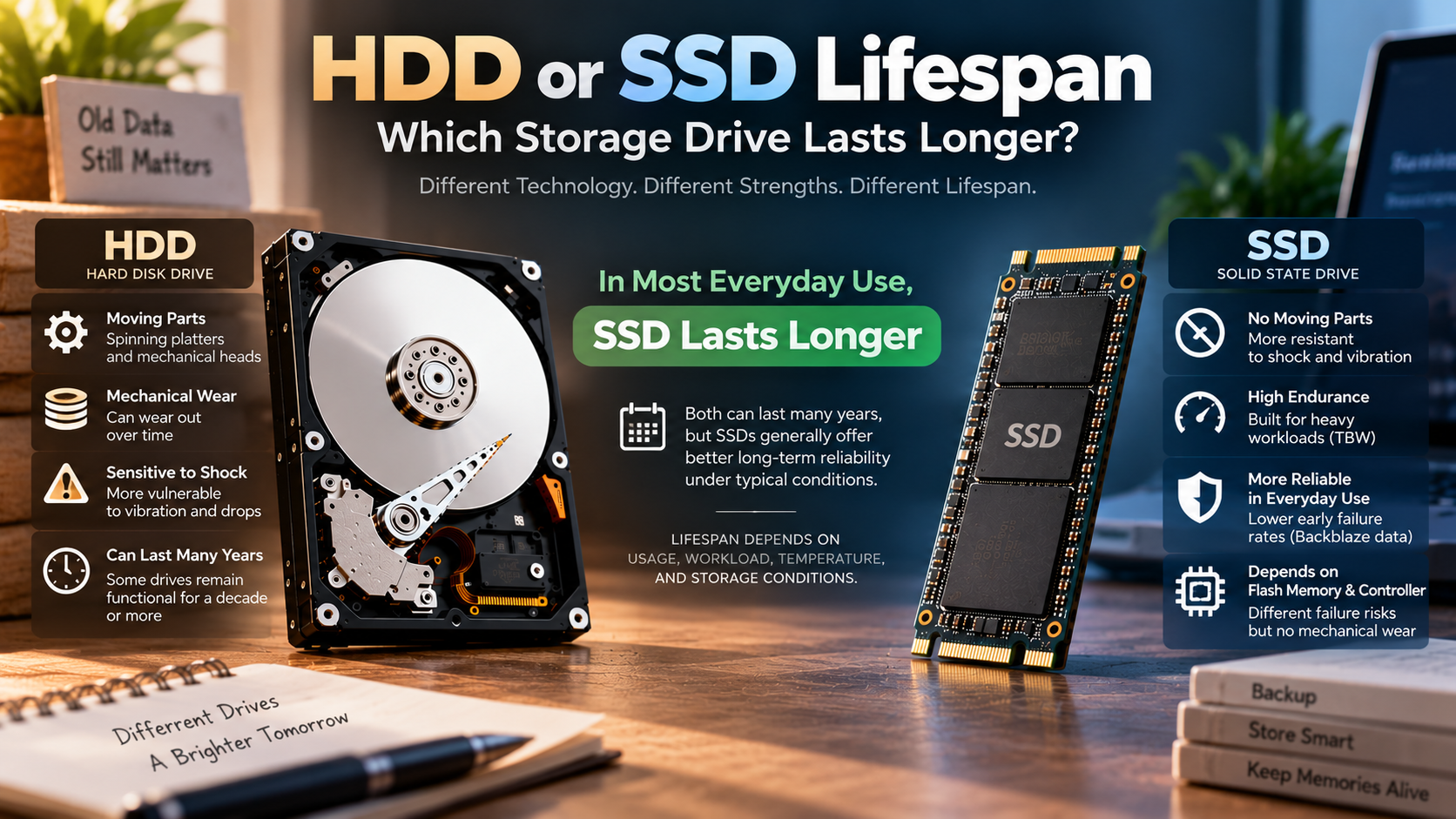
Users often compare HDD or SSD lifespan because both technologies handle data differently. Hard disk drives use spinning platters and moving heads. Solid-state drives use NAND flash memory with no moving mechanical parts.
These different designs create different failure risks. HDDs can suffer from mechanical wear, vibration, and head or motor failures. SSDs avoid those mechanical problems but depend on flash memory, controllers, and other electronic components.
According to published drive reliability data from cloud backup provider Backblaze, modern solid-state media exhibits lower early failure rates than mechanical drives during active everyday use.
So, which drive lasts longer? The answer depends on how you use and store it. Daily workloads, write volume, heat, power conditions, and storage practices all affect storage drive lifespan.
This guide compares HDD vs. SSD lifespan, explains endurance limits, and examines long-term storage risks. It also covers 20-year-old HDDs, unpowered SSDs, older hardware, and whether HDDs remain worthwhile in 2026.
Which has a longer lifespan, HDD or SSD?
When comparing HDD or SSD lifespan, an SSD can offer excellent longevity under typical everyday workloads. However, it is too broad to say every SSD will outlast every HDD. Drive quality, workload, operating temperature, and usage patterns all affect reliability.
HDDs contain moving parts. Spinning platters, spindle motors, bearings, and actuator assemblies can eventually develop faults. Physical shocks can also damage an operating HDD. SSDs have no moving parts, which gives them an advantage against vibration and accidental movement.
Modern SSDs also have substantial write endurance. Manufacturers commonly specify endurance using Terabytes Written (TBW). A typical consumer workload may remain well below the rated endurance of a quality SSD. For buyers comparing SSD options, Is There Any Point In Buying An Expensive SSD In 2026? can help explain when paying more actually makes sense.
Modern drive reliability data shows that SSD and HDD failure patterns can vary significantly by age, workload, and model. Some SSDs maintain low failure rates for years, while individual drives can still fail unexpectedly.
Still, there is no universal five- or ten-year expiration date. A well-maintained drive can last much longer, regardless of whether it uses flash or magnetic storage.

The Decisive Factor of Total Bytes Written
Total Bytes Written (TBW) is one of the most useful SSD endurance measurements. It estimates how much data can be written before the drive reaches its rated endurance limit.
Flash memory cells can only tolerate a finite number of program and erase cycles. SSD controllers reduce this wear through technologies such as wear leveling, over-provisioning, and error correction.
For most consumer systems, TBW is rarely the limiting factor. Typical workloads often remain far below the endurance ratings of quality SSDs. Keeping enough unused capacity can also support SSD performance and longevity, as explained in What Is the Minimum Free Space you should leave on an SSD?
Your actual workload matters more than a simple calendar age. Gaming, video editing, virtual machines, databases, and other write-heavy tasks can consume endurance faster than office work. For demanding workloads, NVMe SSDs: Benefits, Speed, Uses, and Buying Guide explains where faster SSD technology can make a difference.
You should therefore check the SSD’s TBW rating before buying it for intensive use. A higher rating provides more endurance headroom.
SMART information can also help you monitor an SSD’s health. Many modern drives report remaining life or percentage used. However, these indicators vary between manufacturers, so they should not be treated as guarantees.
For most everyday users, SSD endurance is sufficient for many years. However, proper backups remain essential because even a healthy drive can fail unexpectedly.
Can HDD last 20 years?
When considering HDD or SSD lifespan, it is important to remember that an HDD can remain functional for 20 years. However, there is no reliable lifespan guarantee. Some drives continue working well beyond a decade, while others fail much earlier.
A hard drive’s environment makes a major difference. An HDD operating continuously for 20 years experiences far more mechanical activity than one stored and powered down for most of that period.
Long-term storage also introduces different risks. Magnetic data can remain stable for many years under suitable conditions. However, the drive itself may not remain mechanically healthy enough to read that data later.
Aging motors, bearings, controller electronics, seals, and other components can eventually cause problems. Lubricants and mechanical assemblies can also change over long periods.
Long service is possible, but failure rates generally increase as drives age. Different models can also have very different reliability profiles.
However, 20 years should never be treated as a safe storage target. Important data needs multiple copies rather than reliance on one aging drive.
The Real Risk of Lubricant Evaporation
Long-term HDD storage involves more than magnetic data retention. The drive’s mechanical and electronic components also age while sitting unused.
The spindle motor, bearings, actuator assembly, and other internal parts can deteriorate over many years. Lubricants may change properties, while electronic components can also age.
This creates an important distinction between data retention and drive usability. Magnetic information might remain readable in principle, yet the drive may fail when powered on.
A drive that has spent 20 years disconnected is therefore not automatically safer than one that has been used regularly. Both scenarios create different risks.
For critical archives, do not assume an old HDD will start successfully after decades. Maintain multiple copies and periodically verify that archived files remain readable.
If you plan to use an old drive, test it before depending on it. Copy important files to newer storage rather than treating the old HDD as the only archive.
The safest approach combines redundancy, periodic testing, and migration. Replace aging storage before failure becomes an emergency.
Can SSD last 100 years?
When evaluating HDD or SSD lifespan, a standard consumer SSD should not be considered reliable 100-year archival storage. SSDs are designed primarily for active use, not century-long unpowered preservation.
NAND flash stores information by changing the electrical state of memory cells. Those states can gradually become less reliable when the drive remains unpowered for extended periods.
Temperature also matters. Higher temperatures generally accelerate charge loss and can shorten data-retention margins. The exact retention period depends on the NAND type, drive condition, temperature, age, and other factors.
There is no universal rule saying an SSD will retain data for exactly two, five, or ten years without power. Retention depends on the drive and storage conditions.
For this reason, an SSD should not become your only cold-storage archive. Keep multiple copies and migrate the data to fresh media periodically.
For century-scale preservation, use a managed archival strategy instead of relying on one SSD. Keep multiple copies and migrate the data to newer storage as needed.
Why Temperature Accelerates Flash Charge Leakage
Temperature is an important factor in SSD data retention. Higher temperatures can accelerate the physical processes that cause stored charge to become less distinct.
This matters most when an SSD remains disconnected from power for long periods. A hot environment, such as an attic or vehicle, can create worse conditions than a cool, controlled room.
However, it is misleading to claim that every consumer SSD will lose its data within one year in warm conditions. Retention varies by NAND type, drive age, temperature, and manufacturer specifications.
The better rule is simple: do not use an unpowered SSD as your only long-term archive.
For important files, keep at least one additional copy on another storage medium. Cloud storage can provide another layer of protection when configured correctly.
If an SSD contains important archived data, periodically connect it and verify the files. Consider migrating the data to newer storage as the hardware ages.
Temperature control, redundancy, verification, and planned migration provide much stronger protection than relying on a specific retention-year estimate.
Is it safe to use a 10 year old HDD?
A 10-year-old HDD can still work, but it should not be trusted as your only copy of important data. Age alone does not prove that a drive will fail immediately. It does increase the importance of monitoring and redundancy.
Hard drives can operate for more than a decade, particularly when workloads and operating conditions have been favorable. However, reliability varies considerably between models and individual drives.
If a decade-old HDD still works, use it cautiously. Avoid making it the primary location for irreplaceable photos, documents, business records, or other critical files.
Instead, maintain a verified backup on newer storage. You can continue using the old drive for less important data if its health remains stable.
Before relying on an older HDD, check its SMART health information. Look for increasing error counts, bad sectors, or other signs of deterioration.
How SMART Diagnostics Reveal Hidden Drive Decay
SMART, or Self-Monitoring, Analysis, and Reporting Technology, can reveal warning signs before an HDD fails completely.
Useful indicators include reallocated sectors, pending sectors, uncorrectable errors, and other drive-specific health attributes. However, SMART is not a guarantee of future reliability.
If SMART values deteriorate, treat that as a reason to replace the drive. Do not wait for the HDD to become completely inaccessible.
Regular backups remain essential because some failures happen suddenly. A healthy SMART report today cannot guarantee that the drive will work tomorrow.
If an HDD contains valuable information, replace it when its reliability becomes questionable. The cost of a new drive is usually far lower than professional data recovery.
Is HDD still worth it in 2026?
When comparing HDD or SSD lifespan and value, HDDs are still worth buying in 2026. They are especially useful when capacity matters more than speed.
HDDs remain practical for backups, media libraries, surveillance storage, NAS systems, and other large datasets. Their lower cost per terabyte makes them attractive for cloud storage vs. external hard drives when storing large amounts of data.
SSDs are usually the better choice for operating systems, applications, games, and active projects. Their low latency and high random-access performance make computers feel much faster. If you are choosing between different SSD interfaces, Is a SATA SSD Still Worth It? Performance & Buying Guide can help you compare your options.
HDDs still provide an important advantage for bulk storage: cost per terabyte. Large-capacity mechanical drives can store substantial amounts of data without the higher cost associated with equivalent SSD capacity.
This makes HDDs particularly useful as secondary storage. A desktop might use an SSD for the operating system and applications, then use an HDD for large media files.
The same approach works well for local backup systems. You can use fast SSD storage for daily work while keeping larger HDDs for backup copies.
High-capacity HDDs remain widely used for large-scale storage. Their balance of capacity and cost keeps them relevant for data-heavy applications.
A practical setup can therefore combine both technologies. Use an SSD for speed and an HDD for affordable bulk storage.
Calculating Cost per Terabyte Advantages
Cost per terabyte is one of the strongest reasons to choose an HDD. The larger the storage requirement becomes, the more important the price difference can be.
For example, someone storing several terabytes of video, photos, games, or backups may not need SSD-level performance for every file.
An HDD can provide substantial capacity at a lower storage cost. That makes it practical for cold backups, media libraries, surveillance footage, and NAS storage.
However, price should not be the only consideration. HDDs are slower and more vulnerable to physical shock while operating. SSDs provide much faster access and better resistance to movement.
A practical setup can therefore combine both technologies. Use an SSD for active files and applications. Use one or more HDDs for large secondary datasets and backup copies. If you are concerned about hardware problems before they become serious, Warning Signs for Your Laptop: 15 Red Flags covers several useful warning signs to watch for.
The best choice depends on your workload rather than a simple HDD-versus-SSD rule. If you need speed, choose SSD. If you need inexpensive capacity, HDD remains highly competitive.
Most importantly, never confuse low cost with safe backup. A cheap drive is only useful when your data also exists somewhere else.
Frequently Asked Questions
How long does an SSD retain data without power?
An unpowered SSD typically retains data for two to five years at room temperature. If stored in hot conditions, electron leakage accelerates, potentially corrupting stored data within several months. To ensure absolute data integrity on cold flash storage, reconnect the SSD to a computer annually to let drive firmware refresh the NAND flash cells.
What are the warning signs of a failing HDD?
Common signs of mechanical drive failure include unusual clicking or grinding noises, frequent file corruption, and severe system freezing during file access. You might also encounter sudden blue-screen crashes or missing directories. If your operating system regularly forces disk-checking scans on startup, back up your critical data immediately before the motor or head fails.
Do SSDs fail without warning?
Yes, SSDs often fail abruptly without the physical noises that characterize mechanical breakdown. While mechanical drives produce telltale clicks, an SSD failure typically stems from logic controller burnout, power surges, or firmware corruption. When these electronic components break down, the drive abruptly becomes undetectable by your system BIOS, locking you out of your data instantly.
Does defragmenting extend the life of an SSD?
No, defragmenting actively harms an SSD and reduces its usable lifespan. Solid-state memory reads data from any physical sector with identical speed, making file fragmentation irrelevant to performance. Running defragmentation tools forces thousands of unnecessary, intensive write cycles across flash cells, accelerating the exhaustion of the drive’s total write endurance without offering any performance benefit.
Conclusion
Understanding HDD or SSD lifespan helps you choose storage based on your actual needs. Neither technology has a guaranteed expiration date. Both can fail unexpectedly, even when they appear healthy.
For operating systems, applications, gaming, and active projects, SSDs are usually the better choice. They provide excellent performance and avoid mechanical failure points.
HDDs remain valuable for large-capacity storage. Their lower cost per terabyte makes them especially useful for media libraries, NAS systems, surveillance storage, and local backups.
However, neither an HDD nor an SSD should be treated as a permanent archive by itself. Long-term data protection depends on redundancy, monitoring, verification, and planned migration.
The best strategy is to combine storage technologies when appropriate. Use SSDs for speed and everyday workloads. Use HDDs where inexpensive capacity matters.
Finally, follow the 3-2-1 backup strategy. Keep three copies of important data, store them on at least two types of media, and keep one copy offsite.
Storage devices are replaceable. Your data may not be.