5 Drawbacks of Using Ethernet Cables for Home Internet
Most tech enthusiasts praise hardwired connections for speed, stability, and low latency. However, understanding the drawbacks of using Ethernet cables matters before installing permanent wiring around your home. Ethernet provides a direct connection between a device and your network. Yet, that reliability comes with physical and practical limitations.
Unlike WiFi, Ethernet requires a cable to reach every connected device. This can create clutter, restrict device placement, and make installation difficult in larger homes. Modern laptops, tablets, and smartphones also prioritize wireless connectivity. Many no longer include a built-in RJ45 Ethernet port.
These limitations do not make Ethernet a poor choice. They simply mean wired and wireless networks solve different problems. Ethernet works particularly well for stationary devices that need consistent performance. WiFi remains more convenient for portable devices.
Understanding physical network limitations helps you build a balanced home setup. Standard standards maintained by the Institute of Electrical and Electronics Engineers (IEEE) define these physical media constraints.
In this guide, we examine the main Ethernet disadvantages, installation challenges, costs, and compatibility issues. We will also compare Ethernet with WiFi to help you choose the right connection for your home.
1. You Lose Out on Portability
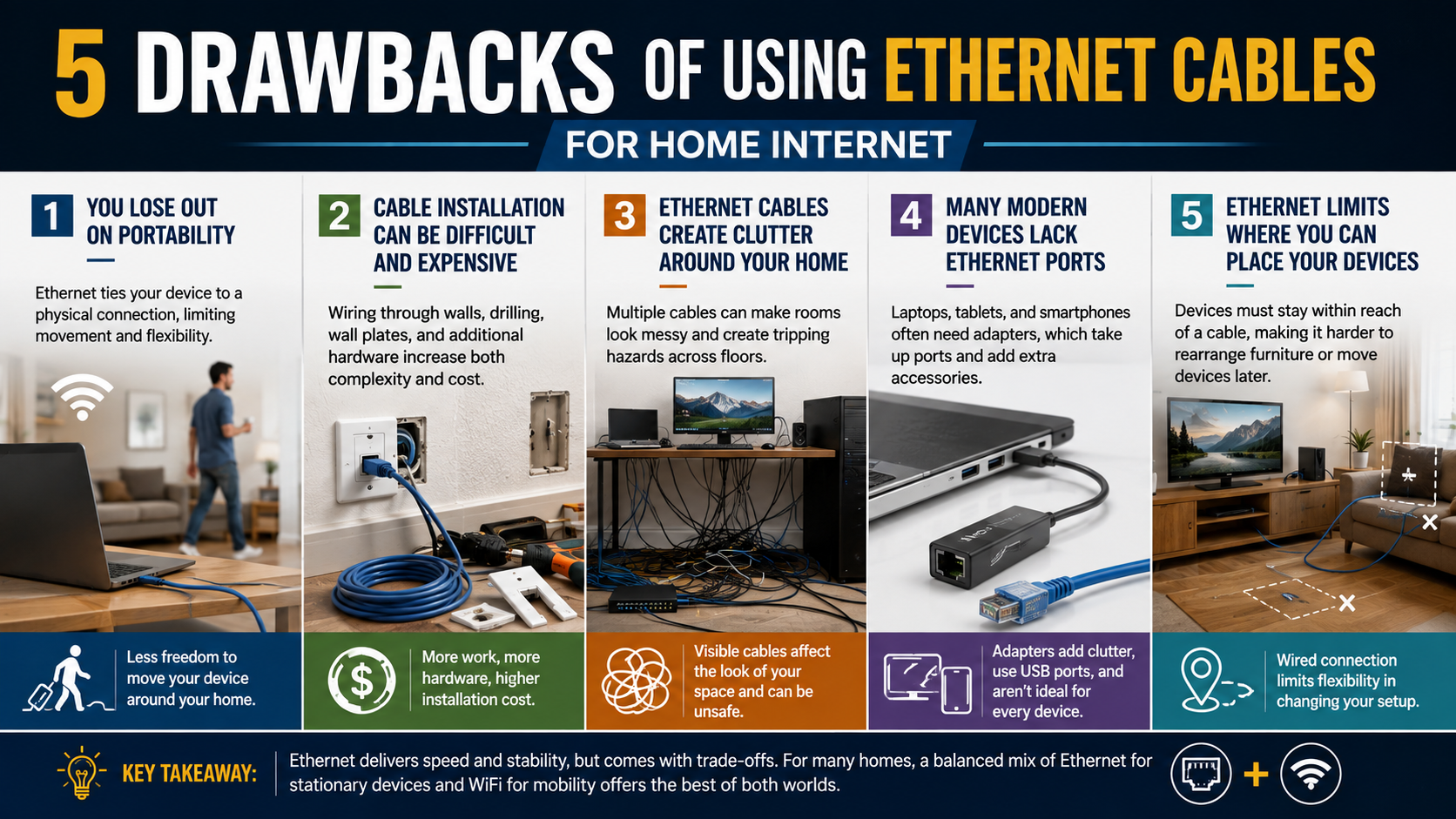
One of the biggest drawbacks of using Ethernet cables is reduced portability. Ethernet ties your device to a physical network connection. A desktop computer can stay connected easily, but portable devices become less convenient when they require an Ethernet cable.
Laptops are designed to move between rooms, desks, and workspaces. An Ethernet cable limits that flexibility because the device must remain within reach of a router, switch, or wall outlet, unlike the mobility offered by a Chromebook vs Laptop: Which Is Better for You? setup.
This limitation becomes even more noticeable with modern thin laptops. Many models no longer include a built-in RJ45 Ethernet port. Users may need a USB-to-Ethernet adapter, which adds another accessory to carry.
WiFi avoids this restriction. You can move around your home while maintaining a network connection without dragging a cable behind you.
Ethernet therefore makes the most sense for devices that rarely move. Desktop PCs, televisions, consoles, and home servers are good examples of devices that benefit from Ethernet.
For laptops and other portable hardware, WiFi provides a more convenient experience. This is one of the clearest disadvantages of using Ethernet for everyday home networking, particularly when considering Wi-Fi 6 vs Wi-Fi 7: Is It Time to Upgrade Your Home Network?
2. Cable Installation Can Be Difficult and Expensive
Another important drawback of using Ethernet cables is the installation process. Installing Ethernet throughout a home requires more work than simply connecting a device to WiFi. The difficulty increases when the router and connected devices are located in different rooms.
A temporary Ethernet cable can run along a wall or floor, but this may look untidy. Long Ethernet cables can also cross walking areas and create potential tripping hazards.
A cleaner solution involves routing Ethernet cables through walls, ceilings, baseboards, or dedicated cable channels. This can require drilling, measuring cable lengths, installing wall outlets, and using additional networking hardware.
Professional Ethernet installation can increase the cost further. You may need wall plates, keystone jacks, patch panels, switches, connectors, and installation labor.
Apartment residents may face additional restrictions. Drilling through walls or permanently modifying rooms may not always be practical.
Wireless networking avoids most of these installation challenges. A properly positioned router or access point can connect many devices without running individual Ethernet cables, and understanding 5 Cool Things You Didn’t Know Your Wi-Fi Router Can Do can help you get more from that wireless setup.
Therefore, installation cost and complexity are major drawbacks of using Ethernet cables when several rooms need wired connections. The performance benefits can justify the effort, but permanent Ethernet cabling is not necessary for every household.
3. Ethernet Cables Create Clutter Around Your Home
Physical cable clutter is another noticeable drawback of using Ethernet cables. A single Ethernet connection is usually easy to hide. However, multiple wired devices can create a much larger cable-management problem.
Consider a home office with a desktop computer, printer, network storage device, and other equipment. Each wired device may require its own Ethernet connection to a switch or wall outlet.
Entertainment areas can face the same problem. Televisions, gaming consoles, streaming devices, and other hardware may require several Ethernet cables.
Loose Ethernet cables can make a room look messy. Cables running across floors can also become obstacles for people and pets.
Cable clips, raceways, sleeves, and wall-mounted network outlets can improve the appearance. However, these solutions require additional planning and installation.
Wireless devices avoid most of this visible cabling. A single WiFi connection can serve multiple devices without requiring a separate Ethernet cable for each one.
This makes cable clutter one of the most obvious Ethernet disadvantages in homes where appearance and flexible furniture placement matter. For homeowners considering the drawbacks of using Ethernet cables, cable management is an important factor to consider before installation.
4. Many Modern Devices Lack Ethernet Ports
Device compatibility is another drawback of using Ethernet cables in modern homes. Many desktop computers and gaming systems still include RJ45 ports, but several portable devices now prioritize wireless connectivity.
Thin laptops and tablets are common examples. Manufacturers often remove Ethernet ports to reduce device thickness and save internal space.
When a device lacks an Ethernet port, you need an adapter. USB-to-Ethernet adapters can restore wired connectivity, but they add another piece of hardware to the setup.
Adapters can also occupy a USB port that you may need for other accessories. Some users may need a USB hub when several peripherals are connected.
Smartphones and many tablets are even less practical to connect through traditional Ethernet. Wired networking may require additional adapters and accessories.
This does not make Ethernet obsolete. It simply means device compatibility is an important consideration before planning a wired Ethernet network.
Before buying Ethernet cables or installing wall outlets, check which devices actually support Ethernet. For many households, a combination of Ethernet and WiFi provides better compatibility than relying entirely on wired connections.
This is an important point when comparing the drawbacks of using Ethernet cables with the convenience of modern WiFi networks.
5. Ethernet Limits Where You Can Place Your Devices
Limited placement is another practical drawback of using Ethernet cables. Every wired device needs a physical path back to the network. This limitation becomes more obvious when furniture layouts change.
You may initially install a desktop computer beside a wall outlet. Later, you might move the desk to another part of the room. The existing Ethernet connection may no longer reach comfortably.
Longer Ethernet cables can solve the problem, but they can also introduce more visible wiring. Routing an Ethernet cable around furniture may create additional clutter.
This limitation can also affect televisions and gaming setups. A device may perform better through Ethernet, but the ideal location may not be close to the router or network outlet.
WiFi provides much greater flexibility. You can rearrange furniture and move devices without planning a new Ethernet cable route, although knowing What Happens If You Never Restart Your Router? can help keep that wireless setup running reliably.
For this reason, Ethernet works best when device locations are relatively permanent. If your home layout changes frequently, wireless networking can be more practical.
The key tradeoff is performance versus flexibility. Ethernet gives stationary devices a dependable connection, while WiFi makes changing your setup much easier.
When evaluating the drawbacks of using Ethernet cables, consider where each device sits today and where it may move later. This can prevent unnecessary wiring and installation costs.
What are the drawbacks of Ethernet?
The primary drawbacks of Ethernet include physical cabling, limited mobility, installation effort, and device compatibility. Unlike WiFi, Ethernet requires a physical connection between your device and network equipment. This becomes inconvenient when devices are located far from the router or network switch.
Long cables can also create visual clutter. Running them across floors, hallways, or doorways can create tripping hazards. Hiding cables inside walls looks cleaner, but it requires planning and additional installation work.
Ethernet also limits where you can use a device. A desktop computer can remain connected easily, but moving it to another room may require another cable. Portable devices create an even bigger problem because many modern laptops and tablets lack Ethernet ports.
There are also hardware limitations. The cable, connectors, network ports, and switches must support the desired speed. Older equipment can prevent a modern connection from reaching its full potential.
Overall, Ethernet delivers excellent reliability, but convenience and flexibility are its biggest weaknesses.
Does Ethernet make your WiFi bill go up?
No. Using Ethernet does not normally increase your monthly WiFi or internet bill. Your internet provider generally charges according to your selected service plan, such as its speed tier or applicable data allowance. The connection method inside your home does not normally create an additional charge.
Your router can provide internet access through both Ethernet and WiFi. Connecting a computer with a cable simply changes how that device communicates with the router. It does not create a separate internet subscription.
There is one indirect consideration. Ethernet can make high-speed activities more convenient. You may download large games, transfer files, or stream high-resolution video more frequently. If your broadband plan includes a monthly data cap, increased usage could eventually result in overage charges.
That issue comes from data consumption, not from Ethernet itself. The same usage would count against your allowance whether the device used WiFi or a wired connection.
Therefore, Ethernet should not increase your ISP bill by itself. If your household has a strict data allowance, monitor total usage rather than worrying about the type of connection.
Do Ethernet cables affect WiFi?
Ethernet cables do not normally weaken or interfere with your WiFi signal. In many homes, connecting stationary devices through Ethernet can actually improve the wireless experience for other devices.
WiFi uses shared radio spectrum. Multiple wireless devices compete for available airtime, especially on busy networks. A gaming console, desktop computer, or smart TV can generate substantial traffic while connected wirelessly, which makes Is 5G Strong Enough For Streaming? relevant when considering other connectivity options for bandwidth-heavy activities.
Moving those devices to Ethernet removes their wireless traffic from the WiFi connection. This can reduce congestion and leave more wireless airtime available for phones, tablets, laptops, and smart-home devices.
Ethernet also avoids problems associated with wireless interference and signal strength. A wired device does not need to maintain a radio connection with the router or access point.
However, Ethernet does not magically increase the internet speed supplied by your ISP. Your broadband connection remains the main limit for internet activities.
The main benefit is better local connection stability and reduced WiFi airtime usage. For crowded households, wiring high-bandwidth stationary devices can therefore make the entire network feel more responsive.
What are the pros and cons of using an Ethernet cable?
The pros and cons of using an Ethernet cable depend heavily on how you use your home network. Ethernet’s biggest advantage is consistency. A wired connection generally provides predictable latency and avoids wireless signal fluctuations caused by distance, obstacles, and radio interference.
Ethernet can also deliver high local-network speeds when the cable, network ports, and switch support them. This makes it useful for gaming, large file transfers, desktop computers, network-attached storage, and other demanding workloads.
The disadvantages are mostly physical. Cables must reach the device, which can restrict placement and create clutter. Permanent installations can also require drilling, cable management, and additional hardware.
Ethernet is less convenient for portable devices. Carrying a laptop around the house becomes awkward when it must remain connected to a network cable.
The practical choice is therefore not simply wired versus wireless. Ethernet prioritizes reliability and performance, while WiFi prioritizes mobility and convenience. Most homes benefit from using both technologies.
Is using Ethernet better than WiFi?
Ethernet is not universally better than WiFi. It is usually better for stationary devices that need consistent performance and low latency. WiFi is often better for portable devices that need freedom of movement.
Gaming PCs and consoles can benefit from Ethernet because a wired connection avoids wireless signal fluctuations. Desktop workstations can also benefit when they regularly transfer large files or connect to network storage.
However, smartphones, tablets, smartwatches, and many modern laptops are designed around wireless connectivity. Connecting these devices by cable can be inconvenient or impractical.
WiFi has also improved significantly with newer standards and better router technology. A well-designed WiFi network can provide fast speeds throughout a home without requiring extensive cabling.
The best approach for most households is a hybrid network. Connect demanding stationary devices through Ethernet where practical. Use WiFi for mobile devices and locations where running cables would be inconvenient.
This strategy provides reliable wired performance without sacrificing the flexibility of wireless networking. The right choice depends on the device, network layout, required performance, and how frequently the device moves.
Frequently Asked Questions
Can an Ethernet cable cause internet drops?
Yes, a damaged Ethernet cable can cause random disconnections and packet loss. Damaged internal copper twisted pairs, broken connector retention clips, or severe bends can disrupt signal transmission. These are possible drawbacks of using Ethernet cables, especially when cables are poorly installed or physically damaged.
If your wired connection drops intermittently, replace the physical patch cable first. You should also verify that the RJ45 connector sits firmly in the network port. If the problem continues, test another router or switch port to rule out hardware issues.
Does the length of an Ethernet cable reduce speed?
Standard twisted-pair Ethernet connections are designed to support cable runs of up to 100 meters (328 feet) under appropriate conditions. Staying within the supported distance helps maintain the cable’s rated performance.
Exceeding the recommended distance can cause signal problems, connection errors, or reduced performance. A network switch can be used to create another Ethernet segment when longer distances are required.
Cable length is therefore another factor to consider when evaluating the drawbacks of using Ethernet cables. For most homes, however, standard cable lengths are more than sufficient.
Are all Ethernet cables the same speed?
No. Ethernet cables have different category ratings that affect their supported bandwidth and network speeds. Older Cat5 cables were commonly used for Fast Ethernet, while Cat5e supports Gigabit Ethernet. Cat6 and Cat6a can support 10Gbps Ethernet under the appropriate conditions, with Cat6 having distance limitations for 10Gbps operation.
Your cable is only one part of the connection. The router, switch, network adapter, and connected devices must also support the desired speed.
Using an older cable with newer networking hardware can therefore limit your local network performance. Check the cable category before upgrading your equipment.
Do Ethernet cables present any safety hazards?
Yes, loose Ethernet cables running across floors, doorways, or stairs can create clear tripping hazards. Cables pinched inside closed doors can also damage their protective jackets and eventually affect network performance.
Proper cable management can reduce these risks. Secure long runs along baseboards with suitable cable clips, raceways, or cable-management channels. For permanent installations, use cabling rated for the intended in-wall environment and follow applicable local building requirements.
These physical concerns are among the drawbacks of using Ethernet cables that homeowners should consider before installing a wired network throughout the house. Proper installation keeps the cables organized, protected, and safer to use.
Conclusion
Understanding the drawbacks of using Ethernet cables helps you make a better decision before wiring your home. Ethernet provides reliable performance, consistent latency, and freedom from wireless signal fluctuations. However, those advantages come with physical limitations.
Cable installation can create clutter and restrict where devices can sit. Permanent wiring may also require additional hardware, tools, and professional labor. Portable devices create another limitation because many modern laptops and mobile devices do not include Ethernet ports.
Ethernet does not normally increase your internet bill. It also does not damage your WiFi signal. In fact, moving stationary, high-bandwidth devices to Ethernet can reduce WiFi airtime usage and improve network capacity for other devices.
For most households, the best solution is not choosing Ethernet or WiFi exclusively. Use Ethernet for stationary devices that benefit from stable, low-latency connections. Keep smartphones, tablets, laptops, and other mobile devices on WiFi.
A hybrid network gives you the reliability of wired connections while preserving the flexibility of wireless networking.