Clear Signs A Video Is AI Generated: How to Spot Deepfakes and Synthetic Media
Understanding the clear signs a video is AI generated has become essential as artificial intelligence creates increasingly realistic synthetic media. Advances in generative AI research from organizations such as OpenAI have made it easier to create realistic digital humans, environments, and video content from simple prompts. AI video tools can now produce convincing deepfake content that can be difficult to distinguish from real footage.
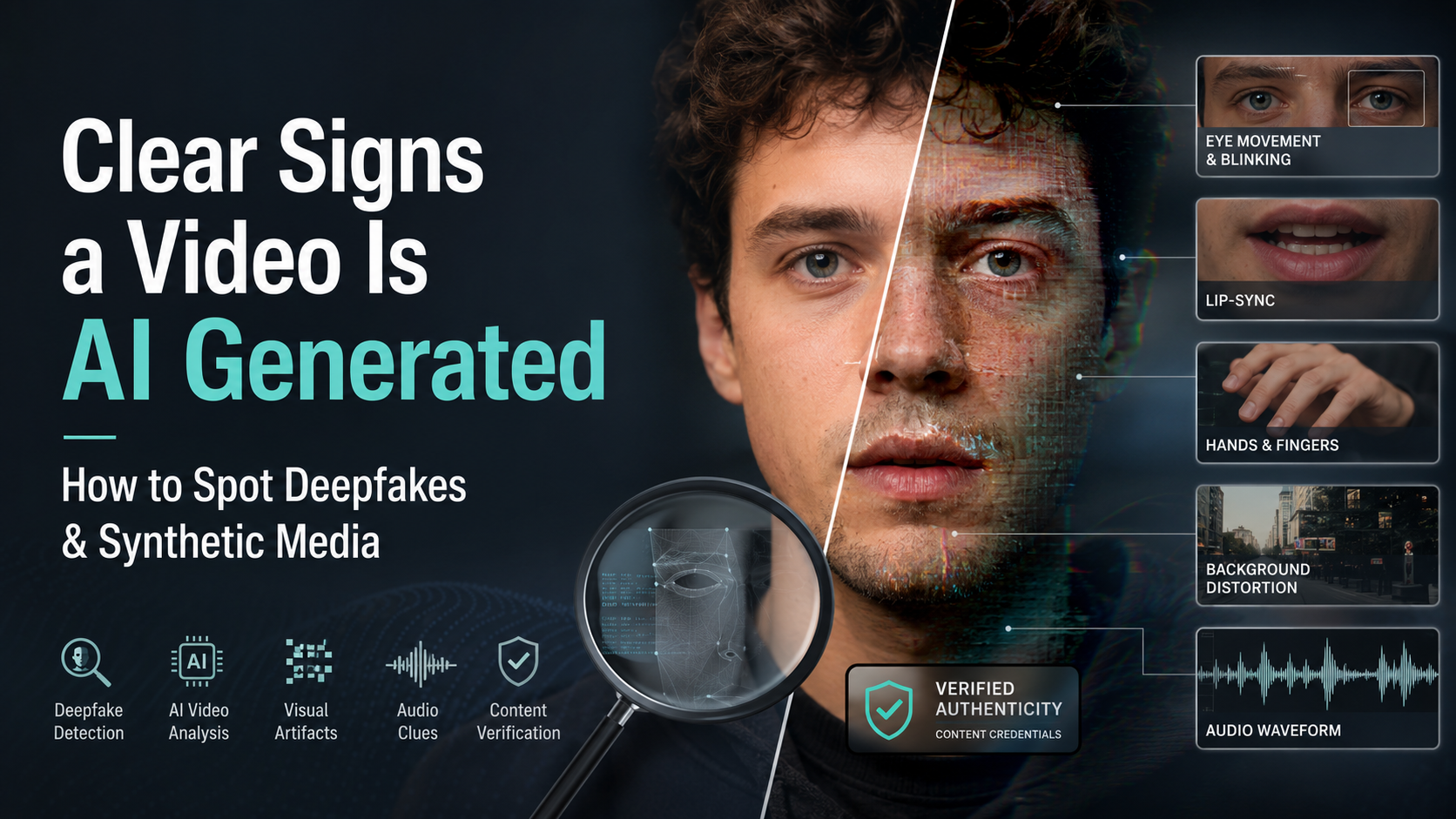
Synthetic videos may look realistic at first glance, but careful observation can reveal hidden problems. Unnatural blinking, distorted hands, shifting textures, strange shadows, and mismatched audio are common indicators of AI-generated content. Understanding concepts like deepfakes overview from the United Nations can also help users recognize how manipulated media affects digital trust.
In this guide, you will learn how to identify AI generated videos using practical visual, audio, and technical clues. You will also discover verification methods, including checking digital content authenticity standards such as C2PA Content Credentials. By understanding these warning signs and verification techniques, you can better evaluate online content and avoid being misled by synthetic media.
Visual Artifacts and Facial Glitches: Clear Signs a Video Is AI Generated
The human face remains one of the most difficult elements for artificial intelligence systems to recreate perfectly. Advanced AI video generators can produce realistic facial features, but maintaining consistent details during movement remains challenging.
Small errors often appear when a person changes expressions, turns their head, or speaks. These mistakes may only last for a few frames, but they can reveal that the footage is synthetic.
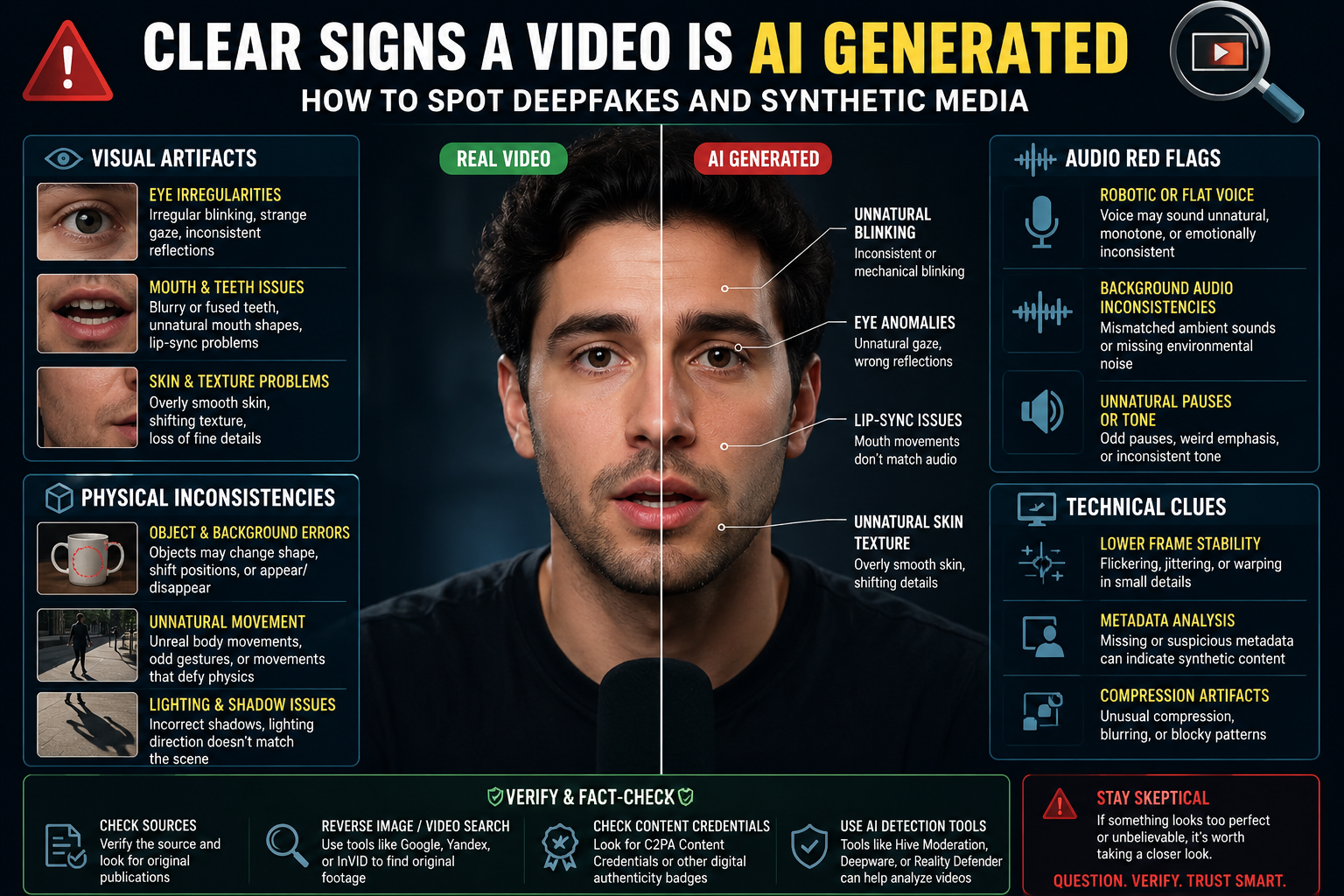
When checking a suspicious video, focus on facial details instead of only watching the overall scene. Look closely at the eyes, mouth, teeth, and skin texture. These areas often contain some of the strongest signs of AI generation.
Common facial inconsistencies include:
- Unnatural blinking patterns
- Misaligned eye movement
- Strange facial expressions
- Distorted mouth shapes
- Unrealistic skin changes between frames
AI video models generate images by predicting patterns rather than understanding real human anatomy. Because of this, they can struggle with small but important details that humans naturally recognize.
Unnatural Eye Movements and Blinking Patterns
Human eyes constantly respond to emotions, surroundings, and physical movement. They blink naturally, follow objects, and reflect light consistently. AI-generated videos often struggle to reproduce these subtle behaviors accurately.
One common sign of synthetic video is unusual blinking. Older AI systems sometimes created faces that rarely blinked. Newer models can add blinking, but the timing may still appear mechanical or unnatural.
Pay attention to these eye-related clues:
- Irregular blinking: The subject may blink too rarely or at perfectly timed intervals.
- Unstable gaze: The eyes may appear disconnected from the environment or fail to track movement naturally.
- Inconsistent reflections: Light reflections inside the pupils may differ between both eyes.
Real eyes usually show matching catchlights because they are exposed to the same lighting conditions. AI-generated eyes may display different reflections, incorrect highlights, or unusual pupil shapes.
When watching a suspicious clip, slow the video down. Eye movement problems that are difficult to notice at normal speed often become obvious in slow motion.
Teeth, Mouth, and Lip-Sync Problems in AI Videos
The mouth is another area where AI-generated videos often reveal their weaknesses. Speaking requires precise coordination between facial muscles, teeth, lips, and sound. Even advanced AI models can struggle to maintain these details consistently.
One common problem is unrealistic teeth rendering. Instead of showing individual teeth clearly, AI videos may create blurred shapes or a smooth white area inside the mouth.
Other warning signs include:
- Lip-sync errors: The mouth movement may not perfectly match the spoken words.
- Unnatural mouth shapes: Certain sounds may cause the lips or jaw to distort.
- Frozen expressions: Facial movement may appear limited or repetitive.
Pay close attention to difficult speech sounds such as “P,” “B,” and “M.” These sounds require specific lip movements, making synchronization errors easier to notice.
A realistic-looking face does not always mean a realistic video. Small mouth inconsistencies can expose AI-generated content, especially when combined with other visual problems.
Physical Inconsistencies: Clear Signs a Video Is AI Generated
One of the clearest signs a video is AI generated is the presence of physical inconsistencies. Real-world videos follow natural rules of movement, gravity, depth, and object interaction. AI models, however, create footage by predicting visual patterns rather than truly understanding physics.
Because of this limitation, synthetic videos may contain impossible movements or unstable details. Objects can shift without reason, body movements may feel unnatural, and scenes may change slightly from frame to frame.
These errors are often easier to detect when you look beyond the main subject. Many viewers focus only on the person speaking, but backgrounds and surrounding objects often reveal AI mistakes faster.
Common physical signs of AI-generated video include:
- Objects changing shape between frames
- Unrealistic movement patterns
- Incorrect depth perception
- Background elements appearing or disappearing
- Objects interacting incorrectly with people
AI video quality continues to improve, but maintaining complete consistency across every frame remains difficult. Small physics failures can expose synthetic content even when the main subject appears realistic.
Background Warping and Scene Distortion
Background details are among the most useful areas to inspect when identifying AI-generated videos. AI systems often focus heavily on the main subject while struggling to maintain stable environments.
Look carefully at objects behind the person. Walls, furniture, buildings, and patterns may subtly change during movement. These changes can happen so smoothly that they are difficult to notice during normal playback.
Common background problems include:
- Moving textures: Wall patterns, signs, or surfaces may shift or melt unexpectedly.
- Missing objects: Items may disappear, appear suddenly, or change position.
- Unstable edges: Hair, clothing, or body outlines may blend into nearby backgrounds.
Depth errors are also common. Background objects may appear to merge with the subject’s body or create unusual blurry edges.
A useful technique is to watch the background instead of the person. If surrounding details continuously change while the camera remains stable, the footage may be AI generated.
Unnatural Hands, Hair, and Accessories
Small physical details remain challenging for many AI video generators. Hands, hair, and accessories require complex shapes and consistent movement, making them common sources of visible errors.
Hands are especially difficult because they contain many joints, fingers, and changing positions. AI-generated videos may show extra fingers, missing details, or impossible finger movements.
Other common indicators include:
| Feature | AI Video Warning Signs |
|---|---|
| Hands and fingers | Extra digits, fused fingers, incorrect joints |
| Hair and fur | Blurry strands, floating hair, unnatural textures |
| Glasses and jewelry | Warped frames, uneven shapes, missing details |
Hair often reveals AI manipulation because individual strands are difficult to maintain across multiple frames. Instead of natural movement, hair may look like a solid shape or appear to merge with the background.
Accessories can also expose synthetic footage. Glasses may change shape, earrings may become uneven, and jewelry patterns may shift during movement.
When combined with facial or lighting problems, these small details provide strong evidence that a video may be artificially generated.
Lighting, Shadows, and Temporal Flaws in Synthetic Media
Real videos capture consistent relationships between light, shadows, movement, and camera conditions. AI-generated videos often struggle to maintain these details across multiple frames.
Because AI systems generate each frame based on learned patterns, small changes can appear over time. These inconsistencies may create a visual feeling that something is unnatural, even when the footage looks realistic at first.
Lighting problems are among the strongest indicators of synthetic media. Pay attention to whether highlights and shadows behave naturally throughout the scene.
Common lighting and temporal issues include:
- Incorrect shadow placement
- Sudden changes in brightness
- Flickering skin tones
- Unstable colors between frames
- Unnatural movement transitions
A real light source affects all objects in the same environment. If a person’s face is brightly lit but nearby objects show different lighting behavior, the video may contain artificial elements.
Inconsistent Lighting and Floating Shadows
Shadows provide important information about how objects exist in physical space. They reveal the direction of light, object position, and contact with surfaces.
AI-generated videos often create shadows that do not match the surrounding environment. A person may appear to walk naturally, but their shadow may not connect correctly with the ground.
Look for these warning signs:
- Mismatched light sources: Highlights and shadows may appear on incorrect sides of objects.
- Floating shadows: A shadow may appear disconnected from a person’s feet or body.
- Changing skin tones: Facial lighting may suddenly brighten or change color without explanation.
These problems happen because AI models can imitate the appearance of lighting without fully understanding how light behaves.
When reviewing suspicious footage, compare the subject with nearby objects. Consistent lighting across the entire scene is expected in authentic recordings.
Motion Blur and Frame Transition Problems
Motion blur occurs naturally when cameras capture fast movement. Real footage creates smooth transitions because the camera records continuous physical motion.
AI-generated videos may struggle with this process. Fast movements can reveal unnatural blur patterns, frame jumps, or strange visual artifacts.
Common motion-related AI video signs include:
- Stuttering movement: Actions may appear slightly robotic or disconnected.
- Ghosting effects: Moving objects may leave unnatural duplicate images.
- Selective blur: Some parts of the scene may blur incorrectly while others remain unnaturally sharp.
These issues become easier to identify when watching videos at slower speeds. Reducing playback speed can reveal sudden changes in facial features, hands, clothing, and backgrounds.
Although AI video generators continue improving, smooth and physically accurate motion remains one of their biggest challenges.
Audio Clues That Reveal Clear Signs a Video Is AI Generated
Identifying AI-generated videos requires more than visual inspection. Audio can provide equally important clues when determining whether content is authentic or synthetic.
Modern AI voice systems can create highly realistic speech, but they may still struggle with natural human expression. Real voices contain emotional changes, breathing patterns, background interactions, and small imperfections. Synthetic voices often sound cleaner but less natural.
When analyzing suspicious audio, pay attention to:
- Unnatural breathing: AI voices may continue speaking without realistic pauses for breathing.
- Flat delivery: Synthetic speech may lack emotional variation, emphasis, or natural rhythm.
- Strange pauses: AI-generated voices can pause too long or stop unexpectedly.
A video may look realistic but still contain audio problems. Comparing the voice with the speaker’s environment can reveal inconsistencies.
For example, someone speaking in a crowded outdoor location should have matching background sounds and natural room acoustics. If the voice sounds like it was recorded in a silent studio, the audio may have been artificially generated or modified.
Flat Cadence and Robotic Intonation
Human speech is naturally unpredictable. People change their tone, speed, volume, and emphasis depending on emotions and context. AI-generated voices often struggle to reproduce these small variations.
A synthetic voice may sound almost perfect but still feel slightly unnatural. This happens because AI systems can copy speech patterns without fully understanding human communication.
Common voice generation clues include:
- Uniform speaking speed
- Limited emotional expression
- Repeated pitch patterns
- Missing casual speech characteristics
Some advanced AI models can now imitate breathing and emotion more effectively. However, subtle differences may remain, especially during longer conversations.
Listen for moments where the speaker should naturally react. Excitement, hesitation, frustration, or humor often reveal whether the voice is genuinely human.
Acoustic Disconnect and Background Noise Problems
Authentic videos usually contain audio that matches the visible environment. The location, distance, and surroundings influence how a voice sounds.
AI-generated videos may create a disconnect between what you see and what you hear. The voice may sound too clean, too close, or completely separate from the environment.
Look for these audio warning signs:
- Clean voice in a noisy location: The speaker sounds isolated despite visible background activity.
- Artificial echoes: The audio contains repeated or unnatural room effects.
- Digital artifacts: Metallic sounds, buzzing, or high-frequency distortion may appear.
Audio analysis should always be combined with visual checks. A single unusual sound does not automatically prove a video is fake, but multiple inconsistencies can indicate synthetic media.
How to Verify If a Video Is AI Generated
When you suspect a video may be AI generated, several verification methods can help confirm whether the content is authentic.
Visual clues are useful, but technical checks provide additional evidence. Combining multiple verification methods creates a more reliable assessment.
Useful verification techniques include:
Slow Down Video Playback
Reduce the playback speed to 0.5x or 0.25x. Slow motion makes small problems easier to notice.
Look for:
- Facial changes between frames
- Flickering details
- Unnatural hand movement
- Background distortion
Perform Reverse Image Searches
Capture a clear screenshot from the video and search it using tools such as Google Lens or TinEye.
This can help you:
- Find the original source
- Identify edited versions
- Discover previous fact-checks
Inspect Metadata and Digital Provenance
Some media files contain information about their creation history. Tools based on C2PA (Coalition for Content Provenance and Authenticity) standards can help verify whether content includes trusted origin information.
Check Reliable Sources
Search trusted news organizations and verification platforms. If a video is misleading or manipulated, it may already have been investigated.
Using several methods together provides stronger results than relying on a single visual clue.
Frequently Asked Questions About Clear Signs a Video Is AI Generated
What Is the Most Reliable Sign That a Video Is AI Generated?
One of the strongest signs is usually a combination of physical inconsistencies and unstable details. AI models often struggle with hands, backgrounds, and object interactions.
Look for extra fingers, unusual joints, shifting textures, or objects that change between frames. Background problems are especially useful because they often remain visible even when facial generation looks realistic.
Facial features are improving quickly, so relying only on the face is less effective than before. Instead, examine the entire scene and compare how objects, lighting, and movement behave.
No single clue can confirm every AI video. However, multiple unusual details appearing together strongly suggest synthetic generation.
Can AI Generated Videos Fake Human Voice and Breathing Accurately?
Yes, modern AI audio systems can create realistic voices and even imitate breathing patterns. However, small differences may still reveal synthetic speech.
AI-generated voices may struggle with emotional expression, natural timing, and environmental sound matching. A voice might sound realistic but fail to match the location shown in the video.
For example, a person standing in a large public area should have natural background sounds and room effects. If the audio sounds completely isolated, it may have been generated or edited.
Listening carefully to rhythm, pauses, and background acoustics can help identify AI voice manipulation.
Why Do AI Video Tools Struggle With Eyes and Teeth?
AI models do not create videos using a complete understanding of human anatomy. Instead, they generate images by learning patterns from large collections of visual data.
Eyes and teeth are difficult because they require precise shapes, reflections, symmetry, and movement. Small mistakes become noticeable because humans are highly familiar with faces.
Common AI errors include:
- Different reflections in each eye
- Unusual pupil shapes
- Blurred teeth
- Incorrect mouth movement
These details can expose synthetic videos even when the overall image appears realistic.
Are There Free Tools to Detect AI Generated Videos?
Yes, several free tools and verification techniques can help analyze suspicious videos.
Reverse image search tools can help identify reused footage. Metadata analysis tools can provide information about a file’s origin. Some online platforms also offer AI detection features.
Examples of useful approaches include:
- Checking video keyframes with image search tools
- Reviewing available metadata
- Looking for digital provenance information
- Comparing the video with trusted sources
Detection tools are helpful, but they are not perfect. The most reliable approach combines technology with careful human observation.
Will AI Videos Become Impossible to Detect?
AI video quality will continue improving, and obvious visual mistakes may become less common. Future synthetic videos may look nearly identical to real recordings.
However, detection methods will also advance. Digital provenance systems, watermarking technologies, and forensic analysis tools will become increasingly important.
Media literacy will remain essential. Understanding how AI-generated content works helps people evaluate information more carefully.
The goal is not to assume every unusual video is fake. Instead, viewers should develop the habit of checking sources, context, and evidence before accepting digital content as real.
Conclusion: Staying Ahead of AI Generated Video Deception
Recognizing the clear signs a video is AI generated allows viewers to question suspicious footage, verify sources, and identify possible deepfakes before sharing misleading content.Detecting synthetic media requires careful observation and critical thinking. While AI video technology continues to improve, many generated videos still contain clues that reveal their artificial nature.
The most common clear signs a video is AI generated include unnatural eye movement, distorted hands, unstable backgrounds, incorrect lighting, and audio inconsistencies.
Simple habits can improve your ability to evaluate online videos. Slow down suspicious footage, inspect small details, verify sources, and use available detection tools when necessary.
For a deeper understanding of how manipulated media is created, read our detailed guide on deepfake technology explained.
As synthetic media becomes more common, understanding these warning signs is an important digital skill. By combining technical awareness with healthy skepticism, you can better separate authentic footage from AI-generated content and make more informed decisions online.