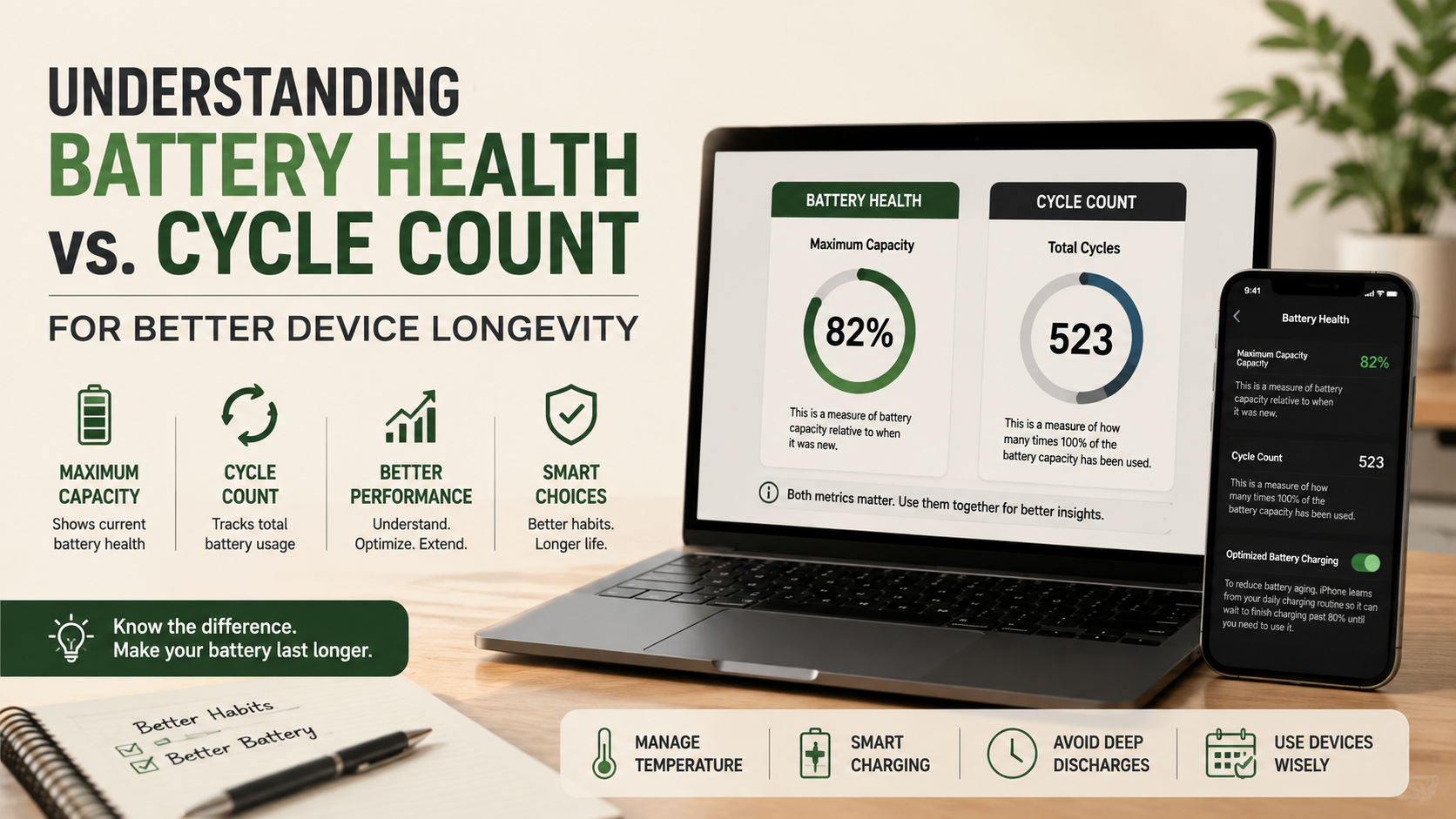
Understanding Battery Health Vs. Cycle Count for Better Device Longevity
When checking your phone or laptop battery, you may see two important metrics: maximum capacity and cycle count. Understanding battery health vs. cycle count helps you judge battery performance and remaining lifespan.
Battery health shows how much capacity your battery can hold compared with when it was new. Cycle count shows how much total battery capacity you have used over time. These metrics measure different aspects of battery aging.
Lithium-ion batteries naturally lose capacity as they age. Apple explains that chemical aging depends on factors such as usage, temperature, and charging patterns. Therefore, battery health and cycle count should be viewed together.
Neither metric tells the complete story on its own. Battery health is usually more useful for judging current daily performance. Cycle count provides valuable context about the battery’s usage history.
Understanding both numbers can help you decide when a battery replacement may be worthwhile. It can also help you adopt better charging habits and protect your device’s long-term performance.
How Many Cycles Is 1 Battery Health Percentage?
There is no fixed number of cycles that equals one percentage point of battery health. Battery health measures your battery’s current maximum capacity compared with its original capacity. A new battery generally starts close to 100%, although the reported value can vary.
A cycle count measures cumulative battery usage. One complete cycle represents using an amount equal to 100% of the battery’s capacity. That usage can happen across several charging sessions.
Battery degradation does not happen at a predictable rate. You might see a health percentage remain unchanged for many cycles. It may then drop by several points over a shorter period.
Factors such as heat, charging habits, workload, and battery age can affect degradation. Fast charging can also increase heat under some conditions. However, modern devices manage charging carefully to reduce unnecessary stress.
For this reason, you should not use cycle count to calculate battery health mathematically. Instead, use both metrics to understand the battery’s current condition and usage history.
The Non-Linear Nature of Battery Capacity Loss
Battery capacity does not always decline at a steady rate. Lithium-ion cells gradually lose their ability to store energy as their internal chemistry ages. The rate of degradation can change throughout the battery’s lifespan.
Manufacturers typically specify a design target for battery retention after a certain number of cycles. For example, some batteries are designed to retain around 80% of their original capacity after a specified cycle count. However, this target differs by device and battery model.
Temperature is one of the most important factors affecting battery aging. High temperatures can accelerate chemical reactions inside lithium-ion cells. Heavy workloads while charging can also create additional heat.
Charging habits can influence long-term performance, but they do not determine battery health alone. A device with relatively few cycles can still have poor battery health if it experienced prolonged heat exposure.
Therefore, avoid treating cycle count as a precise battery-life calculator. Battery age, temperature, usage, charging behavior, and battery design all matter. Looking at these factors together gives you a more realistic picture of battery condition.
Which Is More Important: Battery Health or Cycle Count?
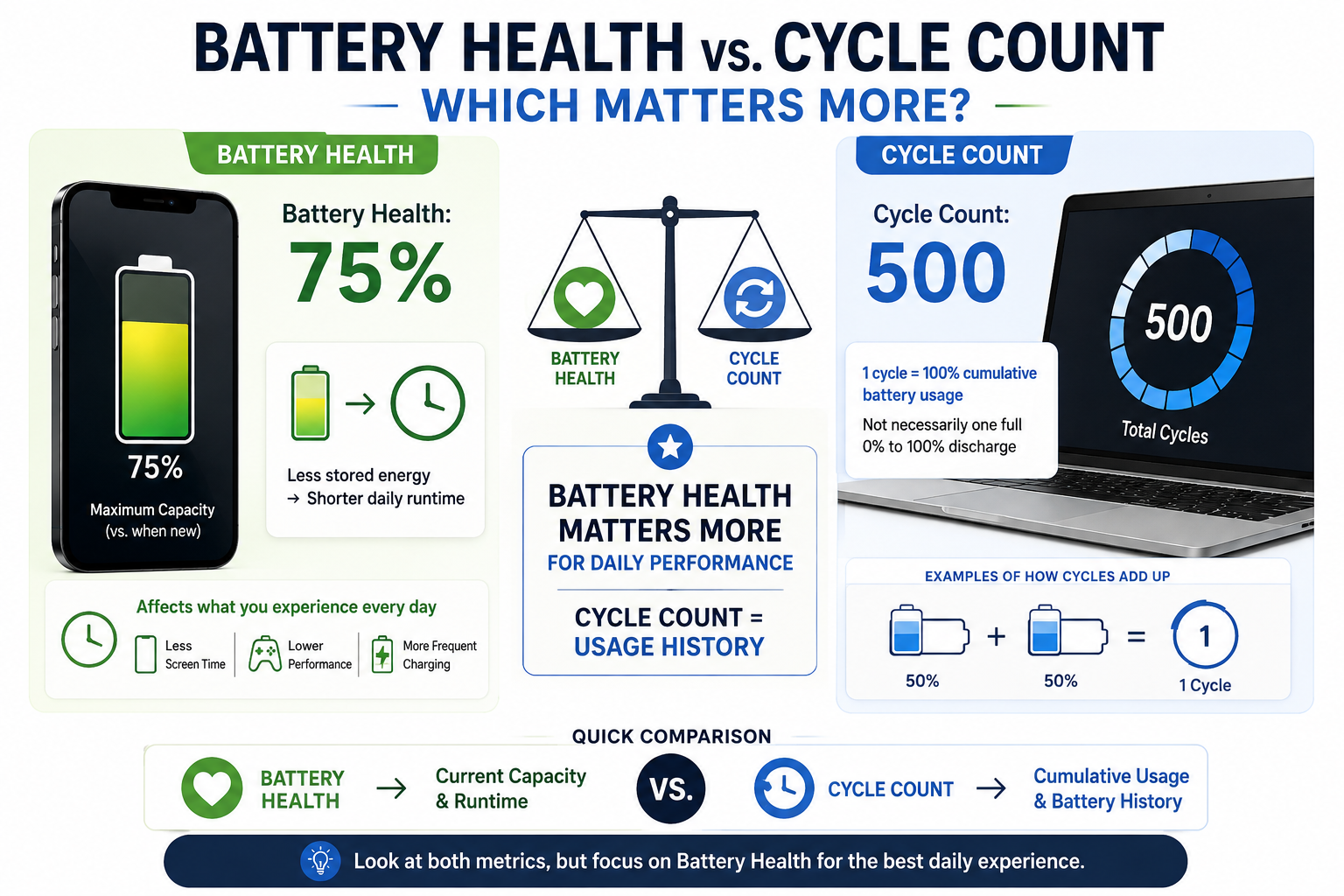
When comparing battery health vs. cycle count, battery health is usually more important for everyday performance. It tells you how much charge the battery can currently store compared with its original capacity.
For example, a battery showing 75% maximum capacity has significantly less usable energy than when it was new. You may need to charge the device more often, even if its cycle count is relatively low.
Cycle count provides a different type of information. It shows how much cumulative battery usage has occurred. A higher count suggests the battery has completed more equivalent full discharge cycles.
Neither metric should be ignored. A low cycle count does not guarantee excellent battery health. Likewise, a higher cycle count does not automatically mean the battery needs immediate replacement.
The best approach is to consider both numbers together. Battery health helps you understand current capacity. Cycle count helps explain the battery’s usage history.
If your main concern is daily runtime, maximum capacity usually matters more. If you are evaluating a used device, cycle count can provide useful additional context.
Why Maximum Capacity Matters for Daily Performance
Maximum capacity directly affects how much energy your battery can store. A battery at 80% capacity may provide noticeably less runtime than the same battery when new.
This makes maximum battery capacity especially useful when evaluating everyday performance. If your device needs frequent charging, declining battery health may be the main reason.
Cycle count alone cannot predict your daily runtime. Two batteries with similar cycle counts can have different health levels. Their conditions may differ because of temperature, workload, age, and charging behavior.
A device with a low cycle count can still show significant degradation. For example, prolonged exposure to high temperatures can accelerate battery aging. Conversely, a well-maintained battery can remain useful after many cycles.
Therefore, maximum capacity is often the better first metric to check. Cycle count should then provide additional context about usage.
If battery health has fallen substantially and your device no longer meets your needs, replacement may make sense. Always consider the manufacturer’s recommended service threshold and your actual usage before making that decision.
How Long Will a 500-Cycle Battery Last?
A battery rated for 500 cycles is designed to withstand at least that many equivalent full cycles under specified conditions. It does not mean the battery will suddenly stop working after reaching 500 cycles.
The actual time required to reach 500 cycles depends on your daily usage. If you use an amount equal to one full battery capacity each day, you could reach 500 cycles in roughly 500 days. Lighter usage can take much longer.
For example, using the equivalent of 50% capacity per day would add about half a cycle daily. At that rate, reaching 500 cycles could take several years.
Battery lifespan also depends on temperature, device design, battery age, and charging behavior. Some modern devices use batteries designed for substantially more than 500 cycles.
The important point is that 500 cycles is a rating, not an expiration date. A battery can continue operating beyond its rated cycle target. However, its maximum capacity and performance may have declined.
When comparing Battery Health Vs. Cycle Count, check your device manufacturer’s specifications for the most accurate cycle-life rating. Then consider battery health alongside cycle count when judging remaining battery life.
Real-World Factors That Influence Battery Lifespan
Cycle count is only one factor affecting lithium-ion battery longevity. Temperature is particularly important because excessive heat can accelerate chemical aging inside the battery.
Heavy workloads can also increase heat. Gaming, video rendering, navigation, or other demanding tasks can warm the device, especially when charging simultaneously.
Charging patterns matter as well. Modern lithium-ion batteries do not need to be completely discharged before charging. Partial charging is normal and does not add unnecessary full cycles. For more practical advice, see these smartphone mistakes that reduce battery life.
Some devices also include optimized charging features. These features can reduce the amount of time the battery spends at a very high charge level. Using them can be helpful when your device remains plugged in for long periods.
To support long-term battery health:
- Avoid prolonged exposure to excessive heat.
- Use reliable chargers and charging accessories.
- Enable optimized charging when available.
- Avoid unnecessary deep discharges.
- Keep demanding tasks from generating excessive heat while charging.
These habits cannot stop normal battery aging. However, they can help reduce avoidable stress and preserve usable capacity for longer.
Is a 70 Battery Cycle Count Good?
A 70-cycle battery count is generally low for a device designed to withstand hundreds of cycles. It means the battery has accumulated relatively little equivalent full-capacity usage.
However, cycle count should not be considered proof that a battery is healthy. Battery age, storage conditions, temperature exposure, and usage history also affect capacity.
This distinction is especially important when buying a secondhand phone or laptop. A device with 70 cycles may look attractive, but you should also check its reported maximum capacity.
A low cycle count combined with strong battery health is a more useful sign. It suggests the battery has experienced limited cumulative usage and still retains much of its original capacity.
You should also verify the information through the device’s built-in settings whenever possible. Third-party tools can provide useful information, but system-reported data is generally preferable. When evaluating a used laptop, you should also look for warning signs for your laptop that may indicate broader hardware problems.
When evaluating Battery Health Vs. Cycle Count on a used device, consider these factors together:
- Battery health or maximum capacity
- Cycle count
- Device age
- Physical battery condition
- Charging behavior
- Overall device performance
A 70-cycle battery can be a positive sign, but it should never be the only factor in your decision.
Evaluating Secondhand Devices With Low Cycle Counts
A low cycle count can make a used phone or laptop more appealing. It suggests the battery has experienced relatively little cumulative usage. However, the number alone cannot confirm the battery’s condition.
Start by checking maximum capacity or the manufacturer’s equivalent health indicator. A low cycle count paired with high remaining capacity is more reassuring than a low count paired with significant capacity loss.
Next, consider the device’s age. Batteries can degrade through chemical aging even when they have not completed many cycles. Storage conditions also matter, particularly if the device spent long periods in high temperatures.
You should also check for physical warning signs. Battery swelling, unusual heat, sudden shutdowns, or rapid percentage drops can indicate a problem.
Before purchasing a secondhand device, review:
- Battery health and cycle count
- Charging and discharge behavior
- Physical condition
- Device age
- Manufacturer service information
If possible, test the device under normal use before buying it. A low cycle count is useful evidence, but it should support your overall assessment rather than determine it alone.
Is a Battery Cycle 100%?
Yes, one complete battery cycle represents 100% of the battery’s capacity being used, but that does not require a single discharge from 100% to 0%.
For example, suppose you use 50% of your battery today and recharge it. You then use another 50% later. Those two periods together represent one complete cycle.
The important number is cumulative battery usage. The device effectively adds up the amount of capacity you use over time until the total reaches the equivalent of 100%.
This means partial charging does not create a full cycle every time you connect the charger. You can charge your device several times during the day without adding several complete cycles.
Partial charging is normal for modern lithium-ion batteries. You do not need to wait until the battery reaches 0% before charging it.
Avoiding unnecessary deep discharges can also reduce battery stress. Likewise, keeping the device away from excessive heat can support longer-term battery health.
Understanding how cycles work makes statistics about Battery Health Vs. Cycle Count easier to interpret. It also prevents a common misconception: charging from 50% to 100% does not automatically count as one complete cycle.
Understanding Partial Charging Mechanics
Partial charging does not mean you are wasting battery cycles. Modern devices track cumulative energy usage rather than simply counting every charging session.
For example, using 25% of your battery four times would equal roughly one complete cycle. The charging sessions can happen across several days. What matters is the total amount of battery capacity consumed.
You also do not need to follow a strict charging range to maintain battery health. Lithium-ion batteries can be charged whenever convenient. However, avoiding prolonged extreme conditions can reduce unnecessary stress. You can also learn more about how to improve iPhone battery life for practical battery-care tips.
Many devices now include optimized charging or similar battery-management features. These systems can reduce the time a battery remains at a very high charge level.
If convenient, moderate charge levels can be useful for long-term battery care. More importantly, avoid excessive heat and use appropriate charging equipment.
There is no need to obsess over individual charging sessions. Battery aging is influenced by many factors, including time, temperature, usage, and charging conditions.
The goal should be simple: charge when needed, avoid excessive heat, and use the battery-management features provided by your device.
Frequently Asked Questions
How can I check my device battery health and cycle count?
You can easily check your battery status by navigating to your device’s native system settings. On iPhones, go to Battery Health and Charging to view your maximum capacity percentage. MacBooks display cycle counts under System Information, while Windows laptops require running a power report via the command prompt. Android users may need third-party diagnostic apps or system updates to view detailed health metrics.
Does fast charging ruin battery health faster?
Fast charging does generate more heat than standard slow charging, which can accelerate chemical degradation over a long period. However, modern devices feature sophisticated power management systems that throttle charging speeds when temperatures rise. While standard charging is slightly gentler, modern fast charging is safe enough that the convenience usually outweighs the minor reduction in long-term longevity.
Should I keep my phone plugged in all the time?
Keeping your phone plugged in constantly, especially while running intensive apps, creates continuous heat that degrades maximum battery health. Modern operating systems include optimized battery charging features to limit maximum capacity when plugged in for long periods. It remains best practice to unplug your device once it reaches full charge, particularly overnight or during heavy computational tasks.
What are the signs that my battery needs replacement?
The most obvious sign that your battery needs replacement is significantly reduced daily runtime between charges. You might also notice unexpected device shutdowns, sudden battery percentage drops, or physical swelling of the battery pack. If your device throttles performance to prevent random crashes, visiting an authorized service center for a fresh battery is strongly recommended.
Conclusion
Understanding battery health vs. cycle count makes it easier to evaluate your phone or laptop’s battery condition. These metrics measure different things, so neither should be viewed in isolation.
Battery health shows your battery’s current maximum capacity. This makes it particularly useful for judging everyday runtime. Cycle count shows cumulative battery usage and provides helpful context about the battery’s history.
A cycle does not require a single 0% to 100% discharge. Instead, it represents cumulative usage equal to 100% of the battery’s capacity. Partial charging sessions can therefore contribute to one complete cycle over time.
Battery lifespan also depends on factors beyond cycle count. Temperature, device age, charging behavior, workload, and battery design can all influence degradation.
For better long-term battery care, avoid excessive heat and use your device’s optimized charging features when available. You do not need to obsess over every charging session.
Check your battery health and cycle count periodically. These metrics can help you recognize normal aging, identify potential battery problems, and decide when replacement may be worthwhile. If you’re also deciding which type of phone is right for your needs, this guide to iPhone or Android for students can help you compare the two platforms.