Are Chromebooks Still Worth Buying After the Googlebook Release?
Shopping for a budget-friendly laptop can be confusing when new devices enter the market. Google’s changing laptop lineup has raised an important question: Are Chromebooks still worth buying after the Googlebook release? Before spending your money, understand how these devices differ and which one suits your daily needs.
Chromebooks run ChromeOS, an operating system designed around web browsing, cloud applications, and productivity tools. Googlebooks represent a newer laptop category associated with Google’s Android ecosystem. Although both target everyday computing, their software experiences and application compatibility can differ.
Choosing between these devices depends on your budget, workload, and preferred applications. You should also consider battery life, hardware specifications, and long-term software support before purchasing a laptop.
In this guide, we’ll examine Chromebook relevance in 2026, Google’s hardware direction, and the lifespan of older models. We’ll also explain when a Chromebook remains a practical purchase and when another laptop might make more sense.
Are Googlebooks Replacing Chromebooks?
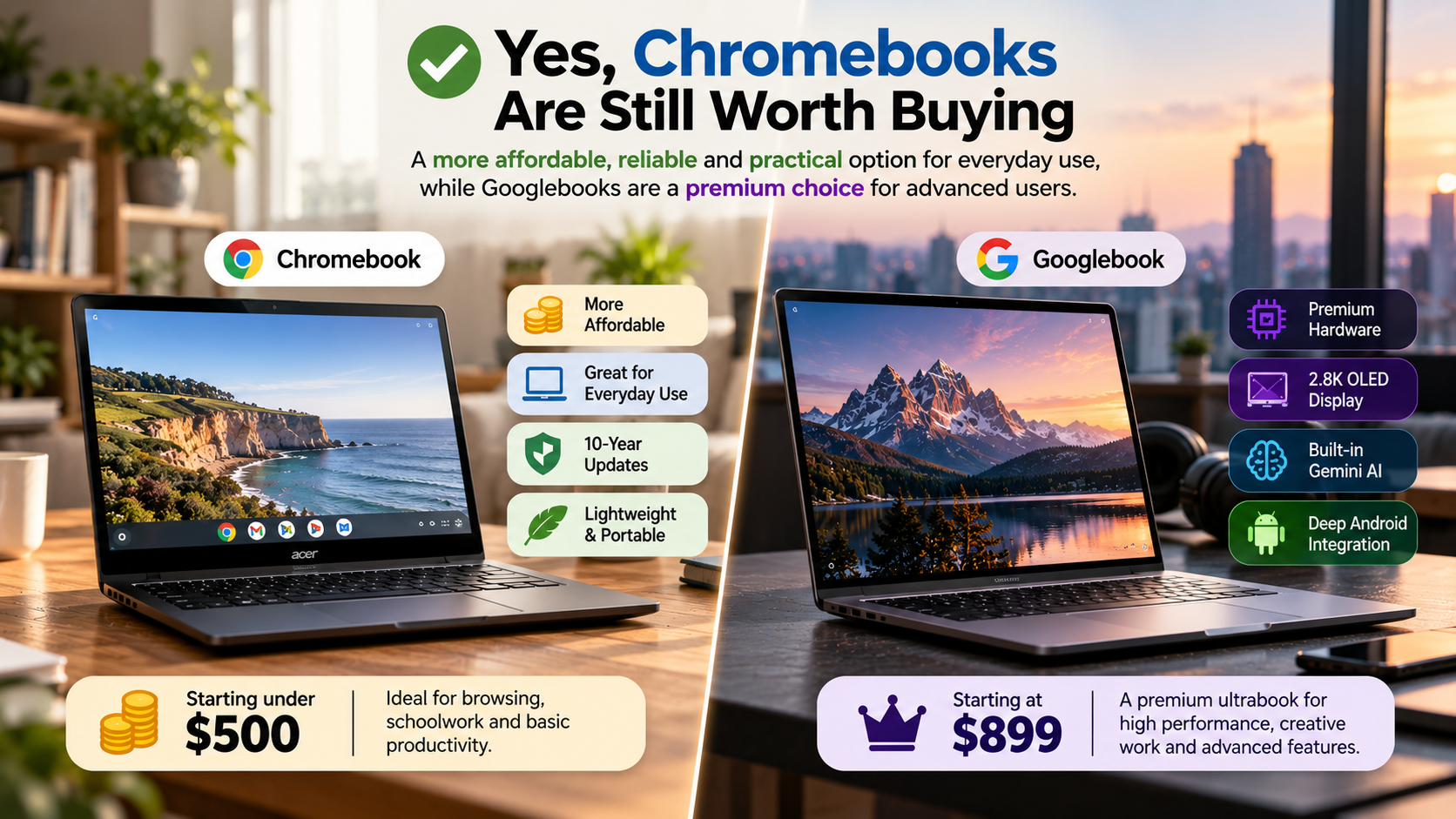
Googlebooks introduce another option for laptop buyers, but their arrival does not automatically mean Chromebooks are disappearing. These devices represent different approaches to Google’s computing ecosystem. Chromebooks run ChromeOS, while Googlebooks emphasize Android-based computing and closer integration with Android phones. Their software experiences and application compatibility can differ significantly. If you’re comparing your options, this Chromebook vs. laptop comparison can help you understand the differences in everyday use.
Chromebooks remain established choices for schools, businesses, and everyday users. They support browser-based workflows, Google Workspace, and compatible Android applications. Googlebooks provide an alternative for people interested in Android integration and newer laptop features.
If you’re asking, are Chromebooks still worth buying, consider your existing workflow before choosing a replacement. A familiar operating system, reliable applications, and long-term support matter more than a product’s name.
Software Services vs. Physical Hardware
Google’s product names can be confusing because its ecosystem includes digital services and physical devices. Understanding these differences helps you choose the right laptop without relying on rumors.
- Google Play Books: A digital platform for purchasing, reading, and managing ebooks.
- Chromebooks: Physical laptops running ChromeOS.
- Googlebooks: A newer laptop category associated with Google’s Android-based computing direction.
Google Play Books does not compete with either laptop category. Instead, it provides reading services across compatible devices.
Chromebooks are available from manufacturers such as Acer, ASUS, HP, and Lenovo. Googlebooks offer a different software experience, so buyers should check application compatibility before purchasing.
The main distinction is the operating system, not simply the manufacturer. If you mainly use websites and browser-based tools, a Chromebook may meet your needs. For a closer look at ChromeOS features, compatibility, and setup, explore this ChromeOS guide covering features, comparisons, and installation. If you prefer Android integration, examine Googlebook compatibility with your essential applications first.
Are Chromebooks Still Relevant in 2026?
Yes, Chromebooks remain relevant in 2026, particularly for students, casual users, and people who work primarily online. They handle everyday activities such as browsing, document editing, video streaming, and online meetings without requiring expensive hardware. Their straightforward interface also suits users who prefer a simpler computing experience.
However, Chromebooks are not automatically the best choice for every budget. Windows laptops may offer broader compatibility with professional software, while Googlebooks provide another option for people interested in Android-based computing. If you are also considering a tablet for everyday tasks, compare Chromebooks and iPads as alternatives to Windows laptops before making your decision.
So, are Chromebooks still worth buying for everyday work? They can be, especially when your main activities involve web applications, online classes, and office documents. Look for sufficient memory, dependable battery life, and several years of remaining software support.
Before buying, compare available models and their total costs. A slightly more expensive laptop may deliver better long-term value if it supports your work more effectively.
The Rise of Chromebook Plus and AI
Chromebook Plus models offer stronger hardware and additional capabilities compared with many entry-level Chromebooks. Google’s published requirements include an Intel Core i3 processor from the 12th generation or newer, or an AMD Ryzen 3 processor from the 7000 series or newer. Eligible models also include at least 8GB of RAM, 128GB of storage, a Full HD IPS display, and a 1080p webcam.
These specifications make Chromebook Plus devices suitable for multitasking, video calls, and everyday creative work. Selected models also offer integrated AI features, depending on hardware, software version, region, and availability.
Before paying extra for a Chromebook Plus laptop, consider whether you need its additional performance. Basic browsing and document editing may work perfectly well on a standard Chromebook.
You can compare models on the official Chromebook website. Check individual specifications and supported features rather than assuming every model offers identical AI capabilities.
Is Google Phasing Out Chromebooks?
The arrival of Googlebooks does not, by itself, establish that Google is discontinuing Chromebooks. ChromeOS remains an established platform with a substantial education and business user base. Google also publishes software support information for existing devices, allowing buyers to check their expected update schedules.
However, it would be misleading to assume that every Chromebook will receive support indefinitely. Individual models have specific update deadlines, and older hardware may not support every newer feature. Google’s future product strategy could also evolve as its laptop ecosystem changes.
If you already own a Chromebook, there is no need to replace it solely because Googlebooks have appeared. First, check whether your device still receives updates and handles your daily tasks comfortably.
For new buyers wondering are Chromebooks still worth buying alongside newer alternatives, the answer depends on practical requirements. Compare application compatibility, hardware specifications, prices, and support commitments. These details offer a better basis for deciding than product rumors or assumptions about Google’s future plans.
Long-Term Enterprise and Education Commitments
Schools and businesses often choose Chromebooks because they are relatively straightforward to manage across many devices. Administrators can configure accounts, control access, and deploy applications using Google’s management tools. These capabilities make ChromeOS useful in environments where consistent settings and centralized administration matter.
Long-term support is another important consideration for organizations purchasing laptops in bulk. Google publishes automatic update deadlines for individual ChromeOS devices, helping administrators plan replacements and manage security requirements.
However, enterprise adoption does not guarantee that every model will remain supported forever. Organizations must evaluate each device’s update schedule, hardware condition, and compatibility with required applications.
For individual buyers, the same principle applies. A Chromebook with several years of remaining support may offer better value than a newer-looking model approaching its final update.
Google’s continued support for existing ChromeOS devices matters when assessing their value. Still, buyers should verify the specific model rather than relying on broad claims about the platform’s future.
Do Chromebooks Become Outdated?
Yes, Chromebooks eventually become outdated, just like Windows laptops and MacBooks. Their useful lifespan depends on software support, hardware condition, and the applications you need to run. A device may still function after its official update period ends, but continued use can involve security and compatibility risks.
Google calls its automatic update deadline the Automatic Update Expiration (AUE) date. After a device reaches its final supported update, it no longer receives regular ChromeOS and browser updates. Some applications or websites may eventually require newer software versions.
Google provides ten years of automatic updates for eligible Chromebook platforms, including devices released from 2021 onward under its extended support policy. The exact deadline depends on the device and its platform.
Before buying a used Chromebook, check its remaining support period. A low purchase price may not represent good value if updates are ending soon.
How to Check Your Device Update Schedule
You can check your Chromebook’s official update deadline through its settings. This is particularly important when purchasing a second-hand device or deciding whether to replace an older laptop.
Follow these steps:
- Turn on your Chromebook and select the time in the bottom-right corner.
- Open Settings.
- Select About ChromeOS.
- Open Additional details.
- Find the Update schedule section.
This section shows when your device is expected to receive its final automatic update. You can also check the model against Google’s official support information.
For a used Chromebook, verify the deadline before paying. A laptop with several years of updates remaining may offer better value than one approaching the end of its support period.
Remember that software support is only one part of the decision. Battery condition, available memory, storage, screen quality, and physical damage also affect whether an older device remains worth using.
Is a 5-Year-Old Chromebook Still Good?
Yes, a five-year-old Chromebook can still be useful in 2026, but its condition and update status matter more than its age alone. A device purchased in 2021 may still receive automatic updates under Google’s extended support policy. However, check the exact model and deadline rather than assuming every five-year-old Chromebook receives updates until 2031.
For basic tasks, an older Chromebook may still handle email, web browsing, document editing, and video streaming. Its performance depends on the processor, available memory, battery health, and demands of modern websites.
A model with 8GB of RAM will generally provide more flexibility for multitasking than one with 4GB. However, memory alone cannot guarantee good performance if the processor or battery is worn out.
Before buying a used device, inspect the screen, keyboard, charging port, and battery. Also, confirm that its update schedule suits your needs.
If the laptop remains supported, works reliably, and meets your requirements, keeping it may be more economical than upgrading unnecessarily.
Hardware Signs to Watch Out For
Software support cannot compensate for worn-out hardware. Before purchasing or continuing to use an older Chromebook, inspect its physical condition and test its everyday performance. Pay particular attention to battery life, and investigate why your laptop battery drains so fast if it loses charge unusually quickly.
Pay particular attention to these areas:
- Battery health: Check whether the battery holds a charge and lasts long enough for your routine.
- Memory: Four gigabytes may handle light tasks, but 8GB is preferable for heavier browsing and multitasking.
- Charging port: Confirm that the charger connects securely and charges the laptop consistently.
- Screen and keyboard: Look for display defects, damaged keys, and unreliable touchpad operation.
- Performance: Open your usual websites and applications to check for excessive lag.
- Software support: Verify the official update deadline before purchasing.
Do not buy an older Chromebook simply because it is inexpensive. A device nearing its final update may have a shorter practical lifespan than expected.
If repairs are expensive or essential applications no longer work properly, replacing the laptop may be more sensible. Compare repair costs with the price of a supported alternative before deciding.
Final Verdict: Should You Buy a Chromebook in 2026?
Are Chromebooks still worth buying? For students, casual users, and people who primarily work online, they can still be a practical and affordable option. Their simple interface, browser-based productivity tools, and support for everyday applications make them suitable for many common tasks.
However, the right choice depends on your needs. A Windows laptop may be more suitable for specialized desktop software, while a Googlebook may appeal to users who prioritize Android integration.
Before purchasing, compare the following:
- Your essential applications and their compatibility.
- Hardware specifications and battery life.
- The remaining software support period.
- The total price compared with competing laptops.
Avoid choosing a device based only on brand popularity or new features. Focus on how well it supports your daily activities and how long it should remain useful.
Ultimately, a supported Chromebook that meets your needs can still offer good value in 2026. Check the exact model, compare alternatives, and make your decision based on practical requirements rather than rumors.