Are Older AMD GPUs Still Worth Buying Today?
Buying a graphics card does not always mean choosing the newest model. For budget-conscious PC builders, older AMD GPUs can offer strong gaming performance at a much lower price.
New graphics cards can be expensive, especially when you want enough performance for modern games. Older Radeon models can provide a cheaper route into PC gaming without requiring a high-end budget.
However, age alone does not determine whether a GPU is worth buying. You also need to consider VRAM, gaming performance, driver support, power consumption, cooling, and used-market pricing.
Some older cards remain capable at 1080p. Others may struggle with newer games, modern graphics features, or demanding texture settings.
The used market also introduces additional risks. A card may have been heavily used, overclocked, poorly maintained, or exposed to high temperatures.
This guide looks at the practical value of older AMD GPUs today. You will learn about gaming performance, AMD driver support, resale value, hardware lifespan, and maintenance.
Are Old GPUs Still Good for Gaming?
Old GPUs can still provide good gaming performance when you choose the right model. The biggest mistake is assuming that every older graphics card performs the same way.
Many older AMD GPUs remain capable at 1080p. They can handle esports games and older AAA titles without requiring extremely low settings.
Games such as Valorant, Counter-Strike 2, and Rocket League can run well on suitable hardware. However, results depend on the exact GPU, processor, RAM, game settings, and resolution.
Modern AAA games create a different challenge. They often require more VRAM and GPU processing power. Some newer releases may require medium or low settings on older hardware.
That does not automatically make an older Radeon card useless. Lowering graphics settings can often provide a substantial performance improvement. You can also explore ways to get more out of your GPU without overclocking before replacing the card.
Before buying older AMD GPUs, check benchmarks for the games you actually play. Do not rely only on the GPU’s launch date or original price.
Pay attention to these factors:
- VRAM: More memory can help with modern games and higher texture settings.
- Resolution: Older cards are often more suitable for 1080p than 4K.
- Game requirements: Check recommended GPU specifications before buying.
- Driver support: Current software support can affect compatibility.
- Power consumption: Older cards may use more electricity than newer models.
The right older GPU can still provide a useful gaming experience. The wrong one can become a frustrating upgrade almost immediately.
The Impact of Upscaling on Older AMD GPUs
Upscaling can make a significant difference when using older graphics hardware. Technologies such as AMD FidelityFX Super Resolution (FSR) allow supported games to render internally at a lower resolution.
The game then reconstructs the image toward the selected output resolution. Because the GPU renders fewer pixels directly, the workload can decrease.
This can increase frame rates in demanding games. It can also make older AMD GPUs more useful than their raw native-resolution performance suggests.
However, upscaling is not a replacement for graphics processing power. An extremely old GPU may still lack enough compute performance or VRAM.
Image quality can also change depending on the selected upscaling mode. Lower-quality modes may produce softer images or visible reconstruction artifacts.
For that reason, treat upscaling as a performance tool rather than a magic solution.
When evaluating older AMD GPUs, check whether your most-played games support FSR or another suitable upscaling technology. This can be especially useful when trying to improve gaming performance without immediately upgrading your hardware.
You should also compare native and upscaled performance where possible. Independent benchmarks can show whether the feature provides a meaningful improvement for a particular GPU.
Upscaling is most useful when a card is close to meeting a game’s requirements. It can extend the practical life of capable hardware without changing its underlying architecture.
Are AMD GPU Drivers Still Bad?
The reputation of AMD graphics drivers comes from problems reported during earlier generations. However, it is too broad to describe current Radeon drivers as consistently unreliable.
AMD’s graphics software has changed significantly over time. Driver quality can still vary between releases, games, operating systems, and hardware generations.
For owners of older AMD GPUs, the more important question is whether the specific card still has appropriate software support.
An older Radeon model may receive driver updates while another legacy model receives fewer updates or stops receiving new features. Support can therefore differ considerably between generations.
Driver problems have not disappeared completely. Game-specific bugs, installation conflicts, crashes, and compatibility issues can still occur.
The same principle applies across the graphics market. A driver issue does not automatically mean the underlying GPU is defective.
If you buy a used Radeon card, check AMD’s official driver information for the exact model. Also verify compatibility with your operating system.
A clean driver installation can help when replacing an existing graphics card. Tools such as Display Driver Uninstaller (DDU) are commonly used when a complete driver cleanup is needed.
However, DDU is not something you need to run constantly. Unnecessary driver changes can create additional troubleshooting work.
Before buying older AMD GPUs, investigate:
- Current driver availability
- Operating-system compatibility
- Known game-specific problems
- Recent driver release notes
- User reports for the exact GPU model
The goal is not to find a GPU with zero possible driver problems. That standard is unrealistic. Instead, look for hardware with appropriate ongoing compatibility for your intended use.
How to Keep Older AMD GPUs Stable
Driver stability depends on more than the graphics software itself. Hardware condition, temperatures, power delivery, and system configuration can also affect reliability.
Start by installing the correct driver for your exact GPU model. Download drivers from AMD or another trusted source rather than random third-party websites.
If you are replacing a different graphics card, a clean installation can reduce potential conflicts. DDU can be useful when a normal installation does not resolve persistent driver problems.
You should also monitor the physical condition of older AMD GPUs. Excessive dust can restrict airflow and increase operating temperatures, so learning how to safely clean your electronics with compressed air can help you maintain the card properly.
Unstable overclocks can cause crashes that look like driver failures. Return the GPU to stock settings when troubleshooting unexplained instability.
Your power supply also matters. An aging or inadequate PSU can create crashes, black screens, or system shutdowns under heavy GPU loads.
Use a simple troubleshooting process:
- Install the correct official driver.
- Remove unstable overclocking settings.
- Check GPU temperatures under load.
- Confirm adequate power delivery.
- Test several games or benchmarks.
- Look for artifacts, crashes, or unusual fan behavior.
These steps cannot eliminate every driver problem. They can, however, help separate software issues from failing hardware.
For older AMD GPUs, good maintenance and sensible configuration can make a bigger difference than constantly changing drivers.
Will AMD Ever Make a High-End GPU Again?
AMD’s graphics strategy has changed across different product generations. The company has competed in high-end graphics before, while other periods have placed more emphasis on mainstream and performance-focused products.
That history makes future product strategy difficult to predict with certainty. A decision made for one generation does not necessarily determine what AMD will release later.
For buyers considering older AMD GPUs, speculation about future flagship products should not be the main purchasing factor.
Instead, evaluate the card based on what it can do today. A used GPU should provide enough performance for your games at a price that makes sense compared with available alternatives.
AMD continues to develop graphics architectures and related technologies. Advances in chiplet designs, memory systems, manufacturing processes, and compute architectures can influence future Radeon products.
However, future products can change pricing and performance across the market. That does not mean you should automatically delay a purchase.
Budget buyers should focus on measurable factors:
- Current gaming performance
- VRAM capacity
- Driver compatibility
- Power consumption
- Used-market price
- Physical condition
- Game requirements
This approach is more reliable than trying to predict AMD’s next flagship strategy.
If older AMD GPUs already meet your gaming needs, a future product announcement does not automatically make them bad purchases.
Why Mainstream AMD GPUs Can Benefit Budget Gamers
Mainstream graphics cards often appeal to buyers who care about practical gaming performance rather than maximum benchmark numbers.
This can create opportunities for people shopping for older AMD GPUs. When newer models arrive, previous-generation cards can become cheaper on the secondhand market.
However, falling prices do not automatically make every old card a bargain. Some used GPUs remain expensive because demand is high or supply is limited.
Power consumption also deserves attention. An older card may offer similar gaming performance to a newer model while consuming considerably more electricity.
The better comparison is therefore performance per dollar, rather than the original market position of the GPU.
A used Radeon card can make sense when it offers:
- Enough VRAM for your games
- Suitable 1080p or 1440p performance
- Reliable cooling
- Reasonable power consumption
- Appropriate driver support
- A meaningful discount over newer options
Older cards can also serve secondary purposes. You might use one in a backup PC, media system, office computer, or other machine that does not need cutting-edge graphics. In fact, there are several things your GPU can do besides play games that can give an older card additional value.
The important point is to compare actual performance and total ownership cost.
A cheap GPU that consumes more electricity or requires immediate repairs may not be a bargain.
For budget buyers, older AMD GPUs can provide useful value when their purchase price reflects their age and limitations.
Are Old GPUs Worth Anything?
Old graphics cards can retain meaningful resale value, but their prices vary considerably. The exact GPU model matters more than simply knowing that the card is old.
Some older AMD GPUs remain popular because they provide reasonable gaming performance at lower secondhand prices. Others lose most of their value because newer integrated graphics can provide similar performance.
VRAM capacity can also affect demand. Cards with larger memory capacities may appeal to users with specific gaming or compute requirements.
Physical condition matters as well. A clean card with working fans and stable performance is generally easier to sell than neglected hardware.
Do not estimate resale value from the card’s original retail price. A GPU that cost a large amount several years ago may now compete with much cheaper new hardware.
Instead, research recent listings for the exact model. Compare multiple sellers and focus on actual transaction prices when available.
Important resale factors include:
- GPU model and generation
- VRAM capacity
- Physical condition
- Cooling performance
- Power requirements
- Driver support
- Current buyer demand
Some older AMD GPUs can remain useful long after their original gaming market has moved on.
However, there is no universal resale value for old graphics cards. Local demand, availability, and competing hardware can change prices quickly.
If you are selling, describe the card honestly and provide evidence that it works correctly.
How to Maximize the Resale Value of Older AMD GPUs
Maintenance can improve the resale appeal of older AMD GPUs. Buyers usually want confidence that a used graphics card can operate reliably under load.
Start by cleaning dust from the heatsink, fans, and surrounding areas. Heavy dust can restrict airflow and increase temperatures.
Next, test the card using a game or graphics benchmark. Monitor temperatures and look for crashes, artifacts, abnormal fan noise, or sudden performance drops.
Keep the original box and accessories if you still have them. While they do not change GPU performance, they can make the listing more complete.
Do not claim that a card is “like new” if it has visible wear. Provide accurate information about its age, condition, and usage.
A useful listing should include:
- Exact GPU model
- VRAM capacity
- Physical condition
- Known usage history
- Recent temperature readings
- Benchmark results
- Included accessories
- Any known problems
Replacing thermal paste can sometimes improve temperatures. However, opening a graphics card carries some risk and is not always necessary before selling.
If the fans are failing, compare repair costs with the card’s current value. Spending too much on an old GPU can reduce your potential return.
Clear testing information can make older AMD GPUs easier for buyers to evaluate.
The goal is not to hide the card’s age. It is to demonstrate that the hardware still works as described.
What Is the Lifespan of a GPU?
There is no guaranteed lifespan for a graphics card. A well-maintained GPU can remain functional for many years, while another card may fail earlier because of heat, component wear, electrical problems, or defects.
For many older AMD GPUs, software limitations become important before physical failure.
A card may still turn on and display an image while struggling with modern games. New game engines can demand more processing power, VRAM, and graphics features.
Cooling components can also age before the GPU itself fails. Fans can wear out, while thermal interface material can become less effective over time.
This does not mean every old card needs immediate replacement. The practical question is whether the GPU still meets your workload requirements.
Several factors influence GPU longevity:
- Operating temperatures
- Dust accumulation
- Fan condition
- Power quality
- Overclocking history
- Usage intensity
- Component quality
A card used lightly at reasonable temperatures may remain functional for a long time. A heavily stressed card may experience problems sooner.
When buying older AMD GPUs, inspect them carefully before paying.
Watch for graphical artifacts, abnormal fan noise, overheating, crashes, and unstable clock speeds. These symptoms can indicate hardware problems.
Remember that physical lifespan and useful lifespan are different. A GPU can remain operational but no longer provide acceptable performance for modern games.
That distinction is essential when deciding whether an older Radeon card still represents good value.
How to Extend the Lifespan of Older AMD GPUs
Simple maintenance can help extend the useful life of older AMD GPUs. The most important step is keeping airflow around the graphics card clear.
Dust buildup can restrict airflow through the heatsink. Higher temperatures can then cause thermal throttling and increase stress during demanding workloads.
Clean the case and GPU periodically using appropriate equipment and safe procedures. Avoid damaging the fans or forcing debris deeper into the heatsink.
Monitor temperatures during demanding games. If temperatures suddenly increase compared with previous results, investigate the cause.
Thermal paste can also deteriorate over time. Replacing it may improve heat transfer when the existing material has degraded.
However, repasting is not automatically necessary. Opening a graphics card can create risks if you do not have the experience to do it safely.
Avoid aggressive overclocking on aging hardware. Higher voltage and temperatures can place additional stress on components.
Good maintenance habits include:
- Keep the GPU and case free from heavy dust.
- Maintain clear airflow around the card.
- Monitor temperatures during demanding workloads.
- Replace failing fans when practical.
- Avoid unnecessary voltage increases.
- Investigate new crashes or artifacts quickly.
These steps cannot make older AMD GPUs perform like current-generation cards. They can reduce avoidable thermal and mechanical problems.
Eventually, performance or software compatibility may become the limiting factor. At that point, replacing the GPU can make more sense than continuing to maintain aging hardware.
Conclusion: Are Older AMD GPUs Still Worth Buying?
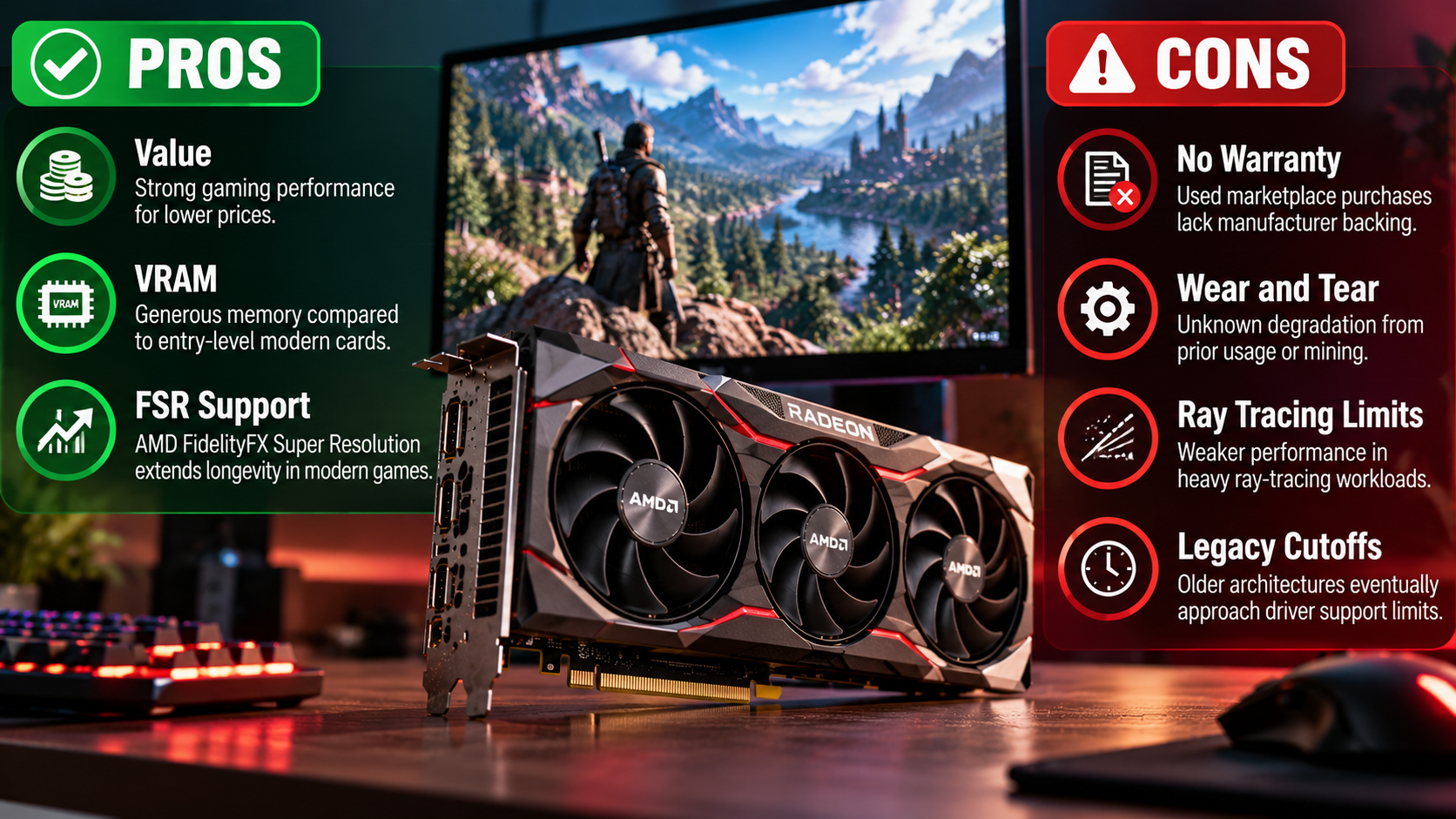
Older AMD GPUs can still be worth buying, but the right choice depends on your games, budget, and the condition of the card. A previous-generation Radeon GPU can deliver solid 1080p performance without the cost of a new graphics card.
However, age should never be the only factor. Check the GPU’s VRAM, driver support, power consumption, cooling condition, and current used-market price before buying. You can also check AMD’s official Radeon software and driver support resources to confirm compatibility for a specific model.
If the card handles your target games at acceptable settings and costs significantly less than a newer alternative, it can be a practical upgrade. On the other hand, a heavily used GPU with poor cooling or limited software support may not be worth the savings.
For buyers considering older AMD GPUs, the best approach is simple: compare real-world benchmarks, inspect the hardware carefully, and research current prices. A good used GPU is not necessarily the newest one. It is the one that provides the performance you need at a price that makes sense.