
Is There Any Point In Buying An AI Subscription?
Almost every productivity tool now promotes a paid premium tier. Open your browser, and you will find countless offers promising faster work through artificial intelligence. But is an AI subscription worth it, or are software companies simply benefiting from AI hype?
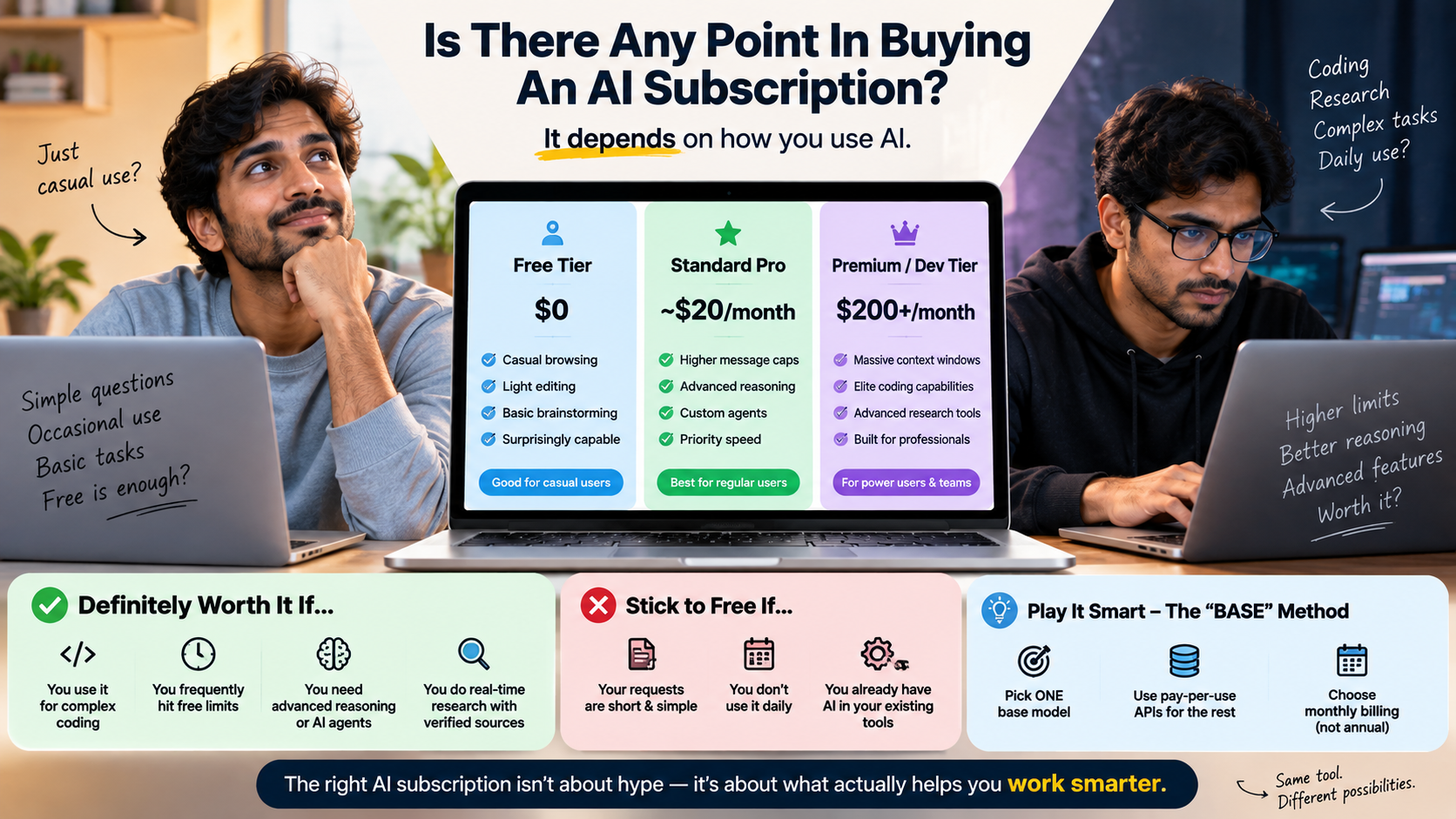
The answer depends on how you use these tools. Paying $20 or $30 every month can make sense when AI saves meaningful time on work you already do regularly. It makes less sense when you only use AI for occasional questions, basic proofreading, or simple email drafts.
Modern AI tools can support writing, coding, studying, research, file analysis, and planning, making them useful across many types of workflows. OpenAI’s ChatGPT FAQ However, having more features does not automatically mean a paid subscription provides better value. The real question is whether those features solve problems you regularly face.
This guide explains how to evaluate an AI subscription based on actual usage, productivity gains, workflow needs, infrastructure costs, and cheaper alternatives.
Is an AI subscription worth it?
An AI subscription worth it calculation should focus on measurable value rather than excitement about new features. Start by comparing the monthly price with the amount of useful time the tool saves. Comparing ChatGPT vs Gemini pricing can also help you understand what different free and paid plans offer. If a subscription saves two hours of productive work each week, its value can quickly exceed the monthly fee for many professionals.
Software developers may benefit from faster debugging and code generation. Writers can use AI for research, outlines, editing, and content refinement. Analysts may save time when summarizing documents or organizing information. However, occasional users may not receive enough additional value to justify paying every month.
The key question is simple: Does the paid plan solve a recurring problem that matters to you?
Before subscribing, consider your usage frequency, required features, output quality, and available free alternatives. A subscription should support a real workflow rather than become another recurring expense.
Calculating Your Personal Return on Investment
Track your AI usage for at least two weeks before committing to a paid plan. Record which tasks you complete with the tool and how much time each task takes without assistance.
Then compare your estimated time savings with the monthly subscription cost. Your personal calculation can use this simple formula:
Monthly value = hours saved × value of one working hour
For example, someone who values an hour of productive work at $20 and saves five hours monthly creates approximately $100 in potential time value. A $20 subscription could therefore make financial sense if those savings are genuine.
However, time saved is not automatically productive time. If AI simply gives you more time to browse social media, the economic benefit is smaller. Also consider accuracy, editing time, usage limits, and the cost of switching between tools.
The strongest case for an AI subscription appears when it repeatedly removes a genuine bottleneck from your work.
What is the 30% rule in AI?
The so-called 30% rule in AI should not be treated as a formal industry standard. It is better understood as a practical guideline for deciding how much responsibility to give an AI system.
One interpretation suggests that AI can handle a portion of a workflow while humans retain responsibility for judgment, verification, and final decisions. For example, AI can help create an initial outline, summarize information, or generate repetitive code. A person can then review the result and correct errors.
The exact percentage does not need to be 30%. Some tasks may benefit from much more automation. Other tasks require extensive human involvement because mistakes carry significant consequences.
This distinction matters because AI systems can produce incorrect information, missing context, or convincing but unsupported statements. Current benchmark research also documents that even advanced models can make reasoning and factual errors.
The useful principle is therefore human oversight, not an arbitrary percentage.
Applying the 30% Threshold to Daily Workflows
Instead of treating 30% as a strict limit, use it as a starting point for reviewing your workflow. Identify repetitive tasks where AI can reduce friction without controlling the final decision.
AI can assist with activities such as:
- Brainstorming initial ideas
- Creating document outlines
- Cleaning or restructuring notes
- Producing boilerplate code
- Summarizing lengthy material
- Drafting routine communications with a free AI writing tool when advanced features are unnecessary.
Human review should remain important when the task involves specialized knowledge, sensitive information, factual claims, or important business decisions.
For technical work, developers should test generated code before using it in production. Writers should verify factual claims and revise AI-generated language. Analysts should check calculations and confirm source data.
The percentage of AI involvement can change from task to task. A repetitive formatting task might be heavily automated. A legal, financial, medical, or strategic decision may require much closer human control.
The goal is not to minimize AI usage. The goal is to use automation where it creates value without surrendering necessary judgment.
Which AI subscription is worth the money?
There is no single AI subscription that provides the same value to every user. The right choice depends on your main workload, required features, usage limits, integrations, and budget.
For long-form writing and document analysis, tools such as Claude can be useful when their context handling and writing capabilities match your workflow. Before committing to Claude, consider its disadvantages of using Claude alongside the features you actually need. ChatGPT offers a broad set of capabilities across writing, reasoning, data analysis, and multimodal tasks. Developers may consider GitHub Copilot when integrated coding assistance saves substantial development time.
These examples should not be treated as permanent rankings. AI products change quickly, and pricing, models, limits, and features can change as well.
Instead of purchasing several overlapping subscriptions, identify your most important use case first. Then compare the tools that address that need.
The better question is not which AI subscription is universally best. It is which subscription provides enough useful functionality to justify its recurring cost for your specific work.
Selecting Tools Based on Primary Deliverables
Choose an AI service according to the work you actually need to complete. Start by identifying your most frequent professional tasks rather than choosing a platform because it is popular.
Developers may prioritize coding assistance, repository integration, debugging support, and context handling. Writers may care more about editing, research assistance, document length, and consistency. Analysts may prioritize data processing, file support, calculations, and visualization.
Avoid paying for several tools that perform essentially the same function. Exploring open-source AI models and tools can also help reduce dependence on overlapping paid services. Overlapping subscriptions can quietly increase your monthly software budget without providing proportional benefits.
Before subscribing, check:
- Monthly usage limits
- Available models
- File and data support
- Integrations with existing software
- Privacy and data-handling policies
- Cancellation terms
- API availability
- Features included in the free tier
A tool becomes more valuable when it fits naturally into your existing workflow. The fewer steps required to use it, the easier it is to turn its capabilities into consistent time savings.
Why are AI subscriptions so expensive?
AI subscriptions can cost more than ordinary software because AI services require substantial computing infrastructure. Large models run on specialized hardware and require significant processing resources for training and inference.
A subscription does not simply provide access to a piece of static software. Providers must operate data centers, maintain servers, purchase or rent specialized computing hardware, develop models, improve reliability, and maintain security systems.
Companies also spend money on research, engineering, data preparation, model evaluation, and safety work. Some services provide additional features such as document processing, image generation, coding tools, agents, or other computationally intensive functions.
The economics also change depending on how heavily users access the service. A person sending a few simple prompts creates different infrastructure demands from someone processing large documents or running complex workflows throughout the day.
That does not mean every subscription price is automatically justified. Providers still compete on pricing, features, limits, and user value.
The important point is that AI subscriptions pay for an ongoing computing service, not merely access to an application interface.
The Hidden Infrastructure Behind Computational Scale
Every AI request requires computing resources somewhere. Depending on the service, that processing may happen across large cloud data centers equipped with specialized hardware.
These facilities require electricity, networking equipment, cooling systems, physical space, maintenance, and hardware replacement. AI providers must also operate the software infrastructure that routes requests and manages users.
Beyond physical infrastructure, companies employ researchers, engineers, security specialists, product teams, and operations staff. Model development and evaluation add further costs.
This infrastructure helps explain why AI services differ from simple software subscriptions. A traditional application may perform most operations on your own computer. Cloud AI services often perform substantial computation on remote servers.
However, infrastructure cost alone does not tell you whether a subscription is worthwhile. The relevant question remains whether the service produces enough value for your particular usage.
If you use AI only a few times each month, a free service may be sufficient. If you use advanced features every working day, the additional cost may be easier to justify.
Understanding this difference can help you evaluate AI pricing without assuming that every premium feature deserves a monthly fee.
How to Avoid High AI Subscription Costs
You can reduce AI expenses without abandoning AI completely. The first step is to identify which features you actually use. Many people pay for premium limits or tools they rarely access.
Free AI services may be enough for simple questions, brainstorming, basic writing, and occasional research. Another option is pay-as-you-go API access when a provider offers usage-based pricing. This approach can make sense for users whose workloads are irregular.
Local AI models provide another alternative. Tools such as Ollama can run compatible open models directly on a computer, while Hugging Face provides access to models and local-app integrations.
Local models can offer privacy and avoid recurring provider fees, but they are not completely free in an economic sense. Your computer needs enough memory and processing capability, and larger models can require substantial hardware.
The best cost-saving strategy is therefore to match the payment model with your actual usage.
Migrating to Developer APIs and Local Software
Pay-as-you-go APIs can be useful when your AI usage changes from month to month. Instead of paying a fixed subscription, you pay according to the amount of processing you consume.
This approach works particularly well for developers building applications or users who make occasional automated requests. However, API costs depend on the provider, model, input size, output size, and frequency of requests. Heavy usage can become expensive, so monitoring remains important.
Local AI software offers another route. Hugging Face documents several ways to run models locally, including integrations with applications such as Ollama. Local execution can provide greater control and may avoid recurring API charges.
Before moving locally, check your computer’s RAM, storage, processor, and GPU capabilities. Larger models can require significant resources.
For many users, the most practical solution is a hybrid approach: use free services for simple tasks, paid subscriptions for high-value workflows, and local models where privacy or recurring costs matter most.
Frequently Asked Questions
Can free AI models replace paid subscriptions for casual users?
Yes, modern free models easily handle everyday personal needs. Base models manage casual writing, quick summaries, translation, and standard research questions without fees. Premium subscriptions cater to power users who require massive file uploads, advanced coding modules, and early access to newly released experimental models.
Do AI subscriptions automatically renew each billing cycle?
Yes, virtually all software platforms operate on automatic recurring billing schedules. Unless you actively cancel your account inside your billing settings before your current billing period concludes, your account will be billed automatically every thirty days or annually, depending on your chosen plan.
Can running local models completely replace cloud software?
Running open-source models locally works well for privacy and standard tasks, provided your hardware has a powerful graphics processor. However, top-tier cloud models still lead in massive context processing, multimodal analysis, and complex reasoning without consuming your computer’s memory or storage capacity.
What happens if I cancel my premium membership early?
When you cancel an active membership, you retain premium features until the final date of your paid billing period. After that date passes, your account reverts to the basic tier, meaning you lose priority bandwidth, specialized tools, and higher daily prompt thresholds.
Conclusion
An AI subscription worth it only makes sense when the tool delivers measurable value beyond what free alternatives provide. If you use AI every day for coding, research, writing, analysis, or other demanding work, a paid plan can justify its monthly cost by saving substantial time. If you use AI occasionally, paying for premium access is usually unnecessary.
The decision should come down to results, not hype. Track how much time the tool saves, which features you actually use, and whether a free tool can handle the same tasks. If the subscription consistently improves your workflow and saves more value than it costs, keep it. If it does not, cancel it and use a cheaper alternative. In short, AI subscription worth it is a practical question of measurable value, not brand popularity.