
Why Phones Are Running Out of Storage Faster Than Ever
Have you ever checked your phone and panicked after seeing a sudden “Storage Full” notification? If you wonder why phones are running out of storage faster than before, you are not alone. Modern smartphones handle larger files, more demanding apps, and higher-quality media than ever.
Everyday activities, such as taking photos, recording videos, downloading games, and streaming content, consume more space. Even apps running in the background can quietly reduce available storage. As a result, many users find themselves deleting files more frequently.
Understanding why phones are running out of storage can help you make smarter decisions about your next device. This guide explores the main causes of smartphone storage problems and compares 32GB, 128GB, 256GB, and 512GB capacities. You will also learn how to choose the right amount of storage for your needs.

Why Am I Running Out of Storage on My Phone So Fast?
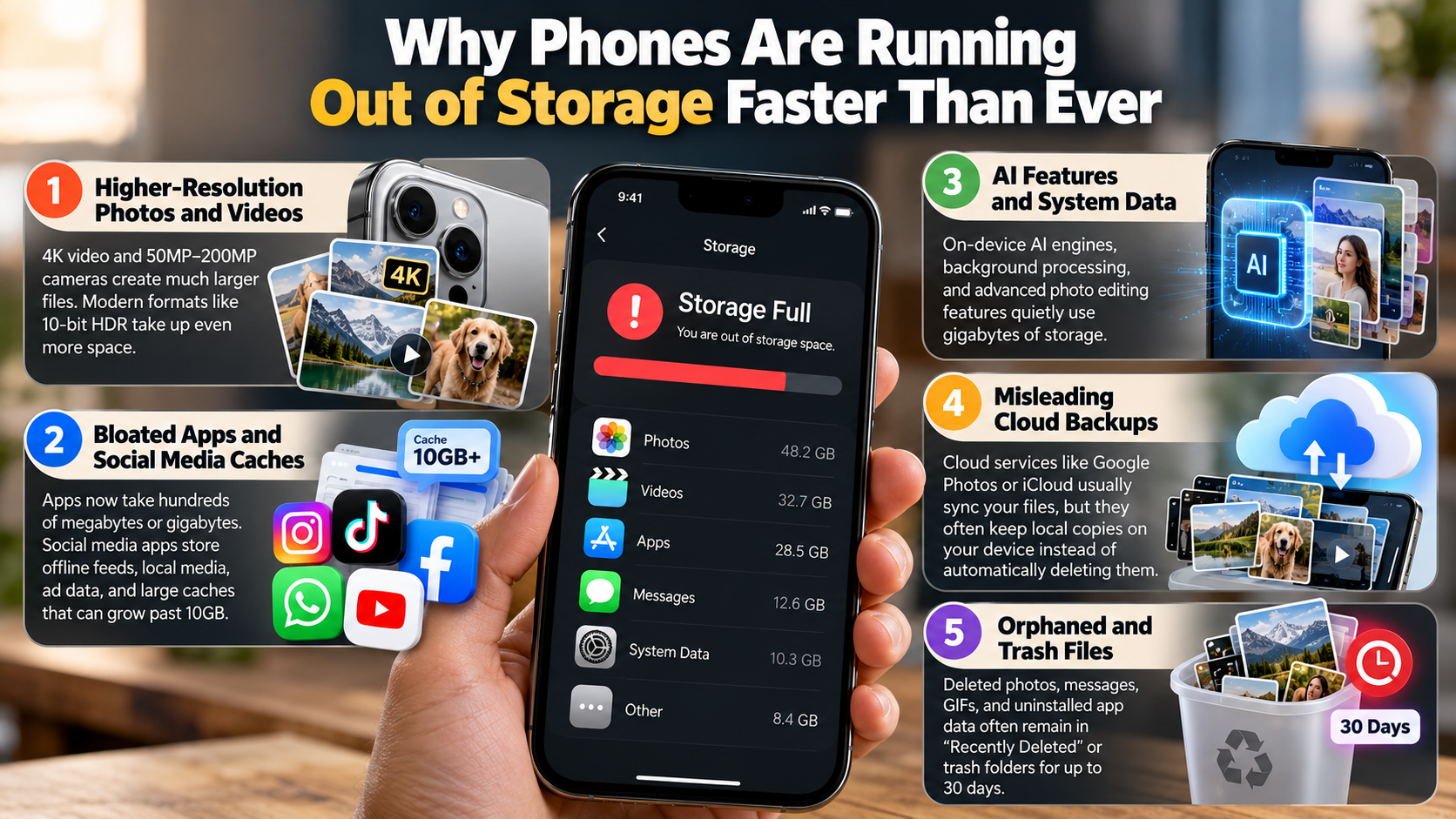
Understanding why phones are running out of storage starts with the growing size of everyday files. High-resolution photos, 4K videos, and graphics-heavy mobile games can consume gigabytes quickly. Meanwhile, operating systems and preinstalled apps occupy part of your phone’s advertised storage.
Apps also grow as developers introduce new features, richer graphics, and additional content. Messaging platforms save photos and videos, while streaming services download media for offline viewing. These files can gradually reduce your available space without obvious warning.
The Hidden Impact of App Caching and Media Bloat
App caches and temporary files are another reason phones run out of storage. Social media platforms, browsers, streaming services, and messaging apps store data locally to improve loading speeds. Over time, these files can occupy several gigabytes.
For example, repeatedly watching videos or browsing image-heavy feeds can increase cached data. Downloaded music, offline movies, and duplicate photos add even more pressure. This gradual buildup explains why phones are running out of storage even when users rarely install new apps.
Clearing unnecessary files can free up space, but cached data often returns during normal use. Review your apps regularly, remove unwanted downloads, and delete duplicate media. You can also enable cloud backups for photos and videos. These habits help control storage growth without sacrificing the features you use every day.
Is 512GB Overkill for a Phone?
Choosing a 512GB smartphone might seem excessive if you have always managed with less storage. However, 512GB is a practical choice for power users who store large amounts of content locally. It provides room for high-resolution videos, extensive photo libraries, offline downloads, and multiple demanding games.
This extra capacity reduces the need to delete files or uninstall apps frequently. You can keep more digital content available without depending on an internet connection. That convenience becomes especially valuable when traveling or working away from reliable Wi-Fi.
However, 512GB may be unnecessary for casual users. If you mainly browse social media, send messages, take occasional photos, and use cloud storage, a smaller capacity may be sufficient. Consider your daily habits before paying extra for additional space. The best storage option depends on your usage, budget, and how long you plan to keep your phone.
Who Actually Needs Half a Terabyte of Space?
A 512GB phone makes the most sense for people who regularly work with large files. Content creators, mobile gamers, and frequent travelers can benefit significantly from the extra capacity. It allows them to store projects, games, movies, and personal media without constantly checking available space.
Recording lengthy 4K videos can consume substantial storage. Keeping multiple large games installed can also use dozens of gigabytes. Travelers may prefer downloading playlists, films, and maps before leaving home.
A larger capacity is particularly useful when mobile data is limited or internet access is unreliable. It keeps important files accessible offline and reduces the need for frequent transfers.
Before upgrading, check how much storage you currently use. If you regularly approach your current limit, 512GB could be worthwhile. Otherwise, 256GB may offer a better balance between capacity and cost.
Is 128GB Better Than 256GB?
When comparing 128GB and 256GB smartphones, the better choice depends on your storage habits and budget. However, 256GB generally offers more flexibility for modern smartphone users. It doubles the advertised capacity of a 128GB device, giving you more room for apps, photos, videos, and downloads.
A 128GB phone can still work well for people with lighter storage needs. It suits users who rely on cloud backups, stream most of their media, and regularly remove unnecessary files. However, understanding the differences between cloud storage and external hard drives can help you choose a suitable backup solution for your photos, videos, and other files. Large games, high-resolution videos, and growing app caches can still make that capacity feel restrictive.
This growing demand for space is another reason why phones are running out of storage faster than many users expect. Choosing 256GB reduces the need to manage storage constantly. You can keep more files locally and download additional content when needed.
The price difference also matters. Compare the cost of each configuration before deciding. If the upgrade is affordable, 256GB can provide valuable convenience and flexibility throughout your phone’s lifespan.
Future-Proofing Your Device for Years to Come
Many people keep their smartphones for several years, making storage capacity an important purchasing decision. Some manufacturers now provide extended software support, with certain models offering updates for five to seven years. However, support periods vary by device and manufacturer.
During that time, apps may grow larger, operating systems may require more space, and your personal media library may expand. A 128GB phone could become restrictive if your usage increases. Choosing 256GB gives you more room to accommodate these changes.
Extra storage does not automatically make a phone faster or guarantee a longer lifespan. Performance also depends on the processor, memory, software, and overall device condition. Still, sufficient free space makes everyday storage management easier.
If you plan to keep your next phone for several years, consider your future needs rather than your current usage alone. A 256GB smartphone offers a useful middle ground for people who want more flexibility without paying for 512GB.
Is 32GB a Lot for a Phone?
In today’s smartphone market, 32GB is very limited storage for most users. Although it may support basic tasks, it leaves little room for modern apps and personal files. The operating system and preinstalled software can occupy a substantial portion of the advertised capacity.
Depending on the device, system software may consume around 12GB to 15GB or more. That leaves significantly less space for photos, videos, messages, and downloads. App updates and temporary files can reduce the remaining capacity even further.
A 32GB phone may still suit someone who mainly makes calls and sends text messages. However, installing several apps or recording frequent videos can quickly create storage problems. Some devices may also struggle to install updates when free space becomes limited.
Before buying a phone with 32GB, consider whether its storage can meet your everyday needs. For most modern users, 64GB is a more practical starting point, while 128GB or 256GB provides greater flexibility.
Navigating Extreme Space Limitations Every Day
Using a 32GB smartphone often requires careful storage management. You may need to remove files regularly, uninstall unused apps, and avoid keeping large downloads on your device. Even routine activities can become frustrating when only a small amount of space remains.
Cloud storage can help by moving photos and videos away from your phone’s internal memory. However, cloud services may require a subscription, an internet connection, or additional time for uploads. They also do not eliminate the storage needed for apps and system files.
To make the most of a 32GB device, follow these practical steps:
- Remove unused apps: Uninstall applications you no longer need.
- Delete unnecessary downloads: Remove old videos, documents, and offline content.
- Review app storage: Clear caches where your phone provides that option.
- Back up photos: Transfer important media to a computer or cloud service.
- Use lighter apps: Choose less demanding alternatives when available.
These habits can help maintain enough free space for essential tasks. However, they cannot eliminate the limitations of a small storage capacity. If your phone constantly displays storage warnings, understanding why phones are running out of storage can help you choose a more suitable device.
Final Thoughts
Smartphone storage fills up quickly because apps, operating systems, photos, videos, and cached files continue to demand more space. Understanding why phones are running out of storage helps you identify the causes and choose a device that matches your needs.
A 32GB phone is restrictive for most modern users, while 128GB may suit people with lighter storage requirements. For many smartphone owners, 256GB offers a practical balance between capacity, convenience, and cost. Meanwhile, 512GB is worth considering for content creators, mobile gamers, and people who store extensive media libraries.
Before upgrading, review your current storage usage and remove unnecessary files. Android users can follow Google’s official guide to free up storage on an Android device. iPhone users can also learn how to manage photo and video storage with Apple Support.
Choosing the right storage capacity can reduce constant cleanup, provide room for future files, and make your smartphone more convenient to use.