
These 4 Cool New Google Wallet Features Make It Easier to Track Your Purchases
Keeping track of everyday expenses can be challenging when paper receipts pile up and digital confirmations disappear into your inbox. Fortunately, several reported Google Wallet features aim to make purchase records easier to manage. These updates could also help users organize payment notifications, simplify online checkout, and find important information more quickly. For additional ways to manage everyday spending, explore these practical money-saving tips to help you make better financial decisions.
As cashless payments become more popular, monitoring your spending becomes increasingly important. Even small purchases, such as coffee, groceries, and transport, can add up over time. Clear transaction details and organized purchase records can help you review expenses, identify unfamiliar charges, and maintain better financial records.
In this guide, we explore four reported Google Wallet features, practical shortcuts for opening the app, and the differences between Google Wallet and Google Pay in India. We also explain how Google Wallet works and share essential security tips to help protect your information.
What Are the Latest Google Wallet Features?
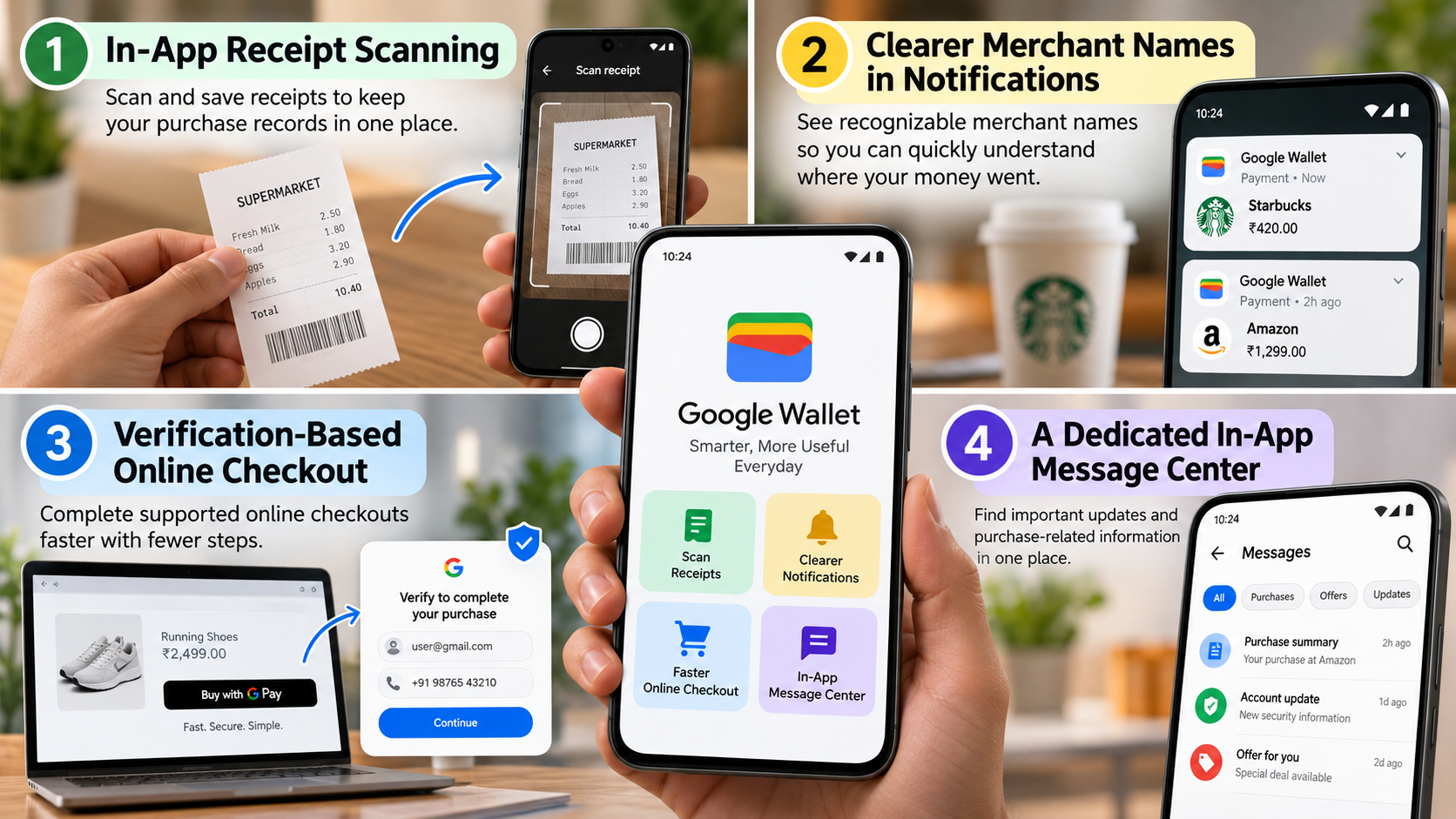
Recent reports highlight four potential Google Wallet improvements that could make managing purchase information more convenient. These features include receipt scanning, clearer merchant names in transaction notifications, verification-based online checkout, and a dedicated in-app message center.
However, Google may offer these features differently depending on your device, region, and the services you use. Let’s examine what each feature could offer and what you should know before relying on it.

1. In-App Receipt Scanning
Paper receipts often disappear when you need them most. An in-app receipt-scanning feature could help users create digital copies and organize purchase records in one convenient place.
For example, you could use scanned receipts to track business expenses, keep proof of purchase, manage warranty documents, or prepare tax records. Digital copies can also reduce paper clutter and make important information easier to find.
However, scanning a receipt does not automatically mean Google Wallet will match it with your bank transactions. Similarly, you should not assume that the feature includes comprehensive budgeting or expense-reporting tools.
Before relying on receipt scanning for important records, check whether your version of Google Wallet offers this option. If you cannot find it, consider using a dedicated receipt-scanning app to organize your purchases.
2. Clearer Merchant Names in Notifications
Clear merchant names can help you recognize transactions without opening another banking app. Reported improvements to payment notifications aim to show users where their money went and make purchase reviews more convenient.
For instance, a notification that displays a familiar retailer’s name can provide more useful information than one that shows only an unfamiliar payment processor. Clearer descriptions may therefore help you review purchases and identify transactions that require further investigation.
However, payment systems and merchants determine which transaction details appear in notifications. As a result, some descriptions may still look unfamiliar or confusing.
If you notice a suspicious charge, open the full transaction details and compare them with your bank statement. Contact your bank or card issuer promptly if you suspect unauthorized activity. Do not rely on a notification alone to determine whether a payment is legitimate.
3. Verification-Based Online Checkout
Online shopping often requires customers to enter the same personal information repeatedly. Updates to supported Google Pay checkout experiences in Chrome for Android aim to reduce these repetitive steps.
Under eligible conditions, shoppers may complete supported checkout flows without using the standard Payment Request interface. Depending on the checkout process, the system may use previously provided information and request verification through details such as a name, email address, or phone number.
This approach could make online shopping faster by reducing the information users need to enter manually. It may prove especially convenient when shoppers use their phones to complete purchases.
However, the experience depends on the merchant, browser, available payment methods, and applicable security requirements. Google does not offer this as a universal Google Wallet feature that works on every website or shopping app.
To make checkout smoother, keep your payment information up to date and follow the verification instructions that appear during the transaction.
4. A Dedicated In-App Message Center
Important updates can easily get lost among everyday phone notifications. A dedicated message center could help users find relevant alerts by bringing supported information together inside the app.
A centralized location may reduce the need to search through notification history or navigate multiple screens. It could also make it easier to revisit important updates whenever necessary.
Some reports suggest that this section might eventually display purchase summaries. Such a feature could help users review purchase-related information without searching through separate records.
However, Google has not clearly established the exact functionality and availability of this reported message center for all users. Treat purchase summaries and other advanced options as reported or potential capabilities rather than features that everyone can access.
Check the latest Google Wallet release information and explore your app settings to see which options your device supports.
How to Access Google Wallet More Easily
You don’t need to search through your app drawer every time you want to open Google Wallet. Depending on your Android phone and software version, you can use several shortcuts to access the app more quickly. You can also make your Android home screen more useful by organizing frequently used apps and placing important shortcuts within easy reach.
Try these methods:
- Add a home screen shortcut: Open your app drawer, find Google Wallet, and add its icon to your home screen if your launcher supports this option.
- Check Quick Settings: Swipe down from the top of your screen and look for a Wallet tile. If you find one, open the tile editor and add it to your Quick Settings panel.
- Review lock screen shortcuts: Some Android devices let you place a wallet shortcut on the lock screen for faster access.
- Explore hardware-button shortcuts: Certain phones let you launch a wallet or another selected app through a physical-button gesture. Check your device settings to see whether your phone supports this option.
Android phones do not all support these shortcuts in the same way. If you cannot find a particular setting, consult your phone manufacturer’s instructions.
Remember that opening Google Wallet does not automatically enable contactless payments. You still need compatible hardware, a supported payment method, and the required security settings. In India, payment options also differ from those available in countries where Google Wallet supports contactless bank-card payments.
Is Google Pay a Wallet or UPI?
Google Pay and Google Wallet serve different purposes, particularly in India. Although Google owns both services, they offer different functions and support different types of transactions.
Google Pay plays a major role in India’s Unified Payments Interface (UPI) ecosystem. Users can scan QR codes to pay merchants, transfer money between bank accounts, and send money to other people through supported services. However, before making a payment, it is important to avoid scanning an unknown QR code because scammers can use deceptive codes to direct users to fraudulent websites or payment requests.
Google Wallet, by contrast, focuses on storing digital items such as loyalty cards, boarding passes, event tickets, and other eligible passes. Its available features depend on the country and participating service providers.
The following table highlights their main differences.
| Feature | Google Pay in India | Google Wallet in India |
|---|---|---|
| Primary purpose | Digital payments | Digital passes and supported credentials |
| UPI bank transfers | Supported | Not its primary function |
| UPI QR-code payments | Supported | Not its primary function |
| Loyalty cards and tickets | Depends on available services | Supports eligible passes |
| Contactless bank-card payments | Depends on the supported payment service | Not generally available as a Google Wallet payment feature in India |
For everyday UPI transactions, Google Pay remains the relevant Google service in India. Google Wallet, meanwhile, can help you organize eligible digital passes and credentials.
Importantly, the two apps are not interchangeable. Before adding a payment card, transit pass, or another digital item, check Google’s official documentation to confirm that your country and service provider support it.
What Is Google Wallet?
Google Wallet is a digital wallet from Google that lets users store and access supported digital versions of everyday items on compatible phones and smartwatches. As digital wallets continue to evolve, understanding how Google Wallet could solve digital identity problems can offer additional insight into the future of digital credentials and identity verification.
Depending on your location and the participating provider, you may be able to store loyalty cards, boarding passes, event tickets, transit passes, access credentials, and eligible identification documents. In supported countries, Google Wallet also lets users add eligible debit or credit cards for contactless payments.
Near Field Communication (NFC) technology enables many contactless payments. NFC allows compatible devices to communicate with payment terminals over a short distance. When your country and payment service support this functionality, you can use an eligible card through Google Wallet instead of presenting the physical card.
Here are some common ways to use the app:
- Store boarding passes and tickets: Keep eligible travel documents and event tickets accessible on your phone.
- Organize loyalty cards: Present supported digital membership cards at participating retailers.
- Access transit passes: Use eligible digital transit passes where local services support them.
- Make contactless payments: Pay with supported bank cards in eligible countries.
- Keep digital credentials together: Store supported passes and credentials in one convenient location.
However, Google Wallet cannot accommodate every physical card or document. Availability depends on your country, device, issuer, merchant, and service provider. Before relying on a particular feature, confirm that the relevant service supports it in your region.
Is Google Wallet a Good Idea?
Google Wallet can prove useful if you regularly use digital tickets, loyalty cards, or other supported passes. By keeping these items together, the app can reduce the number of physical cards you carry and save you from searching through emails for important documents.
In countries that support contactless payments, Google Wallet can also make everyday transactions more convenient. For eligible payments, Google uses security technologies such as tokenization to help protect sensitive payment information.
Tokenization allows eligible payment transactions to use a virtual account number instead of exposing your actual card number to the merchant. This approach helps reduce the exposure of your card details during supported transactions.
Nevertheless, a digital wallet cannot protect you against every security risk. An insecure device, a compromised Google Account, or a convincing scam could still put your information at risk. Follow these precautions to improve your security:
- Use a secure screen lock: Set a strong PIN, password, or supported biometric authentication method.
- Protect your Google Account: Keep your recovery information current and enable the security protections available to you.
- Check supported payment methods: Confirm that your bank, card, and country support the features you intend to use.
- Review your transactions: Check bank statements and payment notifications regularly to identify unfamiliar activity.
- Report suspicious payments: Contact your bank or card issuer promptly if you suspect unauthorized activity.
Also, remember that organizing purchase records does not replace budgeting. Google Wallet may help you access supported digital items and payment information, but you should continue reviewing your bank records to understand your overall spending.
Final Thoughts
The four reported Google Wallet features aim to make purchase information easier to manage, simplify supported online checkout, and improve access to relevant updates. Receipt scanning and clearer merchant descriptions could prove particularly useful for people who want to keep better track of everyday purchases.
However, Google may not offer every reported feature to all users. Before relying on receipt scanning, a dedicated message center, or other newly reported capabilities, check your app and consult the official Google Wallet Help Center for the latest information about supported features and services.
For users in India, understanding the difference between Google Pay and Google Wallet remains especially important. Google Pay handles everyday UPI payments, while Google Wallet primarily helps users organize supported digital passes and credentials.
Ultimately, Google Wallet can make certain everyday tasks more convenient, but it should complement rather than replace careful financial record-keeping and good digital security habits.