
Should Your Physical Keyboard Be Flat Or Tilted?
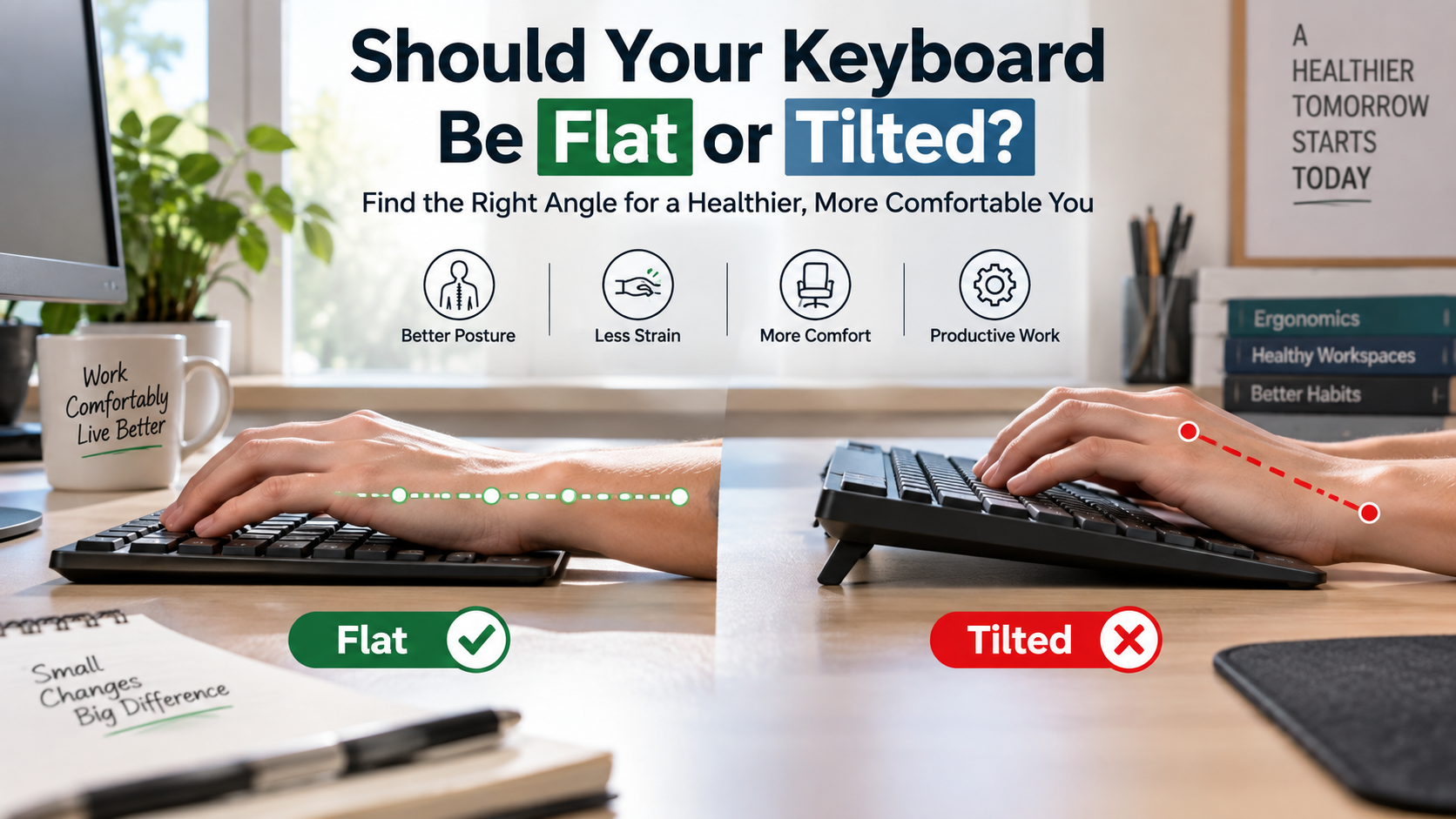
When deciding whether your keyboard should be flat or tilted, the small plastic feet underneath matter more than you might expect. Many people flip them up automatically without considering how the angle affects their typing posture. After several hours, an unsuitable keyboard position can contribute to wrist and forearm discomfort.
OSHA recommends maintaining a neutral wrist position when working at a computer, making keyboard height and positioning important parts of an ergonomic workstation.
So, should your keyboard be flat or tilted for better ergonomics? For most users, a flat keyboard or slight negative tilt provides a comfortable starting point. Raising the rear edge can increase wrist extension, especially when combined with a tall keyboard and high desk.
Your desk height, chair position, keyboard thickness, and typing style also influence comfort. There is no single angle that works for everyone.
This guide explains keyboard flat or tilted setups, positive and negative tilt, 96% layouts, gaming positions, and QWERTY. You will learn how keyboard angle affects posture and how to create a more comfortable workspace.
Is it better to have my keyboard angled or flat?
For most users, a flat keyboard or slight negative tilt provides a comfortable starting point. If you are choosing a new board for work, learning how to pick the perfect mechanical keyboard for your office can also help you find a comfortable design. Raising the rear edge can increase wrist extension, especially when combined with a tall keyboard and high desk.
A flat keyboard allows your hands to approach the keys with less upward bending. That can reduce unnecessary tension during long typing sessions. However, there is no single keyboard angle that works perfectly for everyone.
Your desk height, chair position, keyboard thickness, and forearm posture all matter. A flat keyboard may feel ideal for one person but uncomfortable for another. The goal is not simply to achieve zero degrees. Instead, aim for a position that keeps your wrists relaxed and your forearms supported.
If your wrists bend upward, lower the keyboard or remove its rear feet. Then adjust your chair and desk height until your hands feel naturally aligned.

The Problem With Positive Tilt
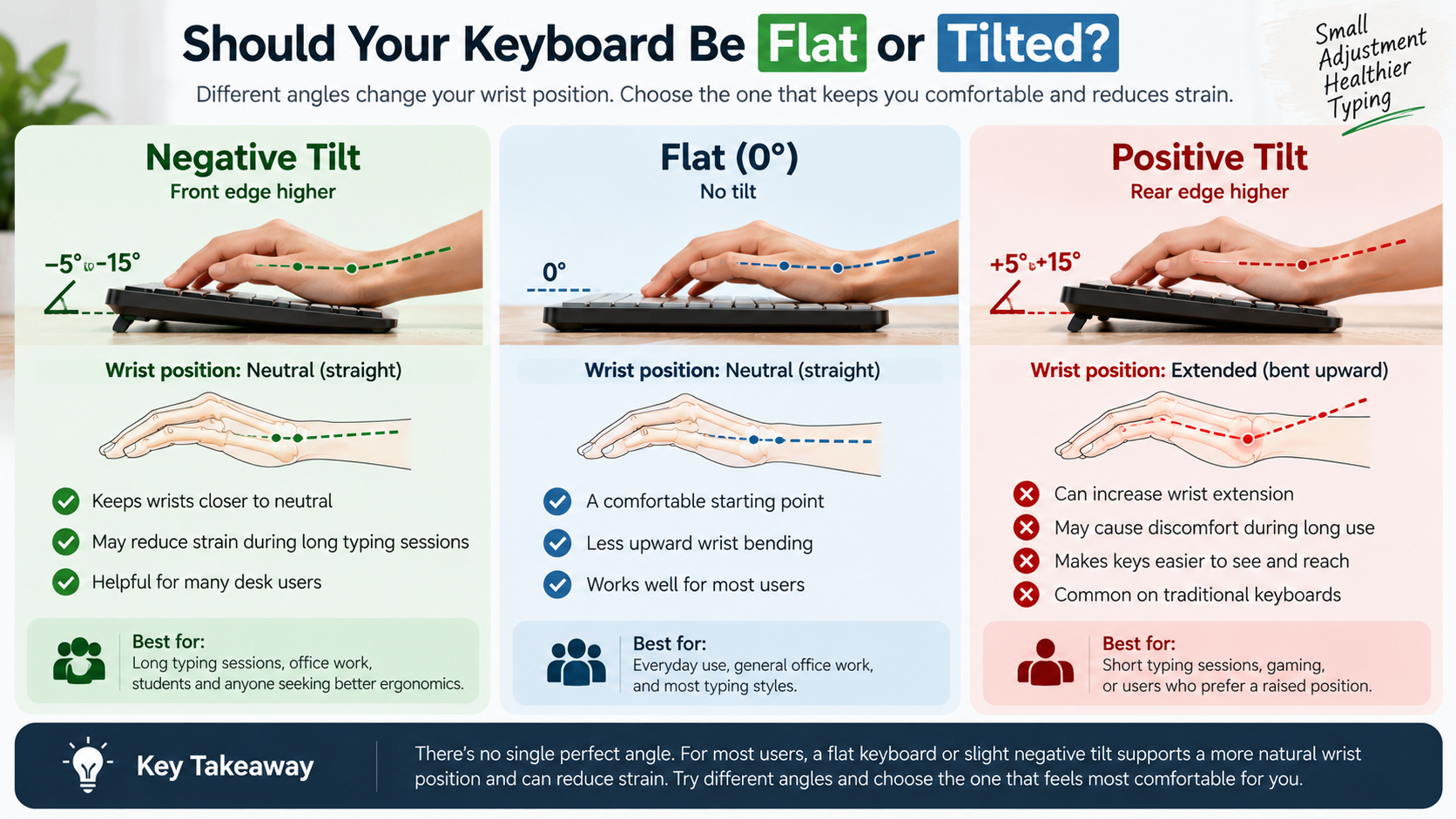
Raising the rear feet creates a positive keyboard tilt. This design is common on traditional keyboards because it can make the keys easier to see and reach. However, it also encourages your wrists to bend backward during typing.
That position may become uncomfortable during long work sessions. The issue is especially noticeable when a tall keyboard already sits high on the desk. Adding more rear elevation can increase the amount of wrist extension required to reach the keys.
Positive tilt is not automatically harmful for everyone. Short sessions may cause no problems at all. Comfort depends on your individual posture, keyboard height, and typing technique.
If the raised feet make your wrists feel tense, try folding them down. A lower keyboard can provide a more neutral hand position. You can also adjust your chair or desk height to improve alignment.
The best keyboard flat or tilted setup is the one that keeps your hands relaxed without forcing your wrists into an extreme angle.
Is it better to tilt your keyboard?
Whether it is better to tilt your keyboard depends on which direction you tilt it. A positive tilt raises the rear edge and can increase wrist extension. A negative tilt does the opposite by raising the front edge slightly.
For many seated users, a gentle negative angle can feel more natural. It lets the forearms slope downward toward the keyboard while keeping the wrists closer to neutral. This can also reduce the need to rest your wrists against the desk while typing.
Still, negative tilt is not an automatic solution. The correct position depends on your keyboard height, desk depth, chair setup, and personal comfort. Some users prefer a completely flat board, while others benefit from a slight negative angle.
The important point is to avoid forcing your hands into an awkward position. Try several keyboard flat or tilted positions and pay attention to wrist tension during longer sessions.
Adopting a Negative Incline
A negative keyboard tilt raises the front edge slightly while lowering the rear edge. This position can help keep your wrists closer to neutral when your forearms slope downward toward the desk.
It can be particularly useful for users who experience discomfort with traditional positive-tilt keyboards. Instead of bending your hands upward to reach the keys, your fingers can approach from a more natural angle.
You do not need an aggressive slope. A small adjustment is often enough to determine whether negative tilt feels better. An adjustable keyboard tray can make experimentation easier. You can also use a suitable desk surface or keyboard support designed for angle adjustment.
Pay attention to your entire posture rather than your wrists alone. Your shoulders should remain relaxed, and your elbows should stay in a comfortable position. Avoid reaching too far forward.
If a negative incline increases discomfort, return to a flat position. The ideal keyboard flat or tilted angle should support your natural posture rather than force your hands into one fixed position.
What is a 96% keyboard missing?
A 96% keyboard keeps most of the functionality of a full-size keyboard while using less space. Its main difference is the compressed layout. Unlike a traditional full-size board, it removes much of the empty spacing between key groups.
A typical 96% keyboard still includes a number pad, function row, arrow keys, and most navigation functions. However, keys such as Insert, Home, End, Page Up, Page Down, and Delete may be repositioned. Some layouts also remove less frequently used keys or place them behind function layers.
The exact key count varies between manufacturers, so there is no universal 96% layout. That makes checking the specific keyboard layout important before buying one.
The main benefit is desk space. You get much of the functionality of a full-size board without its wider footprint. This can leave more room for a mouse or other accessories while preserving familiar productivity features.
Whether you choose a 96% keyboard or another layout, your keyboard flat or tilted position should still allow comfortable access to every key.
Compressed Layout Trade-offs
The biggest advantage of a 96% keyboard layout is also its main compromise. Manufacturers compress the keys to reduce the board’s overall footprint. This leaves less visual and physical separation between different key groups.
Users who regularly work with spreadsheets may appreciate keeping a dedicated number pad. Programmers and office workers can also retain many familiar navigation functions. However, relocated keys may require an adjustment period.
The exact experience depends on the keyboard design. Some models use a compact navigation column, while others move several keys into unfamiliar positions. Secondary function layers can also change how frequently used commands are accessed.
Before switching, check the board’s layout carefully. A few minutes of research can prevent frustration later.
Once you adapt to the spacing, a 96% keyboard can offer an effective balance between functionality and desk efficiency. It is especially useful when you want more mouse space without giving up the number pad or function row.
Regardless of layout, remember that keyboard angle and wrist position remain important for comfortable daily use.
Why do pro gamers tilt their keyboard?
Professional gamers often rotate their keyboards sideways to create more room for mouse movement. This is especially common in competitive first-person shooters. Players may also consider why gamers prefer wired keyboards over wireless ones when building a competitive setup. Low mouse sensitivity can require broad arm movements for precise aiming.
Turning the keyboard frees valuable desk space beside the mousepad. Instead of allowing the keyboard to occupy the area needed for large swipes, players move it toward the monitor or side of the desk.
The angle also reflects individual preference. Some players find that a rotated keyboard gives their left arm a more comfortable position. Others simply prefer the extra mouse clearance.
There is no universal gaming angle. Some players use a slight rotation, while others position the keyboard at 45 degrees or more. Extreme angles are usually based on personal setup requirements rather than a proven ergonomic rule.
For competitive gaming, the best keyboard flat or tilted orientation is the one that allows comfortable movement, reliable key access, and enough space for accurate mouse control.
Competitive Ergonomics and Comfort
Competitive gaming setups often prioritize mouse movement and desk space. A sideways keyboard can prevent the keyboard from interfering with broad mouse swipes. For players using wireless peripherals, how to boost your wireless keyboard’s lifespan with one easy habit can also be useful when maintaining a gaming setup.
Tournament desks can also be cramped. Rotating the board gives players more control over how their limited surface area is used. It may also let the left arm sit closer to the body’s natural position.
However, a dramatic keyboard angle is not automatically more ergonomic. A 45- to 90-degree rotation can work well for some players but feel awkward for others. The position should not force excessive wrist bending or shoulder rotation.
Comfort remains important during long gaming sessions. Players should keep their shoulders relaxed and avoid excessive reaching. The keyboard, mouse, chair, and monitor should work together as one setup.
Competitive habits often develop from personal preference and available desk space. What works for a professional player may not suit your workstation.
Your preferred keyboard flat or tilted setup should always support comfortable movement rather than copy another player’s exact position.
Why are we still using QWERTY?
We still use QWERTY because of history, compatibility, familiarity, and established standards. Christopher Sholes developed the early QWERTY arrangement for mechanical typewriters in the nineteenth century. Its design was influenced by the mechanical limitations of early typewriters.
As typewriters became widespread, large numbers of people learned QWERTY. Businesses, schools, manufacturers, and publishers gradually built systems around it. Later, computers adopted the familiar layout instead of forcing users to learn an entirely new system.
Alternative layouts, including Dvorak and Colemak, can reduce finger movement for some typing patterns. Yet changing layouts comes with a significant learning cost. Users must develop new muscle memory and may temporarily lose typing speed.
Modern devices also reinforce QWERTY through compatibility. The same basic arrangement appears across laptops, desktop keyboards, phones, and public computers.
QWERTY therefore survives for practical reasons. Its dominance does not necessarily mean it is the most efficient layout. It means the world has invested heavily in keeping the existing standard.
The Power of Muscle Memory
Muscle memory plays a major role in keeping QWERTY popular. Experienced typists can enter words without consciously thinking about each individual key. Years of repetition make the layout automatic.
Switching to another arrangement can temporarily disrupt that ability. Even if an alternative layout offers potential efficiency benefits, users must spend time rebuilding their typing habits.
This creates a practical barrier for individuals and organizations. A person who types quickly on QWERTY may not want to sacrifice productivity while learning another system. Businesses also benefit from maintaining a familiar keyboard standard across employees and devices.
QWERTY’s widespread availability creates another advantage. You can sit at almost any computer and immediately understand the basic layout. That consistency matters in schools, workplaces, libraries, and shared environments.
Alternative layouts remain useful for people who want to experiment with typing efficiency or comfort. However, their smaller user base means they require more personal commitment.
Just as keyboard flat or tilted choices depend on personal comfort, keyboard layouts also involve individual preferences. QWERTY remains popular because familiarity and compatibility are difficult to replace.
Frequently Asked Questions
What is the most ergonomic typing angle for your hands?
The most ergonomic angle is a neutral or slight negative tilt where your wrists remain completely straight. Your forearms should angle slightly downward toward the floor, allowing your hands to float naturally above the keys without resting hard on the desk. This orientation minimizes internal tendon friction and eliminates pressure on the median nerve during long shifts.
Should I use a wrist rest while typing at my desk?
You should only use a wrist rest to support your palms between typing bouts, never while actively striking keys. Resting your wrists while typing creates contact pressure on vulnerable soft tissues and restricts natural side-to-side arm movements. Instead, let your arms float while working, then rest your lower palm on the pad during pauses.
Does a flat keyboard improve your typing speed?
A flat keyboard improves typing speed indirectly by lowering muscular fatigue and strain over time. While the layout angle does not instantly boost words per minute, it keeps your fingers closer to home position without straining forearm extensors. Reduced fatigue allows you to maintain peak typing accuracy and consistent speed across full workdays.
How do low-profile keyboards compare to tilted mechanical boards?
Traditional mechanical keyboards stand tall, frequently tempting users to flip out the kickstands or bend their wrists backward to reach top rows. If you are comparing keyboard types for different uses, mechanical vs membrane keyboards for gamers offers another useful perspective. A low-profile board reduces the need for steep angles or bulky wrist pads.
Conclusion
Optimizing your workstation is one of the simplest ways to improve everyday typing comfort. As we have explored, choosing whether your keyboard is flat or tilted can affect wrist position and overall posture.
For many users, a flat keyboard is an effective starting point. A gentle negative incline may also feel comfortable. By contrast, raising the rear edge can increase wrist extension, especially when combined with a tall keyboard and high desk.
Your setup should also reflect how you use your keyboard. A 96% layout can save desk space while retaining many full-size features. Competitive gamers may rotate their boards to create more room for large mouse movements. Meanwhile, QWERTY remains dominant because familiarity and compatibility are difficult to replace.
Take a moment to inspect your workstation. Fold down the kickstands if they make your wrists bend upward. Then adjust your chair, desk, keyboard, and mouse until your arms feel relaxed.
Ultimately, there is no universal answer to the keyboard flat or tilted question. Start flat, experiment with a slight negative angle, and choose the position that feels natural during extended use.
Small changes can make long typing sessions more comfortable and sustainable.