
Secret Codes on Smartphone to Unlock Hidden Features
Have you ever wondered whether your smartphone has hidden features that you can access without installing additional applications? Secret codes on smartphone to unlock hidden features let you explore built-in diagnostic menus, check hardware information, and inspect network settings. These special dialer combinations provide access to functions that manufacturers do not always display in standard settings.
Most smartphones include diagnostic utilities for identifying hardware and connectivity problems. However, many users never discover these tools. Some codes display device information, while others open testing panels or carrier-related settings.
Using secret codes on smartphone to unlock hidden features can help you investigate common device issues. You can check your IMEI number, examine cellular signal strength, and test supported hardware components. Certain Samsung devices also provide additional diagnostic options.
However, these codes do not work universally. Their availability depends on your smartphone manufacturer, operating system, carrier, and region. This guide explains useful smartphone codes, their functions, and important precautions before using them.
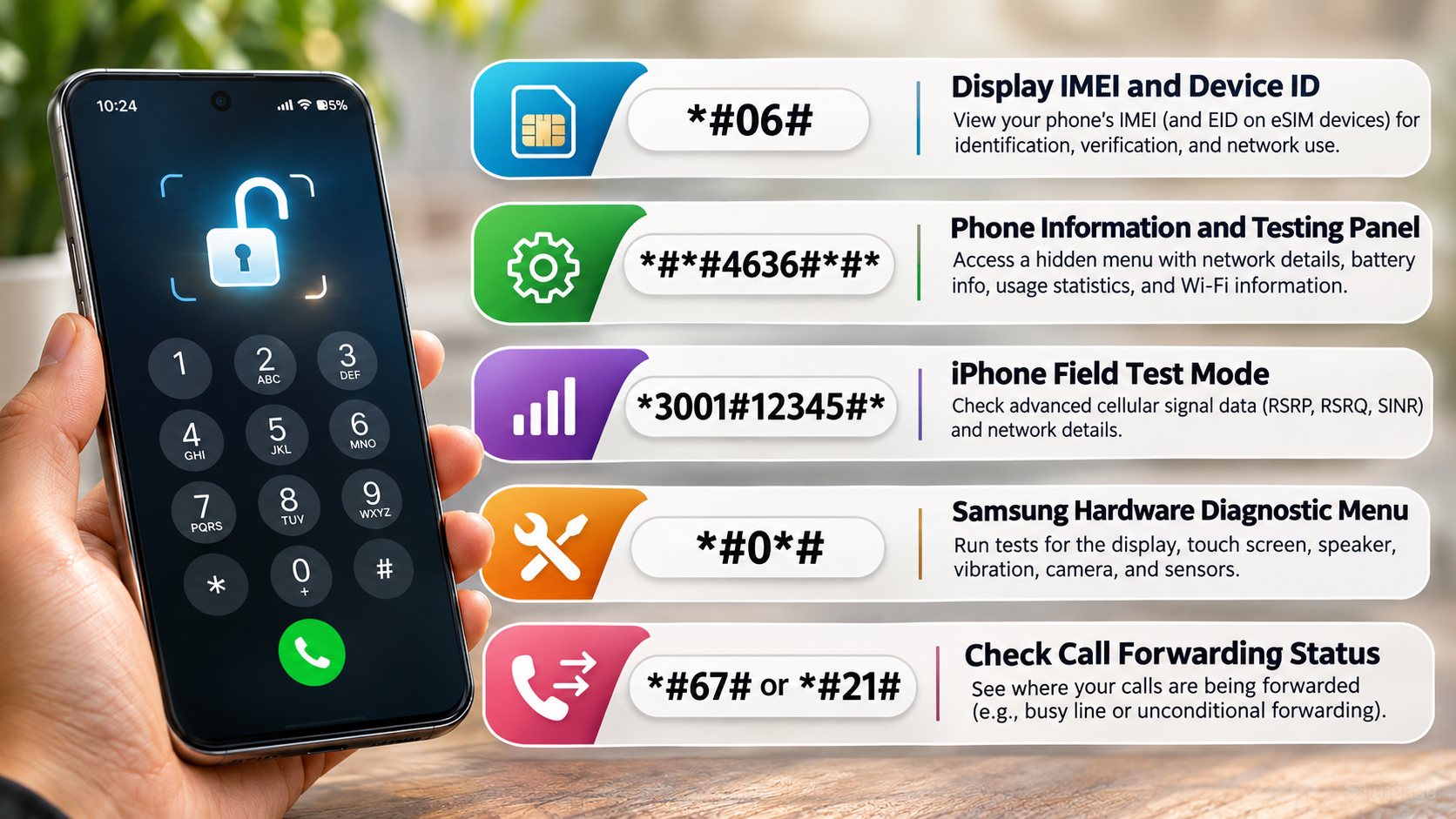

1. *#06# — Display IMEI and Device Identification
The *#06# code is among the most widely supported smartphone dialer combinations. It displays your device’s International Mobile Equipment Identity (IMEI) number. This unique identifier helps distinguish your smartphone from other cellular devices.
Most modern Android smartphones and iPhones support this combination. Some eSIM-compatible devices may also display an Embedded Identity Document (EID) number. This identifier relates to the phone’s embedded SIM functionality.
You can use the IMEI number for several practical purposes:
- Device identification: Check your smartphone’s unique identification number.
- Authenticity verification: Compare the IMEI with available manufacturer records.
- Lost or stolen phones: Provide the IMEI to your carrier or relevant authorities when reporting a missing device.
- Network compatibility: Check whether a carrier supports your device using its IMEI.
This is one of the most useful secret codes on smartphone to unlock hidden features because it provides essential device information without additional applications.
Remember that an IMEI number does not directly track your phone’s location. Location tracking requires separate services or authorized network assistance. Avoid sharing your IMEI publicly because it is a sensitive device identifier.
2. *#*#4636#*#* — Phone Information and Testing Panel
The *#*#4636#*#* code opens a hidden testing interface on many Android smartphones. It provides technical information that standard settings may not display. However, this combination does not work on every Android device. Some manufacturers disable or replace the menu.
Depending on your smartphone, the interface may contain four sections:
- Phone Information: Displays cellular network details, signal strength, and selected radio information.
- Battery Information: Shows available measurements, such as temperature, voltage, and charging status.
- Usage Statistics: Provides information about application usage and activity.
- Wi-Fi Information: Displays certain wireless network details and testing options.
This menu can help investigate weak cellular signals, unusual battery temperatures, and connectivity problems. If your Samsung phone displays an unfamiliar network indicator, understanding what the H+ symbol means on your Samsung phone can also help you interpret your mobile connection. Advanced users can also examine certain network configurations.
Among the useful secret codes on smartphone to unlock hidden features, this combination provides particularly detailed technical information. It can help you understand how your device communicates with cellular and wireless networks.
However, avoid changing unfamiliar radio settings. Forcing network types or modifying connectivity options can interrupt mobile service. Battery measurements also do not necessarily represent an accurate battery health percentage.
3. *3001#12345#* — iPhone Field Test Mode
The *3001#12345#* combination opens Field Test Mode on supported iPhones. Unlike ordinary signal bars, this interface provides technical information about your cellular connection. It helps users investigate network performance and identify possible reception problems.
Depending on your iPhone model, iOS version, carrier, and network connection, the menu may display measurements such as:
- RSRP: Indicates the strength of the received cellular signal.
- RSRQ: Helps evaluate cellular signal quality.
- SINR: Indicates the relationship between the signal, interference, and background noise.
- Cell information: Displays available details about the connected cellular network.
These measurements can help identify locations with weak reception. For example, you can compare signal readings in different rooms or locations. If you regularly experience unclear conversations or dropped calls, explore how to improve your iPhone’s call quality using practical troubleshooting methods.
To access Field Test Mode, open the Phone app and enter the combination. Tap the call button if required. The available information may differ between devices and carriers.
These secret codes on smartphone to unlock hidden features are particularly useful for users investigating cellular connectivity. However, Field Test Mode primarily displays technical information. It does not automatically improve reception or increase internet speeds.
Use the measurements to investigate connectivity problems rather than changing unfamiliar network settings.
4. *#0*# — Samsung Hardware Diagnostic Menu
The *#0*# code opens a hardware diagnostic menu on many supported Samsung Galaxy smartphones. This interface provides individual tests for different physical components. It is particularly useful when investigating suspected screen, speaker, camera, or sensor problems.
Depending on your device and software version, the diagnostic screen may include options for:
- Red, Green, and Blue: Check individual display colors and identify visible screen issues.
- Touch: Test touchscreen responsiveness across different screen areas.
- Speaker: Check whether the phone produces sound correctly.
- Vibration: Test the vibration motor.
- Camera: Access available camera testing options.
- Sensors: Examine supported sensors and their responses.
These tests can help identify hardware problems before visiting a repair center. They are also useful when checking a second-hand Samsung smartphone.
Among Samsung’s secret codes on smartphone to unlock hidden features, this combination provides convenient access to basic hardware tests. However, it is not available on every Galaxy model or carrier variant.
If the code does not work, check Samsung Members or your phone’s built-in diagnostic options. Avoid selecting unfamiliar service options. Stick to basic hardware tests unless a qualified technician recommends additional procedures.
5. *#67# or *#21# — Check Call Forwarding Status
The *#67# and *#21# combinations can help you inspect call forwarding settings. These codes use carrier-supported supplementary service functions. Their availability and displayed results depend on your mobile operator and network configuration.
The two combinations serve different purposes:
*#21#: Checks the status of unconditional call forwarding, where supported.*#67#: Checks call forwarding when your line is busy, where supported.
These checks help you understand where incoming calls are redirected. For example, your carrier may forward unanswered calls or busy-line calls to voicemail.
Checking these settings is useful when you suspect that calls are not reaching your phone correctly. It can also help you review forwarding configurations after changing SIM cards or network providers.
These secret codes on smartphone to unlock hidden features can help you inspect certain carrier services. However, an active call forwarding setting does not automatically indicate unauthorized access. Many carriers configure voicemail forwarding as a standard service.
If the results look unfamiliar, contact your carrier before making changes. You can also review call forwarding options through your phone’s calling settings.
What Are Some Secret Codes for All Mobile Phones?
There is no single collection of secret codes that works across every mobile phone. Different manufacturers, operating systems, and network providers support different dialer combinations. Some codes follow established mobile network conventions, while others access proprietary diagnostic interfaces.
The most widely supported example is *#06#. It displays the IMEI number on most modern cellular devices. This makes it useful when identifying a phone or checking its device information.
Other combinations have more limited compatibility. For example, *#*#4636#*#* works on many Android implementations. However, manufacturers can disable the associated testing interface. Similarly, Samsung diagnostic codes are designed for supported Galaxy devices rather than every Android smartphone.
iPhone users can try *3001#12345#* to access Field Test Mode. However, the displayed measurements depend on the device, carrier, and network technology. You can also understand the VoLTE symbol on your phone to learn how voice calls use supported cellular networks.
Before using secret codes on smartphone to unlock hidden features, consider these precautions:
- Check whether the combination supports your smartphone model.
- Use the original Phone or Dialer application.
- Avoid changing unfamiliar engineering settings.
- Never share your IMEI publicly.
- Contact your carrier when a network-related code produces unexpected results.
These precautions help you explore diagnostic features without unnecessarily changing important device configurations.
What Does *#7353# Do?
The *#7353# combination opens the Samsung Quick Test menu on certain older and supported Galaxy smartphones. Samsung designed this diagnostic interface to provide quick access to basic hardware tests. It allows users to examine individual components without installing third-party testing applications.
Depending on the handset, the menu may include tests for the speaker, vibration motor, camera, display, Bluetooth, and other hardware functions. It can also provide options for checking touchscreen responsiveness and audio output.
This shortcut is particularly useful when inspecting an older Samsung smartphone. For example, you can test the speaker before purchasing a second-hand device. You can also check whether the touchscreen responds across different areas.
However, the code is not guaranteed to work on newer Galaxy models. Samsung has changed its diagnostic options across different hardware generations and software versions.
If the combination does not open the menu, try the Samsung Members application. Its diagnostic section provides supported hardware checks on compatible devices.
For users exploring secret codes on smartphone to unlock hidden features, Quick Test offers another hardware inspection option. Remember that it does not automatically repair defective components or improve smartphone performance.
What Is the 4636 Secret Code?
The *#*#4636#*#* combination opens an Android testing interface on supported smartphones. It provides technical information about cellular connectivity, battery measurements, application usage, and Wi-Fi functionality. The available sections depend on the manufacturer’s implementation.
The Phone Information section is particularly useful for examining cellular network conditions. It may display signal strength in dBm, network type, and other connection details. These readings can help investigate poor reception or inconsistent mobile connectivity.
The Battery Information section may display voltage, temperature, charging status, and other available measurements. However, these values should not be confused with a complete battery health assessment. Understanding whether overnight charging affects your smartphone battery can also help you make informed charging decisions.
Usage Statistics can help users understand application activity. Meanwhile, Wi-Fi Information provides access to certain wireless connection details and testing options.
Some versions also expose advanced network configuration controls. These settings can affect cellular connectivity if changed incorrectly. Avoid modifying options unless you understand their purpose.
This is one of the more informative Android secret codes on smartphone to unlock hidden features. It does not require root access on devices that support the testing interface. However, manufacturers can restrict access or remove the menu entirely.
What Does *#9900# Do to Your Phone?
The *#9900# combination opens the SysDump utility on supported Samsung smartphones. This diagnostic interface helps users and technicians collect system logs for troubleshooting. These records can contain information about software errors, system activity, and device-related problems.
Samsung’s SysDump utility includes several administrative options. One of them is Delete dumpstate/logcat, which removes previously generated diagnostic logs. These files can occupy internal storage, particularly when large diagnostic reports accumulate.
However, this option is not a general-purpose storage cleaner. It does not remove personal photos, installed applications, documents, or other ordinary user files. The amount of storage recovered depends on the diagnostic files present. If your phone frequently runs low on space, understanding why phones are running out of storage faster than ever can help you identify other causes.
Samsung documents this utility as part of its device troubleshooting process. Technicians can reproduce a problem, collect diagnostic logs, and remove the generated files afterward. You can consult the Samsung Knox troubleshooting documentation for additional information.
Among the Samsung secret codes on smartphone to unlock hidden features, this combination provides access to diagnostic log management. However, use SysDump carefully and avoid changing unfamiliar debugging settings.
If you only want to free up ordinary storage, use your phone’s built-in storage management tools instead. This is generally more appropriate for removing unnecessary files and applications.
Conclusion
Smartphones offer several hidden diagnostic features that can help users understand their devices better. By using secret codes on smartphone to unlock hidden features, you can check your IMEI number, examine network information, test hardware components, and inspect certain system settings. These built-in tools can also help identify potential problems before seeking professional assistance.
However, not every code works on every smartphone. Availability depends on the device manufacturer, operating system, and mobile carrier. Always verify a code before using it, and avoid changing unfamiliar settings inside diagnostic menus.
Whether you use an Android phone, Samsung Galaxy, or iPhone, understanding these shortcuts can make basic troubleshooting easier. Use them carefully to explore your smartphone’s capabilities and keep your device functioning properly.