
Overclocking Your CPU Safely: Essential Steps and Safety Precautions
If you want better performance from your gaming PC or workstation without replacing your hardware, overclocking your CPU safely can be an effective solution. Modern processors often have additional performance potential beyond their default factory settings.
However, increasing CPU frequency also increases power consumption and heat output. Without proper preparation, excessive voltage or poor cooling can reduce processor stability and damage components over time. Before making adjustments, it is important to understand your processor’s official specifications and supported features from the manufacturer, such as those provided in the Intel Processor Specifications Database.
Safe CPU overclocking requires a careful approach. You need reliable monitoring tools, a capable cooling system, and patience when adjusting performance settings.
This guide explains how to increase processor speeds while protecting your hardware. You will learn how CPU overclocking works, how to prepare your system, and how to maintain stable performance without creating unnecessary risks.
Understanding Overclocking Your CPU Safely and How It Works
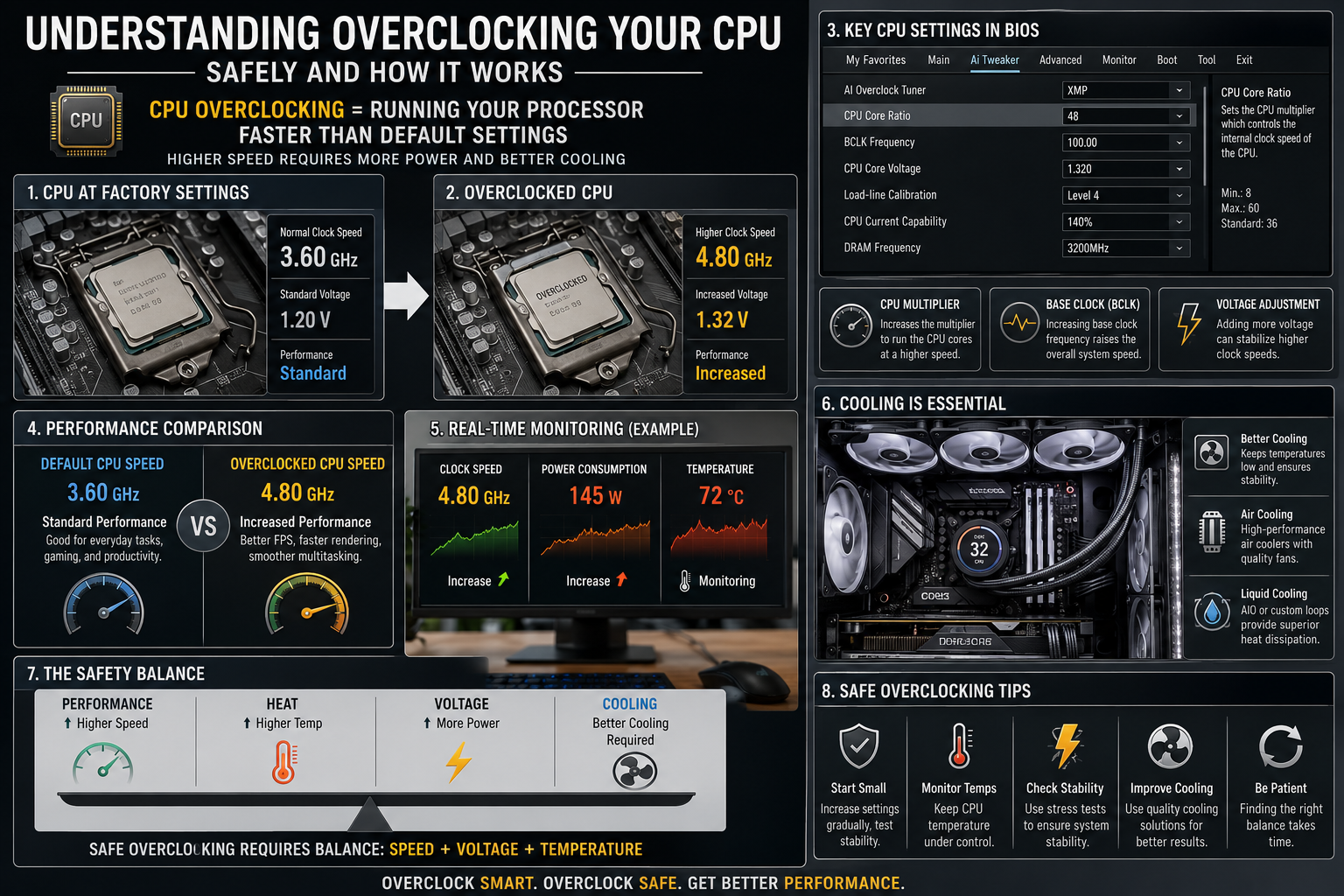

CPU overclocking is the process of increasing a processor’s operating speed beyond its default factory settings. Every CPU has a standard clock frequency defined by the manufacturer. This frequency determines how many instructions the processor can complete within a specific time period.
When you overclock your CPU, you adjust settings such as the CPU multiplier, base clock frequency, and voltage levels. These adjustments allow the processor to run at higher speeds and deliver improved performance in demanding tasks.
Most CPU overclocking changes are made through the motherboard BIOS. Some manufacturers also provide software tools that allow users to adjust performance settings within the operating system. However, BIOS-based tuning generally provides better control and reliability.
The main purpose of overclocking is to unlock additional performance from existing hardware. This can benefit applications such as gaming, video editing, streaming, and 3D rendering. However, increasing CPU speed also increases power consumption and heat output.
Successful overclocking your CPU safely requires balancing performance improvements with proper cooling, stable voltage levels, and consistent temperature monitoring.
Is It Safe to Overclock Your CPU?
Overclocking a CPU can improve performance, but it also increases power consumption and heat. If done correctly, it is generally safe. Modern processors include built-in thermal protection that reduces clock speeds or shuts the system down before serious damage occurs. However, these safeguards cannot protect against every mistake, especially when voltage settings are pushed too high.
A safe overclock requires quality cooling, a reliable power supply, and gradual adjustments. Small changes are much safer than aggressive settings. You should also monitor temperatures and test system stability after every change. Stress-testing software helps confirm that your computer remains stable under heavy workloads. With patience and the right hardware, you can achieve noticeable performance gains without significantly increasing the risk of hardware failure.
Choosing the Right Voltage Limits
Keeping CPU voltage within safe limits is the most important part of overclocking. Increasing voltage allows the processor to reach higher clock speeds, but it also creates much more heat. Even a small voltage increase can noticeably raise operating temperatures, making effective cooling essential.
Before changing any settings, research the recommended safe voltage for your specific processor model. Manufacturers and experienced overclocking communities often provide reliable guidelines. Avoid exceeding these limits, even if your system appears stable. Long-term exposure to high voltage accelerates silicon wear and reduces the processor’s lifespan. Conservative voltage adjustments deliver a better balance between performance, stability, and hardware longevity.
Is It Good to Overclock a CPU?
Overclocking is a good option if you want to extend the life of an older computer or maximize the performance of enthusiast-grade hardware. A higher clock speed can improve gaming, video editing, 3D rendering, and other processor-intensive workloads. It may also reduce the need for an immediate hardware upgrade.
However, overclocking is not ideal for every system. Computers with stock coolers, budget motherboards, or low-quality power supplies may struggle with the additional heat and power demands. It also increases electricity usage and produces more heat during long sessions. Consider your hardware, workload, and cooling solution before deciding whether overclocking is worthwhile.
Real-World Performance Benefits
The benefits of CPU overclocking vary depending on how you use your computer. Synthetic benchmarks usually show measurable improvements, but real-world performance gains differ across applications. Programs that rely heavily on processor speed often benefit the most.
You are more likely to notice smoother gameplay, faster rendering, and shorter export times in demanding software. Everyday tasks like web browsing or document editing may show little difference. Before overclocking, identify whether your current performance bottleneck is actually the processor. This helps determine whether the extra effort will provide meaningful improvements.
Is 90°C Too Hot for a CPU?
A CPU temperature of 90°C is considered very high. While most modern processors can operate briefly at this temperature, they often approach their thermal limits. When that happens, the processor automatically reduces clock speeds to lower heat output. This process, known as thermal throttling, protects the hardware but also reduces performance.
For long-term reliability, it is best to keep load temperatures below 80°C whenever possible. If your CPU regularly reaches 90°C during gaming or rendering, inspect your cooling system. Clean dust from fans and heatsinks, improve case airflow, check fan settings, and replace old thermal paste if needed. Upgrading to a more capable air or liquid cooler may also solve persistent temperature issues.
Managing Thermal Throttling Issues
Thermal throttling is a built-in safety feature that prevents processors from overheating. Instead of shutting down immediately, the CPU lowers its operating speed to reduce temperatures. Although this protects the hardware, it can cause lower frame rates, slower rendering, and noticeable system stuttering.
If throttling occurs frequently, investigate the cause rather than ignoring it. Poor airflow, inadequate cooling, excessive voltage, or worn thermal paste are common reasons. Monitoring software can help you identify temperature spikes during demanding workloads. Addressing these issues restores consistent performance while protecting your processor from unnecessary heat stress over time.
Can You Damage a CPU by Overclocking?
Yes, a CPU can be damaged by overclocking if voltage or temperatures become excessive. High electrical current increases wear inside the processor through a process called electromigration. Over time, this damages microscopic circuits and reduces stability.
Modern processors include protective features that lower performance or shut down the system before dangerous temperatures are reached. However, manually increasing voltage beyond recommended limits increases the risk of permanent damage. Using a quality motherboard with strong power delivery and making gradual adjustments greatly reduces these risks. Careful tuning helps maximize performance while maintaining long-term reliability.
Understanding Electromigration Risks
Electromigration is one of the primary long-term risks associated with aggressive overclocking. It occurs when high electrical current slowly moves metal atoms inside the processor’s tiny circuits. As this wear increases, the CPU becomes less stable and may eventually fail.
This process usually develops over years rather than days. Keeping voltage conservative significantly slows the rate of degradation. Good cooling also reduces thermal stress, helping preserve processor health. If long-term reliability matters more than achieving the highest benchmark scores, prioritize safe voltage settings over maximum clock speeds.
Is 4.7 GHz Fast for a CPU?
A clock speed of 4.7 GHz is considered fast for a modern processor. It provides excellent performance for gaming, content creation, multitasking, and many professional applications. Higher clock speeds allow the processor to complete more cycles each second, improving responsiveness in demanding workloads.
However, clock speed alone does not determine overall performance. Processor architecture, core count, cache size, and instructions per cycle (IPC) all play major roles. A newer CPU running at 4.7 GHz often outperforms an older processor operating at the same frequency. Evaluating the complete hardware platform provides a much more accurate picture of real-world performance than clock speed alone.
Evaluating Instructions Per Cycle
Instructions per cycle (IPC) measures how much work a processor completes during each clock cycle. A CPU with higher IPC performs more calculations without increasing clock speed. That is why newer processor generations often outperform older models despite running at similar frequencies.
When comparing processors, consider both IPC and clock speed rather than focusing on one specification. A balanced combination delivers the best overall performance in games, creative software, and productivity tasks. Understanding this relationship helps you make better upgrade decisions and sets realistic expectations when overclocking your existing processor.
Frequently Asked Questions
Is Overclocking Your CPU Safely Actually Possible?
Yes, safe CPU overclocking is possible when you follow a careful process. The key factors are proper cooling, gradual adjustments, and regular stability testing.
Avoid excessive voltage increases because voltage is one of the main causes of heat buildup and hardware wear.
A successful overclock does not require extreme settings. Even moderate improvements can provide noticeable benefits in gaming and productivity applications.
The safest approach is to prioritize stability over maximum speed. A slightly lower but reliable overclock is usually better than an unstable configuration.
What Causes an Unstable System After Speed Adjustments?
System instability usually happens because the processor does not receive enough voltage for the selected frequency. Higher clock speeds require the CPU to complete more operations in less time.
If voltage levels are insufficient, the processor may produce calculation errors. These errors can cause crashes, blue screens, or sudden system restarts.
To fix instability, reduce the clock speed or increase voltage slightly. Always test changes carefully before continuing.
How Do I Know If My Cooler Is Adequate?
Your cooling system is suitable if your processor maintains safe temperatures during demanding workloads.
Run a stress test and monitor temperature behavior. A good cooler should keep temperatures stable rather than allowing them to quickly approach thermal limits.
If your CPU reaches throttling temperatures, performance may decrease despite the higher clock speed.
Improving case airflow, upgrading the cooler, or reducing voltage can help maintain better thermal performance.
Can CPU Overclocking Void a Hardware Warranty?
Warranty policies vary between manufacturers. Some companies may not cover damage caused by manual voltage or frequency adjustments.
Before overclocking, review your processor and motherboard warranty terms.
Modern enthusiast hardware often includes protective features, but manual tuning still carries risks. Responsible settings and proper monitoring reduce those risks.
How Much Performance Improvement Can I Expect?
Performance gains depend on your processor model, cooling system, workload, and the quality of your individual CPU.
Many users see improvements of around five to fifteen percent in CPU-limited applications and games.
However, overclocking will not transform an outdated processor into a modern high-end system.
The biggest improvements usually appear in tasks that already depend heavily on CPU performance.
What Should I Do If My Computer Will Not Boot?
If your PC fails to start after changing overclocking settings, the configuration is likely unstable.
Many modern motherboards include automatic recovery features that restore default BIOS settings after failed boot attempts.
If recovery does not happen automatically, you may need to clear the CMOS settings. This resets BIOS options and allows the computer to start again.
Always make changes carefully to avoid unnecessary troubleshooting.
Conclusion
Overclocking your CPU safely can provide additional performance and extend the useful life of your existing hardware. The process requires careful preparation, reliable cooling, and consistent testing.
The most important rules are simple: make small adjustments, monitor temperatures, and avoid excessive voltage. Understanding your processor’s capabilities is also important before making performance changes, especially when comparing different CPU options and architectures. You can learn more about processor differences in our guide on AMD Ryzen 7 vs Intel Core i7 comparison.
A successful overclock is not about reaching the highest possible frequency. It is about achieving better performance while maintaining system stability and hardware reliability.
With patience and proper techniques, you can enjoy smoother gaming, faster workloads, and improved responsiveness from your PC without unnecessary risk.