
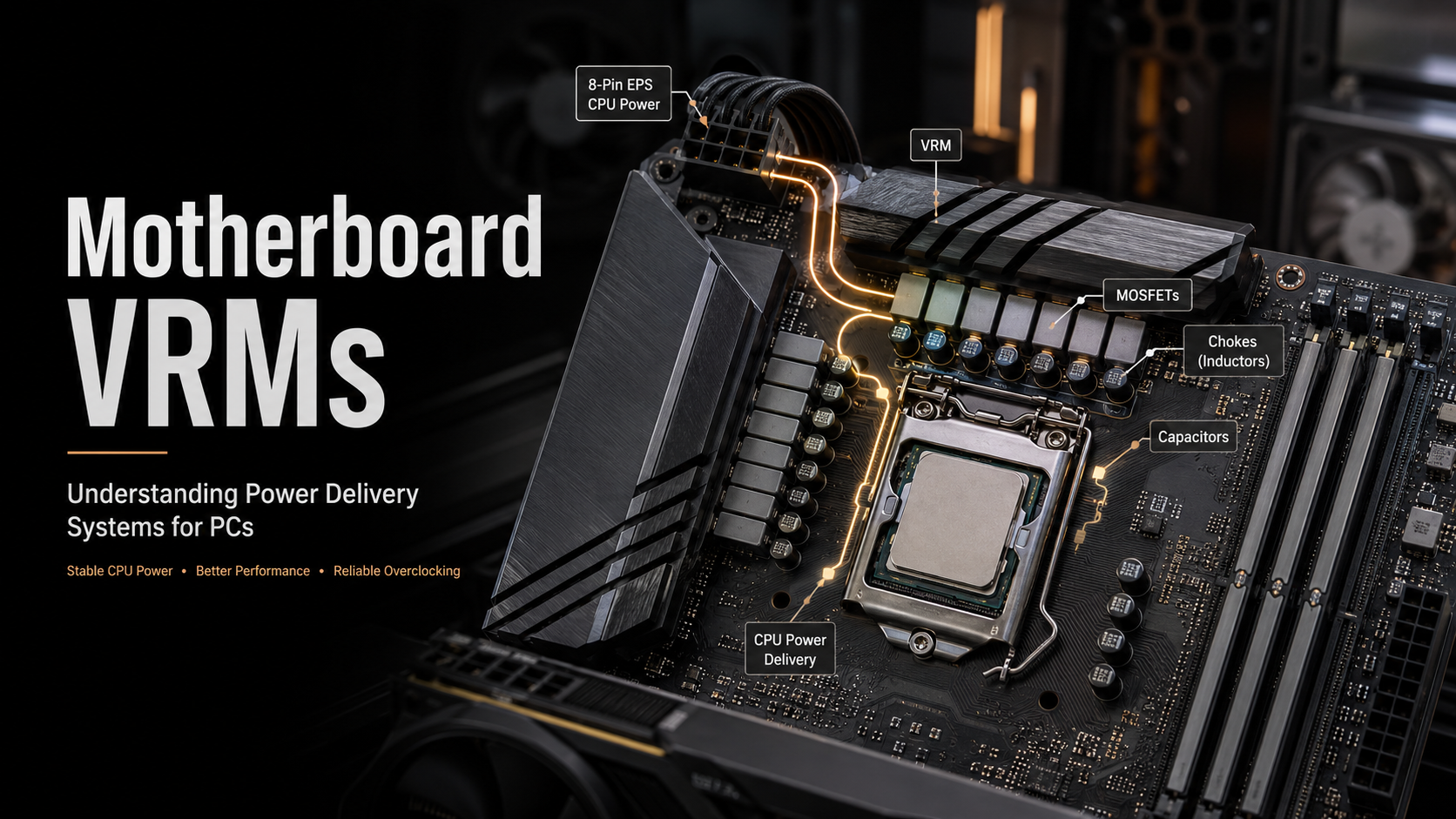
Understanding Motherboard VRMs and Power Delivery Systems: A Complete Guide
Motherboard VRMs are one of the most important components in any modern PC build, controlling how power reaches the processor and ensuring stable system performance. While most users focus on the CPU, GPU, and RAM, the quality of the motherboard VRM directly affects CPU efficiency, temperature management, and reliability.
Modern CPUs are highly advanced and constantly adjust their power consumption based on performance demands. During gaming, video editing, 3D rendering, or heavy multitasking, the processor can quickly increase its power requirements. A high-quality motherboard VRM responds instantly to these changes and maintains stable voltage levels.
A weak power delivery system can create several problems, including voltage instability, excessive heat, CPU throttling, and unexpected system crashes. These issues become even more noticeable with high-performance processors, such as Intel Core and AMD Ryzen CPUs, which can draw significantly more power during demanding applications.
Understanding how VRMs work helps PC builders select the right motherboard for their needs. Whether you are building a budget gaming system, a workstation, or an overclocked enthusiast PC, VRM quality directly affects performance, reliability, and long-term hardware health.
This guide explains motherboard VRM design, power phases, cooling methods, overclocking requirements, and the features that make a motherboard’s power delivery system effective.
What Are Motherboard VRMs and How Do They Control CPU Power Delivery?
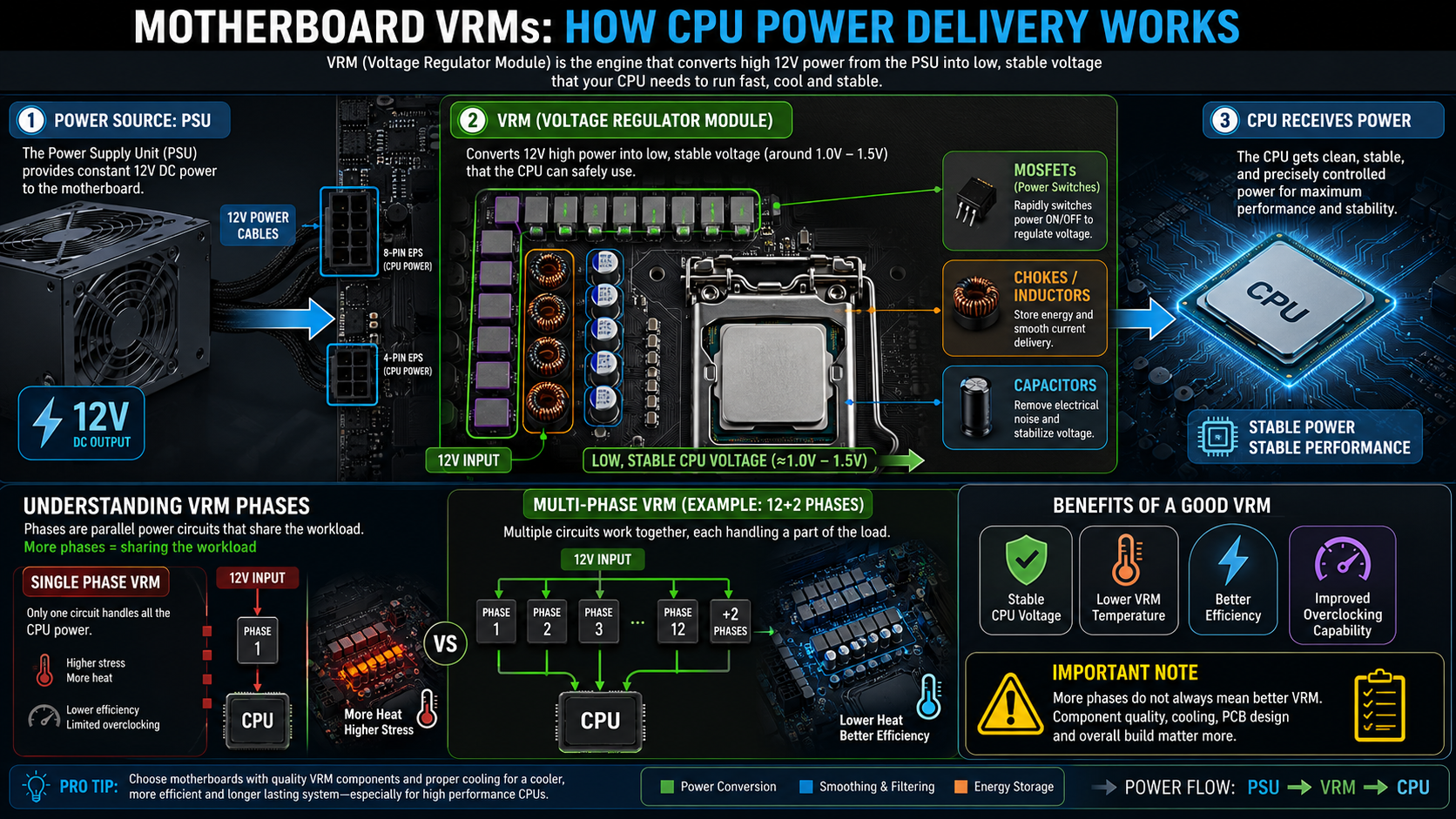

A motherboard VRM (Voltage Regulator Module) is an electrical system designed to convert power from the power supply into the precise voltage required by the CPU. A typical power supply delivers 12 volts through the motherboard’s power connectors, but modern processors require much lower voltages, often between 1.0V and 1.5V depending on workload conditions.
The main purpose of a VRM is not only voltage reduction but also power stability. CPUs constantly change their power requirements based on clock speed, temperature, and workload. The VRM must quickly adjust power delivery to prevent sudden voltage drops or spikes.
A motherboard with a reliable VRM design provides smoother CPU operation and reduces stress on the processor. This is especially important for high-end CPUs that draw significant current during demanding applications.
The VRM works as a bridge between the power supply and the CPU. It manages electrical energy through several important components:
- MOSFETs: These act as electronic switches that control how power flows through the VRM circuit.
- Chokes (Inductors): These store electrical energy temporarily and smooth current delivery.
- Capacitors: These filter electrical noise and help maintain consistent voltage output.
Together, these components create a stable power delivery system that allows the processor to operate efficiently under different workloads.
What Is Motherboard VRM?
A motherboard VRM (Voltage Regulator Module) is an electronic circuit located near the CPU socket. Its main job is to convert the 12-volt power supplied by the power supply unit (PSU) into the much lower voltage required by the processor. Modern CPUs typically operate below 1.5 volts, and they constantly switch between idle and heavy workloads. Because of this, the VRM must adjust voltage thousands of times every second to deliver clean and stable power.
A VRM consists of several important components that work together. These include PWM (Pulse Width Modulation) controllers, MOSFETs, chokes (inductors), and solid-state capacitors. MOSFETs rapidly switch electrical current, while chokes smooth voltage fluctuations. Capacitors then store and release energy to stabilize the final output. Without a properly designed VRM, the processor would receive unsafe voltage levels that could damage the CPU or cause system instability. A high-quality motherboard VRM also improves efficiency, reduces heat, and provides consistent performance during demanding workloads or extended gaming sessions.
The Role of Phases in Power Delivery
VRM power stages are divided into phases to spread electrical and thermal loads across multiple components. More phases generally reduce heat generation and provide cleaner, more stable power to the processor. This becomes especially important during heavy multitasking, gaming, content creation, and CPU overclocking.
Manufacturers often increase phase counts by using phase doublers or parallel power stage designs. These approaches improve power distribution without significantly increasing circuit complexity. However, the overall quality of the VRM matters more than the advertised phase count. Well-designed power stages, efficient MOSFETs, and effective cooling usually have a greater impact than simply having more phases.
How Much VRM Is Good for a Motherboard?
The amount of VRM power delivery you need depends mainly on your processor and whether you plan to overclock. A budget gaming PC or office computer with a low-power, locked CPU usually performs perfectly with a 4- to 6-phase VRM and basic heatsinks. These processors consume less power, allowing the VRM to operate within safe temperatures without premium cooling.
High-end processors place much greater demands on the motherboard’s power delivery system. Enthusiast CPUs with many cores draw substantial current during rendering, video editing, or intensive gaming. For these systems, motherboards with 12 to 20 or more power phases and large aluminum heatsinks provide better stability and lower temperatures. Some premium models even include small cooling fans for additional airflow. Choosing a motherboard with a VRM that matches your processor prevents overheating, avoids performance throttling, and ensures reliable operation during sustained workloads. Buying a stronger VRM than your CPU requires may also provide better upgrade potential for future processors.
Matching Power Phases to Your CPU
Choosing the right VRM depends on your processor’s power requirements.
- Entry-level CPUs: A basic 4- to 6-phase VRM is usually sufficient.
- Mid-range processors: An 8- to 10-phase VRM offers better efficiency and thermal performance.
- High-end unlocked CPUs: A 12-phase or higher VRM is recommended for demanding workloads and overclocking.
Always compare the motherboard’s VRM quality with your CPU’s power consumption instead of focusing only on the phase count. Good cooling, quality components, and efficient power stages are equally important.
How to Know if a Motherboard Has a Good VRM?
The easiest way to judge VRM quality is by looking beyond marketing claims and examining the motherboard’s hardware. Start by checking the heatsinks around the CPU socket. Thick aluminum heatsinks with deep fins remove heat far more effectively than thin decorative covers commonly found on budget boards. Proper cooling keeps MOSFET temperatures under control and improves long-term reliability.
Component quality also plays a major role. Premium motherboards often use DrMOS power stages, high-quality chokes, and solid-state capacitors rated for higher operating temperatures. Reading independent motherboard reviews is another excellent way to evaluate VRM performance. Many hardware reviewers perform thermal testing with infrared cameras and stress tests. These results reveal whether a motherboard maintains safe operating temperatures under full CPU load or suffers from excessive VRM heat that can reduce performance or lifespan.
Inspecting Heatsinks and Thermal Pads
Effective VRM cooling is essential because power regulation generates significant heat under heavy CPU loads.
Look for the following features:
- Thick aluminum heatsinks with large surface areas.
- High-quality thermal pads between the heatsink and MOSFETs.
- Secure screw-mounted heatsinks instead of plastic push pins.
- Full VRM coverage without exposed MOSFETs.
A well-cooled VRM helps maintain stable CPU performance, especially during gaming, rendering, and prolonged workloads.
What Is the Difference Between VRM and VRAM?
Although the names look similar, VRM and VRAM perform completely different functions inside a computer. A Voltage Regulator Module (VRM) is responsible for supplying clean and stable electrical power to the CPU. It regulates voltage, manages current flow, and helps maintain system stability during varying workloads. The VRM is located on the motherboard near the processor socket and focuses entirely on power delivery.
VRAM (Video Random Access Memory) is dedicated memory found on a graphics card or integrated GPU. It stores textures, frame buffers, shaders, and other graphical data needed for rendering images and videos. Unlike a VRM, VRAM has nothing to do with voltage regulation. Instead, it provides fast access to graphics data so the GPU can render complex scenes smoothly. In short, the VRM manages electrical power, while VRAM stores graphics data that improves visual performance in games and professional applications.
Understanding Dedicated Video Memory
VRAM acts as a high-speed workspace for the graphics processor.
It stores:
- Game textures
- 3D models
- Frame buffers
- Shaders
- Rendered images
More VRAM allows modern games and creative applications to handle larger textures and higher resolutions without noticeable performance drops.
Which Is Faster, RAM or VRAM?
When comparing memory speed, VRAM delivers much higher bandwidth than standard system RAM. Modern graphics memory uses technologies such as GDDR6, GDDR6X, and HBM, combined with wide memory buses ranging from 128-bit to 384-bit or even wider. High-end graphics cards can exceed one terabyte per second of memory bandwidth, allowing GPUs to process massive amounts of visual data quickly.
System RAM uses DDR4 or DDR5 memory and normally operates through a 64-bit memory channel per module. Although it offers lower bandwidth than VRAM, it provides lower latency for general computing tasks. RAM is designed to support the operating system, applications, and multitasking efficiently, while VRAM is optimized for graphics rendering. Neither memory type is better overall because each serves a different purpose. Together, they deliver balanced system performance for gaming, productivity, and professional workloads.
Memory Bus Width and Bandwidth Differences
The width of the memory bus determines how much data can move between memory and the processor at one time.
- VRAM uses wider memory buses to maximize graphics bandwidth.
- RAM uses narrower channels with lower latency for everyday computing.
- GPUs prioritize bandwidth for rendering textures and visual effects.
- CPUs benefit from RAM’s quick response times for multitasking and application performance.
This difference explains why VRAM excels at graphics processing while system RAM remains the better choice for general computing tasks.
Frequently Asked Questions About Motherboard VRMs
What is a motherboard VRM and what does it do?
A motherboard VRM converts the 12V power from your power supply into the lower voltage required by your CPU. It provides stable and controlled power that adjusts according to processor workload.
How do VRM phases affect system stability?
VRM phases divide electrical workload across multiple circuits. This reduces heat, improves efficiency, and helps deliver smoother power during demanding tasks such as gaming and overclocking.
Do I need an expensive VRM if I do not overclock?
Not always. Users running CPUs at stock settings with moderate workloads usually do not need an extreme VRM design. However, a quality VRM improves reliability and provides better upgrade flexibility.
What causes Motherboard VRMs to overheat?
VRMs can overheat due to heavy electrical loads, poor cooling, restricted airflow, or low-quality components. Better heatsinks, proper case ventilation, and a reliable PSU help prevent excessive temperatures.
How can I monitor VRM temperatures?
Programs such as HWMonitor and HWiNFO64 can display available motherboard temperature sensors. These tools help users monitor whether the power delivery system is operating safely.
Conclusion: Choosing the Right Motherboard VRMs
Understanding motherboard VRMs and power delivery systems helps you make smarter decisions when building a PC. While the CPU and graphics card often receive the most attention, the VRM quietly manages one of the most important tasks in your system.
A well-designed VRM provides stable voltage, reduces heat, supports demanding workloads, and improves hardware longevity. Factors such as phase design, component quality, heatsink size, and airflow should all be considered when selecting a motherboard.
For basic office systems, an entry-level VRM may be enough. For gaming PCs, workstation builds, or overclocking systems, investing in stronger power delivery can provide better stability and performance.
Before purchasing a motherboard, consider your processor’s power requirements and your future upgrade plans. Choosing a reliable VRM design ensures your PC remains efficient, stable, and ready for demanding tasks for years to come.
If you are also comparing processors before choosing your motherboard and PC configuration, check out our detailed guide on AMD Ryzen 7 vs Intel Core i7 processors to understand which CPU option best fits your performance needs.