Why It’s Crucial to Keep Your Phone Apps Updated
Your smartphone stores personal messages, photos, banking information, passwords, and work files. That makes software maintenance more important than it may seem. Keeping your phone apps updated helps reduce security risks and keeps important services working properly.
Developers regularly release updates to fix security vulnerabilities, remove bugs, improve compatibility, and introduce new features. Ignoring these updates can leave older versions exposed to problems that developers have already fixed.
Updated apps can also work better with newer versions of Android or iOS. They may receive performance improvements, interface changes, and compatibility fixes. However, an update does not always make every phone faster or improve battery life.
This guide explains why you should keep your phone apps updated, what app updates actually change, and what can happen when you ignore them. You will also learn why app updates and operating system updates both matter for smartphone security.
Why Is It Important to Keep Your Phone Apps Updated?
Apps often handle sensitive information every day. Banking apps process financial details. Messaging apps store conversations. Shopping apps may save payment and delivery information. Because of this, keeping your phone apps updated should be part of your basic digital security routine.
Developers release patches when they discover security weaknesses or software bugs. Installing these patches can reduce the risk of attackers exploiting known vulnerabilities. It does not make your phone completely secure, but it removes weaknesses that have already been addressed.
Updates also help applications remain compatible with current operating systems and online services. An older app may eventually stop working correctly when its supporting technology changes.
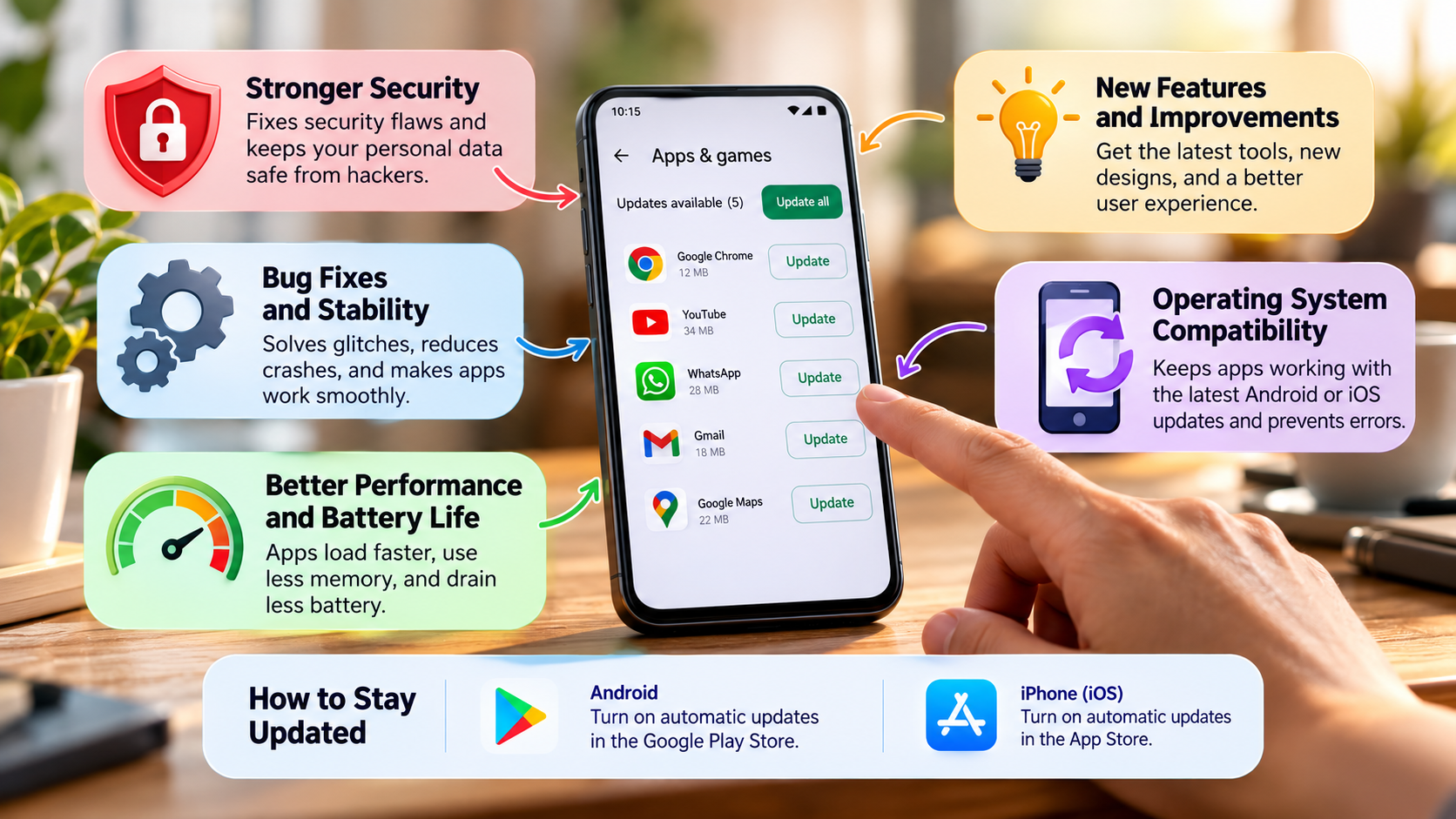
Regular updates can provide several benefits:
- Security patches for known vulnerabilities
- Bug fixes that resolve crashes and errors
- Compatibility improvements for newer operating systems
- Feature updates and interface improvements
- Performance refinements where developers identify inefficiencies
You do not need to study every release in detail. For most apps, automatic updates provide the simplest way to stay current.
Patching Vulnerabilities Before Attackers Exploit Them
One of the strongest reasons to keep your phone apps updated is security. Application vulnerabilities can sometimes allow attackers to access information, perform unauthorized actions, or run malicious code.
When developers discover a vulnerability, they can release a security patch. The patch changes the affected software so the specific weakness is corrected or reduced.
Not every security vulnerability is actively exploited. However, once a weakness becomes known, attackers may attempt to find devices running older versions. Delaying an available security fix therefore creates an avoidable risk.
Security updates are particularly important for apps that handle sensitive information. This includes banking, payment, password management, email, cloud storage, and messaging applications.
You should also remember that app updates are only one layer of protection. Strong passwords, two-factor authentication, safe browsing, and official app stores remain important.
If an update includes a security fix, installing it promptly is usually the safer choice. Keeping your phone apps updated helps ensure that known software weaknesses do not remain unnecessarily exposed.
Why Is It Important to Keep My Phone Updated?
Updating individual apps is only part of smartphone maintenance. Your phone’s operating system also needs regular updates. While an app update affects one application, a system update can affect the software foundation that supports the entire device.
Operating system updates may include security patches, bug fixes, driver improvements, compatibility changes, and new features. They can address problems that individual app developers cannot fix.
Keeping your operating system current also helps newer applications work correctly. Developers often build apps around current Android or iOS capabilities. An outdated system may eventually cause compatibility problems.
However, you should not assume every system update will automatically make an older phone faster. Major updates can sometimes require more resources. Battery performance can also vary depending on the device and software version.
For better protection, maintain both your phone apps updated and your operating system. Check your manufacturer’s support information when a major update becomes available.
Before installing a major system upgrade, make sure you have enough storage. Backing up important information is also a sensible precaution.
Strengthening Core Operating System Architecture
Your operating system manages many fundamental functions on your smartphone. These include memory, permissions, storage, connectivity, security controls, and communication with hardware components.
System updates can fix weaknesses within these core components. An individual application cannot normally repair a vulnerability inside the operating system itself.
Updates can also improve compatibility between the operating system and newer applications. This becomes increasingly important as developers adopt new APIs, security requirements, and device capabilities.
Security patches are particularly important because operating system vulnerabilities can affect more than one application. A weakness in a core component may potentially impact many functions across the device.
Still, updates are not guaranteed to improve every aspect of performance. Older devices may have hardware limitations that software cannot overcome.
You should also check how long your manufacturer supports your particular phone. Some older devices eventually stop receiving major operating system updates.
Maintaining both system software and phone apps updated gives your device a stronger security and compatibility foundation. It also reduces problems caused by outdated software components working together.
Why Do I Have to Keep Updating My Apps?
Mobile apps operate within a constantly changing technology environment. They communicate with operating systems, cloud servers, APIs, databases, and other online services. When those systems change, applications may also require updates.
Developers update apps for several reasons. They may fix security vulnerabilities, correct bugs, support newer operating systems, or improve existing features.
An old version can sometimes continue working for months without problems. That does not mean it will remain compatible forever. A developer may eventually stop supporting that version, which can create security and compatibility problems. For a closer look at these risks, see what happens when you don’t update apps.
Online services can create additional compatibility issues. Banking, email, cloud storage, streaming, and communication apps often depend on remote servers. Changes to those servers may require a newer version of the app.
Keeping your phone apps updated helps reduce these compatibility problems. It also ensures that you receive important fixes and improvements released by developers.
You do not need to manually check every application every day. Enabling automatic updates can handle most routine maintenance. For major apps, checking release notes can help you understand important changes before installing them.
Adapting to Rapid Cloud and API Modifications
Many smartphone applications depend on remote systems to perform important tasks. For example, a banking app may communicate with servers when you check your balance or make a payment.
This communication often relies on APIs and security protocols. Developers may change these systems to improve security, add functionality, or handle technical changes.
When the server changes, the mobile application may need new code. Developers can release an update that allows the app to communicate correctly with the new system.
If you continue using an outdated version, certain features may eventually stop working. You could encounter login errors, synchronization problems, connection failures, or missing functionality.
This does not mean every server change immediately breaks older applications. Many companies support previous versions for some time. Eventually, however, older versions may no longer meet technical or security requirements.
Keeping your phone apps updated reduces the chance of unexpected compatibility problems. It is especially important for apps that provide access to financial accounts, work systems, cloud files, or important communication services.
If an app suddenly stops working, check whether a newer version is available before assuming your phone has a hardware problem.
What Does Updating Your Apps Do?
When you update an app, your phone installs a newer software version from the developer. That version can contain security patches, bug fixes, compatibility improvements, feature changes, or performance refinements.
The exact changes depend on the update. Some releases may fix one specific problem. Others may introduce several new features or significantly change the user interface.
Updates can also improve compatibility with your phone’s operating system. Developers often release changes after Android or iOS receives a major upgrade.
Performance improvements are another possible benefit. Developers may identify inefficient processes and change the code to reduce crashes or unnecessary resource usage.
However, you should not assume that every update will make your phone faster. New features can sometimes require additional storage or processing power. The effect can vary between devices.
Before installing a major update, make sure your phone has enough free storage. If the application contains important information, keeping your phone backed up is also useful.
Overall, keeping your phone apps updated helps your software stay aligned with current security standards, operating systems, and online services.
Enhancing Hardware Efficiency and Resource Consumption
App developers sometimes identify processes that use too much CPU power, memory, storage, or network data. Updates can address these problems by changing inefficient code or reducing unnecessary background activity.
These improvements may help an application run more smoothly. In some cases, they can reduce battery consumption during normal use. They may also reduce crashes caused by software bugs or excessive resource usage.
However, battery improvements are not guaranteed. A new version may introduce features that require additional processing. As a result, an updated app could sometimes use more resources than an older version.
The same applies to overall device speed. An optimized app may respond faster, but software updates cannot overcome every hardware limitation.
You can improve your phone’s overall performance by keeping phone apps updated and removing applications you no longer use. Maintaining enough free storage can also help prevent performance problems.
Regular maintenance is therefore more useful than expecting one update to transform your device.
The main goal is reliable software. Updated applications are generally better prepared to work with current operating systems and online services.
What Happens If I Don’t Update My Apps?
Ignoring app updates can create security, compatibility, and reliability problems over time. The biggest concern is security because an outdated application may still contain a vulnerability that developers have already fixed.
Older versions can also become incompatible with newer operating systems. You may notice crashes, login failures, missing features, or unexpected errors.
Online services can cause another problem. Companies sometimes retire older APIs or introduce stronger security requirements. An outdated app may then fail to communicate with the service correctly.
Performance issues can also appear when older software contains unresolved bugs. However, not every outdated app will immediately become slow or unstable.
You also do not need to install every update the moment it appears. For non-essential applications, waiting briefly after a major release can be reasonable if you want to avoid early bugs.
For important applications, however, delaying updates for long periods creates unnecessary risk. Banking, payment, email, cloud storage, and communication apps deserve particular attention.
If you regularly keep your phone apps updated, you reduce the likelihood of running outdated software with known problems.
Sudden Account Lockouts and Server Incompatibility
An outdated application may eventually lose compatibility with the service it connects to. This can happen when a company retires an old API, changes authentication requirements, or introduces stronger security standards.
You may see the problem as a failed login, connection error, synchronization issue, or missing feature. Some apps may display a message requiring you to install the latest version.
This can be especially frustrating when the application provides access to an important service. Banking, email, cloud storage, communication, and work apps can become difficult to use until you update them.
The problem does not always appear immediately. Companies may support older versions for months or longer before ending compatibility.
Keeping phone apps updated reduces the chance of unexpected interruptions. It also ensures that available security patches and compatibility improvements are installed.
If an app suddenly stops working, check its app-store page for an available update. You should also check whether your phone’s operating system meets its current requirements.
Maintaining updated apps and system software helps your smartphone remain secure, compatible, and dependable.
Conclusion
Keeping your phone apps updated is a simple habit that can prevent many avoidable problems. Updates can fix security vulnerabilities, remove bugs, improve compatibility, and introduce useful features. They also help your apps work properly with newer versions of Android, iOS, and online services.
You should pay particular attention to apps that handle sensitive information, such as banking, payments, email, passwords, and cloud storage. Installing security updates promptly can reduce your exposure to known vulnerabilities. The Cybersecurity and Infrastructure Security Agency (CISA) also recommends keeping software updated to reduce security risks.
At the same time, remember that updates are not a complete security solution. Use strong passwords, enable two-factor authentication, download apps from trusted sources, and keep your phone’s operating system updated.
The easiest approach is to enable automatic app updates whenever practical. This reduces the chance of forgetting important patches and keeps your device’s software reasonably current.
A few minutes spent maintaining your apps can help you avoid much bigger problems later. Treat regular updates as basic smartphone maintenance, just like backing up your data and protecting your accounts.