
How Secure Is iCloud Keychain Compared to the Alternatives?
Protecting online accounts has become essential as cyberattacks and credential theft continue to threaten internet users. But how secure is iCloud Keychain compared to the alternatives like Bitwarden and 1Password? Apple’s built-in password manager uses end-to-end encryption to protect saved passwords, passkeys, and other sensitive information. Understanding its security features can help you choose the right password manager for your digital accounts.
This raises an important question: how secure is iCloud Keychain compared to the alternatives available today? Apple’s built-in password manager uses end-to-end encryption to protect saved passwords, passkeys, and other sensitive information. It also syncs credentials across approved Apple devices.
You can explore Apple’s technical explanations in the Apple Platform Security Guide. It explains how Apple protects sensitive information through encryption and device-level security.
However, iCloud Keychain is not the only available option. Dedicated password managers such as Bitwarden and 1Password offer additional features and cross-platform support.
Understanding their differences helps you choose the right solution. This guide examines encryption, cloud security, account protection, and password storage. It also compares Apple’s security approach with Google’s and Samsung’s broader ecosystems.

Is iCloud Keychain Safe and Secure?
Yes. iCloud Keychain is a secure password management solution for most everyday users. Apple protects saved passwords and passkeys using 256-bit AES encryption during storage and transmission. Importantly, password data receives end-to-end encryption, meaning Apple cannot read the saved credentials. This protection also applies to synchronised Keychain information across approved devices.
However, strong encryption does not eliminate every security risk. Your Apple Account, device passcode, and trusted devices remain important parts of the protection system. Understanding common ways passwords are hacked and how to stop them can help you recognise threats before attackers access your accounts.
Apple also provides secure recovery mechanisms for iCloud Keychain. These mechanisms help users restore access without exposing their passwords to Apple. You can read the official iCloud Keychain security documentation for technical details.
Hardware Protection and Biometric Authentication
Apple combines device security with biometric authentication to protect saved credentials. Face ID and Touch ID help verify your identity before accessing sensitive information. The Secure Enclave protects important cryptographic operations and biometric information. It creates an additional security boundary within supported Apple hardware.
This approach reduces the risk of unauthorised access. However, biometrics should not be treated as complete protection against every attack. A compromised device, exposed passcode, or successful phishing attack can still create security problems.
For stronger protection, follow these security practices:
- Use a strong and unique Apple Account password.
- Enable two-factor authentication.
- Keep iOS, iPadOS, and macOS updated.
- Protect your device passcode from other people.
- Avoid approving unfamiliar sign-in requests.
- Review devices connected to your Apple Account.
Remember that biometric authentication and encryption serve different purposes. Together, they provide multiple layers of protection for your saved credentials.
Which Is Safer, Gmail or iCloud?
Gmail and iCloud serve different purposes, so comparing their security directly requires some clarification. Gmail primarily provides email services, while iCloud supports several cloud services, including password synchronisation. Google’s Gmail security focuses heavily on detecting phishing, spam, malicious attachments, and suspicious account activity.
Apple’s iCloud Keychain focuses on protecting saved credentials through end-to-end encryption. This makes it more appropriate for direct comparison with dedicated password managers. Gmail’s security features instead help protect the email account that users often rely on for password recovery.
Google also encrypts Gmail messages during transmission and storage. However, ordinary Gmail messages do not receive universal end-to-end encryption. Apple’s iCloud Keychain passwords, by contrast, are protected using end-to-end encryption by default. If you regularly store personal files online, understanding whether your cloud storage is actually secure can help you make better privacy decisions.
Therefore, neither service is universally safer. Their protection depends on the information being stored and the threats being considered.
Phishing Defenses Versus Encryption Privacy
Google and Apple approach account protection from different directions. Gmail uses automated security systems to identify suspicious messages, dangerous links, and potentially harmful attachments. These protections help users avoid common phishing attempts before opening malicious content.
Google reports that Gmail blocks more than 99.9% of spam, phishing, and malware from reaching users’ inboxes. This demonstrates its focus on email-based threat detection. However, no filtering system catches every malicious message.
Apple’s iCloud Keychain focuses on protecting stored passwords and passkeys. Its end-to-end encryption prevents Apple from reading saved credentials. This offers strong privacy protection against unauthorised access to cloud-stored password data.
The distinction matters when choosing security tools. Gmail helps defend your inbox against deceptive messages. iCloud Keychain protects the credentials you save. Using both services with strong authentication provides broader account protection.
What Is the Safest Place to Store Passwords on My iPhone?
The safest practical place to store passwords on an iPhone is a reputable password manager. Apple’s built-in Passwords app offers strong protection and integrates directly with iOS. It supports passwords, passkeys, verification codes, and synchronisation across approved Apple devices.
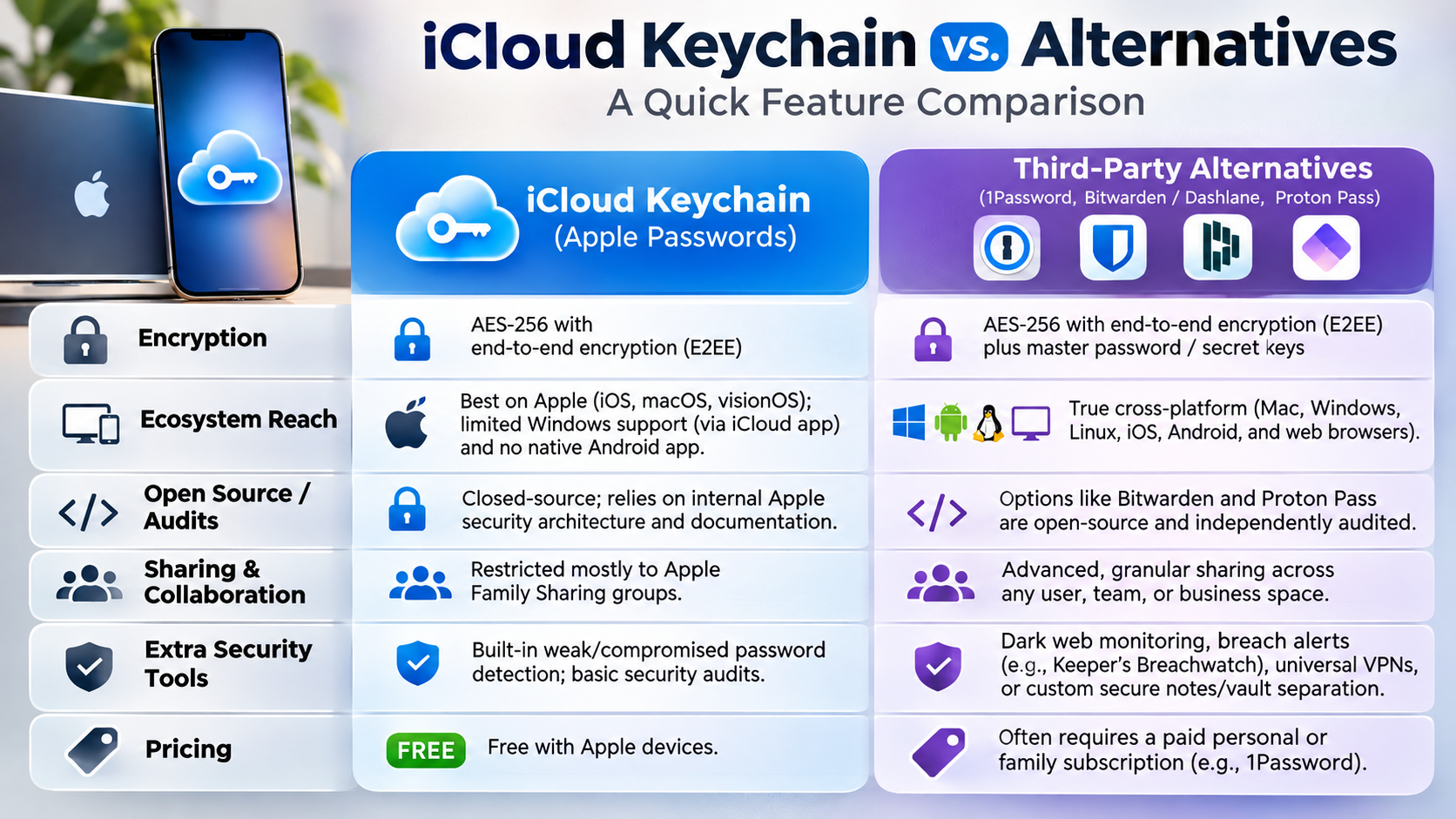
However, dedicated password managers also provide excellent security. Bitwarden and 1Password offer encrypted vaults, secure password generation, and additional account management features. They also support different operating systems, making them useful for people who regularly switch devices.
Avoid storing passwords in ordinary Notes, screenshots, messaging conversations, or unencrypted documents. These locations lack the specialised protections offered by password managers.
Your choice should depend on your device ecosystem and security requirements. Apple Passwords works well for Apple-focused users. Dedicated managers provide greater flexibility for people using Windows, Android, and other platforms.
Cross-Platform Vaults Versus Native Ecosystem Tools
Apple Passwords offers convenient credential management without requiring another subscription. It integrates with Safari, supported apps, and Apple’s authentication features. This makes saving and using passwords straightforward across compatible devices.
Dedicated managers offer additional flexibility. For example, Bitwarden supports multiple platforms and uses a zero-knowledge encryption model. Its encrypted vault is designed so the provider cannot read your stored passwords. Meanwhile, 1Password offers additional account protection through its Secret Key system.
Consider these differences before choosing:
- Apple Passwords: Best for convenient password management across Apple devices.
- Bitwarden: Suitable for users wanting open-source software and cross-platform access.
- 1Password: Offers additional account security features and organised vault management.
A dedicated password manager may also provide better sharing and administrative controls. However, it introduces another account and master password to protect.
Importantly, neither option is automatically safer for everyone. Your security habits and account recovery arrangements matter just as much as the software.
Is Apple Really More Secure Than Google?
Apple and Google both invest heavily in operating system security, account protection, and vulnerability research. However, their approaches differ. Apple controls its hardware, operating systems, and app distribution more closely. This allows the company to coordinate security updates across supported devices.
Google also provides extensive security protections through Android, Google Play Protect, and regular platform updates. Its Pixel devices receive direct security updates from Google. Other Android manufacturers manage updates according to their individual device policies.
Apple’s controlled ecosystem can reduce certain risks associated with unverified applications and delayed updates. However, this does not make every iPhone automatically safer than every Android device. Device age, software updates, installed applications, and user behaviour all influence security.
For most consumers, both platforms offer strong security when configured correctly. The better choice depends on the device, software support, and security features you actually use.
App Ecosystem Control and Sideloading Vulnerabilities
One major difference between iOS and Android involves application distribution. Apple traditionally restricts app installation through its App Store review process. Android supports broader application distribution, including installation from external sources.
This flexibility creates additional opportunities for users and developers. However, installing applications from untrusted sources can increase malware exposure. Fake applications may imitate legitimate services and request unnecessary permissions.
Apple’s app review process also cannot guarantee that every application is completely safe. Malicious behaviour, vulnerabilities, and deceptive practices can still affect applications distributed through official stores. Regular updates are equally important, which explains why keeping your phone apps updated helps protect your device against security vulnerabilities.
For better protection, follow these precautions:
- Download applications from trusted sources.
- Check application permissions before granting access.
- Install operating system security updates promptly.
- Avoid unfamiliar APK files and suspicious installation links.
- Remove applications you no longer use.
- Enable available device security protections.
Neither ecosystem is immune to attacks. Good installation habits and timely security updates matter more than platform reputation alone.
Who Gets Hacked More, Apple or Samsung?
There is no reliable universal statistic proving that Apple users or Samsung users get hacked more frequently. The answer depends on the type of attack, geographical region, device population, and reporting methods. Android has a larger global device ecosystem, which creates a broad target for cybercriminals. However, this does not automatically prove that individual Samsung users face greater risks.
Apple devices also experience security incidents. These include phishing attacks, account takeovers, malicious configuration profiles, and targeted spyware campaigns. Samsung devices have additional security protections through Samsung Knox, which provides hardware-backed security features and device management capabilities.
Comparing manufacturers using total malware detections can produce misleading conclusions. A larger user population may naturally attract more attacks. A meaningful comparison must consider infection rates, device usage, vulnerability exposure, and security patch availability.
Ultimately, both manufacturers provide security technologies. Keeping devices updated and avoiding suspicious applications remain essential for reducing everyday security risks.
Mass Android Malware Versus Targeted iOS Phishing
Android and iOS users face overlapping cybersecurity threats. However, attackers sometimes choose different methods depending on their targets and the available vulnerabilities. Android’s wider application distribution creates opportunities for trojanised applications and malicious downloads. Users who install software from untrusted sources face additional risks.
iPhone users also encounter phishing campaigns, fraudulent websites, and account takeover attempts. Attackers may impersonate Apple Support or send convincing messages requesting Apple Account credentials. These attacks target human behaviour rather than relying entirely on operating system vulnerabilities.
Targeted spyware can also affect both platforms. Some sophisticated attacks exploit previously unknown vulnerabilities to compromise specific devices. Such campaigns are different from ordinary malware distribution and should not be confused with everyday infection rates.
Protecting your device requires more than choosing a manufacturer. Use strong authentication, install security updates, and verify unexpected messages. Avoid clicking unfamiliar links or sharing verification codes. These habits help reduce risks across both Android and iOS devices.
Conclusion
iCloud Keychain offers strong security through end-to-end encryption, secure synchronisation, and Apple’s built-in device protections. For users who primarily use Apple devices, it provides a convenient way to manage passwords and passkeys without installing additional software.
However, Bitwarden and 1Password offer useful alternatives for people who need cross-platform compatibility and advanced password management features. Each option has different strengths, so the right choice depends on your devices and security requirements.
Ultimately, iCloud Keychain is a secure choice for everyday password management, but no password manager can eliminate every cybersecurity risk. Use unique passwords, enable two-factor authentication, keep your devices updated, and protect your primary account credentials. These habits will help keep your digital accounts safer, regardless of which password manager you choose.