
The 5 Most Common Ways Passwords Are Hacked, And How To Avoid Them
Understanding the common ways passwords are hacked is an important first step toward protecting your online identity. Attackers use several techniques to steal or guess credentials, including deceptive messages, stolen password databases, automated guessing tools, and malicious software.
According to the Cybersecurity and Infrastructure Security Agency (CISA), using strong passwords and enabling multi-factor authentication can help protect accounts from common threats. These measures are especially important because a stolen password can sometimes be reused to access other accounts.
Attackers often exploit predictable passwords, stolen credentials, deceptive messages, malicious software, and weak security practices. Learning the common ways passwords are hacked can help you recognize suspicious activity before it leads to account compromise.
The good news is that you do not need advanced cybersecurity knowledge to improve your protection. Using unique passwords, keeping your devices updated, recognizing phishing attempts, and enabling multi-factor authentication (MFA) can significantly reduce common risks.
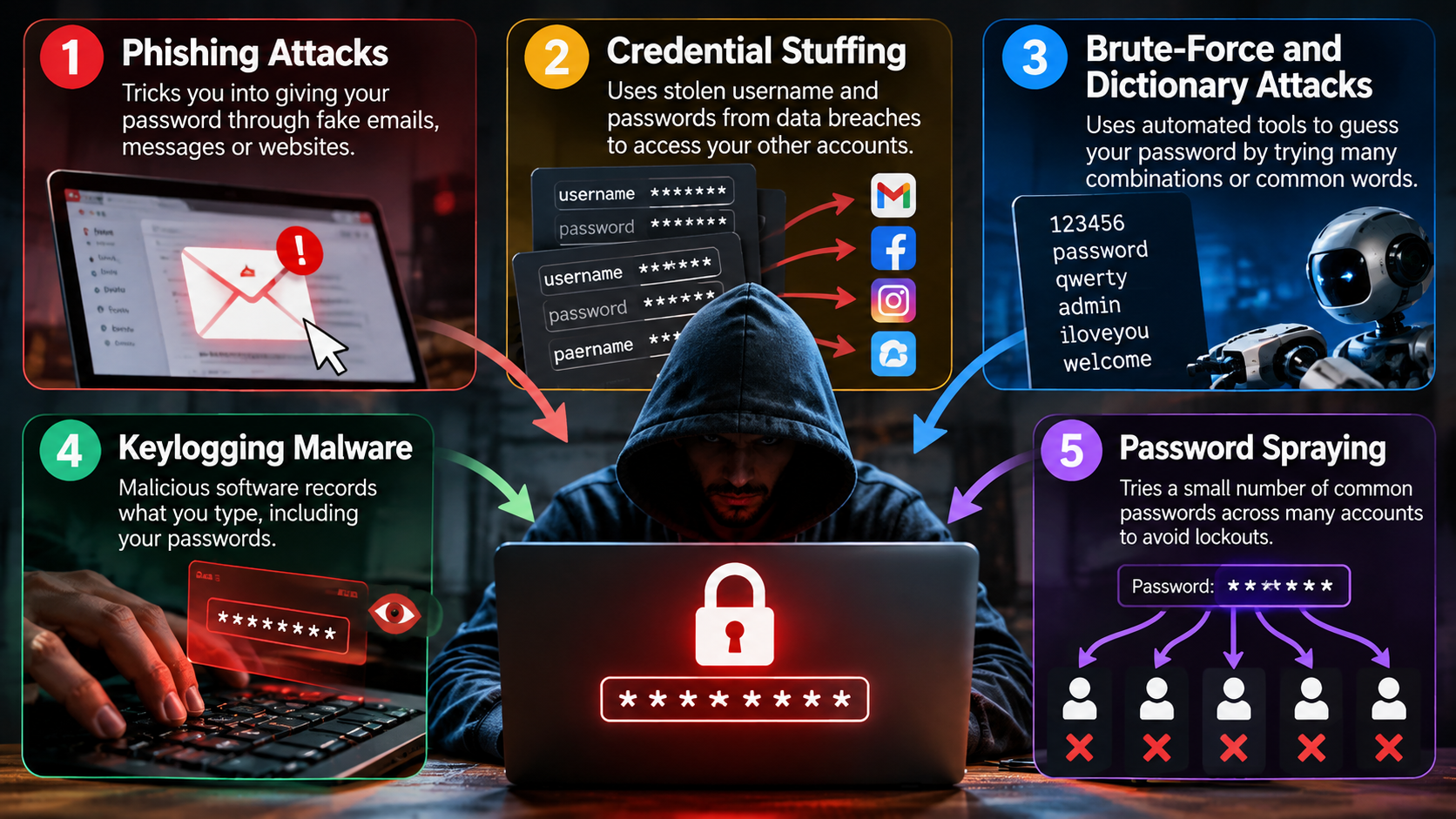
Here are five common password attacks, how they work, and the practical steps you can take to reduce your risk.

1. Phishing Attacks
Phishing is one of the common ways passwords are hacked because it tricks people into revealing their credentials. Instead of breaking into an account directly, criminals create fake emails, text messages, login pages, or websites that look legitimate.
A phishing message may claim that your account has been locked, your payment failed, or you need to verify your information. The message often contains a link to a fraudulent website. If you enter your username and password there, the attacker can capture your credentials.
Attackers may copy familiar logos, layouts, and writing styles to make their messages look genuine. AI can also make scam messages more convincing and easier to personalize. For more examples, see these ways scammers are using AI to trick you. Some campaigns also try to steal MFA codes, security questions, or session information.
How to Avoid Phishing Attacks
- Check the sender: Examine the complete email address before responding.
- Inspect links: Hover over links and check the destination domain before clicking.
- Use official websites: Open the company’s website or app yourself instead of following unexpected links.
- Avoid urgent requests: Treat messages demanding immediate action with extra caution.
- Protect verification codes: Never share MFA codes through email, text, or chat.
- Use MFA or passkeys: These can provide additional protection when attackers obtain your password.
When a message seems suspicious, do not interact with its links or attachments. Contact the organization through an official channel instead.
2. Credential Stuffing
Credential stuffing is another common way attackers compromise passwords. Criminals use stolen username and password combinations from previous data breaches. Automated tools then test those credentials against other websites and services.
The attack works because many people reuse passwords across multiple accounts. For example, a password exposed through an old shopping account may also work on an email or social media account.
Attackers do not need to crack the password again when the same credentials still work elsewhere. One data breach can therefore expose several accounts belonging to the same person.
Even an account you rarely use can create a security risk when you reuse its password. Following a broader password security guide can help you understand how to create unique credentials and protect important accounts. Your email account deserves particular protection because attackers can use it to reset passwords for other services.
How to Avoid Credential Stuffing
- Use a unique password for every account: Never reuse passwords across important services.
- Use a password manager: Let it generate and store strong, random passwords.
- Enable MFA: Add another verification step to important accounts.
- Change exposed passwords: Replace a password immediately if a service reports a breach.
- Secure your email account: Protect it with a unique password and strong authentication.
- Review account alerts: Watch for unfamiliar login attempts or security notifications.
A password manager can make unique passwords practical because you do not need to memorize every credential.
3. Brute-Force and Dictionary Attacks
Brute-force and dictionary attacks are common ways attackers try to guess weak passwords. These attacks use automated software to test possible password combinations. Dictionary attacks use lists of common words, phrases, names, and predictable variations.
Attackers often target passwords that contain familiar words or simple patterns. Passwords such as a name followed by a year or a common word followed by “123” can provide easier targets.
The difficulty of cracking a password depends on factors such as its length, randomness, and how attackers obtain the password. Online services can also slow automated guessing by limiting failed login attempts.
Long, random passwords create a much larger search space. The same principle applies to network devices, where a strong router password can help prevent unauthorized access. A password manager can generate secure credentials without requiring you to remember complicated combinations.
How to Avoid Brute-Force and Dictionary Attacks
- Choose long passwords: Use long, unique credentials rather than short passwords.
- Use random passwords: Let a password manager create unpredictable combinations.
- Avoid personal information: Do not use names, birthdays, addresses, or pet names.
- Avoid predictable patterns: Do not simply add “123” or a year to a familiar word.
- Use passphrases: Several unrelated words can create a long, memorable passphrase.
- Enable MFA: A second authentication factor can protect the account if someone guesses the password.
- Use reputable services: Choose platforms that apply login protections and rate limits.
The goal is not to create a password that looks complicated. The goal is to create one that attackers cannot easily predict.
4. Keylogging Malware
Keylogging malware gives attackers another way to steal passwords. A keylogger records what you type on a computer or mobile device. Depending on the malware, it may capture usernames, passwords, messages, payment information, and other sensitive data.
Attackers can distribute keyloggers through malicious downloads, infected attachments, compromised websites, or deceptive software. Once installed, the malware may operate quietly while collecting information.
Keylogging differs from password guessing because the attacker can obtain the password directly from the device. Even a strong password offers limited protection if malware records it as you type.
Keep your operating system, browser, and security software updated. These steps form an important part of malware protection tips for protecting your devices from malicious software. Avoid downloading programs from unknown websites. You should also treat unexpected email attachments and suspicious downloads with caution.
How to Avoid Keylogging Malware
- Keep software updated: Install security and operating system updates promptly.
- Avoid suspicious downloads: Use trusted sources for applications and files.
- Be careful with attachments: Do not open unexpected files from unknown senders.
- Use security software: Keep reputable antivirus or endpoint protection active.
- Secure your browser: Keep your browser updated and remove suspicious extensions.
- Avoid pirated software: Unofficial software can carry malware or unwanted programs.
- Watch for unusual behavior: Investigate unexplained pop-ups, slowdowns, or unfamiliar applications.
If you suspect malware on a device, stop entering sensitive credentials until you have secured the device.
5. Password Spraying
Password spraying is another technique attackers use to compromise accounts. Instead of trying many passwords against one username, criminals test a small number of common passwords against many different accounts.
For example, an attacker might test a commonly used password across hundreds or thousands of usernames. This approach can help attackers avoid some account lockout controls that trigger after repeated failures against one account.
Password spraying often targets organizations with many user accounts. However, individual users can also face this threat when they choose common or predictable passwords.
Using a unique and unpredictable password reduces the chance that your account matches a commonly tested credential. Avoid passwords based on company names, seasons, years, sports teams, or other predictable patterns.
How to Avoid Password Spraying
- Avoid common passwords: Never use widely known passwords or simple variations.
- Create unique credentials: Give every account its own password.
- Use MFA: Require an additional authentication factor whenever possible.
- Use a password manager: Generate random passwords instead of creating predictable ones.
- Avoid personal details: Do not build passwords around names, dates, or other public information.
- Monitor login activity: Review alerts for unfamiliar sign-in attempts.
- Use security controls: Organizations should apply rate limits, password screening, and suspicious-login detection.
MFA provides an important additional layer because attackers may still need a second authentication factor after guessing a password.
What Are the Most Common Passwords That Are Hacked?
Predictable passwords remain among the easiest credentials for attackers to target. Common examples include “123456,” “password,” “qwerty,” and “admin.” Attackers also test personal details, such as birthdays, pet names, children’s names, and favorite teams. These details are often easy to discover through social media or public profiles.
The bigger problem is password reuse. If one website suffers a data breach, attackers may test the exposed username and password on other services. This technique is known as credential stuffing. It can put email, shopping, social media, and financial accounts at risk.
Avoid passwords based on personal information or common patterns. Instead, use a unique, randomly generated password for every important account. A password manager can create and store these credentials for you. Longer passwords or passphrases are also harder to guess. Combining uniqueness, length, and multi-factor authentication gives accounts stronger protection against common password attacks.
What Is the Most Common Method Used by Attackers to Steal User Passwords?
Phishing is one of the most common ways attackers steal passwords because it targets people directly. Attackers send deceptive emails, text messages, or social media messages that imitate trusted companies. The message may claim that an account will be suspended unless you act immediately.
A phishing link can open a fake login page that closely resembles a legitimate website. When you enter your username and password, the attacker can capture them. Some campaigns also try to steal multi-factor authentication codes or session information.
Phishing works because messages create urgency, fear, or curiosity. Technical security cannot always stop someone from submitting credentials to a fraudulent site. Careful verification is therefore important.
Instead of clicking an unexpected login link, open the company’s official website directly. Check the sender address and domain carefully. Use multi-factor authentication or passkeys where available. These protections can reduce the impact of stolen passwords.
How Do People Hack Passwords?
Attackers use several techniques to obtain or guess passwords. Understanding these methods helps explain the common ways passwords are hacked and why weak credentials remain vulnerable.
Brute-force attacks repeatedly test possible character combinations. The difficulty depends on password length, randomness, rate limits, and whether attackers target an online login or an offline password hash.
Dictionary attacks take a different approach. They test common words, phrases, names, and predictable substitutions. Attackers can also use lists of previously exposed passwords to make password guessing more efficient.
Credential stuffing does not require attackers to guess the password. Instead, they take username and password combinations from earlier breaches and test them on other services. Reusing a password can therefore turn one data breach into several account compromises.
Attackers may also target poorly secured devices or use malicious software to capture credentials. However, HTTPS protects most modern web login traffic during transmission. Using unique passwords, MFA, updated software, and secure networks can reduce your exposure to these threats.
How Do Hackers Steal Your Data?
A stolen password can expose much more than the account itself. Once attackers gain access, they may read private emails, view stored files, access contact lists, or use saved payment information. The potential impact depends on the account’s permissions and the information it contains.
Email accounts are particularly valuable because attackers can use them to reset passwords for other services. Criminals may also search cloud storage for identity documents, financial records, or other sensitive files. A compromised account can then become a starting point for additional attacks.
Attackers may also install malware after gaining access to a device. Keyloggers can capture information entered later, while other malicious software may collect files or browser data. Attackers can also abuse active browser sessions, making web cookies and session safety important parts of account security. In workplaces, compromised accounts may also support impersonation, fraud, or further credential theft.
These risks show why the common ways passwords are hacked matter beyond the initial login. A single compromised password can sometimes give attackers access to a much larger collection of personal information.
Conclusion
Understanding the common ways passwords are hacked can help you protect your accounts before attackers gain access. Phishing, credential stuffing, brute-force attacks, keylogging malware, and password spraying all target passwords in different ways.
You can reduce your risk by using a unique, strong password for every account. A password manager makes this easier by generating and storing secure credentials. You should also enable multi-factor authentication (MFA) wherever possible.
Stay cautious when opening links, downloading files, or responding to unexpected login requests. Keep your devices and software updated, and pay attention to unusual account activity.
Strong passwords alone cannot prevent every attack. Combining unique credentials, MFA, updated software, and good security habits gives your accounts multiple layers of protection.