

How Bitrate Affects Audio Quality: Everything You Need to Know
Have you ever heard a song that sounded muddy or muffled? Then you changed the quality setting and noticed clearer instruments. Understanding how bitrate affects audio quality can help you choose better settings for music, podcasts, recordings, and streaming.
Bitrate describes how much digital audio data is processed each second. It is usually measured in kilobits per second (kbps). With lossy formats, lower bitrates require stronger compression, which can remove some audio information. For a helpful overview of bitrate, compression, and digital audio, see Adobe’s guide to understanding audio bitrate.
Higher bitrates give an encoder more data to work with. However, a higher number does not always produce an audible improvement. The audio format, codec, encoder, source quality, and listening environment also affect the final result.
Understanding how bitrate affects audio quality becomes especially useful when choosing between common settings. This guide explains what bitrate means, whether 3,000 kbps is useful for recording, and how 128 kbps, 256 kbps, and 320 kbps compare.
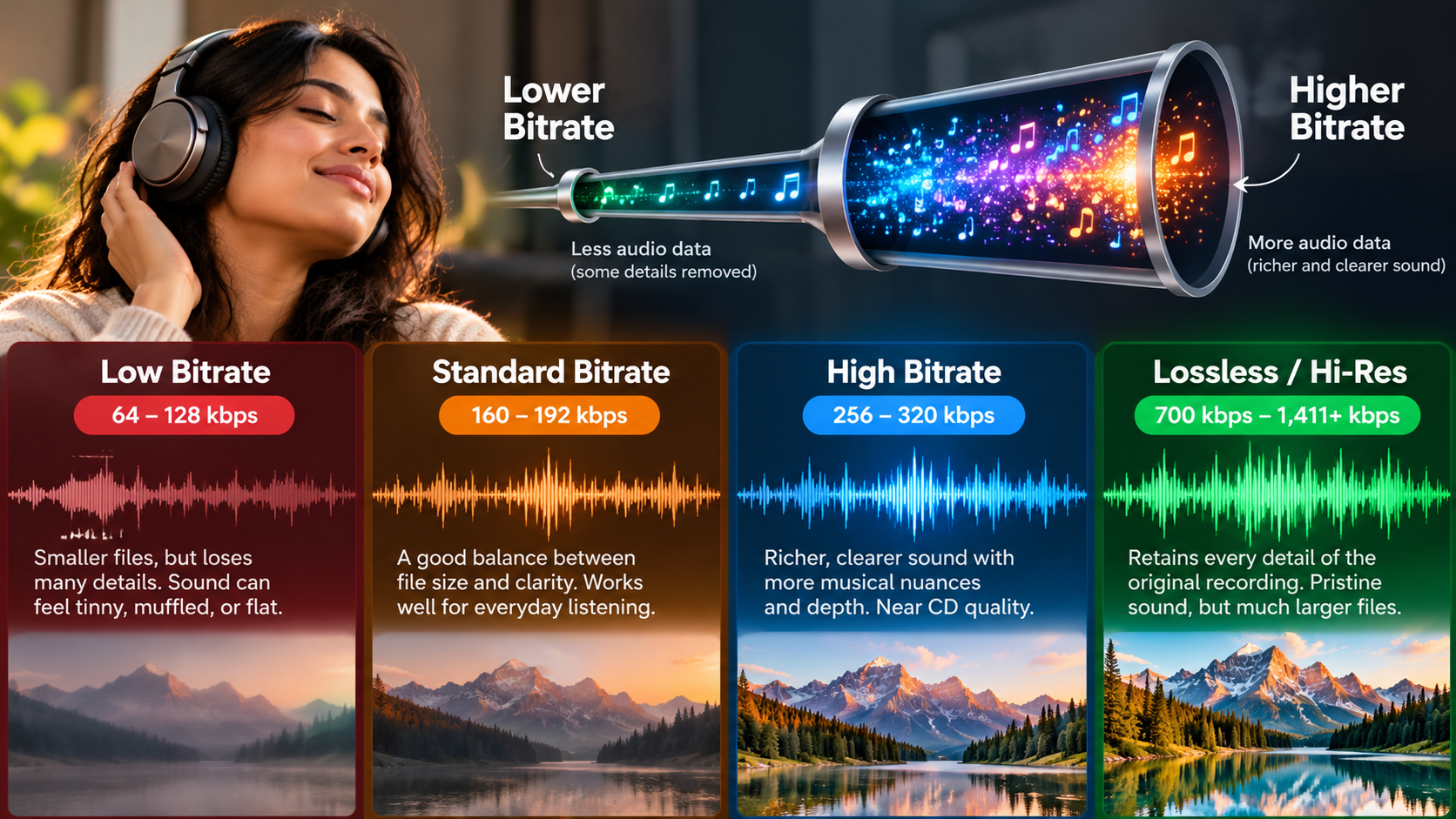

Is a Higher Bitrate Better for Audio Quality?
A higher bitrate usually improves sound quality when comparing the same lossy format and encoder. More data gives the encoder greater flexibility when representing the original recording. This can reduce compression artifacts and preserve more subtle audio details. If you want to optimize playback quality on YouTube Music, you can also explore how to get the highest-quality audio out of YouTube Music.
At lower bitrates, an encoder must remove more information to keep the file small. You may notice weaker high frequencies, blurred transients, or watery sounds. These problems can become easier to hear during complex musical passages.
However, higher bitrate does not guarantee better sound. Once a lossy file reaches a level that sounds transparent to a listener, additional bitrate may provide little audible improvement.
This is why understanding how bitrate affects audio quality requires more than comparing numbers. Codec efficiency also matters. For example, 256 kbps AAC and 320 kbps MP3 should not be judged by bitrate alone.
The Point of Diminishing Sonic Returns
Higher bitrates can reduce compression problems, but audible improvements eventually become smaller. This is especially true with efficient codecs and well-designed encoders.
There is no single bitrate where every listener reaches transparency. Music content, encoder quality, playback equipment, and individual hearing can all affect the result.
Complex recordings can expose compression artifacts more easily. Cymbals, orchestral passages, electronic music, and dense mixes often contain details that challenge aggressive compression.
Good headphones or speakers can also make differences easier to notice. However, better equipment cannot restore information already removed by lossy compression. Your choice between wired and wireless audio can also affect how you approach playback quality and equipment.
For everyday listening, extremely high bitrates may therefore offer limited benefits. A practical choice should consider your codec, storage, bandwidth, and listening habits.
The key lesson is simple: understanding how bitrate affects audio quality helps you avoid both unnecessary compression and unnecessary file sizes.
What Exactly Does Bitrate Mean for Sound Quality?
Bitrate describes how much digital data represents audio during each second of playback. It is commonly expressed in kilobits per second (kbps). A 128 kbps file therefore contains less data per second than a 320 kbps file.
Bitrate matters most when discussing lossy audio formats, including MP3 and AAC. These formats reduce file sizes by removing information that the codec considers less important.
Lower bitrates generally require more aggressive compression. That can affect high-frequency detail, transients, stereo information, and other parts of the recording.
However, bitrate does not work alone. Codec efficiency, encoder quality, sample rate, and source quality also influence the final result.
Uncompressed PCM audio works differently. CD-quality stereo PCM uses 16-bit samples at 44.1 kHz. Its raw data rate is about 1,411 kbps without lossy compression.
Understanding how bitrate affects audio quality therefore requires knowing whether you are dealing with compressed or uncompressed audio.
How Compression Shapes What You Hear
Lossy codecs use psychoacoustic techniques to reduce data. They analyze audio and remove information that may be difficult for people to perceive.
At aggressive compression settings, these decisions can become audible. High-frequency sounds may become less natural, while complex passages can develop metallic or watery artifacts.
You may also notice changes around sharp transients. Cymbals, percussion, consonants, and other fast sounds can expose compression more easily.
Higher bitrates give the encoder more room to preserve these details. However, that does not mean every high-bitrate file will sound better.
The original recording also matters. A poor recording cannot become high-quality simply by increasing its bitrate. The same principle applies when using accessories, so it is useful to understand whether headphone splitters hurt audio quality before adding them to your setup.
Similarly, converting a low-bitrate MP3 into a higher-bitrate MP3 does not restore information that compression already removed.
This is why how bitrate affects audio quality should always be considered alongside the codec and source.
Is 3,000 Bitrate Good for Recording?
A 3,000 kbps bitrate is not automatically better for audio recording. Professional recording usually does not use an arbitrary compressed bitrate as its main quality setting.
Instead, recording engineers commonly use uncompressed PCM with settings such as 24-bit depth and 48 kHz or 96 kHz sample rates. These settings describe sample resolution and sampling frequency.
For example, stereo 24-bit/48 kHz PCM has a raw data rate of about 2,304 kbps. Stereo 24-bit/96 kHz PCM has a raw rate of about 4,608 kbps.
These numbers differ from MP3 or AAC bitrates. Lossless and uncompressed recording formats preserve the original audio data differently from lossy formats.
A 3,000 kbps setting can also appear in broadcasting or streaming software. In that situation, the number may refer to video or total stream bandwidth rather than dedicated audio quality.
Audio Bitrates Versus Video Streaming Settings
Streaming software often provides separate bitrate settings for video and audio. A setting of 3,000 kbps may therefore describe video bitrate rather than audio bitrate.
For example, a livestream could use 3,000 kbps for video while using a much smaller bitrate for audio. The exact configuration depends on the streaming platform and software.
For dedicated audio recording, focus on the sample rate, bit depth, and recording format. WAV and AIFF are common production formats because they can store audio without lossy compression.
If you need a smaller file for delivery, you can encode the finished recording into AAC, MP3, or another suitable format.
This workflow also gives you greater flexibility during editing. Avoid repeatedly converting between lossy formats because each conversion can introduce additional quality loss.
So, when considering how bitrate affects audio quality, do not treat 3,000 kbps as a universal quality target.
Is 256 Audio Bitrate Good?
Yes, 256 kbps can provide very good audio quality, especially when using an efficient codec such as AAC. For many listeners, a well-encoded 256 kbps file can sound very close to the original source.
The codec still matters. A 256 kbps AAC file and a 256 kbps MP3 file do not necessarily produce identical results. Different codecs use different compression techniques.
Source quality also matters. A clean, well-mastered recording gives the encoder better material to process. Poor source audio will remain poor regardless of bitrate.
For everyday music listening, 256 kbps can provide a practical balance between quality and file size. It offers more data than 128 kbps while requiring less storage than many higher-quality settings. If you are comparing streaming platforms, you can also explore which music streaming service has the best sound quality.
However, you should not assume that every listener will hear a major difference between 256 kbps and 320 kbps. The result depends on the codec, recording, playback equipment, and listener.
This is another reason why understanding how bitrate affects audio quality is more useful than simply choosing the largest number.
The Efficiency of Modern AAC
AAC can provide strong audio quality at relatively modest bitrates. Its compression system differs from older formats such as MP3.
This makes direct bitrate comparisons between codecs misleading. A 256 kbps AAC file may sound different from a 256 kbps MP3 file, even though both use the same numerical bitrate.
AAC can preserve important musical information effectively at common streaming settings. However, claims that one bitrate is always indistinguishable from another should be treated carefully.
Human hearing varies between listeners. Music content and playback equipment can also affect what people notice.
For everyday streaming, 256 kbps AAC can be a sensible option. For editing or archiving, use an uncompressed or lossless format instead.
The important distinction is between delivery and production. A convenient compressed file is not necessarily the right format for preserving an original recording.
Which Music Quality Is Best: 128k, 256k, or 320kbps?
When comparing MP3 files made from the same source and with the same encoder, 320 kbps uses the least aggressive compression of these three settings.
That can reduce audible compression artifacts compared with lower settings. However, 320 kbps is not automatically the best choice for every listener or situation.
A well-encoded 256 kbps file can sound extremely close to a 320 kbps file. Some listeners may have difficulty detecting a difference, especially with everyday playback.
At 128 kbps, compression becomes more aggressive. Artifacts can become easier to notice during complex music, sharp percussion, and high-frequency passages.
Your choice can therefore depend on your priorities:
- 128 kbps: Smaller files and lower bandwidth requirements.
- 256 kbps: A strong balance between quality and file size.
- 320 kbps: Higher data rate with less aggressive MP3 compression.
For archiving, neither 256 nor 320 kbps is ideal when you need to preserve the original source. A lossless format such as FLAC retains the original audio data without lossy compression.
Why Context Dictates the Right Choice
The right bitrate depends on how you plan to use the audio. A podcast does not necessarily need the same settings as a music collection.
Spoken-word recordings can often use lower bitrates while maintaining acceptable clarity. Music usually benefits more from higher-quality encoding because it contains broader frequency content and more complex sounds.
Storage and internet bandwidth also matter. Smaller files consume less storage and require less data during playback.
For music, 256 kbps can offer a useful balance when using an efficient codec. If you specifically want high-quality MP3 encoding, 320 kbps provides a higher data rate. Your choice of streaming service can also influence the available audio quality, so it is worth comparing Spotify vs. Apple Music before deciding where to listen.
For editing and long-term preservation, choose lossless or uncompressed audio instead. Increasing the bitrate of an already compressed file will not restore lost information.
Ultimately, how bitrate affects audio quality depends on more than bitrate alone. Codec, source, encoding method, and playback equipment all influence the final listening experience.
Conclusion
Understanding how bitrate affects audio quality makes it easier to choose the right audio settings. Higher bitrates can preserve more information in lossy formats, but they do not guarantee a noticeable improvement in every situation.
For everyday music listening, 256 kbps can provide a strong balance between sound quality and file size. A 320 kbps MP3 uses less aggressive compression, while 128 kbps prioritizes smaller files and lower bandwidth use.
For recording, editing, and long-term preservation, lossless or uncompressed formats are usually more appropriate. These formats avoid the information loss associated with lossy compression.
The most important point is that bitrate is only one part of audio quality. Codec efficiency, source quality, encoding settings, and playback equipment all matter.
Once you understand how bitrate affects audio quality, you can choose settings based on your actual needs instead of simply selecting the highest number.