
How to Get the Highest-Quality Audio Out of YouTube Music
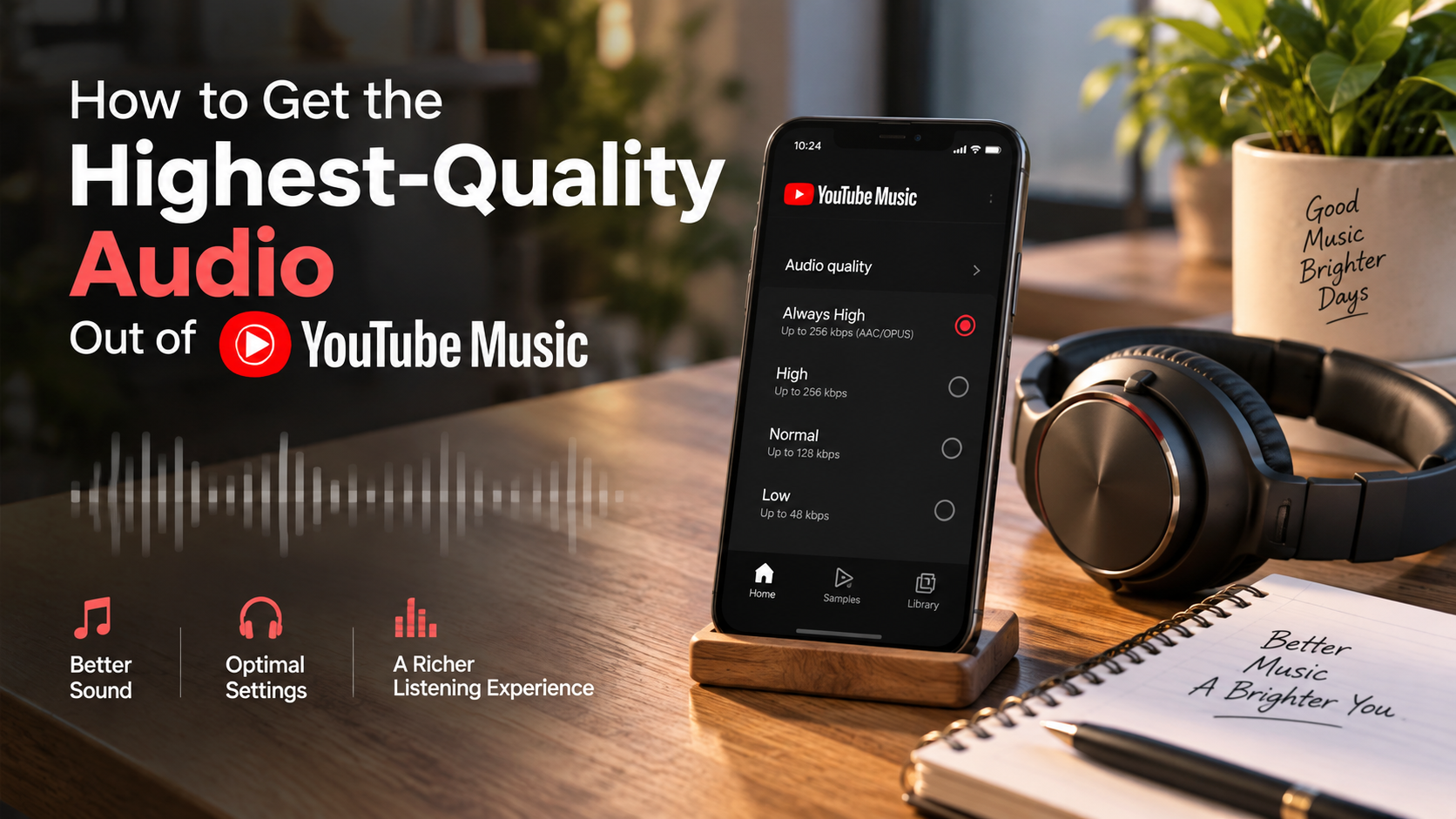
To get the highest-quality audio out of YouTube Music, open the app and check its audio settings. On Android, tap your profile picture, choose Settings, then Data saving. From there, open the audio-quality settings for Wi-Fi and mobile networks. You can select High or Always High, depending on your needs.
YouTube Music lists 256 kbps AAC and OPUS for the Always High setting. The app also offers Normal at up to 128 kbps and Low at up to 48 kbps. Always High is designed to maintain the selected high quality when the connection becomes poor.
Streaming platforms make music discovery effortless, but default configurations may not deliver the highest available quality. If you want the highest-quality audio out of YouTube Music, start by checking your playback settings. YouTube Music’s official audio-quality guide explains how High and Always High settings work and what bitrates are available.
For offline listening, open Settings > Download & storage > Audio quality. Select High if you want downloads at 256 kbps. Previously downloaded tracks do not automatically change quality. You must download them again after changing the setting.
These settings provide the highest-quality audio out of YouTube Music through the standard YouTube Music controls.

How to Get High-Quality Audio From YouTube Music
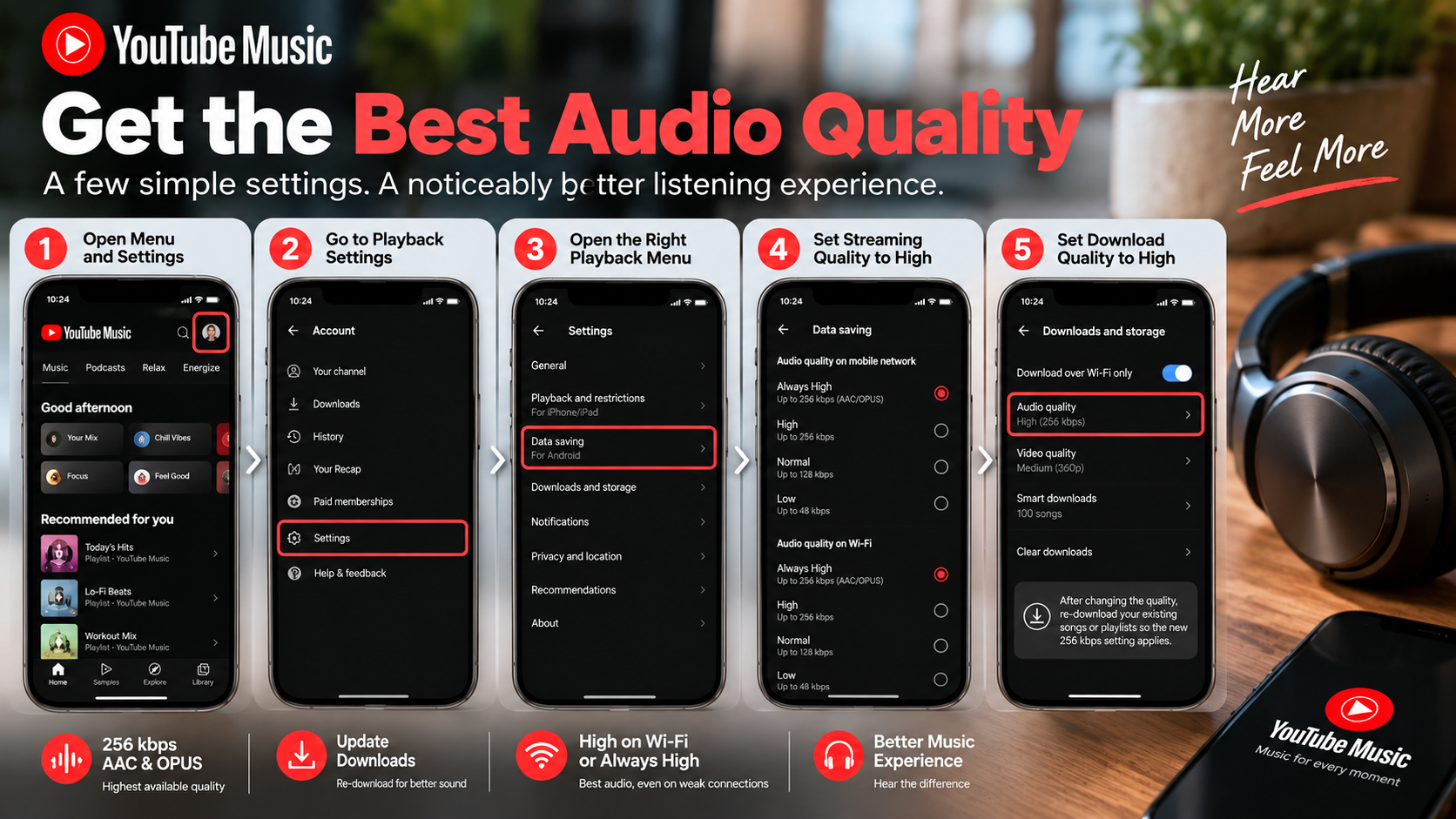
To get the highest available streaming quality, open the YouTube Music app and check its audio settings. On Android, tap your profile picture, choose Settings, then Data saving. From there, open the audio-quality settings for Wi-Fi and mobile networks. You can select High or Always High, depending on your needs.
YouTube Music lists 256 kbps AAC and OPUS for the Always High setting. The app also offers Normal at up to 128 kbps and Low at up to 48 kbps. Always High is designed to maintain the selected high quality when the connection becomes poor.
For offline listening, open Settings > Download & storage > Audio quality. Select High if you want downloads at 256 kbps. Previously downloaded tracks do not automatically change quality. You must download them again after changing the setting.
These settings provide the highest quality currently offered through the standard YouTube Music controls.
Enable Persistent High-Bitrate Streaming
The Always High setting is useful when you want YouTube Music to prioritize high-quality playback. According to YouTube Music’s current help documentation, this setting maintains 256 kbps AAC or OPUS even when your connection becomes poor. That makes it different from settings that can reduce quality to save data.
The trade-off is increased data consumption. High-quality streaming uses more data than Normal or Low quality. This matters most when you frequently stream music over a limited cellular plan.
For unlimited or generous mobile data, Always High can be convenient. For restricted plans, consider using High or Always High mainly over Wi-Fi. You can also enable the app’s Stream via Wi-Fi only option when you want to prevent mobile-data streaming.
Remember that higher bitrate does not automatically mean dramatically better sound. Your headphones, speakers, listening environment, and the original recording also affect what you hear.
The important goal is simple: choose the highest setting that fits your data usage without creating unnecessary restrictions.
How to Get Better Audio Quality on YouTube Music
Changing YouTube Music’s bitrate is only one part of improving sound quality. Your playback equipment can also influence the final listening experience. Start with headphones or speakers that produce a balanced sound rather than relying only on software adjustments.
If you are deciding between wired and wireless headphones, Wired vs Wireless Audio explains the key differences between these two listening options. Bluetooth audio quality varies by device, codec, and connection. A more expensive codec does not automatically guarantee a dramatic improvement.
You should also check whether your phone or headphones apply an equalizer, sound enhancer, bass boost, or other processing. These features change the sound rather than increasing the source bitrate. Some listeners prefer them, while others prefer a flatter presentation.
Volume normalization can also change perceived loudness between tracks. If you dislike its effect, compare playback with the setting enabled and disabled.
The best approach is to make one change at a time. Set YouTube Music to High, use familiar tracks, and then evaluate your headphones or speakers. This makes it easier to identify what actually improves your listening experience.
Connect a Dedicated External DAC
A DAC, or digital-to-analog converter, converts digital audio into the analog signal used by headphones or speakers. Many smartphones already include a DAC internally, so adding an external model is not automatically an upgrade.
An external DAC can be useful when your existing audio hardware has problems. These may include noticeable noise, poor amplification, or limited compatibility with demanding headphones. A good DAC can provide a cleaner output when the phone’s built-in hardware is the limiting factor.
However, a DAC cannot turn YouTube Music’s compressed stream into a lossless recording. The source remains the source. If YouTube Music provides a 256 kbps AAC or OPUS stream, an external DAC simply converts that available digital signal for playback.
For most casual listeners, upgrading headphones may produce a more noticeable difference than buying an expensive DAC. Your headphones have a direct influence on frequency balance, detail, comfort, and soundstage.
If your current setup already sounds clean, an external DAC may offer little practical benefit. Consider one when you have a specific hardware limitation to solve.
Does YouTube Music Offer 320kbps?
YouTube Music’s current Android help documentation lists 256 kbps AAC and OPUS as the maximum bitrate for its High and Always High streaming options. It does not list a 320 kbps streaming option in those settings.
This does not mean 256 kbps AAC and 320 kbps MP3 are directly interchangeable in every technical situation. Different codecs use different compression methods. A bitrate number alone cannot fully describe perceived audio quality.
YouTube Music also supports OPUS at its listed high-quality bitrate. Therefore, describing the service simply as a 256 kbps AAC platform is incomplete. The current documentation identifies AAC and OPUS for the available quality tiers.
For Premium members, the practical takeaway is straightforward. Select High or Always High when you want the highest available streaming quality. Free users do not get the same Premium quality controls described in YouTube Music’s current help documentation.
You also do not need to chase a 320 kbps number simply because another service advertises it. Codec efficiency and the quality of the original source both matter when comparing music streaming services.
Understanding AAC and OPUS Versus MP3
Bitrate is only one part of digital audio quality. AAC, OPUS, and MP3 use different encoding technologies, so identical bitrate numbers do not guarantee identical results.
YouTube Music currently identifies AAC and OPUS as formats used by its quality settings. Its High and Always High options reach 256 kbps.
That means comparing YouTube Music’s 256 kbps setting directly with another platform’s 320 kbps setting can be misleading. Spotify vs. Apple Music also shows why streaming quality comparisons involve more than bitrate alone. The codecs may produce different results at the same bitrate. The original master, encoder settings, playback hardware, and listener can also affect the result.
For everyday listening, the more useful question is whether your current setup sounds good to you. If you notice harsh treble, weak bass, or other problems, changing headphones may help more than focusing on bitrate alone.
You should also avoid assuming that higher numbers always produce audible improvements. Once compression becomes sufficiently transparent for a particular listener and recording, further increases may be difficult to notice.
For YouTube Music users, selecting High or Always High is the practical way to access the platform’s highest listed streaming quality.
Does YouTube Music Offer High-Resolution Audio?
YouTube Music’s current audio-quality documentation lists streaming options up to 256 kbps AAC and OPUS. It does not document a lossless or high-resolution streaming tier in its standard quality settings.
That distinction matters because high-resolution audio is not simply another bitrate setting. High-resolution services typically offer formats with higher sample rates, greater bit depth, or both. Lossless formats also preserve the original audio data rather than using lossy compression.
YouTube Music’s highest listed quality remains a compressed streaming option. Therefore, listeners specifically looking for documented lossless or high-resolution catalogs may need to consider services that explicitly offer those formats.
However, the absence of high-resolution streaming does not make YouTube Music unsuitable for everyday listening. A properly encoded compressed stream can still sound clear and detailed through good headphones or speakers.
The most useful approach is to match the service to your priorities. If convenience, catalog access, recommendations, and video integration matter most, YouTube Music can remain practical. If lossless or high-resolution files are essential, check whether your chosen service explicitly supports them.
Hardware Limitations With Compressed Catalogs
Expensive audio hardware cannot restore audio information that has already been removed by lossy compression. This is an important limitation when building a high-end listening setup around YouTube Music.
A powerful amplifier, premium DAC, or expensive headphones can still change what you hear. Better headphones may provide improved frequency balance, separation, imaging, and comfort. A clean DAC or amplifier can also help when existing hardware has measurable or audible limitations.
But these improvements should not be confused with increasing the source resolution. If the stream is delivered at YouTube Music’s listed 256 kbps maximum, the hardware receives that compressed signal. It cannot reconstruct the exact original master from the missing information.
This does not mean high-quality equipment is pointless. It means the equipment should be chosen for the improvements it actually provides.
For most listeners, a sensible upgrade path is simple. First optimize the YouTube Music settings. Then use good headphones or speakers. Only consider additional equipment when you can identify a specific limitation that needs fixing.
Will YouTube Music Ever Get Lossless Audio?
There is no current YouTube Music help documentation announcing a lossless streaming tier. The service’s current documented quality controls continue to top out at 256 kbps AAC and OPUS.
That makes future lossless support difficult to predict. Google could change the service later, but there is no reliable basis for stating when that might happen. Speculation about future products should therefore be separated from the features available today.
Lossless streaming would also involve more than simply increasing a bitrate number. It would require suitable source files, delivery infrastructure, storage considerations, and a product strategy that supports the feature.
Bluetooth is another consideration, although its capabilities vary by codec and device. Some wireless systems apply their own compression, so a lossless source does not always mean lossless transmission to the headphones.
For now, YouTube Music users should focus on the options that are actually available. Set streaming quality to High or Always High, choose High for downloads, and use suitable headphones or speakers.
If Google introduces a lossless tier, its official documentation will be the appropriate source for confirming the format, bitrate, availability, and subscription requirements.
Competitive Pressure and Future Developments
Competition can influence how streaming services develop their audio features, but it cannot reliably predict what YouTube Music will launch next. If you are still deciding whether the platform fits your listening needs, Why You Should Switch To YouTube Music Today explores the broader reasons to use the service. Other music platforms may offer lossless or high-resolution options, creating additional choices for listeners who prioritize those formats.
YouTube Music’s current documentation still lists 256 kbps AAC and OPUS as the highest quality for its standard streaming settings. This is the clearest reference point for users deciding what the service currently provides.
Future developments could include new codecs, higher bitrates, lossless formats, or other audio features. However, none should be presented as confirmed until Google announces them.
For now, users can make the most of the existing platform by choosing the highest available quality. Premium members can control streaming and download quality through the app’s settings.
It is also worth considering whether you can actually hear a meaningful difference before changing services. Your headphones, listening environment, and preferred music can have a larger practical effect than theoretical specifications.
If lossless audio is a non-negotiable requirement, compare services based on their currently documented formats. Do not base the decision on rumors about possible future upgrades.
Frequently Asked Questions
Does YouTube Music sound worse than Spotify?
YouTube Music does not inherently sound worse than Spotify. At top settings, YouTube Music streams 256kbps AAC, whereas Spotify delivers 320kbps Ogg Vorbis to premium subscribers. Because AAC is an extremely transparent codec, both services sound nearly identical in blind listening tests. Sound discrepancies usually stem from volume normalization settings or different master track uploads.
How much cellular data does YouTube Music use at top quality?
At the Always High setting, YouTube Music consumes roughly 115 megabytes of cellular data per hour of playback. In comparison, standard 128kbps streaming uses around 58 megabytes per hour. If you maintain a restricted mobile data plan, download your playlists over home Wi-Fi to preserve your cellular allowance.
Does using the web browser player decrease audio fidelity?
The web browser player limits output fidelity depending on your network conditions and browser codecs. While premium subscribers can access 256kbps AAC in modern browsers like Chrome, background tab management can occasionally force downsampling. For consistent acoustic playback, install the official progressive web app and explicitly set quality to High.
Can an equalizer really make YouTube Music sound cleaner?
A device equalizer cannot restore lost sonic detail stripped away by lossy compression, but it can balance your audio hardware. Tweaking the frequency bands smooths out harsh treble or boomy bass caused by consumer headphones. This tuning allows instruments to sound more natural, significantly improving perceived fidelity during listening sessions.
Conclusion
Getting the highest-quality audio out of YouTube Music does not require an expensive audio system. Start with the settings that directly control the stream. YouTube Music currently lists 256 kbps AAC and OPUS as the highest bitrate for its High and Always High options.
Premium members can open the app’s audio settings and select High or Always High for streaming. For offline music, choose High under the download-quality settings. Remember that existing downloads must be downloaded again after changing their quality.
Your playback hardware also matters, but expensive equipment cannot restore information removed by lossy compression. Good headphones or speakers can still make the available signal sound more balanced and detailed.
An external DAC can help when your device has a genuine audio-output limitation. It should not be treated as a way to turn compressed YouTube Music streams into lossless recordings.
Finally, focus on the changes you can actually hear. Optimize the app settings first, use capable headphones, and adjust equalization only when needed. This approach gives you the highest practical quality from the service without spending money where it may not make a noticeable difference.