
Is the Google Pixel 11’s Extreme Charging Mode Bad for Your Battery?
Extreme charging mode on the Google Pixel 11 is designed to recharge your phone faster when you need extra power quickly. However, faster charging can raise concerns about long-term battery health.
The Pixel 11 introduces Extreme Charging Mode, giving users a faster way to recharge when time is limited. Google says the feature works when the battery is at 50% or lower. The phone also manages temperature automatically during charging.
So, does Extreme Charging Mode damage the Pixel 11 battery?
The answer is more nuanced. Faster charging can create additional heat and battery stress. However, modern phones use charging controls to manage these conditions. Occasional use is different from relying on maximum charging speeds during every charging session.
Understanding how extreme charging mode works can help you decide when to use it and which settings can help protect battery health.

What Is Extreme Charging Mode?
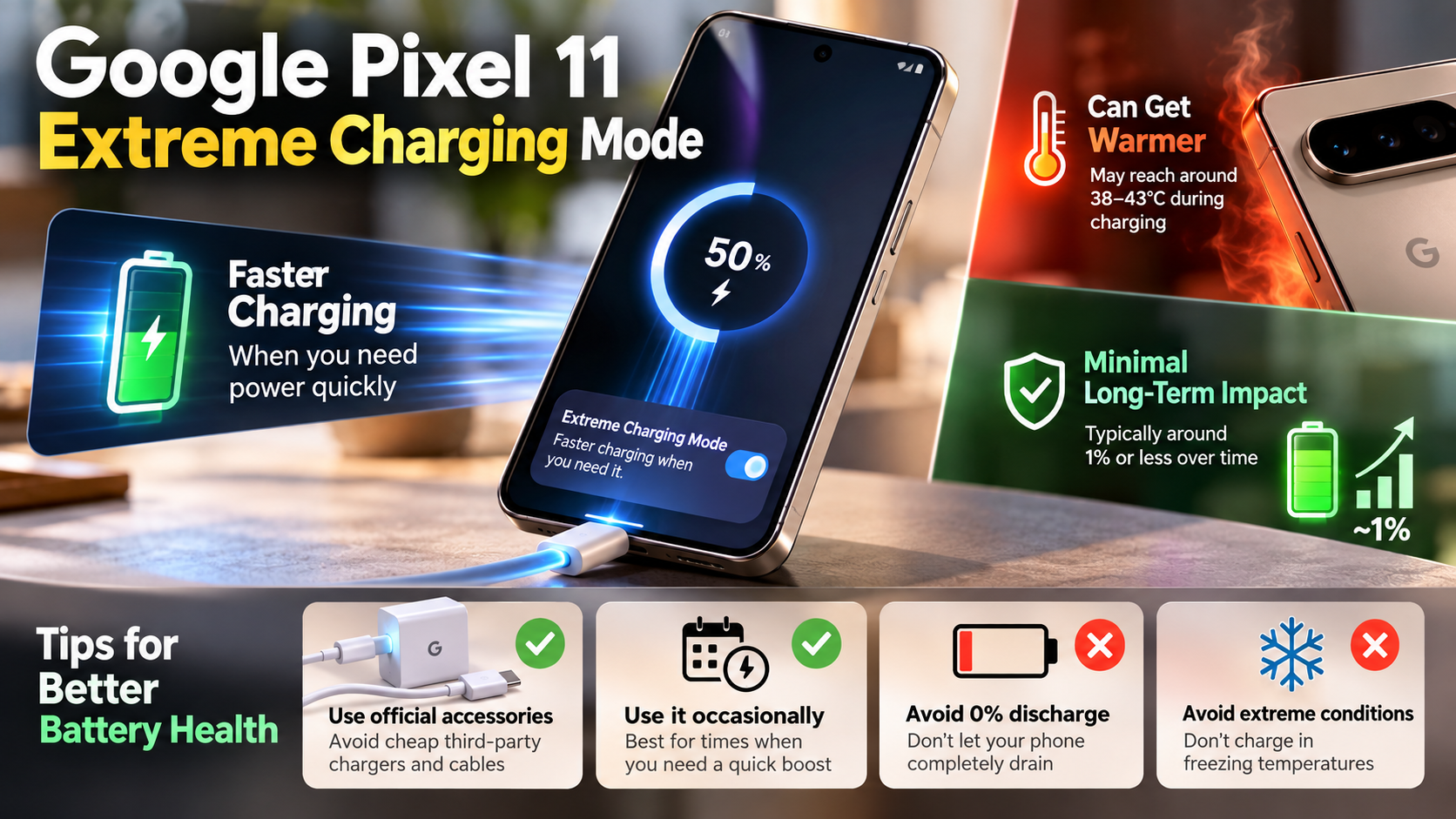
Extreme Charging Mode is a Pixel feature designed to prioritize charging speed when you need power quickly. On Pixel 11 and later devices, Google says it becomes available when the battery level is 50% or lower. It can then remain active until the phone reaches a higher charge level or you disconnect the charger.
The feature is different from simply using a more powerful charger. The phone controls the charging process and adjusts its behavior based on conditions such as temperature.
When Extreme Charging Mode is active, Pixel temporarily pauses some background activities. For example, app updates can be paused while calls, texts, and notifications continue to work.
This approach helps the phone focus more of its available power on charging. It does not mean the charger continuously forces maximum power into the battery.
Google also states that the phone automatically manages temperature changes during Extreme Charging Mode. That protection is important because excessive heat can contribute to battery aging.
The feature is therefore best understood as a faster charging mode controlled by the phone, rather than an uncontrolled power surge.
Is Extreme Charging Mode Bad for Your Battery?
Using Extreme Charging Mode is not inherently harmful to your Pixel 11. Google designed the feature specifically for Pixel 11 and later devices and includes automatic temperature management.
However, charging speed is only one part of battery aging. Battery longevity is also affected by heat, charging habits, battery level, usage patterns, and time spent at high charge levels.
Fast charging can generate more heat than slower charging. Heat is an important factor in lithium-ion battery aging. This is why keeping a phone cool during demanding charging sessions is useful.
The Pixel 11 also does not use Extreme Charging continuously from empty to full under every condition. Google states that the feature is available when the battery is 50% or lower. The system can also disable it when the battery reaches a higher charge level or charging is disconnected.
For everyday use, there is little reason to avoid Extreme Charging when you genuinely need a quick top-up. The bigger concern is unnecessary heat and prolonged charging at high battery levels.
For better long-term battery health:
- Use Extreme Charging when you need speed.
- Avoid charging in direct sunlight or excessive heat.
- Limit intensive phone use while charging.
- Use compatible USB-C charging equipment.
- Consider an 80% charging limit if you rarely need a full battery.
You can also review common phone charging myths to avoid habits that may unnecessarily affect battery health.
The important distinction is between occasional fast charging and consistently exposing the battery to unnecessary heat.
Does the Pixel 11 Support Reverse Charging?
The Pixel 11 supports wireless charging through Google’s Pixelsnap system. Google lists Qi2.2-certified wireless charging at up to 25W for the Pixel 11.
However, the original claim that the Pixel 11 can use Battery Share to reverse-charge earbuds, watches, or another phone should not be presented as a confirmed Pixel 11 feature without device-specific documentation.
This matters because wireless charging and reverse wireless charging are not the same feature. Wireless charging allows the phone to receive power from a compatible charging accessory. Reverse charging allows the phone itself to act as a wireless power source.
If your article is specifically about Pixel 11 features, it is safer to focus on Google’s documented Pixelsnap charging capabilities. Google confirms that the Pixel 11 can charge through a compatible Pixelsnap Charger at up to 25W.
Wireless charging can also produce additional heat compared with wired charging. The charging environment therefore still matters when battery longevity is the priority.
For readers, the practical advice is simple: use compatible wireless accessories when convenient, but keep the phone cool during charging. If the phone becomes unusually warm, reducing charging speed or moving it to a cooler location can help.
This section should not promise reverse charging capabilities unless Google specifically confirms them for the Pixel 11 model.
How to Make a Pixel Charge to 100%
If your Pixel stops charging at 80%, it may be using Google’s Charging optimization feature. Google provides an 80% charging limit to help prioritize long-term battery health. If you usually charge your phone overnight, it is also worth understanding whether overnight charging ruins your smartphone battery.
To allow the phone to charge to 100%, open:
Settings → Battery → Battery health → Charging optimization
From there, you can choose between Adaptive Charging and Limit to 80%. Google recommends the 80% option when you normally finish the day with battery remaining.
1. Turn Off the 80% Charging Limit
If Limit to 80% is enabled, switch to another charging option when you need a full battery.
Google states that turning off the 80% limit allows the phone to reach 100%.
This does not mean you should charge to 100% every time. A lower charging limit can reduce the time the battery spends at a high charge level.
2. Use Adaptive Charging
Adaptive Charging is useful when you regularly charge overnight. Pixel learns your charging habits and can delay the final part of charging until closer to when you normally unplug the phone.
Google says Adaptive Charging needs about 14 days to learn your charging habits.
This reduces the amount of time the phone remains fully charged.
3. Allow Battery Protection to Finish
Pixel can also temporarily limit charging when certain conditions are detected. Google says battery protection can limit charging to around 70%–80% during prolonged charging or high-temperature conditions.
If you need a full charge, Google provides a Charge to full option when battery protection is active.
Does the Google Pixel 11 Have Fast Charging?
Yes. The Pixel 11 supports fast wired charging through USB-C and USB Power Delivery. Google’s specifications state that the Pixel 11 can reach up to 55% in about 30 minutes using a 30W USB-C PPS charger or higher.
This is an important correction to the common assumption that a 45W or 65W charger automatically makes the Pixel 11 charge at those speeds. A higher-rated charger does not mean the phone will draw that full wattage. Understanding 5V 1A vs. 5V 2A charging can also help explain why different power ratings affect charging speed.
Google’s official specifications identify 30W PPS as the charging requirement for the Pixel 11’s advertised wired charging performance.
Fast Charging Requirements
For reliable fast charging, use:
- A USB-C PPS charger rated at 30W or higher.
- A compatible USB-C cable. If you are unsure about cable quality, understanding whether USB-C cables are more reliable than Lightning cables can help when choosing charging accessories.
- A wall outlet rather than a slower power source such as some laptops.
Google also recommends compatible USB-C power adapters for Pixel charging.
Charging speed can still vary. Google notes that actual results depend on factors such as usage, battery age, and ambient temperature.
The Pixel 11 also supports Extreme Charging Mode when the battery is at 50% or below. This mode is designed for situations where getting more battery quickly matters.
Should You Use Extreme Charging Mode Every Day?
Extreme Charging Mode is useful, but you do not need to use it for every charging session. Its main purpose is to provide faster charging when you are short on time.
For normal overnight charging, Google’s Adaptive Charging feature is better suited to battery-conscious users. It can delay the final part of charging so the phone spends less time sitting at 100%.
If you usually finish the day with plenty of battery remaining, the 80% charging limit is another option. Google specifically provides this setting to prioritize long-term battery health.
A practical charging routine could look like this:
- Need a quick boost: Use Extreme Charging Mode.
- Charging overnight: Use Adaptive Charging.
- Usually have plenty of battery: Consider the 80% limit.
- Phone feels hot: Move it somewhere cooler and reduce intensive use.
- Need maximum battery life for a long day: Charge to 100%.
The goal is not to avoid fast charging completely. Instead, avoid creating unnecessary heat and avoid keeping the battery at a high charge level for long periods.
Extreme Charging Mode is therefore a convenience feature, not something Pixel 11 owners need to fear.