
Do Blue Light Screen Protectors Really Work?
In today’s digital world, we spend hours looking at phones, tablets, laptops, and monitors. This constant screen use can contribute to digital eye strain, especially during long work or study sessions. Many people therefore consider blue light screen protectors as an extra layer of protection.
However, it is important to understand what these filters can and cannot do. The American Academy of Ophthalmology notes that ordinary computer screen use has not been shown to damage the eyes. Digital eye strain is more closely linked to factors such as prolonged focusing, reduced blinking, glare, and viewing habits.
Blue light can still affect the body’s circadian rhythm, particularly when exposure occurs late at night. Research on blue-light filtering products, however, has produced mixed results. This article explains how blue light screen protectors work, whether they help with eye strain, how they compare with anti-glare protectors, and what to consider before buying one.
Do Blue Light Screen Protectors Really Work?
Blue light screen protectors can filter some short-wavelength visible light, but their benefits should not be overstated. The amount of blue light filtered depends on the product, its materials, and its design. Some filters also change the appearance of the display by adding a slight yellow or amber tint.
Current evidence does not show that blue-light filtering products prevent eye damage from normal screen use. A Cochrane review of 17 randomized controlled trials found that blue-light filtering lenses may provide little or no short-term benefit for computer-related eye strain. Evidence about sleep benefits was also inconclusive.
That does not mean a screen filter is useless. Some people may find a particular filter more comfortable, especially if it also reduces brightness or glare. However, factors such as screen distance, lighting, blinking, and regular breaks often matter more for digital eye strain.
For evening use, reducing bright and short-wavelength light may support healthier sleep habits. Still, a physical protector should be viewed as an optional comfort tool rather than essential eye protection.
The Science Behind Sleep and Evening Exposure
Light plays an important role in controlling the body’s circadian rhythm, which helps regulate sleep and wakefulness. Short-wavelength light, including blue light, can influence this system when exposure occurs in the evening.
Bright screens used close to bedtime may therefore make it harder for some people to wind down. Research has found that evening exposure to short-wavelength light can affect sleep-related processes, although the effectiveness of blue-light filtering products varies between studies.
This distinction is important. A blue light screen protector does not automatically improve sleep simply because it filters blue wavelengths. The overall brightness of the display, the duration of screen use, and the timing of exposure also matter.
For better evening habits, reducing bright and short-wavelength light may support healthier sleep habits. You can also reduce screen use before bedtime when practical by exploring the growing screen-free technology trend. A physical blue light filter may provide another option if you prefer using one.
Ultimately, good sleep habits involve more than filtering one part of the light spectrum. A consistent bedtime routine, a calm home environment, and reduced late-night screen exposure remain important.
Are There Screen Protectors That Block Blue Light?
Yes. Manufacturers offer blue light screen protectors for smartphones, tablets, laptops, and desktop monitors. These products generally use specialized coatings, films, or glass materials designed to filter selected wavelengths of visible light.
The amount of filtering varies considerably between products. Some protectors have a noticeable tint, while others are designed to maintain a clearer appearance. Because there is no single standard level of filtering across all products, shoppers should check the manufacturer’s specifications before buying.
A quality protector should also fit the exact device model. Poorly fitted products can interfere with edges, cases, touch response, or the appearance of the display. Some tempered glass protectors provide additional scratch and impact resistance, making them useful for device protection as well.
It is also worth separating blue-light filtering from UV protection. These are not the same thing. Digital screens are not generally considered a significant source of harmful UV exposure during normal use.
When comparing products, look for transparent information about the wavelengths filtered, optical clarity, thickness, touch compatibility, and testing. Avoid relying only on broad marketing claims about eye protection.
Finding Quality Options for Your Devices
Choosing a blue light screen protector requires more than looking for the words “blue light blocking” on the package. Start by checking whether the product is specifically designed for your phone, tablet, laptop, or monitor. A precise fit helps preserve touch response and keeps the protector from lifting around the edges.
Next, review the manufacturer’s light-filtering specifications. Look for information about the wavelengths filtered and how the filtering performance was measured. If independent laboratory testing is available, it can provide more useful information than unsupported marketing claims.
Consider optical clarity as well. A strongly tinted protector may affect how whites, skin tones, photographs, or graphics appear. This can be especially important for photographers, designers, video editors, and other users who rely on accurate colors.
If device protection is also a priority, tempered glass can provide useful scratch and impact resistance. However, no screen protector guarantees that a phone screen will survive a serious drop.
Before buying, compare:
- Device compatibility and dimensions
- Blue-light filtering specifications
- Optical clarity and color performance
- Touch sensitivity
- Scratch and impact resistance
- Installation quality and warranty
These factors can help you choose a protector that suits your actual needs.
Is a Blue Light Filter Good for Eyes?
A blue light filter may make screen viewing feel more comfortable for some people, but it should not be considered a treatment for eye problems. Research has not established that blue-light filtering products prevent eye damage caused by ordinary digital device use. The strongest evidence also does not show a consistent reduction in computer-related eye strain.
Digital eye strain usually has several contributing factors. These include prolonged near focusing, reduced blinking, dry air, poor lighting, glare, and spending long periods without looking away from the screen.
A filter can still be useful if it makes your display more comfortable. For example, a protector that also reduces reflections may help in a bright workspace. Lowering screen brightness can also reduce discomfort when the display is much brighter than the surrounding room.
For better eye comfort, combine any filter with practical screen habits. Keep your monitor at a comfortable distance, adjust the display brightness, blink regularly, and take periodic breaks.
If you experience persistent headaches, blurred vision, eye pain, or other ongoing symptoms, consider getting an eye examination. A screen protector cannot correct an underlying vision problem.
Preventing Digital Eye Strain Effectively
A screen protector is only one possible part of a digital eye strain strategy. Your everyday screen habits often have a greater effect on comfort. One widely recommended approach is the 20-20-20 rule: every 20 minutes, look at something about 20 feet away for at least 20 seconds. For families looking to reduce recreational device use, screen-free activities for families can also provide practical alternatives.
Regular breaks give your eyes an opportunity to relax from sustained near focusing. They can also encourage you to blink more frequently, which may help reduce the dryness associated with prolonged screen use.
Your workspace matters too. Position the screen so that you do not need to tilt your head or lean forward. Reduce strong reflections from windows and overhead lighting, and adjust the display so it is comfortable without being excessively bright.
Other useful habits include:
- Keep the screen at a comfortable viewing distance.
- Increase text size if you frequently squint.
- Blink regularly during long sessions.
- Reduce reflections and harsh overhead lighting.
- Take short breaks during extended computer work.
- Use appropriate room lighting rather than viewing a bright screen in darkness.
These steps can often provide more practical relief than relying on blue-light filtering alone. A physical protector can be added if you find it personally comfortable.
Are Blue Light Screen Protectors Clear?
Many modern blue light screen protectors are designed to remain relatively clear. However, not every blue light filter is completely color-neutral. The stronger the filtering effect, the more likely the material is to produce a visible tint.
Some products use coatings that create only a subtle change in display color. Others may have a noticeable yellow or amber appearance. The difference can matter if you regularly edit photographs, create graphics, work with video, or perform other color-sensitive tasks.
A protector’s clarity also depends on the quality of the glass or film. Lower-quality products may introduce haze, reflections, bubbles, or reduced sharpness. These issues can make reading small text less comfortable.
Before purchasing, check whether the manufacturer provides information about optical transparency and color performance. Customer photographs can also help you understand how strongly tinted a product appears, although they should not replace technical specifications.
If accurate color reproduction is essential, choose a protector designed for high optical clarity. You may also prefer a less aggressively tinted option.
Remember that filtering blue light and maintaining perfect color accuracy can involve trade-offs. The best choice depends on whether your priority is visual comfort, color fidelity, glare reduction, or device protection.
Understanding Color Accuracy and Transparency
Color accuracy is an important consideration when choosing a blue light screen protector. Any material placed over a display can potentially affect how colors appear. The effect depends on the filter’s construction, coating, tint, and level of light transmission.
Clearer products generally create less noticeable color change, while stronger filters may produce warmer tones. This difference may not matter for casual browsing, reading, or messaging. It can matter considerably for people who edit photographs, design graphics, produce videos, or work with brand colors.
Before buying, check product descriptions for information about transparency and color reproduction. Terms such as “high transparency” can be useful, but they should not be treated as proof of perfect color accuracy.
If possible, look for detailed specifications rather than relying only on promotional claims. Independent testing can also provide more confidence when available.
It is worth remembering that screen settings can affect color too. Night modes and warmer display settings intentionally change the screen’s color temperature. These settings may be useful in the evening but are not ideal for every color-sensitive task.
For everyday users, a slight color shift may be an acceptable trade-off. For professional visual work, however, optical clarity should be a major buying consideration.
Which Is Better, Blue Light or Anti-Glare?
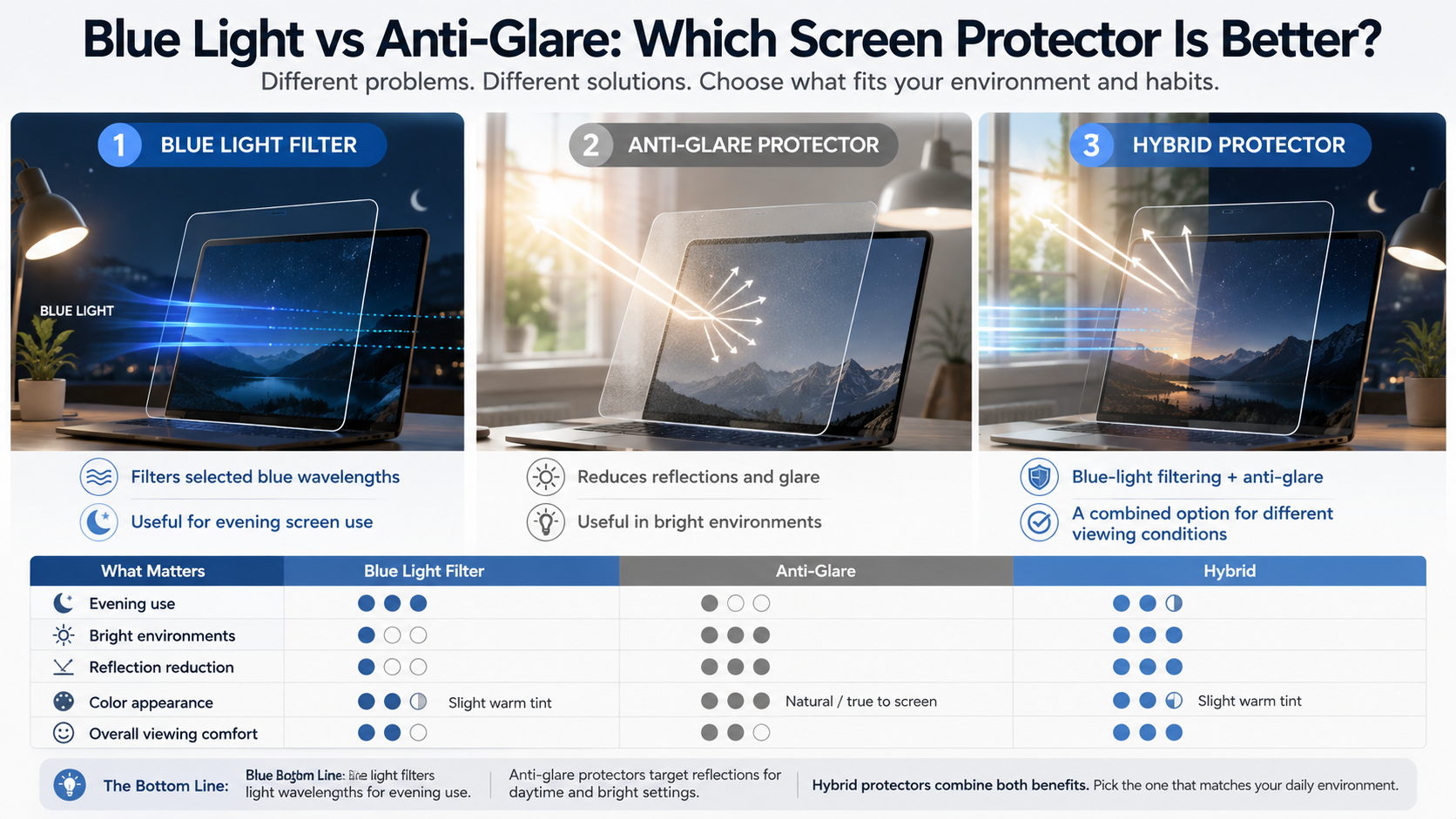

The better option depends on the problem you are trying to solve. Blue light screen protectors filter selected wavelengths of visible light, while anti-glare protectors are designed primarily to reduce reflections and distracting light from the surrounding environment.
If you work beside a sunny window or under strong overhead lighting, an anti-glare protector may provide more noticeable comfort. Its matte surface can scatter reflections and make the screen easier to view in bright conditions.
A blue light filter serves a different purpose. It reduces some short-wavelength visible light, which may be relevant when using screens in the evening. However, current evidence does not establish that blue-light filtering products consistently reduce digital eye strain.
Your working environment should therefore guide your decision.
Choose anti-glare if:
- Reflections are your main problem.
- You work under bright lights.
- Your screen is near a window.
- You prefer a matte viewing surface.
Consider blue-light filtering if:
- You frequently use screens at night.
- You prefer a warmer display.
- You want to experiment with reducing short-wavelength light.
For many users, reducing glare and adjusting screen brightness may offer the most immediate benefit.
Combining Both Technologies for Maximum Comfort
Some screen protectors combine blue-light filtering and anti-glare properties in one product. These hybrid protectors can be useful for people who deal with both evening screen exposure and reflections during the day.
The anti-glare surface is designed to reduce distracting reflections from windows, lamps, and overhead lighting. The blue-light component filters selected wavelengths from the display. Combining these features can therefore address two separate viewing concerns.
However, adding more features does not automatically make a protector better. Matte surfaces can sometimes reduce perceived sharpness or make text appear slightly less crisp. Blue-light filtering can also introduce a warmer color cast, depending on the product.
For that reason, consider your actual environment before choosing a hybrid option. If glare is your biggest problem, a high-quality matte protector may be enough. If evening use is your main concern, display settings and reduced screen exposure may be more useful.
When selecting a hybrid protector, check:
- Optical clarity
- Matte surface quality
- Touch sensitivity
- Color appearance
- Blue-light filtering specifications
- Compatibility with your device
The goal should be comfortable screen use, rather than buying the product with the longest list of features.
Frequently Asked Questions About Blue Light Screen Protectors
Do blue light screen protectors affect phone touch sensitivity?
High-quality tempered glass options are engineered to maintain complete touch sensitivity and smooth responsiveness. They are thin enough to register your fingers accurately while still offering robust scratch and drop protection for your delicate device screen.
Can I use software settings instead of a physical screen protector?
Yes, built-in operating system night modes or software filters reduce high-energy light effectively. You can also improve your everyday phone experience by making your Android home screen more useful, which may help you access important functions without unnecessary screen navigation. However, physical screen protectors work constantly throughout the day without requiring you to adjust software settings or sacrifice your display color accuracy during daytime hours.
Do these screen protectors protect my phone from breaking?
Many options are made from tempered glass that provides standard drop and scratch resistance alongside optical filtration. While they absorb minor impacts to protect your original display, their primary design focus remains visual comfort rather than heavy-duty drop protection.
Do blue light filters help prevent headaches?
Many computer users experience fewer tension headaches after installing these filters because they reduce harsh display brightness and visual strain. By softening the intense light hitting your eyes over long periods, they help prevent the fatigue that triggers headaches.
Conclusion
Navigating digital eye strain and protecting your long-term visual comfort requires making informed choices about your everyday accessories. Throughout this article, we explored how blue light screen protectors work, evaluated their clarity, and compared them against anti-glare alternatives. While software settings offer a free alternative, physical filters provide continuous protection and help maintain better evening sleep habits. By investing in quality blue light screen protectors, you can create a more comfortable viewing environment for your eyes. Take time to evaluate your workspace lighting and daily habits to choose the right protection level for your needs today.